


 Home
HomeIdeogram 2.0 Launches, Empowering AI-Powered Image Creation
In today's fast-paced digital landscape, the power to produce stunning visuals quickly and effortlessly is transformative. Ideogram 2.0 is a cutting-edge AI image generator that masterfully merges imagination with realism, providing an intuitive platform to design logos, typography, anime characters, and spectacular 3D visuals. Whether you're an experienced designer or a beginner, Ideogram 2.0 gives you the tools to materialize your creative ideas. This guide explores the capabilities, operation, and potential of Ideogram 2.0, equipping you with all the essential knowledge to begin creating immediately.
Key Points
Ideogram 2.0 expertly combines imaginative and realistic elements in its image generation.
It's ideal for producing impressive logos, custom typography, and eye-catching posters.
The platform generates charming anime characters and spectacular three-dimensional imagery.
Ideogram 2.0 features an intuitive interface and multiple customization choices.
Both complimentary and premium plans are offered, serving various user requirements.
The 'Magic Prompt' function automatically refines your initial instructions for better outcomes.
Users can browse and adapt images made by others for inspiration and modification.
This tool simplifies creating realistic, design-focused, and animated visuals.
Introduction to Ideogram 2.0
What is Ideogram 2.0?
Ideogram 2.0 represents a sophisticated AI image creation platform engineered to enable users to produce diverse visual content with simplicity and accuracy. It stands out by smoothly integrating fantastical concepts with real-world aesthetics, facilitating the production of everything from lifelike portraits to creative scenery. The system's adaptability makes it an important resource for designers, marketing professionals, artists, and anyone seeking to improve their visual materials.
Ideogram 2.0's primary advantage rests in its capacity to understand user instructions and convert them into premium images. Unlike certain AI generators that yield generic or inconsistent outcomes, Ideogram 2.0 provides substantial control and personalization options. Whether you require a polished logo, attractive typography, engaging anime figures, or immersive three-dimensional artwork, Ideogram 2.0 supplies the means to realize your concepts. This advanced artificial intelligence solution is rapidly gaining popularity among users needing high-quality visual content on demand.
Additionally, Ideogram 2.0 emphasizes user experience. Its straightforward interface guarantees that even individuals with minimal design background can rapidly learn to operate the platform and create striking images. The provision of both free and subscription-based plans makes it available to a wide audience, accommodating both casual users and experts. The accessible design is a distinguishing characteristic of this AI image generator.
Notably, Ideogram 2.0's utility extends beyond basic image creation. It allows users to examine the methods and prompts employed by others, promoting a cooperative atmosphere and offering valuable educational chances. This functionality supports experimentation and innovation, enabling users to improve their instruction skills and uncover new creative opportunities. This collaborative aspect is extremely beneficial to the artistic community.
In an era where visual content dominates, Ideogram 2.0 appears as a potent instrument for releasing creativity and improving communication. By streamlining the image creation procedure and providing extensive customization possibilities, Ideogram 2.0 enables individuals and organizations to distinguish themselves in a visually saturated environment. This AI image generator is genuinely exceptional.
Why Choose Ideogram 2.0 for AI Image Generation?
Given the multitude of AI image generators available, what establishes Ideogram 2.0 as the optimal selection? Multiple elements contribute to its attractiveness and performance:
- Seamless Integration of Imagination and Realism: Ideogram 2.0 performs exceptionally at producing images that soften the boundaries between creative concepts and actual visuals. This ability makes it perfect for projects demanding magical elements or distinctive aesthetics.
- Artistic Atmosphere and Creative Management: The platform's AI systems are educated to comprehend and reproduce various artistic approaches, delivering creative atmospheres directly to your disposal. Whether you're targeting a traditional painting style or a contemporary digital art appearance, Ideogram 2.0 can achieve it.
- Excellent for Logos, Typography, and Posters: Ideogram 2.0 contains functions specifically designed for graphic design requirements. Its text creation abilities are especially notable, permitting you to develop visually attractive logos, attention-grabbing typography, and powerful posters.
- Engaging Anime Characters and Impressive 3D Visuals: For those interested in character development or three-dimensional art, Ideogram 2.0 offers specialized instruments and algorithms to actualize your concepts. The outcomes are frequently remarkable and richly detailed.
- User-Friendly Interface: Ideogram 2.0 is constructed to be approachable for users of all experience levels. The instinctive interface simplifies navigating the platform and generating images with minimal difficulty.
- Examine Community Productions: The platform provides the capability to investigate prompts and methods utilized by other users, encouraging a cooperative setting and supplying valuable educational opportunities.
By delivering a distinctive blend of artistic functions, accessible design, and collaborative characteristics, Ideogram 2.0 distinguishes itself as a premier option for AI image creation. Whether you're a professional designer or a creative hobbyist, Ideogram 2.0 furnishes the instruments to unlock your complete potential and bring your visual concepts to fruition.
Getting Started with Ideogram 2.0: A Step-by-Step Guide
Accessing the Ideogram 2.0 Platform
The initial step in utilizing the power of Ideogram 2.0 is to reach the platform.
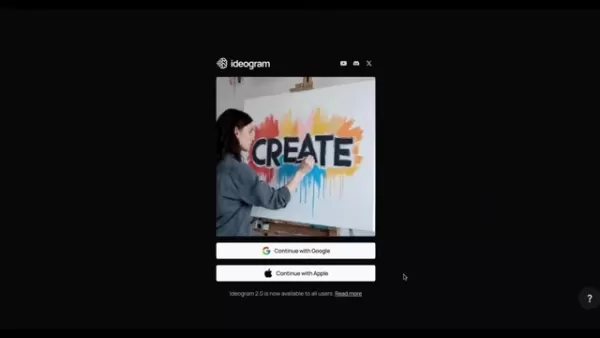
The procedure is simple and user-oriented:
- Visit the Ideogram Website: Launch your chosen web browser and go to the Ideogram website.
- Sign In or Register: If you possess an existing account, simply sign in using your credentials. For new users, register utilizing your Google or Apple account. The platform supports smooth integration with these accounts for rapid and straightforward setup.
- Browse the Homepage: After logging in, you'll access the Ideogram homepage. Here you'll discover a broad assortment of images produced by other users, offering inspiration and demonstrating the platform's abilities.
Exploring the User Interface
Once you're on the Ideogram homepage, spend time familiarizing yourself with the user interface.
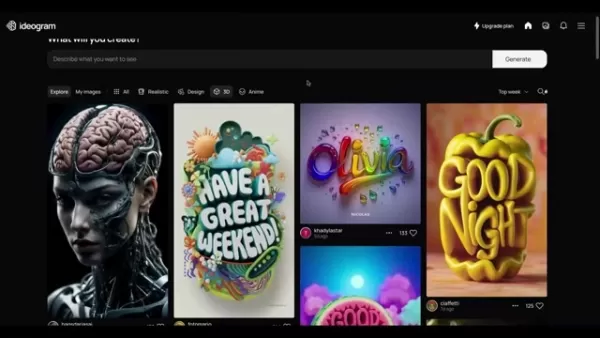
The arrangement is instinctive and structured to lead you through the image creation process:
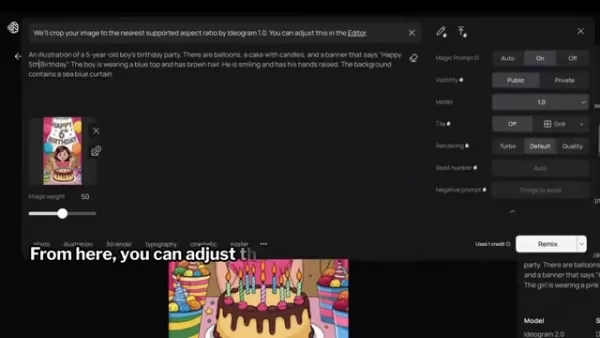
- Prompt Field: At the page's top, you'll locate the prompt field. This is where you'll input your text instructions to characterize the images you wish to produce. Selecting the Prompt field displays a menu containing various configurations to personalize your image creation.
- Accessible Settings: The settings menu presents multiple options to refine your image generation:
- Magic Prompt: Activating this function automatically improves your initial instructions to enhance the generated image.
- Aspect Ratio: Pick the preferred aspect ratio for your image, such as 9:16, 1:1, or 16:9.
- Visibility: Decide whether your created images will be public or private.
- Model: Choose the Ideogram version you prefer to utilize. Version 2.0 is the newest and most sophisticated.
- Color Scheme: Select a color arrangement for your image. You can pick from numerous preset combinations or design your own custom color scheme with a paid subscription.
- Rendering: Choose the rendering standard for your image. Alternatives include Turbo, Default, and Quality.
- Style Selections: At the prompt field's base, you'll find style choices to further customize your image generation. These comprise Auto, General, Realistic, Design, 3D, and Anime.
Crafting Effective Prompts
The caliber of your produced images relies greatly on the efficiency of your prompts. Here are some recommendations for creating prompts that generate remarkable outcomes:
- Provide Specifics: The more detailed you are in your prompt, the better the AI can comprehend your concept. Incorporate information about the subject, style, colors, and arrangement.
- Apply Descriptive Terminology: Employ vivid and descriptive language to depict a clear image of what you want to create. Don't hesitate to use descriptive words to add particulars.
- Test Various Styles: Experiment with different style options to observe how they influence the generated image. The style selections can considerably change the appearance and atmosphere of your creation.
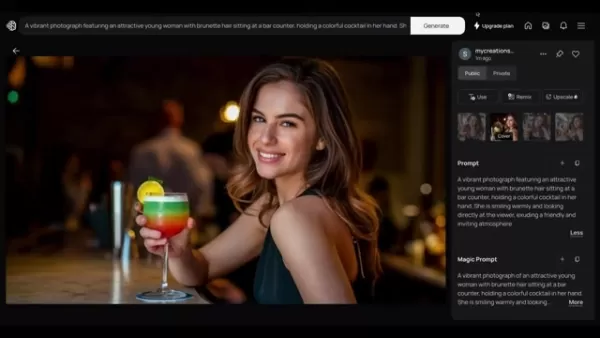
- Browse Existing Works: Look through images produced by other users to gain inspiration and learn about successful prompting methods. Notice the prompts that resulted in visually appealing outcomes.
- Employ Magic Prompt: Activate the Magic Prompt function to automatically improve your initial instructions. This frequently leads to enhanced image quality and more inventive results.
Generating and Downloading Images
After you've created your prompt and personalized your settings, it's time to produce your image:
- Input Your Prompt: Type your prompt into the prompt field.
- Adjust Settings: Modify the settings according to your preferences, including aspect ratio, visibility, model, color scheme, and rendering standard.
- Pick a Style: Select a style option that corresponds with your desired aesthetic.
- Create the Image: Select the 'Generate' button. Ideogram 2.0 will process your prompt and generate a collection of images based on your specifications.
- Assess the Outcomes: Examine the created images and choose the one that most closely matches your concept.
- Save the Image: If you're pleased with the result, select the three dots menu and choose 'Download' to preserve the image on your device. You can opt to save in PNG or JPEG format.
Ideogram 2.0 Pricing: Free vs. Paid Plans
Understanding the Available Plans
Ideogram 2.0 provides a selection of pricing options to suit different user needs and financial plans. The platform offers both complimentary and premium alternatives, each with its own collection of functions and advantages. Comprehending the variations between these plans is vital for making a knowledgeable decision about which one suits you best.
The four pricing options are Free, Basic, Plus, and Pro.
Here's an analysis of the primary functions and restrictions of each plan:
Feature Free Basic Plus Pro Price $0 USD/month $7 USD/month $16 USD/month $48 USD/month Slow Credits/Day 10 100 Unlimited Slow Credits Unlimited Slow Credit Priority Credits/Month - 400 1,000 3,000 Ideogram Editor - Yes Yes Yes Upscale - Yes Yes Yes Image Upload - - Yes Yes Private Generation - - Yes Yes Custom Color Palettes - - Yes Yes Relax Bulk generation CSV - - - Yes(Coming Soon) Download Compressed JPGs Yes Download Original Quality PNGs Download Original Quality PNGs Download Original Quality PNGs
The Free plan is excellent for occasional users who want to investigate the platform and experiment with AI image creation. It offers a restricted number of credits daily, enabling you to generate several images without expense.
The Basic plan activates more functions and eliminates waiting periods. It's a suitable choice for users who need to produce images more regularly.
The Plus plan, the most favored option, is intended for creators requiring greater flexibility and command over their images. It provides unlimited slow credits.
The Pro plan is the ultimate solution for professional designers and businesses. It offers the highest priority credits and the most advanced functions, allowing you to generate professional-standard images in volume.
Making the Right Choice
The optimal pricing plan for you will rely on your personal requirements and usage habits. Consider these elements when making your selection:
- Usage Frequency: If you intend to produce images frequently, a paid plan with a greater credit allocation could be a worthwhile investment.
- Preferred Functions: Assess the functions provided in each plan and establish which ones are necessary for your workflow.
- Budget: Establish a financial plan for your AI image creation needs and select a plan that fits within your monetary limits.
By thoroughly evaluating these factors, you can choose the pricing plan that most closely matches your needs and optimizes the value you obtain from Ideogram 2.0.
Weighing the Options: Ideogram 2.0 Pros and Cons
Pros
User-friendly interface makes it accessible to all skill levels.
Versatile platform suitable for various creative projects.
High-quality image output for professional applications.
Free plan available for casual users.
Collaborative features foster a learning environment.
Cons
Free plan has limited credits.
Custom color palettes require a paid plan.
Image quality can vary depending on the prompt.
Reliance on AI may limit originality in some cases.
Wait times can be longer on the free plan.
Exploring the Core Features of Ideogram 2.0
Key Functionalities and Capabilities
Ideogram 2.0 is equipped with functions designed to empower users and simplify the image creation process. Here's a detailed examination of some of the platform's essential functionalities:
- Text-to-Image Creation: The foundation of Ideogram 2.0 is its capacity to convert text instructions into visually impressive images. Simply input a description of the image you want to produce, and the AI will generate a set of alternatives based on your prompt.
- Style Selections: Ideogram 2.0 presents multiple style choices to personalize the appearance and feel of your images. These include Auto, General, Realistic, Design, 3D, and Anime.
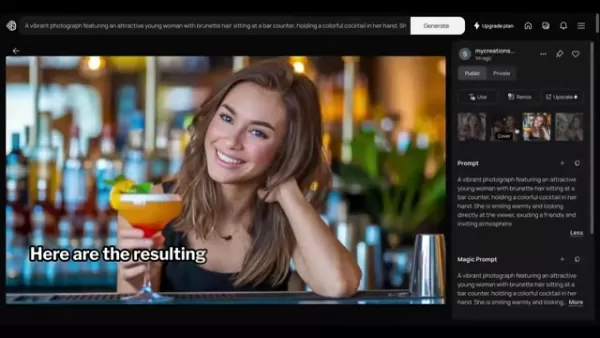
Testing different styles can substantially change the result and help you accomplish your preferred aesthetic.
- Aspect Ratio Management: The platform permits you to manage the aspect ratio of your produced images. This is essential for guaranteeing that your images are correctly sized for different platforms and uses.
- Color Scheme Selection: Ideogram 2.0 supplies a range of preset color schemes to affect the color arrangement of your images. You can also design your own custom color schemes with a paid subscription for even greater control.
- Magic Prompt Improvement: The 'Magic Prompt' function automatically refines your initial instructions to enhance the generated image. This frequently results in improved image quality and more creative outcomes.
- Remixing and Investigation: Ideogram 2.0 enables you to explore images produced by other users and adapt them to create your own unique versions. This function promotes a cooperative setting and offers valuable educational chances.
- Private Creation: If you're using a paid subscription, you can opt to generate images privately, ensuring they remain invisible to other users.
- Premium Output: Ideogram 2.0 is engineered to generate high-standard images appropriate for a broad spectrum of applications, from social media content to professional promotional materials.
Unleashing Your Creativity: Ideogram 2.0 Use Cases
Diverse Applications Across Industries
Ideogram 2.0's adaptability makes it a beneficial resource for numerous industries and applications. Here are several illustrations of how you can utilize the platform to release your creativity:
- Logo Development: Create distinctive and memorable logos for your enterprise or brand. Ideogram 2.0's typography and style choices simplify crafting logos that differentiate from competitors.
- Promotional Materials: Generate attention-grabbing images for your marketing initiatives, including social media posts, website headers, and printed advertisements. Ideogram 2.0 can assist in creating visuals that capture interest and stimulate interaction.
- Content Production: Improve your blog entries, articles, and presentations with compelling visuals. Ideogram 2.0 can help you create images that demonstrate your points and make your content more engaging.
- Character Development: Design unique and memorable characters for your games, animations, or illustrations. Ideogram 2.0's anime and three-dimensional style choices simplify bringing your character concepts to life.
- Creative Expression: Investigate your creativity and generate impressive artworks. Ideogram 2.0 can be employed to create everything from abstract paintings to realistic portraits.
- Educational Resources: Create engaging visuals for educational materials, such as textbooks, presentations, and online classes. Ideogram 2.0 can assist in creating images that make learning more interactive and pleasurable.
Frequently Asked Questions About Ideogram 2.0
Is Ideogram 2.0 really free to use?
Yes, Ideogram 2.0 provides a free plan that permits you to generate a restricted number of images daily. This is an excellent alternative for occasional users who want to explore the platform and experiment with AI image creation. If you need to produce more images or access additional functions, you can upgrade to a paid plan.
What is the 'Magic Prompt' feature and how does it work?
The 'Magic Prompt' function is an AI-powered instrument that automatically improves your initial instructions to enhance the generated image. When activated, it examines your prompt and incorporates details, keywords, and stylistic components to improve the quality and creativity of the outcomes.
Can I use Ideogram 2.0 to create images for commercial purposes?
Yes, you can employ Ideogram 2.0 to produce images for commercial uses, even with the free plan. However, it's important to examine the platform's terms of service to guarantee you adhere to all usage guidelines and licensing limitations.
What file formats are supported for downloading images?
Ideogram 2.0 enables you to save images in both PNG and JPEG formats. PNG is a lossless format that maintains image quality, while JPEG is a compressed format that decreases file size. Select the format that best matches your requirements.
How can I get the best results from Ideogram 2.0?
To achieve the best outcomes from Ideogram 2.0, it's essential to create efficient prompts, experiment with various style choices, and personalize the settings to your preference. Dedicate time to investigate the platform and learn from images produced by other users.
Related Questions
What are the best AI image generators in 2025?
While Ideogram 2.0 is a powerful competitor, the AI image creation field is continuously developing. Some other notable AI image generators in 2025 include: DALL-E 3: Created by OpenAI, DALL-E 3 is recognized for its capacity to generate highly realistic and detailed images from text instructions. Midjourney: Midjourney is a popular AI image generator that excels at producing artistic and surreal images. Stable Diffusion: Stable Diffusion is an open-source AI image generator that provides a substantial degree of personalization and control. Each of these platforms possesses its own advantages and disadvantages, so it's beneficial to investigate them to find the one that best matches your needs. Ultimately, the 'best' AI image generator depends on your individual requirements and preferences. Consider elements such as image quality, ease of use, pricing, and accessible functions when making your decision.
Related article
 U.S. Stocks Hit Historic Milestone as AI and Aerospace Giants Prepare for Trillion-Dollar Debut
Elon Musk, Sam Altman, and Dario Amodei, three titans of the technology sector, are advancing toward initial public offerings for their respective ventures. With SpaceX, OpenAI, and Anthropic—three industry behemoths nearing trillion-dollar valuation
Swedish AI Startup Lovable Eyes $13.2 Billion Valuation After Major Funding Round
As AI-driven coding tools gain traction, Swedish startup Lovable has secured a major funding round. The company aims to raise $3 billion, potentially boosting its valuation to $13.2 billion—double the $6.6 billion recorded last December. Menlo Ventur
Google Tests Remy AI Agent for Gemini as Focus Shifts to User Control
According to Business Insider, Google is testing Remy, a new AI personal agent for Gemini. This tool aims to execute tasks on behalf of users, streamlining both professional workflows and daily routines.Currently, Remy is undergoing testing in an int
Related Special Topic Recommendations
Data Analysis
U.S. Stocks Hit Historic Milestone as AI and Aerospace Giants Prepare for Trillion-Dollar Debut
Elon Musk, Sam Altman, and Dario Amodei, three titans of the technology sector, are advancing toward initial public offerings for their respective ventures. With SpaceX, OpenAI, and Anthropic—three industry behemoths nearing trillion-dollar valuation
Swedish AI Startup Lovable Eyes $13.2 Billion Valuation After Major Funding Round
As AI-driven coding tools gain traction, Swedish startup Lovable has secured a major funding round. The company aims to raise $3 billion, potentially boosting its valuation to $13.2 billion—double the $6.6 billion recorded last December. Menlo Ventur
Google Tests Remy AI Agent for Gemini as Focus Shifts to User Control
According to Business Insider, Google is testing Remy, a new AI personal agent for Gemini. This tool aims to execute tasks on behalf of users, streamlining both professional workflows and daily routines.Currently, Remy is undergoing testing in an int
Related Special Topic Recommendations
Data Analysis
 Best AI Anomaly Detection Tools for KPI Monitoring across SaaS and Ecommerce Teams
2026 Latest Best Top-rated AI Anomaly Detection Tools for KPI Monitoring in SaaS and Ecommerce teams! XIX.AI has curated a powerful, game-changing collection based on rigorous real-world tests and weekly updated rankings. You’ll find detailed free vs paid comparison insights to help you identify the must-try solution that boosts productivity and unlocks your AI edge. Explore now!
 10 tools
 xix.ai
writing
Best AI Outline Generators for Long-Form SEO Articles
xix.ai
writing
Best AI Outline Generators for Long-Form SEO Articles
2026 Latest Best Top-Rated AI Outline Generators for Long-Form SEO Articles, meticulously curated by XIX.AI. These powerful tools offer game-changing assistance in creating high-quality content quickly, boosting writing efficiency significantly. Get a free vs paid comparison along with real-world tests and detailed rankings to help you find the must-try option that suits your needs. Explore now to unlock your AI edge.
8 tools
xix.ai
Education and Learning
AI Study Tools for Homework and Exam Prep
2026 Latest Best AI Study Tools for Homework and Exam Prep! XIX.AI curates a top-rated list of powerful, game-changing tools that help students boost productivity, streamline homework completion, and ace exams through real-world tests. Get a free vs paid comparison, detailed rankings, and must-try options to unlock your AI edge. Explore now!
10 tools
xix.ai
Music composition
AI Vocal Demo Tools for Songwriters, Hooks, Toplines, and Multilingual Draft Sessions
2026 Latest Best AI Vocal Demo Tools for Songwriters, Hook Creators, and Multi-Language Content Teams! XIX.AI has curated a top-rated list of powerful game-changing tools that go through rigorous real-world tests. You’ll find detailed free vs paid comparison data, comprehensive rankings, and must-try options to help you boost writing efficiency and unlock your creative potential. Explore now to discover your perfect tool for all your content needs!
9 tools
xix.ai
Business
Best AI Competitive Research Tools for Small Businesses
2026 Latest Best Top-rated AI Competitive Research Tools for Small Businesses! XIX.AI has curated a highly powerful game-changing collection, updated weekly with rigorous real-world tests and detailed rankings. You can find a comprehensive free vs paid comparison to help you identify the must-try tools that boost your productivity and give you a competitive edge. Explore now to discover your perfect tool!
9 tools
xix.ai
Image editing
Photoshop AI Retouch Tools for Ecommerce Apparel, Skin Cleanup, and Color Consistency
2026 Latest Best Photoshop AI retouch tools for ecommerce apparel, skin cleanup, and color consistency! This top-rated curated list features powerful game-changing solutions that help you boost writing efficiency, streamline content creation, and achieve perfect visual results effortlessly. Each tool has undergone real-world tests through weekly updated rankings, complete with free vs paid comparison details. Backed by XIX.AI, it’s the must-try guide for anyone aiming to unlock your AI edge. Explore now!
10 tools
xix.ai

 Comments (1)
0/500
Comments (1)
0/500
![FrankLewis]()
Honestly, this makes me wonder about the future of stock image sites... It's so easy to just generate what you need now. Kinda exciting but also a bit scary for designers, isn’t it? What do you think?
In today's fast-paced digital landscape, the power to produce stunning visuals quickly and effortlessly is transformative. Ideogram 2.0 is a cutting-edge AI image generator that masterfully merges imagination with realism, providing an intuitive platform to design logos, typography, anime characters, and spectacular 3D visuals. Whether you're an experienced designer or a beginner, Ideogram 2.0 gives you the tools to materialize your creative ideas. This guide explores the capabilities, operation, and potential of Ideogram 2.0, equipping you with all the essential knowledge to begin creating immediately.
Key Points
Ideogram 2.0 expertly combines imaginative and realistic elements in its image generation.
It's ideal for producing impressive logos, custom typography, and eye-catching posters.
The platform generates charming anime characters and spectacular three-dimensional imagery.
Ideogram 2.0 features an intuitive interface and multiple customization choices.
Both complimentary and premium plans are offered, serving various user requirements.
The 'Magic Prompt' function automatically refines your initial instructions for better outcomes.
Users can browse and adapt images made by others for inspiration and modification.
This tool simplifies creating realistic, design-focused, and animated visuals.
Introduction to Ideogram 2.0
What is Ideogram 2.0?
Ideogram 2.0 represents a sophisticated AI image creation platform engineered to enable users to produce diverse visual content with simplicity and accuracy. It stands out by smoothly integrating fantastical concepts with real-world aesthetics, facilitating the production of everything from lifelike portraits to creative scenery. The system's adaptability makes it an important resource for designers, marketing professionals, artists, and anyone seeking to improve their visual materials.
Ideogram 2.0's primary advantage rests in its capacity to understand user instructions and convert them into premium images. Unlike certain AI generators that yield generic or inconsistent outcomes, Ideogram 2.0 provides substantial control and personalization options. Whether you require a polished logo, attractive typography, engaging anime figures, or immersive three-dimensional artwork, Ideogram 2.0 supplies the means to realize your concepts. This advanced artificial intelligence solution is rapidly gaining popularity among users needing high-quality visual content on demand.
Additionally, Ideogram 2.0 emphasizes user experience. Its straightforward interface guarantees that even individuals with minimal design background can rapidly learn to operate the platform and create striking images. The provision of both free and subscription-based plans makes it available to a wide audience, accommodating both casual users and experts. The accessible design is a distinguishing characteristic of this AI image generator.
Notably, Ideogram 2.0's utility extends beyond basic image creation. It allows users to examine the methods and prompts employed by others, promoting a cooperative atmosphere and offering valuable educational chances. This functionality supports experimentation and innovation, enabling users to improve their instruction skills and uncover new creative opportunities. This collaborative aspect is extremely beneficial to the artistic community.
In an era where visual content dominates, Ideogram 2.0 appears as a potent instrument for releasing creativity and improving communication. By streamlining the image creation procedure and providing extensive customization possibilities, Ideogram 2.0 enables individuals and organizations to distinguish themselves in a visually saturated environment. This AI image generator is genuinely exceptional.
Why Choose Ideogram 2.0 for AI Image Generation?
Given the multitude of AI image generators available, what establishes Ideogram 2.0 as the optimal selection? Multiple elements contribute to its attractiveness and performance:
- Seamless Integration of Imagination and Realism: Ideogram 2.0 performs exceptionally at producing images that soften the boundaries between creative concepts and actual visuals. This ability makes it perfect for projects demanding magical elements or distinctive aesthetics.
- Artistic Atmosphere and Creative Management: The platform's AI systems are educated to comprehend and reproduce various artistic approaches, delivering creative atmospheres directly to your disposal. Whether you're targeting a traditional painting style or a contemporary digital art appearance, Ideogram 2.0 can achieve it.
- Excellent for Logos, Typography, and Posters: Ideogram 2.0 contains functions specifically designed for graphic design requirements. Its text creation abilities are especially notable, permitting you to develop visually attractive logos, attention-grabbing typography, and powerful posters.
- Engaging Anime Characters and Impressive 3D Visuals: For those interested in character development or three-dimensional art, Ideogram 2.0 offers specialized instruments and algorithms to actualize your concepts. The outcomes are frequently remarkable and richly detailed.
- User-Friendly Interface: Ideogram 2.0 is constructed to be approachable for users of all experience levels. The instinctive interface simplifies navigating the platform and generating images with minimal difficulty.
- Examine Community Productions: The platform provides the capability to investigate prompts and methods utilized by other users, encouraging a cooperative setting and supplying valuable educational opportunities.
By delivering a distinctive blend of artistic functions, accessible design, and collaborative characteristics, Ideogram 2.0 distinguishes itself as a premier option for AI image creation. Whether you're a professional designer or a creative hobbyist, Ideogram 2.0 furnishes the instruments to unlock your complete potential and bring your visual concepts to fruition.
Getting Started with Ideogram 2.0: A Step-by-Step Guide
Accessing the Ideogram 2.0 Platform
The initial step in utilizing the power of Ideogram 2.0 is to reach the platform.
The procedure is simple and user-oriented:
- Visit the Ideogram Website: Launch your chosen web browser and go to the Ideogram website.
- Sign In or Register: If you possess an existing account, simply sign in using your credentials. For new users, register utilizing your Google or Apple account. The platform supports smooth integration with these accounts for rapid and straightforward setup.
- Browse the Homepage: After logging in, you'll access the Ideogram homepage. Here you'll discover a broad assortment of images produced by other users, offering inspiration and demonstrating the platform's abilities.
Exploring the User Interface
Once you're on the Ideogram homepage, spend time familiarizing yourself with the user interface.
The arrangement is instinctive and structured to lead you through the image creation process:
- Prompt Field: At the page's top, you'll locate the prompt field. This is where you'll input your text instructions to characterize the images you wish to produce. Selecting the Prompt field displays a menu containing various configurations to personalize your image creation.
- Accessible Settings: The settings menu presents multiple options to refine your image generation:
- Magic Prompt: Activating this function automatically improves your initial instructions to enhance the generated image.
- Aspect Ratio: Pick the preferred aspect ratio for your image, such as 9:16, 1:1, or 16:9.
- Visibility: Decide whether your created images will be public or private.
- Model: Choose the Ideogram version you prefer to utilize. Version 2.0 is the newest and most sophisticated.
- Color Scheme: Select a color arrangement for your image. You can pick from numerous preset combinations or design your own custom color scheme with a paid subscription.
- Rendering: Choose the rendering standard for your image. Alternatives include Turbo, Default, and Quality.
- Style Selections: At the prompt field's base, you'll find style choices to further customize your image generation. These comprise Auto, General, Realistic, Design, 3D, and Anime.
Crafting Effective Prompts
The caliber of your produced images relies greatly on the efficiency of your prompts. Here are some recommendations for creating prompts that generate remarkable outcomes:
- Provide Specifics: The more detailed you are in your prompt, the better the AI can comprehend your concept. Incorporate information about the subject, style, colors, and arrangement.
- Apply Descriptive Terminology: Employ vivid and descriptive language to depict a clear image of what you want to create. Don't hesitate to use descriptive words to add particulars.
- Test Various Styles: Experiment with different style options to observe how they influence the generated image. The style selections can considerably change the appearance and atmosphere of your creation.
- Browse Existing Works: Look through images produced by other users to gain inspiration and learn about successful prompting methods. Notice the prompts that resulted in visually appealing outcomes.
- Employ Magic Prompt: Activate the Magic Prompt function to automatically improve your initial instructions. This frequently leads to enhanced image quality and more inventive results.
Generating and Downloading Images
After you've created your prompt and personalized your settings, it's time to produce your image:
- Input Your Prompt: Type your prompt into the prompt field.
- Adjust Settings: Modify the settings according to your preferences, including aspect ratio, visibility, model, color scheme, and rendering standard.
- Pick a Style: Select a style option that corresponds with your desired aesthetic.
- Create the Image: Select the 'Generate' button. Ideogram 2.0 will process your prompt and generate a collection of images based on your specifications.
- Assess the Outcomes: Examine the created images and choose the one that most closely matches your concept.
- Save the Image: If you're pleased with the result, select the three dots menu and choose 'Download' to preserve the image on your device. You can opt to save in PNG or JPEG format.
Ideogram 2.0 Pricing: Free vs. Paid Plans
Understanding the Available Plans
Ideogram 2.0 provides a selection of pricing options to suit different user needs and financial plans. The platform offers both complimentary and premium alternatives, each with its own collection of functions and advantages. Comprehending the variations between these plans is vital for making a knowledgeable decision about which one suits you best.
The four pricing options are Free, Basic, Plus, and Pro.
Here's an analysis of the primary functions and restrictions of each plan:
| Feature | Free | Basic | Plus | Pro |
|---|---|---|---|---|
| Price | $0 USD/month | $7 USD/month | $16 USD/month | $48 USD/month |
| Slow Credits/Day | 10 | 100 | Unlimited Slow Credits | Unlimited Slow Credit |
| Priority Credits/Month | - | 400 | 1,000 | 3,000 |
| Ideogram Editor | - | Yes | Yes | Yes |
| Upscale | - | Yes | Yes | Yes |
| Image Upload | - | - | Yes | Yes |
| Private Generation | - | - | Yes | Yes |
| Custom Color Palettes | - | - | Yes | Yes |
| Relax Bulk generation CSV | - | - | - | Yes(Coming Soon) |
| Download Compressed JPGs | Yes | Download Original Quality PNGs | Download Original Quality PNGs | Download Original Quality PNGs |
The Free plan is excellent for occasional users who want to investigate the platform and experiment with AI image creation. It offers a restricted number of credits daily, enabling you to generate several images without expense.
The Basic plan activates more functions and eliminates waiting periods. It's a suitable choice for users who need to produce images more regularly.
The Plus plan, the most favored option, is intended for creators requiring greater flexibility and command over their images. It provides unlimited slow credits.
The Pro plan is the ultimate solution for professional designers and businesses. It offers the highest priority credits and the most advanced functions, allowing you to generate professional-standard images in volume.
Making the Right Choice
The optimal pricing plan for you will rely on your personal requirements and usage habits. Consider these elements when making your selection:
- Usage Frequency: If you intend to produce images frequently, a paid plan with a greater credit allocation could be a worthwhile investment.
- Preferred Functions: Assess the functions provided in each plan and establish which ones are necessary for your workflow.
- Budget: Establish a financial plan for your AI image creation needs and select a plan that fits within your monetary limits.
By thoroughly evaluating these factors, you can choose the pricing plan that most closely matches your needs and optimizes the value you obtain from Ideogram 2.0.
Weighing the Options: Ideogram 2.0 Pros and Cons
Pros
User-friendly interface makes it accessible to all skill levels.
Versatile platform suitable for various creative projects.
High-quality image output for professional applications.
Free plan available for casual users.
Collaborative features foster a learning environment.
Cons
Free plan has limited credits.
Custom color palettes require a paid plan.
Image quality can vary depending on the prompt.
Reliance on AI may limit originality in some cases.
Wait times can be longer on the free plan.
Exploring the Core Features of Ideogram 2.0
Key Functionalities and Capabilities
Ideogram 2.0 is equipped with functions designed to empower users and simplify the image creation process. Here's a detailed examination of some of the platform's essential functionalities:
- Text-to-Image Creation: The foundation of Ideogram 2.0 is its capacity to convert text instructions into visually impressive images. Simply input a description of the image you want to produce, and the AI will generate a set of alternatives based on your prompt.
- Style Selections: Ideogram 2.0 presents multiple style choices to personalize the appearance and feel of your images. These include Auto, General, Realistic, Design, 3D, and Anime.
Testing different styles can substantially change the result and help you accomplish your preferred aesthetic.
- Aspect Ratio Management: The platform permits you to manage the aspect ratio of your produced images. This is essential for guaranteeing that your images are correctly sized for different platforms and uses.
- Color Scheme Selection: Ideogram 2.0 supplies a range of preset color schemes to affect the color arrangement of your images. You can also design your own custom color schemes with a paid subscription for even greater control.
- Magic Prompt Improvement: The 'Magic Prompt' function automatically refines your initial instructions to enhance the generated image. This frequently results in improved image quality and more creative outcomes.
- Remixing and Investigation: Ideogram 2.0 enables you to explore images produced by other users and adapt them to create your own unique versions. This function promotes a cooperative setting and offers valuable educational chances.
- Private Creation: If you're using a paid subscription, you can opt to generate images privately, ensuring they remain invisible to other users.
- Premium Output: Ideogram 2.0 is engineered to generate high-standard images appropriate for a broad spectrum of applications, from social media content to professional promotional materials.
Unleashing Your Creativity: Ideogram 2.0 Use Cases
Diverse Applications Across Industries
Ideogram 2.0's adaptability makes it a beneficial resource for numerous industries and applications. Here are several illustrations of how you can utilize the platform to release your creativity:
- Logo Development: Create distinctive and memorable logos for your enterprise or brand. Ideogram 2.0's typography and style choices simplify crafting logos that differentiate from competitors.
- Promotional Materials: Generate attention-grabbing images for your marketing initiatives, including social media posts, website headers, and printed advertisements. Ideogram 2.0 can assist in creating visuals that capture interest and stimulate interaction.
- Content Production: Improve your blog entries, articles, and presentations with compelling visuals. Ideogram 2.0 can help you create images that demonstrate your points and make your content more engaging.
- Character Development: Design unique and memorable characters for your games, animations, or illustrations. Ideogram 2.0's anime and three-dimensional style choices simplify bringing your character concepts to life.
- Creative Expression: Investigate your creativity and generate impressive artworks. Ideogram 2.0 can be employed to create everything from abstract paintings to realistic portraits.
- Educational Resources: Create engaging visuals for educational materials, such as textbooks, presentations, and online classes. Ideogram 2.0 can assist in creating images that make learning more interactive and pleasurable.
Frequently Asked Questions About Ideogram 2.0
Is Ideogram 2.0 really free to use?
Yes, Ideogram 2.0 provides a free plan that permits you to generate a restricted number of images daily. This is an excellent alternative for occasional users who want to explore the platform and experiment with AI image creation. If you need to produce more images or access additional functions, you can upgrade to a paid plan.
What is the 'Magic Prompt' feature and how does it work?
The 'Magic Prompt' function is an AI-powered instrument that automatically improves your initial instructions to enhance the generated image. When activated, it examines your prompt and incorporates details, keywords, and stylistic components to improve the quality and creativity of the outcomes.
Can I use Ideogram 2.0 to create images for commercial purposes?
Yes, you can employ Ideogram 2.0 to produce images for commercial uses, even with the free plan. However, it's important to examine the platform's terms of service to guarantee you adhere to all usage guidelines and licensing limitations.
What file formats are supported for downloading images?
Ideogram 2.0 enables you to save images in both PNG and JPEG formats. PNG is a lossless format that maintains image quality, while JPEG is a compressed format that decreases file size. Select the format that best matches your requirements.
How can I get the best results from Ideogram 2.0?
To achieve the best outcomes from Ideogram 2.0, it's essential to create efficient prompts, experiment with various style choices, and personalize the settings to your preference. Dedicate time to investigate the platform and learn from images produced by other users.
Related Questions
What are the best AI image generators in 2025?
While Ideogram 2.0 is a powerful competitor, the AI image creation field is continuously developing. Some other notable AI image generators in 2025 include: DALL-E 3: Created by OpenAI, DALL-E 3 is recognized for its capacity to generate highly realistic and detailed images from text instructions. Midjourney: Midjourney is a popular AI image generator that excels at producing artistic and surreal images. Stable Diffusion: Stable Diffusion is an open-source AI image generator that provides a substantial degree of personalization and control. Each of these platforms possesses its own advantages and disadvantages, so it's beneficial to investigate them to find the one that best matches your needs. Ultimately, the 'best' AI image generator depends on your individual requirements and preferences. Consider elements such as image quality, ease of use, pricing, and accessible functions when making your decision.








 U.S. Stocks Hit Historic Milestone as AI and Aerospace Giants Prepare for Trillion-Dollar Debut
Elon Musk, Sam Altman, and Dario Amodei, three titans of the technology sector, are advancing toward initial public offerings for their respective ventures. With SpaceX, OpenAI, and Anthropic—three industry behemoths nearing trillion-dollar valuation
U.S. Stocks Hit Historic Milestone as AI and Aerospace Giants Prepare for Trillion-Dollar Debut
Elon Musk, Sam Altman, and Dario Amodei, three titans of the technology sector, are advancing toward initial public offerings for their respective ventures. With SpaceX, OpenAI, and Anthropic—three industry behemoths nearing trillion-dollar valuation
 Swedish AI Startup Lovable Eyes $13.2 Billion Valuation After Major Funding Round
As AI-driven coding tools gain traction, Swedish startup Lovable has secured a major funding round. The company aims to raise $3 billion, potentially boosting its valuation to $13.2 billion—double the $6.6 billion recorded last December. Menlo Ventur
Google Tests Remy AI Agent for Gemini as Focus Shifts to User Control
According to Business Insider, Google is testing Remy, a new AI personal agent for Gemini. This tool aims to execute tasks on behalf of users, streamlining both professional workflows and daily routines.Currently, Remy is undergoing testing in an int
Swedish AI Startup Lovable Eyes $13.2 Billion Valuation After Major Funding Round
As AI-driven coding tools gain traction, Swedish startup Lovable has secured a major funding round. The company aims to raise $3 billion, potentially boosting its valuation to $13.2 billion—double the $6.6 billion recorded last December. Menlo Ventur
Google Tests Remy AI Agent for Gemini as Focus Shifts to User Control
According to Business Insider, Google is testing Remy, a new AI personal agent for Gemini. This tool aims to execute tasks on behalf of users, streamlining both professional workflows and daily routines.Currently, Remy is undergoing testing in an int

2026 Latest Best Top-rated AI Anomaly Detection Tools for KPI Monitoring in SaaS and Ecommerce teams! XIX.AI has curated a powerful, game-changing collection based on rigorous real-world tests and weekly updated rankings. You’ll find detailed free vs paid comparison insights to help you identify the must-try solution that boosts productivity and unlocks your AI edge. Explore now!
10 tools
xix.ai

2026 Latest Best Top-Rated AI Outline Generators for Long-Form SEO Articles, meticulously curated by XIX.AI. These powerful tools offer game-changing assistance in creating high-quality content quickly, boosting writing efficiency significantly. Get a free vs paid comparison along with real-world tests and detailed rankings to help you find the must-try option that suits your needs. Explore now to unlock your AI edge.
8 tools
xix.ai

2026 Latest Best AI Study Tools for Homework and Exam Prep! XIX.AI curates a top-rated list of powerful, game-changing tools that help students boost productivity, streamline homework completion, and ace exams through real-world tests. Get a free vs paid comparison, detailed rankings, and must-try options to unlock your AI edge. Explore now!
10 tools
xix.ai

2026 Latest Best AI Vocal Demo Tools for Songwriters, Hook Creators, and Multi-Language Content Teams! XIX.AI has curated a top-rated list of powerful game-changing tools that go through rigorous real-world tests. You’ll find detailed free vs paid comparison data, comprehensive rankings, and must-try options to help you boost writing efficiency and unlock your creative potential. Explore now to discover your perfect tool for all your content needs!
9 tools
xix.ai

2026 Latest Best Top-rated AI Competitive Research Tools for Small Businesses! XIX.AI has curated a highly powerful game-changing collection, updated weekly with rigorous real-world tests and detailed rankings. You can find a comprehensive free vs paid comparison to help you identify the must-try tools that boost your productivity and give you a competitive edge. Explore now to discover your perfect tool!
9 tools
xix.ai

2026 Latest Best Photoshop AI retouch tools for ecommerce apparel, skin cleanup, and color consistency! This top-rated curated list features powerful game-changing solutions that help you boost writing efficiency, streamline content creation, and achieve perfect visual results effortlessly. Each tool has undergone real-world tests through weekly updated rankings, complete with free vs paid comparison details. Backed by XIX.AI, it’s the must-try guide for anyone aiming to unlock your AI edge. Explore now!
10 tools
xix.ai

Honestly, this makes me wonder about the future of stock image sites... It's so easy to just generate what you need now. Kinda exciting but also a bit scary for designers, isn’t it? What do you think?












