


 Home
HomeHiggsfield AI Aims to Transform Video Creation with New Model
In the fast-paced world of AI video generation, Higgsfield AI has quickly become a noteworthy player, attracting interest with its distinct philosophy. While many AI video tools concentrate on content creation, Higgsfield AI elevates camera movement to a central role, providing a novel angle for cinematic narrative. This platform aims to equip creators with innovative features and flexible content policies, positioning it as a fascinating choice within the AI landscape.
Key Points
Higgsfield AI focuses on camera movement to enable cinematic storytelling.
It provides an extensive selection of preset cinematic camera motion controls.
The platform facilitates image-to-video generation through simple uploads.
It enables the blending of multiple camera motion types to craft sophisticated scenes.
The video quality, while not the highest, offers distinctive shooting perspectives.
Higgsfield AI maintains a lenient moderation policy, encouraging greater creative freedom.
Users can reuse various elements, streamlining the iteration process.
Free credits are awarded upon signup to test the platform's features.
Diving into Higgsfield AI
What is Higgsfield AI?
Higgsfield AI is an artificial intelligence platform designed for video generation, with a central emphasis on cinematic camera movements. Its defining characteristic is the treatment of camera motion as a fundamental component of video creation, rather than an afterthought. Instead of producing static scenes, Higgsfield AI weaves camera movement directly into the generative process

. This focus strives to deliver a more immersive, film-like viewing experience, empowering users to craft compelling visual narratives with enhanced depth and energy.
In a market dominated by tools prioritizing prompt accuracy and content fidelity, Higgsfield AI carves out a unique niche. Its capability to produce complex, smooth camera movements—often challenging for conventional AI—provides a significant advantage. This approach may signal a shift in AI-generated video, placing greater importance on visual storytelling techniques.
Cinematic Storytelling and Camera Motion
As filmmakers know, camera motion is more than an aesthetic choice; it's a narrative tool. A well-executed pan, tilt, dolly, or zoom can reveal information, build suspense, shift focus, and guide the audience's emotional journey. By embedding camera movement as a core AI function, Higgsfield AI allows users to experiment with these cinematic techniques and incorporate professional-grade visual storytelling into their AI-generated projects.
Harnessing the Power of AI for Unique Shot Types
Higgsfield AI presents a diverse array of cinematic camera motion controls for users to explore
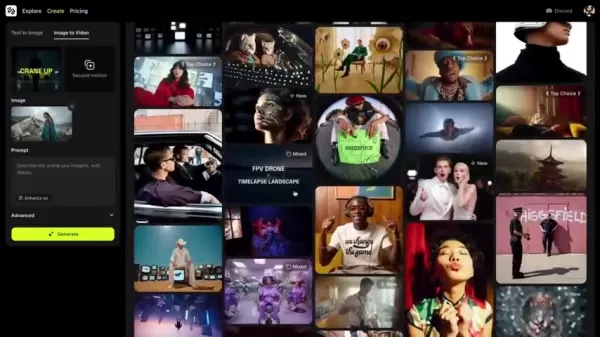
. It's about not just what you generate, but *how* you present it. Here are some key examples:
- Crash Zoom-in: This sudden, high-speed zoom creates urgency or shock, thrusting the viewer toward the subject to intensify key moments.
- Dolly Zoom-in: By moving the camera forward while zooming out, this effect warps the background while keeping the subject stable, producing a disorienting perspective often used for dramatic realizations.
- Robo Arm: These precise, mechanical movements

deliver swift, repeatable, and dynamic shots perfect for product showcases, stylized sequences, or visuals beyond typical human operation.
- Super Dolly-in: A slow, smooth forward movement that gradually closes in on the subject, drawing the audience deeper into the emotional heart of the scene.
- Focus Change: This technique shifts viewer attention between subjects by adjusting the shot's depth of field, creating a visual dialogue.
- 360 Orbit: The camera moves in a full circle around the subject, ideal for creating immersive views or dramatic emphasis.
- FPV Drone: Simulating a first-person-view drone flight, this offers a raw, bird's- or insect-like perspective for navigating landscapes or interiors dynamically.
- Through Object-in: This method adds layers and depth by passing through foreground objects before fully revealing the main subject.
- Crane-up: A lifting motion that reveals scale and grandeur, evoking feelings of awe or isolation.
- Lazy Susan: The subject slowly rotates with subtle camera movement, providing a complete 360-degree view of an item.
- Action Run: A fast, kinetic tracking shot that mirrors the energy of a character in motion.
- Handheld: Subtle camera shake adds raw emotion and gritty realism to a scene.
- Dutch Angle: A tilted camera angle evokes unease, instability, or tension, signaling that something is amiss.
- Car Grip: The camera is mounted on a moving vehicle, often used to depict characters on a journey.
By delivering unique and complex camera movements, Higgsfield AI assists in creating compelling short films or promotional videos.
Getting Started with Higgsfield AI: A User's Guide
Initial Setup and Free Credits
After signing up, Higgsfield AI provides new users with complimentary credits to explore the platform

. These credits allow for the generation of several video clips, helping you understand the tool's potential. The platform currently supports image-to-video functionality, offering a straightforward entry into video creation.
To begin, upload a starting image that will serve as the foundation for your video. The initial frame should be compatible with your desired camera motion for optimal results. This setup lets you direct your scene, establishing the stage for the camera's movement and the unfolding story.
Generating Your First Video
The true power of Higgsfield AI lies in its extensive library of cinematic camera motion controls. After uploading your image:
- Select Your Shot: Choose a preset motion type from the visual library, ranging from simple pans to complex actions like 'building explosion' or 'car chase'.
- Customize the Mix (Optional): For nuanced control, use the 'mix' feature to combine multiple motion types. Blend complementary shots for the best outcome.
- Adjust Motion Weights (Optional): Fine-tune the intensity of each selected motion using dedicated sliders for precise control over the final video.
- Enhance with Prompts (Optional): Describe the scene in your initial frame and include desired camera movements at the end of your prompt to guide the AI.
- Generate and Iterate: Click 'Generate' and let Higgsfield AI create your video. If unsatisfied, make adjustments and use the 'Rerun' function to quickly refine the output.
Higgsfield AI Pricing: Tailored Options for Every Creator
Understanding Higgsfield AI's Subscription Plans
Higgsfield AI offers various pricing plans [insert latest pricing here] based on usage needs. It's advisable to visit their official website for current pricing and specific tier details to select the best option for your requirements. Plans typically differ in the monthly credit allowance, which determines how many videos you can generate
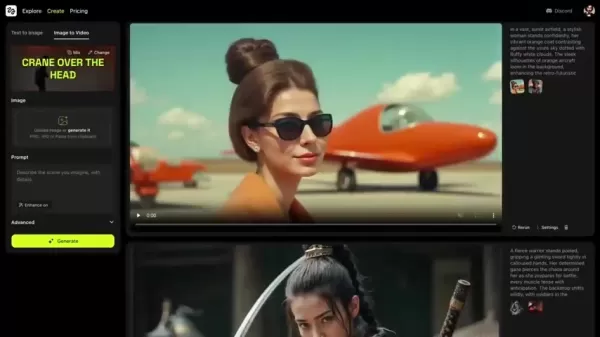
. This structure makes the platform accessible to a broad range of creators, from hobbyists to professional filmmakers.
Plan Name Monthly Credits Price (USD) Basic 50 $10 Standard 150 $25 Premium 500 $50
Higgsfield AI: Weighing the Advantages and Disadvantages
Pros
Unique camera-first approach for cinematic videos.
Generous moderation policy compared to other platforms.
Diverse selection of pre-set camera motion types.
Easy to use and efficient workflow for experimenting with different shots.
Cons
Video quality isn't on par with some leading AI video generators.
Requires careful selection of initial frames to align with desired motion.
User satisfaction may vary widely based on project requirements.
Core Features: What Makes Higgsfield AI Stand Out?
Highlighting the Strengths of Higgsfield AI
Higgsfield AI is equipped with several core features designed to enhance the AI video creation process:
- Camera-First Approach: Prioritizes cinematic camera movements for compelling visual storytelling.
- Image-to-Video Support: Effortlessly transforms static images into dynamic video content.
- Variety of Motion Controls: Offers a diverse library of pre-designed cinematic camera motion controls.
- Mix and Match Motions: Ability to mix multiple camera motion types.
- Visual Library: A library of visual previews that are easy to select.
- Prompt Enhancement: Assists with writing effective prompts to guide the AI.
- Flexible Iteration: Includes one-button rerolling and element reuse for efficient refinement.
Unlocking Creative Potential: Use Cases for Higgsfield AI
Diverse Applications for Higgsfield AI
Higgsfield AI can be applied to a wide variety of video creation projects:
- Short Films: Quickly generate unique shots and dynamic sequences with cinematic camera movements.
- Product Showcases: Use 'Robo Arm' shots to create stylized, repeatable product presentations.
- Environmental Tours: Create engaging, aerial overviews of locations for guided tours or novel perspectives.
- Music Videos: Experiment with creative camera movements and visual effects.
- Social Media Content: Produce dynamic, attention-grabbing content for various platforms.
- Concept Visualizations: Quickly visualize ideas and concepts in motion, ideal for presentations or brainstorming.
- Educational Content: Create engaging explainers and tutorials enhanced by dynamic camera work.
Frequently Asked Questions About Higgsfield AI
How does Higgsfield AI differ from other AI video generators?
Higgsfield AI distinguishes itself by putting camera motion first, offering a range of cinematic movements as a primary feature, unlike other tools that focus elsewhere.
Can I try Higgsfield AI before committing to a subscription?
Yes, Higgsfield AI provides free credits upon signup, allowing you to test the platform and its capabilities.
What kind of input does Higgsfield AI accept?
Higgsfield AI primarily supports image-to-video generation but also offers text-to-video functionality.
Can I combine different camera movements?
Yes, the 'Mix' feature allows you to blend multiple motion types for unique and customized results.
Does Higgsfield AI offer options for moderation?
Yes, Higgsfield AI employs a more permissive moderation approach, which can be beneficial for creative exploration.
Related Questions
What are the best AI video generators?
The best AI video generator depends on your specific needs. Some popular options include: RunwayML Gen-2: Known for its balanced text-to-video and image-to-video capabilities with good control. Pika Labs: A strong contender praised for its realism and creative tools. Synthesia: Excels at creating AI avatars for professional and business video content. Designs.ai’s Videomaker: Useful for generating short marketing and social media videos, though with limitations in complex scenarios. Kling 1.6: A model recognized for producing smooth video output. RunwayML Gen 4: A platform capable of uploading images and generating video content.
What are the limitations of Higgsfield AI?
While Higgsfield AI excels in camera motion, it has certain limitations: Video Quality: The generated video quality may not match other top-tier AI generators like Kling 1.6 or RunwayML Gen-2.
Related article
 Swedish AI Startup Lovable Eyes $13.2 Billion Valuation After Major Funding Round
As AI-driven coding tools gain traction, Swedish startup Lovable has secured a major funding round. The company aims to raise $3 billion, potentially boosting its valuation to $13.2 billion—double the $6.6 billion recorded last December. Menlo Ventur
Google Tests Remy AI Agent for Gemini as Focus Shifts to User Control
According to Business Insider, Google is testing Remy, a new AI personal agent for Gemini. This tool aims to execute tasks on behalf of users, streamlining both professional workflows and daily routines.Currently, Remy is undergoing testing in an int
How to fix Core Web Vitals for better SEO rankings
Streamline Report Card Comments with AI ToolsIntroductionAI Tools for Generating Report Card CommentsMagic SchoolAlmanac AIChat GPTUsing Magic School to Generate Report Card CommentsLogging into Magic SchoolSelecting the Report Card Comments ToolCust
Related Special Topic Recommendations
writing
Swedish AI Startup Lovable Eyes $13.2 Billion Valuation After Major Funding Round
As AI-driven coding tools gain traction, Swedish startup Lovable has secured a major funding round. The company aims to raise $3 billion, potentially boosting its valuation to $13.2 billion—double the $6.6 billion recorded last December. Menlo Ventur
Google Tests Remy AI Agent for Gemini as Focus Shifts to User Control
According to Business Insider, Google is testing Remy, a new AI personal agent for Gemini. This tool aims to execute tasks on behalf of users, streamlining both professional workflows and daily routines.Currently, Remy is undergoing testing in an int
How to fix Core Web Vitals for better SEO rankings
Streamline Report Card Comments with AI ToolsIntroductionAI Tools for Generating Report Card CommentsMagic SchoolAlmanac AIChat GPTUsing Magic School to Generate Report Card CommentsLogging into Magic SchoolSelecting the Report Card Comments ToolCust
Related Special Topic Recommendations
writing
 Best AI Outline Generators for Long-Form SEO Articles
2026 Latest Best Top-Rated AI Outline Generators for Long-Form SEO Articles, meticulously curated by XIX.AI. These powerful tools offer game-changing assistance in creating high-quality content quickly, boosting writing efficiency significantly. Get a free vs paid comparison along with real-world tests and detailed rankings to help you find the must-try option that suits your needs. Explore now to unlock your AI edge.
 8 tools
 xix.ai
Education and Learning
AI Study Tools for Homework and Exam Prep
xix.ai
Education and Learning
AI Study Tools for Homework and Exam Prep
2026 Latest Best AI Study Tools for Homework and Exam Prep! XIX.AI curates a top-rated list of powerful, game-changing tools that help students boost productivity, streamline homework completion, and ace exams through real-world tests. Get a free vs paid comparison, detailed rankings, and must-try options to unlock your AI edge. Explore now!
10 tools
xix.ai
Music composition
AI Vocal Demo Tools for Songwriters, Hooks, Toplines, and Multilingual Draft Sessions
2026 Latest Best AI Vocal Demo Tools for Songwriters, Hook Creators, and Multi-Language Content Teams! XIX.AI has curated a top-rated list of powerful game-changing tools that go through rigorous real-world tests. You’ll find detailed free vs paid comparison data, comprehensive rankings, and must-try options to help you boost writing efficiency and unlock your creative potential. Explore now to discover your perfect tool for all your content needs!
9 tools
xix.ai
Business
Best AI Competitive Research Tools for Small Businesses
2026 Latest Best Top-rated AI Competitive Research Tools for Small Businesses! XIX.AI has curated a highly powerful game-changing collection, updated weekly with rigorous real-world tests and detailed rankings. You can find a comprehensive free vs paid comparison to help you identify the must-try tools that boost your productivity and give you a competitive edge. Explore now to discover your perfect tool!
9 tools
xix.ai
Image editing
Photoshop AI Retouch Tools for Ecommerce Apparel, Skin Cleanup, and Color Consistency
2026 Latest Best Photoshop AI retouch tools for ecommerce apparel, skin cleanup, and color consistency! This top-rated curated list features powerful game-changing solutions that help you boost writing efficiency, streamline content creation, and achieve perfect visual results effortlessly. Each tool has undergone real-world tests through weekly updated rankings, complete with free vs paid comparison details. Backed by XIX.AI, it’s the must-try guide for anyone aiming to unlock your AI edge. Explore now!
10 tools
xix.ai
Prompt
Best AI Prompt Libraries for ChatGPT Workflows
2026 Latest Best Top-Rated AI Prompt Libraries for optimizing all types of ChatGPT workflows. XIX.AI has curated a powerful, game-changing collection that goes through rigorous real-world tests to ensure top performance. You can find detailed free vs paid comparisons and expert rankings to help you choose the must-try tools that boost your productivity and unlock your AI edge. Explore now!
11 tools
xix.ai

 Comments (2)
0/500
Comments (2)
0/500
![PatrickGarcia]()
Finally, someone gets it! 🎥 Most AI video tools just spit out static frames, but Higgsfield's focus on actual camera movement feels like a leap forward. It’s refreshing to see innovation beyond just 'make a cat fly.' I’m skeptical about the learning curve, but if the motion control is as smooth as they claim, this could change how we tell stories. Can’t wait to test it out! 🚀
![JeffreyRamirez]()
Finally, someone focusing on camera movement instead of just generating random clips! 🎥 This could be a game-changer for filmmakers who want more control. Curious how it handles dynamic shots though.
In the fast-paced world of AI video generation, Higgsfield AI has quickly become a noteworthy player, attracting interest with its distinct philosophy. While many AI video tools concentrate on content creation, Higgsfield AI elevates camera movement to a central role, providing a novel angle for cinematic narrative. This platform aims to equip creators with innovative features and flexible content policies, positioning it as a fascinating choice within the AI landscape.
Key Points
Higgsfield AI focuses on camera movement to enable cinematic storytelling.
It provides an extensive selection of preset cinematic camera motion controls.
The platform facilitates image-to-video generation through simple uploads.
It enables the blending of multiple camera motion types to craft sophisticated scenes.
The video quality, while not the highest, offers distinctive shooting perspectives.
Higgsfield AI maintains a lenient moderation policy, encouraging greater creative freedom.
Users can reuse various elements, streamlining the iteration process.
Free credits are awarded upon signup to test the platform's features.
Diving into Higgsfield AI
What is Higgsfield AI?
Higgsfield AI is an artificial intelligence platform designed for video generation, with a central emphasis on cinematic camera movements. Its defining characteristic is the treatment of camera motion as a fundamental component of video creation, rather than an afterthought. Instead of producing static scenes, Higgsfield AI weaves camera movement directly into the generative process
. This focus strives to deliver a more immersive, film-like viewing experience, empowering users to craft compelling visual narratives with enhanced depth and energy.
In a market dominated by tools prioritizing prompt accuracy and content fidelity, Higgsfield AI carves out a unique niche. Its capability to produce complex, smooth camera movements—often challenging for conventional AI—provides a significant advantage. This approach may signal a shift in AI-generated video, placing greater importance on visual storytelling techniques.
Cinematic Storytelling and Camera Motion
As filmmakers know, camera motion is more than an aesthetic choice; it's a narrative tool. A well-executed pan, tilt, dolly, or zoom can reveal information, build suspense, shift focus, and guide the audience's emotional journey. By embedding camera movement as a core AI function, Higgsfield AI allows users to experiment with these cinematic techniques and incorporate professional-grade visual storytelling into their AI-generated projects.
Harnessing the Power of AI for Unique Shot Types
Higgsfield AI presents a diverse array of cinematic camera motion controls for users to explore
. It's about not just what you generate, but *how* you present it. Here are some key examples:
- Crash Zoom-in: This sudden, high-speed zoom creates urgency or shock, thrusting the viewer toward the subject to intensify key moments.
- Dolly Zoom-in: By moving the camera forward while zooming out, this effect warps the background while keeping the subject stable, producing a disorienting perspective often used for dramatic realizations.
- Robo Arm: These precise, mechanical movements
deliver swift, repeatable, and dynamic shots perfect for product showcases, stylized sequences, or visuals beyond typical human operation.
- Super Dolly-in: A slow, smooth forward movement that gradually closes in on the subject, drawing the audience deeper into the emotional heart of the scene.
- Focus Change: This technique shifts viewer attention between subjects by adjusting the shot's depth of field, creating a visual dialogue.
- 360 Orbit: The camera moves in a full circle around the subject, ideal for creating immersive views or dramatic emphasis.
- FPV Drone: Simulating a first-person-view drone flight, this offers a raw, bird's- or insect-like perspective for navigating landscapes or interiors dynamically.
- Through Object-in: This method adds layers and depth by passing through foreground objects before fully revealing the main subject.
- Crane-up: A lifting motion that reveals scale and grandeur, evoking feelings of awe or isolation.
- Lazy Susan: The subject slowly rotates with subtle camera movement, providing a complete 360-degree view of an item.
- Action Run: A fast, kinetic tracking shot that mirrors the energy of a character in motion.
- Handheld: Subtle camera shake adds raw emotion and gritty realism to a scene.
- Dutch Angle: A tilted camera angle evokes unease, instability, or tension, signaling that something is amiss.
- Car Grip: The camera is mounted on a moving vehicle, often used to depict characters on a journey.
By delivering unique and complex camera movements, Higgsfield AI assists in creating compelling short films or promotional videos.
Getting Started with Higgsfield AI: A User's Guide
Initial Setup and Free Credits
After signing up, Higgsfield AI provides new users with complimentary credits to explore the platform
. These credits allow for the generation of several video clips, helping you understand the tool's potential. The platform currently supports image-to-video functionality, offering a straightforward entry into video creation.
To begin, upload a starting image that will serve as the foundation for your video. The initial frame should be compatible with your desired camera motion for optimal results. This setup lets you direct your scene, establishing the stage for the camera's movement and the unfolding story.
Generating Your First Video
The true power of Higgsfield AI lies in its extensive library of cinematic camera motion controls. After uploading your image:
- Select Your Shot: Choose a preset motion type from the visual library, ranging from simple pans to complex actions like 'building explosion' or 'car chase'.
- Customize the Mix (Optional): For nuanced control, use the 'mix' feature to combine multiple motion types. Blend complementary shots for the best outcome.
- Adjust Motion Weights (Optional): Fine-tune the intensity of each selected motion using dedicated sliders for precise control over the final video.
- Enhance with Prompts (Optional): Describe the scene in your initial frame and include desired camera movements at the end of your prompt to guide the AI.
- Generate and Iterate: Click 'Generate' and let Higgsfield AI create your video. If unsatisfied, make adjustments and use the 'Rerun' function to quickly refine the output.
Higgsfield AI Pricing: Tailored Options for Every Creator
Understanding Higgsfield AI's Subscription Plans
Higgsfield AI offers various pricing plans [insert latest pricing here] based on usage needs. It's advisable to visit their official website for current pricing and specific tier details to select the best option for your requirements. Plans typically differ in the monthly credit allowance, which determines how many videos you can generate
. This structure makes the platform accessible to a broad range of creators, from hobbyists to professional filmmakers.
| Plan Name | Monthly Credits | Price (USD) |
|---|---|---|
| Basic | 50 | $10 |
| Standard | 150 | $25 |
| Premium | 500 | $50 |
Higgsfield AI: Weighing the Advantages and Disadvantages
Pros
Unique camera-first approach for cinematic videos.
Generous moderation policy compared to other platforms.
Diverse selection of pre-set camera motion types.
Easy to use and efficient workflow for experimenting with different shots.
Cons
Video quality isn't on par with some leading AI video generators.
Requires careful selection of initial frames to align with desired motion.
User satisfaction may vary widely based on project requirements.
Core Features: What Makes Higgsfield AI Stand Out?
Highlighting the Strengths of Higgsfield AI
Higgsfield AI is equipped with several core features designed to enhance the AI video creation process:
- Camera-First Approach: Prioritizes cinematic camera movements for compelling visual storytelling.
- Image-to-Video Support: Effortlessly transforms static images into dynamic video content.
- Variety of Motion Controls: Offers a diverse library of pre-designed cinematic camera motion controls.
- Mix and Match Motions: Ability to mix multiple camera motion types.
- Visual Library: A library of visual previews that are easy to select.
- Prompt Enhancement: Assists with writing effective prompts to guide the AI.
- Flexible Iteration: Includes one-button rerolling and element reuse for efficient refinement.
Unlocking Creative Potential: Use Cases for Higgsfield AI
Diverse Applications for Higgsfield AI
Higgsfield AI can be applied to a wide variety of video creation projects:
- Short Films: Quickly generate unique shots and dynamic sequences with cinematic camera movements.
- Product Showcases: Use 'Robo Arm' shots to create stylized, repeatable product presentations.
- Environmental Tours: Create engaging, aerial overviews of locations for guided tours or novel perspectives.
- Music Videos: Experiment with creative camera movements and visual effects.
- Social Media Content: Produce dynamic, attention-grabbing content for various platforms.
- Concept Visualizations: Quickly visualize ideas and concepts in motion, ideal for presentations or brainstorming.
- Educational Content: Create engaging explainers and tutorials enhanced by dynamic camera work.
Frequently Asked Questions About Higgsfield AI
How does Higgsfield AI differ from other AI video generators?
Higgsfield AI distinguishes itself by putting camera motion first, offering a range of cinematic movements as a primary feature, unlike other tools that focus elsewhere.
Can I try Higgsfield AI before committing to a subscription?
Yes, Higgsfield AI provides free credits upon signup, allowing you to test the platform and its capabilities.
What kind of input does Higgsfield AI accept?
Higgsfield AI primarily supports image-to-video generation but also offers text-to-video functionality.
Can I combine different camera movements?
Yes, the 'Mix' feature allows you to blend multiple motion types for unique and customized results.
Does Higgsfield AI offer options for moderation?
Yes, Higgsfield AI employs a more permissive moderation approach, which can be beneficial for creative exploration.
Related Questions
What are the best AI video generators?
The best AI video generator depends on your specific needs. Some popular options include: RunwayML Gen-2: Known for its balanced text-to-video and image-to-video capabilities with good control. Pika Labs: A strong contender praised for its realism and creative tools. Synthesia: Excels at creating AI avatars for professional and business video content. Designs.ai’s Videomaker: Useful for generating short marketing and social media videos, though with limitations in complex scenarios. Kling 1.6: A model recognized for producing smooth video output. RunwayML Gen 4: A platform capable of uploading images and generating video content.
What are the limitations of Higgsfield AI?
While Higgsfield AI excels in camera motion, it has certain limitations: Video Quality: The generated video quality may not match other top-tier AI generators like Kling 1.6 or RunwayML Gen-2.








 Swedish AI Startup Lovable Eyes $13.2 Billion Valuation After Major Funding Round
As AI-driven coding tools gain traction, Swedish startup Lovable has secured a major funding round. The company aims to raise $3 billion, potentially boosting its valuation to $13.2 billion—double the $6.6 billion recorded last December. Menlo Ventur
Google Tests Remy AI Agent for Gemini as Focus Shifts to User Control
According to Business Insider, Google is testing Remy, a new AI personal agent for Gemini. This tool aims to execute tasks on behalf of users, streamlining both professional workflows and daily routines.Currently, Remy is undergoing testing in an int
Swedish AI Startup Lovable Eyes $13.2 Billion Valuation After Major Funding Round
As AI-driven coding tools gain traction, Swedish startup Lovable has secured a major funding round. The company aims to raise $3 billion, potentially boosting its valuation to $13.2 billion—double the $6.6 billion recorded last December. Menlo Ventur
Google Tests Remy AI Agent for Gemini as Focus Shifts to User Control
According to Business Insider, Google is testing Remy, a new AI personal agent for Gemini. This tool aims to execute tasks on behalf of users, streamlining both professional workflows and daily routines.Currently, Remy is undergoing testing in an int
 How to fix Core Web Vitals for better SEO rankings
Streamline Report Card Comments with AI ToolsIntroductionAI Tools for Generating Report Card CommentsMagic SchoolAlmanac AIChat GPTUsing Magic School to Generate Report Card CommentsLogging into Magic SchoolSelecting the Report Card Comments ToolCust
How to fix Core Web Vitals for better SEO rankings
Streamline Report Card Comments with AI ToolsIntroductionAI Tools for Generating Report Card CommentsMagic SchoolAlmanac AIChat GPTUsing Magic School to Generate Report Card CommentsLogging into Magic SchoolSelecting the Report Card Comments ToolCust

2026 Latest Best Top-Rated AI Outline Generators for Long-Form SEO Articles, meticulously curated by XIX.AI. These powerful tools offer game-changing assistance in creating high-quality content quickly, boosting writing efficiency significantly. Get a free vs paid comparison along with real-world tests and detailed rankings to help you find the must-try option that suits your needs. Explore now to unlock your AI edge.
8 tools
xix.ai

2026 Latest Best AI Study Tools for Homework and Exam Prep! XIX.AI curates a top-rated list of powerful, game-changing tools that help students boost productivity, streamline homework completion, and ace exams through real-world tests. Get a free vs paid comparison, detailed rankings, and must-try options to unlock your AI edge. Explore now!
10 tools
xix.ai

2026 Latest Best AI Vocal Demo Tools for Songwriters, Hook Creators, and Multi-Language Content Teams! XIX.AI has curated a top-rated list of powerful game-changing tools that go through rigorous real-world tests. You’ll find detailed free vs paid comparison data, comprehensive rankings, and must-try options to help you boost writing efficiency and unlock your creative potential. Explore now to discover your perfect tool for all your content needs!
9 tools
xix.ai

2026 Latest Best Top-rated AI Competitive Research Tools for Small Businesses! XIX.AI has curated a highly powerful game-changing collection, updated weekly with rigorous real-world tests and detailed rankings. You can find a comprehensive free vs paid comparison to help you identify the must-try tools that boost your productivity and give you a competitive edge. Explore now to discover your perfect tool!
9 tools
xix.ai

2026 Latest Best Photoshop AI retouch tools for ecommerce apparel, skin cleanup, and color consistency! This top-rated curated list features powerful game-changing solutions that help you boost writing efficiency, streamline content creation, and achieve perfect visual results effortlessly. Each tool has undergone real-world tests through weekly updated rankings, complete with free vs paid comparison details. Backed by XIX.AI, it’s the must-try guide for anyone aiming to unlock your AI edge. Explore now!
10 tools
xix.ai

2026 Latest Best Top-Rated AI Prompt Libraries for optimizing all types of ChatGPT workflows. XIX.AI has curated a powerful, game-changing collection that goes through rigorous real-world tests to ensure top performance. You can find detailed free vs paid comparisons and expert rankings to help you choose the must-try tools that boost your productivity and unlock your AI edge. Explore now!
11 tools
xix.ai

Finally, someone gets it! 🎥 Most AI video tools just spit out static frames, but Higgsfield's focus on actual camera movement feels like a leap forward. It’s refreshing to see innovation beyond just 'make a cat fly.' I’m skeptical about the learning curve, but if the motion control is as smooth as they claim, this could change how we tell stories. Can’t wait to test it out! 🚀
Finally, someone focusing on camera movement instead of just generating random clips! 🎥 This could be a game-changer for filmmakers who want more control. Curious how it handles dynamic shots though.












