


 Home
HomeGrok Launches Automation: Scheduled Tasks, Email Triggers, and Auto-Reply
Handing over a repetitive task once and never worrying about it again—that's the ultimate dream of effortless efficiency. xAI has made it a reality. Grok now introduces Automations (Automation Tasks): simply describe your work, set the schedule, and let Grok take care of the rest. Whether it's quietly researching before you wake up or flagging an important email the moment it arrives, Grok monitors everything for you. This feature is available on grok.com and the Grok app for iOS and Android.
Creating an automation task is as easy as sending a chat message. Describe your needs naturally, attach files for context, connect tools and skills, and choose a running mode. Name it, save it, and each subsequent run becomes a fresh request—same instructions, but always the latest data. It doesn't merely replay previous inputs; it uses the same task blueprint to fetch the most current information.
Regarding scheduling, Grok offers two options. First, a time-based schedule: you can set it to run once, daily, weekdays only, weekly, monthly, or yearly, at a specific time in your time zone. For example, a morning briefing delivered before 8 a.m., or a rent reminder on the first of each month. Second, an email trigger: Grok monitors your inbox and activates the task as soon as an email matches your filters (sender, recipient, or subject). The task then uses that email as context, allowing Grok to respond to the actual message. You can also include a specific tool by typing @ followed by a connector, and Grok will automatically use it each time the task runs. And of course, you can manually trigger the task immediately—handy for testing after setup.
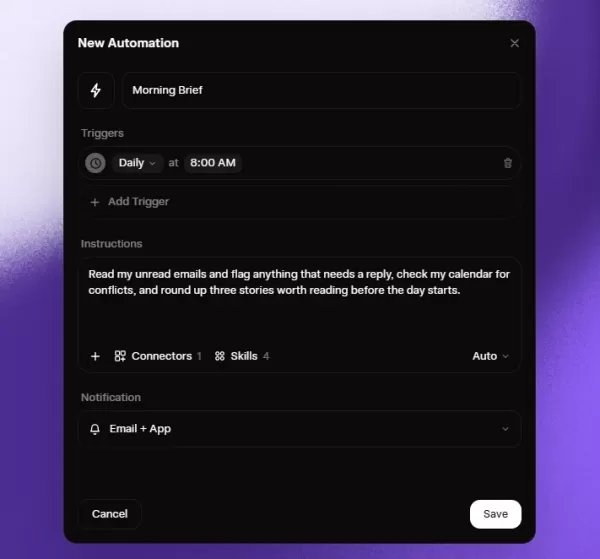
Each trigger is more than a simple output of results. When an automation task starts, Grok initiates a real conversation, completes the work, and saves the results in the run history. You can open any run, review the entire conversation thread, or even continue the conversation from where Grok left off. As for notifications, the choice is yours—email, app notifications, both, or neither—and you can check later. It's entirely up to you.
You can also create tasks more casually. Directly within a chat, tell Grok something like "every morning, check the news and flag any articles about pricing," and it will set up the process. The Automations page also offers ready-made templates to help you get started. Any task can be paused, resumed, edited, or deleted at any time, keeping full control in your hands.
You can now create your first automation task at grok.com/automations. Scheduled tasks are available to everyone, while the email-triggered feature is included in the SuperGrok subscription. As AI learns to check the time, monitor emails, and start working on its own, perhaps the only thing humans need to do is clearly express their ideas.
Related article
 U.S. Stocks Hit Historic Milestone as AI and Aerospace Giants Prepare for Trillion-Dollar Debut
Elon Musk, Sam Altman, and Dario Amodei, three titans of the technology sector, are advancing toward initial public offerings for their respective ventures. With SpaceX, OpenAI, and Anthropic—three industry behemoths nearing trillion-dollar valuation
Swedish AI Startup Lovable Eyes $13.2 Billion Valuation After Major Funding Round
As AI-driven coding tools gain traction, Swedish startup Lovable has secured a major funding round. The company aims to raise $3 billion, potentially boosting its valuation to $13.2 billion—double the $6.6 billion recorded last December. Menlo Ventur
Google Tests Remy AI Agent for Gemini as Focus Shifts to User Control
According to Business Insider, Google is testing Remy, a new AI personal agent for Gemini. This tool aims to execute tasks on behalf of users, streamlining both professional workflows and daily routines.Currently, Remy is undergoing testing in an int
Related Special Topic Recommendations
Data Analysis
U.S. Stocks Hit Historic Milestone as AI and Aerospace Giants Prepare for Trillion-Dollar Debut
Elon Musk, Sam Altman, and Dario Amodei, three titans of the technology sector, are advancing toward initial public offerings for their respective ventures. With SpaceX, OpenAI, and Anthropic—three industry behemoths nearing trillion-dollar valuation
Swedish AI Startup Lovable Eyes $13.2 Billion Valuation After Major Funding Round
As AI-driven coding tools gain traction, Swedish startup Lovable has secured a major funding round. The company aims to raise $3 billion, potentially boosting its valuation to $13.2 billion—double the $6.6 billion recorded last December. Menlo Ventur
Google Tests Remy AI Agent for Gemini as Focus Shifts to User Control
According to Business Insider, Google is testing Remy, a new AI personal agent for Gemini. This tool aims to execute tasks on behalf of users, streamlining both professional workflows and daily routines.Currently, Remy is undergoing testing in an int
Related Special Topic Recommendations
Data Analysis
 Best AI Anomaly Detection Tools for KPI Monitoring across SaaS and Ecommerce Teams
2026 Latest Best Top-rated AI Anomaly Detection Tools for KPI Monitoring in SaaS and Ecommerce teams! XIX.AI has curated a powerful, game-changing collection based on rigorous real-world tests and weekly updated rankings. You’ll find detailed free vs paid comparison insights to help you identify the must-try solution that boosts productivity and unlocks your AI edge. Explore now!
 10 tools
 xix.ai
writing
Best AI Outline Generators for Long-Form SEO Articles
xix.ai
writing
Best AI Outline Generators for Long-Form SEO Articles
2026 Latest Best Top-Rated AI Outline Generators for Long-Form SEO Articles, meticulously curated by XIX.AI. These powerful tools offer game-changing assistance in creating high-quality content quickly, boosting writing efficiency significantly. Get a free vs paid comparison along with real-world tests and detailed rankings to help you find the must-try option that suits your needs. Explore now to unlock your AI edge.
8 tools
xix.ai
Education and Learning
AI Study Tools for Homework and Exam Prep
2026 Latest Best AI Study Tools for Homework and Exam Prep! XIX.AI curates a top-rated list of powerful, game-changing tools that help students boost productivity, streamline homework completion, and ace exams through real-world tests. Get a free vs paid comparison, detailed rankings, and must-try options to unlock your AI edge. Explore now!
10 tools
xix.ai
Music composition
AI Vocal Demo Tools for Songwriters, Hooks, Toplines, and Multilingual Draft Sessions
2026 Latest Best AI Vocal Demo Tools for Songwriters, Hook Creators, and Multi-Language Content Teams! XIX.AI has curated a top-rated list of powerful game-changing tools that go through rigorous real-world tests. You’ll find detailed free vs paid comparison data, comprehensive rankings, and must-try options to help you boost writing efficiency and unlock your creative potential. Explore now to discover your perfect tool for all your content needs!
9 tools
xix.ai
Business
Best AI Competitive Research Tools for Small Businesses
2026 Latest Best Top-rated AI Competitive Research Tools for Small Businesses! XIX.AI has curated a highly powerful game-changing collection, updated weekly with rigorous real-world tests and detailed rankings. You can find a comprehensive free vs paid comparison to help you identify the must-try tools that boost your productivity and give you a competitive edge. Explore now to discover your perfect tool!
9 tools
xix.ai
Image editing
Photoshop AI Retouch Tools for Ecommerce Apparel, Skin Cleanup, and Color Consistency
2026 Latest Best Photoshop AI retouch tools for ecommerce apparel, skin cleanup, and color consistency! This top-rated curated list features powerful game-changing solutions that help you boost writing efficiency, streamline content creation, and achieve perfect visual results effortlessly. Each tool has undergone real-world tests through weekly updated rankings, complete with free vs paid comparison details. Backed by XIX.AI, it’s the must-try guide for anyone aiming to unlock your AI edge. Explore now!
10 tools
xix.ai

 Comments (0)
0/500
Comments (0)
0/500
Handing over a repetitive task once and never worrying about it again—that's the ultimate dream of effortless efficiency. xAI has made it a reality. Grok now introduces Automations (Automation Tasks): simply describe your work, set the schedule, and let Grok take care of the rest. Whether it's quietly researching before you wake up or flagging an important email the moment it arrives, Grok monitors everything for you. This feature is available on grok.com and the Grok app for iOS and Android.
Creating an automation task is as easy as sending a chat message. Describe your needs naturally, attach files for context, connect tools and skills, and choose a running mode. Name it, save it, and each subsequent run becomes a fresh request—same instructions, but always the latest data. It doesn't merely replay previous inputs; it uses the same task blueprint to fetch the most current information.
Regarding scheduling, Grok offers two options. First, a time-based schedule: you can set it to run once, daily, weekdays only, weekly, monthly, or yearly, at a specific time in your time zone. For example, a morning briefing delivered before 8 a.m., or a rent reminder on the first of each month. Second, an email trigger: Grok monitors your inbox and activates the task as soon as an email matches your filters (sender, recipient, or subject). The task then uses that email as context, allowing Grok to respond to the actual message. You can also include a specific tool by typing @ followed by a connector, and Grok will automatically use it each time the task runs. And of course, you can manually trigger the task immediately—handy for testing after setup.
Each trigger is more than a simple output of results. When an automation task starts, Grok initiates a real conversation, completes the work, and saves the results in the run history. You can open any run, review the entire conversation thread, or even continue the conversation from where Grok left off. As for notifications, the choice is yours—email, app notifications, both, or neither—and you can check later. It's entirely up to you.
You can also create tasks more casually. Directly within a chat, tell Grok something like "every morning, check the news and flag any articles about pricing," and it will set up the process. The Automations page also offers ready-made templates to help you get started. Any task can be paused, resumed, edited, or deleted at any time, keeping full control in your hands.
You can now create your first automation task at grok.com/automations. Scheduled tasks are available to everyone, while the email-triggered feature is included in the SuperGrok subscription. As AI learns to check the time, monitor emails, and start working on its own, perhaps the only thing humans need to do is clearly express their ideas.








 U.S. Stocks Hit Historic Milestone as AI and Aerospace Giants Prepare for Trillion-Dollar Debut
Elon Musk, Sam Altman, and Dario Amodei, three titans of the technology sector, are advancing toward initial public offerings for their respective ventures. With SpaceX, OpenAI, and Anthropic—three industry behemoths nearing trillion-dollar valuation
U.S. Stocks Hit Historic Milestone as AI and Aerospace Giants Prepare for Trillion-Dollar Debut
Elon Musk, Sam Altman, and Dario Amodei, three titans of the technology sector, are advancing toward initial public offerings for their respective ventures. With SpaceX, OpenAI, and Anthropic—three industry behemoths nearing trillion-dollar valuation
 Swedish AI Startup Lovable Eyes $13.2 Billion Valuation After Major Funding Round
As AI-driven coding tools gain traction, Swedish startup Lovable has secured a major funding round. The company aims to raise $3 billion, potentially boosting its valuation to $13.2 billion—double the $6.6 billion recorded last December. Menlo Ventur
Google Tests Remy AI Agent for Gemini as Focus Shifts to User Control
According to Business Insider, Google is testing Remy, a new AI personal agent for Gemini. This tool aims to execute tasks on behalf of users, streamlining both professional workflows and daily routines.Currently, Remy is undergoing testing in an int
Swedish AI Startup Lovable Eyes $13.2 Billion Valuation After Major Funding Round
As AI-driven coding tools gain traction, Swedish startup Lovable has secured a major funding round. The company aims to raise $3 billion, potentially boosting its valuation to $13.2 billion—double the $6.6 billion recorded last December. Menlo Ventur
Google Tests Remy AI Agent for Gemini as Focus Shifts to User Control
According to Business Insider, Google is testing Remy, a new AI personal agent for Gemini. This tool aims to execute tasks on behalf of users, streamlining both professional workflows and daily routines.Currently, Remy is undergoing testing in an int

2026 Latest Best Top-rated AI Anomaly Detection Tools for KPI Monitoring in SaaS and Ecommerce teams! XIX.AI has curated a powerful, game-changing collection based on rigorous real-world tests and weekly updated rankings. You’ll find detailed free vs paid comparison insights to help you identify the must-try solution that boosts productivity and unlocks your AI edge. Explore now!
10 tools
xix.ai

2026 Latest Best Top-Rated AI Outline Generators for Long-Form SEO Articles, meticulously curated by XIX.AI. These powerful tools offer game-changing assistance in creating high-quality content quickly, boosting writing efficiency significantly. Get a free vs paid comparison along with real-world tests and detailed rankings to help you find the must-try option that suits your needs. Explore now to unlock your AI edge.
8 tools
xix.ai

2026 Latest Best AI Study Tools for Homework and Exam Prep! XIX.AI curates a top-rated list of powerful, game-changing tools that help students boost productivity, streamline homework completion, and ace exams through real-world tests. Get a free vs paid comparison, detailed rankings, and must-try options to unlock your AI edge. Explore now!
10 tools
xix.ai

2026 Latest Best AI Vocal Demo Tools for Songwriters, Hook Creators, and Multi-Language Content Teams! XIX.AI has curated a top-rated list of powerful game-changing tools that go through rigorous real-world tests. You’ll find detailed free vs paid comparison data, comprehensive rankings, and must-try options to help you boost writing efficiency and unlock your creative potential. Explore now to discover your perfect tool for all your content needs!
9 tools
xix.ai

2026 Latest Best Top-rated AI Competitive Research Tools for Small Businesses! XIX.AI has curated a highly powerful game-changing collection, updated weekly with rigorous real-world tests and detailed rankings. You can find a comprehensive free vs paid comparison to help you identify the must-try tools that boost your productivity and give you a competitive edge. Explore now to discover your perfect tool!
9 tools
xix.ai

2026 Latest Best Photoshop AI retouch tools for ecommerce apparel, skin cleanup, and color consistency! This top-rated curated list features powerful game-changing solutions that help you boost writing efficiency, streamline content creation, and achieve perfect visual results effortlessly. Each tool has undergone real-world tests through weekly updated rankings, complete with free vs paid comparison details. Backed by XIX.AI, it’s the must-try guide for anyone aiming to unlock your AI edge. Explore now!
10 tools
xix.ai












