


 Home
HomeAI-Powered Shopping Assistant: Shopify Integration Guide
In the fast-paced world of e-commerce, delivering a seamless customer experience is critical. The Flyfish AI Shopping Assistant transforms how you connect with customers, offering personalized guidance and boosting purchase decisions. This guide walks you through the installation, setup, and optimization of Flyfish AI for your Shopify store, empowering you to enhance customer engagement and increase sales. Discover how AI can redefine your e-commerce strategy!
Key Features
Add Flyfish AI Shopping Assistant directly from the Shopify App Store.
Customize the AI’s look, name, and greeting messages.
Sync your Shopify product catalog for tailored product suggestions.
Create a dedicated 'Shopping Assistant' page for seamless customer access.
Align the AI’s branding and functionality with your store’s identity.
Leverage the AI to address customer questions and simplify product discovery.
Starting with Flyfish AI Shopping Assistant
Installing Flyfish AI from the Shopify App Store
Begin transforming your Shopify store by installing the Flyfish AI Shopping Assistant.
The installation is quick and user-friendly, taking only a few minutes.
- Access the App Store: Log into your Shopify admin panel, go to the 'Apps' section, and select 'Shopify App Store'.
- Find Flyfish AI: Search for the 'Flyfish' app using the search bar. Look for the 'Flyfish-test' app in the results.
- Install the App: Click the app, review its details, click the ellipsis, and select 'Install' to start the process.
- Authorize Permissions: Grant Flyfish AI the required permissions to access your store’s data. Review carefully and click 'Install app' to continue.
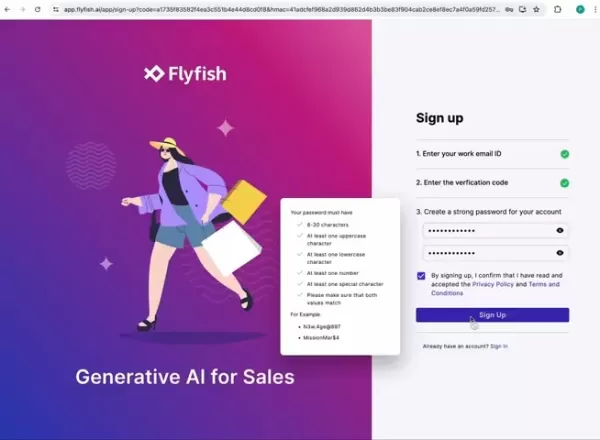
- Finalize Installation: After authorizing, you’ll be redirected to Flyfish’s setup page. Agree to terms, provide your work email and organization name, enter the emailed verification code, set a secure password, and explore pricing plans.
Flyfish AI Pricing Plans
Flyfish AI offers versatile pricing options tailored to businesses of all sizes, including a 14-day free trial, Starter, Advanced, and Premium plans.
Key features of each plan include:
- 14-Day Free Trial: Test core features, establish a digital presence, and lay a foundation for growth.
- Starter: Perfect for small businesses and startups building a strong online presence.
- Advanced: Ideal for growing businesses seeking advanced tools to automate sales and boost revenue.
- Premium: Offers premium features for scaling businesses, with enhanced customization and multilingual support.
Setting Up Your AI Shopping Assistant
Payment and Team Setup
After selecting a plan, you’ll be directed to the Shopify Payment page.
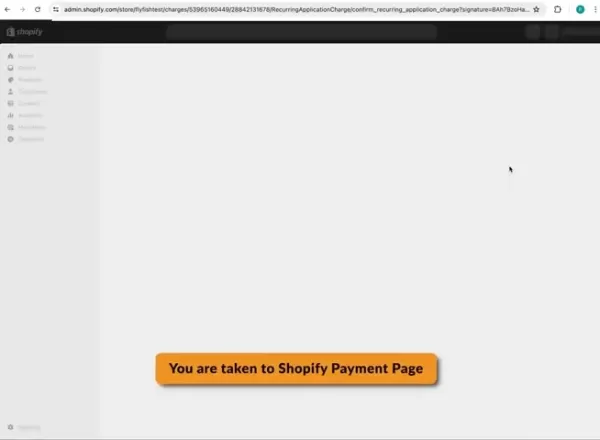
Approve the initial payment, then create a team to manage multiple AI assistants. Assign a unique team name and click 'Create' to complete setup, ensuring efficient AI management.
With your account and team ready, proceed to configure your AI Shopping Assistant. Select your domain and click create.
- Connect Your Store: Link your Shopify store to Flyfish AI, enabling access to your product catalog for seamless sales across platforms.
Configuring Your AI Shopping Assistant
Customizing AI and Pop-Up Widget
With the AI installed and linked, customize its settings to reflect your brand and customer service goals. Access the Configuration Panel: From the Flyfish AI dashboard, go to the 'Configure' section.
This panel lets you adjust the AI’s behavior and appearance.
- Define Basic Settings: Choose an avatar and name for your AI to make it recognizable to customers.
- Personalize the Pop-Up Widget: Customize the welcome and introductory messages for the pop-up widget.
- Activate the Pop-Up: Enable the widget on your website.
- Save Changes: Click 'Save changes' to apply your settings.
Your AI Shopping Assistant is now ready for testing!
Testing and Launching Your AI
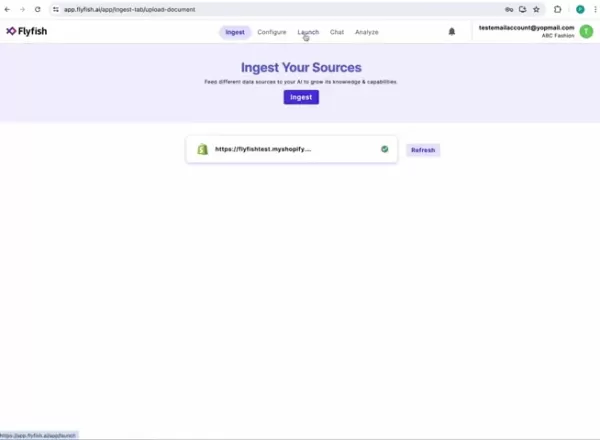
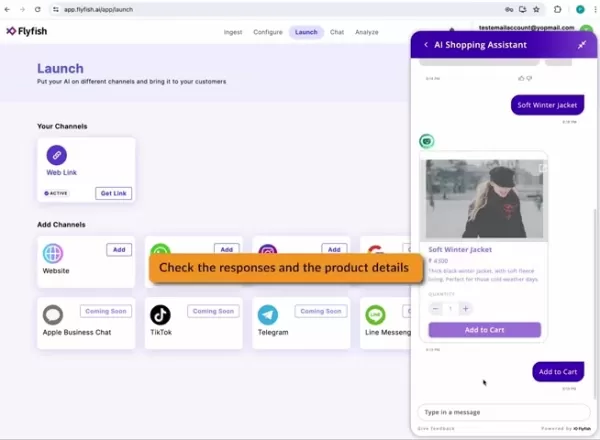
After setup, test and launch your AI to ensure optimal performance. Verify Data Sources: Confirm all data sources are ingested, indicated by a green checkmark. Test the AI: Go to the launch tab, click the avatar in the bottom right corner to open the assistant, and test with various queries.
- Test Conversations: Start a chat with the AI, testing responses to product, category, or customer service queries.
- Checkout Process: Click checkout to initiate the Shopify checkout process, redirecting to the checkout page.
Your AI is now live and ready to assist customers. Test and tweak queries to optimize performance for your business.
Pros and Cons of Flyfish AI Shopping Assistant
Pros
Boosted Engagement: Delivers personalized assistance and product recommendations.
Enhanced Support: Provides instant responses to common customer questions.
Higher Sales: Guides customers to make confident purchase decisions.
Cost Savings: Automates support, reducing reliance on human agents.
Scalability: Handles high volumes of customer interactions effortlessly.
Cons
Setup Time: Requires effort to configure and train the AI initially.
Data Reliance: Performance depends on the quality of ingested data.
Occasional Errors: AI may provide inaccurate responses in some cases.
Limited Empathy: Lacks the emotional depth of human interaction in complex scenarios.
Ongoing Maintenance: Needs regular updates to maintain peak performance.
Frequently Asked Questions
How do I add the shopping assistant to my store’s navigation?
To integrate the AI Shopping Assistant into your Shopify store’s navigation, go to your Shopify Admin page. Under Pages, create a new page titled 'Shopping Assistant,' enable the HTML link, and save. In the Navigation Menu, add a 'Shopping Assistant' item to the Main Menu. Then, go to Themes, click 'View your store,' and select the Shopping Assistant menu to access the page with the pop-up widget.
How do I customize the brand colors of the shopping assistant?
To adjust the brand colors, navigate to the Configure tab, select appearance, use the color picker to set your brand color, and save changes. For example, you can change the color to green.
Related Questions
What data sources can Flyfish AI ingest?
Flyfish AI can process your Shopify product catalog, website data, documents, and even call recordings. Ensuring comprehensive data input is key to delivering accurate and helpful customer responses.
How does the AI Shopping Assistant handle inquiries?
The AI uses natural language processing to interpret customer queries and provide relevant answers based on ingested data. Customizing its behavior allows tailored responses to specific questions or scenarios.
Can Flyfish AI Shopping Assistant support lead generation?
Yes, the AI can be configured to collect customer information or offer personalized recommendations, capturing valuable leads to drive business growth.
Related article
 Slackbot Becomes an AI Agent
Slackbot, the automated assistant embedded in Salesforce’s corporate messaging platform Slack, is evolving into an AI agent. Salesforce CTO Parker Harris envisions it achieving viral status comparable to OpenAI’s ChatGPT.The cloud software giant laun
ByteDance Boosts Core AI Incentives as Doubao Surges 14.6%
ByteDance recently convened a DouBao equity briefing to unveil fresh incentive policies for staff involved in the DouBao division. The strike price for DouBao shares has been lifted from $14.85 in June 2026 to $17.02, marking an approximate 14.6% inc
MiniMax Unveils 10x Team Program to Incentivize Global AI Experts
MiniMax (Xiyu Technology), the General Artificial Intelligence Lab, has officially launched "10x Team," a global talent collaboration initiative. This program aims to recruit top experts across industries to explore the deep application of large mode
Related Special Topic Recommendations
Education and Learning
Slackbot Becomes an AI Agent
Slackbot, the automated assistant embedded in Salesforce’s corporate messaging platform Slack, is evolving into an AI agent. Salesforce CTO Parker Harris envisions it achieving viral status comparable to OpenAI’s ChatGPT.The cloud software giant laun
ByteDance Boosts Core AI Incentives as Doubao Surges 14.6%
ByteDance recently convened a DouBao equity briefing to unveil fresh incentive policies for staff involved in the DouBao division. The strike price for DouBao shares has been lifted from $14.85 in June 2026 to $17.02, marking an approximate 14.6% inc
MiniMax Unveils 10x Team Program to Incentivize Global AI Experts
MiniMax (Xiyu Technology), the General Artificial Intelligence Lab, has officially launched "10x Team," a global talent collaboration initiative. This program aims to recruit top experts across industries to explore the deep application of large mode
Related Special Topic Recommendations
Education and Learning
 AI Study Tools for Homework and Exam Prep
2026 Latest Best AI Study Tools for Homework and Exam Prep! XIX.AI curates a top-rated list of powerful, game-changing tools that help students boost productivity, streamline homework completion, and ace exams through real-world tests. Get a free vs paid comparison, detailed rankings, and must-try options to unlock your AI edge. Explore now!
 10 tools
 xix.ai
Music composition
AI Vocal Demo Tools for Songwriters, Hooks, Toplines, and Multilingual Draft Sessions
xix.ai
Music composition
AI Vocal Demo Tools for Songwriters, Hooks, Toplines, and Multilingual Draft Sessions
2026 Latest Best AI Vocal Demo Tools for Songwriters, Hook Creators, and Multi-Language Content Teams! XIX.AI has curated a top-rated list of powerful game-changing tools that go through rigorous real-world tests. You’ll find detailed free vs paid comparison data, comprehensive rankings, and must-try options to help you boost writing efficiency and unlock your creative potential. Explore now to discover your perfect tool for all your content needs!
9 tools
xix.ai
Business
Best AI Competitive Research Tools for Small Businesses
2026 Latest Best Top-rated AI Competitive Research Tools for Small Businesses! XIX.AI has curated a highly powerful game-changing collection, updated weekly with rigorous real-world tests and detailed rankings. You can find a comprehensive free vs paid comparison to help you identify the must-try tools that boost your productivity and give you a competitive edge. Explore now to discover your perfect tool!
9 tools
xix.ai
Image editing
Photoshop AI Retouch Tools for Ecommerce Apparel, Skin Cleanup, and Color Consistency
2026 Latest Best Photoshop AI retouch tools for ecommerce apparel, skin cleanup, and color consistency! This top-rated curated list features powerful game-changing solutions that help you boost writing efficiency, streamline content creation, and achieve perfect visual results effortlessly. Each tool has undergone real-world tests through weekly updated rankings, complete with free vs paid comparison details. Backed by XIX.AI, it’s the must-try guide for anyone aiming to unlock your AI edge. Explore now!
10 tools
xix.ai
Prompt
Best AI Prompt Libraries for ChatGPT Workflows
2026 Latest Best Top-Rated AI Prompt Libraries for optimizing all types of ChatGPT workflows. XIX.AI has curated a powerful, game-changing collection that goes through rigorous real-world tests to ensure top performance. You can find detailed free vs paid comparisons and expert rankings to help you choose the must-try tools that boost your productivity and unlock your AI edge. Explore now!
11 tools
xix.ai
Education and Learning
AI Quiz Builder Platforms for Teachers, Tutors, and Cohort-Based Learning Programs
2026 Latest Best AI Quiz Builder Platforms for Teachers, Tutors, and Cohort-Based Learning Programs! XIX.AI has curated a top-rated list of powerful game-changing tools that go through real-world tests to deliver accurate rankings. These must-try platforms help boost writing efficiency, streamline content creation, and simplify quiz design across all learning scenarios. Explore now to discover your perfect tool for unlocking your AI edge in teaching!
13 tools
xix.ai

 Comments (4)
0/500
Comments (4)
0/500
![GaryJones]()
Just integrated this AI assistant on my Shopify store last week, and the customer engagement metrics already look promising! The personalized recommendations feature feels less robotic than I expected—though I'm curious how it handles niche products with limited data. Anyone else testing this with physical/digital hybrid inventories? 🤔
![RobertWhite]()
Je trouve cet article super pertinent ! J'ai toujours galéré à personnaliser l'expérience client sur ma boutique en ligne. L'idée d'un assistant IA intégré à Shopify est maline, mais j'aimerais savoir si c'est vraiment abordable pour les petites boutiques ? 🤔 Ça pourrait changer la donne face à Amazon...
![RaymondGreen]()
この記事を読んで、AIで買い物体験がここまで変わるのかと驚きました!特にShopify連携の実用的なガイドが参考になります✨ 個人的には、AIアシスタントが消費者のプライバシーをどう扱うのか少し気になりますね… 将来的には人間の接客スキルが減ってしまうのかな?とも思いました🥺
![ChristopherAllen]()
¡Esto es justo lo que necesitaba para mi tienda en Shopify! Siempre busco formas de mejorar la experiencia del cliente, y un asistente de compras con IA suena perfecto. ¿Alguien ya lo ha probado? Me encantaría saber opiniones reales antes de instalarlo en mi tienda online 🛒
In the fast-paced world of e-commerce, delivering a seamless customer experience is critical. The Flyfish AI Shopping Assistant transforms how you connect with customers, offering personalized guidance and boosting purchase decisions. This guide walks you through the installation, setup, and optimization of Flyfish AI for your Shopify store, empowering you to enhance customer engagement and increase sales. Discover how AI can redefine your e-commerce strategy!
Key Features
Add Flyfish AI Shopping Assistant directly from the Shopify App Store.
Customize the AI’s look, name, and greeting messages.
Sync your Shopify product catalog for tailored product suggestions.
Create a dedicated 'Shopping Assistant' page for seamless customer access.
Align the AI’s branding and functionality with your store’s identity.
Leverage the AI to address customer questions and simplify product discovery.
Starting with Flyfish AI Shopping Assistant
Installing Flyfish AI from the Shopify App Store
Begin transforming your Shopify store by installing the Flyfish AI Shopping Assistant.
The installation is quick and user-friendly, taking only a few minutes.
- Access the App Store: Log into your Shopify admin panel, go to the 'Apps' section, and select 'Shopify App Store'.
- Find Flyfish AI: Search for the 'Flyfish' app using the search bar. Look for the 'Flyfish-test' app in the results.
- Install the App: Click the app, review its details, click the ellipsis, and select 'Install' to start the process.
- Authorize Permissions: Grant Flyfish AI the required permissions to access your store’s data. Review carefully and click 'Install app' to continue.
- Finalize Installation: After authorizing, you’ll be redirected to Flyfish’s setup page. Agree to terms, provide your work email and organization name, enter the emailed verification code, set a secure password, and explore pricing plans.
Flyfish AI Pricing Plans
Flyfish AI offers versatile pricing options tailored to businesses of all sizes, including a 14-day free trial, Starter, Advanced, and Premium plans.
Key features of each plan include:
- 14-Day Free Trial: Test core features, establish a digital presence, and lay a foundation for growth.
- Starter: Perfect for small businesses and startups building a strong online presence.
- Advanced: Ideal for growing businesses seeking advanced tools to automate sales and boost revenue.
- Premium: Offers premium features for scaling businesses, with enhanced customization and multilingual support.
Setting Up Your AI Shopping Assistant
Payment and Team Setup
After selecting a plan, you’ll be directed to the Shopify Payment page.
Approve the initial payment, then create a team to manage multiple AI assistants. Assign a unique team name and click 'Create' to complete setup, ensuring efficient AI management.
With your account and team ready, proceed to configure your AI Shopping Assistant. Select your domain and click create.
- Connect Your Store: Link your Shopify store to Flyfish AI, enabling access to your product catalog for seamless sales across platforms.
Configuring Your AI Shopping Assistant
Customizing AI and Pop-Up Widget
With the AI installed and linked, customize its settings to reflect your brand and customer service goals. Access the Configuration Panel: From the Flyfish AI dashboard, go to the 'Configure' section.
This panel lets you adjust the AI’s behavior and appearance.
- Define Basic Settings: Choose an avatar and name for your AI to make it recognizable to customers.
- Personalize the Pop-Up Widget: Customize the welcome and introductory messages for the pop-up widget.
- Activate the Pop-Up: Enable the widget on your website.
- Save Changes: Click 'Save changes' to apply your settings.
Your AI Shopping Assistant is now ready for testing!
Testing and Launching Your AI
After setup, test and launch your AI to ensure optimal performance. Verify Data Sources: Confirm all data sources are ingested, indicated by a green checkmark. Test the AI: Go to the launch tab, click the avatar in the bottom right corner to open the assistant, and test with various queries.
- Test Conversations: Start a chat with the AI, testing responses to product, category, or customer service queries.
- Checkout Process: Click checkout to initiate the Shopify checkout process, redirecting to the checkout page.
Your AI is now live and ready to assist customers. Test and tweak queries to optimize performance for your business.
Pros and Cons of Flyfish AI Shopping Assistant
Pros
Boosted Engagement: Delivers personalized assistance and product recommendations.
Enhanced Support: Provides instant responses to common customer questions.
Higher Sales: Guides customers to make confident purchase decisions.
Cost Savings: Automates support, reducing reliance on human agents.
Scalability: Handles high volumes of customer interactions effortlessly.
Cons
Setup Time: Requires effort to configure and train the AI initially.
Data Reliance: Performance depends on the quality of ingested data.
Occasional Errors: AI may provide inaccurate responses in some cases.
Limited Empathy: Lacks the emotional depth of human interaction in complex scenarios.
Ongoing Maintenance: Needs regular updates to maintain peak performance.
Frequently Asked Questions
How do I add the shopping assistant to my store’s navigation?
To integrate the AI Shopping Assistant into your Shopify store’s navigation, go to your Shopify Admin page. Under Pages, create a new page titled 'Shopping Assistant,' enable the HTML link, and save. In the Navigation Menu, add a 'Shopping Assistant' item to the Main Menu. Then, go to Themes, click 'View your store,' and select the Shopping Assistant menu to access the page with the pop-up widget.
How do I customize the brand colors of the shopping assistant?
To adjust the brand colors, navigate to the Configure tab, select appearance, use the color picker to set your brand color, and save changes. For example, you can change the color to green.
Related Questions
What data sources can Flyfish AI ingest?
Flyfish AI can process your Shopify product catalog, website data, documents, and even call recordings. Ensuring comprehensive data input is key to delivering accurate and helpful customer responses.
How does the AI Shopping Assistant handle inquiries?
The AI uses natural language processing to interpret customer queries and provide relevant answers based on ingested data. Customizing its behavior allows tailored responses to specific questions or scenarios.
Can Flyfish AI Shopping Assistant support lead generation?
Yes, the AI can be configured to collect customer information or offer personalized recommendations, capturing valuable leads to drive business growth.








 Slackbot Becomes an AI Agent
Slackbot, the automated assistant embedded in Salesforce’s corporate messaging platform Slack, is evolving into an AI agent. Salesforce CTO Parker Harris envisions it achieving viral status comparable to OpenAI’s ChatGPT.The cloud software giant laun
Slackbot Becomes an AI Agent
Slackbot, the automated assistant embedded in Salesforce’s corporate messaging platform Slack, is evolving into an AI agent. Salesforce CTO Parker Harris envisions it achieving viral status comparable to OpenAI’s ChatGPT.The cloud software giant laun
 ByteDance Boosts Core AI Incentives as Doubao Surges 14.6%
ByteDance recently convened a DouBao equity briefing to unveil fresh incentive policies for staff involved in the DouBao division. The strike price for DouBao shares has been lifted from $14.85 in June 2026 to $17.02, marking an approximate 14.6% inc
ByteDance Boosts Core AI Incentives as Doubao Surges 14.6%
ByteDance recently convened a DouBao equity briefing to unveil fresh incentive policies for staff involved in the DouBao division. The strike price for DouBao shares has been lifted from $14.85 in June 2026 to $17.02, marking an approximate 14.6% inc
 MiniMax Unveils 10x Team Program to Incentivize Global AI Experts
MiniMax (Xiyu Technology), the General Artificial Intelligence Lab, has officially launched "10x Team," a global talent collaboration initiative. This program aims to recruit top experts across industries to explore the deep application of large mode
MiniMax Unveils 10x Team Program to Incentivize Global AI Experts
MiniMax (Xiyu Technology), the General Artificial Intelligence Lab, has officially launched "10x Team," a global talent collaboration initiative. This program aims to recruit top experts across industries to explore the deep application of large mode

2026 Latest Best AI Study Tools for Homework and Exam Prep! XIX.AI curates a top-rated list of powerful, game-changing tools that help students boost productivity, streamline homework completion, and ace exams through real-world tests. Get a free vs paid comparison, detailed rankings, and must-try options to unlock your AI edge. Explore now!
10 tools
xix.ai

2026 Latest Best AI Vocal Demo Tools for Songwriters, Hook Creators, and Multi-Language Content Teams! XIX.AI has curated a top-rated list of powerful game-changing tools that go through rigorous real-world tests. You’ll find detailed free vs paid comparison data, comprehensive rankings, and must-try options to help you boost writing efficiency and unlock your creative potential. Explore now to discover your perfect tool for all your content needs!
9 tools
xix.ai

2026 Latest Best Top-rated AI Competitive Research Tools for Small Businesses! XIX.AI has curated a highly powerful game-changing collection, updated weekly with rigorous real-world tests and detailed rankings. You can find a comprehensive free vs paid comparison to help you identify the must-try tools that boost your productivity and give you a competitive edge. Explore now to discover your perfect tool!
9 tools
xix.ai

2026 Latest Best Photoshop AI retouch tools for ecommerce apparel, skin cleanup, and color consistency! This top-rated curated list features powerful game-changing solutions that help you boost writing efficiency, streamline content creation, and achieve perfect visual results effortlessly. Each tool has undergone real-world tests through weekly updated rankings, complete with free vs paid comparison details. Backed by XIX.AI, it’s the must-try guide for anyone aiming to unlock your AI edge. Explore now!
10 tools
xix.ai

2026 Latest Best Top-Rated AI Prompt Libraries for optimizing all types of ChatGPT workflows. XIX.AI has curated a powerful, game-changing collection that goes through rigorous real-world tests to ensure top performance. You can find detailed free vs paid comparisons and expert rankings to help you choose the must-try tools that boost your productivity and unlock your AI edge. Explore now!
11 tools
xix.ai

2026 Latest Best AI Quiz Builder Platforms for Teachers, Tutors, and Cohort-Based Learning Programs! XIX.AI has curated a top-rated list of powerful game-changing tools that go through real-world tests to deliver accurate rankings. These must-try platforms help boost writing efficiency, streamline content creation, and simplify quiz design across all learning scenarios. Explore now to discover your perfect tool for unlocking your AI edge in teaching!
13 tools
xix.ai

Just integrated this AI assistant on my Shopify store last week, and the customer engagement metrics already look promising! The personalized recommendations feature feels less robotic than I expected—though I'm curious how it handles niche products with limited data. Anyone else testing this with physical/digital hybrid inventories? 🤔
Je trouve cet article super pertinent ! J'ai toujours galéré à personnaliser l'expérience client sur ma boutique en ligne. L'idée d'un assistant IA intégré à Shopify est maline, mais j'aimerais savoir si c'est vraiment abordable pour les petites boutiques ? 🤔 Ça pourrait changer la donne face à Amazon...
この記事を読んで、AIで買い物体験がここまで変わるのかと驚きました!特にShopify連携の実用的なガイドが参考になります✨ 個人的には、AIアシスタントが消費者のプライバシーをどう扱うのか少し気になりますね… 将来的には人間の接客スキルが減ってしまうのかな?とも思いました🥺
¡Esto es justo lo que necesitaba para mi tienda en Shopify! Siempre busco formas de mejorar la experiencia del cliente, y un asistente de compras con IA suena perfecto. ¿Alguien ya lo ha probado? Me encantaría saber opiniones reales antes de instalarlo en mi tienda online 🛒












