


 Home
HomeFlux AI Inpainting: The Ultimate Guide to AI-Powered Image Editing
Mastering AI Inpainting with Flux AI: A Complete Guide
AI-powered image editing has revolutionized how we retouch photos, and inpainting stands out as one of its most impressive capabilities. Whether you're removing unwanted objects, restoring old photos, or creatively altering images, Flux AI—combined with ComfyUI and Facebook’s Segment Anything (SAM)—provides a powerful yet accessible solution.
This guide will walk you through everything you need to know, from basic setup to advanced techniques, ensuring you get flawless results every time.
Understanding Flux AI Inpainting
What Is AI Inpainting?
AI inpainting is the process of intelligently filling in missing or unwanted parts of an image. Unlike traditional Photoshop tools that rely on manual cloning, AI analyzes surrounding pixels and generates content that blends seamlessly.
Flux AI takes this a step further by offering:
✔ Precision masking (manual or AI-assisted)
✔ Text-guided generation (describe what you want to fill)
✔ Seamless blending (adjustable opacity & blurring)
Key Components for Success
To get the best results, you’ll need:
- Flux AI Model – The core AI that generates new content.
- ComfyUI – A node-based workflow system for fine-tuning the process.
- Segment Anything (SAM) – Facebook’s AI tool for automatic object selection.
- Effective Prompts – Guiding the AI with clear instructions.

Segment Anything (SAM) makes masking effortless.
Enhancing Your Inpainting Results
1. Optimizing Prompts for Better Outputs
The AI relies on your prompts to understand what to generate. Here’s how to craft effective ones:
- Be specific – Instead of "fix the background," try "replace the background with a misty forest."
- Use style keywords – "Photorealistic," "cinematic lighting," or "oil painting style" help guide the AI.
- Experiment – Sometimes, slight tweaks lead to drastically better results.
📌 Pro Tip: Check the Midjourney Prompt Database for inspiration on hyperrealistic prompts.
2. Mastering Mask Opacity & Blurring
The mask defines what gets replaced, but its edges matter:
- Full opacity = AI ignores what’s underneath.
- Partial opacity = AI blends with existing pixels.
- Blurred edges = Smoother transitions.
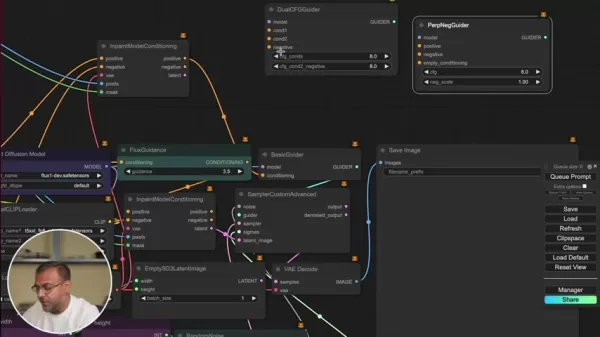
Adjusting mask opacity affects how the AI interprets the area.
3. Leveraging Florence2 for Segmentation
Florence2 (by Microsoft) powers Segment Anything, making object selection lightning-fast.
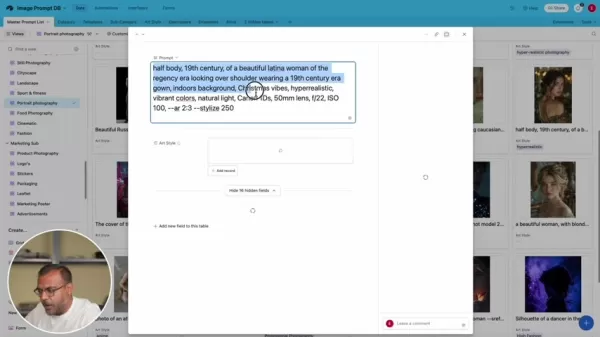
Florence2 integration in ComfyUI for precise masking.
Step-by-Step Flux AI Inpainting Guide
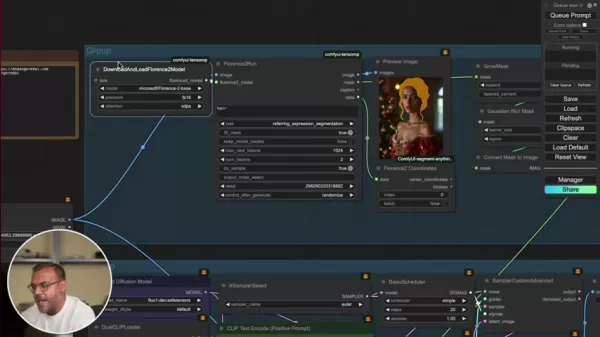
1. Setting Up ComfyUI Workflow
ComfyUI lets you customize the entire inpainting process. Here’s a basic setup:
- Load Image Node – Your input image.
- CLIP Text Encode – Positive & negative prompts (e.g., "a modern city skyline").
- Load Diffusion Model – The Flux AI model for generation.
- DualCLIPLoader – Enhances text understanding.
- Inpaint Model Conditioning – Links prompts, mask, and image.
- Sampler Custom Advanced – Generates the final output.
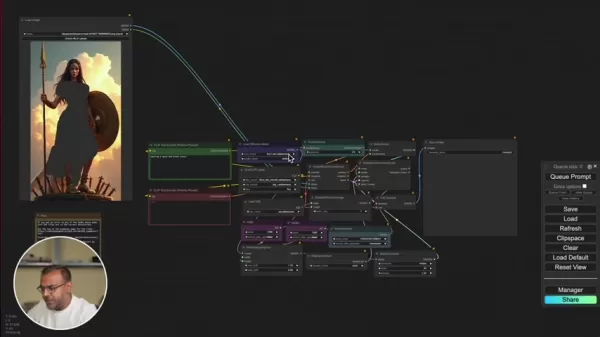
Example ComfyUI workflow for inpainting.
2. Masking the Target Area
- Manual masking – Paint directly in ComfyUI’s editor.
- Segment Anything (SAM) – Auto-select objects with AI.
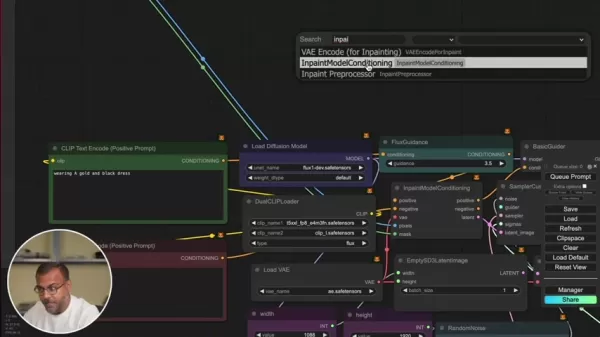
SAM makes masking complex objects a breeze.
3. Running & Refining Results
After generating, tweak:
- Mask expansion (10-30 pixels for better blending).
- Prompt adjustments (if the AI misinterprets).
- Gaussian blur masking (for smoother edges).
Final inpainted result after refinements.
Flux AI Pricing & Hardware
Cost Considerations
- Free tier available (limited features).
- Patreon tiers (Endangered AI offers advanced workflows).
- Cloud options – RunPod or vast.ai for affordable GPU rentals.
Hardware Requirements
✔ High-end GPU (NVIDIA recommended) – Faster processing.
✔ 8GB+ VRAM – For smooth performance.
Pros & Cons of Flux AI Inpainting
✅ Pros
✔ Seamless edits – Hard to detect AI intervention.
✔ ComfyUI flexibility – Full workflow control.
✔ SAM integration – Speeds up masking.
✔ Prompt-driven creativity – Endless possibilities.
❌ Cons
✖ Steep learning curve – Node-based workflows take time.
✖ GPU-dependent – Slower on low-end hardware.
✖ Prompt sensitivity – Bad prompts = bad results.
Use Cases for Flux AI Inpainting
Where Can You Use It?
- Photo restoration – Fix old/damaged photos.
- Object removal – Delete photobombers.
- Creative edits – Swap skies, add elements.
- Product photography – Clean up imperfections.
Before & after inpainting for creative edits.
FAQ & Troubleshooting
Q: What GPU is best for Flux AI?
A: NVIDIA RTX 3060+ (8GB VRAM minimum).
Q: Can I use Flux AI commercially?
A: Yes, but check licensing terms.
Q: Where to find pre-made workflows?
A: Endangered AI’s Patreon offers downloadable setups.
Final Thoughts
Flux AI inpainting is a game-changer for digital artists, photographers, and designers. With ComfyUI’s flexibility and Segment Anything’s precision, you can achieve professional edits without years of Photoshop experience.
🚀 Ready to dive in? Start experimenting and see how AI can transform your images!
Related article
 U.S. Stocks Hit Historic Milestone as AI and Aerospace Giants Prepare for Trillion-Dollar Debut
Elon Musk, Sam Altman, and Dario Amodei, three titans of the technology sector, are advancing toward initial public offerings for their respective ventures. With SpaceX, OpenAI, and Anthropic—three industry behemoths nearing trillion-dollar valuation
Swedish AI Startup Lovable Eyes $13.2 Billion Valuation After Major Funding Round
As AI-driven coding tools gain traction, Swedish startup Lovable has secured a major funding round. The company aims to raise $3 billion, potentially boosting its valuation to $13.2 billion—double the $6.6 billion recorded last December. Menlo Ventur
Google Tests Remy AI Agent for Gemini as Focus Shifts to User Control
According to Business Insider, Google is testing Remy, a new AI personal agent for Gemini. This tool aims to execute tasks on behalf of users, streamlining both professional workflows and daily routines.Currently, Remy is undergoing testing in an int
Related Special Topic Recommendations
Data Analysis
U.S. Stocks Hit Historic Milestone as AI and Aerospace Giants Prepare for Trillion-Dollar Debut
Elon Musk, Sam Altman, and Dario Amodei, three titans of the technology sector, are advancing toward initial public offerings for their respective ventures. With SpaceX, OpenAI, and Anthropic—three industry behemoths nearing trillion-dollar valuation
Swedish AI Startup Lovable Eyes $13.2 Billion Valuation After Major Funding Round
As AI-driven coding tools gain traction, Swedish startup Lovable has secured a major funding round. The company aims to raise $3 billion, potentially boosting its valuation to $13.2 billion—double the $6.6 billion recorded last December. Menlo Ventur
Google Tests Remy AI Agent for Gemini as Focus Shifts to User Control
According to Business Insider, Google is testing Remy, a new AI personal agent for Gemini. This tool aims to execute tasks on behalf of users, streamlining both professional workflows and daily routines.Currently, Remy is undergoing testing in an int
Related Special Topic Recommendations
Data Analysis
 Best AI Anomaly Detection Tools for KPI Monitoring across SaaS and Ecommerce Teams
2026 Latest Best Top-rated AI Anomaly Detection Tools for KPI Monitoring in SaaS and Ecommerce teams! XIX.AI has curated a powerful, game-changing collection based on rigorous real-world tests and weekly updated rankings. You’ll find detailed free vs paid comparison insights to help you identify the must-try solution that boosts productivity and unlocks your AI edge. Explore now!
 10 tools
 xix.ai
writing
Best AI Outline Generators for Long-Form SEO Articles
xix.ai
writing
Best AI Outline Generators for Long-Form SEO Articles
2026 Latest Best Top-Rated AI Outline Generators for Long-Form SEO Articles, meticulously curated by XIX.AI. These powerful tools offer game-changing assistance in creating high-quality content quickly, boosting writing efficiency significantly. Get a free vs paid comparison along with real-world tests and detailed rankings to help you find the must-try option that suits your needs. Explore now to unlock your AI edge.
8 tools
xix.ai
Education and Learning
AI Study Tools for Homework and Exam Prep
2026 Latest Best AI Study Tools for Homework and Exam Prep! XIX.AI curates a top-rated list of powerful, game-changing tools that help students boost productivity, streamline homework completion, and ace exams through real-world tests. Get a free vs paid comparison, detailed rankings, and must-try options to unlock your AI edge. Explore now!
10 tools
xix.ai
Music composition
AI Vocal Demo Tools for Songwriters, Hooks, Toplines, and Multilingual Draft Sessions
2026 Latest Best AI Vocal Demo Tools for Songwriters, Hook Creators, and Multi-Language Content Teams! XIX.AI has curated a top-rated list of powerful game-changing tools that go through rigorous real-world tests. You’ll find detailed free vs paid comparison data, comprehensive rankings, and must-try options to help you boost writing efficiency and unlock your creative potential. Explore now to discover your perfect tool for all your content needs!
9 tools
xix.ai
Business
Best AI Competitive Research Tools for Small Businesses
2026 Latest Best Top-rated AI Competitive Research Tools for Small Businesses! XIX.AI has curated a highly powerful game-changing collection, updated weekly with rigorous real-world tests and detailed rankings. You can find a comprehensive free vs paid comparison to help you identify the must-try tools that boost your productivity and give you a competitive edge. Explore now to discover your perfect tool!
9 tools
xix.ai
Image editing
Photoshop AI Retouch Tools for Ecommerce Apparel, Skin Cleanup, and Color Consistency
2026 Latest Best Photoshop AI retouch tools for ecommerce apparel, skin cleanup, and color consistency! This top-rated curated list features powerful game-changing solutions that help you boost writing efficiency, streamline content creation, and achieve perfect visual results effortlessly. Each tool has undergone real-world tests through weekly updated rankings, complete with free vs paid comparison details. Backed by XIX.AI, it’s the must-try guide for anyone aiming to unlock your AI edge. Explore now!
10 tools
xix.ai

 Comments (7)
0/500
Comments (7)
0/500
![ArthurSanchez]()
Honestly, the inpainting feature in Flux looks incredibly promising for photo restoration. I tried it on an old family picture and the results were surprisingly clean, though sometimes the hands still look a bit weird. It’s definitely faster than manual editing, but I still prefer tweaking the results myself for that perfect touch. Anyone else noticed how good it handles complex textures? 🤔🖼️
![PaulTaylor]()
La función de inpainting de Flux parece realmente útil para restaurar fotos antiguas. Tengo unas cuantas imágenes familiares dañadas que quizá pueda intentar arreglar con esto. Si es tan fácil como lo describen, podría ser un salvavidas para los recuerdos 😅. ¿Alguien ya lo probó para ese uso? Me pregunto qué tan bien maneja rasguños severos o partes faltantes grandes.
![KevinMartínez]()
Also das klingt ja richtig krass! 🚀 Kann mir vorstellen, wie praktisch das für alte Familienfotos wäre - mein Opa hätte sich sicher gefreut, wenn seine kaputten Kriegsfotos repariert werden könnten. Aber ich frage mich, ob diese KI am Ende vielleicht zu gut wird... Was, wenn jemand damit historische Fotos manipulieren will? Irgendwie gruselig, oder?
![BenHernández]()
Flux AIのインペインティング機能、実際に使ってみたけどすごく自然な仕上がりで感動した!古い家族写真の傷もきれいに消せて、技術の進歩には驚くばかりです✨ でもAI編集が当たり前になるにつれ、偽画像問題がさらに深刻化するんじゃないかとちょっと不安…
![KevinScott]()
Flux AI's inpainting is mind-blowing! I tried removing a random pole from a photo, and it was like it never existed. Super easy to use, but I wonder how it handles super complex backgrounds? 🤔
![KeithMoore]()
Flux AI inpainting sounds like magic! 🪄 Removing objects from photos effortlessly is a game-changer for my editing projects.
Mastering AI Inpainting with Flux AI: A Complete Guide
AI-powered image editing has revolutionized how we retouch photos, and inpainting stands out as one of its most impressive capabilities. Whether you're removing unwanted objects, restoring old photos, or creatively altering images, Flux AI—combined with ComfyUI and Facebook’s Segment Anything (SAM)—provides a powerful yet accessible solution.
This guide will walk you through everything you need to know, from basic setup to advanced techniques, ensuring you get flawless results every time.
Understanding Flux AI Inpainting
What Is AI Inpainting?
AI inpainting is the process of intelligently filling in missing or unwanted parts of an image. Unlike traditional Photoshop tools that rely on manual cloning, AI analyzes surrounding pixels and generates content that blends seamlessly.
Flux AI takes this a step further by offering:
✔ Precision masking (manual or AI-assisted)
✔ Text-guided generation (describe what you want to fill)
✔ Seamless blending (adjustable opacity & blurring)
Key Components for Success
To get the best results, you’ll need:
- Flux AI Model – The core AI that generates new content.
- ComfyUI – A node-based workflow system for fine-tuning the process.
- Segment Anything (SAM) – Facebook’s AI tool for automatic object selection.
- Effective Prompts – Guiding the AI with clear instructions.
Segment Anything (SAM) makes masking effortless.
Enhancing Your Inpainting Results
1. Optimizing Prompts for Better Outputs
The AI relies on your prompts to understand what to generate. Here’s how to craft effective ones:
- Be specific – Instead of "fix the background," try "replace the background with a misty forest."
- Use style keywords – "Photorealistic," "cinematic lighting," or "oil painting style" help guide the AI.
- Experiment – Sometimes, slight tweaks lead to drastically better results.
📌 Pro Tip: Check the Midjourney Prompt Database for inspiration on hyperrealistic prompts.
2. Mastering Mask Opacity & Blurring
The mask defines what gets replaced, but its edges matter:
- Full opacity = AI ignores what’s underneath.
- Partial opacity = AI blends with existing pixels.
- Blurred edges = Smoother transitions.
Adjusting mask opacity affects how the AI interprets the area.
3. Leveraging Florence2 for Segmentation
Florence2 (by Microsoft) powers Segment Anything, making object selection lightning-fast.
Florence2 integration in ComfyUI for precise masking.
Step-by-Step Flux AI Inpainting Guide
1. Setting Up ComfyUI Workflow
ComfyUI lets you customize the entire inpainting process. Here’s a basic setup:
- Load Image Node – Your input image.
- CLIP Text Encode – Positive & negative prompts (e.g., "a modern city skyline").
- Load Diffusion Model – The Flux AI model for generation.
- DualCLIPLoader – Enhances text understanding.
- Inpaint Model Conditioning – Links prompts, mask, and image.
- Sampler Custom Advanced – Generates the final output.
Example ComfyUI workflow for inpainting.
2. Masking the Target Area
- Manual masking – Paint directly in ComfyUI’s editor.
- Segment Anything (SAM) – Auto-select objects with AI.
SAM makes masking complex objects a breeze.
3. Running & Refining Results
After generating, tweak:
- Mask expansion (10-30 pixels for better blending).
- Prompt adjustments (if the AI misinterprets).
- Gaussian blur masking (for smoother edges).
Final inpainted result after refinements.
Flux AI Pricing & Hardware
Cost Considerations
- Free tier available (limited features).
- Patreon tiers (Endangered AI offers advanced workflows).
- Cloud options – RunPod or vast.ai for affordable GPU rentals.
Hardware Requirements
✔ High-end GPU (NVIDIA recommended) – Faster processing.
✔ 8GB+ VRAM – For smooth performance.
Pros & Cons of Flux AI Inpainting
✅ Pros
✔ Seamless edits – Hard to detect AI intervention.
✔ ComfyUI flexibility – Full workflow control.
✔ SAM integration – Speeds up masking.
✔ Prompt-driven creativity – Endless possibilities.
❌ Cons
✖ Steep learning curve – Node-based workflows take time.
✖ GPU-dependent – Slower on low-end hardware.
✖ Prompt sensitivity – Bad prompts = bad results.
Use Cases for Flux AI Inpainting
Where Can You Use It?
- Photo restoration – Fix old/damaged photos.
- Object removal – Delete photobombers.
- Creative edits – Swap skies, add elements.
- Product photography – Clean up imperfections.
Before & after inpainting for creative edits.
FAQ & Troubleshooting
Q: What GPU is best for Flux AI?
A: NVIDIA RTX 3060+ (8GB VRAM minimum).
Q: Can I use Flux AI commercially?
A: Yes, but check licensing terms.
Q: Where to find pre-made workflows?
A: Endangered AI’s Patreon offers downloadable setups.
Final Thoughts
Flux AI inpainting is a game-changer for digital artists, photographers, and designers. With ComfyUI’s flexibility and Segment Anything’s precision, you can achieve professional edits without years of Photoshop experience.
🚀 Ready to dive in? Start experimenting and see how AI can transform your images!








 U.S. Stocks Hit Historic Milestone as AI and Aerospace Giants Prepare for Trillion-Dollar Debut
Elon Musk, Sam Altman, and Dario Amodei, three titans of the technology sector, are advancing toward initial public offerings for their respective ventures. With SpaceX, OpenAI, and Anthropic—three industry behemoths nearing trillion-dollar valuation
U.S. Stocks Hit Historic Milestone as AI and Aerospace Giants Prepare for Trillion-Dollar Debut
Elon Musk, Sam Altman, and Dario Amodei, three titans of the technology sector, are advancing toward initial public offerings for their respective ventures. With SpaceX, OpenAI, and Anthropic—three industry behemoths nearing trillion-dollar valuation
 Swedish AI Startup Lovable Eyes $13.2 Billion Valuation After Major Funding Round
As AI-driven coding tools gain traction, Swedish startup Lovable has secured a major funding round. The company aims to raise $3 billion, potentially boosting its valuation to $13.2 billion—double the $6.6 billion recorded last December. Menlo Ventur
Google Tests Remy AI Agent for Gemini as Focus Shifts to User Control
According to Business Insider, Google is testing Remy, a new AI personal agent for Gemini. This tool aims to execute tasks on behalf of users, streamlining both professional workflows and daily routines.Currently, Remy is undergoing testing in an int
Swedish AI Startup Lovable Eyes $13.2 Billion Valuation After Major Funding Round
As AI-driven coding tools gain traction, Swedish startup Lovable has secured a major funding round. The company aims to raise $3 billion, potentially boosting its valuation to $13.2 billion—double the $6.6 billion recorded last December. Menlo Ventur
Google Tests Remy AI Agent for Gemini as Focus Shifts to User Control
According to Business Insider, Google is testing Remy, a new AI personal agent for Gemini. This tool aims to execute tasks on behalf of users, streamlining both professional workflows and daily routines.Currently, Remy is undergoing testing in an int

2026 Latest Best Top-rated AI Anomaly Detection Tools for KPI Monitoring in SaaS and Ecommerce teams! XIX.AI has curated a powerful, game-changing collection based on rigorous real-world tests and weekly updated rankings. You’ll find detailed free vs paid comparison insights to help you identify the must-try solution that boosts productivity and unlocks your AI edge. Explore now!
10 tools
xix.ai

2026 Latest Best Top-Rated AI Outline Generators for Long-Form SEO Articles, meticulously curated by XIX.AI. These powerful tools offer game-changing assistance in creating high-quality content quickly, boosting writing efficiency significantly. Get a free vs paid comparison along with real-world tests and detailed rankings to help you find the must-try option that suits your needs. Explore now to unlock your AI edge.
8 tools
xix.ai

2026 Latest Best AI Study Tools for Homework and Exam Prep! XIX.AI curates a top-rated list of powerful, game-changing tools that help students boost productivity, streamline homework completion, and ace exams through real-world tests. Get a free vs paid comparison, detailed rankings, and must-try options to unlock your AI edge. Explore now!
10 tools
xix.ai

2026 Latest Best AI Vocal Demo Tools for Songwriters, Hook Creators, and Multi-Language Content Teams! XIX.AI has curated a top-rated list of powerful game-changing tools that go through rigorous real-world tests. You’ll find detailed free vs paid comparison data, comprehensive rankings, and must-try options to help you boost writing efficiency and unlock your creative potential. Explore now to discover your perfect tool for all your content needs!
9 tools
xix.ai

2026 Latest Best Top-rated AI Competitive Research Tools for Small Businesses! XIX.AI has curated a highly powerful game-changing collection, updated weekly with rigorous real-world tests and detailed rankings. You can find a comprehensive free vs paid comparison to help you identify the must-try tools that boost your productivity and give you a competitive edge. Explore now to discover your perfect tool!
9 tools
xix.ai

2026 Latest Best Photoshop AI retouch tools for ecommerce apparel, skin cleanup, and color consistency! This top-rated curated list features powerful game-changing solutions that help you boost writing efficiency, streamline content creation, and achieve perfect visual results effortlessly. Each tool has undergone real-world tests through weekly updated rankings, complete with free vs paid comparison details. Backed by XIX.AI, it’s the must-try guide for anyone aiming to unlock your AI edge. Explore now!
10 tools
xix.ai

Honestly, the inpainting feature in Flux looks incredibly promising for photo restoration. I tried it on an old family picture and the results were surprisingly clean, though sometimes the hands still look a bit weird. It’s definitely faster than manual editing, but I still prefer tweaking the results myself for that perfect touch. Anyone else noticed how good it handles complex textures? 🤔🖼️
La función de inpainting de Flux parece realmente útil para restaurar fotos antiguas. Tengo unas cuantas imágenes familiares dañadas que quizá pueda intentar arreglar con esto. Si es tan fácil como lo describen, podría ser un salvavidas para los recuerdos 😅. ¿Alguien ya lo probó para ese uso? Me pregunto qué tan bien maneja rasguños severos o partes faltantes grandes.
Also das klingt ja richtig krass! 🚀 Kann mir vorstellen, wie praktisch das für alte Familienfotos wäre - mein Opa hätte sich sicher gefreut, wenn seine kaputten Kriegsfotos repariert werden könnten. Aber ich frage mich, ob diese KI am Ende vielleicht zu gut wird... Was, wenn jemand damit historische Fotos manipulieren will? Irgendwie gruselig, oder?
Flux AIのインペインティング機能、実際に使ってみたけどすごく自然な仕上がりで感動した!古い家族写真の傷もきれいに消せて、技術の進歩には驚くばかりです✨ でもAI編集が当たり前になるにつれ、偽画像問題がさらに深刻化するんじゃないかとちょっと不安…
Flux AI's inpainting is mind-blowing! I tried removing a random pole from a photo, and it was like it never existed. Super easy to use, but I wonder how it handles super complex backgrounds? 🤔
Flux AI inpainting sounds like magic! 🪄 Removing objects from photos effortlessly is a game-changer for my editing projects.












