


 Home
HomeFarming Simulator 25: Optimize Efficiency with AI Workers Mastery
If you're diving into the world of Farming Simulator 25, you're in for a treat with its new level of realism and complexity. One of the game's standout features is the use of AI workers, which can be a game-changer for managing your virtual farm. These digital assistants can automate a lot of the grunt work, letting you focus on the bigger picture of farm management and boosting your profits. Let's explore how to make the most out of AI workers, their capabilities, and some of the best practices to follow.
Key Points About AI Workers
- They can handle field work such as seeding, cultivating, and plowing.
- AI workers are adept at harvesting crops with specialized harvesters.
- They can transport goods between different locations on your farm.
- However, they can't bale hay, use forage wagons, or pick up crop swaths directly.
- The base game's GPS system can boost AI worker efficiency.
- You can customize their settings like working width, headlands, and work direction.
- They might struggle a bit in tight spaces.
Understanding AI Workers in Farming Simulator 25
What Are AI Workers?
In Farming Simulator 25, AI workers are essentially your virtual farmhands. These non-player characters (NPCs) can be hired to take care of the repetitive tasks on your farm, from operating machinery to cultivating fields and transporting goods. They're not perfect and might need a bit of supervision, but they're a huge help in scaling your operations and keeping your focus on strategic planning.
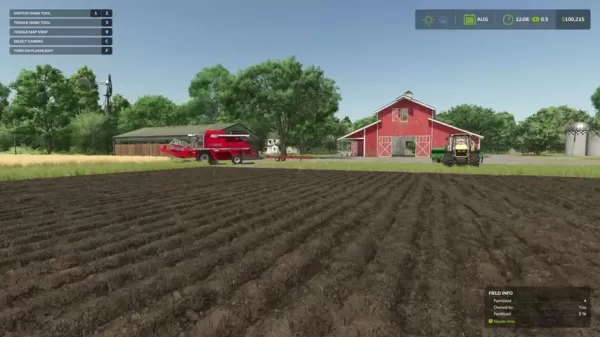
Think of AI workers as your farm's workforce. Using them effectively is crucial for running a profitable farm. They can handle a variety of tasks, and understanding their capabilities, limitations, and how to customize their behavior is key to streamlining your operations. Each version of Farming Simulator improves on AI worker performance, making the game more enjoyable by letting you focus on what you love about farming.
Tasks AI Workers Can Perform
AI workers are pretty versatile and can take on a range of tasks to keep your farm running smoothly:
- Field Work: They can handle essential tasks like seeding, cultivating, plowing, and fertilizing your fields.
- Harvesting: AI workers can harvest various crops including wheat, barley, canola, oats, corn, and soybeans using dedicated harvesters.
- Transporting: They can move harvested crops to storage, deliver products to selling points, and transport resources like seeds and fertilizers from the store to your farm.
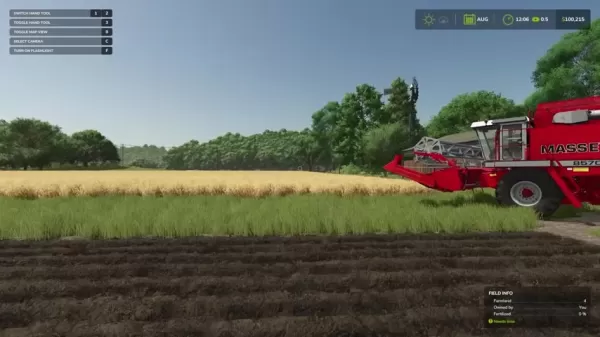
Automating these tasks can significantly lighten your workload and make managing larger farms much easier. Just remember, they're not infallible and might need a bit of oversight now and then.
Tasks AI Workers Cannot Perform
While AI workers are helpful, they do have their limits. Here's what they can't do:
- They can't bale hay or straw.
- They're unable to use forage wagons.
- They can't pick up crop swaths directly from the field.
Knowing these limitations helps you plan your farm operations better and decide where you need to step in personally. For example, if you're into hay production, you'll need to handle the baling yourself since AI workers can't do it.
Leveraging GPS for Enhanced AI Worker Efficiency
GPS Integration with AI Workers
The GPS system in Farming Simulator 25 is a game-changer for AI worker efficiency. It helps them follow set paths, maintain even spacing, and reduce overlaps, leading to more efficient field coverage and less waste. However, the GPS in the base game works a bit differently; it doesn't let you load a pre-configured route for AI workers to follow automatically.
Using GPS with AI workers offers several benefits:
- Precise Field Operations: GPS ensures AI workers stick to accurate paths, reducing gaps and overlaps during tasks like seeding and fertilizing.
- Optimized Resource Usage: By minimizing overlaps, you save on seeds, fertilizers, and fuel, which can boost your bottom line.
- Improved Crop Yields: Uniform field coverage leads to better crop growth and higher yields.
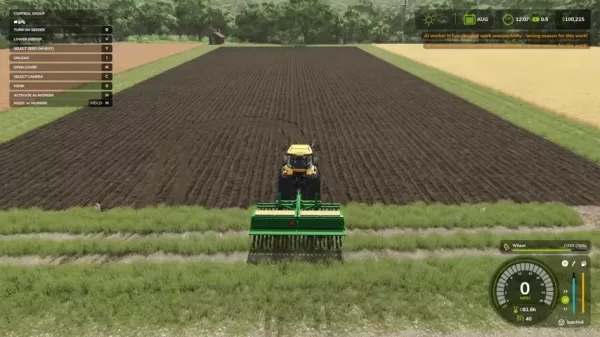
For more on how to use the GPS system effectively, check out the separate GPS guide. It'll walk you through configuring settings and using GPS features to optimize your farming operations.
How to Effectively Use AI Workers
Hiring and Managing AI Workers
To hire an AI worker in Farming Simulator 25, follow these steps:
- Get into the vehicle or implement you want the AI worker to operate.
- Press the 'H' key (or the designated key binding) to activate the AI worker. You'll see a message confirming they've started.
- Keep an eye on their progress to ensure they're doing the job right.
- Use the AI settings menu (accessible by holding 'H') to tweak parameters like working width, headlands, and work direction.
- If they run into trouble or go off course, take control, correct the issue, and then reactivate them.

Managing AI workers is a balance of automation and oversight. They can handle routine tasks, but you need to monitor them and step in when needed to keep things running smoothly. Many seasoned players recommend adjusting the working width to save resources, which can make a big difference in the long run.
Customizing AI Worker Behavior
Farming Simulator 25 lets you tailor AI worker behavior to suit your needs:
- Working Width: Adjusts the width of the area they cover, helping to optimize resource use and minimize overlaps.
- Number of Headlands: Sets how many headland passes they make, which can affect field coverage and time.
- Work the Headlands: Toggle to have them work the headlands or leave them for you.
- Start With: Choose where they start working - top, bottom, or headlands.
- Skip Lines: Set the number of rows they skip between passes, which can be useful but may leave gaps.
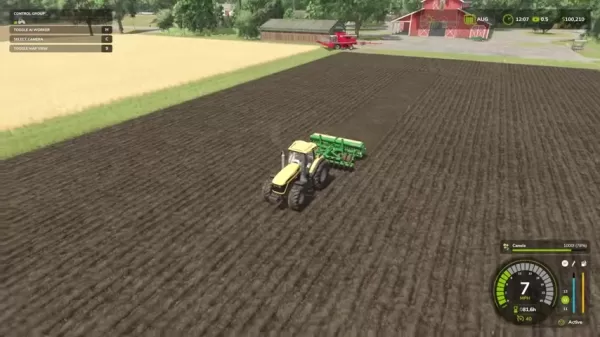
By fine-tuning these settings, you can optimize AI worker performance for different tasks and field conditions. Don't be afraid to experiment to find what works best for your farm.
Troubleshooting AI Worker Issues
Even with their improvements, AI workers can still run into issues. Here are some common problems and how to fix them:
- AI Worker Gets Stuck: If they get stuck, take control, fix the issue, and then reactivate them.
- AI Worker Skips Areas: Check and adjust the working width and skip lines settings to ensure complete coverage.
- AI Worker Refuses to Start: Make sure they're properly configured and have the necessary resources. Also, check if the vehicle or implement is suitable for the task.
Addressing these issues promptly helps keep your AI workers running smoothly. Keep in mind that some vehicles aren't designed for AI workers, so choose your equipment wisely.
Cost of AI Workers
Hiring and Wage Costs
Hiring AI workers involves both an initial fee and ongoing wages. The hiring fee depends on the task's complexity and the equipment used. On top of that, you'll pay an hourly wage based on their skill level and the task's difficulty. Skilled workers and complex tasks mean higher wages.
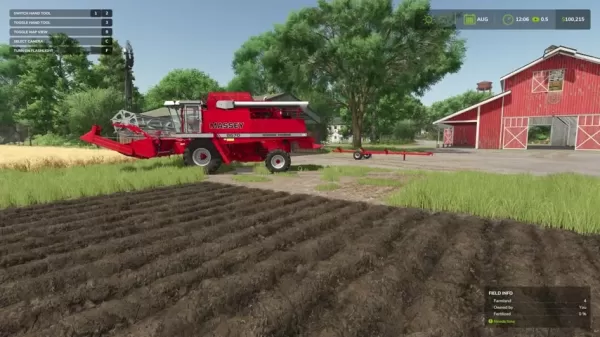
It's important to manage these costs carefully to maintain profitability. When you activate an AI worker, their hourly costs start being deducted, and you'll see this reflected in the game's display.
Benefits and Drawbacks of Using AI Workers in Farming Simulator 25
Pros
- Increase automation and efficiency of routine farming tasks.
- Reduce your manual workload, allowing you to focus on strategic farm management.
- Capable of transporting goods, including harvests.
- Customizable settings to fine-tune their performance.
- Allow you to focus on other farm aspects while they work.
Cons
- Can't perform certain tasks like baling hay or using forage wagons.
- May struggle in confined spaces.
- Some vehicles are not suited for AI workers, requiring manual operation.
Core Features of AI Workers
Automation and Efficiency
AI workers boost automation and efficiency by handling repetitive tasks like plowing, seeding, and harvesting. This frees you up to focus on strategic planning and more complex operations, maximizing your in-game time and farm output.
Transport Capabilities
Beyond field work, AI workers can manage transportation tasks, moving harvests to selling points and delivering goods to your farm. This means less work for you and more profit.
Customizable AI Settings
The game offers customizable settings for AI workers, allowing you to adjust working width, headlands, work direction, and skip lines. This control helps tailor their performance to your farming needs.
Use Cases for AI Workers
Automating Large-Scale Farming
AI workers are perfect for automating large-scale farming operations. They can handle the workload across expansive fields, from land preparation to harvesting and transporting crops.
Handling Repetitive Tasks
They excel at taking over repetitive tasks like fertilizing, plowing, and seeding, freeing you to focus on other farm management aspects.
Performing Transport Operations
AI workers can automate transport operations to buying stations, allowing you to keep farming and increase your farm's overall profit.
FAQ
What can AI workers do in Farming Simulator 25?
AI workers can handle field work, harvesting, and transportation of goods, but they cannot bale hay or use forage wagons.
Can I use GPS to improve AI worker efficiency?
Yes, the base game's GPS system integrates with AI workers to help them accomplish tasks more efficiently.
What are the key settings I can customize for AI workers?
Key settings include working width, number of headlands, whether to work the headlands, the starting point, and the number of lines to skip.
Why did my AI worker stop working?
An AI worker may stop working due to an obstacle in its path or because the assigned task is invalid. Ensure the task is valid and there are no obstacles.
Related Questions
How do I maximize AI worker efficiency on complex fields?
To maximize AI worker efficiency on complex fields, use GPS when available, adjust working width settings, monitor their progress to prevent them from getting stuck, and position yourself on the field to ensure they follow the most efficient path.
Related article
 Ex-Ramp Engineers Raise $20M for Melius Platform After Pivoting From First Product
Melius, an AI-driven platform for creating ad campaigns, images, and videos, announced on Tuesday that it has secured $25 million in total funding. This includes a $20 million Series A round led by CRV and a $5 million seed round backed by General Ca
WeRide Unveils WIIT, a Physical AI Perception Model to Decode the Real World
At the 2026 World Artificial Intelligence Conference (WAIC), WeRide unveiled WIIT, a physical AI cognitive foundation model that charts a new course for artificial intelligence, shifting the focus from data interpretation to real-world cognition.WIIT
Anthropic CEO Amodei Dismisses Pessimistic Views, Attributes AI Trust Crisis to Unkept Promises
Amidst escalating public discourse on AI risks and regulation, Anthropic CEO Dario Amodei has pushed back against claims that his messaging is unduly pessimistic. This clarification directly addresses critiques from investor Gavin Baker, who appeared
Related Special Topic Recommendations
Video creation
Ex-Ramp Engineers Raise $20M for Melius Platform After Pivoting From First Product
Melius, an AI-driven platform for creating ad campaigns, images, and videos, announced on Tuesday that it has secured $25 million in total funding. This includes a $20 million Series A round led by CRV and a $5 million seed round backed by General Ca
WeRide Unveils WIIT, a Physical AI Perception Model to Decode the Real World
At the 2026 World Artificial Intelligence Conference (WAIC), WeRide unveiled WIIT, a physical AI cognitive foundation model that charts a new course for artificial intelligence, shifting the focus from data interpretation to real-world cognition.WIIT
Anthropic CEO Amodei Dismisses Pessimistic Views, Attributes AI Trust Crisis to Unkept Promises
Amidst escalating public discourse on AI risks and regulation, Anthropic CEO Dario Amodei has pushed back against claims that his messaging is unduly pessimistic. This clarification directly addresses critiques from investor Gavin Baker, who appeared
Related Special Topic Recommendations
Video creation
 AI Subtitle and Dubbing Tools: Localize Video for Global Audiences
2026 Latest Best Top-rated AI Subtitle and Dubbing Tools Curated for Localizing Video for Global Audiences Powerfully boost content reach across language barriers with game-changing accuracy Real-world tests prove these must-try solutions offer free vs paid comparison and reliable rankings to maximize productivity Explore now to Discover your perfect tool for global content delivery
 10 tools
 xix.ai
automation
AI Invoice Processing Tools for AP Automation, Approval Routing, and ERP Sync Workflows
xix.ai
automation
AI Invoice Processing Tools for AP Automation, Approval Routing, and ERP Sync Workflows
2026 Latest Best AI Invoice Processing Tools for AP Automation, Approval Routing, and ERP Sync Workflows! XIX.AI curates top-rated, powerful solutions that pass rigorous real-world tests to boost productivity dramatically. Get a free vs paid comparison, see detailed rankings, and discover must-try options to streamline your finance operations. Explore now to unlock your AI edge!
9 tools
xix.ai
writing
AI Technical Documentation Tools for Developer Teams
2026 Latest Best Top-rated AI Technical Documentation Tools for Developer Teams! XIX.AI has curated a powerful, game-changing collection of must-try tools that go through rigorous real-world tests and weekly updated rankings. These top-rated solutions help teams boost productivity dramatically by streamlining content creation, fixing documentation errors, and accelerating coding workflows across all projects. Explore now to Discover your perfect tool for unlocking your AI edge!
13 tools
xix.ai
Software Development
AI Bug Triage Assistants: Rank Issues by Severity and User Impact
2026 Latest Best Top-rated AI Bug Triage Assistants Ranked! This curated collection showcases powerful game-changing tools that help teams quickly sort bugs by severity and user impact, saving valuable time. XIX.AI offers a free vs paid comparison along with real-world tests to help you find the must-try solution that boosts productivity significantly. Explore now to Discover your perfect tool for streamlining development workflows!
10 tools
xix.ai
code
Best AI Coding Tools for Python and JavaScript
2026 Latest Best Top-Rated AI Coding Tools for Python and JavaScript are here on XIX.AI’s curated list. These powerful game-changing tools have undergone rigorous real-world tests to deliver exceptional results for writing efficient code, fixing bugs, and boosting productivity. Get a free vs paid comparison and see which options suit your needs. Explore now to Discover your perfect coding tool and Unlock your AI edge.
10 tools
xix.ai
Academic Research
Best AI Citation Mapping Tools for Research Discovery
2026 Latest Best Top-Rated AI Citation Mapping Tools for Research Discovery! XIX.AI has curated a powerful, game-changing collection of must-try tools that go through rigorous real-world tests to deliver accurate results. You’ll find detailed free vs paid comparisons, weekly updated rankings, and insights to help you boost your research efficiency and uncover valuable data faster. Explore now to discover your perfect tool for academic work! 238 characters
11 tools
xix.ai

 Comments (1)
0/500
Comments (1)
0/500
![NicholasDavis]()
哇,Farming Simulator 25的AI工人真的太強了!感覺就像請了一群超有效率的農夫,種田收穫都不用自己動手了!不過有時候AI好像有點太「聰明」,會不會哪天它們自己開農場啦?😅
If you're diving into the world of Farming Simulator 25, you're in for a treat with its new level of realism and complexity. One of the game's standout features is the use of AI workers, which can be a game-changer for managing your virtual farm. These digital assistants can automate a lot of the grunt work, letting you focus on the bigger picture of farm management and boosting your profits. Let's explore how to make the most out of AI workers, their capabilities, and some of the best practices to follow.
Key Points About AI Workers
- They can handle field work such as seeding, cultivating, and plowing.
- AI workers are adept at harvesting crops with specialized harvesters.
- They can transport goods between different locations on your farm.
- However, they can't bale hay, use forage wagons, or pick up crop swaths directly.
- The base game's GPS system can boost AI worker efficiency.
- You can customize their settings like working width, headlands, and work direction.
- They might struggle a bit in tight spaces.
Understanding AI Workers in Farming Simulator 25
What Are AI Workers?
In Farming Simulator 25, AI workers are essentially your virtual farmhands. These non-player characters (NPCs) can be hired to take care of the repetitive tasks on your farm, from operating machinery to cultivating fields and transporting goods. They're not perfect and might need a bit of supervision, but they're a huge help in scaling your operations and keeping your focus on strategic planning.
Think of AI workers as your farm's workforce. Using them effectively is crucial for running a profitable farm. They can handle a variety of tasks, and understanding their capabilities, limitations, and how to customize their behavior is key to streamlining your operations. Each version of Farming Simulator improves on AI worker performance, making the game more enjoyable by letting you focus on what you love about farming.
Tasks AI Workers Can Perform
AI workers are pretty versatile and can take on a range of tasks to keep your farm running smoothly:
- Field Work: They can handle essential tasks like seeding, cultivating, plowing, and fertilizing your fields.
- Harvesting: AI workers can harvest various crops including wheat, barley, canola, oats, corn, and soybeans using dedicated harvesters.
- Transporting: They can move harvested crops to storage, deliver products to selling points, and transport resources like seeds and fertilizers from the store to your farm.
Automating these tasks can significantly lighten your workload and make managing larger farms much easier. Just remember, they're not infallible and might need a bit of oversight now and then.
Tasks AI Workers Cannot Perform
While AI workers are helpful, they do have their limits. Here's what they can't do:
- They can't bale hay or straw.
- They're unable to use forage wagons.
- They can't pick up crop swaths directly from the field.
Knowing these limitations helps you plan your farm operations better and decide where you need to step in personally. For example, if you're into hay production, you'll need to handle the baling yourself since AI workers can't do it.
Leveraging GPS for Enhanced AI Worker Efficiency
GPS Integration with AI Workers
The GPS system in Farming Simulator 25 is a game-changer for AI worker efficiency. It helps them follow set paths, maintain even spacing, and reduce overlaps, leading to more efficient field coverage and less waste. However, the GPS in the base game works a bit differently; it doesn't let you load a pre-configured route for AI workers to follow automatically.
Using GPS with AI workers offers several benefits:
- Precise Field Operations: GPS ensures AI workers stick to accurate paths, reducing gaps and overlaps during tasks like seeding and fertilizing.
- Optimized Resource Usage: By minimizing overlaps, you save on seeds, fertilizers, and fuel, which can boost your bottom line.
- Improved Crop Yields: Uniform field coverage leads to better crop growth and higher yields.
For more on how to use the GPS system effectively, check out the separate GPS guide. It'll walk you through configuring settings and using GPS features to optimize your farming operations.
How to Effectively Use AI Workers
Hiring and Managing AI Workers
To hire an AI worker in Farming Simulator 25, follow these steps:
- Get into the vehicle or implement you want the AI worker to operate.
- Press the 'H' key (or the designated key binding) to activate the AI worker. You'll see a message confirming they've started.
- Keep an eye on their progress to ensure they're doing the job right.
- Use the AI settings menu (accessible by holding 'H') to tweak parameters like working width, headlands, and work direction.
- If they run into trouble or go off course, take control, correct the issue, and then reactivate them.
Managing AI workers is a balance of automation and oversight. They can handle routine tasks, but you need to monitor them and step in when needed to keep things running smoothly. Many seasoned players recommend adjusting the working width to save resources, which can make a big difference in the long run.
Customizing AI Worker Behavior
Farming Simulator 25 lets you tailor AI worker behavior to suit your needs:
- Working Width: Adjusts the width of the area they cover, helping to optimize resource use and minimize overlaps.
- Number of Headlands: Sets how many headland passes they make, which can affect field coverage and time.
- Work the Headlands: Toggle to have them work the headlands or leave them for you.
- Start With: Choose where they start working - top, bottom, or headlands.
- Skip Lines: Set the number of rows they skip between passes, which can be useful but may leave gaps.
By fine-tuning these settings, you can optimize AI worker performance for different tasks and field conditions. Don't be afraid to experiment to find what works best for your farm.
Troubleshooting AI Worker Issues
Even with their improvements, AI workers can still run into issues. Here are some common problems and how to fix them:
- AI Worker Gets Stuck: If they get stuck, take control, fix the issue, and then reactivate them.
- AI Worker Skips Areas: Check and adjust the working width and skip lines settings to ensure complete coverage.
- AI Worker Refuses to Start: Make sure they're properly configured and have the necessary resources. Also, check if the vehicle or implement is suitable for the task.
Addressing these issues promptly helps keep your AI workers running smoothly. Keep in mind that some vehicles aren't designed for AI workers, so choose your equipment wisely.
Cost of AI Workers
Hiring and Wage Costs
Hiring AI workers involves both an initial fee and ongoing wages. The hiring fee depends on the task's complexity and the equipment used. On top of that, you'll pay an hourly wage based on their skill level and the task's difficulty. Skilled workers and complex tasks mean higher wages.
It's important to manage these costs carefully to maintain profitability. When you activate an AI worker, their hourly costs start being deducted, and you'll see this reflected in the game's display.
Benefits and Drawbacks of Using AI Workers in Farming Simulator 25
Pros
- Increase automation and efficiency of routine farming tasks.
- Reduce your manual workload, allowing you to focus on strategic farm management.
- Capable of transporting goods, including harvests.
- Customizable settings to fine-tune their performance.
- Allow you to focus on other farm aspects while they work.
Cons
- Can't perform certain tasks like baling hay or using forage wagons.
- May struggle in confined spaces.
- Some vehicles are not suited for AI workers, requiring manual operation.
Core Features of AI Workers
Automation and Efficiency
AI workers boost automation and efficiency by handling repetitive tasks like plowing, seeding, and harvesting. This frees you up to focus on strategic planning and more complex operations, maximizing your in-game time and farm output.
Transport Capabilities
Beyond field work, AI workers can manage transportation tasks, moving harvests to selling points and delivering goods to your farm. This means less work for you and more profit.
Customizable AI Settings
The game offers customizable settings for AI workers, allowing you to adjust working width, headlands, work direction, and skip lines. This control helps tailor their performance to your farming needs.
Use Cases for AI Workers
Automating Large-Scale Farming
AI workers are perfect for automating large-scale farming operations. They can handle the workload across expansive fields, from land preparation to harvesting and transporting crops.
Handling Repetitive Tasks
They excel at taking over repetitive tasks like fertilizing, plowing, and seeding, freeing you to focus on other farm management aspects.
Performing Transport Operations
AI workers can automate transport operations to buying stations, allowing you to keep farming and increase your farm's overall profit.
FAQ
What can AI workers do in Farming Simulator 25?
AI workers can handle field work, harvesting, and transportation of goods, but they cannot bale hay or use forage wagons.
Can I use GPS to improve AI worker efficiency?
Yes, the base game's GPS system integrates with AI workers to help them accomplish tasks more efficiently.
What are the key settings I can customize for AI workers?
Key settings include working width, number of headlands, whether to work the headlands, the starting point, and the number of lines to skip.
Why did my AI worker stop working?
An AI worker may stop working due to an obstacle in its path or because the assigned task is invalid. Ensure the task is valid and there are no obstacles.
Related Questions
How do I maximize AI worker efficiency on complex fields?
To maximize AI worker efficiency on complex fields, use GPS when available, adjust working width settings, monitor their progress to prevent them from getting stuck, and position yourself on the field to ensure they follow the most efficient path.








 Ex-Ramp Engineers Raise $20M for Melius Platform After Pivoting From First Product
Melius, an AI-driven platform for creating ad campaigns, images, and videos, announced on Tuesday that it has secured $25 million in total funding. This includes a $20 million Series A round led by CRV and a $5 million seed round backed by General Ca
Ex-Ramp Engineers Raise $20M for Melius Platform After Pivoting From First Product
Melius, an AI-driven platform for creating ad campaigns, images, and videos, announced on Tuesday that it has secured $25 million in total funding. This includes a $20 million Series A round led by CRV and a $5 million seed round backed by General Ca
 WeRide Unveils WIIT, a Physical AI Perception Model to Decode the Real World
At the 2026 World Artificial Intelligence Conference (WAIC), WeRide unveiled WIIT, a physical AI cognitive foundation model that charts a new course for artificial intelligence, shifting the focus from data interpretation to real-world cognition.WIIT
WeRide Unveils WIIT, a Physical AI Perception Model to Decode the Real World
At the 2026 World Artificial Intelligence Conference (WAIC), WeRide unveiled WIIT, a physical AI cognitive foundation model that charts a new course for artificial intelligence, shifting the focus from data interpretation to real-world cognition.WIIT
 Anthropic CEO Amodei Dismisses Pessimistic Views, Attributes AI Trust Crisis to Unkept Promises
Amidst escalating public discourse on AI risks and regulation, Anthropic CEO Dario Amodei has pushed back against claims that his messaging is unduly pessimistic. This clarification directly addresses critiques from investor Gavin Baker, who appeared
Anthropic CEO Amodei Dismisses Pessimistic Views, Attributes AI Trust Crisis to Unkept Promises
Amidst escalating public discourse on AI risks and regulation, Anthropic CEO Dario Amodei has pushed back against claims that his messaging is unduly pessimistic. This clarification directly addresses critiques from investor Gavin Baker, who appeared

2026 Latest Best Top-rated AI Subtitle and Dubbing Tools Curated for Localizing Video for Global Audiences Powerfully boost content reach across language barriers with game-changing accuracy Real-world tests prove these must-try solutions offer free vs paid comparison and reliable rankings to maximize productivity Explore now to Discover your perfect tool for global content delivery
10 tools
xix.ai

2026 Latest Best AI Invoice Processing Tools for AP Automation, Approval Routing, and ERP Sync Workflows! XIX.AI curates top-rated, powerful solutions that pass rigorous real-world tests to boost productivity dramatically. Get a free vs paid comparison, see detailed rankings, and discover must-try options to streamline your finance operations. Explore now to unlock your AI edge!
9 tools
xix.ai

2026 Latest Best Top-rated AI Technical Documentation Tools for Developer Teams! XIX.AI has curated a powerful, game-changing collection of must-try tools that go through rigorous real-world tests and weekly updated rankings. These top-rated solutions help teams boost productivity dramatically by streamlining content creation, fixing documentation errors, and accelerating coding workflows across all projects. Explore now to Discover your perfect tool for unlocking your AI edge!
13 tools
xix.ai

2026 Latest Best Top-rated AI Bug Triage Assistants Ranked! This curated collection showcases powerful game-changing tools that help teams quickly sort bugs by severity and user impact, saving valuable time. XIX.AI offers a free vs paid comparison along with real-world tests to help you find the must-try solution that boosts productivity significantly. Explore now to Discover your perfect tool for streamlining development workflows!
10 tools
xix.ai

2026 Latest Best Top-Rated AI Coding Tools for Python and JavaScript are here on XIX.AI’s curated list. These powerful game-changing tools have undergone rigorous real-world tests to deliver exceptional results for writing efficient code, fixing bugs, and boosting productivity. Get a free vs paid comparison and see which options suit your needs. Explore now to Discover your perfect coding tool and Unlock your AI edge.
10 tools
xix.ai

2026 Latest Best Top-Rated AI Citation Mapping Tools for Research Discovery! XIX.AI has curated a powerful, game-changing collection of must-try tools that go through rigorous real-world tests to deliver accurate results. You’ll find detailed free vs paid comparisons, weekly updated rankings, and insights to help you boost your research efficiency and uncover valuable data faster. Explore now to discover your perfect tool for academic work! 238 characters
11 tools
xix.ai

哇,Farming Simulator 25的AI工人真的太強了!感覺就像請了一群超有效率的農夫,種田收穫都不用自己動手了!不過有時候AI好像有點太「聰明」,會不會哪天它們自己開農場啦?😅












