


 Home
HomeExcel FormulaBot Analyzed: AI Assistant for Generating Spreadsheet Formulas
Microsoft Excel continues to be a dominant tool for data analysis and organization, yet constructing advanced formulas can present a significant challenge. Excel FormulaBot is an AI-powered solution created to streamline this process. This review examines the capabilities of Excel FormulaBot, putting it to the test with real-world Excel problems to evaluate its usefulness for both novices and power users. We'll look at its features, cost, and overall performance to help you determine if it's the right fit for your spreadsheet tasks.
Key Points
Excel FormulaBot automates Excel formula creation using artificial intelligence.
Our evaluation tests the tool’s performance on data extraction, removing middle names or initials, and stripping salutations.
The tool demonstrates strong capabilities in producing complex formulas, with some minor limitations noted.
Excel FormulaBot includes additional functionalities such as VBA script creation and SQL query assistance.
Consider Excel FormulaBot if you regularly need help with Excel formulas and want to increase your productivity.
Unveiling Excel FormulaBot: An AI Assistant for Excel Tasks
What is Excel FormulaBot?
Excel FormulaBot

is a cloud-based, AI-powered application designed to automatically produce formulas for Excel and Google Sheets. The core idea is to translate simple English descriptions of calculations into working spreadsheet formulas. Marketed as an aid for users who find Excel's formula syntax challenging or wish to speed up their workflow, it aims to simplify common tasks, saving time for analysts, marketers, and anyone who works with data. The interface is clean and intuitive, and it offers features beyond basic formula generation, including the creation of VBA code and help with SQL queries.
Revisiting Excel FormulaBot: Addressing Initial Challenges
In a prior assessment, Excel FormulaBot struggled to provide correct formulas for a challenging data extraction scenario.
Following user feedback, the developers have implemented substantial improvements. This review aims to objectively evaluate the current version of Excel FormulaBot. A key question is whether the tool can now reliably manage the intricacies of practical Excel problems. We will use three specific test cases to measure the tool’s present-day performance.
Hands-On Testing: Evaluating Excel FormulaBot's Performance
Test 1: Extracting First and Last Names Without Middle Names
The first task is to isolate first and last names from a column containing full names, removing any middle names or initials.
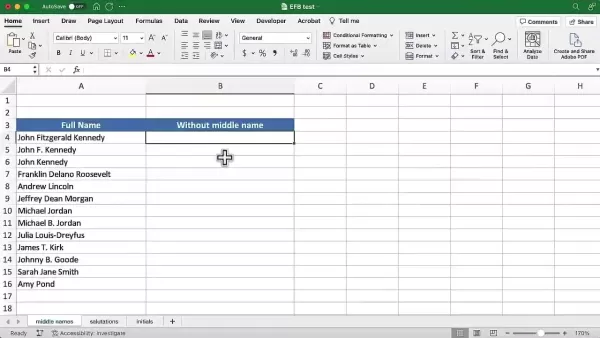
This requires a formula that can accurately identify and extract only the first and last name components. This is a common data cleaning task in Excel, often needed to standardize contact lists. We will see if Excel FormulaBot can successfully generate this formula. The objective is to create an accurate formula that works across a long list of names with varying formats, addressing a typical data preparation challenge.
Test 2: Removing Salutations
This test evaluates the AI’s precision and contextual understanding within text strings. The formula must correctly identify if salutations like "Mr." or "Ms." are present and then remove them cleanly. This is crucial for preparing data for personalized communications, such as cleaning contact lists from marketing campaigns before sending out emails.
Test 3: Extracting First and Last Initials
The final test requires generating a formula to extract just the first and last initials from a list of full names.
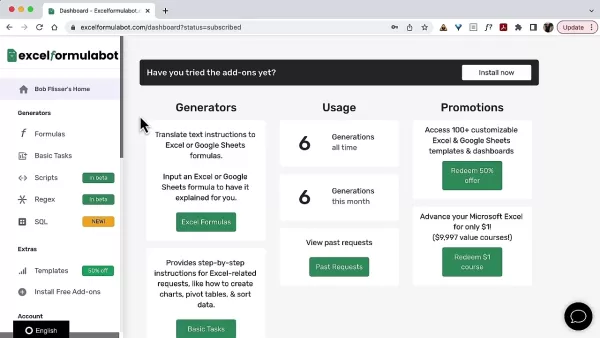
The goal is to display these initials in a separate column. This task checks the AI's ability to parse text strings accurately, isolating the first character of the first name and the first character of the last name. It demonstrates the tool's capability in handling text manipulation and serves as a final assessment of its proficiency.
Excel FormulaBot Usage
Accessing the Tool and Providing Instructions
The first step is to visit the Excel FormulaBot website. The dashboard provides access to its various features
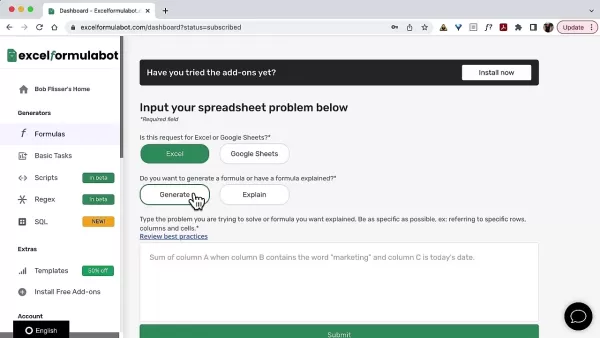
. To create a formula, users navigate to the “Formulas” section and enter a clear, concise description of the desired calculation in plain English. The process is straightforward, with all key functions accessible from a central location, eliminating the need to search for different features.
Interpreting Results
Based on the text description, the AI generates what it determines to be the most suitable formula. This formula can be copied directly into your Excel or Google Sheets document for immediate use
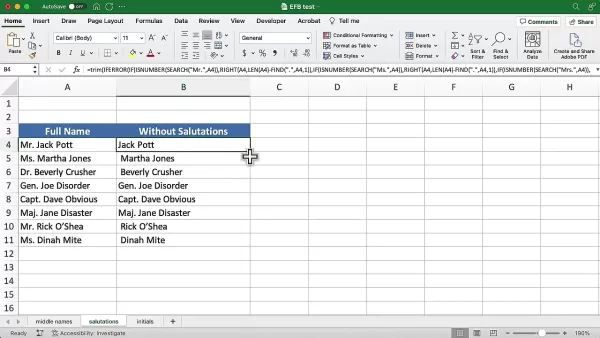
. It is advisable to verify the results to ensure accuracy. This capability can significantly accelerate your workflow by reducing the time spent troubleshooting formula syntax.
Understanding the Pricing Structure of Excel FormulaBot
Evaluating Cost-Effectiveness
Understanding the cost is essential for determining if Excel FormulaBot is a worthwhile investment. Assessing its pricing against the potential productivity gains is important for getting good value. Excel FormulaBot uses a tiered subscription model based on the number of formulas generated. A detailed feature and cost breakdown for each tier is available on their website. Overall, the pricing is considered reasonable for the functionality provided.
Excel FormulaBot: Evaluating the Pros and Cons
Pros
AI automation drastically cuts down the time required to create complex formulas.
Features a user-friendly interface and works with simple, clear text instructions.
Extends functionality by generating VBA and SQL code, not just basic formulas.
Cons
A small number of generated formulas required minor adjustments.
Effectiveness relies on precise plain English descriptions, which can sometimes lead to ambiguity.
Frequently Asked Questions
Is Excel FormulaBot easy to use for beginners?
Yes, Excel FormulaBot is built with ease of use in mind. Its plain English input and clear interface make it accessible for those new to Excel formulas. The website also provides helpful tutorials for guidance, which is beneficial for users who are still learning.
How accurate are the formulas generated by the tool?
Accuracy depends largely on the clarity and detail of the instructions provided. It is always recommended to review the generated formulas to confirm they perform the intended calculation on your specific data. It's also important to ensure your data privacy is maintained when using any online tool.
Does Excel FormulaBot support Google Sheets?
Yes, Excel FormulaBot creates formulas that are compatible with both Microsoft Excel and Google Sheets. Available Google Sheets functions can be generated by the tool. For any issues, users can refer to the documentation or contact support.
Can I use Excel FormulaBot to generate VBA code?
Yes, Excel FormulaBot includes features for generating VBA code to automate repetitive tasks. It provides scripts and templates that can be copied and used directly, which are often ready for implementation after testing.
Dive Deeper: Related Questions Answered
What are the key advantages of using AI for Excel formula generation?
Using AI for formula generation offers major benefits. It significantly reduces the time invested in building complex formulas, which is invaluable under tight deadlines. The AI acts as a helpful assistant, suggesting functions you might not recall and lowering the learning curve for users unfamiliar with Excel's syntax. This empowers a broader range of individuals to accomplish data tasks efficiently.
How does Excel FormulaBot compare to other formula generation tools?
Excel FormulaBot distinguishes itself with its AI-driven approach, creating sophisticated formulas from natural language descriptions. This method is often more intuitive than tools that require manual assembly from components. However, the best choice depends on comparing specific features and pricing against alternative solutions. For many businesses, it serves as a valuable aid in generating reports and streamlining data work.
What skills do I need to effectively use Excel FormulaBot?
To use Excel FormulaBot effectively, you need a basic understanding of Excel concepts like spreadsheets, cells, and data ranges. The most crucial skill is the ability to describe the desired operation clearly in plain English, as the AI handles the translation into formula syntax automatically. Prior knowledge of formula code is not required.
Related article
 U.S. Stocks Hit Historic Milestone as AI and Aerospace Giants Prepare for Trillion-Dollar Debut
Elon Musk, Sam Altman, and Dario Amodei, three titans of the technology sector, are advancing toward initial public offerings for their respective ventures. With SpaceX, OpenAI, and Anthropic—three industry behemoths nearing trillion-dollar valuation
Swedish AI Startup Lovable Eyes $13.2 Billion Valuation After Major Funding Round
As AI-driven coding tools gain traction, Swedish startup Lovable has secured a major funding round. The company aims to raise $3 billion, potentially boosting its valuation to $13.2 billion—double the $6.6 billion recorded last December. Menlo Ventur
Google Tests Remy AI Agent for Gemini as Focus Shifts to User Control
According to Business Insider, Google is testing Remy, a new AI personal agent for Gemini. This tool aims to execute tasks on behalf of users, streamlining both professional workflows and daily routines.Currently, Remy is undergoing testing in an int
Related Special Topic Recommendations
Data Analysis
U.S. Stocks Hit Historic Milestone as AI and Aerospace Giants Prepare for Trillion-Dollar Debut
Elon Musk, Sam Altman, and Dario Amodei, three titans of the technology sector, are advancing toward initial public offerings for their respective ventures. With SpaceX, OpenAI, and Anthropic—three industry behemoths nearing trillion-dollar valuation
Swedish AI Startup Lovable Eyes $13.2 Billion Valuation After Major Funding Round
As AI-driven coding tools gain traction, Swedish startup Lovable has secured a major funding round. The company aims to raise $3 billion, potentially boosting its valuation to $13.2 billion—double the $6.6 billion recorded last December. Menlo Ventur
Google Tests Remy AI Agent for Gemini as Focus Shifts to User Control
According to Business Insider, Google is testing Remy, a new AI personal agent for Gemini. This tool aims to execute tasks on behalf of users, streamlining both professional workflows and daily routines.Currently, Remy is undergoing testing in an int
Related Special Topic Recommendations
Data Analysis
 Best AI Anomaly Detection Tools for KPI Monitoring across SaaS and Ecommerce Teams
2026 Latest Best Top-rated AI Anomaly Detection Tools for KPI Monitoring in SaaS and Ecommerce teams! XIX.AI has curated a powerful, game-changing collection based on rigorous real-world tests and weekly updated rankings. You’ll find detailed free vs paid comparison insights to help you identify the must-try solution that boosts productivity and unlocks your AI edge. Explore now!
 10 tools
 xix.ai
writing
Best AI Outline Generators for Long-Form SEO Articles
xix.ai
writing
Best AI Outline Generators for Long-Form SEO Articles
2026 Latest Best Top-Rated AI Outline Generators for Long-Form SEO Articles, meticulously curated by XIX.AI. These powerful tools offer game-changing assistance in creating high-quality content quickly, boosting writing efficiency significantly. Get a free vs paid comparison along with real-world tests and detailed rankings to help you find the must-try option that suits your needs. Explore now to unlock your AI edge.
8 tools
xix.ai
Education and Learning
AI Study Tools for Homework and Exam Prep
2026 Latest Best AI Study Tools for Homework and Exam Prep! XIX.AI curates a top-rated list of powerful, game-changing tools that help students boost productivity, streamline homework completion, and ace exams through real-world tests. Get a free vs paid comparison, detailed rankings, and must-try options to unlock your AI edge. Explore now!
10 tools
xix.ai
Music composition
AI Vocal Demo Tools for Songwriters, Hooks, Toplines, and Multilingual Draft Sessions
2026 Latest Best AI Vocal Demo Tools for Songwriters, Hook Creators, and Multi-Language Content Teams! XIX.AI has curated a top-rated list of powerful game-changing tools that go through rigorous real-world tests. You’ll find detailed free vs paid comparison data, comprehensive rankings, and must-try options to help you boost writing efficiency and unlock your creative potential. Explore now to discover your perfect tool for all your content needs!
9 tools
xix.ai
Business
Best AI Competitive Research Tools for Small Businesses
2026 Latest Best Top-rated AI Competitive Research Tools for Small Businesses! XIX.AI has curated a highly powerful game-changing collection, updated weekly with rigorous real-world tests and detailed rankings. You can find a comprehensive free vs paid comparison to help you identify the must-try tools that boost your productivity and give you a competitive edge. Explore now to discover your perfect tool!
9 tools
xix.ai
Image editing
Photoshop AI Retouch Tools for Ecommerce Apparel, Skin Cleanup, and Color Consistency
2026 Latest Best Photoshop AI retouch tools for ecommerce apparel, skin cleanup, and color consistency! This top-rated curated list features powerful game-changing solutions that help you boost writing efficiency, streamline content creation, and achieve perfect visual results effortlessly. Each tool has undergone real-world tests through weekly updated rankings, complete with free vs paid comparison details. Backed by XIX.AI, it’s the must-try guide for anyone aiming to unlock your AI edge. Explore now!
10 tools
xix.ai

 Comments (0)
0/500
Comments (0)
0/500
Microsoft Excel continues to be a dominant tool for data analysis and organization, yet constructing advanced formulas can present a significant challenge. Excel FormulaBot is an AI-powered solution created to streamline this process. This review examines the capabilities of Excel FormulaBot, putting it to the test with real-world Excel problems to evaluate its usefulness for both novices and power users. We'll look at its features, cost, and overall performance to help you determine if it's the right fit for your spreadsheet tasks.
Key Points
Excel FormulaBot automates Excel formula creation using artificial intelligence.
Our evaluation tests the tool’s performance on data extraction, removing middle names or initials, and stripping salutations.
The tool demonstrates strong capabilities in producing complex formulas, with some minor limitations noted.
Excel FormulaBot includes additional functionalities such as VBA script creation and SQL query assistance.
Consider Excel FormulaBot if you regularly need help with Excel formulas and want to increase your productivity.
Unveiling Excel FormulaBot: An AI Assistant for Excel Tasks
What is Excel FormulaBot?
Excel FormulaBot
is a cloud-based, AI-powered application designed to automatically produce formulas for Excel and Google Sheets. The core idea is to translate simple English descriptions of calculations into working spreadsheet formulas. Marketed as an aid for users who find Excel's formula syntax challenging or wish to speed up their workflow, it aims to simplify common tasks, saving time for analysts, marketers, and anyone who works with data. The interface is clean and intuitive, and it offers features beyond basic formula generation, including the creation of VBA code and help with SQL queries.
Revisiting Excel FormulaBot: Addressing Initial Challenges
In a prior assessment, Excel FormulaBot struggled to provide correct formulas for a challenging data extraction scenario.
Following user feedback, the developers have implemented substantial improvements. This review aims to objectively evaluate the current version of Excel FormulaBot. A key question is whether the tool can now reliably manage the intricacies of practical Excel problems. We will use three specific test cases to measure the tool’s present-day performance.
Hands-On Testing: Evaluating Excel FormulaBot's Performance
Test 1: Extracting First and Last Names Without Middle Names
The first task is to isolate first and last names from a column containing full names, removing any middle names or initials.
This requires a formula that can accurately identify and extract only the first and last name components. This is a common data cleaning task in Excel, often needed to standardize contact lists. We will see if Excel FormulaBot can successfully generate this formula. The objective is to create an accurate formula that works across a long list of names with varying formats, addressing a typical data preparation challenge.
Test 2: Removing Salutations
This test evaluates the AI’s precision and contextual understanding within text strings. The formula must correctly identify if salutations like "Mr." or "Ms." are present and then remove them cleanly. This is crucial for preparing data for personalized communications, such as cleaning contact lists from marketing campaigns before sending out emails.
Test 3: Extracting First and Last Initials
The final test requires generating a formula to extract just the first and last initials from a list of full names.
The goal is to display these initials in a separate column. This task checks the AI's ability to parse text strings accurately, isolating the first character of the first name and the first character of the last name. It demonstrates the tool's capability in handling text manipulation and serves as a final assessment of its proficiency.
Excel FormulaBot Usage
Accessing the Tool and Providing Instructions
The first step is to visit the Excel FormulaBot website. The dashboard provides access to its various features
. To create a formula, users navigate to the “Formulas” section and enter a clear, concise description of the desired calculation in plain English. The process is straightforward, with all key functions accessible from a central location, eliminating the need to search for different features.
Interpreting Results
Based on the text description, the AI generates what it determines to be the most suitable formula. This formula can be copied directly into your Excel or Google Sheets document for immediate use
. It is advisable to verify the results to ensure accuracy. This capability can significantly accelerate your workflow by reducing the time spent troubleshooting formula syntax.
Understanding the Pricing Structure of Excel FormulaBot
Evaluating Cost-Effectiveness
Understanding the cost is essential for determining if Excel FormulaBot is a worthwhile investment. Assessing its pricing against the potential productivity gains is important for getting good value. Excel FormulaBot uses a tiered subscription model based on the number of formulas generated. A detailed feature and cost breakdown for each tier is available on their website. Overall, the pricing is considered reasonable for the functionality provided.
Excel FormulaBot: Evaluating the Pros and Cons
Pros
AI automation drastically cuts down the time required to create complex formulas.
Features a user-friendly interface and works with simple, clear text instructions.
Extends functionality by generating VBA and SQL code, not just basic formulas.
Cons
A small number of generated formulas required minor adjustments.
Effectiveness relies on precise plain English descriptions, which can sometimes lead to ambiguity.
Frequently Asked Questions
Is Excel FormulaBot easy to use for beginners?
Yes, Excel FormulaBot is built with ease of use in mind. Its plain English input and clear interface make it accessible for those new to Excel formulas. The website also provides helpful tutorials for guidance, which is beneficial for users who are still learning.
How accurate are the formulas generated by the tool?
Accuracy depends largely on the clarity and detail of the instructions provided. It is always recommended to review the generated formulas to confirm they perform the intended calculation on your specific data. It's also important to ensure your data privacy is maintained when using any online tool.
Does Excel FormulaBot support Google Sheets?
Yes, Excel FormulaBot creates formulas that are compatible with both Microsoft Excel and Google Sheets. Available Google Sheets functions can be generated by the tool. For any issues, users can refer to the documentation or contact support.
Can I use Excel FormulaBot to generate VBA code?
Yes, Excel FormulaBot includes features for generating VBA code to automate repetitive tasks. It provides scripts and templates that can be copied and used directly, which are often ready for implementation after testing.
Dive Deeper: Related Questions Answered
What are the key advantages of using AI for Excel formula generation?
Using AI for formula generation offers major benefits. It significantly reduces the time invested in building complex formulas, which is invaluable under tight deadlines. The AI acts as a helpful assistant, suggesting functions you might not recall and lowering the learning curve for users unfamiliar with Excel's syntax. This empowers a broader range of individuals to accomplish data tasks efficiently.
How does Excel FormulaBot compare to other formula generation tools?
Excel FormulaBot distinguishes itself with its AI-driven approach, creating sophisticated formulas from natural language descriptions. This method is often more intuitive than tools that require manual assembly from components. However, the best choice depends on comparing specific features and pricing against alternative solutions. For many businesses, it serves as a valuable aid in generating reports and streamlining data work.
What skills do I need to effectively use Excel FormulaBot?
To use Excel FormulaBot effectively, you need a basic understanding of Excel concepts like spreadsheets, cells, and data ranges. The most crucial skill is the ability to describe the desired operation clearly in plain English, as the AI handles the translation into formula syntax automatically. Prior knowledge of formula code is not required.








 U.S. Stocks Hit Historic Milestone as AI and Aerospace Giants Prepare for Trillion-Dollar Debut
Elon Musk, Sam Altman, and Dario Amodei, three titans of the technology sector, are advancing toward initial public offerings for their respective ventures. With SpaceX, OpenAI, and Anthropic—three industry behemoths nearing trillion-dollar valuation
U.S. Stocks Hit Historic Milestone as AI and Aerospace Giants Prepare for Trillion-Dollar Debut
Elon Musk, Sam Altman, and Dario Amodei, three titans of the technology sector, are advancing toward initial public offerings for their respective ventures. With SpaceX, OpenAI, and Anthropic—three industry behemoths nearing trillion-dollar valuation
 Swedish AI Startup Lovable Eyes $13.2 Billion Valuation After Major Funding Round
As AI-driven coding tools gain traction, Swedish startup Lovable has secured a major funding round. The company aims to raise $3 billion, potentially boosting its valuation to $13.2 billion—double the $6.6 billion recorded last December. Menlo Ventur
Google Tests Remy AI Agent for Gemini as Focus Shifts to User Control
According to Business Insider, Google is testing Remy, a new AI personal agent for Gemini. This tool aims to execute tasks on behalf of users, streamlining both professional workflows and daily routines.Currently, Remy is undergoing testing in an int
Swedish AI Startup Lovable Eyes $13.2 Billion Valuation After Major Funding Round
As AI-driven coding tools gain traction, Swedish startup Lovable has secured a major funding round. The company aims to raise $3 billion, potentially boosting its valuation to $13.2 billion—double the $6.6 billion recorded last December. Menlo Ventur
Google Tests Remy AI Agent for Gemini as Focus Shifts to User Control
According to Business Insider, Google is testing Remy, a new AI personal agent for Gemini. This tool aims to execute tasks on behalf of users, streamlining both professional workflows and daily routines.Currently, Remy is undergoing testing in an int

2026 Latest Best Top-rated AI Anomaly Detection Tools for KPI Monitoring in SaaS and Ecommerce teams! XIX.AI has curated a powerful, game-changing collection based on rigorous real-world tests and weekly updated rankings. You’ll find detailed free vs paid comparison insights to help you identify the must-try solution that boosts productivity and unlocks your AI edge. Explore now!
10 tools
xix.ai

2026 Latest Best Top-Rated AI Outline Generators for Long-Form SEO Articles, meticulously curated by XIX.AI. These powerful tools offer game-changing assistance in creating high-quality content quickly, boosting writing efficiency significantly. Get a free vs paid comparison along with real-world tests and detailed rankings to help you find the must-try option that suits your needs. Explore now to unlock your AI edge.
8 tools
xix.ai

2026 Latest Best AI Study Tools for Homework and Exam Prep! XIX.AI curates a top-rated list of powerful, game-changing tools that help students boost productivity, streamline homework completion, and ace exams through real-world tests. Get a free vs paid comparison, detailed rankings, and must-try options to unlock your AI edge. Explore now!
10 tools
xix.ai

2026 Latest Best AI Vocal Demo Tools for Songwriters, Hook Creators, and Multi-Language Content Teams! XIX.AI has curated a top-rated list of powerful game-changing tools that go through rigorous real-world tests. You’ll find detailed free vs paid comparison data, comprehensive rankings, and must-try options to help you boost writing efficiency and unlock your creative potential. Explore now to discover your perfect tool for all your content needs!
9 tools
xix.ai

2026 Latest Best Top-rated AI Competitive Research Tools for Small Businesses! XIX.AI has curated a highly powerful game-changing collection, updated weekly with rigorous real-world tests and detailed rankings. You can find a comprehensive free vs paid comparison to help you identify the must-try tools that boost your productivity and give you a competitive edge. Explore now to discover your perfect tool!
9 tools
xix.ai

2026 Latest Best Photoshop AI retouch tools for ecommerce apparel, skin cleanup, and color consistency! This top-rated curated list features powerful game-changing solutions that help you boost writing efficiency, streamline content creation, and achieve perfect visual results effortlessly. Each tool has undergone real-world tests through weekly updated rankings, complete with free vs paid comparison details. Backed by XIX.AI, it’s the must-try guide for anyone aiming to unlock your AI edge. Explore now!
10 tools
xix.ai












