


 Home
HomeAI-Enabled 3D Tumbler Design
Crafting visually appealing tumbler designs often demands significant time and technical skill. This guide reveals a revolutionary technique using AI tools to quickly generate stunning 3D inflated effects. Learn how to harness Playground AI to revolutionize your design workflow and effortlessly produce unique, market-ready products.
Key Points
Uncover the potential of Playground AI for crafting 3D inflated tumbler designs.
Discover how to navigate the Playground AI dashboard and choose suitable templates.
Gain expertise in converting existing designs into impressive 3D artwork.
Learn the method for creating seamless patterns for professional tumbler wraps.
Investigate techniques to mock up designs and see the finished product.
Solve typical design problems using the features in Playground AI and Adobe Photoshop.
Introduction to 3D Tumbler Design with AI
The Popularity and Challenges of 3D Inflated Tumbler Wraps
3D inflated tumbler wrap designs have grown extremely popular on platforms such as Etsy. For roughly a year to a year and a half, these designs have consistently drawn customer interest. This trend indicates a strong demand for visually striking and distinctive products in the custom drinkware sector.
However, producing these designs through traditional methods poses considerable difficulties. Many sellers steer clear of them because the process is time-intensive and technically demanding. Manually creating these effects, particularly with software like Adobe Illustrator, frequently causes computer slowdowns and requires substantial design knowledge.
The main obstacle is the heavy consumption of computing resources, especially RAM, needed to render intricate 3D effects in vector-based applications. Even skilled designers encounter frustrations when working within their system's limitations and the steep learning curve associated with these tools.
A New Approach: AI-Powered Design
Thankfully, the rise of AI-powered design tools offers a simplified and more approachable alternative. Now, anyone can produce professional-looking 3D inflated tumbler designs without advanced software expertise or high-performance computer equipment.

These AI tools automate many of the complex steps required to achieve the desired look, making the design process more efficient and available to a wider audience.
This guide will lead you through using Playground AI, a robust and intuitive platform, to turn simple designs into remarkable 3D creations. We will examine how to utilize its features to produce captivating tumbler wraps that excel in a competitive marketplace.
Getting Started with Playground AI
Exploring the Playground AI Interface
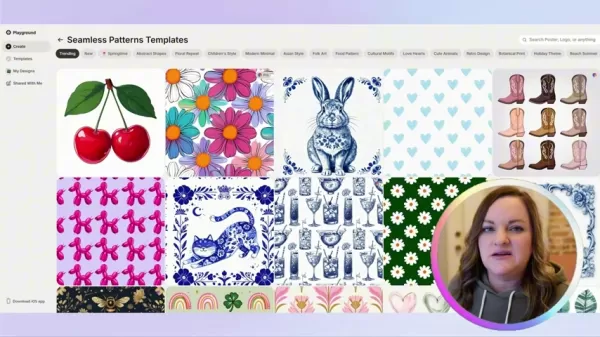
Before starting the design process, let's get to know the Playground AI interface. After logging in, you'll see a dashboard with various design choices.

These include templates for logos, T-shirts, social media posts, and other items.
These templates act as a foundation for your projects, providing a base you can use to develop your custom 3D tumbler designs. Whether your goal is a seamless pattern or a more detailed graphic, the pre-built options can greatly speed up the initial phases of your work.
Selecting the Right Template
Choosing the correct template is essential for obtaining the intended 3D inflated look. Templates for mobile wallpapers, phone case covers, or seamless patterns usually produce the most effective outcomes. It's advisable to avoid patterns that are overly dense or intricate, as they might not inflate with clear definition.
Key Considerations for Template Selection
Not every template works equally well for achieving the ideal 3D inflated appearance. When looking through the choices, remember these points:
- Simplicity: Opt for templates with clean, clearly outlined elements. Complicated designs with overlapping parts can become unclear during the inflation process.
- Spacing: Templates that have plenty of space between individual components typically yield superior results. This gives the AI room to form separate, inflated shapes without blending them together.
- Relevance: Look for template styles intended for mobile wallpapers, phone case covers, or seamless patterns.
- Experimentation: Feel free to test different templates and prompts. The iterative nature of AI design supports exploration and discovery.
Creating a 3D Inflated Design: A Step-by-Step Guide
Step 1: Uploading Your Design or Selecting a Template
To start creating your 3D inflated tumbler wrap, choose whether to use a design you already have or a Playground AI template. If you prefer to use a template, navigate to: Playground AI -> Create -> Templates.
If you're working with an existing design, go to Playground AI -> Create -> Start design from image. This will then direct you to an option for uploading from your computer.
Step 2: Applying the '3D Inflated' Style
Once your image is uploaded, you need to apply the '3D inflated' style. Follow these instructions:
Find the 'What if it were' Prompt box on the left side of the design interface.
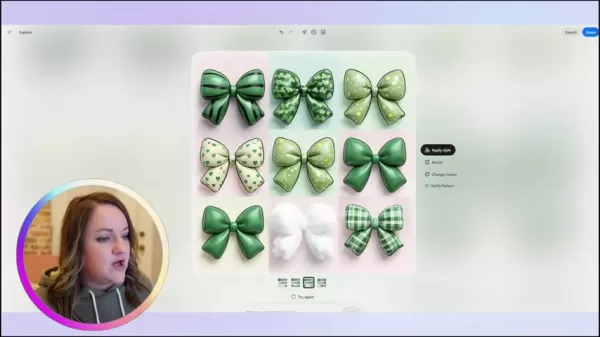
Enter '3D puffy inflated design' into the prompt box.
Select 'Create' to begin the AI transformation.
Step 3: Upscaling and Refining Your Design
After the AI finishes processing, Playground AI will show you four design variations. Pick the version that closest matches your vision. Then, choose the 'Upscale by 4x' option to improve the resolution of your selected design.

Step 4: Making Seamless Designs for Commercial Use in Photoshop
For commercial purposes, especially for tumbler designs, creating a seamless pattern is crucial. Here's how to do this using Adobe Photoshop (this is also possible with other applications that include Generative AI functions):
- Open the upscaled image in Adobe Photoshop.
- Select the Rectangular Marquee Tool.
- Select the entire image and then choose Generative Fill. This instructs the Gen AI to attempt to fill in missing sections.
- The Gen AI will produce several options; select your preferred one. You can also create seamless edges by duplicating the design from one side to the other within the Photoshop canvas.
Important Notes
- Generative AI can require time to produce accurate results, so don't hesitate to generate more options to get the best outcome.
By following these steps, you can create attractive 3D inflated tumbler designs prepared for commercial use.
Playground AI: Pros & Cons
Pros
Fast and fairly easy to use.
Excellent for generating new images and inspiring fresh ideas.
Relatively affordable to access.
Cons
You are limited to the small number of templates it generates.
Requires a third-party application to upscale and create a seamless print.
Images featuring numerous colors and complex styles can be too challenging for the engine to render accurately.
Frequently Asked Questions
What kind of templates work best for 3D inflation with Playground AI?
Typically, templates for mobile wallpapers, phone case covers, or seamless patterns deliver the best results, while the visual style of the 3D render is best described using the term '3D Puffy Inflated Designs'.
Can I inflate my old designs with Playground AI?
Yes, Playground AI can be used for both new and old designs. Simply load your images via the create tab and select 'Start design from image'.
What does generating for a pro version do?
Playground AI provides several options that let you upscale or remove backgrounds from 3D renders, reducing the need for extra tools. In the pro version, upscaling can reach 4x the original size.
What resolution should a Tumbler be designed at?
Tumbler designs are usually created at 2790x2460 pixels, and this can be upscaled either on Playground AI or with other AI upscaling tools.
How can I make my designs to be seamless when posting them for sell?
Playground AI isn't flawless, so you'll typically need another program to make designs completely seamless. Applications like Photoshop are the preferred choice for most creators.
Related Questions
What other AI-powered design tools are available?
A variety of AI-powered design tools have appeared, each with distinct features and capabilities. Here is a short summary of some popular alternatives:Adobe Sensei: Integrated into Adobe Creative Cloud, Sensei uses AI to automate repetitive tasks, improve image editing, and provide personalized content suggestions.Canva AI: Canva's AI tools make design creation simpler, offering features like automatic design recommendations, image improvement, and content generation.DeepArt.io: DeepArt.io focuses on converting images into artistic interpretations using AI algorithms inspired by renowned artists. It's a great choice for producing unique visuals with a distinctive aesthetic.Jasper.ai: Jasper.ai employs AI to create various types of content, including marketing copy, social media updates, and blog posts. This can be useful for pairing your visual designs with engaging written material.Each of these tools has different advantages, so try them out to see which one fits your specific design requirements best.
How do I improve the quality of AI-generated images?
AI image generation has progressed greatly, but getting consistently high-quality outputs needs careful attention. Here are some suggestions for enhancing the quality of your AI-generated visuals:Detailed Prompts:Give the AI precise, specific instructions. The more detailed your prompt is, the better the AI can comprehend your intended result.Experiment with Styles: Try out various artistic styles to find one that suits your design. This can greatly influence the visual impact of your images.Iterative Refinement:Don't hesitate to run multiple generations with small changes to your prompt. This iterative method lets you adjust the results and achieve the look you want.Post-Processing:Utilize image editing software such as Adobe Photoshop or GIMP to polish the final output. This might involve color correction, sharpening details, or eliminating flaws.Choose the pro version of Playground AI: The pro version enables you to upscale the image up to four times its normal size.By mastering these methods, you can regularly create impressive visuals with AI tools.
How can I take my desings a step further with additional tools?
It's important to understand that while Playground AI is helpful, it doesn't handle every task. You will need supplementary third-party software to elevate your designs from good to exceptional. Programs like Adobe Photoshop or similar applications are essential for transforming renders from great to outstanding.
Related article
 U.S. Stocks Hit Historic Milestone as AI and Aerospace Giants Prepare for Trillion-Dollar Debut
Elon Musk, Sam Altman, and Dario Amodei, three titans of the technology sector, are advancing toward initial public offerings for their respective ventures. With SpaceX, OpenAI, and Anthropic—three industry behemoths nearing trillion-dollar valuation
Swedish AI Startup Lovable Eyes $13.2 Billion Valuation After Major Funding Round
As AI-driven coding tools gain traction, Swedish startup Lovable has secured a major funding round. The company aims to raise $3 billion, potentially boosting its valuation to $13.2 billion—double the $6.6 billion recorded last December. Menlo Ventur
Google Tests Remy AI Agent for Gemini as Focus Shifts to User Control
According to Business Insider, Google is testing Remy, a new AI personal agent for Gemini. This tool aims to execute tasks on behalf of users, streamlining both professional workflows and daily routines.Currently, Remy is undergoing testing in an int
Related Special Topic Recommendations
writing
U.S. Stocks Hit Historic Milestone as AI and Aerospace Giants Prepare for Trillion-Dollar Debut
Elon Musk, Sam Altman, and Dario Amodei, three titans of the technology sector, are advancing toward initial public offerings for their respective ventures. With SpaceX, OpenAI, and Anthropic—three industry behemoths nearing trillion-dollar valuation
Swedish AI Startup Lovable Eyes $13.2 Billion Valuation After Major Funding Round
As AI-driven coding tools gain traction, Swedish startup Lovable has secured a major funding round. The company aims to raise $3 billion, potentially boosting its valuation to $13.2 billion—double the $6.6 billion recorded last December. Menlo Ventur
Google Tests Remy AI Agent for Gemini as Focus Shifts to User Control
According to Business Insider, Google is testing Remy, a new AI personal agent for Gemini. This tool aims to execute tasks on behalf of users, streamlining both professional workflows and daily routines.Currently, Remy is undergoing testing in an int
Related Special Topic Recommendations
writing
 Best AI Outline Generators for Long-Form SEO Articles
2026 Latest Best Top-Rated AI Outline Generators for Long-Form SEO Articles, meticulously curated by XIX.AI. These powerful tools offer game-changing assistance in creating high-quality content quickly, boosting writing efficiency significantly. Get a free vs paid comparison along with real-world tests and detailed rankings to help you find the must-try option that suits your needs. Explore now to unlock your AI edge.
 8 tools
 xix.ai
Education and Learning
AI Study Tools for Homework and Exam Prep
xix.ai
Education and Learning
AI Study Tools for Homework and Exam Prep
2026 Latest Best AI Study Tools for Homework and Exam Prep! XIX.AI curates a top-rated list of powerful, game-changing tools that help students boost productivity, streamline homework completion, and ace exams through real-world tests. Get a free vs paid comparison, detailed rankings, and must-try options to unlock your AI edge. Explore now!
10 tools
xix.ai
Music composition
AI Vocal Demo Tools for Songwriters, Hooks, Toplines, and Multilingual Draft Sessions
2026 Latest Best AI Vocal Demo Tools for Songwriters, Hook Creators, and Multi-Language Content Teams! XIX.AI has curated a top-rated list of powerful game-changing tools that go through rigorous real-world tests. You’ll find detailed free vs paid comparison data, comprehensive rankings, and must-try options to help you boost writing efficiency and unlock your creative potential. Explore now to discover your perfect tool for all your content needs!
9 tools
xix.ai
Business
Best AI Competitive Research Tools for Small Businesses
2026 Latest Best Top-rated AI Competitive Research Tools for Small Businesses! XIX.AI has curated a highly powerful game-changing collection, updated weekly with rigorous real-world tests and detailed rankings. You can find a comprehensive free vs paid comparison to help you identify the must-try tools that boost your productivity and give you a competitive edge. Explore now to discover your perfect tool!
9 tools
xix.ai
Image editing
Photoshop AI Retouch Tools for Ecommerce Apparel, Skin Cleanup, and Color Consistency
2026 Latest Best Photoshop AI retouch tools for ecommerce apparel, skin cleanup, and color consistency! This top-rated curated list features powerful game-changing solutions that help you boost writing efficiency, streamline content creation, and achieve perfect visual results effortlessly. Each tool has undergone real-world tests through weekly updated rankings, complete with free vs paid comparison details. Backed by XIX.AI, it’s the must-try guide for anyone aiming to unlock your AI edge. Explore now!
10 tools
xix.ai
Prompt
Best AI Prompt Libraries for ChatGPT Workflows
2026 Latest Best Top-Rated AI Prompt Libraries for optimizing all types of ChatGPT workflows. XIX.AI has curated a powerful, game-changing collection that goes through rigorous real-world tests to ensure top performance. You can find detailed free vs paid comparisons and expert rankings to help you choose the must-try tools that boost your productivity and unlock your AI edge. Explore now!
11 tools
xix.ai

 Comments (0)
0/500
Comments (0)
0/500
Crafting visually appealing tumbler designs often demands significant time and technical skill. This guide reveals a revolutionary technique using AI tools to quickly generate stunning 3D inflated effects. Learn how to harness Playground AI to revolutionize your design workflow and effortlessly produce unique, market-ready products.
Key Points
Uncover the potential of Playground AI for crafting 3D inflated tumbler designs.
Discover how to navigate the Playground AI dashboard and choose suitable templates.
Gain expertise in converting existing designs into impressive 3D artwork.
Learn the method for creating seamless patterns for professional tumbler wraps.
Investigate techniques to mock up designs and see the finished product.
Solve typical design problems using the features in Playground AI and Adobe Photoshop.
Introduction to 3D Tumbler Design with AI
The Popularity and Challenges of 3D Inflated Tumbler Wraps
3D inflated tumbler wrap designs have grown extremely popular on platforms such as Etsy. For roughly a year to a year and a half, these designs have consistently drawn customer interest. This trend indicates a strong demand for visually striking and distinctive products in the custom drinkware sector.
However, producing these designs through traditional methods poses considerable difficulties. Many sellers steer clear of them because the process is time-intensive and technically demanding. Manually creating these effects, particularly with software like Adobe Illustrator, frequently causes computer slowdowns and requires substantial design knowledge.
The main obstacle is the heavy consumption of computing resources, especially RAM, needed to render intricate 3D effects in vector-based applications. Even skilled designers encounter frustrations when working within their system's limitations and the steep learning curve associated with these tools.
A New Approach: AI-Powered Design
Thankfully, the rise of AI-powered design tools offers a simplified and more approachable alternative. Now, anyone can produce professional-looking 3D inflated tumbler designs without advanced software expertise or high-performance computer equipment.
These AI tools automate many of the complex steps required to achieve the desired look, making the design process more efficient and available to a wider audience.
This guide will lead you through using Playground AI, a robust and intuitive platform, to turn simple designs into remarkable 3D creations. We will examine how to utilize its features to produce captivating tumbler wraps that excel in a competitive marketplace.
Getting Started with Playground AI
Exploring the Playground AI Interface
Before starting the design process, let's get to know the Playground AI interface. After logging in, you'll see a dashboard with various design choices.
These include templates for logos, T-shirts, social media posts, and other items.
These templates act as a foundation for your projects, providing a base you can use to develop your custom 3D tumbler designs. Whether your goal is a seamless pattern or a more detailed graphic, the pre-built options can greatly speed up the initial phases of your work.
Selecting the Right Template
Choosing the correct template is essential for obtaining the intended 3D inflated look. Templates for mobile wallpapers, phone case covers, or seamless patterns usually produce the most effective outcomes. It's advisable to avoid patterns that are overly dense or intricate, as they might not inflate with clear definition.
Key Considerations for Template Selection
Not every template works equally well for achieving the ideal 3D inflated appearance. When looking through the choices, remember these points:
- Simplicity: Opt for templates with clean, clearly outlined elements. Complicated designs with overlapping parts can become unclear during the inflation process.
- Spacing: Templates that have plenty of space between individual components typically yield superior results. This gives the AI room to form separate, inflated shapes without blending them together.
- Relevance: Look for template styles intended for mobile wallpapers, phone case covers, or seamless patterns.
- Experimentation: Feel free to test different templates and prompts. The iterative nature of AI design supports exploration and discovery.
Creating a 3D Inflated Design: A Step-by-Step Guide
Step 1: Uploading Your Design or Selecting a Template
To start creating your 3D inflated tumbler wrap, choose whether to use a design you already have or a Playground AI template. If you prefer to use a template, navigate to: Playground AI -> Create -> Templates.
If you're working with an existing design, go to Playground AI -> Create -> Start design from image. This will then direct you to an option for uploading from your computer.
Step 2: Applying the '3D Inflated' Style
Once your image is uploaded, you need to apply the '3D inflated' style. Follow these instructions:
Find the 'What if it were' Prompt box on the left side of the design interface.
Enter '3D puffy inflated design' into the prompt box.
Select 'Create' to begin the AI transformation.
Step 3: Upscaling and Refining Your Design
After the AI finishes processing, Playground AI will show you four design variations. Pick the version that closest matches your vision. Then, choose the 'Upscale by 4x' option to improve the resolution of your selected design.
Step 4: Making Seamless Designs for Commercial Use in Photoshop
For commercial purposes, especially for tumbler designs, creating a seamless pattern is crucial. Here's how to do this using Adobe Photoshop (this is also possible with other applications that include Generative AI functions):
- Open the upscaled image in Adobe Photoshop.
- Select the Rectangular Marquee Tool.
- Select the entire image and then choose Generative Fill. This instructs the Gen AI to attempt to fill in missing sections.
- The Gen AI will produce several options; select your preferred one. You can also create seamless edges by duplicating the design from one side to the other within the Photoshop canvas.
Important Notes
- Generative AI can require time to produce accurate results, so don't hesitate to generate more options to get the best outcome.
By following these steps, you can create attractive 3D inflated tumbler designs prepared for commercial use.
Playground AI: Pros & Cons
Pros
Fast and fairly easy to use.
Excellent for generating new images and inspiring fresh ideas.
Relatively affordable to access.
Cons
You are limited to the small number of templates it generates.
Requires a third-party application to upscale and create a seamless print.
Images featuring numerous colors and complex styles can be too challenging for the engine to render accurately.
Frequently Asked Questions
What kind of templates work best for 3D inflation with Playground AI?
Typically, templates for mobile wallpapers, phone case covers, or seamless patterns deliver the best results, while the visual style of the 3D render is best described using the term '3D Puffy Inflated Designs'.
Can I inflate my old designs with Playground AI?
Yes, Playground AI can be used for both new and old designs. Simply load your images via the create tab and select 'Start design from image'.
What does generating for a pro version do?
Playground AI provides several options that let you upscale or remove backgrounds from 3D renders, reducing the need for extra tools. In the pro version, upscaling can reach 4x the original size.
What resolution should a Tumbler be designed at?
Tumbler designs are usually created at 2790x2460 pixels, and this can be upscaled either on Playground AI or with other AI upscaling tools.
How can I make my designs to be seamless when posting them for sell?
Playground AI isn't flawless, so you'll typically need another program to make designs completely seamless. Applications like Photoshop are the preferred choice for most creators.
Related Questions
What other AI-powered design tools are available?
A variety of AI-powered design tools have appeared, each with distinct features and capabilities. Here is a short summary of some popular alternatives:Adobe Sensei: Integrated into Adobe Creative Cloud, Sensei uses AI to automate repetitive tasks, improve image editing, and provide personalized content suggestions.Canva AI: Canva's AI tools make design creation simpler, offering features like automatic design recommendations, image improvement, and content generation.DeepArt.io: DeepArt.io focuses on converting images into artistic interpretations using AI algorithms inspired by renowned artists. It's a great choice for producing unique visuals with a distinctive aesthetic.Jasper.ai: Jasper.ai employs AI to create various types of content, including marketing copy, social media updates, and blog posts. This can be useful for pairing your visual designs with engaging written material.Each of these tools has different advantages, so try them out to see which one fits your specific design requirements best.
How do I improve the quality of AI-generated images?
AI image generation has progressed greatly, but getting consistently high-quality outputs needs careful attention. Here are some suggestions for enhancing the quality of your AI-generated visuals:Detailed Prompts:Give the AI precise, specific instructions. The more detailed your prompt is, the better the AI can comprehend your intended result.Experiment with Styles: Try out various artistic styles to find one that suits your design. This can greatly influence the visual impact of your images.Iterative Refinement:Don't hesitate to run multiple generations with small changes to your prompt. This iterative method lets you adjust the results and achieve the look you want.Post-Processing:Utilize image editing software such as Adobe Photoshop or GIMP to polish the final output. This might involve color correction, sharpening details, or eliminating flaws.Choose the pro version of Playground AI: The pro version enables you to upscale the image up to four times its normal size.By mastering these methods, you can regularly create impressive visuals with AI tools.
How can I take my desings a step further with additional tools?
It's important to understand that while Playground AI is helpful, it doesn't handle every task. You will need supplementary third-party software to elevate your designs from good to exceptional. Programs like Adobe Photoshop or similar applications are essential for transforming renders from great to outstanding.








 U.S. Stocks Hit Historic Milestone as AI and Aerospace Giants Prepare for Trillion-Dollar Debut
Elon Musk, Sam Altman, and Dario Amodei, three titans of the technology sector, are advancing toward initial public offerings for their respective ventures. With SpaceX, OpenAI, and Anthropic—three industry behemoths nearing trillion-dollar valuation
U.S. Stocks Hit Historic Milestone as AI and Aerospace Giants Prepare for Trillion-Dollar Debut
Elon Musk, Sam Altman, and Dario Amodei, three titans of the technology sector, are advancing toward initial public offerings for their respective ventures. With SpaceX, OpenAI, and Anthropic—three industry behemoths nearing trillion-dollar valuation
 Swedish AI Startup Lovable Eyes $13.2 Billion Valuation After Major Funding Round
As AI-driven coding tools gain traction, Swedish startup Lovable has secured a major funding round. The company aims to raise $3 billion, potentially boosting its valuation to $13.2 billion—double the $6.6 billion recorded last December. Menlo Ventur
Google Tests Remy AI Agent for Gemini as Focus Shifts to User Control
According to Business Insider, Google is testing Remy, a new AI personal agent for Gemini. This tool aims to execute tasks on behalf of users, streamlining both professional workflows and daily routines.Currently, Remy is undergoing testing in an int
Swedish AI Startup Lovable Eyes $13.2 Billion Valuation After Major Funding Round
As AI-driven coding tools gain traction, Swedish startup Lovable has secured a major funding round. The company aims to raise $3 billion, potentially boosting its valuation to $13.2 billion—double the $6.6 billion recorded last December. Menlo Ventur
Google Tests Remy AI Agent for Gemini as Focus Shifts to User Control
According to Business Insider, Google is testing Remy, a new AI personal agent for Gemini. This tool aims to execute tasks on behalf of users, streamlining both professional workflows and daily routines.Currently, Remy is undergoing testing in an int

2026 Latest Best Top-Rated AI Outline Generators for Long-Form SEO Articles, meticulously curated by XIX.AI. These powerful tools offer game-changing assistance in creating high-quality content quickly, boosting writing efficiency significantly. Get a free vs paid comparison along with real-world tests and detailed rankings to help you find the must-try option that suits your needs. Explore now to unlock your AI edge.
8 tools
xix.ai

2026 Latest Best AI Study Tools for Homework and Exam Prep! XIX.AI curates a top-rated list of powerful, game-changing tools that help students boost productivity, streamline homework completion, and ace exams through real-world tests. Get a free vs paid comparison, detailed rankings, and must-try options to unlock your AI edge. Explore now!
10 tools
xix.ai

2026 Latest Best AI Vocal Demo Tools for Songwriters, Hook Creators, and Multi-Language Content Teams! XIX.AI has curated a top-rated list of powerful game-changing tools that go through rigorous real-world tests. You’ll find detailed free vs paid comparison data, comprehensive rankings, and must-try options to help you boost writing efficiency and unlock your creative potential. Explore now to discover your perfect tool for all your content needs!
9 tools
xix.ai

2026 Latest Best Top-rated AI Competitive Research Tools for Small Businesses! XIX.AI has curated a highly powerful game-changing collection, updated weekly with rigorous real-world tests and detailed rankings. You can find a comprehensive free vs paid comparison to help you identify the must-try tools that boost your productivity and give you a competitive edge. Explore now to discover your perfect tool!
9 tools
xix.ai

2026 Latest Best Photoshop AI retouch tools for ecommerce apparel, skin cleanup, and color consistency! This top-rated curated list features powerful game-changing solutions that help you boost writing efficiency, streamline content creation, and achieve perfect visual results effortlessly. Each tool has undergone real-world tests through weekly updated rankings, complete with free vs paid comparison details. Backed by XIX.AI, it’s the must-try guide for anyone aiming to unlock your AI edge. Explore now!
10 tools
xix.ai

2026 Latest Best Top-Rated AI Prompt Libraries for optimizing all types of ChatGPT workflows. XIX.AI has curated a powerful, game-changing collection that goes through rigorous real-world tests to ensure top performance. You can find detailed free vs paid comparisons and expert rankings to help you choose the must-try tools that boost your productivity and unlock your AI edge. Explore now!
11 tools
xix.ai












