


 Home
HomeDzine AI Converts 2D Images into 3D Models Effortlessly
In today's digital landscape, compelling visuals are essential. For marketers, designers, and content creators, the power to turn ordinary images into high-impact, professional-grade visuals is a key advantage. Dzine AI stands out as a transformative solution, providing an intuitive and robust platform to convert 2D photos into breathtaking 3D creations. With minimal effort, you can significantly enhance your imagery and captivate your audience. This guide offers a comprehensive look at Dzine AI, examining its core features, practical applications, and how you can leverage it to boost your creative work.
Key Points
Dzine AI converts 2D images into 3D visuals.
The platform features multiple AI-powered tools for editing and design.
Users can sign up for free and receive daily credits to use the tools.
It offers various 3D styles, including realistic rendering and pixel art.
A subscription is needed to remove watermarks from generated images.
An auto-prompt feature helps generate text prompts for your images automatically.
Understanding Dzine AI: Your Gateway to 3D Image Transformation
What is Dzine AI?
Dzine AI is an innovative platform that simplifies converting 2D images into engaging 3D visuals. This AI-powered tool makes 3D design accessible to users of any experience level. Transform standard photos into exceptional visual assets to improve your marketing materials, design projects, and content. The suite includes tools for creating diverse images, applying AI portrait and photo filters, and even changing a subject's clothing. Beyond portraits, you can also generate impressive product visuals. Dzine AI enables you to create stunning imagery with just a few clicks.
First Steps: Getting Started with Dzine AI
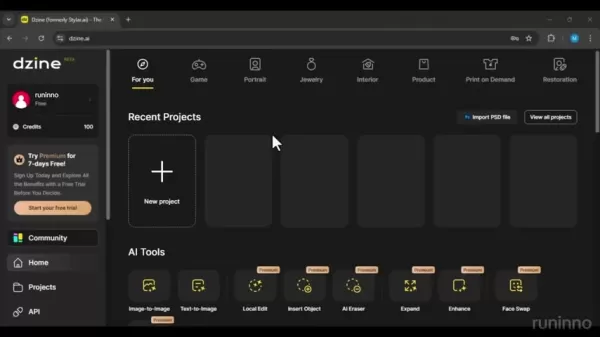
Begin by visiting the Dzine AI website at dzine.ai
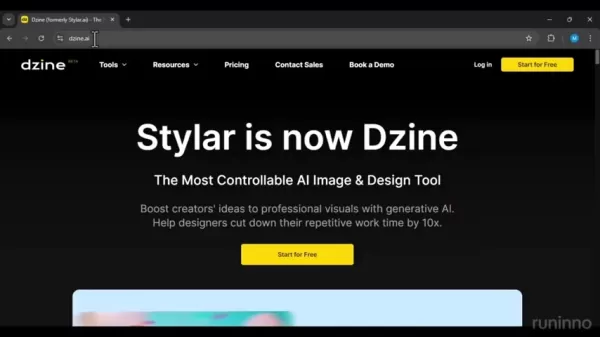
. The homepage presents a clean, intuitive interface highlighting its core offering as 'The Most Controllable AI Image & Design Tool'. Click the 'Start for Free' button to explore its features. You'll be prompted to sign up quickly using your email. After logging in, you'll access a dashboard showcasing various AI Tools, each addressing different image editing and design requirements.
Exploring Dzine AI's Key Tools
Dzine AI provides a comprehensive set of tools

for specific editing and design tasks:
- Image-to-Image: Transforms an image into various styles.
- Text-to-Image: Creates an image from a text description.
- AI Editor: Enables advanced image editing with AI assistance.
- Face Kit: Offers tools for facial enhancements and modifications.
These tools allow extensive image manipulation, unlocking endless creative possibilities.
Diving Deeper: Convert 2D Images to 3D with Dzine AI
Step-by-Step Guide to 2D to 3D Conversion
Follow this process to convert a 2D image into a 3D visual using Dzine AI:
- Start a New Project:
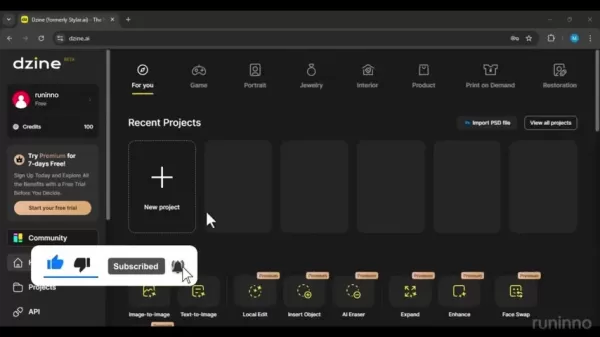
Click the 'New project' button on the dashboard.
- Select Aspect Ratio: Choose your desired aspect ratio. A 1:1 square ratio is common.
- Upload Your Image: Click the upload area to select the 2D image you wish to transform.
- Navigate to Image-to-Image Tool: Select this tool from the menu.
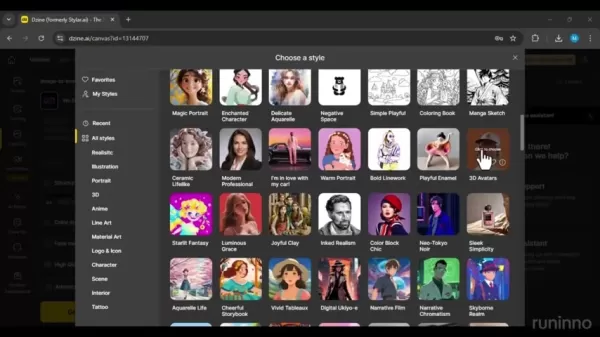
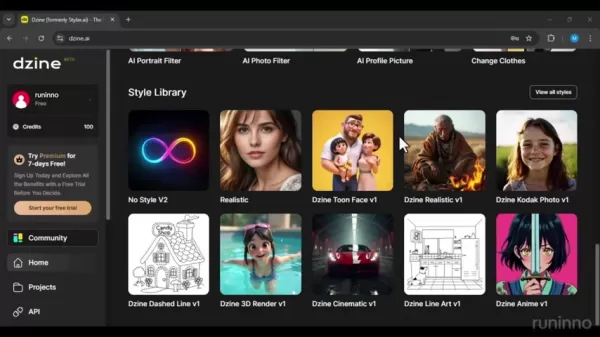
- Choose a 3D Style: Browse available styles like '3D Rendering' or '3D Pixel'
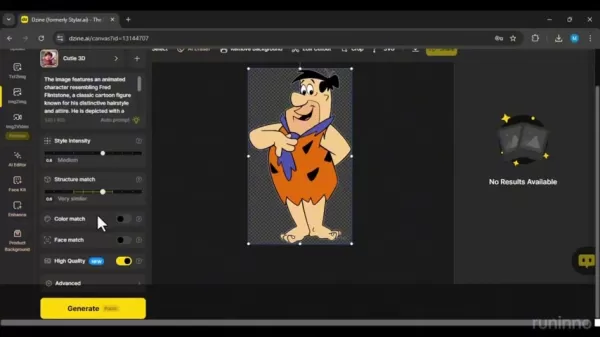
. Pick the one that fits your vision.
- Generate the 3D Image: Click 'Generate' to start the conversion.
- Customize Your Image: Adjust the intensity to your preference. A structure match around 0.6 usually works well. Higher values keep the output closer to the original image.
Dzine AI will then process your image, producing a 3D rendering in your chosen style. You'll receive multiple variations to choose the best match for your project.
Maximizing Results: Tips for Optimal 2D to 3D Conversion
For the best outcomes with Dzine AI's 2D-to-3D conversion, consider these tips:
- Choose High-Quality Source Images: Starting with a high-resolution image typically yields better detail and clarity.
- Experiment with Different Styles: Test various 3D styles to see which complements your image best.
- Adjust the Intensity: Fine-tune customization settings to achieve your preferred look.
- Iterate and Refine: If the initial result isn't perfect, adjust parameters and regenerate until satisfied.
Detailed Walkthrough: Mastering Dzine AI
Exploring Available Tools
Let’s explore the various tools available:
- Text-to-Image: Creates images from a text description
.
- Image-to-Image: Transforms an image into various styles.
- Image-to-Video: Converts an image into a video.
- AI Editor: A premium feature for advanced AI-assisted image editing.
- Face Kit: A premium toolset for facial enhancements and modifications.
- Enhance: Improves image quality and resolution.
- Product Background: Creates professional backgrounds for product shots.
Dzine AI Pricing and Credit System
Understanding Dzine AI's Credit System
Dzine AI uses a credit system
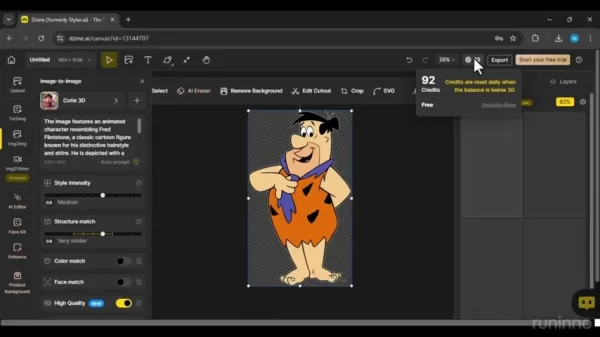
. Free users receive 100 credits upon sign-up. Generating images consumes credits, typically about two per image. After using the initial credits, your account is replenished with 30 credits daily, allowing for regular experimentation. Using these credits is an excellent way to test the platform before considering a paid plan.
Subscription Plans: Unlocking Premium Features
For advanced features and higher-quality outputs, Dzine AI offers subscription plans
. These plans provide extra credits, unlock premium tools like the AI Editor and Face Kit, and remove watermarks.
- Standard Plan: Priced at $10 per month, this plan includes watermark removal, unlimited auto-prompt usage, fast queue credits monthly, and high-resolution exports.
Pros and Cons of Using Dzine AI
Pros
User-Friendly: An intuitive interface makes creating stunning visuals easy for anyone.
Diverse Tools: A wide range of AI-powered tools for image editing and design.
Credit System: Free daily credits let users explore the platform before subscribing.
Automatic Prompts: The auto-prompt tool simplifies image generation.
Cons
Watermarks: Images from the free version include a watermark.
Pricing: Access to the highest quality images requires a payment.
Learning Curve: First-time users may need time to learn the platform.
Subscription Required: A paid plan is necessary to unlock all features.
Unleashing Creativity: Core Features of Dzine AI
The Heart of Dzine AI: AI-Powered Image ConversionDzine AI's core technology uses sophisticated algorithms for seamless 2D-to-3D conversion. The AI analyzes the source image, identifies key features, and intelligently generates a 3D representation based on your selected style. This automated process requires minimal input, making it highly accessible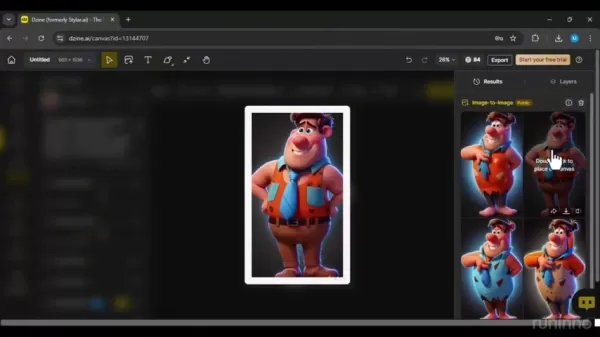
. It's remarkably user-friendly: select a style and click generate. If the result isn't ideal, use the auto-prompt feature to find a better option.
Variety of 3D Styles: Tailoring Your Visuals
Dzine AI offers a diverse range of 3D styles to suit different creative tastes and project needs. From photorealistic renderings to stylized pixel art, you can find the perfect aesthetic. This flexibility helps you create unique visuals aligned with your brand or project vision.
AI Assistance: Simplifying the Design Process
The AI Editor and Face Kit, available with subscriptions, provide intelligent design assistance. These tools can automatically enhance image quality, refine facial features, and suggest improvements, saving time while ensuring professional results. The auto-prompt feature is also highly useful
. It analyzes your image and generates appropriate text prompts, making it easier to create stunning visuals with a single click.
Real-World Applications: How Dzine AI is Transforming Industries
Marketing and Advertising: Capturing Attention with 3D Visuals
In a competitive market, standing out is crucial. Dzine AI helps marketers create eye-catching 3D visuals for campaigns, boosting engagement and conversions. From product showcases to social media ads, it elevates marketing efforts and leaves a lasting impression. The AI background enhancement tool also helps create fresh visual contexts.
E-commerce: Showcasing Products in Stunning Detail
For e-commerce, high-quality visuals are vital for sales. Dzine AI transforms product photos into interactive 3D models, offering customers a more immersive shopping experience. Showcasing products in impressive detail builds trust, increases conversions, and can reduce return rates.
Content Creation: Elevating Your Visual Storytelling
Bloggers, YouTubers, and social media influencers can elevate their storytelling with Dzine AI. By turning ordinary images into captivating 3D visuals, you create more engaging, memorable, and shareable content. This can attract followers, build your brand, and establish visual authority. The AI clothing change feature is also perfect for brands wanting to showcase new apparel without a photoshoot.
Frequently Asked Questions About Dzine AI
Is Dzine AI free to use?
Yes, Dzine AI has a free plan with limited credits and features. A subscription is required for premium tools and watermark removal.
How many credits do I get with the free plan?
Free users get 100 credits upon sign-up, with a daily replenishment of 30 credits.
What is the pricing of the subscription plans?
The Standard Plan costs $10 per month.
Can I use Dzine AI for commercial purposes?
Commercial use is generally permitted with a subscription. Please refer to the platform's Terms of Service for specific details.
Is there a watermark on images generated with the free plan?
Yes, images from the free plan include a Dzine AI watermark. Removing it requires a subscription.
Explore more About 3D Rendering Tools
What are the benefits of using a 3D rendering tool?
The key benefits of using a 3D rendering tool include: Cost-effective: Produces photorealistic images without physical prototypes, reducing marketing costs. Time-saving: Significantly speeds up the creation of marketing materials and allows for quick design changes. Versatile: Suitable for animations, 360° views, augmented reality, and various marketing applications. Photorealistic: Generates high-quality, realistic images for a consistent brand identity. Effective: Enhances customer engagement by helping potential buyers connect with products. Flexible: Offers extensive creative and technical possibilities, enabling exploration of multiple design options. Easy feedback: Simplifies the feedback process from all project stakeholders. Consistent quality: Maintains a uniform visual standard across all product presentations. Engaging experience: Creates compelling visual experiences that resonate with the audience.
Related article
 U.S. Stocks Hit Historic Milestone as AI and Aerospace Giants Prepare for Trillion-Dollar Debut
Elon Musk, Sam Altman, and Dario Amodei, three titans of the technology sector, are advancing toward initial public offerings for their respective ventures. With SpaceX, OpenAI, and Anthropic—three industry behemoths nearing trillion-dollar valuation
Swedish AI Startup Lovable Eyes $13.2 Billion Valuation After Major Funding Round
As AI-driven coding tools gain traction, Swedish startup Lovable has secured a major funding round. The company aims to raise $3 billion, potentially boosting its valuation to $13.2 billion—double the $6.6 billion recorded last December. Menlo Ventur
Google Tests Remy AI Agent for Gemini as Focus Shifts to User Control
According to Business Insider, Google is testing Remy, a new AI personal agent for Gemini. This tool aims to execute tasks on behalf of users, streamlining both professional workflows and daily routines.Currently, Remy is undergoing testing in an int
Related Special Topic Recommendations
Data Analysis
U.S. Stocks Hit Historic Milestone as AI and Aerospace Giants Prepare for Trillion-Dollar Debut
Elon Musk, Sam Altman, and Dario Amodei, three titans of the technology sector, are advancing toward initial public offerings for their respective ventures. With SpaceX, OpenAI, and Anthropic—three industry behemoths nearing trillion-dollar valuation
Swedish AI Startup Lovable Eyes $13.2 Billion Valuation After Major Funding Round
As AI-driven coding tools gain traction, Swedish startup Lovable has secured a major funding round. The company aims to raise $3 billion, potentially boosting its valuation to $13.2 billion—double the $6.6 billion recorded last December. Menlo Ventur
Google Tests Remy AI Agent for Gemini as Focus Shifts to User Control
According to Business Insider, Google is testing Remy, a new AI personal agent for Gemini. This tool aims to execute tasks on behalf of users, streamlining both professional workflows and daily routines.Currently, Remy is undergoing testing in an int
Related Special Topic Recommendations
Data Analysis
 Best AI Anomaly Detection Tools for KPI Monitoring across SaaS and Ecommerce Teams
2026 Latest Best Top-rated AI Anomaly Detection Tools for KPI Monitoring in SaaS and Ecommerce teams! XIX.AI has curated a powerful, game-changing collection based on rigorous real-world tests and weekly updated rankings. You’ll find detailed free vs paid comparison insights to help you identify the must-try solution that boosts productivity and unlocks your AI edge. Explore now!
 10 tools
 xix.ai
writing
Best AI Outline Generators for Long-Form SEO Articles
xix.ai
writing
Best AI Outline Generators for Long-Form SEO Articles
2026 Latest Best Top-Rated AI Outline Generators for Long-Form SEO Articles, meticulously curated by XIX.AI. These powerful tools offer game-changing assistance in creating high-quality content quickly, boosting writing efficiency significantly. Get a free vs paid comparison along with real-world tests and detailed rankings to help you find the must-try option that suits your needs. Explore now to unlock your AI edge.
8 tools
xix.ai
Education and Learning
AI Study Tools for Homework and Exam Prep
2026 Latest Best AI Study Tools for Homework and Exam Prep! XIX.AI curates a top-rated list of powerful, game-changing tools that help students boost productivity, streamline homework completion, and ace exams through real-world tests. Get a free vs paid comparison, detailed rankings, and must-try options to unlock your AI edge. Explore now!
10 tools
xix.ai
Music composition
AI Vocal Demo Tools for Songwriters, Hooks, Toplines, and Multilingual Draft Sessions
2026 Latest Best AI Vocal Demo Tools for Songwriters, Hook Creators, and Multi-Language Content Teams! XIX.AI has curated a top-rated list of powerful game-changing tools that go through rigorous real-world tests. You’ll find detailed free vs paid comparison data, comprehensive rankings, and must-try options to help you boost writing efficiency and unlock your creative potential. Explore now to discover your perfect tool for all your content needs!
9 tools
xix.ai
Business
Best AI Competitive Research Tools for Small Businesses
2026 Latest Best Top-rated AI Competitive Research Tools for Small Businesses! XIX.AI has curated a highly powerful game-changing collection, updated weekly with rigorous real-world tests and detailed rankings. You can find a comprehensive free vs paid comparison to help you identify the must-try tools that boost your productivity and give you a competitive edge. Explore now to discover your perfect tool!
9 tools
xix.ai
Image editing
Photoshop AI Retouch Tools for Ecommerce Apparel, Skin Cleanup, and Color Consistency
2026 Latest Best Photoshop AI retouch tools for ecommerce apparel, skin cleanup, and color consistency! This top-rated curated list features powerful game-changing solutions that help you boost writing efficiency, streamline content creation, and achieve perfect visual results effortlessly. Each tool has undergone real-world tests through weekly updated rankings, complete with free vs paid comparison details. Backed by XIX.AI, it’s the must-try guide for anyone aiming to unlock your AI edge. Explore now!
10 tools
xix.ai

 Comments (1)
0/500
Comments (1)
0/500
![GeorgeWilliams]()
Wait, so Dzine AI can turn a flat picture into a 3D model without any manual tweaking? That’s either witchcraft or some seriously talented machine learning. I’m curious how it handles complex textures though—will it mess up my cat’s fur? 😅
In today's digital landscape, compelling visuals are essential. For marketers, designers, and content creators, the power to turn ordinary images into high-impact, professional-grade visuals is a key advantage. Dzine AI stands out as a transformative solution, providing an intuitive and robust platform to convert 2D photos into breathtaking 3D creations. With minimal effort, you can significantly enhance your imagery and captivate your audience. This guide offers a comprehensive look at Dzine AI, examining its core features, practical applications, and how you can leverage it to boost your creative work.
Key Points
Dzine AI converts 2D images into 3D visuals.
The platform features multiple AI-powered tools for editing and design.
Users can sign up for free and receive daily credits to use the tools.
It offers various 3D styles, including realistic rendering and pixel art.
A subscription is needed to remove watermarks from generated images.
An auto-prompt feature helps generate text prompts for your images automatically.
Understanding Dzine AI: Your Gateway to 3D Image Transformation
What is Dzine AI?
Dzine AI is an innovative platform that simplifies converting 2D images into engaging 3D visuals. This AI-powered tool makes 3D design accessible to users of any experience level. Transform standard photos into exceptional visual assets to improve your marketing materials, design projects, and content. The suite includes tools for creating diverse images, applying AI portrait and photo filters, and even changing a subject's clothing. Beyond portraits, you can also generate impressive product visuals. Dzine AI enables you to create stunning imagery with just a few clicks.
First Steps: Getting Started with Dzine AI
Begin by visiting the Dzine AI website at dzine.ai
. The homepage presents a clean, intuitive interface highlighting its core offering as 'The Most Controllable AI Image & Design Tool'. Click the 'Start for Free' button to explore its features. You'll be prompted to sign up quickly using your email. After logging in, you'll access a dashboard showcasing various AI Tools, each addressing different image editing and design requirements.
Exploring Dzine AI's Key Tools
Dzine AI provides a comprehensive set of tools
for specific editing and design tasks:
- Image-to-Image: Transforms an image into various styles.
- Text-to-Image: Creates an image from a text description.
- AI Editor: Enables advanced image editing with AI assistance.
- Face Kit: Offers tools for facial enhancements and modifications.
These tools allow extensive image manipulation, unlocking endless creative possibilities.
Diving Deeper: Convert 2D Images to 3D with Dzine AI
Step-by-Step Guide to 2D to 3D Conversion
Follow this process to convert a 2D image into a 3D visual using Dzine AI:
- Start a New Project:
Click the 'New project' button on the dashboard.
- Select Aspect Ratio: Choose your desired aspect ratio. A 1:1 square ratio is common.
- Upload Your Image: Click the upload area to select the 2D image you wish to transform.
- Navigate to Image-to-Image Tool: Select this tool from the menu.
- Choose a 3D Style: Browse available styles like '3D Rendering' or '3D Pixel'
. Pick the one that fits your vision.
- Generate the 3D Image: Click 'Generate' to start the conversion.
- Customize Your Image: Adjust the intensity to your preference. A structure match around 0.6 usually works well. Higher values keep the output closer to the original image.
Dzine AI will then process your image, producing a 3D rendering in your chosen style. You'll receive multiple variations to choose the best match for your project.
Maximizing Results: Tips for Optimal 2D to 3D Conversion
For the best outcomes with Dzine AI's 2D-to-3D conversion, consider these tips:
- Choose High-Quality Source Images: Starting with a high-resolution image typically yields better detail and clarity.
- Experiment with Different Styles: Test various 3D styles to see which complements your image best.
- Adjust the Intensity: Fine-tune customization settings to achieve your preferred look.
- Iterate and Refine: If the initial result isn't perfect, adjust parameters and regenerate until satisfied.
Detailed Walkthrough: Mastering Dzine AI
Exploring Available Tools
Let’s explore the various tools available:
- Text-to-Image: Creates images from a text description
.
- Image-to-Image: Transforms an image into various styles.
- Image-to-Video: Converts an image into a video.
- AI Editor: A premium feature for advanced AI-assisted image editing.
- Face Kit: A premium toolset for facial enhancements and modifications.
- Enhance: Improves image quality and resolution.
- Product Background: Creates professional backgrounds for product shots.
Dzine AI Pricing and Credit System
Understanding Dzine AI's Credit System
Dzine AI uses a credit system
. Free users receive 100 credits upon sign-up. Generating images consumes credits, typically about two per image. After using the initial credits, your account is replenished with 30 credits daily, allowing for regular experimentation. Using these credits is an excellent way to test the platform before considering a paid plan.
Subscription Plans: Unlocking Premium Features
For advanced features and higher-quality outputs, Dzine AI offers subscription plans
. These plans provide extra credits, unlock premium tools like the AI Editor and Face Kit, and remove watermarks.
- Standard Plan: Priced at $10 per month, this plan includes watermark removal, unlimited auto-prompt usage, fast queue credits monthly, and high-resolution exports.
Pros and Cons of Using Dzine AI
Pros
User-Friendly: An intuitive interface makes creating stunning visuals easy for anyone.
Diverse Tools: A wide range of AI-powered tools for image editing and design.
Credit System: Free daily credits let users explore the platform before subscribing.
Automatic Prompts: The auto-prompt tool simplifies image generation.
Cons
Watermarks: Images from the free version include a watermark.
Pricing: Access to the highest quality images requires a payment.
Learning Curve: First-time users may need time to learn the platform.
Subscription Required: A paid plan is necessary to unlock all features.
Unleashing Creativity: Core Features of Dzine AI
The Heart of Dzine AI: AI-Powered Image ConversionDzine AI's core technology uses sophisticated algorithms for seamless 2D-to-3D conversion. The AI analyzes the source image, identifies key features, and intelligently generates a 3D representation based on your selected style. This automated process requires minimal input, making it highly accessible
. It's remarkably user-friendly: select a style and click generate. If the result isn't ideal, use the auto-prompt feature to find a better option.
Variety of 3D Styles: Tailoring Your Visuals
Dzine AI offers a diverse range of 3D styles to suit different creative tastes and project needs. From photorealistic renderings to stylized pixel art, you can find the perfect aesthetic. This flexibility helps you create unique visuals aligned with your brand or project vision.
AI Assistance: Simplifying the Design Process
The AI Editor and Face Kit, available with subscriptions, provide intelligent design assistance. These tools can automatically enhance image quality, refine facial features, and suggest improvements, saving time while ensuring professional results. The auto-prompt feature is also highly useful
. It analyzes your image and generates appropriate text prompts, making it easier to create stunning visuals with a single click.
Real-World Applications: How Dzine AI is Transforming Industries
Marketing and Advertising: Capturing Attention with 3D Visuals
In a competitive market, standing out is crucial. Dzine AI helps marketers create eye-catching 3D visuals for campaigns, boosting engagement and conversions. From product showcases to social media ads, it elevates marketing efforts and leaves a lasting impression. The AI background enhancement tool also helps create fresh visual contexts.
E-commerce: Showcasing Products in Stunning Detail
For e-commerce, high-quality visuals are vital for sales. Dzine AI transforms product photos into interactive 3D models, offering customers a more immersive shopping experience. Showcasing products in impressive detail builds trust, increases conversions, and can reduce return rates.
Content Creation: Elevating Your Visual Storytelling
Bloggers, YouTubers, and social media influencers can elevate their storytelling with Dzine AI. By turning ordinary images into captivating 3D visuals, you create more engaging, memorable, and shareable content. This can attract followers, build your brand, and establish visual authority. The AI clothing change feature is also perfect for brands wanting to showcase new apparel without a photoshoot.
Frequently Asked Questions About Dzine AI
Is Dzine AI free to use?
Yes, Dzine AI has a free plan with limited credits and features. A subscription is required for premium tools and watermark removal.
How many credits do I get with the free plan?
Free users get 100 credits upon sign-up, with a daily replenishment of 30 credits.
What is the pricing of the subscription plans?
The Standard Plan costs $10 per month.
Can I use Dzine AI for commercial purposes?
Commercial use is generally permitted with a subscription. Please refer to the platform's Terms of Service for specific details.
Is there a watermark on images generated with the free plan?
Yes, images from the free plan include a Dzine AI watermark. Removing it requires a subscription.
Explore more About 3D Rendering Tools
What are the benefits of using a 3D rendering tool?
The key benefits of using a 3D rendering tool include: Cost-effective: Produces photorealistic images without physical prototypes, reducing marketing costs. Time-saving: Significantly speeds up the creation of marketing materials and allows for quick design changes. Versatile: Suitable for animations, 360° views, augmented reality, and various marketing applications. Photorealistic: Generates high-quality, realistic images for a consistent brand identity. Effective: Enhances customer engagement by helping potential buyers connect with products. Flexible: Offers extensive creative and technical possibilities, enabling exploration of multiple design options. Easy feedback: Simplifies the feedback process from all project stakeholders. Consistent quality: Maintains a uniform visual standard across all product presentations. Engaging experience: Creates compelling visual experiences that resonate with the audience.








 U.S. Stocks Hit Historic Milestone as AI and Aerospace Giants Prepare for Trillion-Dollar Debut
Elon Musk, Sam Altman, and Dario Amodei, three titans of the technology sector, are advancing toward initial public offerings for their respective ventures. With SpaceX, OpenAI, and Anthropic—three industry behemoths nearing trillion-dollar valuation
U.S. Stocks Hit Historic Milestone as AI and Aerospace Giants Prepare for Trillion-Dollar Debut
Elon Musk, Sam Altman, and Dario Amodei, three titans of the technology sector, are advancing toward initial public offerings for their respective ventures. With SpaceX, OpenAI, and Anthropic—three industry behemoths nearing trillion-dollar valuation
 Swedish AI Startup Lovable Eyes $13.2 Billion Valuation After Major Funding Round
As AI-driven coding tools gain traction, Swedish startup Lovable has secured a major funding round. The company aims to raise $3 billion, potentially boosting its valuation to $13.2 billion—double the $6.6 billion recorded last December. Menlo Ventur
Google Tests Remy AI Agent for Gemini as Focus Shifts to User Control
According to Business Insider, Google is testing Remy, a new AI personal agent for Gemini. This tool aims to execute tasks on behalf of users, streamlining both professional workflows and daily routines.Currently, Remy is undergoing testing in an int
Swedish AI Startup Lovable Eyes $13.2 Billion Valuation After Major Funding Round
As AI-driven coding tools gain traction, Swedish startup Lovable has secured a major funding round. The company aims to raise $3 billion, potentially boosting its valuation to $13.2 billion—double the $6.6 billion recorded last December. Menlo Ventur
Google Tests Remy AI Agent for Gemini as Focus Shifts to User Control
According to Business Insider, Google is testing Remy, a new AI personal agent for Gemini. This tool aims to execute tasks on behalf of users, streamlining both professional workflows and daily routines.Currently, Remy is undergoing testing in an int

2026 Latest Best Top-rated AI Anomaly Detection Tools for KPI Monitoring in SaaS and Ecommerce teams! XIX.AI has curated a powerful, game-changing collection based on rigorous real-world tests and weekly updated rankings. You’ll find detailed free vs paid comparison insights to help you identify the must-try solution that boosts productivity and unlocks your AI edge. Explore now!
10 tools
xix.ai

2026 Latest Best Top-Rated AI Outline Generators for Long-Form SEO Articles, meticulously curated by XIX.AI. These powerful tools offer game-changing assistance in creating high-quality content quickly, boosting writing efficiency significantly. Get a free vs paid comparison along with real-world tests and detailed rankings to help you find the must-try option that suits your needs. Explore now to unlock your AI edge.
8 tools
xix.ai

2026 Latest Best AI Study Tools for Homework and Exam Prep! XIX.AI curates a top-rated list of powerful, game-changing tools that help students boost productivity, streamline homework completion, and ace exams through real-world tests. Get a free vs paid comparison, detailed rankings, and must-try options to unlock your AI edge. Explore now!
10 tools
xix.ai

2026 Latest Best AI Vocal Demo Tools for Songwriters, Hook Creators, and Multi-Language Content Teams! XIX.AI has curated a top-rated list of powerful game-changing tools that go through rigorous real-world tests. You’ll find detailed free vs paid comparison data, comprehensive rankings, and must-try options to help you boost writing efficiency and unlock your creative potential. Explore now to discover your perfect tool for all your content needs!
9 tools
xix.ai

2026 Latest Best Top-rated AI Competitive Research Tools for Small Businesses! XIX.AI has curated a highly powerful game-changing collection, updated weekly with rigorous real-world tests and detailed rankings. You can find a comprehensive free vs paid comparison to help you identify the must-try tools that boost your productivity and give you a competitive edge. Explore now to discover your perfect tool!
9 tools
xix.ai

2026 Latest Best Photoshop AI retouch tools for ecommerce apparel, skin cleanup, and color consistency! This top-rated curated list features powerful game-changing solutions that help you boost writing efficiency, streamline content creation, and achieve perfect visual results effortlessly. Each tool has undergone real-world tests through weekly updated rankings, complete with free vs paid comparison details. Backed by XIX.AI, it’s the must-try guide for anyone aiming to unlock your AI edge. Explore now!
10 tools
xix.ai

Wait, so Dzine AI can turn a flat picture into a 3D model without any manual tweaking? That’s either witchcraft or some seriously talented machine learning. I’m curious how it handles complex textures though—will it mess up my cat’s fur? 😅












