


 Home
HomeDiscover the Future of Data Analysis: Explore Power BI's Advanced AI Capabilities
Unlocking the Power of AI in Power BI: Smarter Data Analysis Made Easy
Power BI isn’t just another data visualization tool—it’s a game-changer, especially when you tap into its AI capabilities. Whether you're a data analyst, business user, or just someone looking to make sense of numbers faster, Power BI’s AI-powered features can help you uncover hidden patterns, predict trends, and even analyze text sentiment—all without needing deep technical expertise.
Let’s dive into some of the most powerful AI-driven tools Power BI offers and how they can transform the way you work with data.
1. Quick Insights: Instant Data Discovery
Ever stared at a massive dataset, unsure where to start? Quick Insights is your AI-powered assistant that scans your data and highlights key trends, correlations, and outliers—in seconds.
Why It’s Useful:
- No DAX or complex queries needed—just click and let AI do the work.
- Suggests visualizations you might not have considered.
- Identifies hidden patterns, like sudden spikes in sales or unusual drops in performance.
How to Use It:
- Open Power BI Service.
- Hover over your dataset and click "Get Quick Insights."
- Watch as Power BI generates charts, scatter plots, and trend lines—all pointing to the most interesting parts of your data.
Best for: Exploratory analysis when you don’t yet know what questions to ask.
2. Analyze Feature: AI-Powered Data Explanations
Ever wondered why a sales number suddenly spiked or why customer engagement dropped? The Analyze Feature helps you understand the "why" behind data changes.

How It Works:
- Select a data point in a chart (like a bar or line graph).
- Right-click and choose "Analyze" > "Explain the increase/decrease."
- Power BI instantly suggests possible reasons, like seasonality, regional differences, or product performance.
Best for: Quickly diagnosing trends without manual digging.
3. AI Visuals: Q&A & Decomposition Tree
Q&A: Ask Your Data in Plain English
Want to query your data without writing a single formula? Just type a question like:
- "What were total sales last quarter?"
- "Which region has the highest customer churn?"
Power BI generates the right visualization on the fly.
Decomposition Tree: Break Down Data Like a Pro
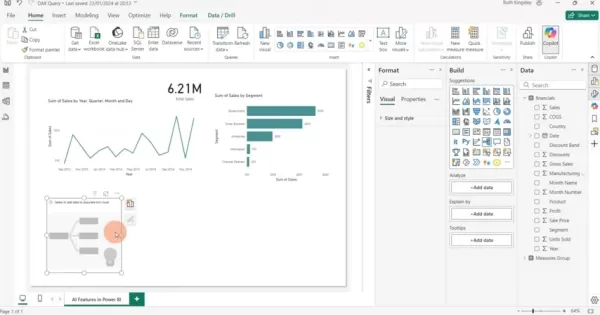
Need to see how different factors impact a metric? The Decomposition Tree lets you drill into data across multiple dimensions—like sales by region, product, and time—with a simple click.
Best for: Interactive, self-service analytics.
4. Text Analytics: Extract Meaning from Customer Feedback
Customer reviews, social media comments, and survey responses hold valuable insights—but manually analyzing them is tedious. Power BI’s Text Analytics (powered by Azure Cognitive Services) automates sentiment analysis, key phrase extraction, and language detection.
How to Use It:
- Open Power Query Editor.
- Select a text column (e.g., customer reviews).
- Click "Add Column" > "Text Analytics" and choose:
- Sentiment Score (positive/negative/neutral)
- Key Phrases (most important words)
- Language Detection
Best for: Understanding customer sentiment without manual tagging.
5. AI-Powered Forecasting: Predict Future Trends
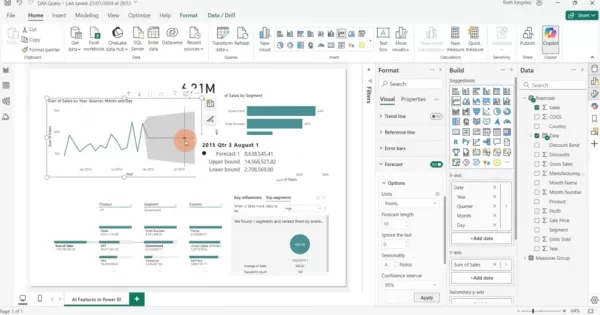
Want to forecast sales, demand, or inventory needs? Power BI’s Forecasting tool uses historical data to predict future trends.
How to Set It Up:
- Create a time-based visual (like a line chart).
- Toggle "Forecast" in the Format pane.
- Adjust forecast length and confidence intervals.
Best for: Budgeting, inventory planning, and trend predictions.
The Pros & Cons of Power BI AI
✅ Pros
✔ Faster analysis—AI does the heavy lifting.
✔ Uncovers hidden insights you might miss manually.
✔ Natural language queries make data accessible to everyone.
✔ Sentiment analysis helps understand customer emotions.
✔ Forecasting aids in smarter business planning.
❌ Cons
✖ Data quality matters—garbage in, garbage out.
✖ Requires Azure Cognitive Services for text analytics.
✖ Overfitting risk—AI models can misinterpret noisy data.
FAQs
❓ What data works best with Quick Insights?
Large datasets with multiple fields (numeric + categorical). Simple datasets may not yield meaningful results.
❓ How accurate is Power BI’s forecasting?
It depends on historical data quality. More data = better predictions. External factors (like market changes) aren’t always captured.
❓ Can I analyze text in different languages?
Yes! Just specify the language code (e.g., "en" for English, "es" for Spanish).
Final Thoughts
Power BI’s AI tools democratize data analysis, making it faster and more intuitive. Whether you’re predicting sales, analyzing customer sentiment, or just exploring data, these features help you work smarter, not harder.
Ready to try them out? Open Power BI and start experimenting—you might be surprised at what your data can tell you! 🚀
Related article
 Google Tests Remy AI Agent for Gemini as Focus Shifts to User Control
According to Business Insider, Google is testing Remy, a new AI personal agent for Gemini. This tool aims to execute tasks on behalf of users, streamlining both professional workflows and daily routines.Currently, Remy is undergoing testing in an int
How to fix Core Web Vitals for better SEO rankings
Streamline Report Card Comments with AI ToolsIntroductionAI Tools for Generating Report Card CommentsMagic SchoolAlmanac AIChat GPTUsing Magic School to Generate Report Card CommentsLogging into Magic SchoolSelecting the Report Card Comments ToolCust
Slackbot Becomes an AI Agent
Slackbot, the automated assistant embedded in Salesforce’s corporate messaging platform Slack, is evolving into an AI agent. Salesforce CTO Parker Harris envisions it achieving viral status comparable to OpenAI’s ChatGPT.The cloud software giant laun
Related Special Topic Recommendations
writing
Google Tests Remy AI Agent for Gemini as Focus Shifts to User Control
According to Business Insider, Google is testing Remy, a new AI personal agent for Gemini. This tool aims to execute tasks on behalf of users, streamlining both professional workflows and daily routines.Currently, Remy is undergoing testing in an int
How to fix Core Web Vitals for better SEO rankings
Streamline Report Card Comments with AI ToolsIntroductionAI Tools for Generating Report Card CommentsMagic SchoolAlmanac AIChat GPTUsing Magic School to Generate Report Card CommentsLogging into Magic SchoolSelecting the Report Card Comments ToolCust
Slackbot Becomes an AI Agent
Slackbot, the automated assistant embedded in Salesforce’s corporate messaging platform Slack, is evolving into an AI agent. Salesforce CTO Parker Harris envisions it achieving viral status comparable to OpenAI’s ChatGPT.The cloud software giant laun
Related Special Topic Recommendations
writing
 Best AI Outline Generators for Long-Form SEO Articles
2026 Latest Best Top-Rated AI Outline Generators for Long-Form SEO Articles, meticulously curated by XIX.AI. These powerful tools offer game-changing assistance in creating high-quality content quickly, boosting writing efficiency significantly. Get a free vs paid comparison along with real-world tests and detailed rankings to help you find the must-try option that suits your needs. Explore now to unlock your AI edge.
 8 tools
 xix.ai
Education and Learning
AI Study Tools for Homework and Exam Prep
xix.ai
Education and Learning
AI Study Tools for Homework and Exam Prep
2026 Latest Best AI Study Tools for Homework and Exam Prep! XIX.AI curates a top-rated list of powerful, game-changing tools that help students boost productivity, streamline homework completion, and ace exams through real-world tests. Get a free vs paid comparison, detailed rankings, and must-try options to unlock your AI edge. Explore now!
10 tools
xix.ai
Music composition
AI Vocal Demo Tools for Songwriters, Hooks, Toplines, and Multilingual Draft Sessions
2026 Latest Best AI Vocal Demo Tools for Songwriters, Hook Creators, and Multi-Language Content Teams! XIX.AI has curated a top-rated list of powerful game-changing tools that go through rigorous real-world tests. You’ll find detailed free vs paid comparison data, comprehensive rankings, and must-try options to help you boost writing efficiency and unlock your creative potential. Explore now to discover your perfect tool for all your content needs!
9 tools
xix.ai
Business
Best AI Competitive Research Tools for Small Businesses
2026 Latest Best Top-rated AI Competitive Research Tools for Small Businesses! XIX.AI has curated a highly powerful game-changing collection, updated weekly with rigorous real-world tests and detailed rankings. You can find a comprehensive free vs paid comparison to help you identify the must-try tools that boost your productivity and give you a competitive edge. Explore now to discover your perfect tool!
9 tools
xix.ai
Image editing
Photoshop AI Retouch Tools for Ecommerce Apparel, Skin Cleanup, and Color Consistency
2026 Latest Best Photoshop AI retouch tools for ecommerce apparel, skin cleanup, and color consistency! This top-rated curated list features powerful game-changing solutions that help you boost writing efficiency, streamline content creation, and achieve perfect visual results effortlessly. Each tool has undergone real-world tests through weekly updated rankings, complete with free vs paid comparison details. Backed by XIX.AI, it’s the must-try guide for anyone aiming to unlock your AI edge. Explore now!
10 tools
xix.ai
Prompt
Best AI Prompt Libraries for ChatGPT Workflows
2026 Latest Best Top-Rated AI Prompt Libraries for optimizing all types of ChatGPT workflows. XIX.AI has curated a powerful, game-changing collection that goes through rigorous real-world tests to ensure top performance. You can find detailed free vs paid comparisons and expert rankings to help you choose the must-try tools that boost your productivity and unlock your AI edge. Explore now!
11 tools
xix.ai

 Comments (6)
0/500
Comments (6)
0/500
![RaymondBaker]()
Power BI mit KI? Endlich mal eine Entwicklung, die nicht einfach nur Buzzwords nachplappert. Die Integration sieht durchdacht aus, aber als kleiner Analyst hoffe ich nur, dass mich das Tool nicht irgendwann ersetzt 😅. Hoffentlich bleibt die Benutzeroberfläche trotz der neuen Funktionen übersichtlich.
![StevenGonzalez]()
Power BI의 AI 기능이 진짜 실무에 도움될까요? 저는 막상 사용해보니 평범한 데이터 탐색에는 쓸만하지만, 복잡한 예측 분석에는 아직 한계가 느껴지더라구요... 🙃 그래도 평소 엑셀만 쓰던 팀원들이 쉽게 시각화해보는 계기가 된 건 좋았어요.
![RogerPerez]()
Power BI의 AI 기능이 정말 신기하네요! 데이터 분석이 이렇게 쉬워질 줄이야 😲 직장에서 보고서 작성할 때 써보면 엄청 시간 절약될 것 같아요. 근데 AI가 점점 발전하다보면 데이터 분석직종은 어떻게 변하게 될지 궁금해지기도 하네...
![JasonRamirez]()
Power BI's AI sounds like a data wizard! 🧙♂️ Makes me wonder if it can predict my coffee consumption trends too. Super cool for analysts!
![JustinLewis]()
Power BI's AI features sound like a total game-changer! I'm curious how it handles real-time data crunching for small businesses—any cool examples out there? 😎
![JackHernández]()
Power BI's AI features sound like a data nerd's dream! 🚀 I'm curious—how easy is it for a beginner to actually use these tools without getting lost in the tech jungle?
Unlocking the Power of AI in Power BI: Smarter Data Analysis Made Easy
Power BI isn’t just another data visualization tool—it’s a game-changer, especially when you tap into its AI capabilities. Whether you're a data analyst, business user, or just someone looking to make sense of numbers faster, Power BI’s AI-powered features can help you uncover hidden patterns, predict trends, and even analyze text sentiment—all without needing deep technical expertise.
Let’s dive into some of the most powerful AI-driven tools Power BI offers and how they can transform the way you work with data.
1. Quick Insights: Instant Data Discovery
Ever stared at a massive dataset, unsure where to start? Quick Insights is your AI-powered assistant that scans your data and highlights key trends, correlations, and outliers—in seconds.
Why It’s Useful:
- No DAX or complex queries needed—just click and let AI do the work.
- Suggests visualizations you might not have considered.
- Identifies hidden patterns, like sudden spikes in sales or unusual drops in performance.
How to Use It:
- Open Power BI Service.
- Hover over your dataset and click "Get Quick Insights."
- Watch as Power BI generates charts, scatter plots, and trend lines—all pointing to the most interesting parts of your data.
Best for: Exploratory analysis when you don’t yet know what questions to ask.
2. Analyze Feature: AI-Powered Data Explanations
Ever wondered why a sales number suddenly spiked or why customer engagement dropped? The Analyze Feature helps you understand the "why" behind data changes.
How It Works:
- Select a data point in a chart (like a bar or line graph).
- Right-click and choose "Analyze" > "Explain the increase/decrease."
- Power BI instantly suggests possible reasons, like seasonality, regional differences, or product performance.
Best for: Quickly diagnosing trends without manual digging.
3. AI Visuals: Q&A & Decomposition Tree
Q&A: Ask Your Data in Plain English
Want to query your data without writing a single formula? Just type a question like:
- "What were total sales last quarter?"
- "Which region has the highest customer churn?"
Power BI generates the right visualization on the fly.
Decomposition Tree: Break Down Data Like a Pro
Need to see how different factors impact a metric? The Decomposition Tree lets you drill into data across multiple dimensions—like sales by region, product, and time—with a simple click.
Best for: Interactive, self-service analytics.
4. Text Analytics: Extract Meaning from Customer Feedback
Customer reviews, social media comments, and survey responses hold valuable insights—but manually analyzing them is tedious. Power BI’s Text Analytics (powered by Azure Cognitive Services) automates sentiment analysis, key phrase extraction, and language detection.
How to Use It:
- Open Power Query Editor.
- Select a text column (e.g., customer reviews).
- Click "Add Column" > "Text Analytics" and choose:
- Sentiment Score (positive/negative/neutral)
- Key Phrases (most important words)
- Language Detection
Best for: Understanding customer sentiment without manual tagging.
5. AI-Powered Forecasting: Predict Future Trends
Want to forecast sales, demand, or inventory needs? Power BI’s Forecasting tool uses historical data to predict future trends.
How to Set It Up:
- Create a time-based visual (like a line chart).
- Toggle "Forecast" in the Format pane.
- Adjust forecast length and confidence intervals.
Best for: Budgeting, inventory planning, and trend predictions.
The Pros & Cons of Power BI AI
✅ Pros
✔ Faster analysis—AI does the heavy lifting.
✔ Uncovers hidden insights you might miss manually.
✔ Natural language queries make data accessible to everyone.
✔ Sentiment analysis helps understand customer emotions.
✔ Forecasting aids in smarter business planning.
❌ Cons
✖ Data quality matters—garbage in, garbage out.
✖ Requires Azure Cognitive Services for text analytics.
✖ Overfitting risk—AI models can misinterpret noisy data.
FAQs
❓ What data works best with Quick Insights?
Large datasets with multiple fields (numeric + categorical). Simple datasets may not yield meaningful results.
❓ How accurate is Power BI’s forecasting?
It depends on historical data quality. More data = better predictions. External factors (like market changes) aren’t always captured.
❓ Can I analyze text in different languages?
Yes! Just specify the language code (e.g., "en" for English, "es" for Spanish).
Final Thoughts
Power BI’s AI tools democratize data analysis, making it faster and more intuitive. Whether you’re predicting sales, analyzing customer sentiment, or just exploring data, these features help you work smarter, not harder.
Ready to try them out? Open Power BI and start experimenting—you might be surprised at what your data can tell you! 🚀







 Google Tests Remy AI Agent for Gemini as Focus Shifts to User Control
According to Business Insider, Google is testing Remy, a new AI personal agent for Gemini. This tool aims to execute tasks on behalf of users, streamlining both professional workflows and daily routines.Currently, Remy is undergoing testing in an int
Google Tests Remy AI Agent for Gemini as Focus Shifts to User Control
According to Business Insider, Google is testing Remy, a new AI personal agent for Gemini. This tool aims to execute tasks on behalf of users, streamlining both professional workflows and daily routines.Currently, Remy is undergoing testing in an int
 How to fix Core Web Vitals for better SEO rankings
Streamline Report Card Comments with AI ToolsIntroductionAI Tools for Generating Report Card CommentsMagic SchoolAlmanac AIChat GPTUsing Magic School to Generate Report Card CommentsLogging into Magic SchoolSelecting the Report Card Comments ToolCust
How to fix Core Web Vitals for better SEO rankings
Streamline Report Card Comments with AI ToolsIntroductionAI Tools for Generating Report Card CommentsMagic SchoolAlmanac AIChat GPTUsing Magic School to Generate Report Card CommentsLogging into Magic SchoolSelecting the Report Card Comments ToolCust
 Slackbot Becomes an AI Agent
Slackbot, the automated assistant embedded in Salesforce’s corporate messaging platform Slack, is evolving into an AI agent. Salesforce CTO Parker Harris envisions it achieving viral status comparable to OpenAI’s ChatGPT.The cloud software giant laun
Slackbot Becomes an AI Agent
Slackbot, the automated assistant embedded in Salesforce’s corporate messaging platform Slack, is evolving into an AI agent. Salesforce CTO Parker Harris envisions it achieving viral status comparable to OpenAI’s ChatGPT.The cloud software giant laun

2026 Latest Best Top-Rated AI Outline Generators for Long-Form SEO Articles, meticulously curated by XIX.AI. These powerful tools offer game-changing assistance in creating high-quality content quickly, boosting writing efficiency significantly. Get a free vs paid comparison along with real-world tests and detailed rankings to help you find the must-try option that suits your needs. Explore now to unlock your AI edge.
8 tools
xix.ai

2026 Latest Best AI Study Tools for Homework and Exam Prep! XIX.AI curates a top-rated list of powerful, game-changing tools that help students boost productivity, streamline homework completion, and ace exams through real-world tests. Get a free vs paid comparison, detailed rankings, and must-try options to unlock your AI edge. Explore now!
10 tools
xix.ai

2026 Latest Best AI Vocal Demo Tools for Songwriters, Hook Creators, and Multi-Language Content Teams! XIX.AI has curated a top-rated list of powerful game-changing tools that go through rigorous real-world tests. You’ll find detailed free vs paid comparison data, comprehensive rankings, and must-try options to help you boost writing efficiency and unlock your creative potential. Explore now to discover your perfect tool for all your content needs!
9 tools
xix.ai

2026 Latest Best Top-rated AI Competitive Research Tools for Small Businesses! XIX.AI has curated a highly powerful game-changing collection, updated weekly with rigorous real-world tests and detailed rankings. You can find a comprehensive free vs paid comparison to help you identify the must-try tools that boost your productivity and give you a competitive edge. Explore now to discover your perfect tool!
9 tools
xix.ai

2026 Latest Best Photoshop AI retouch tools for ecommerce apparel, skin cleanup, and color consistency! This top-rated curated list features powerful game-changing solutions that help you boost writing efficiency, streamline content creation, and achieve perfect visual results effortlessly. Each tool has undergone real-world tests through weekly updated rankings, complete with free vs paid comparison details. Backed by XIX.AI, it’s the must-try guide for anyone aiming to unlock your AI edge. Explore now!
10 tools
xix.ai

2026 Latest Best Top-Rated AI Prompt Libraries for optimizing all types of ChatGPT workflows. XIX.AI has curated a powerful, game-changing collection that goes through rigorous real-world tests to ensure top performance. You can find detailed free vs paid comparisons and expert rankings to help you choose the must-try tools that boost your productivity and unlock your AI edge. Explore now!
11 tools
xix.ai

Power BI mit KI? Endlich mal eine Entwicklung, die nicht einfach nur Buzzwords nachplappert. Die Integration sieht durchdacht aus, aber als kleiner Analyst hoffe ich nur, dass mich das Tool nicht irgendwann ersetzt 😅. Hoffentlich bleibt die Benutzeroberfläche trotz der neuen Funktionen übersichtlich.
Power BI의 AI 기능이 진짜 실무에 도움될까요? 저는 막상 사용해보니 평범한 데이터 탐색에는 쓸만하지만, 복잡한 예측 분석에는 아직 한계가 느껴지더라구요... 🙃 그래도 평소 엑셀만 쓰던 팀원들이 쉽게 시각화해보는 계기가 된 건 좋았어요.
Power BI의 AI 기능이 정말 신기하네요! 데이터 분석이 이렇게 쉬워질 줄이야 😲 직장에서 보고서 작성할 때 써보면 엄청 시간 절약될 것 같아요. 근데 AI가 점점 발전하다보면 데이터 분석직종은 어떻게 변하게 될지 궁금해지기도 하네...
Power BI's AI sounds like a data wizard! 🧙♂️ Makes me wonder if it can predict my coffee consumption trends too. Super cool for analysts!
Power BI's AI features sound like a total game-changer! I'm curious how it handles real-time data crunching for small businesses—any cool examples out there? 😎
Power BI's AI features sound like a data nerd's dream! 🚀 I'm curious—how easy is it for a beginner to actually use these tools without getting lost in the tech jungle?












