


 Home
HomeFree Guide: Build Your Own Custom AI Voice in Simple Steps
Looking to design a unique AI voice that perfectly captures your desired sound? This guide walks you through crafting your own AI voice using Eleven Labs, a free and powerful tool. Whether you're producing content for YouTube, social media, or other channels, a custom AI voice can bring a distinctive flair to your work. Let's explore how you can easily create your own AI voice.
Key Points
Learn how to build a unique AI voice at no cost.
Explore the Eleven Labs tool for AI voice generation.
Follow the steps to customize an AI voice to your preferences.
See how top channels effectively use AI voices.
Understand the advantages of using AI voices for content production.
Introduction to Creating Unique AI Voices
Why Create Your Own AI Voice?
In today's digital world, a unique voice is essential for branding and content creation. AI voices provide a solution, enabling you to develop a persona that captures attention. Imagine a voice that aligns perfectly with your brand's tone, style, and messaging. Thanks to AI technology, this is now achievable, simplifying the process of producing consistent and compelling content. Creating an AI voice involves tailoring it to your specific requirements. Whether you need a formal tone for business or a relaxed style for social media, the options are limitless.
Advances in artificial intelligence have made generating unique voices more accessible and user-friendly than ever. You no longer require costly equipment or specialized expertise. With the right tools and some creativity, you can develop an AI voice that authentically represents you or your brand.
Many content creators and businesses are already using AI voices to elevate their content. By automating narration, they save time and resources while maintaining consistent, high-quality results. This method not only boosts efficiency but also creates new opportunities for creative expression and branding.
Popular Channels Using AI Voices

Many popular channels have integrated AI voices to improve their content and streamline production. Channels such as 10X Income, AI Alert, and Grow With Kaz are excellent examples. By using AI technology, these channels create engaging content more efficiently while maintaining a consistent tone.
AI voices enable these channels to produce videos faster without compromising quality. This is especially useful for channels that require frequent content updates to keep their audience engaged. Additionally, AI voices offer unique branding opportunities. By customizing the voice to fit the channel's theme, creators can strengthen their identity and deliver a memorable viewer experience.
For instance, 10X Income often uses AI voices to narrate tutorials and investment tips. The voice ensures clear and consistent delivery, making complex subjects more approachable. Similarly, AI Alert employs AI voices to discuss the newest trends in artificial intelligence, maintaining an authoritative and engaging tone.
Grow With Kaz uses AI voices to share advice on personal finance and entrepreneurship. The voice adds professionalism and clarity to the content, helping viewers understand key financial concepts more easily. By studying how these channels use AI voices, you can gather ideas and practical strategies for integrating this technology into your own content creation.
Benefits of Using AI Voices for Content Creation
Using AI voices for content creation offers numerous advantages, including:
- Efficiency: AI voices can greatly accelerate content creation by automating narration and voice-over tasks.
- Cost-Effectiveness: Compared to hiring voice actors, AI voices are often more affordable, particularly for small businesses and independent creators.
- Consistency: AI voices maintain a uniform tone and style across all your content, reinforcing your brand identity.
- Scalability: AI voices make it easier to expand your content production, allowing you to create more videos, podcasts, or audiobooks in less time.
- Customization: You can adapt AI voices to meet your specific needs, whether you require a professional tone for business or a casual style for social media.
Given these benefits, it's no surprise that AI voices are growing in popularity among content creators and businesses seeking to enhance their output and reach broader audiences.
Step-by-Step Guide to Creating Your AI Voice with Eleven Labs
Getting Started with Eleven Labs

To start creating your AI voice, you'll need to sign up for an account on Eleven Labs. This platform offers the tools and resources necessary to design a unique and personalized voice. Begin by visiting the Eleven Labs website. You'll find a simple sign-up process. Account creation is free, though some advanced features may require a subscription. After signing up, spend some time exploring the interface. Get to know the various options and settings, as this will help you refine your AI voice to perfection. The interface is user-friendly, so navigation should be straightforward.
Once logged in, you'll see a clean and intuitive dashboard. From here, you can access features like Text-to-Speech conversion, Voice Cloning, and voice customization. The platform supports multiple languages, making it suitable for creators around the world.
Eleven Labs provides several pre-made voices to help you get started. Experiment with these to understand the tool's capabilities. However, the true potential emerges when you begin customizing your own voice. You can adjust parameters such as pitch, tone, and style to create something entirely unique. The platform also lets you upload audio samples, which can train the AI model to mimic your voice or someone else's. This feature is especially useful for creating highly personalized and realistic AI voices.
As you become more familiar with the tool, explore advanced settings to further refine your voice. This includes adjusting voice stability and clarity, as well as adding stylistic elements for greater expressiveness. By experimenting with these settings, you can achieve a level of realism that rivals professional voice actors.
Navigating the Eleven Labs Interface
After signing up, it's important to understand the Eleven Labs interface.

Here are key sections to familiarize yourself with:
- Text-to-Speech: This is where you input the text you want the AI to speak.
- Voice Settings: Adjust parameters like stability, similarity, and style exaggeration.
- Voice Selection: Choose from pre-made voices or create your own.
- History: Review your past creations and experiments.
The text-to-speech section is the core of the platform. Here, you can type or paste any text you wish to convert into speech. The platform supports a wide range of languages, making it versatile for global creators. You can also upload text files directly, saving time and effort.
In the voice settings section, you can fine-tune your AI voice's characteristics. The stability parameter controls voice consistency, while similarity determines how closely the AI voice matches a reference voice. Style exaggeration lets you add emphasis and emotion for a more expressive voice.
The voice selection section is where you choose from various pre-made voices or create your own. Eleven Labs offers a diverse library of voices, each with unique traits. You can browse these and select one that fits your needs. Alternatively, you can create a custom voice by adjusting the parameters mentioned earlier or by uploading audio samples.
The history section provides an easy way to review your past creations. You can quickly access and reuse previously generated audio files, saving time. This section also helps you track your experiments and refine your AI voice over time.
Customizing Your AI Voice
Customizing your AI voice is where you can truly make it your own. Follow these steps to personalize your AI voice:
Text Input: Type or paste the text you want to convert to speech.
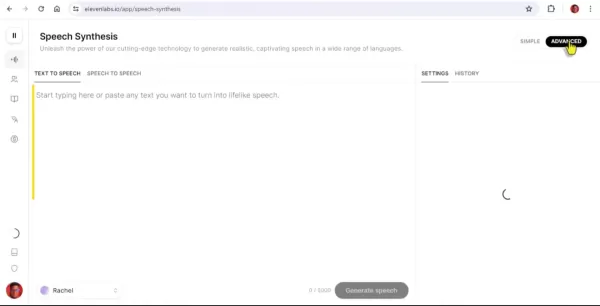
Voice Selection: Click on the voice options to choose a pre-made voice or create a new one.
Adjust Settings: Modify parameters like stability, similarity, and style exaggeration to match your preference.
Generate Speech: Click 'Generate' to create the AI voice.
Review and Adjust: Listen to the generated speech and tweak settings until you’re satisfied.
When creating a new voice, you have several options to tailor it to your needs. Start by adjusting basic parameters like pitch, tone, and style. These settings help you create a voice that matches your brand's personality and target audience.
For example, if your content targets a younger audience, you might prefer a higher pitch and casual tone. Conversely, for a professional audience, a lower pitch and formal tone may be more appropriate.
Beyond basic parameters, you can upload audio samples to train the AI model. This feature is particularly useful for creating highly personalized and realistic AI voices. By uploading samples of your own voice or someone else's, you can create an AI voice that closely mimics the original.
As you experiment with different settings and samples, you can fine-tune your AI voice to perfection. The platform provides real-time feedback, letting you hear changes instantly. This iterative process ensures you end up with an AI voice that truly represents you or your brand.
Eleven Labs Pricing Plans
Overview of Available Plans
Eleven Labs offers several pricing plans to meet different user needs. Understanding these plans can help you select the best option for your content creation goals. Each plan provides varying levels of feature access, usage limits, and support. Here’s a summary of the available plans:
- Free Plan: This plan is ideal for testing the platform and exploring basic features. It includes a limited number of characters per month, access to pre-made voices, and basic support. The Free Plan is perfect for hobbyists and individuals new to AI voice creation.
- Starter Plan: Priced at $5 per month, the Starter Plan offers more characters than the Free Plan and includes advanced features like voice cloning and custom voice creation. This plan suits content creators and small businesses needing more flexibility and control over their AI voices.
- Creator Plan: The Creator Plan, priced at $22 per month, provides even more characters per month and includes priority support. This plan is designed for professional content creators who require high reliability and support.
- Independent Publisher Plan: At $99 per month, this plan caters to independent publishers producing large volumes of content with unique voices. It offers a generous character allowance and enhanced features.
- Business Plan: Priced at $330 per month, the Business Plan includes unlimited characters per month, access to all features, and dedicated support. This plan is tailored for large businesses and organizations needing a comprehensive AI voice solution.
- Enterprise Plan: The Enterprise Plan is a custom solution for organizations with specific needs. It includes tailored features, dedicated support, and flexible pricing. For more details, contact Eleven Labs directly.
Each plan is designed to accommodate different needs and budgets, so evaluate your requirements carefully before deciding.
Features Included in Each Plan
Each Eleven Labs pricing plan includes a specific set of features. Here’s a detailed look at what each plan offers:
Plan Price Characters per Month Voice Cloning Custom Voice Creation Priority Support Dedicated Support Free $0 Limited No No No No Starter $5 More than Free Yes Yes No No Creator $22 More than Starter Yes Yes Yes No Independent Publisher $99 High Yes Yes Yes No Business $330 Unlimited Yes Yes Yes Yes Enterprise Custom Custom Yes Yes Yes Yes
The Free Plan offers a basic introduction to the platform, allowing you to experiment with text-to-speech conversion and pre-made voices. It's a great way to test the tool before committing to a paid subscription.
The Starter Plan unlocks advanced features like voice cloning and custom voice creation. This plan is ideal for content creators who want more control over their AI voices. It also provides a higher character limit, enabling more content production each month.
The Creator Plan is designed for professional content creators who need high reliability and support. This plan offers even more characters per month and includes priority support to ensure timely assistance.
The Independent Publisher Plan caters to independent publishers who produce large volumes of content with unique voices. It offers a generous character allowance and enhanced features to streamline your workflow.
The Business Plan provides unlimited characters per month, making it ideal for large businesses and organizations needing a comprehensive AI voice solution. This plan includes all features and dedicated support to meet your needs.
The Enterprise Plan is a custom solution for organizations with specific requirements. It offers tailored features, dedicated support, and flexible pricing to address your unique challenges.
Pros and Cons of Using Eleven Labs
Pros
High-quality text-to-speech conversion
Voice cloning and customization options
Multilingual support
Versatile use cases
Multiple pricing plans
Cons
Subscription required for advanced features
Character limits on lower-tier plans
Advanced customization options can be challenging to master
Core Features of Eleven Labs
Text-to-Speech Conversion
Eleven Labs excels at text-to-speech conversion. This core feature transforms written text into natural-sounding speech. The platform supports multiple languages, making it versatile for global creators. With advanced algorithms, Eleven Labs ensures the generated speech is engaging and lifelike.
The text-to-speech feature is highly customizable. You can adjust parameters like pitch, tone, and style to match your brand's personality. The platform also supports SSML (Speech Synthesis Markup Language), allowing precise control over speech output.
Eleven Labs' text-to-speech conversion is both accurate and expressive. The AI model can convey emotions and nuances, making the speech more captivating. This feature is particularly useful for creating audiobooks, podcasts, and video voice-overs.
Voice Cloning and Customization
Voice cloning is another standout feature of Eleven Labs. It allows you to create an AI voice that mimics your own voice or someone else's. By uploading audio samples, you can train the AI model to replicate unique vocal characteristics. The voice cloning feature is highly accurate, capturing nuances like accent, intonation, and rhythm.
In addition to voice cloning, Eleven Labs offers extensive customization options. You can adjust parameters such as stability, similarity, and style exaggeration to perfect the AI voice. These settings help you create a voice that is both realistic and expressive.
Voice cloning and customization are especially useful for personalized content. Whether you want an AI voice that sounds like you or a fictional character, Eleven Labs provides the tools to bring your vision to life.
Multilingual Support
Eleven Labs supports multiple languages, making it a versatile tool for creators worldwide. The platform can convert text to speech in various languages, helping you reach a global audience. With multilingual support, you can create content that resonates with people from different cultures and backgrounds.
The multilingual support feature is both comprehensive and accurate. Eleven Labs uses advanced machine learning algorithms to ensure natural and fluent speech in each language. This is particularly useful for creating multilingual audiobooks, podcasts, and video voice-overs.
Eleven Labs' multilingual support extends beyond text-to-speech conversion. The platform also offers voice cloning and customization in multiple languages, allowing you to create personalized AI voices for different regions. This is especially beneficial for businesses looking to expand their reach and connect with customers globally.
Use Cases for Eleven Labs
Content Creation for YouTube
Eleven Labs is an excellent tool for YouTube content creation. With its text-to-speech conversion, voice cloning, and customization features, you can produce high-quality voice-overs for your videos. Whether you're creating tutorials, reviews, or storytelling content, Eleven Labs helps you create engaging and professional videos.
The platform's text-to-speech feature lets you quickly generate voice-overs for your videos. Simply type or paste the text you want converted to speech, and Eleven Labs handles the rest. This is especially useful for videos requiring extensive narration.
The voice cloning feature allows you to create an AI voice that sounds like you or a fictional character. You can use this to create unique and personalized voice-overs, making your videos more engaging and memorable.
The customization features let you fine-tune the AI voice to perfection. You can adjust parameters like pitch, tone, and style to create a voice that matches your brand's personality. This is particularly useful for maintaining a consistent tone and style across your videos.
Social Media Content
Eleven Labs is also a versatile tool for social media content. With its text-to-speech conversion, voice cloning, and customization features, you can create professional and engaging audio content for social media platforms. This includes short promotional videos, explainer clips, and more.
Eleven Labs simplifies audio creation for social media, allowing you to quickly generate attention-grabbing voice-overs. The text-to-speech feature converts written content into spoken words effortlessly, ideal for quick updates or audio-based posts.
Voice cloning lets you create an AI persona that represents your brand, ensuring consistency across all social media channels. This feature helps your content stand out by maintaining a recognizable brand voice.
Customization options further enhance your social media content. By adjusting pitch, tone, and style, you can tailor the voice to suit your message. This is great for adapting your voice to different platforms and audiences.
E-Learning Materials
Eleven Labs is an excellent resource for developing e-learning materials. With its text-to-speech and voice cloning capabilities, you can create audio courses, instructional videos, and interactive tutorials that are both informative and engaging. The platform ensures educational content is delivered clearly and consistently.
Creating engaging e-learning materials is easier with Eleven Labs' text-to-speech feature, which converts written scripts into natural-sounding audio quickly. This is essential for providing learners with a comprehensive auditory experience.
The voice cloning feature allows you to maintain a consistent character throughout your e-learning materials, ensuring a uniform tone and style. You can clone your own voice or develop a unique voice that represents your educational brand.
By adjusting settings like style exaggeration, you can emphasize key points and create a more captivating learning experience. This lets you tailor the tone and emphasis to the subject matter, helping students retain information more effectively.
Frequently Asked Questions
What is Eleven Labs?
Eleven Labs is an AI-powered platform that enables you to create unique voices for various applications. The platform supports text-to-speech conversion, voice cloning, and customization, making it a versatile tool for content creators, businesses, and individuals. With Eleven Labs, you can create voices that match your brand's personality and reach a global audience.
How much does Eleven Labs cost?
Eleven Labs offers a range of pricing plans to suit different needs and budgets. The Free Plan is available at no cost with limited feature access. The Starter Plan is $5 per month, and the Creator Plan is $22 per month. Other plans, like the Independent Publisher and Business Plans, are $99 and $330 per month, respectively. The Enterprise Plan is a custom solution with tailored features and flexible pricing.
Can I use Eleven Labs for commercial purposes?
Yes, you can use Eleven Labs for commercial purposes, depending on your chosen plan. The Starter, Creator, Independent Publisher, Business, and Enterprise Plans all permit commercial use. However, the Free Plan has restrictions on commercial use, so review the terms and conditions before using it for business.
Related Questions
What are some other AI voice tools?
Several other AI voice tools are available, each with unique strengths and weaknesses. Popular alternatives to Eleven Labs include: Murf AI: A versatile AI voice generator offering text-to-speech conversion, voice cloning, and customization. Known for high-quality voices and a user-friendly interface, Murf AI supports multiple languages, making it a great choice for global creators. Descript: A powerful audio and video editing tool with AI voice generation capabilities. It lets you create realistic AI voices for editing projects. Descript also includes transcription, screen recording, and collaboration tools, offering a comprehensive solution for content creators. Lovo AI: An AI voice generator with text-to-speech conversion, voice cloning, and customization options. Known for natural-sounding voices and affordable pricing, Lovo AI supports multiple languages, making it suitable for global creators. Synthesia: An AI video creation platform that lets you create realistic AI avatars for videos. It also includes AI voice generation, allowing you to produce complete AI videos with visual and audio elements. Synthesia is ideal for businesses and organizations creating engaging professional video content. WellSaid Labs: An AI voice generator focused on lifelike voices for commercial use. It offers text-to-speech conversion, voice cloning, and customization. WellSaid Labs is known for high-quality voices and customer support, making it a great choice for businesses and organizations needing reliable AI voice solutions.
Related article
 Swedish AI Startup Lovable Eyes $13.2 Billion Valuation After Major Funding Round
As AI-driven coding tools gain traction, Swedish startup Lovable has secured a major funding round. The company aims to raise $3 billion, potentially boosting its valuation to $13.2 billion—double the $6.6 billion recorded last December. Menlo Ventur
Google Tests Remy AI Agent for Gemini as Focus Shifts to User Control
According to Business Insider, Google is testing Remy, a new AI personal agent for Gemini. This tool aims to execute tasks on behalf of users, streamlining both professional workflows and daily routines.Currently, Remy is undergoing testing in an int
How to fix Core Web Vitals for better SEO rankings
Streamline Report Card Comments with AI ToolsIntroductionAI Tools for Generating Report Card CommentsMagic SchoolAlmanac AIChat GPTUsing Magic School to Generate Report Card CommentsLogging into Magic SchoolSelecting the Report Card Comments ToolCust
Related Special Topic Recommendations
writing
Swedish AI Startup Lovable Eyes $13.2 Billion Valuation After Major Funding Round
As AI-driven coding tools gain traction, Swedish startup Lovable has secured a major funding round. The company aims to raise $3 billion, potentially boosting its valuation to $13.2 billion—double the $6.6 billion recorded last December. Menlo Ventur
Google Tests Remy AI Agent for Gemini as Focus Shifts to User Control
According to Business Insider, Google is testing Remy, a new AI personal agent for Gemini. This tool aims to execute tasks on behalf of users, streamlining both professional workflows and daily routines.Currently, Remy is undergoing testing in an int
How to fix Core Web Vitals for better SEO rankings
Streamline Report Card Comments with AI ToolsIntroductionAI Tools for Generating Report Card CommentsMagic SchoolAlmanac AIChat GPTUsing Magic School to Generate Report Card CommentsLogging into Magic SchoolSelecting the Report Card Comments ToolCust
Related Special Topic Recommendations
writing
 Best AI Outline Generators for Long-Form SEO Articles
2026 Latest Best Top-Rated AI Outline Generators for Long-Form SEO Articles, meticulously curated by XIX.AI. These powerful tools offer game-changing assistance in creating high-quality content quickly, boosting writing efficiency significantly. Get a free vs paid comparison along with real-world tests and detailed rankings to help you find the must-try option that suits your needs. Explore now to unlock your AI edge.
 8 tools
 xix.ai
Education and Learning
AI Study Tools for Homework and Exam Prep
xix.ai
Education and Learning
AI Study Tools for Homework and Exam Prep
2026 Latest Best AI Study Tools for Homework and Exam Prep! XIX.AI curates a top-rated list of powerful, game-changing tools that help students boost productivity, streamline homework completion, and ace exams through real-world tests. Get a free vs paid comparison, detailed rankings, and must-try options to unlock your AI edge. Explore now!
10 tools
xix.ai
Music composition
AI Vocal Demo Tools for Songwriters, Hooks, Toplines, and Multilingual Draft Sessions
2026 Latest Best AI Vocal Demo Tools for Songwriters, Hook Creators, and Multi-Language Content Teams! XIX.AI has curated a top-rated list of powerful game-changing tools that go through rigorous real-world tests. You’ll find detailed free vs paid comparison data, comprehensive rankings, and must-try options to help you boost writing efficiency and unlock your creative potential. Explore now to discover your perfect tool for all your content needs!
9 tools
xix.ai
Business
Best AI Competitive Research Tools for Small Businesses
2026 Latest Best Top-rated AI Competitive Research Tools for Small Businesses! XIX.AI has curated a highly powerful game-changing collection, updated weekly with rigorous real-world tests and detailed rankings. You can find a comprehensive free vs paid comparison to help you identify the must-try tools that boost your productivity and give you a competitive edge. Explore now to discover your perfect tool!
9 tools
xix.ai
Image editing
Photoshop AI Retouch Tools for Ecommerce Apparel, Skin Cleanup, and Color Consistency
2026 Latest Best Photoshop AI retouch tools for ecommerce apparel, skin cleanup, and color consistency! This top-rated curated list features powerful game-changing solutions that help you boost writing efficiency, streamline content creation, and achieve perfect visual results effortlessly. Each tool has undergone real-world tests through weekly updated rankings, complete with free vs paid comparison details. Backed by XIX.AI, it’s the must-try guide for anyone aiming to unlock your AI edge. Explore now!
10 tools
xix.ai
Prompt
Best AI Prompt Libraries for ChatGPT Workflows
2026 Latest Best Top-Rated AI Prompt Libraries for optimizing all types of ChatGPT workflows. XIX.AI has curated a powerful, game-changing collection that goes through rigorous real-world tests to ensure top performance. You can find detailed free vs paid comparisons and expert rankings to help you choose the must-try tools that boost your productivity and unlock your AI edge. Explore now!
11 tools
xix.ai

 Comments (0)
0/500
Comments (0)
0/500
Looking to design a unique AI voice that perfectly captures your desired sound? This guide walks you through crafting your own AI voice using Eleven Labs, a free and powerful tool. Whether you're producing content for YouTube, social media, or other channels, a custom AI voice can bring a distinctive flair to your work. Let's explore how you can easily create your own AI voice.
Key Points
Learn how to build a unique AI voice at no cost.
Explore the Eleven Labs tool for AI voice generation.
Follow the steps to customize an AI voice to your preferences.
See how top channels effectively use AI voices.
Understand the advantages of using AI voices for content production.
Introduction to Creating Unique AI Voices
Why Create Your Own AI Voice?
In today's digital world, a unique voice is essential for branding and content creation. AI voices provide a solution, enabling you to develop a persona that captures attention. Imagine a voice that aligns perfectly with your brand's tone, style, and messaging. Thanks to AI technology, this is now achievable, simplifying the process of producing consistent and compelling content. Creating an AI voice involves tailoring it to your specific requirements. Whether you need a formal tone for business or a relaxed style for social media, the options are limitless.
Advances in artificial intelligence have made generating unique voices more accessible and user-friendly than ever. You no longer require costly equipment or specialized expertise. With the right tools and some creativity, you can develop an AI voice that authentically represents you or your brand.
Many content creators and businesses are already using AI voices to elevate their content. By automating narration, they save time and resources while maintaining consistent, high-quality results. This method not only boosts efficiency but also creates new opportunities for creative expression and branding.
Popular Channels Using AI Voices
Many popular channels have integrated AI voices to improve their content and streamline production. Channels such as 10X Income, AI Alert, and Grow With Kaz are excellent examples. By using AI technology, these channels create engaging content more efficiently while maintaining a consistent tone.
AI voices enable these channels to produce videos faster without compromising quality. This is especially useful for channels that require frequent content updates to keep their audience engaged. Additionally, AI voices offer unique branding opportunities. By customizing the voice to fit the channel's theme, creators can strengthen their identity and deliver a memorable viewer experience.
For instance, 10X Income often uses AI voices to narrate tutorials and investment tips. The voice ensures clear and consistent delivery, making complex subjects more approachable. Similarly, AI Alert employs AI voices to discuss the newest trends in artificial intelligence, maintaining an authoritative and engaging tone.
Grow With Kaz uses AI voices to share advice on personal finance and entrepreneurship. The voice adds professionalism and clarity to the content, helping viewers understand key financial concepts more easily. By studying how these channels use AI voices, you can gather ideas and practical strategies for integrating this technology into your own content creation.
Benefits of Using AI Voices for Content Creation
Using AI voices for content creation offers numerous advantages, including:
- Efficiency: AI voices can greatly accelerate content creation by automating narration and voice-over tasks.
- Cost-Effectiveness: Compared to hiring voice actors, AI voices are often more affordable, particularly for small businesses and independent creators.
- Consistency: AI voices maintain a uniform tone and style across all your content, reinforcing your brand identity.
- Scalability: AI voices make it easier to expand your content production, allowing you to create more videos, podcasts, or audiobooks in less time.
- Customization: You can adapt AI voices to meet your specific needs, whether you require a professional tone for business or a casual style for social media.
Given these benefits, it's no surprise that AI voices are growing in popularity among content creators and businesses seeking to enhance their output and reach broader audiences.
Step-by-Step Guide to Creating Your AI Voice with Eleven Labs
Getting Started with Eleven Labs
To start creating your AI voice, you'll need to sign up for an account on Eleven Labs. This platform offers the tools and resources necessary to design a unique and personalized voice. Begin by visiting the Eleven Labs website. You'll find a simple sign-up process. Account creation is free, though some advanced features may require a subscription. After signing up, spend some time exploring the interface. Get to know the various options and settings, as this will help you refine your AI voice to perfection. The interface is user-friendly, so navigation should be straightforward.
Once logged in, you'll see a clean and intuitive dashboard. From here, you can access features like Text-to-Speech conversion, Voice Cloning, and voice customization. The platform supports multiple languages, making it suitable for creators around the world.
Eleven Labs provides several pre-made voices to help you get started. Experiment with these to understand the tool's capabilities. However, the true potential emerges when you begin customizing your own voice. You can adjust parameters such as pitch, tone, and style to create something entirely unique. The platform also lets you upload audio samples, which can train the AI model to mimic your voice or someone else's. This feature is especially useful for creating highly personalized and realistic AI voices.
As you become more familiar with the tool, explore advanced settings to further refine your voice. This includes adjusting voice stability and clarity, as well as adding stylistic elements for greater expressiveness. By experimenting with these settings, you can achieve a level of realism that rivals professional voice actors.
Navigating the Eleven Labs Interface
After signing up, it's important to understand the Eleven Labs interface.
Here are key sections to familiarize yourself with:
- Text-to-Speech: This is where you input the text you want the AI to speak.
- Voice Settings: Adjust parameters like stability, similarity, and style exaggeration.
- Voice Selection: Choose from pre-made voices or create your own.
- History: Review your past creations and experiments.
The text-to-speech section is the core of the platform. Here, you can type or paste any text you wish to convert into speech. The platform supports a wide range of languages, making it versatile for global creators. You can also upload text files directly, saving time and effort.
In the voice settings section, you can fine-tune your AI voice's characteristics. The stability parameter controls voice consistency, while similarity determines how closely the AI voice matches a reference voice. Style exaggeration lets you add emphasis and emotion for a more expressive voice.
The voice selection section is where you choose from various pre-made voices or create your own. Eleven Labs offers a diverse library of voices, each with unique traits. You can browse these and select one that fits your needs. Alternatively, you can create a custom voice by adjusting the parameters mentioned earlier or by uploading audio samples.
The history section provides an easy way to review your past creations. You can quickly access and reuse previously generated audio files, saving time. This section also helps you track your experiments and refine your AI voice over time.
Customizing Your AI Voice
Customizing your AI voice is where you can truly make it your own. Follow these steps to personalize your AI voice:
Text Input: Type or paste the text you want to convert to speech.
Voice Selection: Click on the voice options to choose a pre-made voice or create a new one.
Adjust Settings: Modify parameters like stability, similarity, and style exaggeration to match your preference.
Generate Speech: Click 'Generate' to create the AI voice.
Review and Adjust: Listen to the generated speech and tweak settings until you’re satisfied.
When creating a new voice, you have several options to tailor it to your needs. Start by adjusting basic parameters like pitch, tone, and style. These settings help you create a voice that matches your brand's personality and target audience.
For example, if your content targets a younger audience, you might prefer a higher pitch and casual tone. Conversely, for a professional audience, a lower pitch and formal tone may be more appropriate.
Beyond basic parameters, you can upload audio samples to train the AI model. This feature is particularly useful for creating highly personalized and realistic AI voices. By uploading samples of your own voice or someone else's, you can create an AI voice that closely mimics the original.
As you experiment with different settings and samples, you can fine-tune your AI voice to perfection. The platform provides real-time feedback, letting you hear changes instantly. This iterative process ensures you end up with an AI voice that truly represents you or your brand.
Eleven Labs Pricing Plans
Overview of Available Plans
Eleven Labs offers several pricing plans to meet different user needs. Understanding these plans can help you select the best option for your content creation goals. Each plan provides varying levels of feature access, usage limits, and support. Here’s a summary of the available plans:
- Free Plan: This plan is ideal for testing the platform and exploring basic features. It includes a limited number of characters per month, access to pre-made voices, and basic support. The Free Plan is perfect for hobbyists and individuals new to AI voice creation.
- Starter Plan: Priced at $5 per month, the Starter Plan offers more characters than the Free Plan and includes advanced features like voice cloning and custom voice creation. This plan suits content creators and small businesses needing more flexibility and control over their AI voices.
- Creator Plan: The Creator Plan, priced at $22 per month, provides even more characters per month and includes priority support. This plan is designed for professional content creators who require high reliability and support.
- Independent Publisher Plan: At $99 per month, this plan caters to independent publishers producing large volumes of content with unique voices. It offers a generous character allowance and enhanced features.
- Business Plan: Priced at $330 per month, the Business Plan includes unlimited characters per month, access to all features, and dedicated support. This plan is tailored for large businesses and organizations needing a comprehensive AI voice solution.
- Enterprise Plan: The Enterprise Plan is a custom solution for organizations with specific needs. It includes tailored features, dedicated support, and flexible pricing. For more details, contact Eleven Labs directly.
Each plan is designed to accommodate different needs and budgets, so evaluate your requirements carefully before deciding.
Features Included in Each Plan
Each Eleven Labs pricing plan includes a specific set of features. Here’s a detailed look at what each plan offers:
| Plan | Price | Characters per Month | Voice Cloning | Custom Voice Creation | Priority Support | Dedicated Support |
|---|---|---|---|---|---|---|
| Free | $0 | Limited | No | No | No | No |
| Starter | $5 | More than Free | Yes | Yes | No | No |
| Creator | $22 | More than Starter | Yes | Yes | Yes | No |
| Independent Publisher | $99 | High | Yes | Yes | Yes | No |
| Business | $330 | Unlimited | Yes | Yes | Yes | Yes |
| Enterprise | Custom | Custom | Yes | Yes | Yes | Yes |
The Free Plan offers a basic introduction to the platform, allowing you to experiment with text-to-speech conversion and pre-made voices. It's a great way to test the tool before committing to a paid subscription.
The Starter Plan unlocks advanced features like voice cloning and custom voice creation. This plan is ideal for content creators who want more control over their AI voices. It also provides a higher character limit, enabling more content production each month.
The Creator Plan is designed for professional content creators who need high reliability and support. This plan offers even more characters per month and includes priority support to ensure timely assistance.
The Independent Publisher Plan caters to independent publishers who produce large volumes of content with unique voices. It offers a generous character allowance and enhanced features to streamline your workflow.
The Business Plan provides unlimited characters per month, making it ideal for large businesses and organizations needing a comprehensive AI voice solution. This plan includes all features and dedicated support to meet your needs.
The Enterprise Plan is a custom solution for organizations with specific requirements. It offers tailored features, dedicated support, and flexible pricing to address your unique challenges.
Pros and Cons of Using Eleven Labs
Pros
High-quality text-to-speech conversion
Voice cloning and customization options
Multilingual support
Versatile use cases
Multiple pricing plans
Cons
Subscription required for advanced features
Character limits on lower-tier plans
Advanced customization options can be challenging to master
Core Features of Eleven Labs
Text-to-Speech Conversion
Eleven Labs excels at text-to-speech conversion. This core feature transforms written text into natural-sounding speech. The platform supports multiple languages, making it versatile for global creators. With advanced algorithms, Eleven Labs ensures the generated speech is engaging and lifelike.
The text-to-speech feature is highly customizable. You can adjust parameters like pitch, tone, and style to match your brand's personality. The platform also supports SSML (Speech Synthesis Markup Language), allowing precise control over speech output.
Eleven Labs' text-to-speech conversion is both accurate and expressive. The AI model can convey emotions and nuances, making the speech more captivating. This feature is particularly useful for creating audiobooks, podcasts, and video voice-overs.
Voice Cloning and Customization
Voice cloning is another standout feature of Eleven Labs. It allows you to create an AI voice that mimics your own voice or someone else's. By uploading audio samples, you can train the AI model to replicate unique vocal characteristics. The voice cloning feature is highly accurate, capturing nuances like accent, intonation, and rhythm.
In addition to voice cloning, Eleven Labs offers extensive customization options. You can adjust parameters such as stability, similarity, and style exaggeration to perfect the AI voice. These settings help you create a voice that is both realistic and expressive.
Voice cloning and customization are especially useful for personalized content. Whether you want an AI voice that sounds like you or a fictional character, Eleven Labs provides the tools to bring your vision to life.
Multilingual Support
Eleven Labs supports multiple languages, making it a versatile tool for creators worldwide. The platform can convert text to speech in various languages, helping you reach a global audience. With multilingual support, you can create content that resonates with people from different cultures and backgrounds.
The multilingual support feature is both comprehensive and accurate. Eleven Labs uses advanced machine learning algorithms to ensure natural and fluent speech in each language. This is particularly useful for creating multilingual audiobooks, podcasts, and video voice-overs.
Eleven Labs' multilingual support extends beyond text-to-speech conversion. The platform also offers voice cloning and customization in multiple languages, allowing you to create personalized AI voices for different regions. This is especially beneficial for businesses looking to expand their reach and connect with customers globally.
Use Cases for Eleven Labs
Content Creation for YouTube
Eleven Labs is an excellent tool for YouTube content creation. With its text-to-speech conversion, voice cloning, and customization features, you can produce high-quality voice-overs for your videos. Whether you're creating tutorials, reviews, or storytelling content, Eleven Labs helps you create engaging and professional videos.
The platform's text-to-speech feature lets you quickly generate voice-overs for your videos. Simply type or paste the text you want converted to speech, and Eleven Labs handles the rest. This is especially useful for videos requiring extensive narration.
The voice cloning feature allows you to create an AI voice that sounds like you or a fictional character. You can use this to create unique and personalized voice-overs, making your videos more engaging and memorable.
The customization features let you fine-tune the AI voice to perfection. You can adjust parameters like pitch, tone, and style to create a voice that matches your brand's personality. This is particularly useful for maintaining a consistent tone and style across your videos.
Social Media Content
Eleven Labs is also a versatile tool for social media content. With its text-to-speech conversion, voice cloning, and customization features, you can create professional and engaging audio content for social media platforms. This includes short promotional videos, explainer clips, and more.
Eleven Labs simplifies audio creation for social media, allowing you to quickly generate attention-grabbing voice-overs. The text-to-speech feature converts written content into spoken words effortlessly, ideal for quick updates or audio-based posts.
Voice cloning lets you create an AI persona that represents your brand, ensuring consistency across all social media channels. This feature helps your content stand out by maintaining a recognizable brand voice.
Customization options further enhance your social media content. By adjusting pitch, tone, and style, you can tailor the voice to suit your message. This is great for adapting your voice to different platforms and audiences.
E-Learning Materials
Eleven Labs is an excellent resource for developing e-learning materials. With its text-to-speech and voice cloning capabilities, you can create audio courses, instructional videos, and interactive tutorials that are both informative and engaging. The platform ensures educational content is delivered clearly and consistently.
Creating engaging e-learning materials is easier with Eleven Labs' text-to-speech feature, which converts written scripts into natural-sounding audio quickly. This is essential for providing learners with a comprehensive auditory experience.
The voice cloning feature allows you to maintain a consistent character throughout your e-learning materials, ensuring a uniform tone and style. You can clone your own voice or develop a unique voice that represents your educational brand.
By adjusting settings like style exaggeration, you can emphasize key points and create a more captivating learning experience. This lets you tailor the tone and emphasis to the subject matter, helping students retain information more effectively.
Frequently Asked Questions
What is Eleven Labs?
Eleven Labs is an AI-powered platform that enables you to create unique voices for various applications. The platform supports text-to-speech conversion, voice cloning, and customization, making it a versatile tool for content creators, businesses, and individuals. With Eleven Labs, you can create voices that match your brand's personality and reach a global audience.
How much does Eleven Labs cost?
Eleven Labs offers a range of pricing plans to suit different needs and budgets. The Free Plan is available at no cost with limited feature access. The Starter Plan is $5 per month, and the Creator Plan is $22 per month. Other plans, like the Independent Publisher and Business Plans, are $99 and $330 per month, respectively. The Enterprise Plan is a custom solution with tailored features and flexible pricing.
Can I use Eleven Labs for commercial purposes?
Yes, you can use Eleven Labs for commercial purposes, depending on your chosen plan. The Starter, Creator, Independent Publisher, Business, and Enterprise Plans all permit commercial use. However, the Free Plan has restrictions on commercial use, so review the terms and conditions before using it for business.
Related Questions
What are some other AI voice tools?
Several other AI voice tools are available, each with unique strengths and weaknesses. Popular alternatives to Eleven Labs include: Murf AI: A versatile AI voice generator offering text-to-speech conversion, voice cloning, and customization. Known for high-quality voices and a user-friendly interface, Murf AI supports multiple languages, making it a great choice for global creators. Descript: A powerful audio and video editing tool with AI voice generation capabilities. It lets you create realistic AI voices for editing projects. Descript also includes transcription, screen recording, and collaboration tools, offering a comprehensive solution for content creators. Lovo AI: An AI voice generator with text-to-speech conversion, voice cloning, and customization options. Known for natural-sounding voices and affordable pricing, Lovo AI supports multiple languages, making it suitable for global creators. Synthesia: An AI video creation platform that lets you create realistic AI avatars for videos. It also includes AI voice generation, allowing you to produce complete AI videos with visual and audio elements. Synthesia is ideal for businesses and organizations creating engaging professional video content. WellSaid Labs: An AI voice generator focused on lifelike voices for commercial use. It offers text-to-speech conversion, voice cloning, and customization. WellSaid Labs is known for high-quality voices and customer support, making it a great choice for businesses and organizations needing reliable AI voice solutions.








 Swedish AI Startup Lovable Eyes $13.2 Billion Valuation After Major Funding Round
As AI-driven coding tools gain traction, Swedish startup Lovable has secured a major funding round. The company aims to raise $3 billion, potentially boosting its valuation to $13.2 billion—double the $6.6 billion recorded last December. Menlo Ventur
Google Tests Remy AI Agent for Gemini as Focus Shifts to User Control
According to Business Insider, Google is testing Remy, a new AI personal agent for Gemini. This tool aims to execute tasks on behalf of users, streamlining both professional workflows and daily routines.Currently, Remy is undergoing testing in an int
Swedish AI Startup Lovable Eyes $13.2 Billion Valuation After Major Funding Round
As AI-driven coding tools gain traction, Swedish startup Lovable has secured a major funding round. The company aims to raise $3 billion, potentially boosting its valuation to $13.2 billion—double the $6.6 billion recorded last December. Menlo Ventur
Google Tests Remy AI Agent for Gemini as Focus Shifts to User Control
According to Business Insider, Google is testing Remy, a new AI personal agent for Gemini. This tool aims to execute tasks on behalf of users, streamlining both professional workflows and daily routines.Currently, Remy is undergoing testing in an int
 How to fix Core Web Vitals for better SEO rankings
Streamline Report Card Comments with AI ToolsIntroductionAI Tools for Generating Report Card CommentsMagic SchoolAlmanac AIChat GPTUsing Magic School to Generate Report Card CommentsLogging into Magic SchoolSelecting the Report Card Comments ToolCust
How to fix Core Web Vitals for better SEO rankings
Streamline Report Card Comments with AI ToolsIntroductionAI Tools for Generating Report Card CommentsMagic SchoolAlmanac AIChat GPTUsing Magic School to Generate Report Card CommentsLogging into Magic SchoolSelecting the Report Card Comments ToolCust

2026 Latest Best Top-Rated AI Outline Generators for Long-Form SEO Articles, meticulously curated by XIX.AI. These powerful tools offer game-changing assistance in creating high-quality content quickly, boosting writing efficiency significantly. Get a free vs paid comparison along with real-world tests and detailed rankings to help you find the must-try option that suits your needs. Explore now to unlock your AI edge.
8 tools
xix.ai

2026 Latest Best AI Study Tools for Homework and Exam Prep! XIX.AI curates a top-rated list of powerful, game-changing tools that help students boost productivity, streamline homework completion, and ace exams through real-world tests. Get a free vs paid comparison, detailed rankings, and must-try options to unlock your AI edge. Explore now!
10 tools
xix.ai

2026 Latest Best AI Vocal Demo Tools for Songwriters, Hook Creators, and Multi-Language Content Teams! XIX.AI has curated a top-rated list of powerful game-changing tools that go through rigorous real-world tests. You’ll find detailed free vs paid comparison data, comprehensive rankings, and must-try options to help you boost writing efficiency and unlock your creative potential. Explore now to discover your perfect tool for all your content needs!
9 tools
xix.ai

2026 Latest Best Top-rated AI Competitive Research Tools for Small Businesses! XIX.AI has curated a highly powerful game-changing collection, updated weekly with rigorous real-world tests and detailed rankings. You can find a comprehensive free vs paid comparison to help you identify the must-try tools that boost your productivity and give you a competitive edge. Explore now to discover your perfect tool!
9 tools
xix.ai

2026 Latest Best Photoshop AI retouch tools for ecommerce apparel, skin cleanup, and color consistency! This top-rated curated list features powerful game-changing solutions that help you boost writing efficiency, streamline content creation, and achieve perfect visual results effortlessly. Each tool has undergone real-world tests through weekly updated rankings, complete with free vs paid comparison details. Backed by XIX.AI, it’s the must-try guide for anyone aiming to unlock your AI edge. Explore now!
10 tools
xix.ai

2026 Latest Best Top-Rated AI Prompt Libraries for optimizing all types of ChatGPT workflows. XIX.AI has curated a powerful, game-changing collection that goes through rigorous real-world tests to ensure top performance. You can find detailed free vs paid comparisons and expert rankings to help you choose the must-try tools that boost your productivity and unlock your AI edge. Explore now!
11 tools
xix.ai












