


 Home
HomeMidjourney V6 Tutorial: How to Create AI Album Art
In today's music industry, visual presentation is more crucial than ever. A captivating album cover can determine whether a song gets noticed or fades into the background. While hiring a professional artist is the preferred choice, it's often not a practical option for independent musicians. This guide explores how to use Midjourney AI V6 to design professional-grade album artwork on a limited budget, including tips for enhancing the final output with free tools like GIMP.
Key Takeaways
Learn to generate compelling album artwork using Midjourney AI V6.
Understand the essentials of getting started with Midjourney, including subscription plans.
Develop the skill of writing effective prompts to achieve your desired visual results.
Review sample album covers created with Midjourney.
Discover techniques for polishing AI-generated artwork using free editing software like GIMP.
Prepare your album art to attract more attention from music blogs and playlist curators.
Unlocking AI-Powered Album Art Creation
The Musician's Dilemma: Art on a Budget
For artists releasing new music, album art plays a vital role. An engaging cover sparks curiosity and can result in more streams, downloads, and a growing fan base. However, many up-and-coming and independent musicians work with limited financial resources. Commissioning a talented artist for custom work represents a major investment, often comparable to costs for audio mastering or other crucial promotional efforts.
This situation forces many musicians to seek affordable alternatives. AI image generation has become a formidable solution, making high-quality visuals accessible to all and serving as a creative resource for artists with budgetary constraints.
This article details how musicians can harness the capabilities of Midjourney AI V6 to produce attention-grabbing album covers. We'll walk through the entire process, from setting up a Midjourney account and formulating powerful prompts to presenting real-life examples and refining your AI art with free software.
Getting Started with Midjourney: Subscriptions and Discord
Your first step toward creating AI-powered album art is to sign up for a Midjourney subscription.
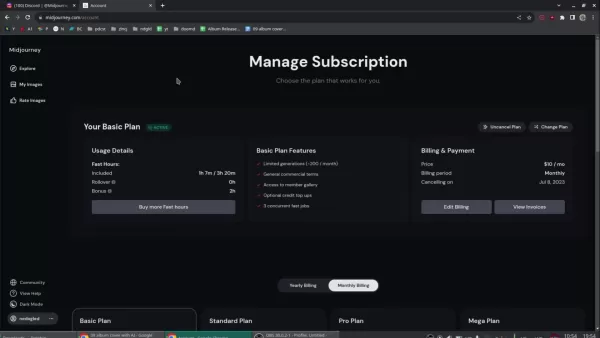
Although free trials might be offered periodically, a paid subscription provides greater functionality and image creation capacity. Here is an outline of the common subscription tiers:
Plan Price (Monthly) Features Image Generations (Approx.) Basic Plan $10 Limited generations, Access to member gallery, 3 concurrent fast jobs ~200 Standard Plan $30 Unlimited relaxed generations, Access to member gallery, Optional credit top-ups, 3 concurrent fast jobs Unlimited Pro Plan $60 Unlimited fast generations, Stealth image generation, Optional credit top-ups, 12 concurrent fast jobs Unlimited Mega Plan $120 Unlimited relaxed generations, Stealth image generation, Optional credit top-ups, 12 concurrent fast jobs Unlimited
The Basic Plan is typically adequate for creating album art, offering sufficient generations to test and refine concepts. If you expect to generate a larger volume of images or require stealth generation, consider the Standard Plan or higher. The Basic Plan provides approximately 200 image generations, which is usually enough to design a cover for your album release. The Mega Plan includes more simultaneous fast jobs.
Midjourney functions mainly via Discord. After subscribing, you'll receive access to the Midjourney Discord server, where you communicate with the AI bot using text commands. This interface may seem overwhelming initially, but sending direct messages to the Midjourney bot is a more streamlined approach. The public channels can become quite congested, making direct messaging preferable. All your image creation takes place within Discord. Both a Discord account and a Midjourney subscription are required to generate AI album covers.
Understanding Midjourney's Terms of Service
Before you start generating images, it's crucial to review Midjourney's Terms of Service (TOS).
This document specifies your rights and obligations concerning the images you produce. You can find the TOS in the documentation section of the Midjourney website. Familiarizing yourself with these terms ensures you use the platform in accordance with its rules and helps prevent potential copyright complications.
Key points to consider include commercial use rights, ownership of generated images, and limitations on acceptable content. Midjourney maintains the right to suspend or terminate your access to its services at any time, and automated tools for accessing its servers are prohibited.
Navigating Discord: Settings and Image Generation
Upon joining the Midjourney Discord server, you'll see multiple channels. Notable channels include announcements for new features and updates, and community channels where users share their creations and prompts.
However, to generate images, you will need a Discord account.
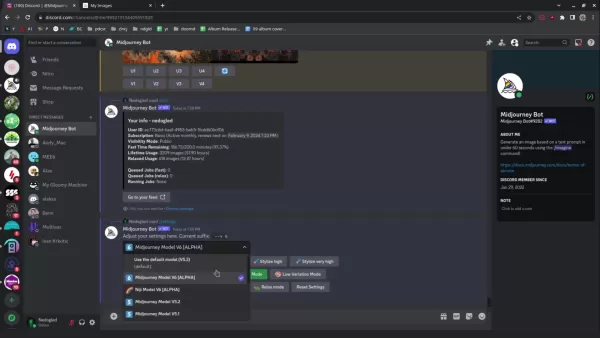
To create images, type the /imagine command in a direct message to the Midjourney bot. This instructs the AI to produce images according to your text description. Using the /info command displays your remaining credit balance, providing an overview of your account status. Before generating images, execute the /settings command. This reveals all configurable options. You should be utilizing the Midjourney Model V6. Selecting the appropriate models is essential for producing the highest quality album art.
Crafting Powerful Prompts for Visualizing Your Music
The Art of the Prompt
The secret to producing effective AI art lies in composing detailed and imaginative prompts. Consider the prompt as a set of directions for the AI, steering it toward your intended visual concept. The more precise and descriptive your prompt, the closer the results will align with your vision. Rather than entering a generic phrase like 'album cover,' try using more descriptive examples such as:
- 'Album cover featuring a psychedelic landscape with swirling colors and a dreamy ambiance'
- 'Album cover with a dark fantasy theme, gothic architecture, a raven, and a haunting melodic feel'
- 'Minimalist album cover design incorporating geometric shapes and vibrant colors'
- 'Album cover ideas inspired by nature'
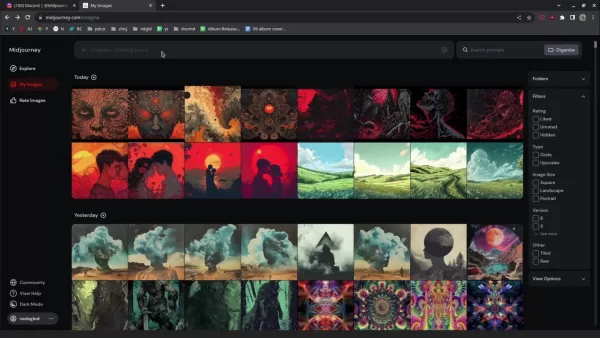
Incorporating aspects like artistic style, color schemes, and mood indicators can further improve your images. Here are additional prompts and the artwork they yielded:
- 'Hand-sketched psychedelic nature scene'
- 'Symmetric fractal psychedelic pattern'
Test various word combinations and phrases to determine what resonates with your artistic vision. With continued use of Midjourney, you'll gain a deeper insight into how the AI processes different prompts, enabling you to generate more reliable and expected outcomes.
Spicing Up Your Creations with GIMP
The power of GIMP
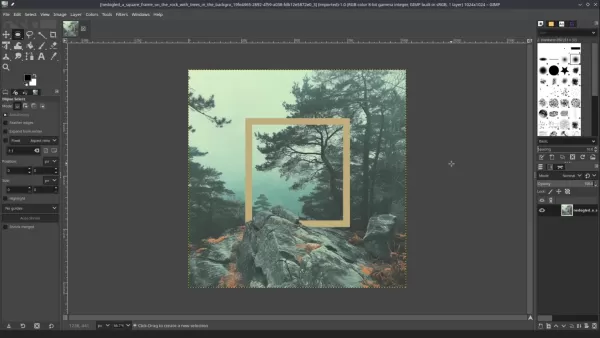
After generating your album artwork with Midjourney, the next step is to refine it using a photo editor. While Adobe Photoshop is widely used, free options like GIMP provide robust editing features suitable for musicians with limited funds. GIMP, the GNU Image Manipulation Program, enables you to improve your AI-generated art, adding personal elements and raising it to a professional standard.
Follow these steps in GIMP:
- Upscale the image: To ensure high image quality, increase the resolution. Navigate to Image>Scale Image. Resize to approximately 3000x3000 pixels. Set the interpolation method to NoHalo for sharper details.
- Adjust Shadows and highlights: The goal is to enhance contrast. Access this via Colors>Shadow Highlights
Midjourney V6 for Album Art: Pros and Cons
Pros
An affordable substitute for hiring human artists.
Makes high-quality visuals accessible to independent musicians.
Facilitates quick brainstorming and testing of various artistic styles.
Offers a creative platform for artists without formal design training.
Cons
The resulting art may not possess the distinctive character and emotional resonance of work created by humans.
Overdependence on AI could hinder the growth of conventional design abilities.
The output quality is closely tied to how clear and detailed your prompts are.
It's important to be aware of the legal aspects associated with AI-generated artwork.
Frequently Asked Questions
Can I use Midjourney-generated art for commercial purposes?
Commercial usage rights are determined by your specific Midjourney subscription package. Consult the Terms of Service for comprehensive details.
What if I can't find the perfect image generation with my initial prompts?
Persistent experimentation is essential! Try different prompts, create variations, and remix existing images until you reach your ideal result.
Is Midjourney the only AI image generator for album art?
No, other AI systems such as DALL-E 2 and Stable Diffusion are also viable options for creating album artwork.
Related Questions
Can AI replace human artists?
AI technologies like Midjourney provide a valuable creative asset for image generation, but they are not a replacement for human artists. AI tools are designed to augment human capabilities and accelerate the artistic process. They are effective for producing a wide range of concepts that might not have been originally conceived. These tools broaden creative horizons but cannot replicate the expertise inherent to a human artist.
Related article
 U.S. Stocks Hit Historic Milestone as AI and Aerospace Giants Prepare for Trillion-Dollar Debut
Elon Musk, Sam Altman, and Dario Amodei, three titans of the technology sector, are advancing toward initial public offerings for their respective ventures. With SpaceX, OpenAI, and Anthropic—three industry behemoths nearing trillion-dollar valuation
Swedish AI Startup Lovable Eyes $13.2 Billion Valuation After Major Funding Round
As AI-driven coding tools gain traction, Swedish startup Lovable has secured a major funding round. The company aims to raise $3 billion, potentially boosting its valuation to $13.2 billion—double the $6.6 billion recorded last December. Menlo Ventur
Google Tests Remy AI Agent for Gemini as Focus Shifts to User Control
According to Business Insider, Google is testing Remy, a new AI personal agent for Gemini. This tool aims to execute tasks on behalf of users, streamlining both professional workflows and daily routines.Currently, Remy is undergoing testing in an int
Related Special Topic Recommendations
SEO
U.S. Stocks Hit Historic Milestone as AI and Aerospace Giants Prepare for Trillion-Dollar Debut
Elon Musk, Sam Altman, and Dario Amodei, three titans of the technology sector, are advancing toward initial public offerings for their respective ventures. With SpaceX, OpenAI, and Anthropic—three industry behemoths nearing trillion-dollar valuation
Swedish AI Startup Lovable Eyes $13.2 Billion Valuation After Major Funding Round
As AI-driven coding tools gain traction, Swedish startup Lovable has secured a major funding round. The company aims to raise $3 billion, potentially boosting its valuation to $13.2 billion—double the $6.6 billion recorded last December. Menlo Ventur
Google Tests Remy AI Agent for Gemini as Focus Shifts to User Control
According to Business Insider, Google is testing Remy, a new AI personal agent for Gemini. This tool aims to execute tasks on behalf of users, streamlining both professional workflows and daily routines.Currently, Remy is undergoing testing in an int
Related Special Topic Recommendations
SEO
 Best AI SERP Analysis Tools for Search Strategy
2026 Latest Best Top-rated AI SERP Analysis Tools for Search Strategy are curated by XIX.AI through rigorous real-world tests and weekly updated rankings. These powerful tools help you unlock hidden optimization opportunities, boost content performance, and gain a competitive edge in search. Discover your perfect tool to elevate your search strategy today. Explore now!
 13 tools
 xix.ai
Data Analysis
Best AI Anomaly Detection Tools for KPI Monitoring across SaaS and Ecommerce Teams
xix.ai
Data Analysis
Best AI Anomaly Detection Tools for KPI Monitoring across SaaS and Ecommerce Teams
2026 Latest Best Top-rated AI Anomaly Detection Tools for KPI Monitoring in SaaS and Ecommerce teams! XIX.AI has curated a powerful, game-changing collection based on rigorous real-world tests and weekly updated rankings. You’ll find detailed free vs paid comparison insights to help you identify the must-try solution that boosts productivity and unlocks your AI edge. Explore now!
10 tools
xix.ai
writing
Best AI Outline Generators for Long-Form SEO Articles
2026 Latest Best Top-Rated AI Outline Generators for Long-Form SEO Articles, meticulously curated by XIX.AI. These powerful tools offer game-changing assistance in creating high-quality content quickly, boosting writing efficiency significantly. Get a free vs paid comparison along with real-world tests and detailed rankings to help you find the must-try option that suits your needs. Explore now to unlock your AI edge.
8 tools
xix.ai
Education and Learning
AI Study Tools for Homework and Exam Prep
2026 Latest Best AI Study Tools for Homework and Exam Prep! XIX.AI curates a top-rated list of powerful, game-changing tools that help students boost productivity, streamline homework completion, and ace exams through real-world tests. Get a free vs paid comparison, detailed rankings, and must-try options to unlock your AI edge. Explore now!
10 tools
xix.ai
Music composition
AI Vocal Demo Tools for Songwriters, Hooks, Toplines, and Multilingual Draft Sessions
2026 Latest Best AI Vocal Demo Tools for Songwriters, Hook Creators, and Multi-Language Content Teams! XIX.AI has curated a top-rated list of powerful game-changing tools that go through rigorous real-world tests. You’ll find detailed free vs paid comparison data, comprehensive rankings, and must-try options to help you boost writing efficiency and unlock your creative potential. Explore now to discover your perfect tool for all your content needs!
9 tools
xix.ai
Business
Best AI Competitive Research Tools for Small Businesses
2026 Latest Best Top-rated AI Competitive Research Tools for Small Businesses! XIX.AI has curated a highly powerful game-changing collection, updated weekly with rigorous real-world tests and detailed rankings. You can find a comprehensive free vs paid comparison to help you identify the must-try tools that boost your productivity and give you a competitive edge. Explore now to discover your perfect tool!
9 tools
xix.ai

 Comments (1)
0/500
Comments (1)
0/500
![WilliamYoung]()
Die vorgestellten Aspekte in diesem Tutorial finde ich super hilfreich! Ich habe selbst schon lange mit KI generierten Bildern für Musikalben gespielt, aber die Tipps zu konkreten Prompts und Stil-Consistency waren mir neu. Da steckt echt Potenzial drin, um unabhängiger von teuren Design-Dienstleistern zu werden. Manchmal zweifel ich aber, ob das vielleicht doch langweilige Visuals fördert, wenn alle die gleichen Tools nutzen... Die Vorher-/Nachher-Beispiele waren sehr aufschlussreich! 😊
In today's music industry, visual presentation is more crucial than ever. A captivating album cover can determine whether a song gets noticed or fades into the background. While hiring a professional artist is the preferred choice, it's often not a practical option for independent musicians. This guide explores how to use Midjourney AI V6 to design professional-grade album artwork on a limited budget, including tips for enhancing the final output with free tools like GIMP.
Key Takeaways
Learn to generate compelling album artwork using Midjourney AI V6.
Understand the essentials of getting started with Midjourney, including subscription plans.
Develop the skill of writing effective prompts to achieve your desired visual results.
Review sample album covers created with Midjourney.
Discover techniques for polishing AI-generated artwork using free editing software like GIMP.
Prepare your album art to attract more attention from music blogs and playlist curators.
Unlocking AI-Powered Album Art Creation
The Musician's Dilemma: Art on a Budget
For artists releasing new music, album art plays a vital role. An engaging cover sparks curiosity and can result in more streams, downloads, and a growing fan base. However, many up-and-coming and independent musicians work with limited financial resources. Commissioning a talented artist for custom work represents a major investment, often comparable to costs for audio mastering or other crucial promotional efforts.
This situation forces many musicians to seek affordable alternatives. AI image generation has become a formidable solution, making high-quality visuals accessible to all and serving as a creative resource for artists with budgetary constraints.
This article details how musicians can harness the capabilities of Midjourney AI V6 to produce attention-grabbing album covers. We'll walk through the entire process, from setting up a Midjourney account and formulating powerful prompts to presenting real-life examples and refining your AI art with free software.
Getting Started with Midjourney: Subscriptions and Discord
Your first step toward creating AI-powered album art is to sign up for a Midjourney subscription.
Although free trials might be offered periodically, a paid subscription provides greater functionality and image creation capacity. Here is an outline of the common subscription tiers:
| Plan | Price (Monthly) | Features | Image Generations (Approx.) |
|---|---|---|---|
| Basic Plan | $10 | Limited generations, Access to member gallery, 3 concurrent fast jobs | ~200 |
| Standard Plan | $30 | Unlimited relaxed generations, Access to member gallery, Optional credit top-ups, 3 concurrent fast jobs | Unlimited |
| Pro Plan | $60 | Unlimited fast generations, Stealth image generation, Optional credit top-ups, 12 concurrent fast jobs | Unlimited |
| Mega Plan | $120 | Unlimited relaxed generations, Stealth image generation, Optional credit top-ups, 12 concurrent fast jobs | Unlimited |
The Basic Plan is typically adequate for creating album art, offering sufficient generations to test and refine concepts. If you expect to generate a larger volume of images or require stealth generation, consider the Standard Plan or higher. The Basic Plan provides approximately 200 image generations, which is usually enough to design a cover for your album release. The Mega Plan includes more simultaneous fast jobs.
Midjourney functions mainly via Discord. After subscribing, you'll receive access to the Midjourney Discord server, where you communicate with the AI bot using text commands. This interface may seem overwhelming initially, but sending direct messages to the Midjourney bot is a more streamlined approach. The public channels can become quite congested, making direct messaging preferable. All your image creation takes place within Discord. Both a Discord account and a Midjourney subscription are required to generate AI album covers.
Understanding Midjourney's Terms of Service
Before you start generating images, it's crucial to review Midjourney's Terms of Service (TOS).
This document specifies your rights and obligations concerning the images you produce. You can find the TOS in the documentation section of the Midjourney website. Familiarizing yourself with these terms ensures you use the platform in accordance with its rules and helps prevent potential copyright complications.
Key points to consider include commercial use rights, ownership of generated images, and limitations on acceptable content. Midjourney maintains the right to suspend or terminate your access to its services at any time, and automated tools for accessing its servers are prohibited.
Navigating Discord: Settings and Image Generation
Upon joining the Midjourney Discord server, you'll see multiple channels. Notable channels include announcements for new features and updates, and community channels where users share their creations and prompts.
However, to generate images, you will need a Discord account.
To create images, type the /imagine command in a direct message to the Midjourney bot. This instructs the AI to produce images according to your text description. Using the /info command displays your remaining credit balance, providing an overview of your account status. Before generating images, execute the /settings command. This reveals all configurable options. You should be utilizing the Midjourney Model V6. Selecting the appropriate models is essential for producing the highest quality album art.
Crafting Powerful Prompts for Visualizing Your Music
The Art of the Prompt
The secret to producing effective AI art lies in composing detailed and imaginative prompts. Consider the prompt as a set of directions for the AI, steering it toward your intended visual concept. The more precise and descriptive your prompt, the closer the results will align with your vision. Rather than entering a generic phrase like 'album cover,' try using more descriptive examples such as:
- 'Album cover featuring a psychedelic landscape with swirling colors and a dreamy ambiance'
- 'Album cover with a dark fantasy theme, gothic architecture, a raven, and a haunting melodic feel'
- 'Minimalist album cover design incorporating geometric shapes and vibrant colors'
- 'Album cover ideas inspired by nature'
Incorporating aspects like artistic style, color schemes, and mood indicators can further improve your images. Here are additional prompts and the artwork they yielded:
- 'Hand-sketched psychedelic nature scene'
- 'Symmetric fractal psychedelic pattern'
Test various word combinations and phrases to determine what resonates with your artistic vision. With continued use of Midjourney, you'll gain a deeper insight into how the AI processes different prompts, enabling you to generate more reliable and expected outcomes.
Spicing Up Your Creations with GIMP
The power of GIMP
After generating your album artwork with Midjourney, the next step is to refine it using a photo editor. While Adobe Photoshop is widely used, free options like GIMP provide robust editing features suitable for musicians with limited funds. GIMP, the GNU Image Manipulation Program, enables you to improve your AI-generated art, adding personal elements and raising it to a professional standard.
Follow these steps in GIMP:
- Upscale the image: To ensure high image quality, increase the resolution. Navigate to Image>Scale Image. Resize to approximately 3000x3000 pixels. Set the interpolation method to NoHalo for sharper details.
- Adjust Shadows and highlights: The goal is to enhance contrast. Access this via Colors>Shadow Highlights
Midjourney V6 for Album Art: Pros and Cons
Pros
An affordable substitute for hiring human artists.
Makes high-quality visuals accessible to independent musicians.
Facilitates quick brainstorming and testing of various artistic styles.
Offers a creative platform for artists without formal design training.
Cons
The resulting art may not possess the distinctive character and emotional resonance of work created by humans.
Overdependence on AI could hinder the growth of conventional design abilities.
The output quality is closely tied to how clear and detailed your prompts are.
It's important to be aware of the legal aspects associated with AI-generated artwork.
Frequently Asked Questions
Can I use Midjourney-generated art for commercial purposes?
Commercial usage rights are determined by your specific Midjourney subscription package. Consult the Terms of Service for comprehensive details.
What if I can't find the perfect image generation with my initial prompts?
Persistent experimentation is essential! Try different prompts, create variations, and remix existing images until you reach your ideal result.
Is Midjourney the only AI image generator for album art?
No, other AI systems such as DALL-E 2 and Stable Diffusion are also viable options for creating album artwork.
Related Questions
Can AI replace human artists?
AI technologies like Midjourney provide a valuable creative asset for image generation, but they are not a replacement for human artists. AI tools are designed to augment human capabilities and accelerate the artistic process. They are effective for producing a wide range of concepts that might not have been originally conceived. These tools broaden creative horizons but cannot replicate the expertise inherent to a human artist.








 U.S. Stocks Hit Historic Milestone as AI and Aerospace Giants Prepare for Trillion-Dollar Debut
Elon Musk, Sam Altman, and Dario Amodei, three titans of the technology sector, are advancing toward initial public offerings for their respective ventures. With SpaceX, OpenAI, and Anthropic—three industry behemoths nearing trillion-dollar valuation
U.S. Stocks Hit Historic Milestone as AI and Aerospace Giants Prepare for Trillion-Dollar Debut
Elon Musk, Sam Altman, and Dario Amodei, three titans of the technology sector, are advancing toward initial public offerings for their respective ventures. With SpaceX, OpenAI, and Anthropic—three industry behemoths nearing trillion-dollar valuation
 Swedish AI Startup Lovable Eyes $13.2 Billion Valuation After Major Funding Round
As AI-driven coding tools gain traction, Swedish startup Lovable has secured a major funding round. The company aims to raise $3 billion, potentially boosting its valuation to $13.2 billion—double the $6.6 billion recorded last December. Menlo Ventur
Google Tests Remy AI Agent for Gemini as Focus Shifts to User Control
According to Business Insider, Google is testing Remy, a new AI personal agent for Gemini. This tool aims to execute tasks on behalf of users, streamlining both professional workflows and daily routines.Currently, Remy is undergoing testing in an int
Swedish AI Startup Lovable Eyes $13.2 Billion Valuation After Major Funding Round
As AI-driven coding tools gain traction, Swedish startup Lovable has secured a major funding round. The company aims to raise $3 billion, potentially boosting its valuation to $13.2 billion—double the $6.6 billion recorded last December. Menlo Ventur
Google Tests Remy AI Agent for Gemini as Focus Shifts to User Control
According to Business Insider, Google is testing Remy, a new AI personal agent for Gemini. This tool aims to execute tasks on behalf of users, streamlining both professional workflows and daily routines.Currently, Remy is undergoing testing in an int

2026 Latest Best Top-rated AI SERP Analysis Tools for Search Strategy are curated by XIX.AI through rigorous real-world tests and weekly updated rankings. These powerful tools help you unlock hidden optimization opportunities, boost content performance, and gain a competitive edge in search. Discover your perfect tool to elevate your search strategy today. Explore now!
13 tools
xix.ai

2026 Latest Best Top-rated AI Anomaly Detection Tools for KPI Monitoring in SaaS and Ecommerce teams! XIX.AI has curated a powerful, game-changing collection based on rigorous real-world tests and weekly updated rankings. You’ll find detailed free vs paid comparison insights to help you identify the must-try solution that boosts productivity and unlocks your AI edge. Explore now!
10 tools
xix.ai

2026 Latest Best Top-Rated AI Outline Generators for Long-Form SEO Articles, meticulously curated by XIX.AI. These powerful tools offer game-changing assistance in creating high-quality content quickly, boosting writing efficiency significantly. Get a free vs paid comparison along with real-world tests and detailed rankings to help you find the must-try option that suits your needs. Explore now to unlock your AI edge.
8 tools
xix.ai

2026 Latest Best AI Study Tools for Homework and Exam Prep! XIX.AI curates a top-rated list of powerful, game-changing tools that help students boost productivity, streamline homework completion, and ace exams through real-world tests. Get a free vs paid comparison, detailed rankings, and must-try options to unlock your AI edge. Explore now!
10 tools
xix.ai

2026 Latest Best AI Vocal Demo Tools for Songwriters, Hook Creators, and Multi-Language Content Teams! XIX.AI has curated a top-rated list of powerful game-changing tools that go through rigorous real-world tests. You’ll find detailed free vs paid comparison data, comprehensive rankings, and must-try options to help you boost writing efficiency and unlock your creative potential. Explore now to discover your perfect tool for all your content needs!
9 tools
xix.ai

2026 Latest Best Top-rated AI Competitive Research Tools for Small Businesses! XIX.AI has curated a highly powerful game-changing collection, updated weekly with rigorous real-world tests and detailed rankings. You can find a comprehensive free vs paid comparison to help you identify the must-try tools that boost your productivity and give you a competitive edge. Explore now to discover your perfect tool!
9 tools
xix.ai

Die vorgestellten Aspekte in diesem Tutorial finde ich super hilfreich! Ich habe selbst schon lange mit KI generierten Bildern für Musikalben gespielt, aber die Tipps zu konkreten Prompts und Stil-Consistency waren mir neu. Da steckt echt Potenzial drin, um unabhängiger von teuren Design-Dienstleistern zu werden. Manchmal zweifel ich aber, ob das vielleicht doch langweilige Visuals fördert, wenn alle die gleichen Tools nutzen... Die Vorher-/Nachher-Beispiele waren sehr aufschlussreich! 😊












