


 Home
HomeGuide to Crafting Viral AI-Generated IPS Officer Images
In the fast-paced world of social media, trends evolve rapidly. One captivating trend gaining traction is creating AI-generated images of individuals as IPS (Indian Police Service) officers. This guide offers a step-by-step approach to producing striking visuals, empowering you to join this viral wave and enhance your social media presence. Explore the techniques for designing shareable, engaging AI images that resonate with your audience.
Key Points
Learn to create AI images portraying individuals as IPS officers.
Master the steps to produce viral social media content.
Understand prompts for generating male and female IPS officer images.
Discover the best app for crafting these trending visuals.
Design personalized, captivating social media posts with AI.
Optimize images for maximum engagement.
Exploring the IPS Officer AI Image Trend
What is the IPS Officer AI Image Trend?
The IPS Officer AI image trend uses artificial intelligence to create visuals of people styled as Indian Police Service officers. Shared widely on platforms like Instagram, these images gain popularity for their unique, personalized appeal.
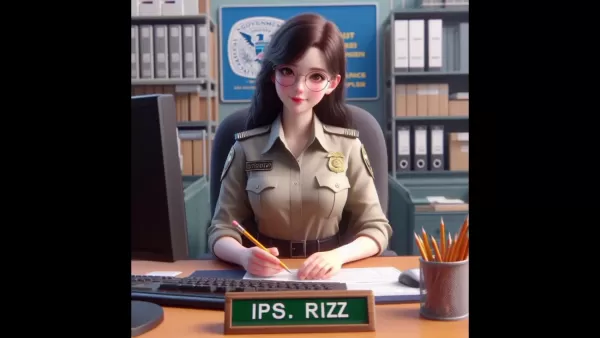
Users love seeing themselves or friends transformed into authoritative figures, driving high engagement and virality. The trend blends the prestige of law enforcement with AI’s creative potential, appealing to diverse audiences. Its accessibility, requiring minimal technical skills and user-friendly AI tools, has fueled its rapid spread across social media, marking it as a significant digital content phenomenon.
Why are these images trending?
Several factors fuel the popularity of IPS Officer AI images. The novelty of seeing oneself in an official role is inherently engaging. These images combine personalization with authority, making them highly shareable. Easy creation through AI tools encourages widespread participation, amplifying the trend. Additionally, the images evoke patriotism and respect for law enforcement, resonating deeply with viewers. This mix of emotional and psychological appeal has created a viral surge, keeping IPS Officer AI images prominent across social media platforms.
Step-by-Step Guide to Creating Your Own IPS Officer AI Images
Preparation and Tool Selection
Before creating images, plan carefully and choose the right tools. Decide on the officer’s gender, setting, and specific details. Select a user-friendly AI image generator capable of high-quality results, such as Bing Image Creator, accessible via the Microsoft Bing Search Engine. Known for producing detailed, realistic images from text prompts, it’s free and ideal for beginners. Proper planning and tool selection ensure your IPS Officer AI images align with your vision.
Downloading and Installing Bing
To begin creating IPS officer AI images, download and install the Bing app with these steps:
- Open the Play Store:
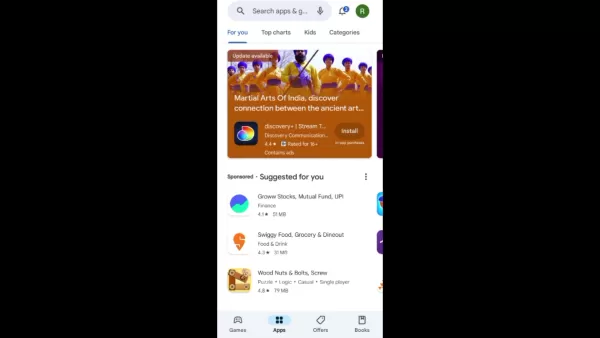
Access the Google Play Store on Android or the App Store on iOS.
- Search for Bing: Type ‘Bing’ in the search bar and press enter.
- Install the App: Find the Bing app (Bing: Chat with AI & GPT-4) and tap ‘Install.’
- Wait for Installation: Let the app download and install, which may take a few minutes based on your connection.
- Open the Bing App: Tap ‘Open’ to launch the app once installed.
These steps prepare the Bing app for generating AI images. Keep it updated for access to the latest features.
Installing the Bing app is your first step toward creating AI-generated IPS officer images, enabling you to use the Bing Image Creator tool to bring your ideas to life.
Accessing Image Creator in Bing
With the Bing app installed, accessing the Image Creator is simple. Follow these steps:
- Launch the Bing App: Open the app on your device.
- Navigate to the Apps Section:
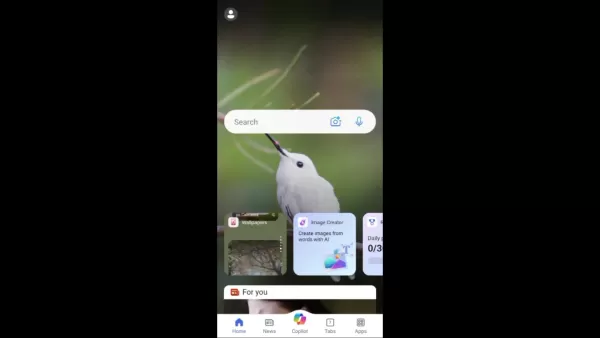
Tap the ‘Apps’ icon, typically at the bottom, to view available Bing tools.
- Find Image Creator: Scroll to locate ‘Image Creator,’ often marked with an AI image generation icon.
- Tap Image Creator: Select the icon to open the tool, where you can input text prompts to create AI images.
If the ‘Apps’ icon isn’t visible, check the Bing app’s home screen for the ‘Image Creator’ icon and tap it to start.
These steps grant easy access to the Image Creator tool in the Bing app, allowing you to generate custom IPS officer AI images. Keep the app updated for the latest features.
Crafting the Perfect Prompt
Creating a compelling IPS Officer AI image hinges on a well-crafted prompt. Follow these tips for effective prompts:
- Be Descriptive: Include detailed descriptions of the officer’s gender, age, appearance, attire, setting, and actions.
- Be Specific: Use precise language to clarify your vision, avoiding vague terms.
- Be Creative: Experiment with unique elements and scenarios to make your images stand out.
Incorporate keywords like ‘Indian Police Service,’ ‘officer uniform,’ or ‘police station’ to guide the AI for accurate results.
With these tips, you can create prompts that produce stunning, realistic IPS Officer AI images. Experiment to find what works best and let your creativity shine.
Image Prompts for Boys and Girls
Here are sample prompts for generating IPS officer AI images for boys and girls:
For Boys:
- ‘Generate an image of a young man in an Indian Police Service uniform, standing confidently in a police station.’
- ‘Create a realistic image of a male IPS officer reviewing documents at his desk.’
- ‘Produce an image of a male IPS officer wearing glasses, writing notes on a file.’
For Girls:
- ‘Generate an image of a woman in an Indian Police Service uniform, smiling confidently at the camera.’
- ‘Create a realistic image of a female IPS officer working on a computer at her desk.’
- ‘Produce an image of a young female IPS officer taking notes during a meeting.’
Customize these prompts with details like the officer’s name, rank, or actions for more tailored results. Detailed prompts yield more accurate, realistic images.
Use these prompts as a foundation to create diverse IPS officer AI images, experimenting to discover the best approach for your vision.
Copying and Pasting the Prompt
After crafting your prompt, input it into the Image Creator tool with these steps:
- Select the Prompt: Highlight and copy your prompt to the clipboard.
- Open Image Creator: Launch the tool in the Bing app.
- Paste the Prompt: Paste the prompt into the text input field.
- Generate the Image: Tap ‘Create’ or ‘Generate’ to start the AI image generation process.
The Image Creator will analyze the prompt and generate an image, which may take seconds to minutes depending on complexity and device performance.
These steps make it easy to input prompts and create custom IPS officer AI images. Review and refine prompts as needed for desired results.
Image Generation and Refinement
After submitting your prompt, the AI generates multiple image variations. Review them carefully to select the best match for your vision. If unsatisfied, refine your prompt and retry.
Tips for refining prompts:
- Add More Detail: Specify lighting, background, or facial expressions.
- Use Specific Adjectives: Replace vague terms with precise descriptors.
- Experiment with Keywords: Test different IPS officer-related keywords to improve results.
Explore the Image Creator’s community showcase for prompt inspiration. Experiment with variations and details to enhance realism. Practice improves your ability to craft effective prompts for stunning IPS Officer AI images.
With patience and persistence, refine prompts to achieve images that align with your vision.
How to Maximize Your AI IPS Officer Images on Social Media
Optimizing Images for Social Media
To maximize the impact of your AI IPS officer images on social media, optimize them with these tips:
- Choose the Right Platform:
Adapt images to each platform’s size and format requirements.
- Use High-Quality Images: Ensure images are high-resolution and sharp for better engagement.
- Add Engaging Captions: Write relevant, interactive captions, such as questions or comment prompts.
- Use Relevant Hashtags: Boost visibility with hashtags like #IPSOfficer, #AIImages, #PoliceOfficer, and #SocialMediaTrend.
- Time Your Posts: Share during peak engagement times to maximize reach.
These strategies enhance the visibility and engagement of your AI IPS officer images. Stay creative and enjoy the process!
Creating Reels and Trending Content
Boost your social media presence with reels and trending content using AI-generated IPS officer images. Here’s how:
- Create a Video:
 Related article
 U.S. Stocks Hit Historic Milestone as AI and Aerospace Giants Prepare for Trillion-Dollar Debut
Elon Musk, Sam Altman, and Dario Amodei, three titans of the technology sector, are advancing toward initial public offerings for their respective ventures. With SpaceX, OpenAI, and Anthropic—three industry behemoths nearing trillion-dollar valuation
Swedish AI Startup Lovable Eyes $13.2 Billion Valuation After Major Funding Round
As AI-driven coding tools gain traction, Swedish startup Lovable has secured a major funding round. The company aims to raise $3 billion, potentially boosting its valuation to $13.2 billion—double the $6.6 billion recorded last December. Menlo Ventur
Google Tests Remy AI Agent for Gemini as Focus Shifts to User Control
According to Business Insider, Google is testing Remy, a new AI personal agent for Gemini. This tool aims to execute tasks on behalf of users, streamlining both professional workflows and daily routines.Currently, Remy is undergoing testing in an int
Related Special Topic Recommendations
SEO
U.S. Stocks Hit Historic Milestone as AI and Aerospace Giants Prepare for Trillion-Dollar Debut
Elon Musk, Sam Altman, and Dario Amodei, three titans of the technology sector, are advancing toward initial public offerings for their respective ventures. With SpaceX, OpenAI, and Anthropic—three industry behemoths nearing trillion-dollar valuation
Swedish AI Startup Lovable Eyes $13.2 Billion Valuation After Major Funding Round
As AI-driven coding tools gain traction, Swedish startup Lovable has secured a major funding round. The company aims to raise $3 billion, potentially boosting its valuation to $13.2 billion—double the $6.6 billion recorded last December. Menlo Ventur
Google Tests Remy AI Agent for Gemini as Focus Shifts to User Control
According to Business Insider, Google is testing Remy, a new AI personal agent for Gemini. This tool aims to execute tasks on behalf of users, streamlining both professional workflows and daily routines.Currently, Remy is undergoing testing in an int
Related Special Topic Recommendations
SEO
 Best AI SERP Analysis Tools for Search Strategy
2026 Latest Best Top-rated AI SERP Analysis Tools for Search Strategy are curated by XIX.AI through rigorous real-world tests and weekly updated rankings. These powerful tools help you unlock hidden optimization opportunities, boost content performance, and gain a competitive edge in search. Discover your perfect tool to elevate your search strategy today. Explore now!
 13 tools
 xix.ai
Data Analysis
Best AI Anomaly Detection Tools for KPI Monitoring across SaaS and Ecommerce Teams
xix.ai
Data Analysis
Best AI Anomaly Detection Tools for KPI Monitoring across SaaS and Ecommerce Teams
2026 Latest Best Top-rated AI Anomaly Detection Tools for KPI Monitoring in SaaS and Ecommerce teams! XIX.AI has curated a powerful, game-changing collection based on rigorous real-world tests and weekly updated rankings. You’ll find detailed free vs paid comparison insights to help you identify the must-try solution that boosts productivity and unlocks your AI edge. Explore now!
10 tools
xix.ai
writing
Best AI Outline Generators for Long-Form SEO Articles
2026 Latest Best Top-Rated AI Outline Generators for Long-Form SEO Articles, meticulously curated by XIX.AI. These powerful tools offer game-changing assistance in creating high-quality content quickly, boosting writing efficiency significantly. Get a free vs paid comparison along with real-world tests and detailed rankings to help you find the must-try option that suits your needs. Explore now to unlock your AI edge.
8 tools
xix.ai
Education and Learning
AI Study Tools for Homework and Exam Prep
2026 Latest Best AI Study Tools for Homework and Exam Prep! XIX.AI curates a top-rated list of powerful, game-changing tools that help students boost productivity, streamline homework completion, and ace exams through real-world tests. Get a free vs paid comparison, detailed rankings, and must-try options to unlock your AI edge. Explore now!
10 tools
xix.ai
Music composition
AI Vocal Demo Tools for Songwriters, Hooks, Toplines, and Multilingual Draft Sessions
2026 Latest Best AI Vocal Demo Tools for Songwriters, Hook Creators, and Multi-Language Content Teams! XIX.AI has curated a top-rated list of powerful game-changing tools that go through rigorous real-world tests. You’ll find detailed free vs paid comparison data, comprehensive rankings, and must-try options to help you boost writing efficiency and unlock your creative potential. Explore now to discover your perfect tool for all your content needs!
9 tools
xix.ai
Business
Best AI Competitive Research Tools for Small Businesses
2026 Latest Best Top-rated AI Competitive Research Tools for Small Businesses! XIX.AI has curated a highly powerful game-changing collection, updated weekly with rigorous real-world tests and detailed rankings. You can find a comprehensive free vs paid comparison to help you identify the must-try tools that boost your productivity and give you a competitive edge. Explore now to discover your perfect tool!
9 tools
xix.ai

 Comments (5)
0/500
Comments (5)
0/500
![JerryMitchell]()
This guide is pretty wild. AI-generated officer pics are cool but also raises some ethical flags about impersonation. 😅
![CharlesLee]()
Sério, fazer essas imagens AI de policiais parece legal, mas não rola usar a autoridade pública de forma irresponsável só pra likes? O artigo ensina, mas a parte ética devia estar mais destacada. Será que as pessoas param pra pensar nisso?🤔
![JackMoore]()
AI taking over even our Instagram fantasies now 😅 This guide feels oddly specific and a bit dystopian—what's next, AI-generated images for job interviews? The tech is fun but makes you wonder about digital identity and how easily we can fabricate realities. On the flip side, can't deny the viral potential! 😄
![GregoryRamirez]()
Dieser Trend mit KI-generierten Polizei-Bildern ist ja mal mega gruselig 😅 Kann man damit nicht einfach echte Fotos nehmen? Die sehen doch eh besser aus als diese künstlichen Gesichter.
![AlbertWalker]()
Que loucura essa moda de transformar pessoas em policiais com IA! Será que não tem risco de alguém usar essas imagens pra coisas erradas? 🤨 Melhor pensar duas vezes antes de postar...
Top News
AI Hosts of NotebookLM Podcast Now Available for Interviews
Corporate AI Adoption Plateaus, Ramp Data Reveals
Microsoft Unveils Business-Focused Copilot+ Surface Devices Powered by Intel
AI Builder and Power Automate Revolutionize Document Summarization
China unveils national humanoid robot and embodied intelligence standards
Bing Image Creator Tutorial: AI Art Generation Guide
iMyFone MagicMic: In-Depth Review and Tutorial on Real-Time AI Voice Changer
Embodied Intelligence Unveils First Industry Standard to Curb Unregulated Growth
Learn to Create AI Music Using Your Voice: A Step-by-Step Suno Tutorial
Apple WWDC 2026 to Spotlight Major AI Advances and Siri Overhaul
More
Featured
LingoDesk
Discover how LingoDesk turns Telegram in
Claude
Meet Claude: Your AI Assistant for Smart
Cici AI
Ever wondered what Cici AI is all about?
Gemini
Ever wondered what the buzz about Gemini
Grok
Ever heard of Grok? It's this nifty AI a
ChatGPT
Ever wondered what ChatGPT is all about?
OpenAI's GPT and Codex
OpenAI's GPT and Codex models are fascin
OpenAI
Ever wondered what the buzz around OpenA
Tencent Hunyuan
Tencent Hunyuan-Large, huh? It's like th
Qwen AI
Ever wondered what Qwen AI is all about?
More
In the fast-paced world of social media, trends evolve rapidly. One captivating trend gaining traction is creating AI-generated images of individuals as IPS (Indian Police Service) officers. This guide offers a step-by-step approach to producing striking visuals, empowering you to join this viral wave and enhance your social media presence. Explore the techniques for designing shareable, engaging AI images that resonate with your audience.
Key Points
Learn to create AI images portraying individuals as IPS officers.
Master the steps to produce viral social media content.
Understand prompts for generating male and female IPS officer images.
Discover the best app for crafting these trending visuals.
Design personalized, captivating social media posts with AI.
Optimize images for maximum engagement.
Exploring the IPS Officer AI Image Trend
What is the IPS Officer AI Image Trend?
The IPS Officer AI image trend uses artificial intelligence to create visuals of people styled as Indian Police Service officers. Shared widely on platforms like Instagram, these images gain popularity for their unique, personalized appeal.
Users love seeing themselves or friends transformed into authoritative figures, driving high engagement and virality. The trend blends the prestige of law enforcement with AI’s creative potential, appealing to diverse audiences. Its accessibility, requiring minimal technical skills and user-friendly AI tools, has fueled its rapid spread across social media, marking it as a significant digital content phenomenon.
Why are these images trending?
Several factors fuel the popularity of IPS Officer AI images. The novelty of seeing oneself in an official role is inherently engaging. These images combine personalization with authority, making them highly shareable. Easy creation through AI tools encourages widespread participation, amplifying the trend. Additionally, the images evoke patriotism and respect for law enforcement, resonating deeply with viewers. This mix of emotional and psychological appeal has created a viral surge, keeping IPS Officer AI images prominent across social media platforms.
Step-by-Step Guide to Creating Your Own IPS Officer AI Images
Preparation and Tool Selection
Before creating images, plan carefully and choose the right tools. Decide on the officer’s gender, setting, and specific details. Select a user-friendly AI image generator capable of high-quality results, such as Bing Image Creator, accessible via the Microsoft Bing Search Engine. Known for producing detailed, realistic images from text prompts, it’s free and ideal for beginners. Proper planning and tool selection ensure your IPS Officer AI images align with your vision.
Downloading and Installing Bing
To begin creating IPS officer AI images, download and install the Bing app with these steps:
- Open the Play Store:
Access the Google Play Store on Android or the App Store on iOS.
- Search for Bing: Type ‘Bing’ in the search bar and press enter.
- Install the App: Find the Bing app (Bing: Chat with AI & GPT-4) and tap ‘Install.’
- Wait for Installation: Let the app download and install, which may take a few minutes based on your connection.
- Open the Bing App: Tap ‘Open’ to launch the app once installed.
These steps prepare the Bing app for generating AI images. Keep it updated for access to the latest features.
Installing the Bing app is your first step toward creating AI-generated IPS officer images, enabling you to use the Bing Image Creator tool to bring your ideas to life.
Accessing Image Creator in Bing
With the Bing app installed, accessing the Image Creator is simple. Follow these steps:
- Launch the Bing App: Open the app on your device.
- Navigate to the Apps Section:
Tap the ‘Apps’ icon, typically at the bottom, to view available Bing tools.
- Find Image Creator: Scroll to locate ‘Image Creator,’ often marked with an AI image generation icon.
- Tap Image Creator: Select the icon to open the tool, where you can input text prompts to create AI images.
If the ‘Apps’ icon isn’t visible, check the Bing app’s home screen for the ‘Image Creator’ icon and tap it to start.
These steps grant easy access to the Image Creator tool in the Bing app, allowing you to generate custom IPS officer AI images. Keep the app updated for the latest features.
Crafting the Perfect Prompt
Creating a compelling IPS Officer AI image hinges on a well-crafted prompt. Follow these tips for effective prompts:
- Be Descriptive: Include detailed descriptions of the officer’s gender, age, appearance, attire, setting, and actions.
- Be Specific: Use precise language to clarify your vision, avoiding vague terms.
- Be Creative: Experiment with unique elements and scenarios to make your images stand out.
Incorporate keywords like ‘Indian Police Service,’ ‘officer uniform,’ or ‘police station’ to guide the AI for accurate results.
With these tips, you can create prompts that produce stunning, realistic IPS Officer AI images. Experiment to find what works best and let your creativity shine.
Image Prompts for Boys and Girls
Here are sample prompts for generating IPS officer AI images for boys and girls:
For Boys:
- ‘Generate an image of a young man in an Indian Police Service uniform, standing confidently in a police station.’
- ‘Create a realistic image of a male IPS officer reviewing documents at his desk.’
- ‘Produce an image of a male IPS officer wearing glasses, writing notes on a file.’
For Girls:
- ‘Generate an image of a woman in an Indian Police Service uniform, smiling confidently at the camera.’
- ‘Create a realistic image of a female IPS officer working on a computer at her desk.’
- ‘Produce an image of a young female IPS officer taking notes during a meeting.’
Customize these prompts with details like the officer’s name, rank, or actions for more tailored results. Detailed prompts yield more accurate, realistic images.
Use these prompts as a foundation to create diverse IPS officer AI images, experimenting to discover the best approach for your vision.
Copying and Pasting the Prompt
After crafting your prompt, input it into the Image Creator tool with these steps:
- Select the Prompt: Highlight and copy your prompt to the clipboard.
- Open Image Creator: Launch the tool in the Bing app.
- Paste the Prompt: Paste the prompt into the text input field.
- Generate the Image: Tap ‘Create’ or ‘Generate’ to start the AI image generation process.
The Image Creator will analyze the prompt and generate an image, which may take seconds to minutes depending on complexity and device performance.
These steps make it easy to input prompts and create custom IPS officer AI images. Review and refine prompts as needed for desired results.
Image Generation and Refinement
After submitting your prompt, the AI generates multiple image variations. Review them carefully to select the best match for your vision. If unsatisfied, refine your prompt and retry.
Tips for refining prompts:
- Add More Detail: Specify lighting, background, or facial expressions.
- Use Specific Adjectives: Replace vague terms with precise descriptors.
- Experiment with Keywords: Test different IPS officer-related keywords to improve results.
Explore the Image Creator’s community showcase for prompt inspiration. Experiment with variations and details to enhance realism. Practice improves your ability to craft effective prompts for stunning IPS Officer AI images.
With patience and persistence, refine prompts to achieve images that align with your vision.
How to Maximize Your AI IPS Officer Images on Social Media
Optimizing Images for Social Media
To maximize the impact of your AI IPS officer images on social media, optimize them with these tips:
- Choose the Right Platform:
Adapt images to each platform’s size and format requirements.
- Use High-Quality Images: Ensure images are high-resolution and sharp for better engagement.
- Add Engaging Captions: Write relevant, interactive captions, such as questions or comment prompts.
- Use Relevant Hashtags: Boost visibility with hashtags like #IPSOfficer, #AIImages, #PoliceOfficer, and #SocialMediaTrend.
- Time Your Posts: Share during peak engagement times to maximize reach.
These strategies enhance the visibility and engagement of your AI IPS officer images. Stay creative and enjoy the process!
Creating Reels and Trending Content
Boost your social media presence with reels and trending content using AI-generated IPS officer images. Here’s how:
- Create a Video:Related article
U.S. Stocks Hit Historic Milestone as AI and Aerospace Giants Prepare for Trillion-Dollar Debut
Elon Musk, Sam Altman, and Dario Amodei, three titans of the technology sector, are advancing toward initial public offerings for their respective ventures. With SpaceX, OpenAI, and Anthropic—three industry behemoths nearing trillion-dollar valuation
Swedish AI Startup Lovable Eyes $13.2 Billion Valuation After Major Funding Round
As AI-driven coding tools gain traction, Swedish startup Lovable has secured a major funding round. The company aims to raise $3 billion, potentially boosting its valuation to $13.2 billion—double the $6.6 billion recorded last December. Menlo Ventur
Google Tests Remy AI Agent for Gemini as Focus Shifts to User Control
According to Business Insider, Google is testing Remy, a new AI personal agent for Gemini. This tool aims to execute tasks on behalf of users, streamlining both professional workflows and daily routines.Currently, Remy is undergoing testing in an int
Related Special Topic RecommendationsSEO
Best AI SERP Analysis Tools for Search Strategy
2026 Latest Best Top-rated AI SERP Analysis Tools for Search Strategy are curated by XIX.AI through rigorous real-world tests and weekly updated rankings. These powerful tools help you unlock hidden optimization opportunities, boost content performance, and gain a competitive edge in search. Discover your perfect tool to elevate your search strategy today. Explore now!
13 tools
xix.ai
Data Analysis
Best AI Anomaly Detection Tools for KPI Monitoring across SaaS and Ecommerce Teams2026 Latest Best Top-rated AI Anomaly Detection Tools for KPI Monitoring in SaaS and Ecommerce teams! XIX.AI has curated a powerful, game-changing collection based on rigorous real-world tests and weekly updated rankings. You’ll find detailed free vs paid comparison insights to help you identify the must-try solution that boosts productivity and unlocks your AI edge. Explore now!
10 tools
xix.ai
writing
Best AI Outline Generators for Long-Form SEO Articles2026 Latest Best Top-Rated AI Outline Generators for Long-Form SEO Articles, meticulously curated by XIX.AI. These powerful tools offer game-changing assistance in creating high-quality content quickly, boosting writing efficiency significantly. Get a free vs paid comparison along with real-world tests and detailed rankings to help you find the must-try option that suits your needs. Explore now to unlock your AI edge.
8 tools
xix.ai
Education and Learning
AI Study Tools for Homework and Exam Prep2026 Latest Best AI Study Tools for Homework and Exam Prep! XIX.AI curates a top-rated list of powerful, game-changing tools that help students boost productivity, streamline homework completion, and ace exams through real-world tests. Get a free vs paid comparison, detailed rankings, and must-try options to unlock your AI edge. Explore now!
10 tools
xix.ai
Music composition
AI Vocal Demo Tools for Songwriters, Hooks, Toplines, and Multilingual Draft Sessions2026 Latest Best AI Vocal Demo Tools for Songwriters, Hook Creators, and Multi-Language Content Teams! XIX.AI has curated a top-rated list of powerful game-changing tools that go through rigorous real-world tests. You’ll find detailed free vs paid comparison data, comprehensive rankings, and must-try options to help you boost writing efficiency and unlock your creative potential. Explore now to discover your perfect tool for all your content needs!
9 tools
xix.ai
Business
Best AI Competitive Research Tools for Small Businesses2026 Latest Best Top-rated AI Competitive Research Tools for Small Businesses! XIX.AI has curated a highly powerful game-changing collection, updated weekly with rigorous real-world tests and detailed rankings. You can find a comprehensive free vs paid comparison to help you identify the must-try tools that boost your productivity and give you a competitive edge. Explore now to discover your perfect tool!
9 tools
xix.ai
Comments (5)0/500This guide is pretty wild. AI-generated officer pics are cool but also raises some ethical flags about impersonation. 😅
Sério, fazer essas imagens AI de policiais parece legal, mas não rola usar a autoridade pública de forma irresponsável só pra likes? O artigo ensina, mas a parte ética devia estar mais destacada. Será que as pessoas param pra pensar nisso?🤔
AI taking over even our Instagram fantasies now 😅 This guide feels oddly specific and a bit dystopian—what's next, AI-generated images for job interviews? The tech is fun but makes you wonder about digital identity and how easily we can fabricate realities. On the flip side, can't deny the viral potential! 😄
Dieser Trend mit KI-generierten Polizei-Bildern ist ja mal mega gruselig 😅 Kann man damit nicht einfach echte Fotos nehmen? Die sehen doch eh besser aus als diese künstlichen Gesichter.
Que loucura essa moda de transformar pessoas em policiais com IA! Será que não tem risco de alguém usar essas imagens pra coisas erradas? 🤨 Melhor pensar duas vezes antes de postar...





























