


 Home
HomePublish AI-Generated Coloring Books Easily
Creating coloring books has become a popular method for authors and artists to build passive income streams. Thanks to advances in AI technology, this process is now quicker and more accessible. This guide will show you how to create and publish coloring books using tools like Nurie Creator and Canva. Let's explore the world of AI-assisted publishing and learn how to transform your creative concepts into tangible, marketable products. It's an excellent opportunity for Christian creators!
Key Points
Use AI tools such as Nurie Creator to produce coloring pages quickly.
Understand the demand for niche coloring books, including those with religious themes.
Take advantage of Canva to design templates and incorporate unique creative elements.
Optimize your coloring book for publishing on platforms like Amazon KDP.
Identify profitable keywords using tools like KDSPY to boost discoverability.
Creating Coloring Books with AI
Leveraging Nurie Creator for Coloring Page Generation
Nurie Creator is a powerful AI-driven tool for rapidly generating coloring pages. It simplifies the creation workflow, allowing you to focus on your book’s overall design and promotion. With Nurie Creator, you can design pages around different themes, such as religious content—an area highlighted in the video as a potentially profitable niche.

The speaker emphasizes that Jesus is central to the season, making a coloring book about his life an engaging choice. This tool is ideal for anyone looking to easily and efficiently publish coloring books.
Follow these steps to begin with Nurie Creator:
- Enter a Prompt: Describe the type of coloring page you want. For example, "create a coloring page showing Jesus speaking with a young boy as they sit on the grass on a sunny day."
- Customize Settings: Choose background options, image size (e.g., 8.5" x 11"), art style, and line thickness.
- Generate Images: The AI will create multiple images based on your description.
- Review and Select: Look through the generated images and choose the ones that best match your vision.
- Download Images: Download your selections in PNG format for editing and inclusion in your coloring book.
If you want more customization in your images, consider upgrading to the Pro version of Nurie Creator. This unlocks features like line thickness control, which can greatly improve the quality and appeal of your pages.
Finding a Profitable Niche: The Example of Christian Coloring Books
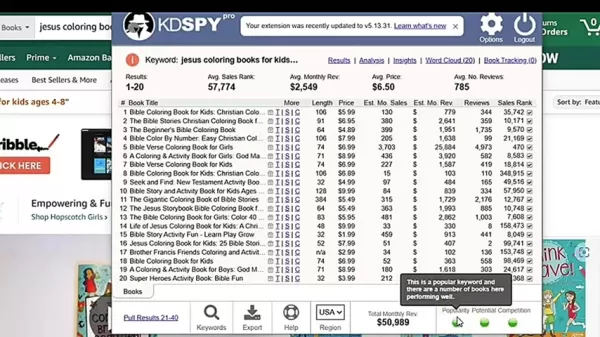
Choosing a profitable niche is essential for your coloring book's success. The video uses Christian coloring books as an example, showing the potential demand for faith-based content. The speaker uses tools like KDSPY to analyze keywords and competition on Amazon.
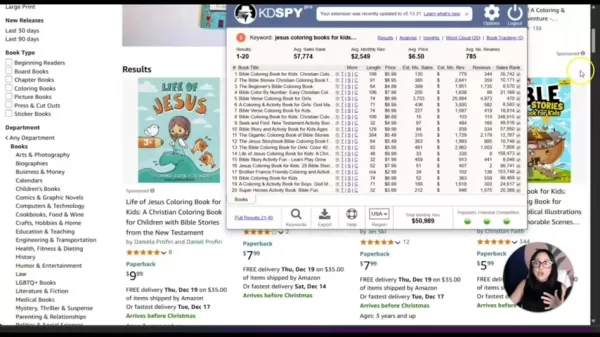
Here’s how to identify a profitable niche:
- Keyword Research: Use tools like KDSPY to explore keywords linked to your niche (e.g., "Jesus coloring books for kids ages 4-8").
- Analyze Search Results: Check the number of search results to understand competition. A good balance between search volume and competition is ideal. The video notes that "Jesus coloring books for kids ages 4-8" yielded over 2,000 results, which indicates strong potential.
- Assess Popularity and Potential: KDSPY provides data on a niche's popularity and revenue potential. Green indicators across categories suggest high demand and solid performance.
- Evaluate Competition: KDSPY also shows competition levels. A green indicator means you have a good chance of ranking on the first page.
Using data-driven tools allows you to make smart decisions about which niches to enter, increasing your likelihood of success in the competitive coloring book space.
Creating a Coloring Book Template in Canva
After generating your coloring pages, the next step is to assemble them into a book. Canva is perfect for this, offering an intuitive interface and a wide range of design options. Here’s how to create a coloring book template in Canva:
Create a Custom Template: Start by designing a custom template with dimensions of 8.5" x 11", a standard coloring book size.
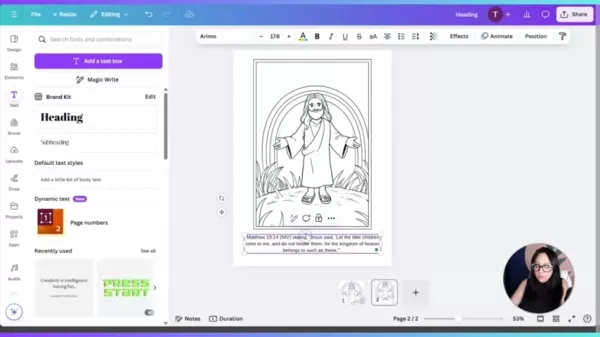
Upload Your Images: Upload the coloring pages you created in Nurie Creator to Canva.
Add a Page Border (Optional): Include a border to improve the book’s visual appeal.
Insert Images: Place the coloring page into the frame and adjust as necessary.
Add Text (Optional): Include supplementary content, such as Bible verses or quotes, that complements your coloring pages. Use Canva's Magic Write feature to generate appropriate text for your theme.
Duplicate Pages: Copy the template to create additional pages for your book.
Canva streamlines the process of putting your coloring book together, letting you add polished design elements and text for a professional finish. It’s an invaluable tool for finalizing your project.
Additional Tips for Coloring Book Creation
Optimizing Prompts for AI Image Generation
The quality of AI-generated coloring pages depends largely on the prompts you use. A well-written prompt can improve results, ensuring the images match what you have in mind. Here are some tips to optimize your prompts:
- Be Specific: Clearly outline the scene, characters, and details you want.
- Use Descriptive Language: Include adjectives and adverbs to set the mood, style, and specifics.
- Specify Art Style: If you want a certain style, state it clearly (e.g., "cartoon style," "realistic line art").
- Experiment: Test different prompts and variations. Iteration helps you refine prompts for better outcomes.
By mastering prompt engineering, you can make the most of AI image generation tools to create original and attractive coloring pages.
Marketing Your Coloring Book on Amazon KDP
Once your coloring book is complete, the next step is to publish it on Amazon KDP (Kindle Direct Publishing). Effective marketing is key to driving sales and connecting with your audience. Try these approaches:
- Keyword Optimization: Include relevant keywords in your book’s title, description, and tags. Refer to your earlier research for the best terms.
- Compelling Book Cover: Invest in a professional, eye-catching cover that represents your book well. An attractive cover helps draw in buyers.
- Detailed Book Description: Write a thorough and engaging description that points out what makes your coloring book special. Use keywords and phrases that appeal to your target readers.
- Customer Reviews: Encourage happy customers to leave reviews. Positive feedback builds credibility and can increase sales.
- Promotions and Advertising: Use Amazon's advertising options to promote your book and expand your reach. Consider targeted ad campaigns to increase visibility and traffic.
A well-rounded marketing strategy can boost your coloring book’s exposure and generate consistent sales through Amazon KDP.
Step-by-Step Guide to Using Nurie Creator and Canva
Step 1: Generating Coloring Pages with Nurie Creator
- Access Nurie Creator: Visit the Nurie Creator website and sign in to your account.
- Enter Your Prompt: Type your prompt into the prompt box. Describe clearly what you want the AI to produce. For example: "create a coloring page with Jesus talking to a small boy while they are sitting on the grass on a sunny day."
- Choose Background Options: Decide if you want no background or background layer assist—this affects the image's complexity.
- Select Image Size, Art Style, and Line Thickness: Choose these settings according to your coloring book specifications.
- Generate Images: Let the tool produce several options based on your input.
- Download the Images: Once generated, download the images as a PNG ZIP file.
Step 2: Creating a Coloring Book Template in Canva
- Access Canva: Go to the Canva website and log in to your account.
- Create a Custom Design: Select custom size and set the dimensions to 8.5" x 11".
- Upload Coloring Pages: Upload the coloring pages you downloaded from Nurie Creator.
- Add a Page Border: Search “Page Border” in the elements tab and select a border design for your template.
- Add Text: Use Magic Write to add a fitting Bible verse or other text.
- Download your new file.
Nurie Creator: Pros and Cons
Pros
AI-powered content creation.
Fast and efficient production.
Customizable image settings.
Works well for various themes, including niche subjects.
Easy to use interface.
Cons
Limited image control in the free version.
Pro version required for advanced features.
Outcomes rely heavily on the quality of prompts.
AI results can be inconsistent.
FAQ
What is Nurie Creator?
Nurie Creator is an AI-based tool that creates coloring pages from user prompts. It makes producing coloring book content straightforward and efficient.
What file format should I download the coloring pages in?
PNG is the recommended format, since it maintains quality and works with most editing and publishing software.
Is Canva a free tool?
Yes, Canva has a free version with many design tools and templates. Some features and elements may require a Canva Pro subscription.
How can I increase the visibility of my coloring book on Amazon KDP?
Use relevant keywords in your title, description, and tags. Optimize your cover and description to help your coloring books stand out.
Related Questions
What other niches are suitable for creating coloring books?
Besides Christian themes, popular niches include animals, nature, mandalas, fantasy, and educational topics. Think about targeting specific age ranges or interests to refine your focus. Other appealing niches could be space, planes, or the military. Don’t forget to publish your new coloring book on Amazon KDP to share your creativity. These ideas can help you get started with your coloring book project.
How important is the quality of the coloring pages?
Quality is crucial. High-resolution images with sharp, well-defined lines provide a satisfying coloring experience. It’s a good idea to explore themes that will connect with customers. For instance, publishing a coloring book with Christian themes can increase your earnings by appealing to that audience.
Related article
 U.S. Stocks Hit Historic Milestone as AI and Aerospace Giants Prepare for Trillion-Dollar Debut
Elon Musk, Sam Altman, and Dario Amodei, three titans of the technology sector, are advancing toward initial public offerings for their respective ventures. With SpaceX, OpenAI, and Anthropic—three industry behemoths nearing trillion-dollar valuation
Swedish AI Startup Lovable Eyes $13.2 Billion Valuation After Major Funding Round
As AI-driven coding tools gain traction, Swedish startup Lovable has secured a major funding round. The company aims to raise $3 billion, potentially boosting its valuation to $13.2 billion—double the $6.6 billion recorded last December. Menlo Ventur
Google Tests Remy AI Agent for Gemini as Focus Shifts to User Control
According to Business Insider, Google is testing Remy, a new AI personal agent for Gemini. This tool aims to execute tasks on behalf of users, streamlining both professional workflows and daily routines.Currently, Remy is undergoing testing in an int
Related Special Topic Recommendations
Data Analysis
U.S. Stocks Hit Historic Milestone as AI and Aerospace Giants Prepare for Trillion-Dollar Debut
Elon Musk, Sam Altman, and Dario Amodei, three titans of the technology sector, are advancing toward initial public offerings for their respective ventures. With SpaceX, OpenAI, and Anthropic—three industry behemoths nearing trillion-dollar valuation
Swedish AI Startup Lovable Eyes $13.2 Billion Valuation After Major Funding Round
As AI-driven coding tools gain traction, Swedish startup Lovable has secured a major funding round. The company aims to raise $3 billion, potentially boosting its valuation to $13.2 billion—double the $6.6 billion recorded last December. Menlo Ventur
Google Tests Remy AI Agent for Gemini as Focus Shifts to User Control
According to Business Insider, Google is testing Remy, a new AI personal agent for Gemini. This tool aims to execute tasks on behalf of users, streamlining both professional workflows and daily routines.Currently, Remy is undergoing testing in an int
Related Special Topic Recommendations
Data Analysis
 Best AI Anomaly Detection Tools for KPI Monitoring across SaaS and Ecommerce Teams
2026 Latest Best Top-rated AI Anomaly Detection Tools for KPI Monitoring in SaaS and Ecommerce teams! XIX.AI has curated a powerful, game-changing collection based on rigorous real-world tests and weekly updated rankings. You’ll find detailed free vs paid comparison insights to help you identify the must-try solution that boosts productivity and unlocks your AI edge. Explore now!
 10 tools
 xix.ai
writing
Best AI Outline Generators for Long-Form SEO Articles
xix.ai
writing
Best AI Outline Generators for Long-Form SEO Articles
2026 Latest Best Top-Rated AI Outline Generators for Long-Form SEO Articles, meticulously curated by XIX.AI. These powerful tools offer game-changing assistance in creating high-quality content quickly, boosting writing efficiency significantly. Get a free vs paid comparison along with real-world tests and detailed rankings to help you find the must-try option that suits your needs. Explore now to unlock your AI edge.
8 tools
xix.ai
Education and Learning
AI Study Tools for Homework and Exam Prep
2026 Latest Best AI Study Tools for Homework and Exam Prep! XIX.AI curates a top-rated list of powerful, game-changing tools that help students boost productivity, streamline homework completion, and ace exams through real-world tests. Get a free vs paid comparison, detailed rankings, and must-try options to unlock your AI edge. Explore now!
10 tools
xix.ai
Music composition
AI Vocal Demo Tools for Songwriters, Hooks, Toplines, and Multilingual Draft Sessions
2026 Latest Best AI Vocal Demo Tools for Songwriters, Hook Creators, and Multi-Language Content Teams! XIX.AI has curated a top-rated list of powerful game-changing tools that go through rigorous real-world tests. You’ll find detailed free vs paid comparison data, comprehensive rankings, and must-try options to help you boost writing efficiency and unlock your creative potential. Explore now to discover your perfect tool for all your content needs!
9 tools
xix.ai
Business
Best AI Competitive Research Tools for Small Businesses
2026 Latest Best Top-rated AI Competitive Research Tools for Small Businesses! XIX.AI has curated a highly powerful game-changing collection, updated weekly with rigorous real-world tests and detailed rankings. You can find a comprehensive free vs paid comparison to help you identify the must-try tools that boost your productivity and give you a competitive edge. Explore now to discover your perfect tool!
9 tools
xix.ai
Image editing
Photoshop AI Retouch Tools for Ecommerce Apparel, Skin Cleanup, and Color Consistency
2026 Latest Best Photoshop AI retouch tools for ecommerce apparel, skin cleanup, and color consistency! This top-rated curated list features powerful game-changing solutions that help you boost writing efficiency, streamline content creation, and achieve perfect visual results effortlessly. Each tool has undergone real-world tests through weekly updated rankings, complete with free vs paid comparison details. Backed by XIX.AI, it’s the must-try guide for anyone aiming to unlock your AI edge. Explore now!
10 tools
xix.ai

 Comments (2)
0/500
Comments (2)
0/500
![AnthonyMoore]()
C’est trop génial de pouvoir créer des livres de coloriage en quelques clics grâce à l’IA, on dirait un cadeau magique pour tous les artistes amateurs qui veulent gagner de l’argent sans passer des heures à travailler !
![WillieHernández]()
AIで塗り絵本を作れるなんて、時代は変わったなぁ。でも、これで誰でも簡単に収入源を作れるなら、プロのイラストレーターの仕事はどうなるんだろう?ちょっと心配になるけど、とりあえず試してみようかな。🎨
Creating coloring books has become a popular method for authors and artists to build passive income streams. Thanks to advances in AI technology, this process is now quicker and more accessible. This guide will show you how to create and publish coloring books using tools like Nurie Creator and Canva. Let's explore the world of AI-assisted publishing and learn how to transform your creative concepts into tangible, marketable products. It's an excellent opportunity for Christian creators!
Key Points
Use AI tools such as Nurie Creator to produce coloring pages quickly.
Understand the demand for niche coloring books, including those with religious themes.
Take advantage of Canva to design templates and incorporate unique creative elements.
Optimize your coloring book for publishing on platforms like Amazon KDP.
Identify profitable keywords using tools like KDSPY to boost discoverability.
Creating Coloring Books with AI
Leveraging Nurie Creator for Coloring Page Generation
Nurie Creator is a powerful AI-driven tool for rapidly generating coloring pages. It simplifies the creation workflow, allowing you to focus on your book’s overall design and promotion. With Nurie Creator, you can design pages around different themes, such as religious content—an area highlighted in the video as a potentially profitable niche.
The speaker emphasizes that Jesus is central to the season, making a coloring book about his life an engaging choice. This tool is ideal for anyone looking to easily and efficiently publish coloring books.
Follow these steps to begin with Nurie Creator:
- Enter a Prompt: Describe the type of coloring page you want. For example, "create a coloring page showing Jesus speaking with a young boy as they sit on the grass on a sunny day."
- Customize Settings: Choose background options, image size (e.g., 8.5" x 11"), art style, and line thickness.
- Generate Images: The AI will create multiple images based on your description.
- Review and Select: Look through the generated images and choose the ones that best match your vision.
- Download Images: Download your selections in PNG format for editing and inclusion in your coloring book.
If you want more customization in your images, consider upgrading to the Pro version of Nurie Creator. This unlocks features like line thickness control, which can greatly improve the quality and appeal of your pages.
Finding a Profitable Niche: The Example of Christian Coloring Books
Choosing a profitable niche is essential for your coloring book's success. The video uses Christian coloring books as an example, showing the potential demand for faith-based content. The speaker uses tools like KDSPY to analyze keywords and competition on Amazon.
Here’s how to identify a profitable niche:
- Keyword Research: Use tools like KDSPY to explore keywords linked to your niche (e.g., "Jesus coloring books for kids ages 4-8").
- Analyze Search Results: Check the number of search results to understand competition. A good balance between search volume and competition is ideal. The video notes that "Jesus coloring books for kids ages 4-8" yielded over 2,000 results, which indicates strong potential.
- Assess Popularity and Potential: KDSPY provides data on a niche's popularity and revenue potential. Green indicators across categories suggest high demand and solid performance.
- Evaluate Competition: KDSPY also shows competition levels. A green indicator means you have a good chance of ranking on the first page.
Using data-driven tools allows you to make smart decisions about which niches to enter, increasing your likelihood of success in the competitive coloring book space.
Creating a Coloring Book Template in Canva
After generating your coloring pages, the next step is to assemble them into a book. Canva is perfect for this, offering an intuitive interface and a wide range of design options. Here’s how to create a coloring book template in Canva:
Create a Custom Template: Start by designing a custom template with dimensions of 8.5" x 11", a standard coloring book size.
Upload Your Images: Upload the coloring pages you created in Nurie Creator to Canva.
Add a Page Border (Optional): Include a border to improve the book’s visual appeal.
Insert Images: Place the coloring page into the frame and adjust as necessary.
Add Text (Optional): Include supplementary content, such as Bible verses or quotes, that complements your coloring pages. Use Canva's Magic Write feature to generate appropriate text for your theme.
Duplicate Pages: Copy the template to create additional pages for your book.
Canva streamlines the process of putting your coloring book together, letting you add polished design elements and text for a professional finish. It’s an invaluable tool for finalizing your project.
Additional Tips for Coloring Book Creation
Optimizing Prompts for AI Image Generation
The quality of AI-generated coloring pages depends largely on the prompts you use. A well-written prompt can improve results, ensuring the images match what you have in mind. Here are some tips to optimize your prompts:
- Be Specific: Clearly outline the scene, characters, and details you want.
- Use Descriptive Language: Include adjectives and adverbs to set the mood, style, and specifics.
- Specify Art Style: If you want a certain style, state it clearly (e.g., "cartoon style," "realistic line art").
- Experiment: Test different prompts and variations. Iteration helps you refine prompts for better outcomes.
By mastering prompt engineering, you can make the most of AI image generation tools to create original and attractive coloring pages.
Marketing Your Coloring Book on Amazon KDP
Once your coloring book is complete, the next step is to publish it on Amazon KDP (Kindle Direct Publishing). Effective marketing is key to driving sales and connecting with your audience. Try these approaches:
- Keyword Optimization: Include relevant keywords in your book’s title, description, and tags. Refer to your earlier research for the best terms.
- Compelling Book Cover: Invest in a professional, eye-catching cover that represents your book well. An attractive cover helps draw in buyers.
- Detailed Book Description: Write a thorough and engaging description that points out what makes your coloring book special. Use keywords and phrases that appeal to your target readers.
- Customer Reviews: Encourage happy customers to leave reviews. Positive feedback builds credibility and can increase sales.
- Promotions and Advertising: Use Amazon's advertising options to promote your book and expand your reach. Consider targeted ad campaigns to increase visibility and traffic.
A well-rounded marketing strategy can boost your coloring book’s exposure and generate consistent sales through Amazon KDP.
Step-by-Step Guide to Using Nurie Creator and Canva
Step 1: Generating Coloring Pages with Nurie Creator
- Access Nurie Creator: Visit the Nurie Creator website and sign in to your account.
- Enter Your Prompt: Type your prompt into the prompt box. Describe clearly what you want the AI to produce. For example: "create a coloring page with Jesus talking to a small boy while they are sitting on the grass on a sunny day."
- Choose Background Options: Decide if you want no background or background layer assist—this affects the image's complexity.
- Select Image Size, Art Style, and Line Thickness: Choose these settings according to your coloring book specifications.
- Generate Images: Let the tool produce several options based on your input.
- Download the Images: Once generated, download the images as a PNG ZIP file.
Step 2: Creating a Coloring Book Template in Canva
- Access Canva: Go to the Canva website and log in to your account.
- Create a Custom Design: Select custom size and set the dimensions to 8.5" x 11".
- Upload Coloring Pages: Upload the coloring pages you downloaded from Nurie Creator.
- Add a Page Border: Search “Page Border” in the elements tab and select a border design for your template.
- Add Text: Use Magic Write to add a fitting Bible verse or other text.
- Download your new file.
Nurie Creator: Pros and Cons
Pros
AI-powered content creation.
Fast and efficient production.
Customizable image settings.
Works well for various themes, including niche subjects.
Easy to use interface.
Cons
Limited image control in the free version.
Pro version required for advanced features.
Outcomes rely heavily on the quality of prompts.
AI results can be inconsistent.
FAQ
What is Nurie Creator?
Nurie Creator is an AI-based tool that creates coloring pages from user prompts. It makes producing coloring book content straightforward and efficient.
What file format should I download the coloring pages in?
PNG is the recommended format, since it maintains quality and works with most editing and publishing software.
Is Canva a free tool?
Yes, Canva has a free version with many design tools and templates. Some features and elements may require a Canva Pro subscription.
How can I increase the visibility of my coloring book on Amazon KDP?
Use relevant keywords in your title, description, and tags. Optimize your cover and description to help your coloring books stand out.
Related Questions
What other niches are suitable for creating coloring books?
Besides Christian themes, popular niches include animals, nature, mandalas, fantasy, and educational topics. Think about targeting specific age ranges or interests to refine your focus. Other appealing niches could be space, planes, or the military. Don’t forget to publish your new coloring book on Amazon KDP to share your creativity. These ideas can help you get started with your coloring book project.
How important is the quality of the coloring pages?
Quality is crucial. High-resolution images with sharp, well-defined lines provide a satisfying coloring experience. It’s a good idea to explore themes that will connect with customers. For instance, publishing a coloring book with Christian themes can increase your earnings by appealing to that audience.








 U.S. Stocks Hit Historic Milestone as AI and Aerospace Giants Prepare for Trillion-Dollar Debut
Elon Musk, Sam Altman, and Dario Amodei, three titans of the technology sector, are advancing toward initial public offerings for their respective ventures. With SpaceX, OpenAI, and Anthropic—three industry behemoths nearing trillion-dollar valuation
U.S. Stocks Hit Historic Milestone as AI and Aerospace Giants Prepare for Trillion-Dollar Debut
Elon Musk, Sam Altman, and Dario Amodei, three titans of the technology sector, are advancing toward initial public offerings for their respective ventures. With SpaceX, OpenAI, and Anthropic—three industry behemoths nearing trillion-dollar valuation
 Swedish AI Startup Lovable Eyes $13.2 Billion Valuation After Major Funding Round
As AI-driven coding tools gain traction, Swedish startup Lovable has secured a major funding round. The company aims to raise $3 billion, potentially boosting its valuation to $13.2 billion—double the $6.6 billion recorded last December. Menlo Ventur
Google Tests Remy AI Agent for Gemini as Focus Shifts to User Control
According to Business Insider, Google is testing Remy, a new AI personal agent for Gemini. This tool aims to execute tasks on behalf of users, streamlining both professional workflows and daily routines.Currently, Remy is undergoing testing in an int
Swedish AI Startup Lovable Eyes $13.2 Billion Valuation After Major Funding Round
As AI-driven coding tools gain traction, Swedish startup Lovable has secured a major funding round. The company aims to raise $3 billion, potentially boosting its valuation to $13.2 billion—double the $6.6 billion recorded last December. Menlo Ventur
Google Tests Remy AI Agent for Gemini as Focus Shifts to User Control
According to Business Insider, Google is testing Remy, a new AI personal agent for Gemini. This tool aims to execute tasks on behalf of users, streamlining both professional workflows and daily routines.Currently, Remy is undergoing testing in an int

2026 Latest Best Top-rated AI Anomaly Detection Tools for KPI Monitoring in SaaS and Ecommerce teams! XIX.AI has curated a powerful, game-changing collection based on rigorous real-world tests and weekly updated rankings. You’ll find detailed free vs paid comparison insights to help you identify the must-try solution that boosts productivity and unlocks your AI edge. Explore now!
10 tools
xix.ai

2026 Latest Best Top-Rated AI Outline Generators for Long-Form SEO Articles, meticulously curated by XIX.AI. These powerful tools offer game-changing assistance in creating high-quality content quickly, boosting writing efficiency significantly. Get a free vs paid comparison along with real-world tests and detailed rankings to help you find the must-try option that suits your needs. Explore now to unlock your AI edge.
8 tools
xix.ai

2026 Latest Best AI Study Tools for Homework and Exam Prep! XIX.AI curates a top-rated list of powerful, game-changing tools that help students boost productivity, streamline homework completion, and ace exams through real-world tests. Get a free vs paid comparison, detailed rankings, and must-try options to unlock your AI edge. Explore now!
10 tools
xix.ai

2026 Latest Best AI Vocal Demo Tools for Songwriters, Hook Creators, and Multi-Language Content Teams! XIX.AI has curated a top-rated list of powerful game-changing tools that go through rigorous real-world tests. You’ll find detailed free vs paid comparison data, comprehensive rankings, and must-try options to help you boost writing efficiency and unlock your creative potential. Explore now to discover your perfect tool for all your content needs!
9 tools
xix.ai

2026 Latest Best Top-rated AI Competitive Research Tools for Small Businesses! XIX.AI has curated a highly powerful game-changing collection, updated weekly with rigorous real-world tests and detailed rankings. You can find a comprehensive free vs paid comparison to help you identify the must-try tools that boost your productivity and give you a competitive edge. Explore now to discover your perfect tool!
9 tools
xix.ai

2026 Latest Best Photoshop AI retouch tools for ecommerce apparel, skin cleanup, and color consistency! This top-rated curated list features powerful game-changing solutions that help you boost writing efficiency, streamline content creation, and achieve perfect visual results effortlessly. Each tool has undergone real-world tests through weekly updated rankings, complete with free vs paid comparison details. Backed by XIX.AI, it’s the must-try guide for anyone aiming to unlock your AI edge. Explore now!
10 tools
xix.ai

C’est trop génial de pouvoir créer des livres de coloriage en quelques clics grâce à l’IA, on dirait un cadeau magique pour tous les artistes amateurs qui veulent gagner de l’argent sans passer des heures à travailler !
AIで塗り絵本を作れるなんて、時代は変わったなぁ。でも、これで誰でも簡単に収入源を作れるなら、プロのイラストレーターの仕事はどうなるんだろう?ちょっと心配になるけど、とりあえず試してみようかな。🎨












