


 Home
HomeCanva AI Generates Custom Dinosaur Coloring Pages
Artificial intelligence is reshaping creative industries in the digital era, and graphic design is no exception. A particularly exciting area is the creation of coloring pages for marketplaces like Etsy. This guide explains how to use Canva's Magic Media AI image generator to design engaging dinosaur coloring pages that attract customers and help build a passive income stream.
Key Points
An overview of Canva's AI image generation capabilities.
How to use AI for crafting dinosaur-themed coloring pages.
A step-by-step tutorial for creating pages within Canva.
Techniques for customizing prompts to get the best results.
Experimenting with various artistic styles for your pages.
Effective strategies for selling your AI-generated pages on Etsy.
Introduction to Canva Magic Media AI Image Generation
What is Canva Magic Media AI?
Canva's Magic Media is an AI-powered feature that creates visual content from text descriptions. It's built to be intuitive, welcoming both professional designers and newcomers. This tool lets you produce one-of-a-kind images for many uses, from social media posts to printable coloring books. It offers a variety of styles and artistic effects, providing a broad spectrum of creative possibilities.
.
Why Use Canva AI for Coloring Pages?
Leveraging Canva's AI for coloring page creation comes with several advantages:
- Efficiency: Produce numerous designs quickly with little effort.
- Uniqueness: Generate original artwork that stands out from standard templates.
- Customization: Fine-tune the AI's output using detailed prompts for your preferred style.
- Scalability: Build a large and varied catalog for your Etsy shop.
- Accessibility: Canva's straightforward interface makes AI image creation easy for all skill levels.
This approach streamlines the process of making marketable digital content for Etsy. It also presents an accessible alternative to more specialized platforms like Leonardo AI.
Creating Dinosaur Coloring Pages: A Step-by-Step Guide
Step 1: Setting Up Your Canva Design
Begin by preparing your Canva document. Proper sizing is crucial for high-quality prints. Follow these steps:
- Log in to your Canva account.
- Click 'Create a Design' on the homepage.
- Choose ‘Custom Size’.
- Enter your dimensions. A good standard is 8.5 x 8.5 inches, or you may prefer the popular 8.5 x 11 inches. Adjust based on your project needs.
- Name your project, for instance, 'Dinosaur Coloring Pages', to stay organized.
Step 2: Accessing Magic Media AI Generator
With your canvas ready, find the AI tool:
- In the left-side panel, click on ‘Elements’.
- Scroll down and select the ‘AI Image Generator’ (Magic Media).
- Click ‘Generate Your Own’ to open the prompt window.
Step 3: Crafting Your AI Prompt
Crafting an effective prompt is key to getting great results. Here's how:
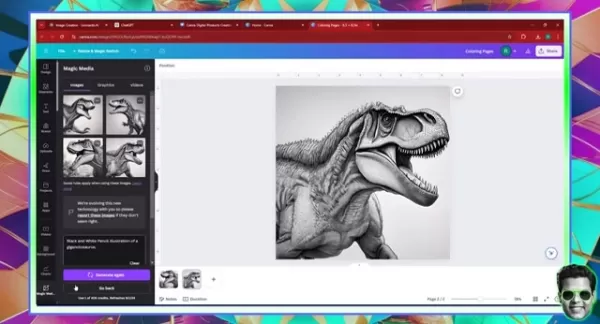
- In the text box, clearly describe your desired image. For example: 'Black and white pencil sketch of a Giganotosaurus'.
- Use keywords like 'coloring page' or 'line art' to guide the AI.
- Try different descriptive words to yield unique designs.
- Add style cues such as 'simple', 'cartoon', or 'detailed'.
Step 4: Generating Images
Once your prompt is set, generate the art:
- Click the ‘Generate Image’ button.
- Canva will create four image variations based on your description.
- Review and select the images that best match your vision.
Step 5: Refining and Customizing Your Coloring Pages
After generation, you can polish your designs:
- Resize and position the images on your canvas.
- Use Canva’s editing tools to add borders, backgrounds, or text.
- Enhance line contrast and clarity for a better coloring experience.
- Duplicate successful designs and make small variations for a diverse collection.
Step 6: Exploring Different Styles
Canva’s AI works with various art styles. Experiment to create diversity:
- In the Magic Media interface, choose the ‘Styles’ option.
- Select from styles like ‘Anime,’ ‘Photo,’ or ‘Watercolor.’
- Observe how each style alters the output and adjust your prompts.
- Combine styles for truly unique creations.
Step 7: Optimizing for Etsy
Before listing, optimize your pages for sales:
- Ensure designs are high-resolution (300 DPI) for crisp prints.
- Create an attractive product mockup to catch buyer interest.
- Write a detailed product description with relevant keywords.
- Set competitive prices.
- Consider bundling multiple pages to increase value.
Advanced Prompt Engineering Techniques
Enhance your prompts with specific details to guide the AI.
Mastering prompt writing is essential for producing top-quality coloring pages. Precise, well-structured prompts greatly improve the relevance and quality of the AI's output. The key is to include specific details that clearly direct the AI.
Start by clearly defining your subject, such as 'a powerful Tyrannosaurus Rex'. Next, specify the desired artistic style, for example, 'in a cartoon style with bold, clear lines perfect for kids'. Finally, add scene details like 'in a lush prehistoric jungle with smaller dinosaurs nearby'. This level of detail helps the AI accurately realize your vision.
More detailed prompts lead to better-tailored images. Instead of 'dinosaur,' specify 'a friendly Triceratops with large, expressive eyes and a happy smile.' Descriptors like 'friendly' and 'happy' steer the AI toward a playful style ideal for children.
Including context is also powerful. A prompt like 'a Stegosaurus peacefully eating ferns in a sunlit meadow' provides the AI with a clear scene, influencing the composition and mood. Experimenting with varied keywords unlocks the tool's creative potential, leading to more engaging pages.
Monetizing Your Dinosaur Coloring Pages on Etsy
Pricing Strategies
To maximize revenue, employ smart pricing tactics:
- Research the going rates for similar coloring pages on Etsy.
- Factor in your time and effort as a production cost.
- Set competitive prices that still ensure a profit.
- Bundle several pages together to enhance value for customers.
- Occasionally run sales or promotions to boost traffic.
Licensing and Copyright
Understand the legal aspects of selling AI-generated artwork:
- Review Canva’s terms of service concerning the commercial use of AI images.
- Be aware that purely AI-generated images may not qualify for standard copyright protection.
- Add your own unique touches to designs to strengthen claims of originality.
- Seek legal advice if you have specific concerns about intellectual property.
Benefits and Drawbacks of AI-Generated Coloring Pages
Pros
Rapid creation of multiple designs.
Unique artwork that differentiates your shop.
Customizable prompts for tailored results.
Easy scaling to build a large product catalog.
User-friendly tools requiring minimal design expertise.
Cons
AI art can sometimes lack a personal, human feel.
Potential copyright ambiguity if outputs resemble existing works.
Often requires additional editing to achieve perfect quality.
Results depend heavily on the AI's interpretation of prompts.
Core Features of Canva Magic Media for Coloring Pages
AI-Powered Image Generation
The core of Magic Media is its advanced AI that transforms text into images. The technology is constantly improving, getting better at understanding detailed prompts. For example, inputting 'intricate T-Rex skeleton line art' can produce surprisingly detailed images perfect for older kids or adults seeking a challenge.
Variety of Artistic Styles
A major strength is the ability to generate images in numerous styles. From 'cartoon' to 'pencil sketch,' the tool adapts to different creative needs. This allows you to create a wide range—from cute dinosaurs for toddlers to realistic illustrations for enthusiasts—helping you target various customer segments on Etsy.
User-Friendly Interface
Magic Media maintains Canva's hallmark ease of use. Its clean layout and clear instructions make it accessible to everyone, regardless of their AI or design experience. You can experiment and create without needing technical knowledge, democratizing AI-assisted art.
Seamless Integration with Canva’s Editing Tools
A key advantage is the direct access to Canva’s full editing suite. Generated images can be instantly enhanced with backgrounds, text, or other graphic elements. This integrated workflow is efficient, allowing you to move smoothly from AI generation to final polish within one platform.
Unlocking Creative Potential: Use Cases for AI Dinosaur Coloring Pages
Etsy Shop Expansion
For existing Etsy sellers, AI-generated coloring pages are an excellent way to diversify offerings and boost sales.
. Creating themed digital coloring books, like a prehistoric collection, attracts niche audiences looking for unique, educational activities for children.
Generating Passive Income
A major appeal of selling digital coloring pages is the potential for passive income. Once your products are listed and optimized, they can sell continuously with minimal ongoing effort, freeing your time for other projects. Success hinges on creating high-quality, appealing designs.
Customizable Educational Material
These pages are valuable beyond entertainment. Educators and parents can use them to supplement lessons on dinosaurs. The ability to customize prompts means you can create pages aligned with specific educational goals, making learning more interactive and fun.
Custom Gifts
Offer personalized coloring pages as unique gifts. Customizing pages with names, favorite dinosaurs, or special messages creates memorable presents. They also work wonderfully for themed birthday parties as both an activity and a take-home favor.
Frequently Asked Questions About Canva AI Coloring Pages
Is Canva Magic Media free to use?
Canva provides a free plan with access to basic features, including Magic Media (with usage limits). A Canva Pro subscription unlocks more advanced features and higher generation limits.
Can I sell the coloring pages I create with Canva AI?
Yes, generally you can sell them. However, you must review and comply with Canva’s current terms of service regarding commercial use of AI-generated content.
What file format should I use for selling coloring pages on Etsy?
PDF is the most recommended and commonly used format. It ensures print quality remains high and the file is compatible with most devices and printers.
How can I improve the quality of my AI-generated coloring pages?
Practice with different prompts and styles. Use Canva's editing tools to refine line art and contrast. Always generate images at the highest available resolution for the best final print quality.
Related Questions About AI Image Generators
Are AI-generated images copyrighted?
Copyright law for AI-generated content is complex and still developing. Currently, in many jurisdictions, images created solely by AI may not be granted traditional copyright protection due to the lack of direct human authorship. Adding significant human creative input (like unique editing and arrangement) can help. It's wise to stay updated on legal changes and consult a lawyer for specific business concerns.
Related article
 Uber Engineer Creates AI Clone of CEO to Dodge Direct Questions
While most staff dread reporting to the CEO, engineers at global travel leader Uber have discovered a strategic advantage: letting an AI replica of their boss provide feedback beforehand."Dara AI": The Executive Coach Before Boardroom MeetingsUber CE
How Unitree is Shaping the Future of Humanoid Robotics
Unitree’s New Creature of Embodied AI with ultra-wide 4D LiDAR technology for advanced real-world navigation. Credit: UnitreeWang Xingxing, CEO of Unitree, targets world model breakthroughs to help humanoid machines execute 80% of tasks when placed i
Why Abnormal AI Partnered With OpenAI on Daybreak
Michael Aiello, Head of Product for Cyber at OpenAI | Credit: Michael Aiello/LinkedInAbnormal AI joins OpenAI’s Daybreak programme, as Mike Aiello says the partnership will accelerate the adoption of practical defences for enterprisesLeading frontier
Related Special Topic Recommendations
Health & Wellness
Uber Engineer Creates AI Clone of CEO to Dodge Direct Questions
While most staff dread reporting to the CEO, engineers at global travel leader Uber have discovered a strategic advantage: letting an AI replica of their boss provide feedback beforehand."Dara AI": The Executive Coach Before Boardroom MeetingsUber CE
How Unitree is Shaping the Future of Humanoid Robotics
Unitree’s New Creature of Embodied AI with ultra-wide 4D LiDAR technology for advanced real-world navigation. Credit: UnitreeWang Xingxing, CEO of Unitree, targets world model breakthroughs to help humanoid machines execute 80% of tasks when placed i
Why Abnormal AI Partnered With OpenAI on Daybreak
Michael Aiello, Head of Product for Cyber at OpenAI | Credit: Michael Aiello/LinkedInAbnormal AI joins OpenAI’s Daybreak programme, as Mike Aiello says the partnership will accelerate the adoption of practical defences for enterprisesLeading frontier
Related Special Topic Recommendations
Health & Wellness
 Best AI Sleep Coaching Tools for Shift Workers, Jet Lag Recovery, and Better Routines
2026 Latest Best AI Sleep Coaching Tools for Shift Workers, Jet Lag Recovery, and Better Routines! XIX.AI has curated a top-rated list of powerful game-changing tools that go through real-world tests to deliver accurate guidance. You can find detailed free vs paid comparison info and see how these must-try solutions help boost sleep quality, speed up jet lag recovery, and build healthier routines. Explore now to discover your perfect tool!
 7 tools
 xix.ai
code
ChatGPT Debugging Tools for Python Errors, API Logs, and Stack Trace Triage
xix.ai
code
ChatGPT Debugging Tools for Python Errors, API Logs, and Stack Trace Triage
2026 Latest Best ChatGPT debugging tools for Python errors, API logs, and stack trace triage are here on XIX.AI. This curated list of top-rated solutions offers a free vs paid comparison, real-world tests, and detailed rankings to help you find the most powerful tool that can significantly boost your productivity and help you solve complex technical issues faster. Explore now to discover your perfect solution!
9 tools
xix.ai
Text-to-speech
AI Voiceover Tools for Product Demo Videos
2026 Latest Best Top-Rated AI Voiceover Tools for Product Demo Videos are here on XIX.AI! This curated list features powerful, game-changing options that help you create professional-quality audio content fast, boosting your demo efficiency significantly. We conduct real-world tests and provide a free vs paid comparison along with weekly updated rankings to help you find the perfect fit. Explore now to Unlock your AI edge!
10 tools
xix.ai
Business
AI Business Plan Tools for Startup Validation
2026 Latest Best AI Business Plan Tools for Startup Validation! XIX.AI has curated a top-rated list of powerful game-changing tools that go through real-world tests to deliver accurate results. You’ll find a free vs paid comparison, detailed rankings, and easy-to-understand insights to help you choose the perfect solution and boost your startup’s success rate. Explore now to Unlock your AI edge!
9 tools
xix.ai
chatbot
AI Chat Apps for Roleplay and Conversation Practice
2026 Latest Best AI Chat Apps for Roleplay and Conversation Practice! XIX.AI curates a top-rated list of powerful must-try tools that go through rigorous real-world tests to deliver exceptional results. You’ll find detailed free vs paid comparison, comprehensive rankings, and insights into how these apps can boost your language skills and communication confidence effectively. Explore now to discover your perfect tool for practice!
10 tools
xix.ai
design
Best AI Wireframe Tools for Product Teams
2026 Latest Best Top-rated AI Wireframe Tools for Product Teams! This curated list showcases powerful, game-changing solutions that significantly boost productivity through real-world tests and rigorous rankings. It includes a detailed free vs paid comparison to help you find the perfect fit. XIX.AI provides expert insights to guide your decision. Explore now to Discover your perfect tool and Unlock your AI edge in product development!
8 tools
xix.ai

 Comments (1)
0/500
Comments (1)
0/500
![EricAllen]()
Kann man mit diesen KI-generierten Dino-Malvorlagen eigentlich Geld verdienen? Die Idee ist clever, aber der Etsy-Markt ist doch schon total übersättigt. Vielleicht sollte man lieber Nischen wie 'historisch korrekte Dinosaurier für Erwachsene' ausprobieren. 🦕💡
Artificial intelligence is reshaping creative industries in the digital era, and graphic design is no exception. A particularly exciting area is the creation of coloring pages for marketplaces like Etsy. This guide explains how to use Canva's Magic Media AI image generator to design engaging dinosaur coloring pages that attract customers and help build a passive income stream.
Key Points
An overview of Canva's AI image generation capabilities.
How to use AI for crafting dinosaur-themed coloring pages.
A step-by-step tutorial for creating pages within Canva.
Techniques for customizing prompts to get the best results.
Experimenting with various artistic styles for your pages.
Effective strategies for selling your AI-generated pages on Etsy.
Introduction to Canva Magic Media AI Image Generation
What is Canva Magic Media AI?
Canva's Magic Media is an AI-powered feature that creates visual content from text descriptions. It's built to be intuitive, welcoming both professional designers and newcomers. This tool lets you produce one-of-a-kind images for many uses, from social media posts to printable coloring books. It offers a variety of styles and artistic effects, providing a broad spectrum of creative possibilities.
.
Why Use Canva AI for Coloring Pages?
Leveraging Canva's AI for coloring page creation comes with several advantages:
- Efficiency: Produce numerous designs quickly with little effort.
- Uniqueness: Generate original artwork that stands out from standard templates.
- Customization: Fine-tune the AI's output using detailed prompts for your preferred style.
- Scalability: Build a large and varied catalog for your Etsy shop.
- Accessibility: Canva's straightforward interface makes AI image creation easy for all skill levels.
This approach streamlines the process of making marketable digital content for Etsy. It also presents an accessible alternative to more specialized platforms like Leonardo AI.
Creating Dinosaur Coloring Pages: A Step-by-Step Guide
Step 1: Setting Up Your Canva Design
Begin by preparing your Canva document. Proper sizing is crucial for high-quality prints. Follow these steps:
- Log in to your Canva account.
- Click 'Create a Design' on the homepage.
- Choose ‘Custom Size’.
- Enter your dimensions. A good standard is 8.5 x 8.5 inches, or you may prefer the popular 8.5 x 11 inches. Adjust based on your project needs.
- Name your project, for instance, 'Dinosaur Coloring Pages', to stay organized.
Step 2: Accessing Magic Media AI Generator
With your canvas ready, find the AI tool:
- In the left-side panel, click on ‘Elements’.
- Scroll down and select the ‘AI Image Generator’ (Magic Media).
- Click ‘Generate Your Own’ to open the prompt window.
Step 3: Crafting Your AI Prompt
Crafting an effective prompt is key to getting great results. Here's how:
- In the text box, clearly describe your desired image. For example: 'Black and white pencil sketch of a Giganotosaurus'.
- Use keywords like 'coloring page' or 'line art' to guide the AI.
- Try different descriptive words to yield unique designs.
- Add style cues such as 'simple', 'cartoon', or 'detailed'.
Step 4: Generating Images
Once your prompt is set, generate the art:
- Click the ‘Generate Image’ button.
- Canva will create four image variations based on your description.
- Review and select the images that best match your vision.
Step 5: Refining and Customizing Your Coloring Pages
After generation, you can polish your designs:
- Resize and position the images on your canvas.
- Use Canva’s editing tools to add borders, backgrounds, or text.
- Enhance line contrast and clarity for a better coloring experience.
- Duplicate successful designs and make small variations for a diverse collection.
Step 6: Exploring Different Styles
Canva’s AI works with various art styles. Experiment to create diversity:
- In the Magic Media interface, choose the ‘Styles’ option.
- Select from styles like ‘Anime,’ ‘Photo,’ or ‘Watercolor.’
- Observe how each style alters the output and adjust your prompts.
- Combine styles for truly unique creations.
Step 7: Optimizing for Etsy
Before listing, optimize your pages for sales:
- Ensure designs are high-resolution (300 DPI) for crisp prints.
- Create an attractive product mockup to catch buyer interest.
- Write a detailed product description with relevant keywords.
- Set competitive prices.
- Consider bundling multiple pages to increase value.
Advanced Prompt Engineering Techniques
Enhance your prompts with specific details to guide the AI.
Mastering prompt writing is essential for producing top-quality coloring pages. Precise, well-structured prompts greatly improve the relevance and quality of the AI's output. The key is to include specific details that clearly direct the AI.
Start by clearly defining your subject, such as 'a powerful Tyrannosaurus Rex'. Next, specify the desired artistic style, for example, 'in a cartoon style with bold, clear lines perfect for kids'. Finally, add scene details like 'in a lush prehistoric jungle with smaller dinosaurs nearby'. This level of detail helps the AI accurately realize your vision.
More detailed prompts lead to better-tailored images. Instead of 'dinosaur,' specify 'a friendly Triceratops with large, expressive eyes and a happy smile.' Descriptors like 'friendly' and 'happy' steer the AI toward a playful style ideal for children.
Including context is also powerful. A prompt like 'a Stegosaurus peacefully eating ferns in a sunlit meadow' provides the AI with a clear scene, influencing the composition and mood. Experimenting with varied keywords unlocks the tool's creative potential, leading to more engaging pages.
Monetizing Your Dinosaur Coloring Pages on Etsy
Pricing Strategies
To maximize revenue, employ smart pricing tactics:
- Research the going rates for similar coloring pages on Etsy.
- Factor in your time and effort as a production cost.
- Set competitive prices that still ensure a profit.
- Bundle several pages together to enhance value for customers.
- Occasionally run sales or promotions to boost traffic.
Licensing and Copyright
Understand the legal aspects of selling AI-generated artwork:
- Review Canva’s terms of service concerning the commercial use of AI images.
- Be aware that purely AI-generated images may not qualify for standard copyright protection.
- Add your own unique touches to designs to strengthen claims of originality.
- Seek legal advice if you have specific concerns about intellectual property.
Benefits and Drawbacks of AI-Generated Coloring Pages
Pros
Rapid creation of multiple designs.
Unique artwork that differentiates your shop.
Customizable prompts for tailored results.
Easy scaling to build a large product catalog.
User-friendly tools requiring minimal design expertise.
Cons
AI art can sometimes lack a personal, human feel.
Potential copyright ambiguity if outputs resemble existing works.
Often requires additional editing to achieve perfect quality.
Results depend heavily on the AI's interpretation of prompts.
Core Features of Canva Magic Media for Coloring Pages
AI-Powered Image Generation
The core of Magic Media is its advanced AI that transforms text into images. The technology is constantly improving, getting better at understanding detailed prompts. For example, inputting 'intricate T-Rex skeleton line art' can produce surprisingly detailed images perfect for older kids or adults seeking a challenge.
Variety of Artistic Styles
A major strength is the ability to generate images in numerous styles. From 'cartoon' to 'pencil sketch,' the tool adapts to different creative needs. This allows you to create a wide range—from cute dinosaurs for toddlers to realistic illustrations for enthusiasts—helping you target various customer segments on Etsy.
User-Friendly Interface
Magic Media maintains Canva's hallmark ease of use. Its clean layout and clear instructions make it accessible to everyone, regardless of their AI or design experience. You can experiment and create without needing technical knowledge, democratizing AI-assisted art.
Seamless Integration with Canva’s Editing Tools
A key advantage is the direct access to Canva’s full editing suite. Generated images can be instantly enhanced with backgrounds, text, or other graphic elements. This integrated workflow is efficient, allowing you to move smoothly from AI generation to final polish within one platform.
Unlocking Creative Potential: Use Cases for AI Dinosaur Coloring Pages
Etsy Shop Expansion
For existing Etsy sellers, AI-generated coloring pages are an excellent way to diversify offerings and boost sales.
. Creating themed digital coloring books, like a prehistoric collection, attracts niche audiences looking for unique, educational activities for children.
Generating Passive Income
A major appeal of selling digital coloring pages is the potential for passive income. Once your products are listed and optimized, they can sell continuously with minimal ongoing effort, freeing your time for other projects. Success hinges on creating high-quality, appealing designs.
Customizable Educational Material
These pages are valuable beyond entertainment. Educators and parents can use them to supplement lessons on dinosaurs. The ability to customize prompts means you can create pages aligned with specific educational goals, making learning more interactive and fun.
Custom Gifts
Offer personalized coloring pages as unique gifts. Customizing pages with names, favorite dinosaurs, or special messages creates memorable presents. They also work wonderfully for themed birthday parties as both an activity and a take-home favor.
Frequently Asked Questions About Canva AI Coloring Pages
Is Canva Magic Media free to use?
Canva provides a free plan with access to basic features, including Magic Media (with usage limits). A Canva Pro subscription unlocks more advanced features and higher generation limits.
Can I sell the coloring pages I create with Canva AI?
Yes, generally you can sell them. However, you must review and comply with Canva’s current terms of service regarding commercial use of AI-generated content.
What file format should I use for selling coloring pages on Etsy?
PDF is the most recommended and commonly used format. It ensures print quality remains high and the file is compatible with most devices and printers.
How can I improve the quality of my AI-generated coloring pages?
Practice with different prompts and styles. Use Canva's editing tools to refine line art and contrast. Always generate images at the highest available resolution for the best final print quality.
Related Questions About AI Image Generators
Are AI-generated images copyrighted?
Copyright law for AI-generated content is complex and still developing. Currently, in many jurisdictions, images created solely by AI may not be granted traditional copyright protection due to the lack of direct human authorship. Adding significant human creative input (like unique editing and arrangement) can help. It's wise to stay updated on legal changes and consult a lawyer for specific business concerns.








 Uber Engineer Creates AI Clone of CEO to Dodge Direct Questions
While most staff dread reporting to the CEO, engineers at global travel leader Uber have discovered a strategic advantage: letting an AI replica of their boss provide feedback beforehand."Dara AI": The Executive Coach Before Boardroom MeetingsUber CE
Uber Engineer Creates AI Clone of CEO to Dodge Direct Questions
While most staff dread reporting to the CEO, engineers at global travel leader Uber have discovered a strategic advantage: letting an AI replica of their boss provide feedback beforehand."Dara AI": The Executive Coach Before Boardroom MeetingsUber CE
 How Unitree is Shaping the Future of Humanoid Robotics
Unitree’s New Creature of Embodied AI with ultra-wide 4D LiDAR technology for advanced real-world navigation. Credit: UnitreeWang Xingxing, CEO of Unitree, targets world model breakthroughs to help humanoid machines execute 80% of tasks when placed i
How Unitree is Shaping the Future of Humanoid Robotics
Unitree’s New Creature of Embodied AI with ultra-wide 4D LiDAR technology for advanced real-world navigation. Credit: UnitreeWang Xingxing, CEO of Unitree, targets world model breakthroughs to help humanoid machines execute 80% of tasks when placed i
 Why Abnormal AI Partnered With OpenAI on Daybreak
Michael Aiello, Head of Product for Cyber at OpenAI | Credit: Michael Aiello/LinkedInAbnormal AI joins OpenAI’s Daybreak programme, as Mike Aiello says the partnership will accelerate the adoption of practical defences for enterprisesLeading frontier
Why Abnormal AI Partnered With OpenAI on Daybreak
Michael Aiello, Head of Product for Cyber at OpenAI | Credit: Michael Aiello/LinkedInAbnormal AI joins OpenAI’s Daybreak programme, as Mike Aiello says the partnership will accelerate the adoption of practical defences for enterprisesLeading frontier

2026 Latest Best AI Sleep Coaching Tools for Shift Workers, Jet Lag Recovery, and Better Routines! XIX.AI has curated a top-rated list of powerful game-changing tools that go through real-world tests to deliver accurate guidance. You can find detailed free vs paid comparison info and see how these must-try solutions help boost sleep quality, speed up jet lag recovery, and build healthier routines. Explore now to discover your perfect tool!
7 tools
xix.ai

2026 Latest Best ChatGPT debugging tools for Python errors, API logs, and stack trace triage are here on XIX.AI. This curated list of top-rated solutions offers a free vs paid comparison, real-world tests, and detailed rankings to help you find the most powerful tool that can significantly boost your productivity and help you solve complex technical issues faster. Explore now to discover your perfect solution!
9 tools
xix.ai
2026 Latest Best Top-Rated AI Voiceover Tools for Product Demo Videos are here on XIX.AI! This curated list features powerful, game-changing options that help you create professional-quality audio content fast, boosting your demo efficiency significantly. We conduct real-world tests and provide a free vs paid comparison along with weekly updated rankings to help you find the perfect fit. Explore now to Unlock your AI edge!
10 tools
xix.ai

2026 Latest Best AI Business Plan Tools for Startup Validation! XIX.AI has curated a top-rated list of powerful game-changing tools that go through real-world tests to deliver accurate results. You’ll find a free vs paid comparison, detailed rankings, and easy-to-understand insights to help you choose the perfect solution and boost your startup’s success rate. Explore now to Unlock your AI edge!
9 tools
xix.ai

2026 Latest Best AI Chat Apps for Roleplay and Conversation Practice! XIX.AI curates a top-rated list of powerful must-try tools that go through rigorous real-world tests to deliver exceptional results. You’ll find detailed free vs paid comparison, comprehensive rankings, and insights into how these apps can boost your language skills and communication confidence effectively. Explore now to discover your perfect tool for practice!
10 tools
xix.ai

2026 Latest Best Top-rated AI Wireframe Tools for Product Teams! This curated list showcases powerful, game-changing solutions that significantly boost productivity through real-world tests and rigorous rankings. It includes a detailed free vs paid comparison to help you find the perfect fit. XIX.AI provides expert insights to guide your decision. Explore now to Discover your perfect tool and Unlock your AI edge in product development!
8 tools
xix.ai

Kann man mit diesen KI-generierten Dino-Malvorlagen eigentlich Geld verdienen? Die Idee ist clever, aber der Etsy-Markt ist doch schon total übersättigt. Vielleicht sollte man lieber Nischen wie 'historisch korrekte Dinosaurier für Erwachsene' ausprobieren. 🦕💡












