


 Home
HomeKreado AI Guide: Creating Full Body AI Videos Step by Step
Thanks to advancements in Artificial Intelligence (AI), producing compelling video content is now more accessible than ever. This comprehensive guide explores how to use Kreado AI for creating full-body avatar videos. Whether you work in marketing, education, or content creation, generating realistic videos with full-body movement can significantly boost your online presence and captivate your audience.
Key Points
Easily learn to create AI-powered full-body videos.
Discover Kreado AI and explore its key features.
Follow step-by-step instructions to produce your own videos.
Tailor your AI avatar to align with your brand identity.
Optimize your video content for maximum audience engagement.
Introduction to AI Video Creation
The Rise of AI in Video Production
AI is transforming video production by offering accessible and cost-effective tools for creating high-quality content. Traditional video production often demands significant resources, including professional gear, actors, and editing skills. AI-driven platforms remove many of these barriers, enabling individuals and businesses to create compelling videos with minimal effort and investment.
Generating videos with realistic full-body avatars adds a new layer to digital content creation. These AI avatars can be customized to represent different personas, delivering messages that resonate with viewers. The full-body aspect increases realism and engagement, making the content more relatable and impactful.

This approach is an excellent way to save time and avoid the costs associated with video sets or actors.
What is Kreado AI?
Kreado AI is an AI-powered platform designed to simplify the creation of digital marketing content. It specializes in producing digital podcast videos that utilize digital human technology. Users can generate videos using AI avatars, text-to-speech synthesis, and customizable backgrounds. The platform makes video creation accessible to everyone, regardless of technical skill or budget.
Key Features of Kreado AI include:
- AI Avatars: A wide selection of customizable avatars with full-body support.
- Text-to-Speech: Convert text into realistic voiceovers in multiple languages.
- Customizable Templates: Pre-designed templates for various applications.
- Easy Editing Tools: A user-friendly interface for video customization and enhancement.
Step-by-Step Guide to Creating Full Body AI Videos with Kreado AI
Accessing Kreado AI
The first step is to access the Kreado AI platform. Since it is a web-based tool, you'll need to use the Google Chrome browser.
- Open Chrome Browser: Launch Chrome on your device.
- Search for Kreado AI: Enter "kreadoai" into the search bar.
- Access the Website: Click the first link that appears. Alternatively, go directly to https://www.kreadoai.com/.
Signing Up and Navigating the Platform
Once on the Kreado AI website, sign up for a free trial to explore its features.
- Start Free Trial: Click the “Free Trial” button to begin registration.
- Email Registration: Provide your email address to sign up, which is required to access all features.
- Confirm Account: Verify your email address using the link sent to your inbox.
After signing up, take time to explore the platform's layout. The dashboard provides access to various AI-powered tools, including:
- Digital Human Video Creation
- AI Copywriting
- AI Text Dubbing
- AI Model
- AI Smart Cutout
Creating Your First AI Video
Now, let's create your first AI video with full-body movement.
- Start Creating: Click “Start Creating” under the Digital Human Video Creation section.
- Choose a Character: Select an AI character from the library. Kreado AI offers a diverse range of avatars for different use cases. Browse carefully to find the one that best fits your needs.
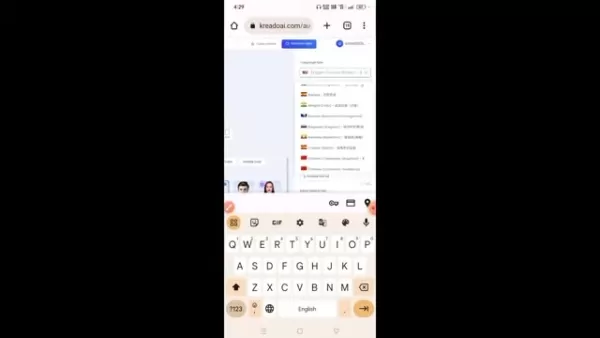
- Select Character Type: On the right side of the page, choose the language and voice type for your avatar. You can select accents such as Middle Eastern, Indian, or Asian, depending on your target audience.
Customizing Your AI Avatar
Personalization is key to making your videos stand out. Kreado AI allows you to adjust several parameters to create a unique avatar.
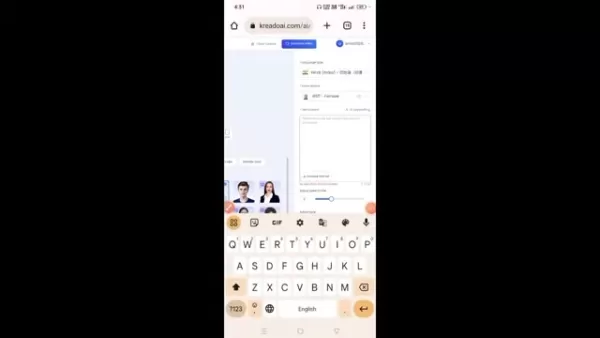
Script Input: Enter the script you want the AI avatar to deliver. Keep it clear and concise.
Adjust Speech Rate: Control the avatar’s speaking speed to match your content’s tone. A speed between 9 and 10 is commonly used.
Generate and Review: Click “Audition” to preview the avatar reading your script. This allows you to fine-tune the speech rate and tone before finalizing the video.
Generate and Download Your Video
Once your avatar is customized, generate the final video.
- Generate Video: Click the “Generate Video” button to start the process.
- Wait for Completion: Video generation typically takes 1–2 minutes.
- Download and Share: Once generated, the video will appear on the next page. Click the download button to save it to your device, then share it across your social media channels.
Editing the Generated Video in Kinemaster
Edit your video in Kinemaster to add effects and remove the green screen.
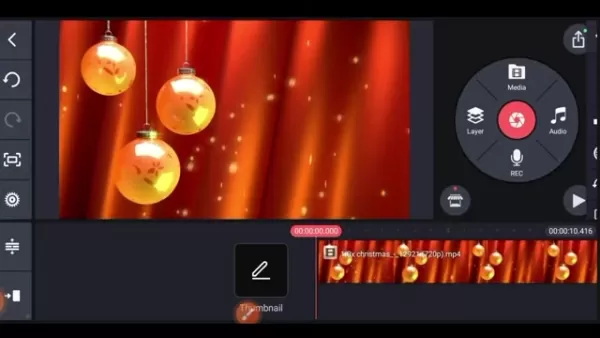
- Open Kinemaster and start a new project.
- Add a non-green background to your project.
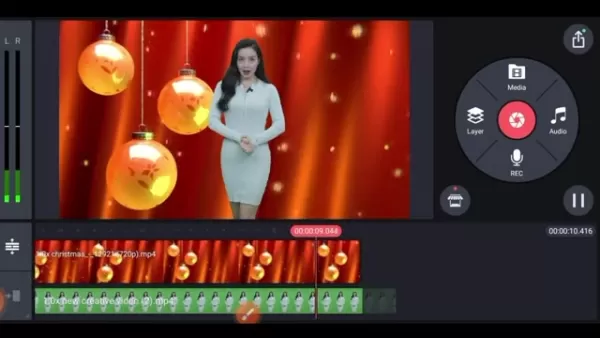
- Import the AI video you downloaded earlier.
- Use the chroma key tool to remove the green screen.
Kreado AI Pricing Plans
Affordable Solutions for Every Creator
Kreado AI offers various pricing plans to suit different needs and budgets. While a free trial is available, a paid plan may be more suitable for extended use. These plans provide a good balance of credits and features. For detailed pricing information, visit https://www.kreadoai.com/pricing.
Pros and Cons of Kreado AI
Pros
User-friendly interface
High-quality AI avatars
Multilingual text-to-speech capability
Customizable templates and backgrounds
Cost-effective solution
Cons
Limited features in the free trial
AI algorithms may lack creative nuance
Requires an internet connection
Some advanced features have a learning curve
Core Features of Kreado AI
Unleashing the Power of AI for Video Creation
Kreado AI excels as a platform for full-body AI video creation, thanks to its robust core features. These tools are designed to simplify and enhance the video production process, helping users create high-quality, engaging content with ease.
AI Avatars with Full Body Support: Choose from a wide range of avatars that feature realistic full-body movements, enhancing engagement.

Text-to-Speech Synthesis: Convert text into natural-sounding speech in multiple languages, eliminating the need for voice actors.
Customizable Templates and Backgrounds: Access a variety of pre-designed templates and backgrounds to create visually appealing videos tailored to your brand.
User-Friendly Editing Tools: Customize your videos using intuitive drag-and-drop tools for a polished final product.
Use Cases for Full Body AI Videos
Diverse Applications Across Industries
Full-body AI videos offer versatile applications across numerous industries. They enhance communication, education, and marketing efforts in various sectors.

- Marketing: Create engaging ads and promotional videos to capture audience attention and drive conversions.
- Education: Develop interactive e-learning modules and training videos with realistic AI instructors to improve knowledge retention.
- Customer Service: Design AI-powered support avatars to handle inquiries and offer personalized assistance.
- Social Media: Produce captivating content for platforms like YouTube, Instagram, and TikTok to grow your online following.
Frequently Asked Questions about Kreado AI
Is Kreado AI really free to use?
Kreado AI offers a free trial that includes access to most core features. For extended use, a paid subscription is required.
Can I use Kreado AI on my mobile phone?
Yes, Kreado AI is accessible on mobile devices via its website.
How do I know if a video is an AI Video?
With the right knowledge and tools, such as those offered by Kreado AI, you can create videos that are difficult to distinguish from those made without AI.
Related Questions on AI Video Creation
What are the limitations of using AI for video creation?
While AI offers many benefits, it also has limitations. AI-generated content may sometimes lack creativity or emotional depth, as algorithms rely on existing patterns and data. Additionally, AI tools might struggle with complex storytelling or cultural nuances, resulting in generic or insensitive content. Combining AI capabilities with human creativity and oversight helps mitigate these issues, ensuring the final output is engaging, relevant, and ethically sound.
Related article
 U.S. Stocks Hit Historic Milestone as AI and Aerospace Giants Prepare for Trillion-Dollar Debut
Elon Musk, Sam Altman, and Dario Amodei, three titans of the technology sector, are advancing toward initial public offerings for their respective ventures. With SpaceX, OpenAI, and Anthropic—three industry behemoths nearing trillion-dollar valuation
Swedish AI Startup Lovable Eyes $13.2 Billion Valuation After Major Funding Round
As AI-driven coding tools gain traction, Swedish startup Lovable has secured a major funding round. The company aims to raise $3 billion, potentially boosting its valuation to $13.2 billion—double the $6.6 billion recorded last December. Menlo Ventur
Google Tests Remy AI Agent for Gemini as Focus Shifts to User Control
According to Business Insider, Google is testing Remy, a new AI personal agent for Gemini. This tool aims to execute tasks on behalf of users, streamlining both professional workflows and daily routines.Currently, Remy is undergoing testing in an int
Related Special Topic Recommendations
Data Analysis
U.S. Stocks Hit Historic Milestone as AI and Aerospace Giants Prepare for Trillion-Dollar Debut
Elon Musk, Sam Altman, and Dario Amodei, three titans of the technology sector, are advancing toward initial public offerings for their respective ventures. With SpaceX, OpenAI, and Anthropic—three industry behemoths nearing trillion-dollar valuation
Swedish AI Startup Lovable Eyes $13.2 Billion Valuation After Major Funding Round
As AI-driven coding tools gain traction, Swedish startup Lovable has secured a major funding round. The company aims to raise $3 billion, potentially boosting its valuation to $13.2 billion—double the $6.6 billion recorded last December. Menlo Ventur
Google Tests Remy AI Agent for Gemini as Focus Shifts to User Control
According to Business Insider, Google is testing Remy, a new AI personal agent for Gemini. This tool aims to execute tasks on behalf of users, streamlining both professional workflows and daily routines.Currently, Remy is undergoing testing in an int
Related Special Topic Recommendations
Data Analysis
 Best AI Anomaly Detection Tools for KPI Monitoring across SaaS and Ecommerce Teams
2026 Latest Best Top-rated AI Anomaly Detection Tools for KPI Monitoring in SaaS and Ecommerce teams! XIX.AI has curated a powerful, game-changing collection based on rigorous real-world tests and weekly updated rankings. You’ll find detailed free vs paid comparison insights to help you identify the must-try solution that boosts productivity and unlocks your AI edge. Explore now!
 10 tools
 xix.ai
writing
Best AI Outline Generators for Long-Form SEO Articles
xix.ai
writing
Best AI Outline Generators for Long-Form SEO Articles
2026 Latest Best Top-Rated AI Outline Generators for Long-Form SEO Articles, meticulously curated by XIX.AI. These powerful tools offer game-changing assistance in creating high-quality content quickly, boosting writing efficiency significantly. Get a free vs paid comparison along with real-world tests and detailed rankings to help you find the must-try option that suits your needs. Explore now to unlock your AI edge.
8 tools
xix.ai
Education and Learning
AI Study Tools for Homework and Exam Prep
2026 Latest Best AI Study Tools for Homework and Exam Prep! XIX.AI curates a top-rated list of powerful, game-changing tools that help students boost productivity, streamline homework completion, and ace exams through real-world tests. Get a free vs paid comparison, detailed rankings, and must-try options to unlock your AI edge. Explore now!
10 tools
xix.ai
Music composition
AI Vocal Demo Tools for Songwriters, Hooks, Toplines, and Multilingual Draft Sessions
2026 Latest Best AI Vocal Demo Tools for Songwriters, Hook Creators, and Multi-Language Content Teams! XIX.AI has curated a top-rated list of powerful game-changing tools that go through rigorous real-world tests. You’ll find detailed free vs paid comparison data, comprehensive rankings, and must-try options to help you boost writing efficiency and unlock your creative potential. Explore now to discover your perfect tool for all your content needs!
9 tools
xix.ai
Business
Best AI Competitive Research Tools for Small Businesses
2026 Latest Best Top-rated AI Competitive Research Tools for Small Businesses! XIX.AI has curated a highly powerful game-changing collection, updated weekly with rigorous real-world tests and detailed rankings. You can find a comprehensive free vs paid comparison to help you identify the must-try tools that boost your productivity and give you a competitive edge. Explore now to discover your perfect tool!
9 tools
xix.ai
Image editing
Photoshop AI Retouch Tools for Ecommerce Apparel, Skin Cleanup, and Color Consistency
2026 Latest Best Photoshop AI retouch tools for ecommerce apparel, skin cleanup, and color consistency! This top-rated curated list features powerful game-changing solutions that help you boost writing efficiency, streamline content creation, and achieve perfect visual results effortlessly. Each tool has undergone real-world tests through weekly updated rankings, complete with free vs paid comparison details. Backed by XIX.AI, it’s the must-try guide for anyone aiming to unlock your AI edge. Explore now!
10 tools
xix.ai

 Comments (0)
0/500
Comments (0)
0/500
Thanks to advancements in Artificial Intelligence (AI), producing compelling video content is now more accessible than ever. This comprehensive guide explores how to use Kreado AI for creating full-body avatar videos. Whether you work in marketing, education, or content creation, generating realistic videos with full-body movement can significantly boost your online presence and captivate your audience.
Key Points
Easily learn to create AI-powered full-body videos.
Discover Kreado AI and explore its key features.
Follow step-by-step instructions to produce your own videos.
Tailor your AI avatar to align with your brand identity.
Optimize your video content for maximum audience engagement.
Introduction to AI Video Creation
The Rise of AI in Video Production
AI is transforming video production by offering accessible and cost-effective tools for creating high-quality content. Traditional video production often demands significant resources, including professional gear, actors, and editing skills. AI-driven platforms remove many of these barriers, enabling individuals and businesses to create compelling videos with minimal effort and investment.
Generating videos with realistic full-body avatars adds a new layer to digital content creation. These AI avatars can be customized to represent different personas, delivering messages that resonate with viewers. The full-body aspect increases realism and engagement, making the content more relatable and impactful.
This approach is an excellent way to save time and avoid the costs associated with video sets or actors.
What is Kreado AI?
Kreado AI is an AI-powered platform designed to simplify the creation of digital marketing content. It specializes in producing digital podcast videos that utilize digital human technology. Users can generate videos using AI avatars, text-to-speech synthesis, and customizable backgrounds. The platform makes video creation accessible to everyone, regardless of technical skill or budget.
Key Features of Kreado AI include:
- AI Avatars: A wide selection of customizable avatars with full-body support.
- Text-to-Speech: Convert text into realistic voiceovers in multiple languages.
- Customizable Templates: Pre-designed templates for various applications.
- Easy Editing Tools: A user-friendly interface for video customization and enhancement.
Step-by-Step Guide to Creating Full Body AI Videos with Kreado AI
Accessing Kreado AI
The first step is to access the Kreado AI platform. Since it is a web-based tool, you'll need to use the Google Chrome browser.
- Open Chrome Browser: Launch Chrome on your device.
- Search for Kreado AI: Enter "kreadoai" into the search bar.
- Access the Website: Click the first link that appears. Alternatively, go directly to https://www.kreadoai.com/.
Signing Up and Navigating the Platform
Once on the Kreado AI website, sign up for a free trial to explore its features.
- Start Free Trial: Click the “Free Trial” button to begin registration.
- Email Registration: Provide your email address to sign up, which is required to access all features.
- Confirm Account: Verify your email address using the link sent to your inbox.
After signing up, take time to explore the platform's layout. The dashboard provides access to various AI-powered tools, including:
- Digital Human Video Creation
- AI Copywriting
- AI Text Dubbing
- AI Model
- AI Smart Cutout
Creating Your First AI Video
Now, let's create your first AI video with full-body movement.
- Start Creating: Click “Start Creating” under the Digital Human Video Creation section.
- Choose a Character: Select an AI character from the library. Kreado AI offers a diverse range of avatars for different use cases. Browse carefully to find the one that best fits your needs.
- Select Character Type: On the right side of the page, choose the language and voice type for your avatar. You can select accents such as Middle Eastern, Indian, or Asian, depending on your target audience.
Customizing Your AI Avatar
Personalization is key to making your videos stand out. Kreado AI allows you to adjust several parameters to create a unique avatar.
Script Input: Enter the script you want the AI avatar to deliver. Keep it clear and concise.
Adjust Speech Rate: Control the avatar’s speaking speed to match your content’s tone. A speed between 9 and 10 is commonly used.
Generate and Review: Click “Audition” to preview the avatar reading your script. This allows you to fine-tune the speech rate and tone before finalizing the video.
Generate and Download Your Video
Once your avatar is customized, generate the final video.
- Generate Video: Click the “Generate Video” button to start the process.
- Wait for Completion: Video generation typically takes 1–2 minutes.
- Download and Share: Once generated, the video will appear on the next page. Click the download button to save it to your device, then share it across your social media channels.
Editing the Generated Video in Kinemaster
Edit your video in Kinemaster to add effects and remove the green screen.
- Open Kinemaster and start a new project.
- Add a non-green background to your project.
- Import the AI video you downloaded earlier.
- Use the chroma key tool to remove the green screen.
Kreado AI Pricing Plans
Affordable Solutions for Every Creator
Kreado AI offers various pricing plans to suit different needs and budgets. While a free trial is available, a paid plan may be more suitable for extended use. These plans provide a good balance of credits and features. For detailed pricing information, visit https://www.kreadoai.com/pricing.
Pros and Cons of Kreado AI
Pros
User-friendly interface
High-quality AI avatars
Multilingual text-to-speech capability
Customizable templates and backgrounds
Cost-effective solution
Cons
Limited features in the free trial
AI algorithms may lack creative nuance
Requires an internet connection
Some advanced features have a learning curve
Core Features of Kreado AI
Unleashing the Power of AI for Video Creation
Kreado AI excels as a platform for full-body AI video creation, thanks to its robust core features. These tools are designed to simplify and enhance the video production process, helping users create high-quality, engaging content with ease.
AI Avatars with Full Body Support: Choose from a wide range of avatars that feature realistic full-body movements, enhancing engagement.
Text-to-Speech Synthesis: Convert text into natural-sounding speech in multiple languages, eliminating the need for voice actors.
Customizable Templates and Backgrounds: Access a variety of pre-designed templates and backgrounds to create visually appealing videos tailored to your brand.
User-Friendly Editing Tools: Customize your videos using intuitive drag-and-drop tools for a polished final product.
Use Cases for Full Body AI Videos
Diverse Applications Across Industries
Full-body AI videos offer versatile applications across numerous industries. They enhance communication, education, and marketing efforts in various sectors.
- Marketing: Create engaging ads and promotional videos to capture audience attention and drive conversions.
- Education: Develop interactive e-learning modules and training videos with realistic AI instructors to improve knowledge retention.
- Customer Service: Design AI-powered support avatars to handle inquiries and offer personalized assistance.
- Social Media: Produce captivating content for platforms like YouTube, Instagram, and TikTok to grow your online following.
Frequently Asked Questions about Kreado AI
Is Kreado AI really free to use?
Kreado AI offers a free trial that includes access to most core features. For extended use, a paid subscription is required.
Can I use Kreado AI on my mobile phone?
Yes, Kreado AI is accessible on mobile devices via its website.
How do I know if a video is an AI Video?
With the right knowledge and tools, such as those offered by Kreado AI, you can create videos that are difficult to distinguish from those made without AI.
Related Questions on AI Video Creation
What are the limitations of using AI for video creation?
While AI offers many benefits, it also has limitations. AI-generated content may sometimes lack creativity or emotional depth, as algorithms rely on existing patterns and data. Additionally, AI tools might struggle with complex storytelling or cultural nuances, resulting in generic or insensitive content. Combining AI capabilities with human creativity and oversight helps mitigate these issues, ensuring the final output is engaging, relevant, and ethically sound.








 U.S. Stocks Hit Historic Milestone as AI and Aerospace Giants Prepare for Trillion-Dollar Debut
Elon Musk, Sam Altman, and Dario Amodei, three titans of the technology sector, are advancing toward initial public offerings for their respective ventures. With SpaceX, OpenAI, and Anthropic—three industry behemoths nearing trillion-dollar valuation
U.S. Stocks Hit Historic Milestone as AI and Aerospace Giants Prepare for Trillion-Dollar Debut
Elon Musk, Sam Altman, and Dario Amodei, three titans of the technology sector, are advancing toward initial public offerings for their respective ventures. With SpaceX, OpenAI, and Anthropic—three industry behemoths nearing trillion-dollar valuation
 Swedish AI Startup Lovable Eyes $13.2 Billion Valuation After Major Funding Round
As AI-driven coding tools gain traction, Swedish startup Lovable has secured a major funding round. The company aims to raise $3 billion, potentially boosting its valuation to $13.2 billion—double the $6.6 billion recorded last December. Menlo Ventur
Google Tests Remy AI Agent for Gemini as Focus Shifts to User Control
According to Business Insider, Google is testing Remy, a new AI personal agent for Gemini. This tool aims to execute tasks on behalf of users, streamlining both professional workflows and daily routines.Currently, Remy is undergoing testing in an int
Swedish AI Startup Lovable Eyes $13.2 Billion Valuation After Major Funding Round
As AI-driven coding tools gain traction, Swedish startup Lovable has secured a major funding round. The company aims to raise $3 billion, potentially boosting its valuation to $13.2 billion—double the $6.6 billion recorded last December. Menlo Ventur
Google Tests Remy AI Agent for Gemini as Focus Shifts to User Control
According to Business Insider, Google is testing Remy, a new AI personal agent for Gemini. This tool aims to execute tasks on behalf of users, streamlining both professional workflows and daily routines.Currently, Remy is undergoing testing in an int

2026 Latest Best Top-rated AI Anomaly Detection Tools for KPI Monitoring in SaaS and Ecommerce teams! XIX.AI has curated a powerful, game-changing collection based on rigorous real-world tests and weekly updated rankings. You’ll find detailed free vs paid comparison insights to help you identify the must-try solution that boosts productivity and unlocks your AI edge. Explore now!
10 tools
xix.ai

2026 Latest Best Top-Rated AI Outline Generators for Long-Form SEO Articles, meticulously curated by XIX.AI. These powerful tools offer game-changing assistance in creating high-quality content quickly, boosting writing efficiency significantly. Get a free vs paid comparison along with real-world tests and detailed rankings to help you find the must-try option that suits your needs. Explore now to unlock your AI edge.
8 tools
xix.ai

2026 Latest Best AI Study Tools for Homework and Exam Prep! XIX.AI curates a top-rated list of powerful, game-changing tools that help students boost productivity, streamline homework completion, and ace exams through real-world tests. Get a free vs paid comparison, detailed rankings, and must-try options to unlock your AI edge. Explore now!
10 tools
xix.ai

2026 Latest Best AI Vocal Demo Tools for Songwriters, Hook Creators, and Multi-Language Content Teams! XIX.AI has curated a top-rated list of powerful game-changing tools that go through rigorous real-world tests. You’ll find detailed free vs paid comparison data, comprehensive rankings, and must-try options to help you boost writing efficiency and unlock your creative potential. Explore now to discover your perfect tool for all your content needs!
9 tools
xix.ai

2026 Latest Best Top-rated AI Competitive Research Tools for Small Businesses! XIX.AI has curated a highly powerful game-changing collection, updated weekly with rigorous real-world tests and detailed rankings. You can find a comprehensive free vs paid comparison to help you identify the must-try tools that boost your productivity and give you a competitive edge. Explore now to discover your perfect tool!
9 tools
xix.ai

2026 Latest Best Photoshop AI retouch tools for ecommerce apparel, skin cleanup, and color consistency! This top-rated curated list features powerful game-changing solutions that help you boost writing efficiency, streamline content creation, and achieve perfect visual results effortlessly. Each tool has undergone real-world tests through weekly updated rankings, complete with free vs paid comparison details. Backed by XIX.AI, it’s the must-try guide for anyone aiming to unlock your AI edge. Explore now!
10 tools
xix.ai












