


 Home
HomeComfyUI Workflow Creates Instant AI-Powered Stickers
AI has made creating personalized stickers simpler than ever. This guide walks you through the ComfyUI Instant Stickers workflow, a powerful tool for generating unique and expressive stickers in just a few steps. Whether your goal is to craft custom emotes, personalize digital spaces, or explore the creative potential of AI image generation, this workflow offers a straightforward and enjoyable solution.
Key Points
The ComfyUI Instant Stickers workflow generates stickers using AI technology.
It leverages the InstantID model for face analysis and style application.
You can customize sticker designs using text prompts and control models.
The process involves downloading, setting up, and loading required models within ComfyUI.
The AI creates stickers based on your image inputs and descriptive text prompts.
You can save and use the final stickers on various digital platforms.
Understanding the ComfyUI Instant Stickers Workflow
What are AI Stickers and Why Use Them?
AI stickers are digital images created by artificial intelligence algorithms. They provide a unique way to personalize online communication, express emotions, and add creative flair to digital content. AI-powered creation allows for a high degree of customization, enabling you to generate designs that align perfectly with your personal style. They offer a more expressive and personalized alternative to simple emojis, allowing you to create custom images, including stylized self-portraits or memes.
Overview of the ComfyUI Instant Stickers Workflow
The workflow simplifies AI sticker creation by integrating several key components:
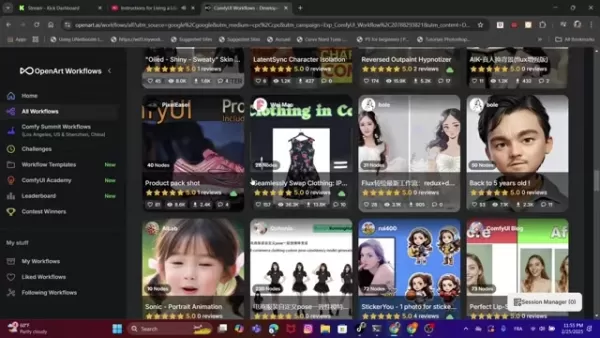
- OpenArt Workflows: A primary platform for discovering AI workflows and tutorials, including this one.
- ComfyUI: A powerful node-based interface for building and customizing AI image generation pipelines.
- InstantID: A specialized model for analyzing and stylizing faces within images.
- Control Models: These provide detailed control over the final sticker's artistic style, such as a watercolor effect.
This interconnected system transforms your existing photos into unique, stylized AI stickers with customizable expressions and effects.
Downloading and Installing the Instant Stickers Workflow
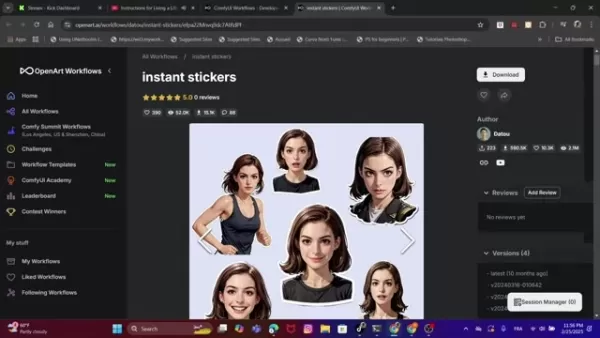
To begin, download the Instant Stickers workflow file from Openart.ai. The workflow is provided as a JSON file containing all necessary node configurations for ComfyUI.
- Visit OpenArt.ai.
- Locate the Instant Stickers Workflow.
- Click "Download" to save the JSON file to your computer.
After downloading, you will need to install the required model dependencies. The workflow creator usually provides links to sources like Civitai for this purpose.
Essential Components for AI Sticker Creation
Detailed Explanation of the Workflow Nodes
A look at the key nodes within the workflow:
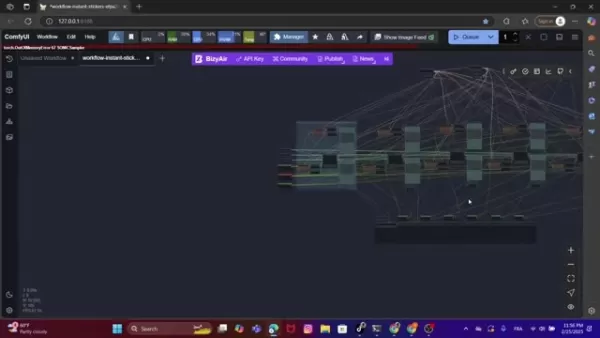
Understanding these nodes is essential for customizing your results.
- Load InstantID Model: Loads the core InstantID model file (e.g.,
ip-adapter.bin) for facial recognition. - InstantID Face Analysis: The central node for extracting and analyzing facial features and landmarks.
- Load Controller Model: Loads a ControlNet model to provide detailed guidance for style and composition.
- CR Text (x3): Input nodes for your text prompts, which guide the AI's style and subject generation.
- Text Concatenate: Combines multiple text strings into a single prompt.
- CLIP Text Encode (Prompt): Translates the combined text prompt into a format the AI model can process.
- Apply InstantID: Applies the facial analysis and style data to the generation process.
- KSampler (Efficient): The core generation node that iteratively refines the image based on all inputs.
- Scale Image to Total Pixels: Resizes the input image to an optimal resolution for processing.
- Save Image (x3): Nodes that save the final generated sticker outputs to your designated folder.
- Save Image: Saves the original input images for reference.
These nodes work together, with the connecting lines in ComfyUI representing the flow of data to produce the final sticker.
Obtaining Required Models and Configurations
You must download these models before running the workflow:
- InstantID Model: Download the recommended InstantID model (like the Stickers.Redmond model for SD XL) from the provided Civitai link.
- ComfyUI Models: Download any required Loras and place them in your ComfyUI models folder (e.g.,
ComfyUImodelsloras). - ControlNet Model: Download a ControlNet model, such as
control_v11fp_sdxl_scribble [ef155db5].pth, as used in the tutorial.
Creating Your Own AI Stickers: A Step-by-Step Guide
Setting up the workflow
Follow these steps to use the workflow:
- Open ComfyUI: Launch the ComfyUI interface on your computer, ensuring you have the necessary extensions installed.
- Load the workflow: Drag and drop the downloaded
workflow-instant-stickers.json file into the ComfyUI window. 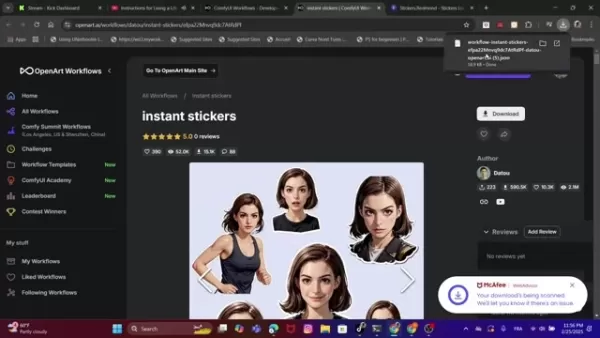
This action loads the complete node setup.
- Load Models: While some models load automatically, others may need manual loading. A red error on a node indicates a missing model; double-click the node to locate and load the correct file.
- Upload Images: Click on the image node to upload your source photos, such as headshots or full-body pictures.
- Add text: Double-click on the
CR text nodes to input your descriptive prompts and style instructions. - Queue: Click the "Queue" button to start the AI generation process.
Generating Different Stickers
You have full creative control. To experiment further:
- Experiment with images: Try different source images, including animals, objects, or landscapes—virtually anything can be turned into a sticker.
- Change the prompt instructions: Modify the text in the
CR text nodes to alter the attributes, mood, and artistic effects applied to your image. Don't be afraid to experiment.
Pricing
OpenArt.ai Pricing
OpenArt.ai operates as a sharing platform for AI models and workflows. It typically follows a freemium model:
Tier Description Price Free Basic access to models and workflows for initial experimentation. Free Paid Plans Enhanced access, faster processing, and advanced platform features. Varies
ComfyUI Pricing
ComfyUI is open-source and free software. Potential costs relate only to your computing setup:
- Local Setup: Free to use, but requires your own hardware and covers electricity costs.
- Cloud-Based Solutions: Costs vary based on the cloud provider and the computing resources you use.
Pros and Cons of Using ComfyUI Instant Stickers
Pros
High Customization: Offers detailed control over every aspect of sticker design.
AI-Powered Style Transfer: Uses advanced models to create unique artistic aesthetics.
Streamlined Process: Simplifies a complex creation process into a manageable workflow.
Free Core Tools: Both ComfyUI and the InstantID model are free to use.
Cons
Requires Initial Setup: Involves downloading and correctly placing several model files.
Learning Curve: The node-based interface can be unfamiliar to new users.
Key Features of the ComfyUI Instant Stickers Workflow
Why This Workflow Stands Out
This workflow offers several advantages for AI sticker creation:
- User-Friendly Interface: ComfyUI's visual node system makes complex AI processes more accessible.
- AI-Powered Transformation: Leverages InstantID to creatively stylize your existing photos.
- Customizable Prompts: Text prompts give you direct influence over the design, allowing for immense creative variety.
- Community-Driven Resources: Integrated with platforms like OpenArt, providing access to a wide ecosystem of models and shared workflows.
Explore the Unlimited Use Cases
Unleash the Power of AI Stickers
The applications for this workflow are diverse:
- Personalized Emotes: Create custom emotes for streaming platforms (Twitch, Discord) and social media that reflect your personal brand.
- Digital Personalization: Enhance digital notebooks, presentations, and documents with unique, expressive stickers.
- Creative Exploration: Experiment with artistic styles and concepts to push the boundaries of AI-generated art.
- Marketing Materials: Incorporate distinctive AI stickers into marketing campaigns for a personalized and memorable touch.
Frequently Asked Questions
What is ComfyUI?
ComfyUI is a node-based visual programming tool designed for creating and executing complex workflows, particularly for AI image generation. Its interface allows users to connect different nodes representing AI models and functions, offering detailed control over the creation process.
Do I need a powerful computer to run this workflow?
Resource requirements depend on image complexity, model size, and desired output resolution. While basic generation may work on mid-range systems, high-resolution outputs or complex models will benefit significantly from a powerful GPU. Running ComfyUI on a cloud service is a viable alternative.
Can I use my own images with this workflow?
Absolutely. A primary function of this workflow is to transform your existing photos into stickers. You can use any image you own as the base for personalization.
Related Questions
What other AI workflows can I use with ComfyUI?
ComfyUI supports a vast ecosystem of workflows for different creative and technical tasks. Some common examples include:Advanced Image Editing: Perform tasks like inpainting, outpainting, and detailed style transfer through customizable nodes.Video Generation and Editing: Create and manipulate video content using AI-powered workflows.Model Training: Train specialized models, such as LoRAs, to apply specific styles or characteristics to generated images. Platforms like OpenArt host many community-created workflows you can download and try.
Related article
 U.S. Stocks Hit Historic Milestone as AI and Aerospace Giants Prepare for Trillion-Dollar Debut
Elon Musk, Sam Altman, and Dario Amodei, three titans of the technology sector, are advancing toward initial public offerings for their respective ventures. With SpaceX, OpenAI, and Anthropic—three industry behemoths nearing trillion-dollar valuation
Swedish AI Startup Lovable Eyes $13.2 Billion Valuation After Major Funding Round
As AI-driven coding tools gain traction, Swedish startup Lovable has secured a major funding round. The company aims to raise $3 billion, potentially boosting its valuation to $13.2 billion—double the $6.6 billion recorded last December. Menlo Ventur
Google Tests Remy AI Agent for Gemini as Focus Shifts to User Control
According to Business Insider, Google is testing Remy, a new AI personal agent for Gemini. This tool aims to execute tasks on behalf of users, streamlining both professional workflows and daily routines.Currently, Remy is undergoing testing in an int
Related Special Topic Recommendations
Data Analysis
U.S. Stocks Hit Historic Milestone as AI and Aerospace Giants Prepare for Trillion-Dollar Debut
Elon Musk, Sam Altman, and Dario Amodei, three titans of the technology sector, are advancing toward initial public offerings for their respective ventures. With SpaceX, OpenAI, and Anthropic—three industry behemoths nearing trillion-dollar valuation
Swedish AI Startup Lovable Eyes $13.2 Billion Valuation After Major Funding Round
As AI-driven coding tools gain traction, Swedish startup Lovable has secured a major funding round. The company aims to raise $3 billion, potentially boosting its valuation to $13.2 billion—double the $6.6 billion recorded last December. Menlo Ventur
Google Tests Remy AI Agent for Gemini as Focus Shifts to User Control
According to Business Insider, Google is testing Remy, a new AI personal agent for Gemini. This tool aims to execute tasks on behalf of users, streamlining both professional workflows and daily routines.Currently, Remy is undergoing testing in an int
Related Special Topic Recommendations
Data Analysis
 Best AI Anomaly Detection Tools for KPI Monitoring across SaaS and Ecommerce Teams
2026 Latest Best Top-rated AI Anomaly Detection Tools for KPI Monitoring in SaaS and Ecommerce teams! XIX.AI has curated a powerful, game-changing collection based on rigorous real-world tests and weekly updated rankings. You’ll find detailed free vs paid comparison insights to help you identify the must-try solution that boosts productivity and unlocks your AI edge. Explore now!
 10 tools
 xix.ai
writing
Best AI Outline Generators for Long-Form SEO Articles
xix.ai
writing
Best AI Outline Generators for Long-Form SEO Articles
2026 Latest Best Top-Rated AI Outline Generators for Long-Form SEO Articles, meticulously curated by XIX.AI. These powerful tools offer game-changing assistance in creating high-quality content quickly, boosting writing efficiency significantly. Get a free vs paid comparison along with real-world tests and detailed rankings to help you find the must-try option that suits your needs. Explore now to unlock your AI edge.
8 tools
xix.ai
Education and Learning
AI Study Tools for Homework and Exam Prep
2026 Latest Best AI Study Tools for Homework and Exam Prep! XIX.AI curates a top-rated list of powerful, game-changing tools that help students boost productivity, streamline homework completion, and ace exams through real-world tests. Get a free vs paid comparison, detailed rankings, and must-try options to unlock your AI edge. Explore now!
10 tools
xix.ai
Music composition
AI Vocal Demo Tools for Songwriters, Hooks, Toplines, and Multilingual Draft Sessions
2026 Latest Best AI Vocal Demo Tools for Songwriters, Hook Creators, and Multi-Language Content Teams! XIX.AI has curated a top-rated list of powerful game-changing tools that go through rigorous real-world tests. You’ll find detailed free vs paid comparison data, comprehensive rankings, and must-try options to help you boost writing efficiency and unlock your creative potential. Explore now to discover your perfect tool for all your content needs!
9 tools
xix.ai
Business
Best AI Competitive Research Tools for Small Businesses
2026 Latest Best Top-rated AI Competitive Research Tools for Small Businesses! XIX.AI has curated a highly powerful game-changing collection, updated weekly with rigorous real-world tests and detailed rankings. You can find a comprehensive free vs paid comparison to help you identify the must-try tools that boost your productivity and give you a competitive edge. Explore now to discover your perfect tool!
9 tools
xix.ai
Image editing
Photoshop AI Retouch Tools for Ecommerce Apparel, Skin Cleanup, and Color Consistency
2026 Latest Best Photoshop AI retouch tools for ecommerce apparel, skin cleanup, and color consistency! This top-rated curated list features powerful game-changing solutions that help you boost writing efficiency, streamline content creation, and achieve perfect visual results effortlessly. Each tool has undergone real-world tests through weekly updated rankings, complete with free vs paid comparison details. Backed by XIX.AI, it’s the must-try guide for anyone aiming to unlock your AI edge. Explore now!
10 tools
xix.ai

 Comments (0)
0/500
Comments (0)
0/500
AI has made creating personalized stickers simpler than ever. This guide walks you through the ComfyUI Instant Stickers workflow, a powerful tool for generating unique and expressive stickers in just a few steps. Whether your goal is to craft custom emotes, personalize digital spaces, or explore the creative potential of AI image generation, this workflow offers a straightforward and enjoyable solution.
Key Points
The ComfyUI Instant Stickers workflow generates stickers using AI technology.
It leverages the InstantID model for face analysis and style application.
You can customize sticker designs using text prompts and control models.
The process involves downloading, setting up, and loading required models within ComfyUI.
The AI creates stickers based on your image inputs and descriptive text prompts.
You can save and use the final stickers on various digital platforms.
Understanding the ComfyUI Instant Stickers Workflow
What are AI Stickers and Why Use Them?
AI stickers are digital images created by artificial intelligence algorithms. They provide a unique way to personalize online communication, express emotions, and add creative flair to digital content. AI-powered creation allows for a high degree of customization, enabling you to generate designs that align perfectly with your personal style. They offer a more expressive and personalized alternative to simple emojis, allowing you to create custom images, including stylized self-portraits or memes.
Overview of the ComfyUI Instant Stickers Workflow
The workflow simplifies AI sticker creation by integrating several key components:
- OpenArt Workflows: A primary platform for discovering AI workflows and tutorials, including this one.
- ComfyUI: A powerful node-based interface for building and customizing AI image generation pipelines.
- InstantID: A specialized model for analyzing and stylizing faces within images.
- Control Models: These provide detailed control over the final sticker's artistic style, such as a watercolor effect.
This interconnected system transforms your existing photos into unique, stylized AI stickers with customizable expressions and effects.
Downloading and Installing the Instant Stickers Workflow
To begin, download the Instant Stickers workflow file from Openart.ai. The workflow is provided as a JSON file containing all necessary node configurations for ComfyUI.
- Visit OpenArt.ai.
- Locate the Instant Stickers Workflow.
- Click "Download" to save the JSON file to your computer.
After downloading, you will need to install the required model dependencies. The workflow creator usually provides links to sources like Civitai for this purpose.
Essential Components for AI Sticker Creation
Detailed Explanation of the Workflow Nodes
A look at the key nodes within the workflow:
Understanding these nodes is essential for customizing your results.
- Load InstantID Model: Loads the core InstantID model file (e.g.,
ip-adapter.bin) for facial recognition. - InstantID Face Analysis: The central node for extracting and analyzing facial features and landmarks.
- Load Controller Model: Loads a ControlNet model to provide detailed guidance for style and composition.
- CR Text (x3): Input nodes for your text prompts, which guide the AI's style and subject generation.
- Text Concatenate: Combines multiple text strings into a single prompt.
- CLIP Text Encode (Prompt): Translates the combined text prompt into a format the AI model can process.
- Apply InstantID: Applies the facial analysis and style data to the generation process.
- KSampler (Efficient): The core generation node that iteratively refines the image based on all inputs.
- Scale Image to Total Pixels: Resizes the input image to an optimal resolution for processing.
- Save Image (x3): Nodes that save the final generated sticker outputs to your designated folder.
- Save Image: Saves the original input images for reference.
These nodes work together, with the connecting lines in ComfyUI representing the flow of data to produce the final sticker.
Obtaining Required Models and Configurations
You must download these models before running the workflow:
- InstantID Model: Download the recommended InstantID model (like the Stickers.Redmond model for SD XL) from the provided Civitai link.
- ComfyUI Models: Download any required Loras and place them in your ComfyUI models folder (e.g.,
ComfyUImodelsloras). - ControlNet Model: Download a ControlNet model, such as
control_v11fp_sdxl_scribble [ef155db5].pth, as used in the tutorial.
Creating Your Own AI Stickers: A Step-by-Step Guide
Setting up the workflow
Follow these steps to use the workflow:
- Open ComfyUI: Launch the ComfyUI interface on your computer, ensuring you have the necessary extensions installed.
- Load the workflow: Drag and drop the downloaded
workflow-instant-stickers.jsonfile into the ComfyUI window.This action loads the complete node setup.
- Load Models: While some models load automatically, others may need manual loading. A red error on a node indicates a missing model; double-click the node to locate and load the correct file.
- Upload Images: Click on the image node to upload your source photos, such as headshots or full-body pictures.
- Add text: Double-click on the
CR textnodes to input your descriptive prompts and style instructions. - Queue: Click the "Queue" button to start the AI generation process.
Generating Different Stickers
You have full creative control. To experiment further:
- Experiment with images: Try different source images, including animals, objects, or landscapes—virtually anything can be turned into a sticker.
- Change the prompt instructions: Modify the text in the
CR textnodes to alter the attributes, mood, and artistic effects applied to your image. Don't be afraid to experiment.
Pricing
OpenArt.ai Pricing
OpenArt.ai operates as a sharing platform for AI models and workflows. It typically follows a freemium model:
| Tier | Description | Price |
|---|---|---|
| Free | Basic access to models and workflows for initial experimentation. | Free |
| Paid Plans | Enhanced access, faster processing, and advanced platform features. | Varies |
ComfyUI Pricing
ComfyUI is open-source and free software. Potential costs relate only to your computing setup:
- Local Setup: Free to use, but requires your own hardware and covers electricity costs.
- Cloud-Based Solutions: Costs vary based on the cloud provider and the computing resources you use.
Pros and Cons of Using ComfyUI Instant Stickers
Pros
High Customization: Offers detailed control over every aspect of sticker design.
AI-Powered Style Transfer: Uses advanced models to create unique artistic aesthetics.
Streamlined Process: Simplifies a complex creation process into a manageable workflow.
Free Core Tools: Both ComfyUI and the InstantID model are free to use.
Cons
Requires Initial Setup: Involves downloading and correctly placing several model files.
Learning Curve: The node-based interface can be unfamiliar to new users.
Key Features of the ComfyUI Instant Stickers Workflow
Why This Workflow Stands Out
This workflow offers several advantages for AI sticker creation:
- User-Friendly Interface: ComfyUI's visual node system makes complex AI processes more accessible.
- AI-Powered Transformation: Leverages InstantID to creatively stylize your existing photos.
- Customizable Prompts: Text prompts give you direct influence over the design, allowing for immense creative variety.
- Community-Driven Resources: Integrated with platforms like OpenArt, providing access to a wide ecosystem of models and shared workflows.
Explore the Unlimited Use Cases
Unleash the Power of AI Stickers
The applications for this workflow are diverse:
- Personalized Emotes: Create custom emotes for streaming platforms (Twitch, Discord) and social media that reflect your personal brand.
- Digital Personalization: Enhance digital notebooks, presentations, and documents with unique, expressive stickers.
- Creative Exploration: Experiment with artistic styles and concepts to push the boundaries of AI-generated art.
- Marketing Materials: Incorporate distinctive AI stickers into marketing campaigns for a personalized and memorable touch.
Frequently Asked Questions
What is ComfyUI?
ComfyUI is a node-based visual programming tool designed for creating and executing complex workflows, particularly for AI image generation. Its interface allows users to connect different nodes representing AI models and functions, offering detailed control over the creation process.
Do I need a powerful computer to run this workflow?
Resource requirements depend on image complexity, model size, and desired output resolution. While basic generation may work on mid-range systems, high-resolution outputs or complex models will benefit significantly from a powerful GPU. Running ComfyUI on a cloud service is a viable alternative.
Can I use my own images with this workflow?
Absolutely. A primary function of this workflow is to transform your existing photos into stickers. You can use any image you own as the base for personalization.
Related Questions
What other AI workflows can I use with ComfyUI?
ComfyUI supports a vast ecosystem of workflows for different creative and technical tasks. Some common examples include:Advanced Image Editing: Perform tasks like inpainting, outpainting, and detailed style transfer through customizable nodes.Video Generation and Editing: Create and manipulate video content using AI-powered workflows.Model Training: Train specialized models, such as LoRAs, to apply specific styles or characteristics to generated images. Platforms like OpenArt host many community-created workflows you can download and try.








 U.S. Stocks Hit Historic Milestone as AI and Aerospace Giants Prepare for Trillion-Dollar Debut
Elon Musk, Sam Altman, and Dario Amodei, three titans of the technology sector, are advancing toward initial public offerings for their respective ventures. With SpaceX, OpenAI, and Anthropic—three industry behemoths nearing trillion-dollar valuation
U.S. Stocks Hit Historic Milestone as AI and Aerospace Giants Prepare for Trillion-Dollar Debut
Elon Musk, Sam Altman, and Dario Amodei, three titans of the technology sector, are advancing toward initial public offerings for their respective ventures. With SpaceX, OpenAI, and Anthropic—three industry behemoths nearing trillion-dollar valuation
 Swedish AI Startup Lovable Eyes $13.2 Billion Valuation After Major Funding Round
As AI-driven coding tools gain traction, Swedish startup Lovable has secured a major funding round. The company aims to raise $3 billion, potentially boosting its valuation to $13.2 billion—double the $6.6 billion recorded last December. Menlo Ventur
Google Tests Remy AI Agent for Gemini as Focus Shifts to User Control
According to Business Insider, Google is testing Remy, a new AI personal agent for Gemini. This tool aims to execute tasks on behalf of users, streamlining both professional workflows and daily routines.Currently, Remy is undergoing testing in an int
Swedish AI Startup Lovable Eyes $13.2 Billion Valuation After Major Funding Round
As AI-driven coding tools gain traction, Swedish startup Lovable has secured a major funding round. The company aims to raise $3 billion, potentially boosting its valuation to $13.2 billion—double the $6.6 billion recorded last December. Menlo Ventur
Google Tests Remy AI Agent for Gemini as Focus Shifts to User Control
According to Business Insider, Google is testing Remy, a new AI personal agent for Gemini. This tool aims to execute tasks on behalf of users, streamlining both professional workflows and daily routines.Currently, Remy is undergoing testing in an int

2026 Latest Best Top-rated AI Anomaly Detection Tools for KPI Monitoring in SaaS and Ecommerce teams! XIX.AI has curated a powerful, game-changing collection based on rigorous real-world tests and weekly updated rankings. You’ll find detailed free vs paid comparison insights to help you identify the must-try solution that boosts productivity and unlocks your AI edge. Explore now!
10 tools
xix.ai

2026 Latest Best Top-Rated AI Outline Generators for Long-Form SEO Articles, meticulously curated by XIX.AI. These powerful tools offer game-changing assistance in creating high-quality content quickly, boosting writing efficiency significantly. Get a free vs paid comparison along with real-world tests and detailed rankings to help you find the must-try option that suits your needs. Explore now to unlock your AI edge.
8 tools
xix.ai

2026 Latest Best AI Study Tools for Homework and Exam Prep! XIX.AI curates a top-rated list of powerful, game-changing tools that help students boost productivity, streamline homework completion, and ace exams through real-world tests. Get a free vs paid comparison, detailed rankings, and must-try options to unlock your AI edge. Explore now!
10 tools
xix.ai

2026 Latest Best AI Vocal Demo Tools for Songwriters, Hook Creators, and Multi-Language Content Teams! XIX.AI has curated a top-rated list of powerful game-changing tools that go through rigorous real-world tests. You’ll find detailed free vs paid comparison data, comprehensive rankings, and must-try options to help you boost writing efficiency and unlock your creative potential. Explore now to discover your perfect tool for all your content needs!
9 tools
xix.ai

2026 Latest Best Top-rated AI Competitive Research Tools for Small Businesses! XIX.AI has curated a highly powerful game-changing collection, updated weekly with rigorous real-world tests and detailed rankings. You can find a comprehensive free vs paid comparison to help you identify the must-try tools that boost your productivity and give you a competitive edge. Explore now to discover your perfect tool!
9 tools
xix.ai

2026 Latest Best Photoshop AI retouch tools for ecommerce apparel, skin cleanup, and color consistency! This top-rated curated list features powerful game-changing solutions that help you boost writing efficiency, streamline content creation, and achieve perfect visual results effortlessly. Each tool has undergone real-world tests through weekly updated rankings, complete with free vs paid comparison details. Backed by XIX.AI, it’s the must-try guide for anyone aiming to unlock your AI edge. Explore now!
10 tools
xix.ai












