


 Home
HomeChat with MySQL Database Using Python and LangChain: A Comprehensive Guide
In today's data-driven world, the ability to access and manipulate database information is essential. However, SQL can be daunting for those without a technical background. This article delves into how you can create a user-friendly natural language interface for your MySQL database using Python and LangChain. By harnessing Python's scripting capabilities and LangChain's flexibility, you can enable users to query and analyze data in plain English, making valuable insights accessible without the need for specialized technical skills. We'll cover the essential components, provide step-by-step guidance, and share best practices for developing a robust and intuitive chatbot for your MySQL database.
Key Points
- Leverage LangChain's SQLChain for Natural Language Querying: Learn how to convert user questions into SQL queries effortlessly.
- Utilize Python for Database Connectivity and Processing: Connect to your MySQL database and handle the results seamlessly.
- Create a Custom LangChain Chain for Tailored Interactions: Design a specific chain tailored to your application's needs.
- Understand the Database Schema for Accurate Query Generation: The schema is crucial for guiding the LLM in generating accurate queries.
- Deploy a User-Friendly Interface for Easy Data Access: Ensure your chatbot is accessible and user-friendly for all users.
Setting up the Foundation: Python, MySQL, and LangChain
Prerequisites: Essential Tools for Database Chatbots
Before you start developing, make sure you have these components installed and set up:
- Python 3.8 or later: Python is the backbone for scripting your chatbot and interacting with the database. Grab the latest version from the official Python website.
- MySQL: This relational database management system is where your data resides. You can download MySQL from its official site.
- LangChain: LangChain makes integrating language models into your applications a breeze. Install it using pip:
pip install langchain
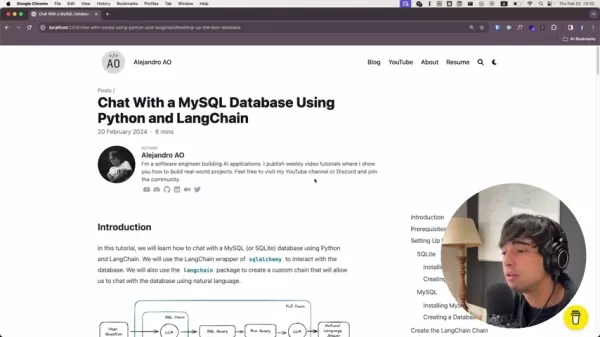
This guide will cover both MySQL and SQLite, but we'll focus on MySQL for its widespread use in production. All the code you need is available on my website.
Don't forget to check the video description for a link to the complete code repository.
Setting up the Test Database: The Chinook Database
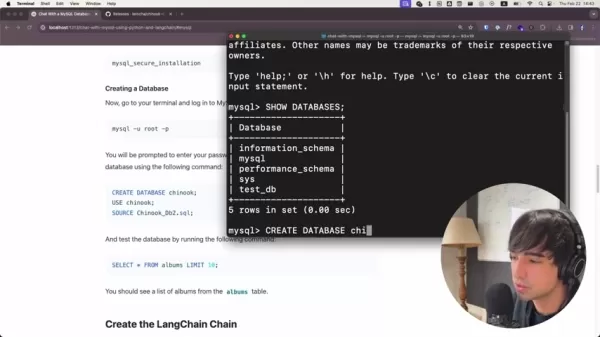
We'll use the Chinook database, a sample database that mimics a digital media store, for this guide. It contains tables for artists, albums, media tracks, invoices, and customers. Setting up a test database is vital for safely testing your code before you connect to a live production database.
Here's how to set it up:
- Download the Chinook Database: Get the SQL file from the GitHub repository. The link is in the article. The data model includes tables for artists, albums, and customers.
- Import the Database: Use this command to import the database, replacing the file path with your own:
mysql -u root -p < path/to/Chinook_mysql.sql
Using a sample database allows you to experiment with queries and functionalities without risking your production data.
Creating a New LangChain Chain: Orchestrating the Chatbot Workflow
Now, let's set up the base code for your LangChain chat with a database tool:
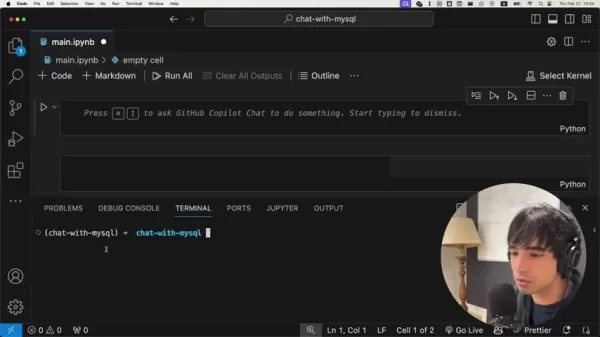
- Install Packages: Use the following command to install the necessary packages:
pip install langchain mysql-connector-python - Configure the Virtual Environment: Before installing, activate your virtual environment. For Conda users, it's:
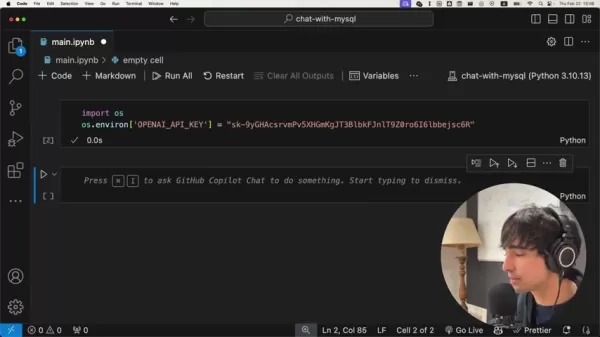
conda activate - Obtain API Key: Since you'll be using the OpenAI model, export your OpenAI API key.
With your test database ready and tools installed, you're set to build your LangChain chain. This chain will manage the workflow of processing user questions, generating SQL queries, and retrieving data from the database. The API key is your pass to using the large language model (LLM).
Digging Deeper: Behind the Scenes of the LangChain Process
Understanding the LangChain Flow
Before we dive into the code, let's visualize the entire process with a diagram:
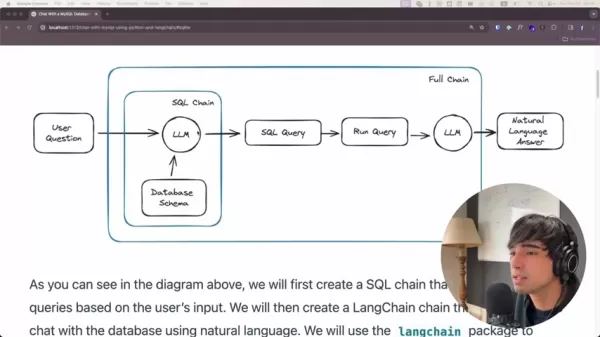
Here's the full chain:
- User Question: It starts with a user asking a question in natural language, like "How many users are there in this database?"
- SQL Chain: This chain handles translating the user's question into a valid SQL query.
- LLM (Language Model): The LLM, along with the database schema, interprets the user's question and crafts a SQL query.
- Database Schema: The schema outlines the database's structure, helping the LLM to generate accurate queries.
- SQL Query: The resulting SQL query is a command that tells the database what data to fetch. For example:
SELECT COUNT(*) FROM users - Run Query: This step executes the SQL query against the MySQL database.
- LLM (Language Model): The query results are then passed back to the LLM to generate a human-readable answer.
- Natural Language Answer: The LLM delivers the results in a natural language format, such as "There are 48 users in this database."
This flow ensures a smooth transition from natural language to SQL, making data accessible to non-technical users.
Creating a Custom Prompt for Enhanced SQL Query Generation
Prompt engineering is key to optimizing your LangChain chatbot's accuracy and effectiveness. Prompts guide the LLM in generating the right SQL queries. You can customize this using the ChatPromptTemplate.
- Describe the Tables: Provide SQL create table statements so the LLM understands what each table represents and its columns.
- Describe the Query Results: Give the LLM some guidance on interpreting SQL results, allowing it to format the response appropriately for the user.
By fine-tuning these prompts, you can enhance your LangChain chatbot's performance and accuracy, making it more reliable and user-friendly. When a user types their request, the model processes it and delivers an appropriate response.
Steps to Use LangChain
First Step
Here's what you need to do:
- Set up your development environment with Python, MySQL, and LangChain.
- Download and import the Chinook database for testing.
Second Step
Next, follow these steps:
- Install the necessary packages and configure your virtual environment.
- Create and customize your LangChain chain to handle user queries.
Pricing
Cost of LangChain
LangChain itself is free, but keep in mind that using the LLM incurs costs per use.
Pros and Cons of Using LangChain
Pros
- Simplified Database Interaction: Users can interact with databases using natural language, bypassing complex SQL.
- Increased Accessibility: Data becomes accessible to non-technical users, fostering data-driven decision-making across the organization.
- Time Savings: Automating query generation reduces the time needed for data retrieval and analysis.
- Customizable Interface: You can tailor the chatbot to fit your specific database structure and user needs.
Cons
- Potential for Inaccurate Queries: The LLM might occasionally generate incorrect SQL queries, leading to inaccurate results. This is where a sample database proves useful.
- Dependency on Language Model Performance: The quality of the chatbot's responses hinges on the performance of the underlying language model.
- Security Considerations: Implementing proper security measures is crucial to protect the database from unauthorized access.
Core Features
Key Differentiators
- Allows connection to various databases.
- Enables more natural language interaction for users instead of SQL.
- Offers a simple installation process.
Use Cases
Cases Where Users Can Use LangChain
- Provide an interface for data scientists to pull complex reports.
- Offer a low-code solution for business users to generate their own reports.
- Create an interface for less technically savvy users to access data.
Frequently Asked Questions
What Databases Are Compatible with LangChain?
LangChain's versatility allows it to work with a wide range of databases, including MySQL, PostgreSQL, SQLite, and other SQL databases. Its SQLChain framework can be customized to interact seamlessly, enabling natural language queries across your existing data infrastructure.
What Are the Common Challenges While Setting This Up?
While LangChain simplifies database interactions, challenges can arise, particularly around prompt engineering and schema understanding. Crafting prompts that accurately guide the LLM to generate correct SQL queries is crucial, as is ensuring the LLM has a comprehensive understanding of the database schema. Addressing these challenges through careful prompt design and schema documentation is key to building a reliable chatbot.
Is LangChain a Secure Solution for Interacting with Sensitive Data?
Security is paramount when dealing with sensitive data. While LangChain provides a powerful interface, it's essential to implement proper authentication and authorization mechanisms to protect your database from unauthorized access. Employing techniques such as input validation and query parameterization can further enhance the security of your LangChain application and safeguard your data.
Related Questions
What Are the Key Differences Between Using LangChain with MySQL Versus SQLite?
LangChain supports both MySQL and SQLite, but each has its own strengths and use cases. MySQL is known for its scalability and robustness, making it ideal for production environments and high-traffic applications. SQLite, on the other hand, is a lightweight, file-based database perfect for testing, development, and smaller applications. The choice between MySQL and SQLite depends on your project's specific needs, considering factors like scalability, security, and deployment complexity. MySQL is suited for production, while SQLite is great for testing.
Related article
 Lenovo Unveils AI Cutie at MWC 2026: Desktop Robotic Arm Becomes Your New Workplace Assistant
If AI in 2025 is still confined to screen-based chats, 2026 marks the shift toward tangible, desk-integrated intelligence. At MWC 2026 in Barcelona, Lenovo unveiled two groundbreaking AI hardware concepts: AI Workmate (an AI Office Partner) and AI Wo
TikTok Launches Voice Copyright Report Channel as AI Clone Voice Complaints Double
TikTok has introduced a dedicated reporting channel for voice-related intellectual property infringement, alongside enhanced rights protection mechanisms. The platform notes that as AI voice synthesis and imitation technologies become more accessible
Is Google AI Overviews safe for SEO? How to use it in 2024
Survivor.io Evo Skills Tier List: The Best and Worst Ranked!Table of Contents:IntroductionWhat is an Evo Skill?Tier List ExplanationC Tier SkillsForce BarrierB Tier SkillsShark Mod GunMagnetic RebounderCaltropsThunderbolt BombInferno BombInquisitor D
Related Special Topic Recommendations
Text-to-speech
Lenovo Unveils AI Cutie at MWC 2026: Desktop Robotic Arm Becomes Your New Workplace Assistant
If AI in 2025 is still confined to screen-based chats, 2026 marks the shift toward tangible, desk-integrated intelligence. At MWC 2026 in Barcelona, Lenovo unveiled two groundbreaking AI hardware concepts: AI Workmate (an AI Office Partner) and AI Wo
TikTok Launches Voice Copyright Report Channel as AI Clone Voice Complaints Double
TikTok has introduced a dedicated reporting channel for voice-related intellectual property infringement, alongside enhanced rights protection mechanisms. The platform notes that as AI voice synthesis and imitation technologies become more accessible
Is Google AI Overviews safe for SEO? How to use it in 2024
Survivor.io Evo Skills Tier List: The Best and Worst Ranked!Table of Contents:IntroductionWhat is an Evo Skill?Tier List ExplanationC Tier SkillsForce BarrierB Tier SkillsShark Mod GunMagnetic RebounderCaltropsThunderbolt BombInferno BombInquisitor D
Related Special Topic Recommendations
Text-to-speech
 Best AI Text to Speech Tools for Natural Voiceovers
2026 Latest Best Top-rated AI Text to Speech Tools for Natural Voiceovers are here on XIX.AI! This curated list features powerful, game-changing options that deliver crystal-clear voices for every use case, backed by real-world tests and weekly updated rankings. Get a free vs paid comparison to find the must-try solution that boosts your productivity instantly. Explore now to Unlock your AI edge!
 11 tools
 xix.ai
Comic Creation
Manga AI Background Generators for Serialized Chapters, Covers, and Promo Art
xix.ai
Comic Creation
Manga AI Background Generators for Serialized Chapters, Covers, and Promo Art
2026 Latest Best Manga AI Background Generators Ranked Top-Rated! This curated collection showcases powerful game-changing tools perfect for creating high-quality chapter backgrounds, book covers, and promotional art. Every option has undergone rigorous real-world tests to ensure reliability. Get a free vs paid comparison along with detailed insights. Explore now to discover your perfect tool and unlock your AI edge in manga creation.
6 tools
xix.ai
Image editing
AI Object Removal Editors: Clean Up Portraits, Travel, and Product Shots
2026 Latest Best Top-rated AI Object Removal Editors for portraits travel product shots! XIX.AI curates a powerful game-changing collection regularly updated with weekly rankings. These tools offer real-world tests to help you quickly remove unwanted elements, boost content quality, and save tons of time without compromising results. Must-try for anyone aiming to unlock their AI creation edge. Explore now!
10 tools
xix.ai
Text-to-speech
Best AI Text to Speech Tools for Online Courses
2026 Latest Best Top-rated AI Text to Speech Tools for Online Courses are curated by XIX.AI based on rigorous real-world tests and weekly updated rankings. These powerful tools help creators deliver crystal-clear audio content effortlessly, boosting writing efficiency and streamlining course production. Check out the free vs paid comparison to find your perfect fit. Explore now to unlock your AI edge in online education.
10 tools
xix.ai
writing
AI Blog Title Tools for Higher Click Through Rates
2026 Latest Best Top-Rated AI Blog Title Tools for Higher Click Through Rates! XIX.AI has carefully curated a powerful, game-changing collection of top tools that go through rigorous real-world tests. You’ll find a free vs paid comparison, weekly updated rankings, and detailed insights to help you boost your blog’s traffic efficiently. Must-try options are highlighted to help you unlock your AI edge. Explore now!
10 tools
xix.ai
automation
Best AI Task Routing Tools for Support Workflows
2026 Latest Best Top-rated AI Task Routing Tools for Support Workflows! XIX.AI has curated a highly powerful game-changing collection of must-try solutions, all undergoing rigorous real-world tests and updated weekly. These tools streamline workflows, boost productivity, and help teams deliver faster, more efficient support. Explore now to discover your perfect tool and unlock your AI edge!
17 tools
xix.ai

 Comments (8)
0/500
Comments (8)
0/500
![EricAllen]()
Als jemand, der SQL immer etwas mühsam fand, finde ich diesen Ansatz super praktisch! Endlich muss ich nicht mehr ständig Syntax googeln, um einfache Abfragen zu machen. Aber ich frage mich, wie sicher so eine natürliche Sprachschnittstelle ist – könnte das nicht zu unbeabsichtigten Datenlecks führen, wenn die KI eine Anfrage falsch interpretiert? 🤔 Trotzdem, coole Sache für Prototypen!
![NicholasYoung]()
この記事はSQLが苦手な人にとって本当に役立つ内容ですね。自然言語でデータベースを操作できるようになれば、業務効率が大幅に向上しそうです。PythonとLangChainの組み合わせは実用的で、実際に試してみたくなりました。データ分析の敷居が下がるのは良い傾向だと思います!👍
![NicholasYoung]()
なんで私の会社の研修がSQLの授業も含めてるのかが分かった気がする…こんなのに自然言語で質問できるなら、データ分析がどれだけ楽になるか。ちょっと試してみたくなるけど、社内のデータベースに勝手につなぐのはまずそう 😅
![EricRoberts]()
이 글을 보니 우리도 회사에서 이런 도구 만들어서 비개발자가 데이터 접근하기 편하게 했으면 좋겠어요. 제일 관심가는 건... 정말 자연스러운 질문이 실제 SQL로 바뀌는 과정이 어떻게 이루어지나요? 쿼리가 틀렸을 때 LLM이 교정을 해준다는 건 신뢰도 문제가 약간 걸리네요ㅜㅜ
![JoeGarcía]()
看到这个教程,用自然语言查询数据库也太酷了吧!对我们这种非技术背景的人来说简直是救星,终于不用硬啃SQL语法了😭 不过有点担心权限管理的问题,万一被问到敏感数据怎么办?希望后续能讲讲安全防护的部分。
![AnthonyJohnson]()
¡Increíble guía! Siempre me pareció complicado conectar bases de datos con lenguaje natural; esto parece una solución super útil para quienes no somos expertos en SQL. Sin embargo, me quedo con la duda: ¿todos esos pasos de configuración y el procesamiento de lenguaje requieren mucho tiempo de desarrollo en aplicaciones reales? De todos modos, ¡gracias por compartir esto! 👏
In today's data-driven world, the ability to access and manipulate database information is essential. However, SQL can be daunting for those without a technical background. This article delves into how you can create a user-friendly natural language interface for your MySQL database using Python and LangChain. By harnessing Python's scripting capabilities and LangChain's flexibility, you can enable users to query and analyze data in plain English, making valuable insights accessible without the need for specialized technical skills. We'll cover the essential components, provide step-by-step guidance, and share best practices for developing a robust and intuitive chatbot for your MySQL database.
Key Points
- Leverage LangChain's SQLChain for Natural Language Querying: Learn how to convert user questions into SQL queries effortlessly.
- Utilize Python for Database Connectivity and Processing: Connect to your MySQL database and handle the results seamlessly.
- Create a Custom LangChain Chain for Tailored Interactions: Design a specific chain tailored to your application's needs.
- Understand the Database Schema for Accurate Query Generation: The schema is crucial for guiding the LLM in generating accurate queries.
- Deploy a User-Friendly Interface for Easy Data Access: Ensure your chatbot is accessible and user-friendly for all users.
Setting up the Foundation: Python, MySQL, and LangChain
Prerequisites: Essential Tools for Database Chatbots
Before you start developing, make sure you have these components installed and set up:
- Python 3.8 or later: Python is the backbone for scripting your chatbot and interacting with the database. Grab the latest version from the official Python website.
- MySQL: This relational database management system is where your data resides. You can download MySQL from its official site.
- LangChain: LangChain makes integrating language models into your applications a breeze. Install it using pip:
pip install langchain
This guide will cover both MySQL and SQLite, but we'll focus on MySQL for its widespread use in production. All the code you need is available on my website.
Don't forget to check the video description for a link to the complete code repository.
Setting up the Test Database: The Chinook Database
We'll use the Chinook database, a sample database that mimics a digital media store, for this guide. It contains tables for artists, albums, media tracks, invoices, and customers. Setting up a test database is vital for safely testing your code before you connect to a live production database.
Here's how to set it up:
- Download the Chinook Database: Get the SQL file from the GitHub repository. The link is in the article. The data model includes tables for artists, albums, and customers.
- Import the Database: Use this command to import the database, replacing the file path with your own:
mysql -u root -p < path/to/Chinook_mysql.sql
Using a sample database allows you to experiment with queries and functionalities without risking your production data.
Creating a New LangChain Chain: Orchestrating the Chatbot Workflow
Now, let's set up the base code for your LangChain chat with a database tool:
- Install Packages: Use the following command to install the necessary packages:
pip install langchain mysql-connector-python - Configure the Virtual Environment: Before installing, activate your virtual environment. For Conda users, it's:
conda activate - Obtain API Key: Since you'll be using the OpenAI model, export your OpenAI API key.
With your test database ready and tools installed, you're set to build your LangChain chain. This chain will manage the workflow of processing user questions, generating SQL queries, and retrieving data from the database. The API key is your pass to using the large language model (LLM).
Digging Deeper: Behind the Scenes of the LangChain Process
Understanding the LangChain Flow
Before we dive into the code, let's visualize the entire process with a diagram:
Here's the full chain:
- User Question: It starts with a user asking a question in natural language, like "How many users are there in this database?"
- SQL Chain: This chain handles translating the user's question into a valid SQL query.
- LLM (Language Model): The LLM, along with the database schema, interprets the user's question and crafts a SQL query.
- Database Schema: The schema outlines the database's structure, helping the LLM to generate accurate queries.
- SQL Query: The resulting SQL query is a command that tells the database what data to fetch. For example:
SELECT COUNT(*) FROM users - Run Query: This step executes the SQL query against the MySQL database.
- LLM (Language Model): The query results are then passed back to the LLM to generate a human-readable answer.
- Natural Language Answer: The LLM delivers the results in a natural language format, such as "There are 48 users in this database."
This flow ensures a smooth transition from natural language to SQL, making data accessible to non-technical users.
Creating a Custom Prompt for Enhanced SQL Query Generation
Prompt engineering is key to optimizing your LangChain chatbot's accuracy and effectiveness. Prompts guide the LLM in generating the right SQL queries. You can customize this using the ChatPromptTemplate.
- Describe the Tables: Provide SQL create table statements so the LLM understands what each table represents and its columns.
- Describe the Query Results: Give the LLM some guidance on interpreting SQL results, allowing it to format the response appropriately for the user.
By fine-tuning these prompts, you can enhance your LangChain chatbot's performance and accuracy, making it more reliable and user-friendly. When a user types their request, the model processes it and delivers an appropriate response.
Steps to Use LangChain
First Step
Here's what you need to do:
- Set up your development environment with Python, MySQL, and LangChain.
- Download and import the Chinook database for testing.
Second Step
Next, follow these steps:
- Install the necessary packages and configure your virtual environment.
- Create and customize your LangChain chain to handle user queries.
Pricing
Cost of LangChain
LangChain itself is free, but keep in mind that using the LLM incurs costs per use.
Pros and Cons of Using LangChain
Pros
- Simplified Database Interaction: Users can interact with databases using natural language, bypassing complex SQL.
- Increased Accessibility: Data becomes accessible to non-technical users, fostering data-driven decision-making across the organization.
- Time Savings: Automating query generation reduces the time needed for data retrieval and analysis.
- Customizable Interface: You can tailor the chatbot to fit your specific database structure and user needs.
Cons
- Potential for Inaccurate Queries: The LLM might occasionally generate incorrect SQL queries, leading to inaccurate results. This is where a sample database proves useful.
- Dependency on Language Model Performance: The quality of the chatbot's responses hinges on the performance of the underlying language model.
- Security Considerations: Implementing proper security measures is crucial to protect the database from unauthorized access.
Core Features
Key Differentiators
- Allows connection to various databases.
- Enables more natural language interaction for users instead of SQL.
- Offers a simple installation process.
Use Cases
Cases Where Users Can Use LangChain
- Provide an interface for data scientists to pull complex reports.
- Offer a low-code solution for business users to generate their own reports.
- Create an interface for less technically savvy users to access data.
Frequently Asked Questions
What Databases Are Compatible with LangChain?
LangChain's versatility allows it to work with a wide range of databases, including MySQL, PostgreSQL, SQLite, and other SQL databases. Its SQLChain framework can be customized to interact seamlessly, enabling natural language queries across your existing data infrastructure.
What Are the Common Challenges While Setting This Up?
While LangChain simplifies database interactions, challenges can arise, particularly around prompt engineering and schema understanding. Crafting prompts that accurately guide the LLM to generate correct SQL queries is crucial, as is ensuring the LLM has a comprehensive understanding of the database schema. Addressing these challenges through careful prompt design and schema documentation is key to building a reliable chatbot.
Is LangChain a Secure Solution for Interacting with Sensitive Data?
Security is paramount when dealing with sensitive data. While LangChain provides a powerful interface, it's essential to implement proper authentication and authorization mechanisms to protect your database from unauthorized access. Employing techniques such as input validation and query parameterization can further enhance the security of your LangChain application and safeguard your data.
Related Questions
What Are the Key Differences Between Using LangChain with MySQL Versus SQLite?
LangChain supports both MySQL and SQLite, but each has its own strengths and use cases. MySQL is known for its scalability and robustness, making it ideal for production environments and high-traffic applications. SQLite, on the other hand, is a lightweight, file-based database perfect for testing, development, and smaller applications. The choice between MySQL and SQLite depends on your project's specific needs, considering factors like scalability, security, and deployment complexity. MySQL is suited for production, while SQLite is great for testing.








 Lenovo Unveils AI Cutie at MWC 2026: Desktop Robotic Arm Becomes Your New Workplace Assistant
If AI in 2025 is still confined to screen-based chats, 2026 marks the shift toward tangible, desk-integrated intelligence. At MWC 2026 in Barcelona, Lenovo unveiled two groundbreaking AI hardware concepts: AI Workmate (an AI Office Partner) and AI Wo
Lenovo Unveils AI Cutie at MWC 2026: Desktop Robotic Arm Becomes Your New Workplace Assistant
If AI in 2025 is still confined to screen-based chats, 2026 marks the shift toward tangible, desk-integrated intelligence. At MWC 2026 in Barcelona, Lenovo unveiled two groundbreaking AI hardware concepts: AI Workmate (an AI Office Partner) and AI Wo
 TikTok Launches Voice Copyright Report Channel as AI Clone Voice Complaints Double
TikTok has introduced a dedicated reporting channel for voice-related intellectual property infringement, alongside enhanced rights protection mechanisms. The platform notes that as AI voice synthesis and imitation technologies become more accessible
TikTok Launches Voice Copyright Report Channel as AI Clone Voice Complaints Double
TikTok has introduced a dedicated reporting channel for voice-related intellectual property infringement, alongside enhanced rights protection mechanisms. The platform notes that as AI voice synthesis and imitation technologies become more accessible
 Is Google AI Overviews safe for SEO? How to use it in 2024
Survivor.io Evo Skills Tier List: The Best and Worst Ranked!Table of Contents:IntroductionWhat is an Evo Skill?Tier List ExplanationC Tier SkillsForce BarrierB Tier SkillsShark Mod GunMagnetic RebounderCaltropsThunderbolt BombInferno BombInquisitor D
Is Google AI Overviews safe for SEO? How to use it in 2024
Survivor.io Evo Skills Tier List: The Best and Worst Ranked!Table of Contents:IntroductionWhat is an Evo Skill?Tier List ExplanationC Tier SkillsForce BarrierB Tier SkillsShark Mod GunMagnetic RebounderCaltropsThunderbolt BombInferno BombInquisitor D

2026 Latest Best Top-rated AI Text to Speech Tools for Natural Voiceovers are here on XIX.AI! This curated list features powerful, game-changing options that deliver crystal-clear voices for every use case, backed by real-world tests and weekly updated rankings. Get a free vs paid comparison to find the must-try solution that boosts your productivity instantly. Explore now to Unlock your AI edge!
11 tools
xix.ai

2026 Latest Best Manga AI Background Generators Ranked Top-Rated! This curated collection showcases powerful game-changing tools perfect for creating high-quality chapter backgrounds, book covers, and promotional art. Every option has undergone rigorous real-world tests to ensure reliability. Get a free vs paid comparison along with detailed insights. Explore now to discover your perfect tool and unlock your AI edge in manga creation.
6 tools
xix.ai

2026 Latest Best Top-rated AI Object Removal Editors for portraits travel product shots! XIX.AI curates a powerful game-changing collection regularly updated with weekly rankings. These tools offer real-world tests to help you quickly remove unwanted elements, boost content quality, and save tons of time without compromising results. Must-try for anyone aiming to unlock their AI creation edge. Explore now!
10 tools
xix.ai

2026 Latest Best Top-rated AI Text to Speech Tools for Online Courses are curated by XIX.AI based on rigorous real-world tests and weekly updated rankings. These powerful tools help creators deliver crystal-clear audio content effortlessly, boosting writing efficiency and streamlining course production. Check out the free vs paid comparison to find your perfect fit. Explore now to unlock your AI edge in online education.
10 tools
xix.ai

2026 Latest Best Top-Rated AI Blog Title Tools for Higher Click Through Rates! XIX.AI has carefully curated a powerful, game-changing collection of top tools that go through rigorous real-world tests. You’ll find a free vs paid comparison, weekly updated rankings, and detailed insights to help you boost your blog’s traffic efficiently. Must-try options are highlighted to help you unlock your AI edge. Explore now!
10 tools
xix.ai

2026 Latest Best Top-rated AI Task Routing Tools for Support Workflows! XIX.AI has curated a highly powerful game-changing collection of must-try solutions, all undergoing rigorous real-world tests and updated weekly. These tools streamline workflows, boost productivity, and help teams deliver faster, more efficient support. Explore now to discover your perfect tool and unlock your AI edge!
17 tools
xix.ai

Als jemand, der SQL immer etwas mühsam fand, finde ich diesen Ansatz super praktisch! Endlich muss ich nicht mehr ständig Syntax googeln, um einfache Abfragen zu machen. Aber ich frage mich, wie sicher so eine natürliche Sprachschnittstelle ist – könnte das nicht zu unbeabsichtigten Datenlecks führen, wenn die KI eine Anfrage falsch interpretiert? 🤔 Trotzdem, coole Sache für Prototypen!
この記事はSQLが苦手な人にとって本当に役立つ内容ですね。自然言語でデータベースを操作できるようになれば、業務効率が大幅に向上しそうです。PythonとLangChainの組み合わせは実用的で、実際に試してみたくなりました。データ分析の敷居が下がるのは良い傾向だと思います!👍
なんで私の会社の研修がSQLの授業も含めてるのかが分かった気がする…こんなのに自然言語で質問できるなら、データ分析がどれだけ楽になるか。ちょっと試してみたくなるけど、社内のデータベースに勝手につなぐのはまずそう 😅
이 글을 보니 우리도 회사에서 이런 도구 만들어서 비개발자가 데이터 접근하기 편하게 했으면 좋겠어요. 제일 관심가는 건... 정말 자연스러운 질문이 실제 SQL로 바뀌는 과정이 어떻게 이루어지나요? 쿼리가 틀렸을 때 LLM이 교정을 해준다는 건 신뢰도 문제가 약간 걸리네요ㅜㅜ
看到这个教程,用自然语言查询数据库也太酷了吧!对我们这种非技术背景的人来说简直是救星,终于不用硬啃SQL语法了😭 不过有点担心权限管理的问题,万一被问到敏感数据怎么办?希望后续能讲讲安全防护的部分。
¡Increíble guía! Siempre me pareció complicado conectar bases de datos con lenguaje natural; esto parece una solución super útil para quienes no somos expertos en SQL. Sin embargo, me quedo con la duda: ¿todos esos pasos de configuración y el procesamiento de lenguaje requieren mucho tiempo de desarrollo en aplicaciones reales? De todos modos, ¡gracias por compartir esto! 👏












