


 Home
HomeBuild Your Own AI Text Summarizer Using Langchain, OpenAI, and Streamlit
In today's fast-evolving digital landscape, the skill to condense substantial text quickly and efficiently is extremely valuable. This guide walks you through creating your own text summarization tool using modern technologies: OpenAI, Langchain, and Streamlit. Whether you're a developer, student, or business professional, this tool will help streamline your work and deepen your comprehension of written information.
Key Points
Develop a text summarization application with OpenAI, Langchain, and Streamlit.
Leverage GPT 3.5 for powerful summarization with a language model.
Use Streamlit to build an intuitive and accessible web interface.
Incorporate Langchain's community tools to improve the summarization workflow.
Learn why dividing text into segments is essential for AI model handling.
Deploy the final app on Streamlit Community Cloud for easy access and sharing.
Integrate a function to automatically clear API keys after use for better security.
Text Summarization App Development
Understanding the Tech Stack
A solid grasp of the technology stack is vital for building a capable text summarization app. Let’s examine each component in detail:

- Streamlit: Streamlit acts as the foundation for the web interface, offering a simple yet flexible way to build interactive applications in Python. Its user-friendly features support quick prototyping and deployment.
- Langchain: Langchain is a framework that streamlines development of applications using Large Language Models (LLMs). It includes modules for working with documents, splitting text, and performing summarization.
- OpenAI: OpenAI supplies the LLM—specifically GPT 3.5—which evaluates and produces succinct summaries from provided text.
- Tiktoken: Tiktoken tokenizes text for efficient use by OpenAI models, breaking it into smaller pieces that the LLM can easily manage.
By integrating these technologies, you can build a reliable and easy-to-use text summarization tool with minimal coding effort.
The Text Summarization Process
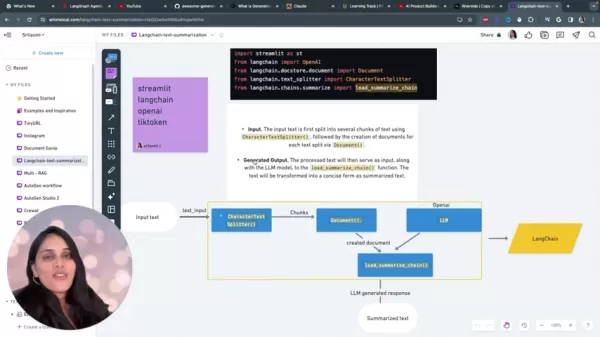
Here’s a step-by-step breakdown of the text summarization process:
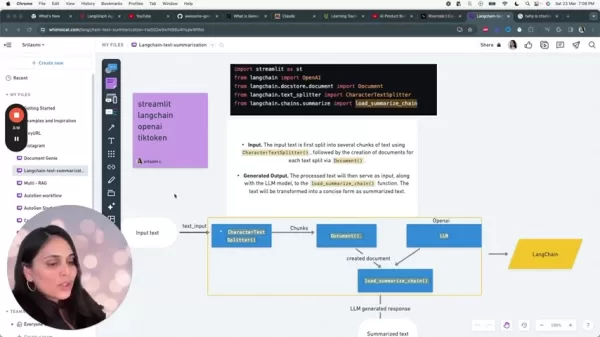
- Input Text: The user supplies the text they wish to summarize. This could be a document, article, or any other written content.
- Character Text Splitter: The input text is segmented into smaller parts with Langchain's
CharacterTextSplitter. This is a key step for managing text effectively. Large amounts of text can strain AI models, so dividing them ensures smooth processing. - Chunking: The text splitter breaks the input into manageable chunks, preserving character boundaries to maintain context.
- Document Creation: Each text chunk is turned into a Langchain
Document object, which works seamlessly with Langchain's summarization functions. - LLM Interaction: The
load_summarize_chain function uses the OpenAI LLM to produce a concise summary of each document. This function simplifies interaction with the language model. - Summarized Text: The end result is an abbreviated version of the original text that keeps the key details in a compact form. The LLM’s capabilities are harnessed to convert the text into a brief yet informative summary.
Why is Chunking Important for AI Models?
Chunking is a critical step because it lets AI models handle information in smaller, more workable pieces.
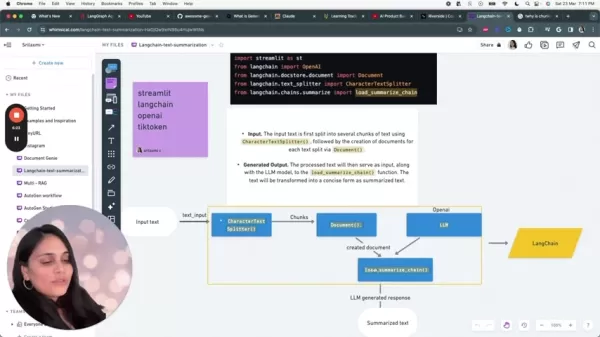
This method lowers the cognitive and computational demands of text summarization. AI models function more efficiently when handling smaller, focused sections, which often leads to improved performance and precision. Breaking down long texts into digestible parts also helps the model preserve context and zoom in on the most relevant information within each segment.
The following table explains the need for splitting the text for LLM to process with more accuracy:
Code Implementation Details
Importing Libraries
The first step in developing the app is importing the required libraries: Streamlit, Langchain, OpenAI, and Tiktoken.
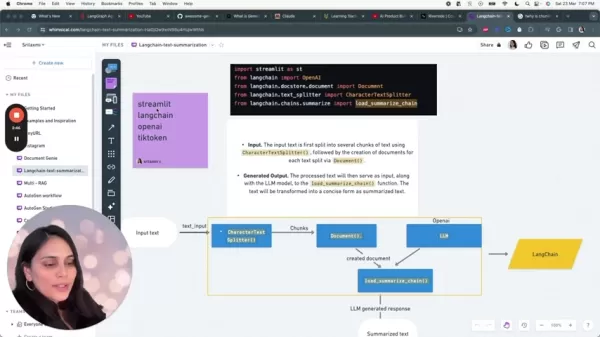
The import syntax is as follows:
import streamlit as stfrom langchain.docstore.document import Documentfrom langchain.text_splitter import CharacterTextSplitterfrom langchain.chains.summarize import load_summarize_chainfrom langchain.llms import OpenAI
Creating the generate_response function
The core of the application is the generate_response function. This function takes the user’s input text and manages the summarization pipeline. It initializes the OpenAI model, splits the input, creates document objects, and calls the load_summarize_chain to generate the final summary.
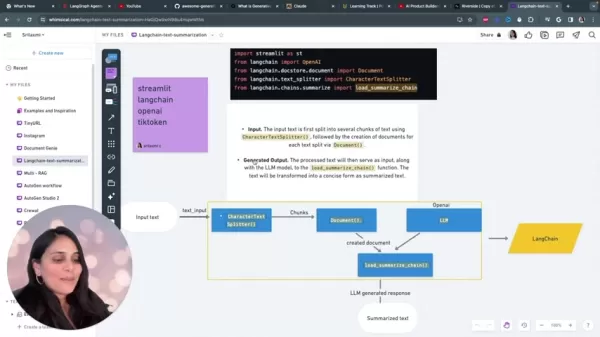
Here is the code:
def generate_response(txt):llm = OpenAI(temperature=0.7, openai_api_key=openai_api_key)text_splitter = CharacterTextSplitter(chunk_size=1000, chunk_overlap=0)texts = text_splitter.split_text(txt)docs = [Document(page_content=t) for t in texts]chain = load_summarize_chain(llm, chain_type="map_reduce", verbose=False)output_summary = chain.run(docs)return output_summary
- Instantiate the LLM: The OpenAI language model is initialized with a chosen temperature and the user’s API key. Temperature affects the output's level of creativity.
- Split the Text: The input text is divided into sections using
CharacterTextSplitter. This keeps text segments at an appropriate size for the model. - Create Documents: Each text section is converted into a
Document object, the standard input type for Langchain. - Load Summarization Chain: The
load_summarize_chain function creates the summarization chain, which is configured based on the language model and preferred summarization method. - Run the Chain: The summarization chain executes via the
run method, which processes the documents and produces the summary. - Return Output: The summarized text is returned as the function's result.
Building the Streamlit Web Interface
Streamlit makes it easy to build the web interface. The interface includes the following components:
- Page configuration for setting the title.
- A text area where users can input the text to summarize.
- A form that securely accepts the user's OpenAI API Key.
- A submit button to activate the summarization process.
- A results area that shows the summarized output.
st.set_page_config(page_title="Text Summarization App")st.title("Text Summarization App")text_input = st.text_area("Enter your text here:", height=200)with st.form('myform', clear_on_submit=True):openai_api_key = st.text_input('OpenAI API Key', type = 'password', disabled=not(openai_api_key_startwith_check))submitted = st.form_submit_button('Submit')if submitted and openai_api_key:with st.spinner('Calculating...'):raw_response = generate_response(text_input)try:st.info(raw_response)except Exception as e:st.error(e)st.subheader("How to get an OpenAI API key:")st.markdown("To use this app, you will need an OpenAI API Key. You can create a secret keyhere: ")st.markdown("[OpenAI API Keys](https://platform.openai.com/api-keys)")
How to Use the Text Summarization App
Step-by-Step Guide to Summarize Text
Using the text summarization app is simple and involves just a few steps:
- Enter Your Text: Copy and paste the text you want summarized into the text input area. This might be a book excerpt, news article, or detailed email.
- Enter OpenAI API Key: Provide your OpenAI API key to authenticate requests to OpenAI’s language models.
For security, the input field automatically clears the API key after the request is processed.
- Submit: Click the submit button to begin the summarization.
- View Summarized Text: After processing completes, the app will show a clear, concise summary of your original text.
Advantages and Disadvantages
Pros
Makes reading and absorbing information easier.
Reduces mental effort by delivering condensed content.
Speeds up work processes with fast summarization.
Improves understanding of complicated or long-form texts.
Cons
Relies on having an OpenAI API key and access to their services.
Possible inaccuracies or loss of subtle details during summarization.
Restricted options to customize the summarization model.
API keys must be cleared after each session to maintain security.
Frequently Asked Questions
What is text summarization?
Text summarization involves shortening a long piece of text while keeping the most important information intact.
Why is chunking important in text summarization?
Chunking helps AI models process large texts more effectively by splitting them into smaller, focused segments—boosting accuracy and lowering processing demand.
How does the API key improve security?
Clearing the API key after usage prevents sensitive authentication information from being stored or misused.
What can I do with the GitHub repo?
Follow the provided instructions to clone the repository, add your OpenAI API key, and start summarizing content of your choice.
How long does the process take to complete?
The entire process, from setup to summary generation, typically takes less than 10 minutes.
Related Questions
Can I use other language models besides OpenAI?
Yes, the text summarization app can be adjusted to work with other language models. You would need to update the code to connect to the API of the alternative model and adapt the text processing steps as needed. Keep in mind that different models may have unique input requirements or performance traits.
Related article
 U.S. Stocks Hit Historic Milestone as AI and Aerospace Giants Prepare for Trillion-Dollar Debut
Elon Musk, Sam Altman, and Dario Amodei, three titans of the technology sector, are advancing toward initial public offerings for their respective ventures. With SpaceX, OpenAI, and Anthropic—three industry behemoths nearing trillion-dollar valuation
Swedish AI Startup Lovable Eyes $13.2 Billion Valuation After Major Funding Round
As AI-driven coding tools gain traction, Swedish startup Lovable has secured a major funding round. The company aims to raise $3 billion, potentially boosting its valuation to $13.2 billion—double the $6.6 billion recorded last December. Menlo Ventur
Google Tests Remy AI Agent for Gemini as Focus Shifts to User Control
According to Business Insider, Google is testing Remy, a new AI personal agent for Gemini. This tool aims to execute tasks on behalf of users, streamlining both professional workflows and daily routines.Currently, Remy is undergoing testing in an int
Related Special Topic Recommendations
SEO
U.S. Stocks Hit Historic Milestone as AI and Aerospace Giants Prepare for Trillion-Dollar Debut
Elon Musk, Sam Altman, and Dario Amodei, three titans of the technology sector, are advancing toward initial public offerings for their respective ventures. With SpaceX, OpenAI, and Anthropic—three industry behemoths nearing trillion-dollar valuation
Swedish AI Startup Lovable Eyes $13.2 Billion Valuation After Major Funding Round
As AI-driven coding tools gain traction, Swedish startup Lovable has secured a major funding round. The company aims to raise $3 billion, potentially boosting its valuation to $13.2 billion—double the $6.6 billion recorded last December. Menlo Ventur
Google Tests Remy AI Agent for Gemini as Focus Shifts to User Control
According to Business Insider, Google is testing Remy, a new AI personal agent for Gemini. This tool aims to execute tasks on behalf of users, streamlining both professional workflows and daily routines.Currently, Remy is undergoing testing in an int
Related Special Topic Recommendations
SEO
 Best AI SERP Analysis Tools for Search Strategy
2026 Latest Best Top-rated AI SERP Analysis Tools for Search Strategy are curated by XIX.AI through rigorous real-world tests and weekly updated rankings. These powerful tools help you unlock hidden optimization opportunities, boost content performance, and gain a competitive edge in search. Discover your perfect tool to elevate your search strategy today. Explore now!
 13 tools
 xix.ai
Data Analysis
Best AI Anomaly Detection Tools for KPI Monitoring across SaaS and Ecommerce Teams
xix.ai
Data Analysis
Best AI Anomaly Detection Tools for KPI Monitoring across SaaS and Ecommerce Teams
2026 Latest Best Top-rated AI Anomaly Detection Tools for KPI Monitoring in SaaS and Ecommerce teams! XIX.AI has curated a powerful, game-changing collection based on rigorous real-world tests and weekly updated rankings. You’ll find detailed free vs paid comparison insights to help you identify the must-try solution that boosts productivity and unlocks your AI edge. Explore now!
10 tools
xix.ai
writing
Best AI Outline Generators for Long-Form SEO Articles
2026 Latest Best Top-Rated AI Outline Generators for Long-Form SEO Articles, meticulously curated by XIX.AI. These powerful tools offer game-changing assistance in creating high-quality content quickly, boosting writing efficiency significantly. Get a free vs paid comparison along with real-world tests and detailed rankings to help you find the must-try option that suits your needs. Explore now to unlock your AI edge.
8 tools
xix.ai
Education and Learning
AI Study Tools for Homework and Exam Prep
2026 Latest Best AI Study Tools for Homework and Exam Prep! XIX.AI curates a top-rated list of powerful, game-changing tools that help students boost productivity, streamline homework completion, and ace exams through real-world tests. Get a free vs paid comparison, detailed rankings, and must-try options to unlock your AI edge. Explore now!
10 tools
xix.ai
Music composition
AI Vocal Demo Tools for Songwriters, Hooks, Toplines, and Multilingual Draft Sessions
2026 Latest Best AI Vocal Demo Tools for Songwriters, Hook Creators, and Multi-Language Content Teams! XIX.AI has curated a top-rated list of powerful game-changing tools that go through rigorous real-world tests. You’ll find detailed free vs paid comparison data, comprehensive rankings, and must-try options to help you boost writing efficiency and unlock your creative potential. Explore now to discover your perfect tool for all your content needs!
9 tools
xix.ai
Business
Best AI Competitive Research Tools for Small Businesses
2026 Latest Best Top-rated AI Competitive Research Tools for Small Businesses! XIX.AI has curated a highly powerful game-changing collection, updated weekly with rigorous real-world tests and detailed rankings. You can find a comprehensive free vs paid comparison to help you identify the must-try tools that boost your productivity and give you a competitive edge. Explore now to discover your perfect tool!
9 tools
xix.ai

 Comments (2)
0/500
Comments (2)
0/500
![JerryGonzález]()
この記事を読んで、自分でもAI要約ツールを作ってみたくなりました。特にLangchainの使い方が分かりやすく説明されていて助かります。ただ、OpenAIのAPIコストが気になるな…ローカルで動く軽量モデルを使ったバージョンも紹介してほしいです。🤔
![JamesGreen]()
Klasse! Endlich mal eine praktische Anwendung statt nur Theorie. Die Kombination aus Langchain und Streamlit klingt vielversprechend für Prototypen. Ich frage mich, wie gut das bei sehr speziellen Fachtexten funktioniert. Würde mir wünschen, dass so Tools auch für andere Sprachen als Englisch optimiert werden. Hat jemand schon Erfahrungen damit gemacht? 😊
In today's fast-evolving digital landscape, the skill to condense substantial text quickly and efficiently is extremely valuable. This guide walks you through creating your own text summarization tool using modern technologies: OpenAI, Langchain, and Streamlit. Whether you're a developer, student, or business professional, this tool will help streamline your work and deepen your comprehension of written information.
Key Points
Develop a text summarization application with OpenAI, Langchain, and Streamlit.
Leverage GPT 3.5 for powerful summarization with a language model.
Use Streamlit to build an intuitive and accessible web interface.
Incorporate Langchain's community tools to improve the summarization workflow.
Learn why dividing text into segments is essential for AI model handling.
Deploy the final app on Streamlit Community Cloud for easy access and sharing.
Integrate a function to automatically clear API keys after use for better security.
Text Summarization App Development
Understanding the Tech Stack
A solid grasp of the technology stack is vital for building a capable text summarization app. Let’s examine each component in detail:
- Streamlit: Streamlit acts as the foundation for the web interface, offering a simple yet flexible way to build interactive applications in Python. Its user-friendly features support quick prototyping and deployment.
- Langchain: Langchain is a framework that streamlines development of applications using Large Language Models (LLMs). It includes modules for working with documents, splitting text, and performing summarization.
- OpenAI: OpenAI supplies the LLM—specifically GPT 3.5—which evaluates and produces succinct summaries from provided text.
- Tiktoken: Tiktoken tokenizes text for efficient use by OpenAI models, breaking it into smaller pieces that the LLM can easily manage.
By integrating these technologies, you can build a reliable and easy-to-use text summarization tool with minimal coding effort.
The Text Summarization Process
Here’s a step-by-step breakdown of the text summarization process:
- Input Text: The user supplies the text they wish to summarize. This could be a document, article, or any other written content.
- Character Text Splitter: The input text is segmented into smaller parts with Langchain's
CharacterTextSplitter. This is a key step for managing text effectively. Large amounts of text can strain AI models, so dividing them ensures smooth processing. - Chunking: The text splitter breaks the input into manageable chunks, preserving character boundaries to maintain context.
- Document Creation: Each text chunk is turned into a Langchain
Documentobject, which works seamlessly with Langchain's summarization functions. - LLM Interaction: The
load_summarize_chainfunction uses the OpenAI LLM to produce a concise summary of each document. This function simplifies interaction with the language model. - Summarized Text: The end result is an abbreviated version of the original text that keeps the key details in a compact form. The LLM’s capabilities are harnessed to convert the text into a brief yet informative summary.
Why is Chunking Important for AI Models?
Chunking is a critical step because it lets AI models handle information in smaller, more workable pieces.
This method lowers the cognitive and computational demands of text summarization. AI models function more efficiently when handling smaller, focused sections, which often leads to improved performance and precision. Breaking down long texts into digestible parts also helps the model preserve context and zoom in on the most relevant information within each segment.
The following table explains the need for splitting the text for LLM to process with more accuracy:
Code Implementation Details
Importing Libraries
The first step in developing the app is importing the required libraries: Streamlit, Langchain, OpenAI, and Tiktoken.
The import syntax is as follows:
import streamlit as stfrom langchain.docstore.document import Documentfrom langchain.text_splitter import CharacterTextSplitterfrom langchain.chains.summarize import load_summarize_chainfrom langchain.llms import OpenAI
Creating the generate_response function
The core of the application is the generate_response function. This function takes the user’s input text and manages the summarization pipeline. It initializes the OpenAI model, splits the input, creates document objects, and calls the load_summarize_chain to generate the final summary.
Here is the code:
def generate_response(txt):llm = OpenAI(temperature=0.7, openai_api_key=openai_api_key)text_splitter = CharacterTextSplitter(chunk_size=1000, chunk_overlap=0)texts = text_splitter.split_text(txt)docs = [Document(page_content=t) for t in texts]chain = load_summarize_chain(llm, chain_type="map_reduce", verbose=False)output_summary = chain.run(docs)return output_summary
- Instantiate the LLM: The OpenAI language model is initialized with a chosen temperature and the user’s API key. Temperature affects the output's level of creativity.
- Split the Text: The input text is divided into sections using
CharacterTextSplitter. This keeps text segments at an appropriate size for the model. - Create Documents: Each text section is converted into a
Documentobject, the standard input type for Langchain. - Load Summarization Chain: The
load_summarize_chainfunction creates the summarization chain, which is configured based on the language model and preferred summarization method. - Run the Chain: The summarization chain executes via the
runmethod, which processes the documents and produces the summary. - Return Output: The summarized text is returned as the function's result.
Building the Streamlit Web Interface
Streamlit makes it easy to build the web interface. The interface includes the following components:
- Page configuration for setting the title.
- A text area where users can input the text to summarize.
- A form that securely accepts the user's OpenAI API Key.
- A submit button to activate the summarization process.
- A results area that shows the summarized output.
st.set_page_config(page_title="Text Summarization App")st.title("Text Summarization App")text_input = st.text_area("Enter your text here:", height=200)with st.form('myform', clear_on_submit=True):openai_api_key = st.text_input('OpenAI API Key', type = 'password', disabled=not(openai_api_key_startwith_check))submitted = st.form_submit_button('Submit')if submitted and openai_api_key:with st.spinner('Calculating...'):raw_response = generate_response(text_input)try:st.info(raw_response)except Exception as e:st.error(e)st.subheader("How to get an OpenAI API key:")st.markdown("To use this app, you will need an OpenAI API Key. You can create a secret keyhere: ")st.markdown("[OpenAI API Keys](https://platform.openai.com/api-keys)")
How to Use the Text Summarization App
Step-by-Step Guide to Summarize Text
Using the text summarization app is simple and involves just a few steps:
- Enter Your Text: Copy and paste the text you want summarized into the text input area. This might be a book excerpt, news article, or detailed email.
- Enter OpenAI API Key: Provide your OpenAI API key to authenticate requests to OpenAI’s language models.
For security, the input field automatically clears the API key after the request is processed.
- Submit: Click the submit button to begin the summarization.
- View Summarized Text: After processing completes, the app will show a clear, concise summary of your original text.
Advantages and Disadvantages
Pros
Makes reading and absorbing information easier.
Reduces mental effort by delivering condensed content.
Speeds up work processes with fast summarization.
Improves understanding of complicated or long-form texts.
Cons
Relies on having an OpenAI API key and access to their services.
Possible inaccuracies or loss of subtle details during summarization.
Restricted options to customize the summarization model.
API keys must be cleared after each session to maintain security.
Frequently Asked Questions
What is text summarization?
Text summarization involves shortening a long piece of text while keeping the most important information intact.
Why is chunking important in text summarization?
Chunking helps AI models process large texts more effectively by splitting them into smaller, focused segments—boosting accuracy and lowering processing demand.
How does the API key improve security?
Clearing the API key after usage prevents sensitive authentication information from being stored or misused.
What can I do with the GitHub repo?
Follow the provided instructions to clone the repository, add your OpenAI API key, and start summarizing content of your choice.
How long does the process take to complete?
The entire process, from setup to summary generation, typically takes less than 10 minutes.
Related Questions
Can I use other language models besides OpenAI?
Yes, the text summarization app can be adjusted to work with other language models. You would need to update the code to connect to the API of the alternative model and adapt the text processing steps as needed. Keep in mind that different models may have unique input requirements or performance traits.








 U.S. Stocks Hit Historic Milestone as AI and Aerospace Giants Prepare for Trillion-Dollar Debut
Elon Musk, Sam Altman, and Dario Amodei, three titans of the technology sector, are advancing toward initial public offerings for their respective ventures. With SpaceX, OpenAI, and Anthropic—three industry behemoths nearing trillion-dollar valuation
U.S. Stocks Hit Historic Milestone as AI and Aerospace Giants Prepare for Trillion-Dollar Debut
Elon Musk, Sam Altman, and Dario Amodei, three titans of the technology sector, are advancing toward initial public offerings for their respective ventures. With SpaceX, OpenAI, and Anthropic—three industry behemoths nearing trillion-dollar valuation
 Swedish AI Startup Lovable Eyes $13.2 Billion Valuation After Major Funding Round
As AI-driven coding tools gain traction, Swedish startup Lovable has secured a major funding round. The company aims to raise $3 billion, potentially boosting its valuation to $13.2 billion—double the $6.6 billion recorded last December. Menlo Ventur
Google Tests Remy AI Agent for Gemini as Focus Shifts to User Control
According to Business Insider, Google is testing Remy, a new AI personal agent for Gemini. This tool aims to execute tasks on behalf of users, streamlining both professional workflows and daily routines.Currently, Remy is undergoing testing in an int
Swedish AI Startup Lovable Eyes $13.2 Billion Valuation After Major Funding Round
As AI-driven coding tools gain traction, Swedish startup Lovable has secured a major funding round. The company aims to raise $3 billion, potentially boosting its valuation to $13.2 billion—double the $6.6 billion recorded last December. Menlo Ventur
Google Tests Remy AI Agent for Gemini as Focus Shifts to User Control
According to Business Insider, Google is testing Remy, a new AI personal agent for Gemini. This tool aims to execute tasks on behalf of users, streamlining both professional workflows and daily routines.Currently, Remy is undergoing testing in an int

2026 Latest Best Top-rated AI SERP Analysis Tools for Search Strategy are curated by XIX.AI through rigorous real-world tests and weekly updated rankings. These powerful tools help you unlock hidden optimization opportunities, boost content performance, and gain a competitive edge in search. Discover your perfect tool to elevate your search strategy today. Explore now!
13 tools
xix.ai

2026 Latest Best Top-rated AI Anomaly Detection Tools for KPI Monitoring in SaaS and Ecommerce teams! XIX.AI has curated a powerful, game-changing collection based on rigorous real-world tests and weekly updated rankings. You’ll find detailed free vs paid comparison insights to help you identify the must-try solution that boosts productivity and unlocks your AI edge. Explore now!
10 tools
xix.ai

2026 Latest Best Top-Rated AI Outline Generators for Long-Form SEO Articles, meticulously curated by XIX.AI. These powerful tools offer game-changing assistance in creating high-quality content quickly, boosting writing efficiency significantly. Get a free vs paid comparison along with real-world tests and detailed rankings to help you find the must-try option that suits your needs. Explore now to unlock your AI edge.
8 tools
xix.ai

2026 Latest Best AI Study Tools for Homework and Exam Prep! XIX.AI curates a top-rated list of powerful, game-changing tools that help students boost productivity, streamline homework completion, and ace exams through real-world tests. Get a free vs paid comparison, detailed rankings, and must-try options to unlock your AI edge. Explore now!
10 tools
xix.ai

2026 Latest Best AI Vocal Demo Tools for Songwriters, Hook Creators, and Multi-Language Content Teams! XIX.AI has curated a top-rated list of powerful game-changing tools that go through rigorous real-world tests. You’ll find detailed free vs paid comparison data, comprehensive rankings, and must-try options to help you boost writing efficiency and unlock your creative potential. Explore now to discover your perfect tool for all your content needs!
9 tools
xix.ai

2026 Latest Best Top-rated AI Competitive Research Tools for Small Businesses! XIX.AI has curated a highly powerful game-changing collection, updated weekly with rigorous real-world tests and detailed rankings. You can find a comprehensive free vs paid comparison to help you identify the must-try tools that boost your productivity and give you a competitive edge. Explore now to discover your perfect tool!
9 tools
xix.ai

この記事を読んで、自分でもAI要約ツールを作ってみたくなりました。特にLangchainの使い方が分かりやすく説明されていて助かります。ただ、OpenAIのAPIコストが気になるな…ローカルで動く軽量モデルを使ったバージョンも紹介してほしいです。🤔
Klasse! Endlich mal eine praktische Anwendung statt nur Theorie. Die Kombination aus Langchain und Streamlit klingt vielversprechend für Prototypen. Ich frage mich, wie gut das bei sehr speziellen Fachtexten funktioniert. Würde mir wünschen, dass so Tools auch für andere Sprachen als Englisch optimiert werden. Hat jemand schon Erfahrungen damit gemacht? 😊












