


 Home
HomeBoost Productivity: How ChatGPT Enhances Time Management
In today's fast-paced world, mastering time management is essential for success, whether you're a professional juggling multiple projects or a student balancing school and personal life. ChatGPT offers innovative solutions to revolutionize your scheduling, prioritization, and overall productivity. This article delves into how you can harness ChatGPT's capabilities to enhance your time management, offering practical tips and real-world examples to transform your productivity approach.
Key Points
- Improve Scheduling: ChatGPT helps in planning daily, weekly, and monthly tasks effectively.
- Prioritize Tasks: Learn how to prioritize tasks using ChatGPT to focus on what truly matters.
- Generate To-Do Lists: Create structured to-do lists tailored to your specific needs and schedule.
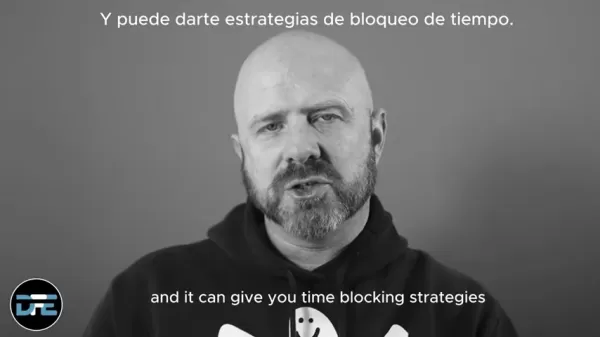
- Time Blocking Strategies: Discover time blocking techniques to maximize efficiency.
- Summarize Information: Use ChatGPT to condense large articles and documents into manageable chunks for quick understanding.
Revolutionizing Time Management with ChatGPT
How ChatGPT Improves Scheduling
ChatGPT can transform your scheduling process by providing tools to plan your daily, weekly, and monthly tasks. By entering your commitments, deadlines, and priorities, ChatGPT can craft an optimized schedule that ensures you allocate enough time to each activity. This is especially helpful for those who find it challenging to balance multiple responsibilities.

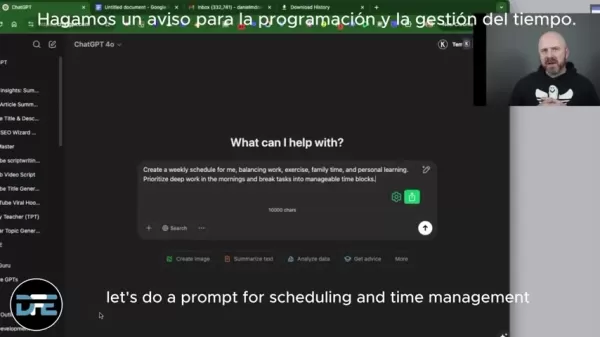
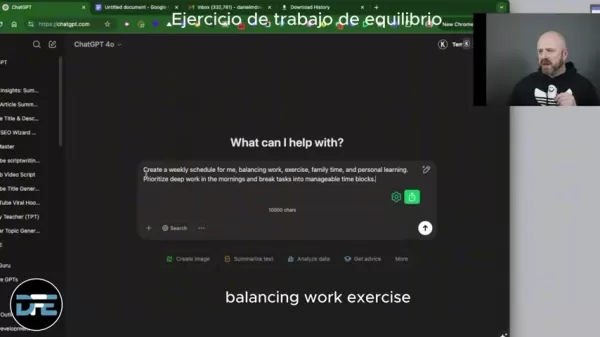
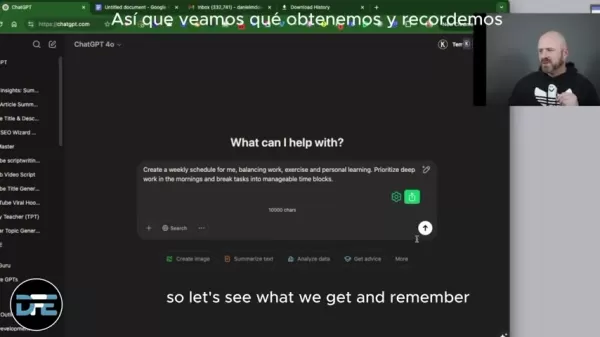
For example, you might say, 'Create a weekly schedule that balances work, exercise, family time, and personal learning. Prioritize deep work in the mornings and break tasks into manageable time blocks.' ChatGPT will then produce a structured schedule that fits all these elements, helping you stay organized and on track.
Consider these benefits:
- Customized Planning: Tailor your schedule to reflect your unique needs and priorities.
- Time Optimization: Allocate time slots based on task importance and your energy levels.
- Reduced Stress: Alleviate the stress of managing multiple commitments with a clear, structured plan.
Prioritizing Tasks Using ChatGPT
One of the most valuable features of ChatGPT is its ability to help you prioritize tasks effectively. By identifying your most critical responsibilities, you can use ChatGPT to create a prioritized list that guides your daily activities. This ensures you focus on high-impact tasks, minimizing time wasted on less important matters.
Here's how to prioritize tasks with ChatGPT:
- List All Tasks: Start by listing all tasks you need to accomplish.
- Assign Priorities: Assign a priority level (high, medium, low) to each task.
- Generate Prioritized List: Input the task list and priorities into ChatGPT, asking it to generate a prioritized to-do list.
- Follow the List: Adhere to the prioritized list, tackling tasks in order of importance to maximize productivity.

This approach ensures that you address critical responsibilities first, leading to greater overall efficiency.
Generating Structured To-Do Lists
ChatGPT can generate structured to-do lists tailored to your specific needs and schedule. These lists provide a clear roadmap for your day, helping you stay focused and avoid distractions. By inputting your tasks and relevant details, ChatGPT can create a comprehensive to-do list that outlines exactly what you need to do and when.
Follow these steps to create effective to-do lists:
- Input Task Details: Provide specific details for each task, including deadlines, priorities, and any relevant context.
- Request Structure: Ask ChatGPT to structure the to-do list in a way that aligns with your schedule and work style.
- Review and Refine: Review the generated to-do list and make any necessary adjustments to ensure it aligns with your goals.

A well-structured to-do list ensures you stay organized, manage your time effectively, and accomplish your objectives.
Advanced ChatGPT Techniques for Time Management
Time Blocking Strategies with ChatGPT
Time blocking is a powerful time management technique that involves allocating specific blocks of time for certain tasks or activities. ChatGPT can help you implement this strategy by generating time blocking schedules that align with your priorities and commitments. By designating specific time slots for focused work, meetings, or personal activities, you can enhance your concentration and minimize distractions.
Here’s how to use ChatGPT for time blocking:
- Identify Key Activities: Determine the key activities that require dedicated time blocks.
- Allocate Time Slots: Assign specific time slots for each activity, considering factors like energy levels and task complexity.
- Generate Schedule: Input the activities and time slots into ChatGPT, asking it to generate a time blocking schedule.
- Adhere to Schedule: Stick to the time blocking schedule, focusing solely on the designated activity during each time slot.

This structured approach promotes focused work and reduces multitasking, leading to increased productivity and better time management.
Summarizing and Reducing Information Overload
In the age of information overload, it's easy to get overwhelmed by vast amounts of data and content. ChatGPT can help you combat this by summarizing and reducing information into more manageable chunks. By condensing large articles, documents, or reports, you can quickly grasp the key takeaways without spending hours reading through everything.
Follow these steps to summarize information with ChatGPT:
- Provide Content: Input the text you want to summarize into ChatGPT.
- Request Summary: Ask ChatGPT to provide a concise summary, highlighting the key points and takeaways.
- Review Summary: Review the summary to ensure it accurately captures the essence of the original content.
By summarizing information, you can save time, improve comprehension, and focus on what's most important.
Using Existing Schedules and Calendars with ChatGPT
ChatGPT can integrate with your existing schedules and calendars to provide even more personalized time management assistance. By providing ChatGPT with information about your existing commitments, deadlines, and recurring events, you can generate a more tailored and accurate schedule that aligns with your real-world constraints.
Follow these tips to integrate your schedules and calendars with ChatGPT:
- Provide Schedule Details: Share details about your existing schedule, including dates, times, and task durations.
- Sync with Calendar: Link ChatGPT to your digital calendar to automatically import events and deadlines.
- Refine Schedule: Use ChatGPT to refine your schedule, adjusting time slots and priorities as needed to optimize your day.
Integrating your schedules ensures that ChatGPT's recommendations are practical, relevant, and aligned with your existing commitments.
Step-by-Step Guide: Implementing ChatGPT for Time Management
Step 1: Setting Up Your ChatGPT Environment
To begin using ChatGPT for time management, you'll need to set up your environment. Start by accessing the ChatGPT platform through the OpenAI website. If you haven't already, create an account and familiarize yourself with the interface.
The ChatGPT platform offers various input methods, including text-based prompts and voice commands. Choose the method that best suits your preferences and workflow. Ensure your device has a stable internet connection to facilitate seamless communication with ChatGPT. This initial setup ensures you're ready to leverage ChatGPT's capabilities for improved time management.
Step 2: Inputting Your Tasks and Commitments
The next step involves inputting your tasks and commitments into ChatGPT. This includes listing all the activities, deadlines, and responsibilities you need to manage. Be specific and detailed when describing each task, including any relevant context or requirements.
For example, instead of simply writing 'Work on project,' provide more details like 'Finalize presentation slides for project X by Friday.' You can also input recurring events, such as 'Attend weekly team meeting on Mondays at 10:00 AM.' The more comprehensive your input, the more accurate and effective ChatGPT's output will be.
Step 3: Generating Your Time Management Plan
Once you've inputted your tasks and commitments, it's time to generate your time management plan. Use specific prompts to guide ChatGPT in creating a schedule that aligns with your goals and priorities.
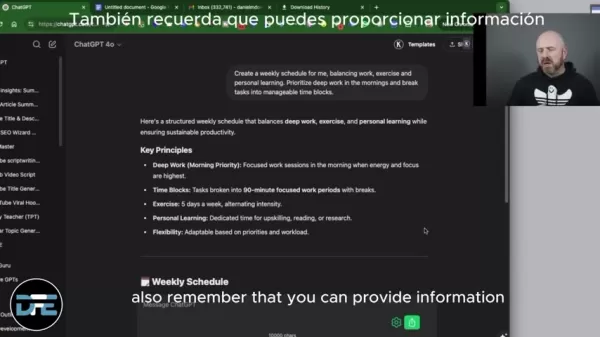
For instance, you can use prompts like:
- 'Create a daily schedule prioritizing high-impact tasks.'
- 'Generate a weekly to-do list categorizing tasks by project.'
- 'Develop a time blocking schedule allocating specific time slots for deep work and meetings.'
Experiment with different prompts to find the approach that best suits your needs. Review ChatGPT's output carefully, making any necessary adjustments to ensure it aligns with your preferences and constraints. This iterative process allows you to refine your time management plan until it meets your exact requirements.
Step 4: Refining and Personalizing Your Schedule
After generating your initial time management plan, take the time to refine and personalize it. Consider factors such as your energy levels, work style, and any unexpected events that may disrupt your schedule. Adjust time slots, priorities, and task durations as needed to optimize your plan.
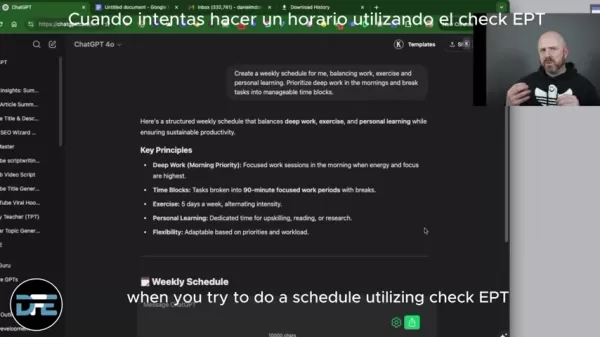
Use ChatGPT to explore alternative scenarios, such as 'What if I need to reschedule the team meeting?' or 'How can I allocate more time for deep work?' By continuously refining and personalizing your schedule, you can create a dynamic time management plan that adapts to your evolving needs.
Step 5: Integrating and Monitoring Your Plan
The final step involves integrating and monitoring your time management plan. Sync ChatGPT with your digital calendar to ensure your schedule is readily accessible and up-to-date. Monitor your progress regularly, tracking your adherence to the plan and identifying any areas for improvement. Use ChatGPT to analyze your performance and provide insights for further optimization.
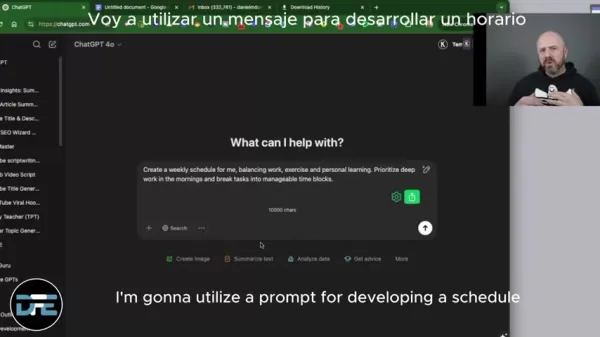
Regularly reviewing and adjusting your time management plan allows you to stay on track, maximize productivity, and achieve your goals. This ongoing process ensures that your time management approach remains effective and aligned with your evolving needs.
Pros and Cons of Using ChatGPT for Time Management
Pros
- Improved Scheduling: ChatGPT helps plan daily, weekly, and monthly tasks efficiently.
- Task Prioritization: Assists in identifying and focusing on high-impact tasks.
- Structured To-Do Lists: Generates clear and organized to-do lists tailored to specific needs.
- Time Blocking Strategies: Offers time blocking techniques to maximize focus and minimize distractions.
- Information Summarization: Condenses large articles and documents into manageable summaries.
Cons
- Dependency: Over-reliance on ChatGPT may hinder independent time management skills.
- Accuracy: ChatGPT's recommendations may not always be perfect and require human review.
- Privacy Concerns: Sharing personal schedule details with ChatGPT raises privacy considerations.
- Over-Automation: Over-automating time management can lead to a rigid and inflexible schedule.
- Technical Issues: Platform outages or technical glitches can disrupt your time management plan.
Frequently Asked Questions
Can ChatGPT really help me manage my time better?
Yes, ChatGPT can significantly improve your time management by helping you schedule tasks, prioritize responsibilities, and generate structured to-do lists. Its ability to analyze information and create tailored plans can enhance your productivity and reduce stress.
Is it difficult to set up ChatGPT for time management?
No, setting up ChatGPT is straightforward. You'll need to create an account on the OpenAI website and familiarize yourself with the interface. From there, you can input your tasks and use specific prompts to generate your time management plan. It’s a user-friendly process that doesn’t require advanced technical skills.
Can ChatGPT integrate with my existing calendar?
Yes, ChatGPT can integrate with digital calendars. Linking ChatGPT to your calendar allows it to automatically import events and deadlines, providing a more accurate and personalized time management plan. This integration helps align ChatGPT's recommendations with your existing commitments.
How often should I review and adjust my ChatGPT-generated schedule?
Regularly reviewing and adjusting your ChatGPT-generated schedule is essential to ensure its effectiveness. It’s recommended to monitor your progress and make adjustments as needed based on your performance, unexpected events, and evolving priorities. A dynamic approach to time management helps you stay on track and maximize productivity.
What if ChatGPT's recommendations don't fit my work style?
If ChatGPT's initial recommendations don't align with your work style, refine and personalize the schedule. Experiment with different prompts, adjust time slots, and prioritize tasks based on your energy levels and preferences. The goal is to create a time management plan that is tailored to your unique needs and optimizes your workflow.
Related article
 Musk's xAI Halts Recruitment of AI Mentors Amid HR Overload
Elon Musk’s AI venture, xAI, has recently introduced an unexpected operational shift. Citing informed sources, Bloomberg reports that the company has temporarily halted recruitment for specialists tasked with training and refining its Grok chatbot. T
How to fix Core Web Vitals for better SEO rankings
How to Build a Free Website: Free Domain, Hosting & AI Website BuilderTable of ContentsIntroductionAI Website Builder 1: Hookous AIStep 1: Sign UpStep 2: Choose Business Type/NicheStep 3: Select ServicesStep 4: Define Website GoalsStep 5: Enter Busin
Apple, Google Partner With Anthropic to Address 27-Year-Old Vulnerability via Glass Wing Protection
As artificial intelligence advances rapidly in code generation and logical reasoning, the cybersecurity landscape faces unprecedented challenges. Recently, the prominent AI startup Anthropic officially launched a cross-industry collaboration called *
Related Special Topic Recommendations
Image editing
Musk's xAI Halts Recruitment of AI Mentors Amid HR Overload
Elon Musk’s AI venture, xAI, has recently introduced an unexpected operational shift. Citing informed sources, Bloomberg reports that the company has temporarily halted recruitment for specialists tasked with training and refining its Grok chatbot. T
How to fix Core Web Vitals for better SEO rankings
How to Build a Free Website: Free Domain, Hosting & AI Website BuilderTable of ContentsIntroductionAI Website Builder 1: Hookous AIStep 1: Sign UpStep 2: Choose Business Type/NicheStep 3: Select ServicesStep 4: Define Website GoalsStep 5: Enter Busin
Apple, Google Partner With Anthropic to Address 27-Year-Old Vulnerability via Glass Wing Protection
As artificial intelligence advances rapidly in code generation and logical reasoning, the cybersecurity landscape faces unprecedented challenges. Recently, the prominent AI startup Anthropic officially launched a cross-industry collaboration called *
Related Special Topic Recommendations
Image editing
 AI Object Removal Editors: Clean Up Portraits, Travel, and Product Shots
2026 Latest Best Top-rated AI Object Removal Editors for portraits travel product shots! XIX.AI curates a powerful game-changing collection regularly updated with weekly rankings. These tools offer real-world tests to help you quickly remove unwanted elements, boost content quality, and save tons of time without compromising results. Must-try for anyone aiming to unlock their AI creation edge. Explore now!
 10 tools
 xix.ai
Text-to-speech
Best AI Text to Speech Tools for Online Courses
xix.ai
Text-to-speech
Best AI Text to Speech Tools for Online Courses
2026 Latest Best Top-rated AI Text to Speech Tools for Online Courses are curated by XIX.AI based on rigorous real-world tests and weekly updated rankings. These powerful tools help creators deliver crystal-clear audio content effortlessly, boosting writing efficiency and streamlining course production. Check out the free vs paid comparison to find your perfect fit. Explore now to unlock your AI edge in online education.
10 tools
xix.ai
writing
AI Blog Title Tools for Higher Click Through Rates
2026 Latest Best Top-Rated AI Blog Title Tools for Higher Click Through Rates! XIX.AI has carefully curated a powerful, game-changing collection of top tools that go through rigorous real-world tests. You’ll find a free vs paid comparison, weekly updated rankings, and detailed insights to help you boost your blog’s traffic efficiently. Must-try options are highlighted to help you unlock your AI edge. Explore now!
10 tools
xix.ai
automation
Best AI Task Routing Tools for Support Workflows
2026 Latest Best Top-rated AI Task Routing Tools for Support Workflows! XIX.AI has curated a highly powerful game-changing collection of must-try solutions, all undergoing rigorous real-world tests and updated weekly. These tools streamline workflows, boost productivity, and help teams deliver faster, more efficient support. Explore now to discover your perfect tool and unlock your AI edge!
17 tools
xix.ai
Academic Research
AI Citation and Paper Summary Tools
2026 Latest Best Top-Rated AI Citation and Paper Summary Tools Curated by XIX.AI. Get powerful game-changing solutions for quick content creation, improved writing efficiency, and boosting productivity. We offer a free vs paid comparison along with real-world tests and weekly updated rankings to help you find the must-try tool that fits your needs perfectly. Explore now to Unlock your AI edge.
10 tools
xix.ai
Productivity
Best AI Productivity Tools for Daily Work
2026 Latest Best Top-Rated AI Productivity Tools for Daily Work! XIX.AI has curated a powerful, game-changing selection based on rigorous weekly updated rankings and real-world tests. You’ll find must-try options that boost writing efficiency, streamline content creation, and help you overcome daily work challenges. Get a free vs paid comparison to find the perfect fit for your needs. Explore now to unlock your AI edge!
9 tools
xix.ai

 Comments (9)
0/500
Comments (9)
0/500
![AnthonyHernández]()
Interesting read, but it made me think about privacy implications. If my schedule gets fed into an AI, is my workflow becoming a product? I've begun using it for drafting emails, though, and it has honestly saved me about an hour a week. Worth the trade-off?
![RyanSanchez]()
ChatGPT for time management sounds like a game-changer! I’m curious how it handles my chaotic schedule. 🤔 Definitely trying this out!
![DennisGarcia]()
ChatGPT for time management sounds like a game-changer! I’m curious how it handles my chaotic schedule. 😅 Anyone tried it for real?
![EricLopez]()
ChatGPT for time management? Mind blown! It’s like having a personal assistant who never sleeps. Super curious how it handles my chaotic schedule! 😎
![RalphSanchez]()
ChatGPT 덕분에 시간 관리 능력이 엄청나게 향상되었어요! 마치 개인 비서가 있는 것 같아서, 업무 우선순위 정리와 일정 관리를 도와줘요. 가끔 말이 너무 많을 때가 있지만, 전반적으로 정리하는 데 큰 도움이 돼요. 바쁜 분들께 강력 추천합니다! 😄
![PaulBrown]()
ChatGPTのおかげで時間管理が格段に向上しました!まるで個人的なアシスタントがいるみたいで、タスクの優先順位付けやスケジュール管理を手伝ってくれます。たまに話しすぎることがありますが、全体的に見ると、整理整頓に大いに役立っています。忙しい人にはぜひおすすめです!😊
In today's fast-paced world, mastering time management is essential for success, whether you're a professional juggling multiple projects or a student balancing school and personal life. ChatGPT offers innovative solutions to revolutionize your scheduling, prioritization, and overall productivity. This article delves into how you can harness ChatGPT's capabilities to enhance your time management, offering practical tips and real-world examples to transform your productivity approach.
Key Points
- Improve Scheduling: ChatGPT helps in planning daily, weekly, and monthly tasks effectively.
- Prioritize Tasks: Learn how to prioritize tasks using ChatGPT to focus on what truly matters.
- Generate To-Do Lists: Create structured to-do lists tailored to your specific needs and schedule.
- Time Blocking Strategies: Discover time blocking techniques to maximize efficiency.
- Summarize Information: Use ChatGPT to condense large articles and documents into manageable chunks for quick understanding.
Revolutionizing Time Management with ChatGPT
How ChatGPT Improves Scheduling
ChatGPT can transform your scheduling process by providing tools to plan your daily, weekly, and monthly tasks. By entering your commitments, deadlines, and priorities, ChatGPT can craft an optimized schedule that ensures you allocate enough time to each activity. This is especially helpful for those who find it challenging to balance multiple responsibilities.
For example, you might say, 'Create a weekly schedule that balances work, exercise, family time, and personal learning. Prioritize deep work in the mornings and break tasks into manageable time blocks.' ChatGPT will then produce a structured schedule that fits all these elements, helping you stay organized and on track.
Consider these benefits:
- Customized Planning: Tailor your schedule to reflect your unique needs and priorities.
- Time Optimization: Allocate time slots based on task importance and your energy levels.
- Reduced Stress: Alleviate the stress of managing multiple commitments with a clear, structured plan.
Prioritizing Tasks Using ChatGPT
One of the most valuable features of ChatGPT is its ability to help you prioritize tasks effectively. By identifying your most critical responsibilities, you can use ChatGPT to create a prioritized list that guides your daily activities. This ensures you focus on high-impact tasks, minimizing time wasted on less important matters.
Here's how to prioritize tasks with ChatGPT:
- List All Tasks: Start by listing all tasks you need to accomplish.
- Assign Priorities: Assign a priority level (high, medium, low) to each task.
- Generate Prioritized List: Input the task list and priorities into ChatGPT, asking it to generate a prioritized to-do list.
- Follow the List: Adhere to the prioritized list, tackling tasks in order of importance to maximize productivity.
This approach ensures that you address critical responsibilities first, leading to greater overall efficiency.
Generating Structured To-Do Lists
ChatGPT can generate structured to-do lists tailored to your specific needs and schedule. These lists provide a clear roadmap for your day, helping you stay focused and avoid distractions. By inputting your tasks and relevant details, ChatGPT can create a comprehensive to-do list that outlines exactly what you need to do and when.
Follow these steps to create effective to-do lists:
- Input Task Details: Provide specific details for each task, including deadlines, priorities, and any relevant context.
- Request Structure: Ask ChatGPT to structure the to-do list in a way that aligns with your schedule and work style.
- Review and Refine: Review the generated to-do list and make any necessary adjustments to ensure it aligns with your goals.
A well-structured to-do list ensures you stay organized, manage your time effectively, and accomplish your objectives.
Advanced ChatGPT Techniques for Time Management
Time Blocking Strategies with ChatGPT
Time blocking is a powerful time management technique that involves allocating specific blocks of time for certain tasks or activities. ChatGPT can help you implement this strategy by generating time blocking schedules that align with your priorities and commitments. By designating specific time slots for focused work, meetings, or personal activities, you can enhance your concentration and minimize distractions.
Here’s how to use ChatGPT for time blocking:
- Identify Key Activities: Determine the key activities that require dedicated time blocks.
- Allocate Time Slots: Assign specific time slots for each activity, considering factors like energy levels and task complexity.
- Generate Schedule: Input the activities and time slots into ChatGPT, asking it to generate a time blocking schedule.
- Adhere to Schedule: Stick to the time blocking schedule, focusing solely on the designated activity during each time slot.
This structured approach promotes focused work and reduces multitasking, leading to increased productivity and better time management.
Summarizing and Reducing Information Overload
In the age of information overload, it's easy to get overwhelmed by vast amounts of data and content. ChatGPT can help you combat this by summarizing and reducing information into more manageable chunks. By condensing large articles, documents, or reports, you can quickly grasp the key takeaways without spending hours reading through everything.
Follow these steps to summarize information with ChatGPT:
- Provide Content: Input the text you want to summarize into ChatGPT.
- Request Summary: Ask ChatGPT to provide a concise summary, highlighting the key points and takeaways.
- Review Summary: Review the summary to ensure it accurately captures the essence of the original content.
By summarizing information, you can save time, improve comprehension, and focus on what's most important.
Using Existing Schedules and Calendars with ChatGPT
ChatGPT can integrate with your existing schedules and calendars to provide even more personalized time management assistance. By providing ChatGPT with information about your existing commitments, deadlines, and recurring events, you can generate a more tailored and accurate schedule that aligns with your real-world constraints.
Follow these tips to integrate your schedules and calendars with ChatGPT:
- Provide Schedule Details: Share details about your existing schedule, including dates, times, and task durations.
- Sync with Calendar: Link ChatGPT to your digital calendar to automatically import events and deadlines.
- Refine Schedule: Use ChatGPT to refine your schedule, adjusting time slots and priorities as needed to optimize your day.
Integrating your schedules ensures that ChatGPT's recommendations are practical, relevant, and aligned with your existing commitments.
Step-by-Step Guide: Implementing ChatGPT for Time Management
Step 1: Setting Up Your ChatGPT Environment
To begin using ChatGPT for time management, you'll need to set up your environment. Start by accessing the ChatGPT platform through the OpenAI website. If you haven't already, create an account and familiarize yourself with the interface.
The ChatGPT platform offers various input methods, including text-based prompts and voice commands. Choose the method that best suits your preferences and workflow. Ensure your device has a stable internet connection to facilitate seamless communication with ChatGPT. This initial setup ensures you're ready to leverage ChatGPT's capabilities for improved time management.
Step 2: Inputting Your Tasks and Commitments
The next step involves inputting your tasks and commitments into ChatGPT. This includes listing all the activities, deadlines, and responsibilities you need to manage. Be specific and detailed when describing each task, including any relevant context or requirements.
For example, instead of simply writing 'Work on project,' provide more details like 'Finalize presentation slides for project X by Friday.' You can also input recurring events, such as 'Attend weekly team meeting on Mondays at 10:00 AM.' The more comprehensive your input, the more accurate and effective ChatGPT's output will be.
Step 3: Generating Your Time Management Plan
Once you've inputted your tasks and commitments, it's time to generate your time management plan. Use specific prompts to guide ChatGPT in creating a schedule that aligns with your goals and priorities.
For instance, you can use prompts like:
- 'Create a daily schedule prioritizing high-impact tasks.'
- 'Generate a weekly to-do list categorizing tasks by project.'
- 'Develop a time blocking schedule allocating specific time slots for deep work and meetings.'
Experiment with different prompts to find the approach that best suits your needs. Review ChatGPT's output carefully, making any necessary adjustments to ensure it aligns with your preferences and constraints. This iterative process allows you to refine your time management plan until it meets your exact requirements.
Step 4: Refining and Personalizing Your Schedule
After generating your initial time management plan, take the time to refine and personalize it. Consider factors such as your energy levels, work style, and any unexpected events that may disrupt your schedule. Adjust time slots, priorities, and task durations as needed to optimize your plan.
Use ChatGPT to explore alternative scenarios, such as 'What if I need to reschedule the team meeting?' or 'How can I allocate more time for deep work?' By continuously refining and personalizing your schedule, you can create a dynamic time management plan that adapts to your evolving needs.
Step 5: Integrating and Monitoring Your Plan
The final step involves integrating and monitoring your time management plan. Sync ChatGPT with your digital calendar to ensure your schedule is readily accessible and up-to-date. Monitor your progress regularly, tracking your adherence to the plan and identifying any areas for improvement. Use ChatGPT to analyze your performance and provide insights for further optimization.
Regularly reviewing and adjusting your time management plan allows you to stay on track, maximize productivity, and achieve your goals. This ongoing process ensures that your time management approach remains effective and aligned with your evolving needs.
Pros and Cons of Using ChatGPT for Time Management
Pros
- Improved Scheduling: ChatGPT helps plan daily, weekly, and monthly tasks efficiently.
- Task Prioritization: Assists in identifying and focusing on high-impact tasks.
- Structured To-Do Lists: Generates clear and organized to-do lists tailored to specific needs.
- Time Blocking Strategies: Offers time blocking techniques to maximize focus and minimize distractions.
- Information Summarization: Condenses large articles and documents into manageable summaries.
Cons
- Dependency: Over-reliance on ChatGPT may hinder independent time management skills.
- Accuracy: ChatGPT's recommendations may not always be perfect and require human review.
- Privacy Concerns: Sharing personal schedule details with ChatGPT raises privacy considerations.
- Over-Automation: Over-automating time management can lead to a rigid and inflexible schedule.
- Technical Issues: Platform outages or technical glitches can disrupt your time management plan.
Frequently Asked Questions
Can ChatGPT really help me manage my time better?
Yes, ChatGPT can significantly improve your time management by helping you schedule tasks, prioritize responsibilities, and generate structured to-do lists. Its ability to analyze information and create tailored plans can enhance your productivity and reduce stress.
Is it difficult to set up ChatGPT for time management?
No, setting up ChatGPT is straightforward. You'll need to create an account on the OpenAI website and familiarize yourself with the interface. From there, you can input your tasks and use specific prompts to generate your time management plan. It’s a user-friendly process that doesn’t require advanced technical skills.
Can ChatGPT integrate with my existing calendar?
Yes, ChatGPT can integrate with digital calendars. Linking ChatGPT to your calendar allows it to automatically import events and deadlines, providing a more accurate and personalized time management plan. This integration helps align ChatGPT's recommendations with your existing commitments.
How often should I review and adjust my ChatGPT-generated schedule?
Regularly reviewing and adjusting your ChatGPT-generated schedule is essential to ensure its effectiveness. It’s recommended to monitor your progress and make adjustments as needed based on your performance, unexpected events, and evolving priorities. A dynamic approach to time management helps you stay on track and maximize productivity.
What if ChatGPT's recommendations don't fit my work style?
If ChatGPT's initial recommendations don't align with your work style, refine and personalize the schedule. Experiment with different prompts, adjust time slots, and prioritize tasks based on your energy levels and preferences. The goal is to create a time management plan that is tailored to your unique needs and optimizes your workflow.







 Musk's xAI Halts Recruitment of AI Mentors Amid HR Overload
Elon Musk’s AI venture, xAI, has recently introduced an unexpected operational shift. Citing informed sources, Bloomberg reports that the company has temporarily halted recruitment for specialists tasked with training and refining its Grok chatbot. T
Musk's xAI Halts Recruitment of AI Mentors Amid HR Overload
Elon Musk’s AI venture, xAI, has recently introduced an unexpected operational shift. Citing informed sources, Bloomberg reports that the company has temporarily halted recruitment for specialists tasked with training and refining its Grok chatbot. T
 How to fix Core Web Vitals for better SEO rankings
How to Build a Free Website: Free Domain, Hosting & AI Website BuilderTable of ContentsIntroductionAI Website Builder 1: Hookous AIStep 1: Sign UpStep 2: Choose Business Type/NicheStep 3: Select ServicesStep 4: Define Website GoalsStep 5: Enter Busin
How to fix Core Web Vitals for better SEO rankings
How to Build a Free Website: Free Domain, Hosting & AI Website BuilderTable of ContentsIntroductionAI Website Builder 1: Hookous AIStep 1: Sign UpStep 2: Choose Business Type/NicheStep 3: Select ServicesStep 4: Define Website GoalsStep 5: Enter Busin
 Apple, Google Partner With Anthropic to Address 27-Year-Old Vulnerability via Glass Wing Protection
As artificial intelligence advances rapidly in code generation and logical reasoning, the cybersecurity landscape faces unprecedented challenges. Recently, the prominent AI startup Anthropic officially launched a cross-industry collaboration called *
Apple, Google Partner With Anthropic to Address 27-Year-Old Vulnerability via Glass Wing Protection
As artificial intelligence advances rapidly in code generation and logical reasoning, the cybersecurity landscape faces unprecedented challenges. Recently, the prominent AI startup Anthropic officially launched a cross-industry collaboration called *

2026 Latest Best Top-rated AI Object Removal Editors for portraits travel product shots! XIX.AI curates a powerful game-changing collection regularly updated with weekly rankings. These tools offer real-world tests to help you quickly remove unwanted elements, boost content quality, and save tons of time without compromising results. Must-try for anyone aiming to unlock their AI creation edge. Explore now!
10 tools
xix.ai

2026 Latest Best Top-rated AI Text to Speech Tools for Online Courses are curated by XIX.AI based on rigorous real-world tests and weekly updated rankings. These powerful tools help creators deliver crystal-clear audio content effortlessly, boosting writing efficiency and streamlining course production. Check out the free vs paid comparison to find your perfect fit. Explore now to unlock your AI edge in online education.
10 tools
xix.ai

2026 Latest Best Top-Rated AI Blog Title Tools for Higher Click Through Rates! XIX.AI has carefully curated a powerful, game-changing collection of top tools that go through rigorous real-world tests. You’ll find a free vs paid comparison, weekly updated rankings, and detailed insights to help you boost your blog’s traffic efficiently. Must-try options are highlighted to help you unlock your AI edge. Explore now!
10 tools
xix.ai

2026 Latest Best Top-rated AI Task Routing Tools for Support Workflows! XIX.AI has curated a highly powerful game-changing collection of must-try solutions, all undergoing rigorous real-world tests and updated weekly. These tools streamline workflows, boost productivity, and help teams deliver faster, more efficient support. Explore now to discover your perfect tool and unlock your AI edge!
17 tools
xix.ai

2026 Latest Best Top-Rated AI Citation and Paper Summary Tools Curated by XIX.AI. Get powerful game-changing solutions for quick content creation, improved writing efficiency, and boosting productivity. We offer a free vs paid comparison along with real-world tests and weekly updated rankings to help you find the must-try tool that fits your needs perfectly. Explore now to Unlock your AI edge.
10 tools
xix.ai

2026 Latest Best Top-Rated AI Productivity Tools for Daily Work! XIX.AI has curated a powerful, game-changing selection based on rigorous weekly updated rankings and real-world tests. You’ll find must-try options that boost writing efficiency, streamline content creation, and help you overcome daily work challenges. Get a free vs paid comparison to find the perfect fit for your needs. Explore now to unlock your AI edge!
9 tools
xix.ai

Interesting read, but it made me think about privacy implications. If my schedule gets fed into an AI, is my workflow becoming a product? I've begun using it for drafting emails, though, and it has honestly saved me about an hour a week. Worth the trade-off?
ChatGPT for time management sounds like a game-changer! I’m curious how it handles my chaotic schedule. 🤔 Definitely trying this out!
ChatGPT for time management sounds like a game-changer! I’m curious how it handles my chaotic schedule. 😅 Anyone tried it for real?
ChatGPT for time management? Mind blown! It’s like having a personal assistant who never sleeps. Super curious how it handles my chaotic schedule! 😎
ChatGPT 덕분에 시간 관리 능력이 엄청나게 향상되었어요! 마치 개인 비서가 있는 것 같아서, 업무 우선순위 정리와 일정 관리를 도와줘요. 가끔 말이 너무 많을 때가 있지만, 전반적으로 정리하는 데 큰 도움이 돼요. 바쁜 분들께 강력 추천합니다! 😄
ChatGPTのおかげで時間管理が格段に向上しました!まるで個人的なアシスタントがいるみたいで、タスクの優先順位付けやスケジュール管理を手伝ってくれます。たまに話しすぎることがありますが、全体的に見ると、整理整頓に大いに役立っています。忙しい人にはぜひおすすめです!😊












