


 Home
HomeBing AI vs. ChatGPT: In-Depth Comparison and Free Thumbnail Guide
In the fast-evolving realm of artificial intelligence, Bing AI and ChatGPT emerge as leading contenders. Both are robust tools for generating text, answering queries, and supporting diverse tasks. But how do they stack up? Which suits your needs best? This article delivers a detailed comparison to guide your choice. Plus, discover a free tool for crafting striking thumbnails to elevate your online presence.
Key Highlights
Bing AI harnesses Microsoft’s search capabilities to deliver real-time data, embedding search results directly into its responses.
ChatGPT shines in creative writing, fostering engaging, human-like conversations.
Thumbnail.ai provides a free, user-friendly platform for creating thumbnails for YouTube, Facebook, and other social media.
Thumbnail customization allows tailoring designs to align with your brand identity.
Your ideal AI depends on whether you prioritize real-time insights or creative content generation.
Bing AI vs. ChatGPT: Detailed Comparison
What is Bing AI?
Bing AI
is Microsoft’s venture into conversational AI, built on its Bing Search Engine. Its strength lies in accessing and processing current data, making it ideal for tasks needing up-to-date information.
Key features of Bing AI include:
- Real-Time Data Access: Bing AI scans the web for recent events, stats, and dynamic data, ensuring relevant and precise responses.
- Search Integration: It seamlessly incorporates Bing search results, offering citations and links to support its answers.
- Multi-Modal Capabilities: Beyond text, it can interpret and generate images and code.
- Creative Tools: Bing AI supports various creative formats, including poems, scripts, code, emails, and more, tailored to your needs.
What is ChatGPT?
Developed by OpenAI, ChatGPT is a language model crafted for natural, human-like dialogue. Unlike Bing AI, it focuses on generating compelling, context-rich text, excelling in storytelling, creative writing, and interactive conversations.
Key Features of ChatGPT:
- Superior Text Generation: ChatGPT crafts diverse creative content, adapting tone and style to fit various prompts.
- Conversational Strength: It excels in natural, engaging dialogue, ideal for chatbots, virtual assistants, and interactive narratives.
- Context Retention: ChatGPT maintains conversational context, ensuring consistent and relevant responses.
- Broad Knowledge Base: Trained on vast text and code datasets, it provides insights across numerous domains.
Head-to-Head: Use Cases and Performance
Selecting between Bing AI and ChatGPT depends on your priorities. Here’s how they perform across scenarios:
For Research and Data Retrieval: Bing AI excels, leveraging real-time web access and search integration to deliver accurate answers with credible sources.
For Creative Writing and Content Creation: ChatGPT leads, producing captivating stories, articles, and creative formats like poems and scripts with adaptable style.
For Chatbots and Virtual Assistants: ChatGPT’s natural, human-like dialogue and context retention make it ideal for interactive experiences.
For Code Generation: Both AIs generate code, but performance varies by complexity and language. Bing AI handles detailed instructions well, supporting scriptwriting and creative applications like song lyrics or movie scripts. Some users find ChatGPT superior for coding and debugging, depending on training data. Test both to find the best fit for your coding needs.
Here’s a table summarizing their strengths:
Feature Bing AI ChatGPT Real-time Information Outstanding Limited Search Integration Seamless None Creative Text Generation Solid Exceptional Conversational Abilities Solid Exceptional Code Generation Varies Varies Factual Accuracy High May Vary
Ultimately, your choice hinges on your needs. For real-time data and accuracy, Bing AI is superior. For creative writing or engaging conversations, ChatGPT excels.
Boosting Your YouTube Presence
Keyword Research and SEO
Keyword research is vital for YouTube SEO, helping videos rank higher and reach more viewers. Strong SEO enhances visibility and drives organic traffic.
Use tools like Google Keyword Planner, Ahrefs, or SEMrush to identify high-volume, low-competition keywords relevant to your content and audience.
- Start with Seed Keywords: Begin with broad terms tied to your video’s topic.
- Leverage Keyword Tools: Expand with long-tail keywords and variations.
- Study Competitors: Analyze keywords used in successful videos in your niche.
- Monitor Performance: Track video metrics to refine your keyword approach.
Optimizing Video Titles and Descriptions
Titles and descriptions are critical for attracting viewers and improving search rankings. Compelling titles and detailed descriptions boost click-through rates and clarify content for YouTube.
Crafting Engaging Titles:
- Use Target Keywords: Place primary keywords early in the title.
- Stay Concise: Keep titles clear, under 60 characters for optimal display.
- Spark Interest: Use words that intrigue viewers and encourage clicks.
Writing Strong Descriptions:
- Lead with a Summary: Open with a brief overview of the video’s content.
- Incorporate Keywords: Naturally weave in relevant keywords.
- Add Timestamps: Include timestamps for key sections to aid navigation.
- Cross-Promote: Link to related videos, playlists, or social media.
Optimized titles and descriptions improve rankings and enhance viewer engagement, increasing watch time and interaction.
Creating Thumbnails with Thumbnail.ai
Step-by-Step Guide to Thumbnail Creation
Thumbnail.ai
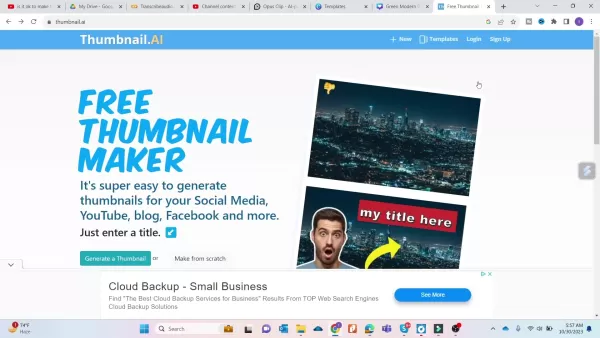
streamlines thumbnail creation with its one-click generation feature.
Steps to follow:
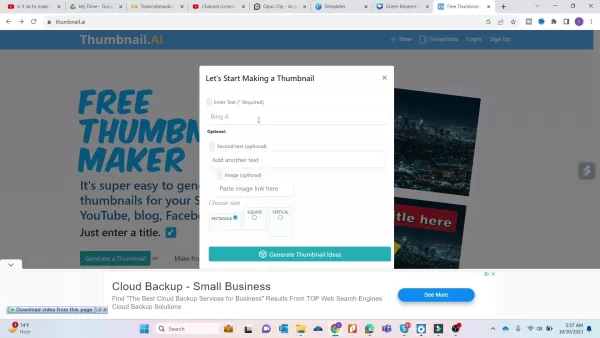
- Visit Thumbnail.ai: Access the website.
- Input Text: Enter your video title or a catchy phrase in the provided field.
- Generate Ideas: Click the ‘Generate Thumbnail Ideas’ button.
- Customize (Optional): Adjust background, font, or other elements as needed.
- Download: Save the finalized thumbnail to your device.
Customization Options in Thumbnail.ai
Thumbnail.ai offers flexible customization:
- Background Images: Choose backgrounds that match your video’s theme.
- Font Styles: Select legible fonts that align with your brand.
- Text Colors: Adjust colors for visibility against the background.
- Themes: Pick color palettes and themes to suit your content.
- Positioning: Fine-tune text and graphic placement.
Pricing of Thumbnail.ai
Free Thumbnail Creation
Thumbnail.ai
offers its core thumbnail generation features at no cost, making it accessible for creators looking to enhance video visuals. The free tier includes diverse templates, customization options, and downloadable designs, ideal for beginners and small creators.
While basic features are free, premium options or subscriptions may offer exclusive templates, advanced editing tools, or watermark removal, depending on Thumbnail.ai’s current plans.
The free tier allows creators to explore the platform and craft appealing thumbnails without cost, simplifying video presentation enhancement.
Pros and Cons of Thumbnail.ai
Pros
Free to use
Simple one-click thumbnail creation
Flexible customization options
Time-saving design process
Cons
Limited customization compared to professional tools
Premium features may require a subscription
Thumbnail quality may depend on input text
FAQ
Is Thumbnail.ai truly free?
Yes, Thumbnail.ai provides free thumbnail creation. While premium features may involve a fee, the core service is accessible at no cost.
Can I customize thumbnails in Thumbnail.ai?
Yes, Thumbnail.ai offers customization options, including backgrounds, fonts, text colors, and other elements to match your style.
Which AI is better, Bing AI or ChatGPT?
The choice between Bing AI and ChatGPT depends on your needs. Bing AI excels in research, delivering real-time data via Microsoft’s search technology, ideal for current information. It also supports multi-modal tasks, generating text, images, and code. ChatGPT shines in creative writing and natural conversations, perfect for chatbots and storytelling. Each has unique strengths based on your goals.
Related Questions
What are the best practices for creating effective YouTube thumbnails?
Effective YouTube thumbnails should be visually striking and relevant to your video. Use high-resolution images with clear text, incorporate branding for consistency, and A/B test designs to gauge audience response. Ensure thumbnails align with content, adhere to community guidelines, and avoid offensive elements.
How can I boost my video’s visibility on YouTube?
Enhance YouTube visibility with keyword research to target audience searches, optimize titles, descriptions, and tags, and promote videos on social media. Engage with viewers in comments, collaborate with other creators, and upload high-quality content consistently. Use YouTube Analytics to track performance and refine your approach.
Related article
 Swedish AI Startup Lovable Eyes $13.2 Billion Valuation After Major Funding Round
As AI-driven coding tools gain traction, Swedish startup Lovable has secured a major funding round. The company aims to raise $3 billion, potentially boosting its valuation to $13.2 billion—double the $6.6 billion recorded last December. Menlo Ventur
Google Tests Remy AI Agent for Gemini as Focus Shifts to User Control
According to Business Insider, Google is testing Remy, a new AI personal agent for Gemini. This tool aims to execute tasks on behalf of users, streamlining both professional workflows and daily routines.Currently, Remy is undergoing testing in an int
How to fix Core Web Vitals for better SEO rankings
Streamline Report Card Comments with AI ToolsIntroductionAI Tools for Generating Report Card CommentsMagic SchoolAlmanac AIChat GPTUsing Magic School to Generate Report Card CommentsLogging into Magic SchoolSelecting the Report Card Comments ToolCust
Related Special Topic Recommendations
writing
Swedish AI Startup Lovable Eyes $13.2 Billion Valuation After Major Funding Round
As AI-driven coding tools gain traction, Swedish startup Lovable has secured a major funding round. The company aims to raise $3 billion, potentially boosting its valuation to $13.2 billion—double the $6.6 billion recorded last December. Menlo Ventur
Google Tests Remy AI Agent for Gemini as Focus Shifts to User Control
According to Business Insider, Google is testing Remy, a new AI personal agent for Gemini. This tool aims to execute tasks on behalf of users, streamlining both professional workflows and daily routines.Currently, Remy is undergoing testing in an int
How to fix Core Web Vitals for better SEO rankings
Streamline Report Card Comments with AI ToolsIntroductionAI Tools for Generating Report Card CommentsMagic SchoolAlmanac AIChat GPTUsing Magic School to Generate Report Card CommentsLogging into Magic SchoolSelecting the Report Card Comments ToolCust
Related Special Topic Recommendations
writing
 Best AI Outline Generators for Long-Form SEO Articles
2026 Latest Best Top-Rated AI Outline Generators for Long-Form SEO Articles, meticulously curated by XIX.AI. These powerful tools offer game-changing assistance in creating high-quality content quickly, boosting writing efficiency significantly. Get a free vs paid comparison along with real-world tests and detailed rankings to help you find the must-try option that suits your needs. Explore now to unlock your AI edge.
 8 tools
 xix.ai
Education and Learning
AI Study Tools for Homework and Exam Prep
xix.ai
Education and Learning
AI Study Tools for Homework and Exam Prep
2026 Latest Best AI Study Tools for Homework and Exam Prep! XIX.AI curates a top-rated list of powerful, game-changing tools that help students boost productivity, streamline homework completion, and ace exams through real-world tests. Get a free vs paid comparison, detailed rankings, and must-try options to unlock your AI edge. Explore now!
10 tools
xix.ai
Music composition
AI Vocal Demo Tools for Songwriters, Hooks, Toplines, and Multilingual Draft Sessions
2026 Latest Best AI Vocal Demo Tools for Songwriters, Hook Creators, and Multi-Language Content Teams! XIX.AI has curated a top-rated list of powerful game-changing tools that go through rigorous real-world tests. You’ll find detailed free vs paid comparison data, comprehensive rankings, and must-try options to help you boost writing efficiency and unlock your creative potential. Explore now to discover your perfect tool for all your content needs!
9 tools
xix.ai
Business
Best AI Competitive Research Tools for Small Businesses
2026 Latest Best Top-rated AI Competitive Research Tools for Small Businesses! XIX.AI has curated a highly powerful game-changing collection, updated weekly with rigorous real-world tests and detailed rankings. You can find a comprehensive free vs paid comparison to help you identify the must-try tools that boost your productivity and give you a competitive edge. Explore now to discover your perfect tool!
9 tools
xix.ai
Image editing
Photoshop AI Retouch Tools for Ecommerce Apparel, Skin Cleanup, and Color Consistency
2026 Latest Best Photoshop AI retouch tools for ecommerce apparel, skin cleanup, and color consistency! This top-rated curated list features powerful game-changing solutions that help you boost writing efficiency, streamline content creation, and achieve perfect visual results effortlessly. Each tool has undergone real-world tests through weekly updated rankings, complete with free vs paid comparison details. Backed by XIX.AI, it’s the must-try guide for anyone aiming to unlock your AI edge. Explore now!
10 tools
xix.ai
Prompt
Best AI Prompt Libraries for ChatGPT Workflows
2026 Latest Best Top-Rated AI Prompt Libraries for optimizing all types of ChatGPT workflows. XIX.AI has curated a powerful, game-changing collection that goes through rigorous real-world tests to ensure top performance. You can find detailed free vs paid comparisons and expert rankings to help you choose the must-try tools that boost your productivity and unlock your AI edge. Explore now!
11 tools
xix.ai

 Comments (1)
0/500
Comments (1)
0/500
![BenjaminMiller]()
I've tried both and honestly, Bing AI's integration with search is a game-changer for quick fact-checking, but ChatGPT's creative writing still blows my mind. The thumbnail guide part seems like a bonus, but who actually makes thumbnails for AI chats? 😄
In the fast-evolving realm of artificial intelligence, Bing AI and ChatGPT emerge as leading contenders. Both are robust tools for generating text, answering queries, and supporting diverse tasks. But how do they stack up? Which suits your needs best? This article delivers a detailed comparison to guide your choice. Plus, discover a free tool for crafting striking thumbnails to elevate your online presence.
Key Highlights
Bing AI harnesses Microsoft’s search capabilities to deliver real-time data, embedding search results directly into its responses.
ChatGPT shines in creative writing, fostering engaging, human-like conversations.
Thumbnail.ai provides a free, user-friendly platform for creating thumbnails for YouTube, Facebook, and other social media.
Thumbnail customization allows tailoring designs to align with your brand identity.
Your ideal AI depends on whether you prioritize real-time insights or creative content generation.
Bing AI vs. ChatGPT: Detailed Comparison
What is Bing AI?
Bing AI
is Microsoft’s venture into conversational AI, built on its Bing Search Engine. Its strength lies in accessing and processing current data, making it ideal for tasks needing up-to-date information.
Key features of Bing AI include:
- Real-Time Data Access: Bing AI scans the web for recent events, stats, and dynamic data, ensuring relevant and precise responses.
- Search Integration: It seamlessly incorporates Bing search results, offering citations and links to support its answers.
- Multi-Modal Capabilities: Beyond text, it can interpret and generate images and code.
- Creative Tools: Bing AI supports various creative formats, including poems, scripts, code, emails, and more, tailored to your needs.
What is ChatGPT?
Developed by OpenAI, ChatGPT is a language model crafted for natural, human-like dialogue. Unlike Bing AI, it focuses on generating compelling, context-rich text, excelling in storytelling, creative writing, and interactive conversations.
Key Features of ChatGPT:
- Superior Text Generation: ChatGPT crafts diverse creative content, adapting tone and style to fit various prompts.
- Conversational Strength: It excels in natural, engaging dialogue, ideal for chatbots, virtual assistants, and interactive narratives.
- Context Retention: ChatGPT maintains conversational context, ensuring consistent and relevant responses.
- Broad Knowledge Base: Trained on vast text and code datasets, it provides insights across numerous domains.
Head-to-Head: Use Cases and Performance
Selecting between Bing AI and ChatGPT depends on your priorities. Here’s how they perform across scenarios:
For Research and Data Retrieval: Bing AI excels, leveraging real-time web access and search integration to deliver accurate answers with credible sources.
For Creative Writing and Content Creation: ChatGPT leads, producing captivating stories, articles, and creative formats like poems and scripts with adaptable style.
For Chatbots and Virtual Assistants: ChatGPT’s natural, human-like dialogue and context retention make it ideal for interactive experiences.
For Code Generation: Both AIs generate code, but performance varies by complexity and language. Bing AI handles detailed instructions well, supporting scriptwriting and creative applications like song lyrics or movie scripts. Some users find ChatGPT superior for coding and debugging, depending on training data. Test both to find the best fit for your coding needs.
Here’s a table summarizing their strengths:
| Feature | Bing AI | ChatGPT |
|---|---|---|
| Real-time Information | Outstanding | Limited |
| Search Integration | Seamless | None |
| Creative Text Generation | Solid | Exceptional |
| Conversational Abilities | Solid | Exceptional |
| Code Generation | Varies | Varies |
| Factual Accuracy | High | May Vary |
Ultimately, your choice hinges on your needs. For real-time data and accuracy, Bing AI is superior. For creative writing or engaging conversations, ChatGPT excels.
Boosting Your YouTube Presence
Keyword Research and SEO
Keyword research is vital for YouTube SEO, helping videos rank higher and reach more viewers. Strong SEO enhances visibility and drives organic traffic.
Use tools like Google Keyword Planner, Ahrefs, or SEMrush to identify high-volume, low-competition keywords relevant to your content and audience.
- Start with Seed Keywords: Begin with broad terms tied to your video’s topic.
- Leverage Keyword Tools: Expand with long-tail keywords and variations.
- Study Competitors: Analyze keywords used in successful videos in your niche.
- Monitor Performance: Track video metrics to refine your keyword approach.
Optimizing Video Titles and Descriptions
Titles and descriptions are critical for attracting viewers and improving search rankings. Compelling titles and detailed descriptions boost click-through rates and clarify content for YouTube.
Crafting Engaging Titles:
- Use Target Keywords: Place primary keywords early in the title.
- Stay Concise: Keep titles clear, under 60 characters for optimal display.
- Spark Interest: Use words that intrigue viewers and encourage clicks.
Writing Strong Descriptions:
- Lead with a Summary: Open with a brief overview of the video’s content.
- Incorporate Keywords: Naturally weave in relevant keywords.
- Add Timestamps: Include timestamps for key sections to aid navigation.
- Cross-Promote: Link to related videos, playlists, or social media.
Optimized titles and descriptions improve rankings and enhance viewer engagement, increasing watch time and interaction.
Creating Thumbnails with Thumbnail.ai
Step-by-Step Guide to Thumbnail Creation
Thumbnail.ai
streamlines thumbnail creation with its one-click generation feature.
Steps to follow:
- Visit Thumbnail.ai: Access the website.
- Input Text: Enter your video title or a catchy phrase in the provided field.
- Generate Ideas: Click the ‘Generate Thumbnail Ideas’ button.
- Customize (Optional): Adjust background, font, or other elements as needed.
- Download: Save the finalized thumbnail to your device.
Customization Options in Thumbnail.ai
Thumbnail.ai offers flexible customization:
- Background Images: Choose backgrounds that match your video’s theme.
- Font Styles: Select legible fonts that align with your brand.
- Text Colors: Adjust colors for visibility against the background.
- Themes: Pick color palettes and themes to suit your content.
- Positioning: Fine-tune text and graphic placement.
Pricing of Thumbnail.ai
Free Thumbnail Creation
Thumbnail.ai
offers its core thumbnail generation features at no cost, making it accessible for creators looking to enhance video visuals. The free tier includes diverse templates, customization options, and downloadable designs, ideal for beginners and small creators.
While basic features are free, premium options or subscriptions may offer exclusive templates, advanced editing tools, or watermark removal, depending on Thumbnail.ai’s current plans.
The free tier allows creators to explore the platform and craft appealing thumbnails without cost, simplifying video presentation enhancement.
Pros and Cons of Thumbnail.ai
Pros
Free to use
Simple one-click thumbnail creation
Flexible customization options
Time-saving design process
Cons
Limited customization compared to professional tools
Premium features may require a subscription
Thumbnail quality may depend on input text
FAQ
Is Thumbnail.ai truly free?
Yes, Thumbnail.ai provides free thumbnail creation. While premium features may involve a fee, the core service is accessible at no cost.
Can I customize thumbnails in Thumbnail.ai?
Yes, Thumbnail.ai offers customization options, including backgrounds, fonts, text colors, and other elements to match your style.
Which AI is better, Bing AI or ChatGPT?
The choice between Bing AI and ChatGPT depends on your needs. Bing AI excels in research, delivering real-time data via Microsoft’s search technology, ideal for current information. It also supports multi-modal tasks, generating text, images, and code. ChatGPT shines in creative writing and natural conversations, perfect for chatbots and storytelling. Each has unique strengths based on your goals.
Related Questions
What are the best practices for creating effective YouTube thumbnails?
Effective YouTube thumbnails should be visually striking and relevant to your video. Use high-resolution images with clear text, incorporate branding for consistency, and A/B test designs to gauge audience response. Ensure thumbnails align with content, adhere to community guidelines, and avoid offensive elements.
How can I boost my video’s visibility on YouTube?
Enhance YouTube visibility with keyword research to target audience searches, optimize titles, descriptions, and tags, and promote videos on social media. Engage with viewers in comments, collaborate with other creators, and upload high-quality content consistently. Use YouTube Analytics to track performance and refine your approach.








 Swedish AI Startup Lovable Eyes $13.2 Billion Valuation After Major Funding Round
As AI-driven coding tools gain traction, Swedish startup Lovable has secured a major funding round. The company aims to raise $3 billion, potentially boosting its valuation to $13.2 billion—double the $6.6 billion recorded last December. Menlo Ventur
Google Tests Remy AI Agent for Gemini as Focus Shifts to User Control
According to Business Insider, Google is testing Remy, a new AI personal agent for Gemini. This tool aims to execute tasks on behalf of users, streamlining both professional workflows and daily routines.Currently, Remy is undergoing testing in an int
Swedish AI Startup Lovable Eyes $13.2 Billion Valuation After Major Funding Round
As AI-driven coding tools gain traction, Swedish startup Lovable has secured a major funding round. The company aims to raise $3 billion, potentially boosting its valuation to $13.2 billion—double the $6.6 billion recorded last December. Menlo Ventur
Google Tests Remy AI Agent for Gemini as Focus Shifts to User Control
According to Business Insider, Google is testing Remy, a new AI personal agent for Gemini. This tool aims to execute tasks on behalf of users, streamlining both professional workflows and daily routines.Currently, Remy is undergoing testing in an int
 How to fix Core Web Vitals for better SEO rankings
Streamline Report Card Comments with AI ToolsIntroductionAI Tools for Generating Report Card CommentsMagic SchoolAlmanac AIChat GPTUsing Magic School to Generate Report Card CommentsLogging into Magic SchoolSelecting the Report Card Comments ToolCust
How to fix Core Web Vitals for better SEO rankings
Streamline Report Card Comments with AI ToolsIntroductionAI Tools for Generating Report Card CommentsMagic SchoolAlmanac AIChat GPTUsing Magic School to Generate Report Card CommentsLogging into Magic SchoolSelecting the Report Card Comments ToolCust

2026 Latest Best Top-Rated AI Outline Generators for Long-Form SEO Articles, meticulously curated by XIX.AI. These powerful tools offer game-changing assistance in creating high-quality content quickly, boosting writing efficiency significantly. Get a free vs paid comparison along with real-world tests and detailed rankings to help you find the must-try option that suits your needs. Explore now to unlock your AI edge.
8 tools
xix.ai

2026 Latest Best AI Study Tools for Homework and Exam Prep! XIX.AI curates a top-rated list of powerful, game-changing tools that help students boost productivity, streamline homework completion, and ace exams through real-world tests. Get a free vs paid comparison, detailed rankings, and must-try options to unlock your AI edge. Explore now!
10 tools
xix.ai

2026 Latest Best AI Vocal Demo Tools for Songwriters, Hook Creators, and Multi-Language Content Teams! XIX.AI has curated a top-rated list of powerful game-changing tools that go through rigorous real-world tests. You’ll find detailed free vs paid comparison data, comprehensive rankings, and must-try options to help you boost writing efficiency and unlock your creative potential. Explore now to discover your perfect tool for all your content needs!
9 tools
xix.ai

2026 Latest Best Top-rated AI Competitive Research Tools for Small Businesses! XIX.AI has curated a highly powerful game-changing collection, updated weekly with rigorous real-world tests and detailed rankings. You can find a comprehensive free vs paid comparison to help you identify the must-try tools that boost your productivity and give you a competitive edge. Explore now to discover your perfect tool!
9 tools
xix.ai

2026 Latest Best Photoshop AI retouch tools for ecommerce apparel, skin cleanup, and color consistency! This top-rated curated list features powerful game-changing solutions that help you boost writing efficiency, streamline content creation, and achieve perfect visual results effortlessly. Each tool has undergone real-world tests through weekly updated rankings, complete with free vs paid comparison details. Backed by XIX.AI, it’s the must-try guide for anyone aiming to unlock your AI edge. Explore now!
10 tools
xix.ai

2026 Latest Best Top-Rated AI Prompt Libraries for optimizing all types of ChatGPT workflows. XIX.AI has curated a powerful, game-changing collection that goes through rigorous real-world tests to ensure top performance. You can find detailed free vs paid comparisons and expert rankings to help you choose the must-try tools that boost your productivity and unlock your AI edge. Explore now!
11 tools
xix.ai

I've tried both and honestly, Bing AI's integration with search is a game-changer for quick fact-checking, but ChatGPT's creative writing still blows my mind. The thumbnail guide part seems like a bonus, but who actually makes thumbnails for AI chats? 😄












