


 Home
HomeApple seeks to close the gap at WWDC
Apple kicked off its Worldwide Developer Conference on Monday with what felt like an apology. Rather than diving straight into the big news about a revamped AI-powered Siri, Senior Vice President of Software Engineering Craig Federighi spent the opening minutes of the keynote addressing a list of fixes.
For the past two years, Apple has been racing to catch up in AI while frustrations with its core software quietly piled up: a design overhaul users hated, a search function that barely worked, a file-sharing feature that routinely failed, and a Health app that ignored half its user base. Apple didn’t say any of that on Monday. But the structure of its WWDC keynote said it for them, leading with fixes before features, and positioning a better Siri as just one item on a long list of improvements rather than the main event. At the very least, the sequencing suggests Apple believes the foundation needs shoring up before it can credibly ask users to trust it with something as consequential as AI.
“Instead of just introducing a host of new features, we’re also taking the features you already rely on and making them even better, because we believe the best operating systems aren’t just built on big breakthroughs, they’re built on sweating the details,” Federighi said. It’s the kind of statement that would be unremarkable from most companies, but from Apple, it was as close to an admission of fault as you’ll get. (Sweating the details is exactly what critics said the company had stopped doing.)
Federighi didn’t have to wait long to prove the point. The first item on the list was the company’s controversial Liquid Glass design language that first arrived in iOS 26 and promptly triggered consumer backlash over readability and usability concerns.
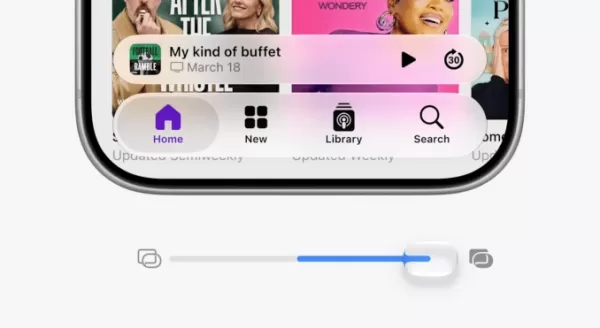
Image Credits:Apple
While visually impressive, Liquid Glass’s glass-like aesthetic made certain on-screen elements harder to see. Users pointed out numerous ways the update was undercooked, particularly on the Mac, and begged Apple for tools to restore the more frosted look.
The company approached the moment carefully, saying it “really appreciates” the user feedback it received over Liquid Glass over the past year.
“While we think this is a great new default look, we also know that some users would like Liquid Glass to be even more clear, and others prefer a more tinted appearance,” said Apple’s director of human interface design, Shubham Kedia, during the keynote address. (Nobody, for the record, is asking for it to be even clearer.)
Apple, which had already tweaked the design before today, is now allowing users to dial it back entirely with a new slider that goes all the way to “fully tinted.”
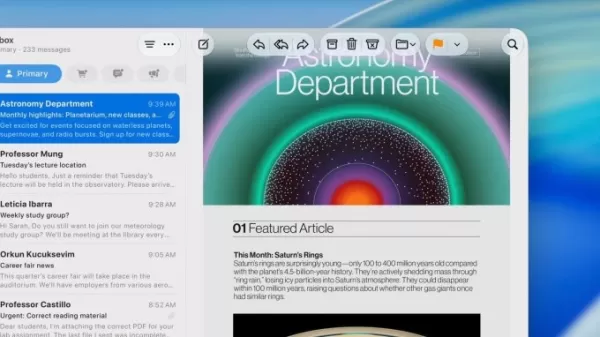
Image Credits:Apple
A few other small but telling updates followed. Apple showed a “more uniform” toolbar in macOS designed to better distinguish controls and text from the content beneath them, in another usability improvement. App icons received additional Liquid Glass refinements to make them “sharper and more defined,” even when set to clear mode.
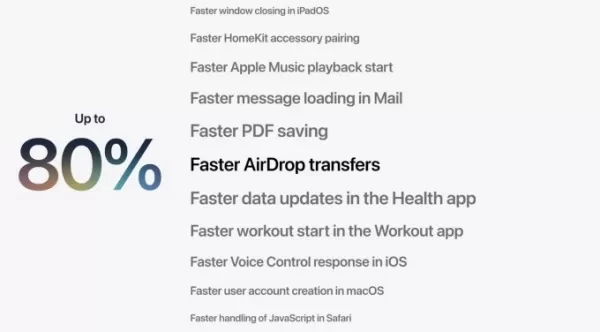
Then came performance improvements. iPhone and iPad apps now launch 30% faster, new photos appear up to 70% faster in your library, and files are transferred up to 80% faster when using AirDrop, a notoriously flaky file-sharing system.
AppleImage Credits:Apple
In a subtle acknowledgment that people are holding onto their phones longer these days, Apple said it extended performance improvements to all models back to iPhone 11, a phone released in 2019.
Apple also addressed several long-standing friction points: smoother transitions between Wi-Fi and cellular, a new indicator that lets you know when your messages are taking longer to go through (useful when you’re on low bandwidth or sending a large file), and a rebuilt search experience that the company describes as “more stable, more efficient, and more comprehensive of content.” New content will be indexed almost immediately, and a new ranking system in Mail will surface the most relevant results first. (The fact that this needed fixing at all says something about how far Apple’s search had fallen behind.)
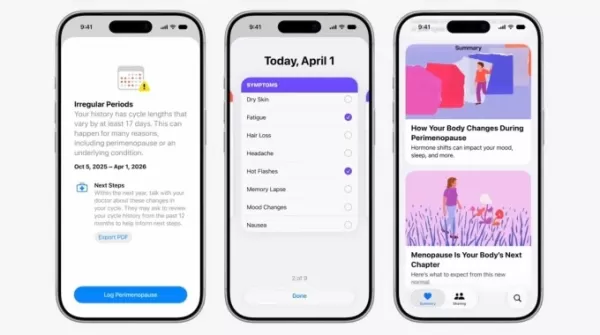
Apple’s Health app — which had gone years without meaningfully supporting half its user base — added support for perimenopause and menopause tracking. It’s a long-overdue move that arrives as the menopause care market hits its stride: earlier this year, menopause telehealth startup Midi Health crossed a $1 billion valuation, and dedicated investment in the category topped $294 million between 2022 and last year.
ScreenshotImage Credits:Apple
iCloud shared photo albums can now accept contributions from Android and Windows users, making the feature far more useful for shared trips and group events.
Apple also rolled out improved screen time controls for parents before turning to the main event: the announcement of the AI-enhanced Siri.
The sequencing was intentional. By stacking a long list of smaller improvements up front, Apple reframed its Siri update as one piece of a broader effort, rather than the make-or-break AI moment the industry has been watching for.
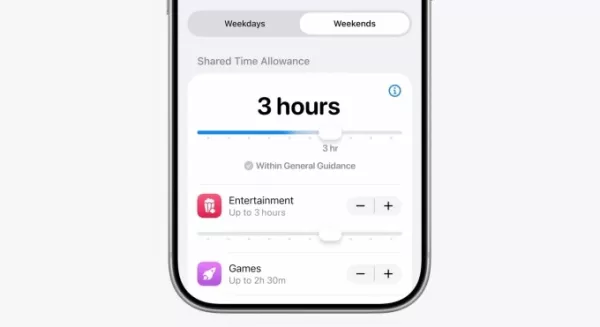
Image Credits:Apple
That framing is probably smart. Siri is launching into “beta” for consumers later this year, but not in the EU or China, where Apple still has regulatory hurdles to clear. For a feature that was supposed to define Apple’s AI strategy, “beta, coming later, not everywhere” is a pretty noteworthy hedge.
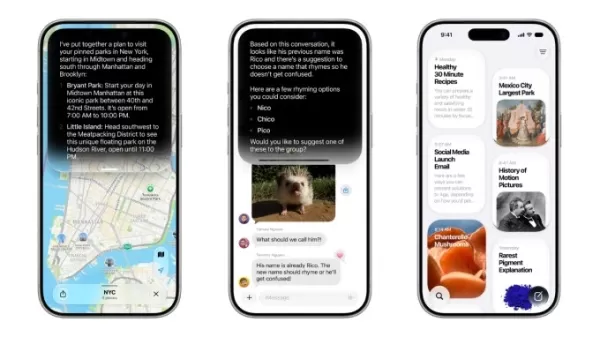
Image Credits:Apple
Apple outlined other smaller AI advances, like how Apple Intelligence will be able to organize your webpages’ tabs, analyze webpages for information, check pages for updates, and more. You can even generate a custom Safari extension on the fly using AI, which sounds interesting.
Passwords and Safari can now work together to suggest and apply stronger passwords automatically. Apple Intelligence is also adding helpful reply suggestions in Messages based on conversation context. For instance, if someone asks you for photos, Apple’s AI can point you to the right ones. Calendar can now create events from natural language commands — something third-party apps like Fantastical have offered for years, which makes this a catch-up feature.
And AI will be able to surface key information when you make a phone call, like a confirmation code when calling an airline.
Meanwhile, the Home app will use AI to summarize events, catching up with companies like Amazon and Google, which have moved on to more advanced territory, things like fire detection and facial recognition. (We’d like to thank Apple for staying away from the latter, however.)
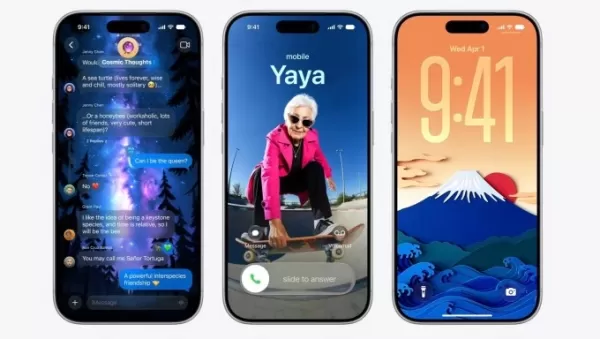
Image Credits:Apple
Image Playground — Apple’s AI image generation app — appears to have finally crossed the threshold from novelty to useful. Earlier versions produced images that were kitschy and difficult to apply practically; the updated model can generate something as functional as a business flyer or a cleanly edited photo. Apple also announced it will open image generation to developers via an API, a move that turns a consumer feature into a potential platform.
AI can also now edit photos more substantively — removing distracting items from a scene or expanding its edges using generative models, similar to what Google Photos offers. The standout is Spatial Reframing, which lets you adjust a photo’s composition after the fact using Apple’s on-device spatial models. It even works retroactively on photos already in your library, meaning years of existing images are now fair game.
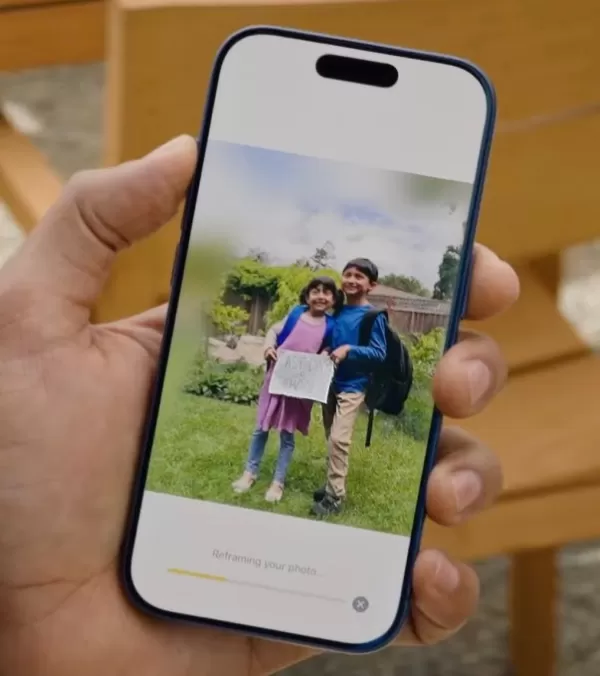
Image Credits:Screenshot/TechCrunch
Related article
 How to fix Core Web Vitals for better SEO rankings
Streamline Report Card Comments with AI ToolsIntroductionAI Tools for Generating Report Card CommentsMagic SchoolAlmanac AIChat GPTUsing Magic School to Generate Report Card CommentsLogging into Magic SchoolSelecting the Report Card Comments ToolCust
Slackbot Becomes an AI Agent
Slackbot, the automated assistant embedded in Salesforce’s corporate messaging platform Slack, is evolving into an AI agent. Salesforce CTO Parker Harris envisions it achieving viral status comparable to OpenAI’s ChatGPT.The cloud software giant laun
ByteDance Boosts Core AI Incentives as Doubao Surges 14.6%
ByteDance recently convened a DouBao equity briefing to unveil fresh incentive policies for staff involved in the DouBao division. The strike price for DouBao shares has been lifted from $14.85 in June 2026 to $17.02, marking an approximate 14.6% inc
Related Special Topic Recommendations
Education and Learning
How to fix Core Web Vitals for better SEO rankings
Streamline Report Card Comments with AI ToolsIntroductionAI Tools for Generating Report Card CommentsMagic SchoolAlmanac AIChat GPTUsing Magic School to Generate Report Card CommentsLogging into Magic SchoolSelecting the Report Card Comments ToolCust
Slackbot Becomes an AI Agent
Slackbot, the automated assistant embedded in Salesforce’s corporate messaging platform Slack, is evolving into an AI agent. Salesforce CTO Parker Harris envisions it achieving viral status comparable to OpenAI’s ChatGPT.The cloud software giant laun
ByteDance Boosts Core AI Incentives as Doubao Surges 14.6%
ByteDance recently convened a DouBao equity briefing to unveil fresh incentive policies for staff involved in the DouBao division. The strike price for DouBao shares has been lifted from $14.85 in June 2026 to $17.02, marking an approximate 14.6% inc
Related Special Topic Recommendations
Education and Learning
 AI Study Tools for Homework and Exam Prep
2026 Latest Best AI Study Tools for Homework and Exam Prep! XIX.AI curates a top-rated list of powerful, game-changing tools that help students boost productivity, streamline homework completion, and ace exams through real-world tests. Get a free vs paid comparison, detailed rankings, and must-try options to unlock your AI edge. Explore now!
 10 tools
 xix.ai
Music composition
AI Vocal Demo Tools for Songwriters, Hooks, Toplines, and Multilingual Draft Sessions
xix.ai
Music composition
AI Vocal Demo Tools for Songwriters, Hooks, Toplines, and Multilingual Draft Sessions
2026 Latest Best AI Vocal Demo Tools for Songwriters, Hook Creators, and Multi-Language Content Teams! XIX.AI has curated a top-rated list of powerful game-changing tools that go through rigorous real-world tests. You’ll find detailed free vs paid comparison data, comprehensive rankings, and must-try options to help you boost writing efficiency and unlock your creative potential. Explore now to discover your perfect tool for all your content needs!
9 tools
xix.ai
Business
Best AI Competitive Research Tools for Small Businesses
2026 Latest Best Top-rated AI Competitive Research Tools for Small Businesses! XIX.AI has curated a highly powerful game-changing collection, updated weekly with rigorous real-world tests and detailed rankings. You can find a comprehensive free vs paid comparison to help you identify the must-try tools that boost your productivity and give you a competitive edge. Explore now to discover your perfect tool!
9 tools
xix.ai
Image editing
Photoshop AI Retouch Tools for Ecommerce Apparel, Skin Cleanup, and Color Consistency
2026 Latest Best Photoshop AI retouch tools for ecommerce apparel, skin cleanup, and color consistency! This top-rated curated list features powerful game-changing solutions that help you boost writing efficiency, streamline content creation, and achieve perfect visual results effortlessly. Each tool has undergone real-world tests through weekly updated rankings, complete with free vs paid comparison details. Backed by XIX.AI, it’s the must-try guide for anyone aiming to unlock your AI edge. Explore now!
10 tools
xix.ai
Prompt
Best AI Prompt Libraries for ChatGPT Workflows
2026 Latest Best Top-Rated AI Prompt Libraries for optimizing all types of ChatGPT workflows. XIX.AI has curated a powerful, game-changing collection that goes through rigorous real-world tests to ensure top performance. You can find detailed free vs paid comparisons and expert rankings to help you choose the must-try tools that boost your productivity and unlock your AI edge. Explore now!
11 tools
xix.ai
Education and Learning
AI Quiz Builder Platforms for Teachers, Tutors, and Cohort-Based Learning Programs
2026 Latest Best AI Quiz Builder Platforms for Teachers, Tutors, and Cohort-Based Learning Programs! XIX.AI has curated a top-rated list of powerful game-changing tools that go through real-world tests to deliver accurate rankings. These must-try platforms help boost writing efficiency, streamline content creation, and simplify quiz design across all learning scenarios. Explore now to discover your perfect tool for unlocking your AI edge in teaching!
13 tools
xix.ai

 Comments (0)
0/500
Comments (0)
0/500
Apple kicked off its Worldwide Developer Conference on Monday with what felt like an apology. Rather than diving straight into the big news about a revamped AI-powered Siri, Senior Vice President of Software Engineering Craig Federighi spent the opening minutes of the keynote addressing a list of fixes.
For the past two years, Apple has been racing to catch up in AI while frustrations with its core software quietly piled up: a design overhaul users hated, a search function that barely worked, a file-sharing feature that routinely failed, and a Health app that ignored half its user base. Apple didn’t say any of that on Monday. But the structure of its WWDC keynote said it for them, leading with fixes before features, and positioning a better Siri as just one item on a long list of improvements rather than the main event. At the very least, the sequencing suggests Apple believes the foundation needs shoring up before it can credibly ask users to trust it with something as consequential as AI.
“Instead of just introducing a host of new features, we’re also taking the features you already rely on and making them even better, because we believe the best operating systems aren’t just built on big breakthroughs, they’re built on sweating the details,” Federighi said. It’s the kind of statement that would be unremarkable from most companies, but from Apple, it was as close to an admission of fault as you’ll get. (Sweating the details is exactly what critics said the company had stopped doing.)
Federighi didn’t have to wait long to prove the point. The first item on the list was the company’s controversial Liquid Glass design language that first arrived in iOS 26 and promptly triggered consumer backlash over readability and usability concerns.
Image Credits:Apple
While visually impressive, Liquid Glass’s glass-like aesthetic made certain on-screen elements harder to see. Users pointed out numerous ways the update was undercooked, particularly on the Mac, and begged Apple for tools to restore the more frosted look.
The company approached the moment carefully, saying it “really appreciates” the user feedback it received over Liquid Glass over the past year.
“While we think this is a great new default look, we also know that some users would like Liquid Glass to be even more clear, and others prefer a more tinted appearance,” said Apple’s director of human interface design, Shubham Kedia, during the keynote address. (Nobody, for the record, is asking for it to be even clearer.)
Apple, which had already tweaked the design before today, is now allowing users to dial it back entirely with a new slider that goes all the way to “fully tinted.”
Image Credits:Apple
A few other small but telling updates followed. Apple showed a “more uniform” toolbar in macOS designed to better distinguish controls and text from the content beneath them, in another usability improvement. App icons received additional Liquid Glass refinements to make them “sharper and more defined,” even when set to clear mode.
Then came performance improvements. iPhone and iPad apps now launch 30% faster, new photos appear up to 70% faster in your library, and files are transferred up to 80% faster when using AirDrop, a notoriously flaky file-sharing system.
AppleImage Credits:Apple
In a subtle acknowledgment that people are holding onto their phones longer these days, Apple said it extended performance improvements to all models back to iPhone 11, a phone released in 2019.
Apple also addressed several long-standing friction points: smoother transitions between Wi-Fi and cellular, a new indicator that lets you know when your messages are taking longer to go through (useful when you’re on low bandwidth or sending a large file), and a rebuilt search experience that the company describes as “more stable, more efficient, and more comprehensive of content.” New content will be indexed almost immediately, and a new ranking system in Mail will surface the most relevant results first. (The fact that this needed fixing at all says something about how far Apple’s search had fallen behind.)
Apple’s Health app — which had gone years without meaningfully supporting half its user base — added support for perimenopause and menopause tracking. It’s a long-overdue move that arrives as the menopause care market hits its stride: earlier this year, menopause telehealth startup Midi Health crossed a $1 billion valuation, and dedicated investment in the category topped $294 million between 2022 and last year.
ScreenshotImage Credits:Apple
iCloud shared photo albums can now accept contributions from Android and Windows users, making the feature far more useful for shared trips and group events.
Apple also rolled out improved screen time controls for parents before turning to the main event: the announcement of the AI-enhanced Siri.
The sequencing was intentional. By stacking a long list of smaller improvements up front, Apple reframed its Siri update as one piece of a broader effort, rather than the make-or-break AI moment the industry has been watching for.
Image Credits:Apple
That framing is probably smart. Siri is launching into “beta” for consumers later this year, but not in the EU or China, where Apple still has regulatory hurdles to clear. For a feature that was supposed to define Apple’s AI strategy, “beta, coming later, not everywhere” is a pretty noteworthy hedge.
Image Credits:Apple
Apple outlined other smaller AI advances, like how Apple Intelligence will be able to organize your webpages’ tabs, analyze webpages for information, check pages for updates, and more. You can even generate a custom Safari extension on the fly using AI, which sounds interesting.
Passwords and Safari can now work together to suggest and apply stronger passwords automatically. Apple Intelligence is also adding helpful reply suggestions in Messages based on conversation context. For instance, if someone asks you for photos, Apple’s AI can point you to the right ones. Calendar can now create events from natural language commands — something third-party apps like Fantastical have offered for years, which makes this a catch-up feature.
And AI will be able to surface key information when you make a phone call, like a confirmation code when calling an airline.
Meanwhile, the Home app will use AI to summarize events, catching up with companies like Amazon and Google, which have moved on to more advanced territory, things like fire detection and facial recognition. (We’d like to thank Apple for staying away from the latter, however.)
Image Credits:Apple
Image Playground — Apple’s AI image generation app — appears to have finally crossed the threshold from novelty to useful. Earlier versions produced images that were kitschy and difficult to apply practically; the updated model can generate something as functional as a business flyer or a cleanly edited photo. Apple also announced it will open image generation to developers via an API, a move that turns a consumer feature into a potential platform.
AI can also now edit photos more substantively — removing distracting items from a scene or expanding its edges using generative models, similar to what Google Photos offers. The standout is Spatial Reframing, which lets you adjust a photo’s composition after the fact using Apple’s on-device spatial models. It even works retroactively on photos already in your library, meaning years of existing images are now fair game.
Image Credits:Screenshot/TechCrunch








 How to fix Core Web Vitals for better SEO rankings
Streamline Report Card Comments with AI ToolsIntroductionAI Tools for Generating Report Card CommentsMagic SchoolAlmanac AIChat GPTUsing Magic School to Generate Report Card CommentsLogging into Magic SchoolSelecting the Report Card Comments ToolCust
How to fix Core Web Vitals for better SEO rankings
Streamline Report Card Comments with AI ToolsIntroductionAI Tools for Generating Report Card CommentsMagic SchoolAlmanac AIChat GPTUsing Magic School to Generate Report Card CommentsLogging into Magic SchoolSelecting the Report Card Comments ToolCust
 Slackbot Becomes an AI Agent
Slackbot, the automated assistant embedded in Salesforce’s corporate messaging platform Slack, is evolving into an AI agent. Salesforce CTO Parker Harris envisions it achieving viral status comparable to OpenAI’s ChatGPT.The cloud software giant laun
Slackbot Becomes an AI Agent
Slackbot, the automated assistant embedded in Salesforce’s corporate messaging platform Slack, is evolving into an AI agent. Salesforce CTO Parker Harris envisions it achieving viral status comparable to OpenAI’s ChatGPT.The cloud software giant laun
 ByteDance Boosts Core AI Incentives as Doubao Surges 14.6%
ByteDance recently convened a DouBao equity briefing to unveil fresh incentive policies for staff involved in the DouBao division. The strike price for DouBao shares has been lifted from $14.85 in June 2026 to $17.02, marking an approximate 14.6% inc
ByteDance Boosts Core AI Incentives as Doubao Surges 14.6%
ByteDance recently convened a DouBao equity briefing to unveil fresh incentive policies for staff involved in the DouBao division. The strike price for DouBao shares has been lifted from $14.85 in June 2026 to $17.02, marking an approximate 14.6% inc

2026 Latest Best AI Study Tools for Homework and Exam Prep! XIX.AI curates a top-rated list of powerful, game-changing tools that help students boost productivity, streamline homework completion, and ace exams through real-world tests. Get a free vs paid comparison, detailed rankings, and must-try options to unlock your AI edge. Explore now!
10 tools
xix.ai

2026 Latest Best AI Vocal Demo Tools for Songwriters, Hook Creators, and Multi-Language Content Teams! XIX.AI has curated a top-rated list of powerful game-changing tools that go through rigorous real-world tests. You’ll find detailed free vs paid comparison data, comprehensive rankings, and must-try options to help you boost writing efficiency and unlock your creative potential. Explore now to discover your perfect tool for all your content needs!
9 tools
xix.ai

2026 Latest Best Top-rated AI Competitive Research Tools for Small Businesses! XIX.AI has curated a highly powerful game-changing collection, updated weekly with rigorous real-world tests and detailed rankings. You can find a comprehensive free vs paid comparison to help you identify the must-try tools that boost your productivity and give you a competitive edge. Explore now to discover your perfect tool!
9 tools
xix.ai

2026 Latest Best Photoshop AI retouch tools for ecommerce apparel, skin cleanup, and color consistency! This top-rated curated list features powerful game-changing solutions that help you boost writing efficiency, streamline content creation, and achieve perfect visual results effortlessly. Each tool has undergone real-world tests through weekly updated rankings, complete with free vs paid comparison details. Backed by XIX.AI, it’s the must-try guide for anyone aiming to unlock your AI edge. Explore now!
10 tools
xix.ai

2026 Latest Best Top-Rated AI Prompt Libraries for optimizing all types of ChatGPT workflows. XIX.AI has curated a powerful, game-changing collection that goes through rigorous real-world tests to ensure top performance. You can find detailed free vs paid comparisons and expert rankings to help you choose the must-try tools that boost your productivity and unlock your AI edge. Explore now!
11 tools
xix.ai

2026 Latest Best AI Quiz Builder Platforms for Teachers, Tutors, and Cohort-Based Learning Programs! XIX.AI has curated a top-rated list of powerful game-changing tools that go through real-world tests to deliver accurate rankings. These must-try platforms help boost writing efficiency, streamline content creation, and simplify quiz design across all learning scenarios. Explore now to discover your perfect tool for unlocking your AI edge in teaching!
13 tools
xix.ai












