


 Home
HomeAI-Powered Video Editing and Captioning Tool for Premiere Pro Launched
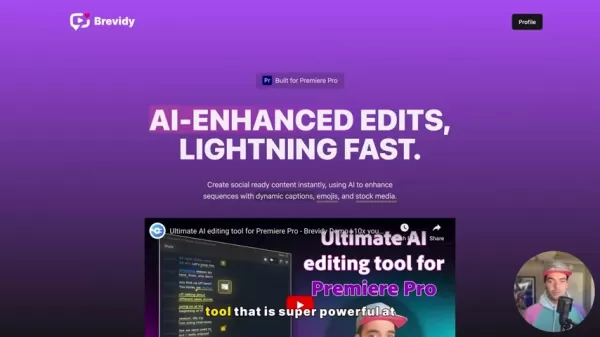
In the whirlwind of today's digital landscape, video content is king. Yet, the process of creating compelling videos, complete with captions, emojis, and stock media, can be a real time sink. That's where Brevity comes into play—a game-changing AI tool designed to supercharge your video editing experience within Adobe Premiere Pro. With Brevity, video editors can save precious hours and craft engaging social media content with ease.
Brevity: Your AI-Powered Video Editing Ally
What is Brevity?
Brevity isn't just another tool; it's a revolution for Adobe Premiere Pro users. It's crafted to slash the time spent on video creation, making it a breeze to whip up captivating content. This AI marvel not only enhances your edits but also throws in dynamic captions, relevant emojis, and seamlessly integrates stock media—all at breakneck speed. Whether you're churning out social media clips or crafting educational videos, Brevity is the ace up your sleeve to keep up with the relentless pace of content creation. By automating the grunt work like transcription and captioning, it frees you up to focus on the creative storytelling that makes your videos shine.
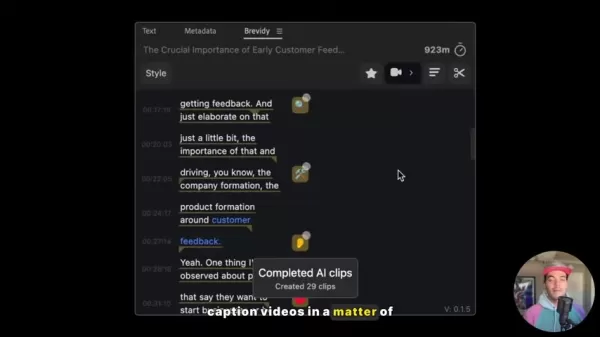
What sets Brevity apart is its perfect blend of AI automation and customizable editing options. This balance ensures you get the efficiency you need without sacrificing the creative control you crave. It's ideal for everything from snappy marketing clips to in-depth educational content.
Why Captions Matter in Video Content
In our digital age, captions have evolved from a nice-to-have to a must-have. Here's why they're indispensable:
- Accessibility: Captions open up your videos to a broader audience, including those who are deaf or hard of hearing. They ensure everyone can engage with your content.
- Engagement: Many of us watch videos on mute, especially on mobile or in public. Captions keep viewers hooked, even when sound isn't an option.
- Comprehension: Research shows captions boost understanding and retention. They reinforce your message, making it stick in viewers' minds.
- SEO: Captions can boost your video's SEO, making it more discoverable in search results and driving more organic traffic to your content.

Brevity understands the power of captions, offering tools to generate and customize them efficiently, ensuring your videos are not only engaging but also accessible and optimized for search.
Benefits of Using Brevity
Time-Saving Efficiency
Brevity cuts down the time you spend on editing like no other. With automated transcription, smart suggestions, and streamlined workflows, you'll finish projects faster. This means more time for your creative pursuits. Whether it's inserting a pause emoji or highlighting key moments in your video, Brevity's unique features make editing a breeze.
Enhanced Content Engagement
With Brevity, your videos pop with dynamic captions, relevant emojis, and engaging stock media. These elements enhance your storytelling, making your videos more shareable and impactful on social media. By using Brevity's formatting tools and speaker options, your content will exude a professional vibe that boosts engagement.
Improved Accessibility and SEO
Brevity ensures your videos reach a wider audience with accurate transcriptions for closed captions and subtitles. This not only makes your content more accessible but also boosts your SEO, driving more organic traffic and expanding your reach. Brevity's unique approach to structuring videos is a far cry from the old-school method of manually adding subtitles.
How to Create Captions Using Brevity: A Step-by-Step Guide
Step 1: Setting In and Out Points
Start by setting your in and out points in the Premiere Pro timeline. This defines the section you want to caption, ensuring your sequence is trimmed to perfection.

Step 2: Accessing the Captions Button
Click on the Captions button within the Brevity panel. This opens a dialog box showing your credits and the cost of this captioning job. Make sure you have enough credits before moving forward.
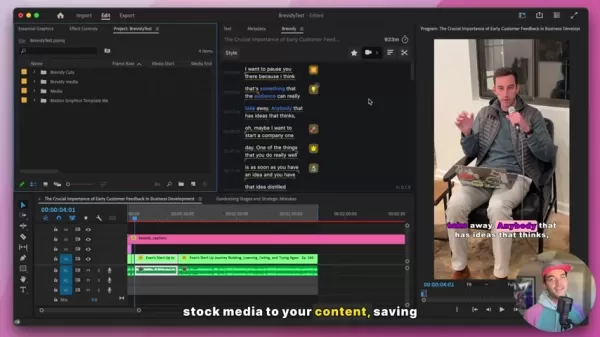
Step 3: Creating Captions
Hit the Create button, and Brevity will work its magic. It'll render the audio and use its AI transcription service to generate captions in less than a minute, adding them to a new caption file in your sequence.
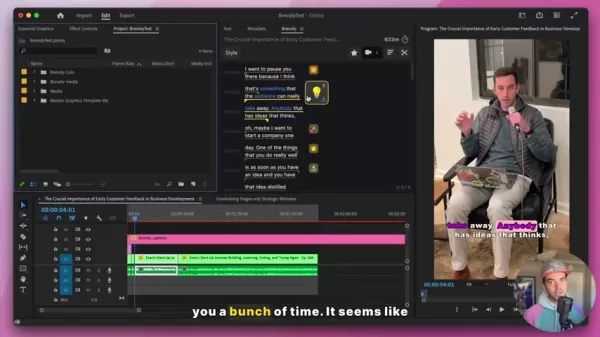
Step 4: Customizing Captions
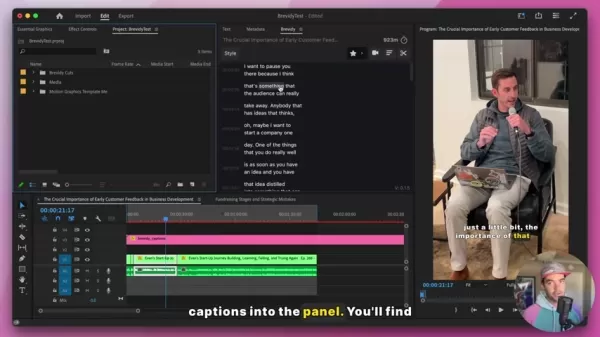
Customize your captions to fit your brand using the Style tab. Adjust everything from position to font, and even add animations to make your captions pop.
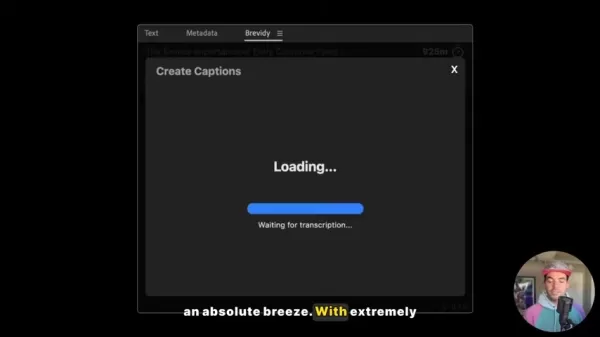
Step 5: Adding Highlights and Emojis
Use the highlight tool to emphasize keywords, or let AI suggest them for you. Add emojis to your captions using the media tool, making your content both informative and engaging.
Step 6: Incorporating Stock Media
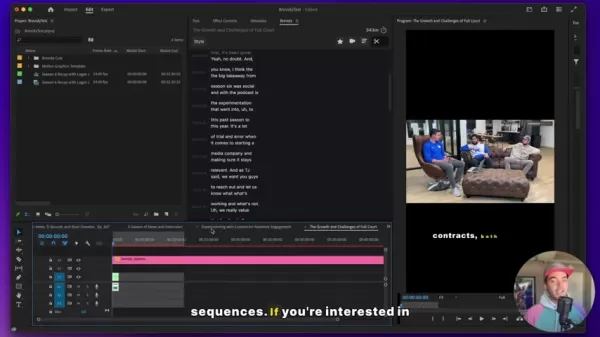
Select a segment of your video and let Brevity's AI find relevant stock media. Review the suggestions, choose the best fit, and adjust it to your liking for that polished look.
Step 7: Adjusting Paragraph Formatting
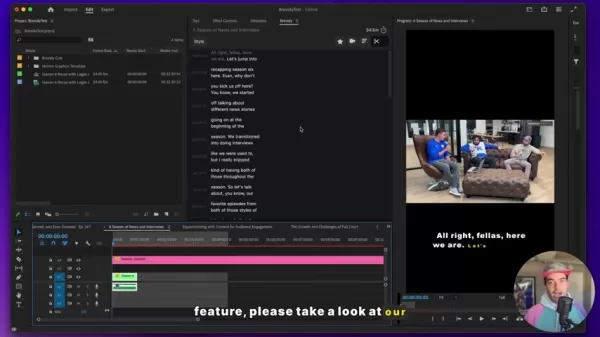
Use the paragraph tool to tweak the number of lines and characters per line, ensuring your captions are easy to read and visually appealing. For multi-speaker content, use the Split Speakers option to differentiate speakers.
Brevity Pricing
Cost and Credits
Brevity runs on a credit-based system. Since it's currently in beta, you can test it out for free and see if it fits your workflow. Keep an eye on your credits, as they're used for various functions.
Pros and Cons of Using Brevity for Video Editing
Pros
- Significant time savings in captioning and editing.
- Highly accurate AI transcription.
- Extensive customization options for caption styles.
- Intelligent suggestions for emojis and stock media.
- Seamless integration with Adobe Premiere Pro.
Cons
- Credits-based system may require budget planning.
- Reliance on AI might need occasional manual review.
- Tool is currently in beta, so bugs or updates may occur.
- Potential learning curve for new users.
Core Features of Brevity
Autocut: AI-Powered Video Segmentation
The Autocut feature is a real game-changer, turning long-form content into bite-sized social media clips. It's perfect for editors dealing with podcasts, interviews, or webinars, making it easy to create engaging content for platforms like Instagram, TikTok, and YouTube Shorts.
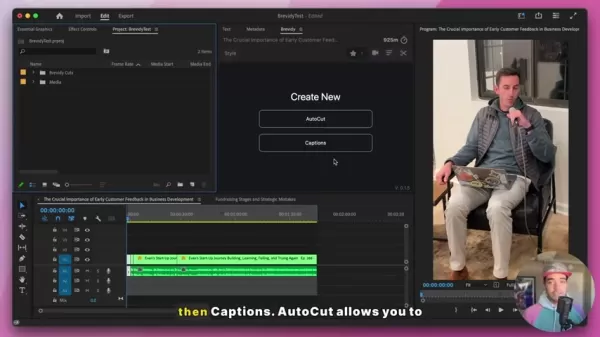
Brevity's AI identifies key segments based on discussion points and speaker engagement, then edits them into new, shorter sequences. For a deeper dive, check out the previous demo video on Autocut.
AI-Powered Captioning: Accuracy and Customization
Brevity's captioning tool is a standout, offering accuracy and customization that's essential for modern video content. It uses an AI transcription service that's more precise than standard Premiere Pro transcriptions, saving you from tedious manual corrections.
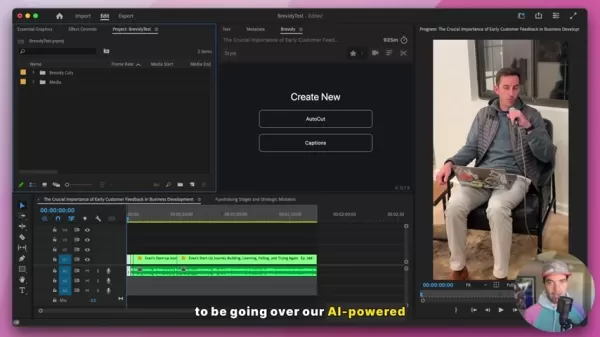
Customize your captions with the Style tab, adjusting everything from position to font. Add animations to highlight active spoken words, and use the highlight tool to emphasize keywords. The paragraph tool ensures your captions are readable and visually appealing, enhancing the viewer experience.
Intelligent Emoji and Stock Media Suggestions
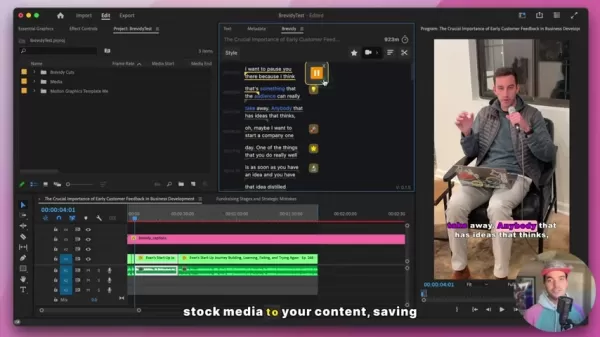
Brevity doesn't stop at captions; it enhances them with intelligent suggestions for emojis and stock media. The tool analyzes your transcript and recommends visuals that enrich your content and grab viewers' attention, saving you time on searching for the right visuals.
Frequently Asked Questions About Brevity
Is Brevity compatible with all versions of Adobe Premiere Pro?
Brevity is designed for the latest versions of Adobe Premiere Pro. Check the official documentation for specific version compatibility to ensure optimal performance.
How accurate is the AI transcription service?
Brevity's AI transcription service boasts high accuracy, typically around 99%. It's always good to review and manually correct any errors, though.
Can I use Brevity for different languages?
Yes, Brevity supports multiple languages. You can select your desired language within the tool's settings.
What types of stock media does Brevity suggest?
Brevity offers a variety of stock media, including videos, GIFs, and images, sourced from providers like Pexels and Giphy, ensuring diverse options to enhance your content.
How do I provide feedback or request new features?
Brevity values user feedback. Reach out through the contact information on their website to share your thoughts, report bugs, or request new features.
Related Questions on AI in Video Editing
What other AI tools can enhance my video editing workflow?
There are several AI tools that can boost your video editing experience. Consider:
- Descript: Known for its audio and video editing capabilities, it uses AI for transcription, editing, and mixing.
- RunwayML: Offers AI Magic Tools for tasks like object removal, background replacement, and motion tracking.
- Topaz Video Enhance AI: Uses AI to upscale and enhance video resolution, reducing noise and improving clarity.
- Adobe Sensei: Integrated into Adobe Creative Cloud, it provides AI-powered features for content-aware fill, face recognition, and automated color correction.
Exploring these tools can further streamline your video editing and content creation process.
Related article
 Swedish AI Startup Lovable Eyes $13.2 Billion Valuation After Major Funding Round
As AI-driven coding tools gain traction, Swedish startup Lovable has secured a major funding round. The company aims to raise $3 billion, potentially boosting its valuation to $13.2 billion—double the $6.6 billion recorded last December. Menlo Ventur
Google Tests Remy AI Agent for Gemini as Focus Shifts to User Control
According to Business Insider, Google is testing Remy, a new AI personal agent for Gemini. This tool aims to execute tasks on behalf of users, streamlining both professional workflows and daily routines.Currently, Remy is undergoing testing in an int
How to fix Core Web Vitals for better SEO rankings
Streamline Report Card Comments with AI ToolsIntroductionAI Tools for Generating Report Card CommentsMagic SchoolAlmanac AIChat GPTUsing Magic School to Generate Report Card CommentsLogging into Magic SchoolSelecting the Report Card Comments ToolCust
Related Special Topic Recommendations
writing
Swedish AI Startup Lovable Eyes $13.2 Billion Valuation After Major Funding Round
As AI-driven coding tools gain traction, Swedish startup Lovable has secured a major funding round. The company aims to raise $3 billion, potentially boosting its valuation to $13.2 billion—double the $6.6 billion recorded last December. Menlo Ventur
Google Tests Remy AI Agent for Gemini as Focus Shifts to User Control
According to Business Insider, Google is testing Remy, a new AI personal agent for Gemini. This tool aims to execute tasks on behalf of users, streamlining both professional workflows and daily routines.Currently, Remy is undergoing testing in an int
How to fix Core Web Vitals for better SEO rankings
Streamline Report Card Comments with AI ToolsIntroductionAI Tools for Generating Report Card CommentsMagic SchoolAlmanac AIChat GPTUsing Magic School to Generate Report Card CommentsLogging into Magic SchoolSelecting the Report Card Comments ToolCust
Related Special Topic Recommendations
writing
 Best AI Outline Generators for Long-Form SEO Articles
2026 Latest Best Top-Rated AI Outline Generators for Long-Form SEO Articles, meticulously curated by XIX.AI. These powerful tools offer game-changing assistance in creating high-quality content quickly, boosting writing efficiency significantly. Get a free vs paid comparison along with real-world tests and detailed rankings to help you find the must-try option that suits your needs. Explore now to unlock your AI edge.
 8 tools
 xix.ai
Education and Learning
AI Study Tools for Homework and Exam Prep
xix.ai
Education and Learning
AI Study Tools for Homework and Exam Prep
2026 Latest Best AI Study Tools for Homework and Exam Prep! XIX.AI curates a top-rated list of powerful, game-changing tools that help students boost productivity, streamline homework completion, and ace exams through real-world tests. Get a free vs paid comparison, detailed rankings, and must-try options to unlock your AI edge. Explore now!
10 tools
xix.ai
Music composition
AI Vocal Demo Tools for Songwriters, Hooks, Toplines, and Multilingual Draft Sessions
2026 Latest Best AI Vocal Demo Tools for Songwriters, Hook Creators, and Multi-Language Content Teams! XIX.AI has curated a top-rated list of powerful game-changing tools that go through rigorous real-world tests. You’ll find detailed free vs paid comparison data, comprehensive rankings, and must-try options to help you boost writing efficiency and unlock your creative potential. Explore now to discover your perfect tool for all your content needs!
9 tools
xix.ai
Business
Best AI Competitive Research Tools for Small Businesses
2026 Latest Best Top-rated AI Competitive Research Tools for Small Businesses! XIX.AI has curated a highly powerful game-changing collection, updated weekly with rigorous real-world tests and detailed rankings. You can find a comprehensive free vs paid comparison to help you identify the must-try tools that boost your productivity and give you a competitive edge. Explore now to discover your perfect tool!
9 tools
xix.ai
Image editing
Photoshop AI Retouch Tools for Ecommerce Apparel, Skin Cleanup, and Color Consistency
2026 Latest Best Photoshop AI retouch tools for ecommerce apparel, skin cleanup, and color consistency! This top-rated curated list features powerful game-changing solutions that help you boost writing efficiency, streamline content creation, and achieve perfect visual results effortlessly. Each tool has undergone real-world tests through weekly updated rankings, complete with free vs paid comparison details. Backed by XIX.AI, it’s the must-try guide for anyone aiming to unlock your AI edge. Explore now!
10 tools
xix.ai
Prompt
Best AI Prompt Libraries for ChatGPT Workflows
2026 Latest Best Top-Rated AI Prompt Libraries for optimizing all types of ChatGPT workflows. XIX.AI has curated a powerful, game-changing collection that goes through rigorous real-world tests to ensure top performance. You can find detailed free vs paid comparisons and expert rankings to help you choose the must-try tools that boost your productivity and unlock your AI edge. Explore now!
11 tools
xix.ai

 Comments (3)
0/500
Comments (3)
0/500
![StevenWalker]()
Эта интеграция AI в Premiere Pro выглядит как настоящая находка для ускорения монтажа! Временами ручная работа с субтитрами и подбор стокового контента превращается в кошмар. Интересно, насколько хорошо ИИ справится с пониманием контекста и интонации речи в разных языках? Если качество будет на уровне, это может изменить правила игры для индустрии в целом. 🎬
![MarkLopez]()
Brevity semble incroyable pour accélérer l'édition vidéo ! J'adore l'idée d'ajouter des emojis automatiquement, ça donne du peps aux montages. Mais est-ce que l'IA comprend vraiment le ton de mes vidéos ? 😅 J'aimerais tester ça sur un projet fun !
![WalterWilliams]()
This AI tool sounds like a lifesaver for editors! 😎 Brevity’s autocut and captioning features could make churning out social media clips a breeze. Has anyone tried it yet? Curious if it’s as smooth as they claim.
In the whirlwind of today's digital landscape, video content is king. Yet, the process of creating compelling videos, complete with captions, emojis, and stock media, can be a real time sink. That's where Brevity comes into play—a game-changing AI tool designed to supercharge your video editing experience within Adobe Premiere Pro. With Brevity, video editors can save precious hours and craft engaging social media content with ease.
Brevity: Your AI-Powered Video Editing Ally
What is Brevity?
Brevity isn't just another tool; it's a revolution for Adobe Premiere Pro users. It's crafted to slash the time spent on video creation, making it a breeze to whip up captivating content. This AI marvel not only enhances your edits but also throws in dynamic captions, relevant emojis, and seamlessly integrates stock media—all at breakneck speed. Whether you're churning out social media clips or crafting educational videos, Brevity is the ace up your sleeve to keep up with the relentless pace of content creation. By automating the grunt work like transcription and captioning, it frees you up to focus on the creative storytelling that makes your videos shine.
What sets Brevity apart is its perfect blend of AI automation and customizable editing options. This balance ensures you get the efficiency you need without sacrificing the creative control you crave. It's ideal for everything from snappy marketing clips to in-depth educational content.
Why Captions Matter in Video Content
In our digital age, captions have evolved from a nice-to-have to a must-have. Here's why they're indispensable:
- Accessibility: Captions open up your videos to a broader audience, including those who are deaf or hard of hearing. They ensure everyone can engage with your content.
- Engagement: Many of us watch videos on mute, especially on mobile or in public. Captions keep viewers hooked, even when sound isn't an option.
- Comprehension: Research shows captions boost understanding and retention. They reinforce your message, making it stick in viewers' minds.
- SEO: Captions can boost your video's SEO, making it more discoverable in search results and driving more organic traffic to your content.
Brevity understands the power of captions, offering tools to generate and customize them efficiently, ensuring your videos are not only engaging but also accessible and optimized for search.
Benefits of Using Brevity
Time-Saving Efficiency
Brevity cuts down the time you spend on editing like no other. With automated transcription, smart suggestions, and streamlined workflows, you'll finish projects faster. This means more time for your creative pursuits. Whether it's inserting a pause emoji or highlighting key moments in your video, Brevity's unique features make editing a breeze.
Enhanced Content Engagement
With Brevity, your videos pop with dynamic captions, relevant emojis, and engaging stock media. These elements enhance your storytelling, making your videos more shareable and impactful on social media. By using Brevity's formatting tools and speaker options, your content will exude a professional vibe that boosts engagement.
Improved Accessibility and SEO
Brevity ensures your videos reach a wider audience with accurate transcriptions for closed captions and subtitles. This not only makes your content more accessible but also boosts your SEO, driving more organic traffic and expanding your reach. Brevity's unique approach to structuring videos is a far cry from the old-school method of manually adding subtitles.
How to Create Captions Using Brevity: A Step-by-Step Guide
Step 1: Setting In and Out Points
Start by setting your in and out points in the Premiere Pro timeline. This defines the section you want to caption, ensuring your sequence is trimmed to perfection.
Step 2: Accessing the Captions Button
Click on the Captions button within the Brevity panel. This opens a dialog box showing your credits and the cost of this captioning job. Make sure you have enough credits before moving forward.
Step 3: Creating Captions
Hit the Create button, and Brevity will work its magic. It'll render the audio and use its AI transcription service to generate captions in less than a minute, adding them to a new caption file in your sequence.
Step 4: Customizing Captions
Customize your captions to fit your brand using the Style tab. Adjust everything from position to font, and even add animations to make your captions pop.
Step 5: Adding Highlights and Emojis
Use the highlight tool to emphasize keywords, or let AI suggest them for you. Add emojis to your captions using the media tool, making your content both informative and engaging.
Step 6: Incorporating Stock Media
Select a segment of your video and let Brevity's AI find relevant stock media. Review the suggestions, choose the best fit, and adjust it to your liking for that polished look.
Step 7: Adjusting Paragraph Formatting
Use the paragraph tool to tweak the number of lines and characters per line, ensuring your captions are easy to read and visually appealing. For multi-speaker content, use the Split Speakers option to differentiate speakers.
Brevity Pricing
Cost and Credits
Brevity runs on a credit-based system. Since it's currently in beta, you can test it out for free and see if it fits your workflow. Keep an eye on your credits, as they're used for various functions.
Pros and Cons of Using Brevity for Video Editing
Pros
- Significant time savings in captioning and editing.
- Highly accurate AI transcription.
- Extensive customization options for caption styles.
- Intelligent suggestions for emojis and stock media.
- Seamless integration with Adobe Premiere Pro.
Cons
- Credits-based system may require budget planning.
- Reliance on AI might need occasional manual review.
- Tool is currently in beta, so bugs or updates may occur.
- Potential learning curve for new users.
Core Features of Brevity
Autocut: AI-Powered Video Segmentation
The Autocut feature is a real game-changer, turning long-form content into bite-sized social media clips. It's perfect for editors dealing with podcasts, interviews, or webinars, making it easy to create engaging content for platforms like Instagram, TikTok, and YouTube Shorts.
Brevity's AI identifies key segments based on discussion points and speaker engagement, then edits them into new, shorter sequences. For a deeper dive, check out the previous demo video on Autocut.
AI-Powered Captioning: Accuracy and Customization
Brevity's captioning tool is a standout, offering accuracy and customization that's essential for modern video content. It uses an AI transcription service that's more precise than standard Premiere Pro transcriptions, saving you from tedious manual corrections.
Customize your captions with the Style tab, adjusting everything from position to font. Add animations to highlight active spoken words, and use the highlight tool to emphasize keywords. The paragraph tool ensures your captions are readable and visually appealing, enhancing the viewer experience.
Intelligent Emoji and Stock Media Suggestions
Brevity doesn't stop at captions; it enhances them with intelligent suggestions for emojis and stock media. The tool analyzes your transcript and recommends visuals that enrich your content and grab viewers' attention, saving you time on searching for the right visuals.
Frequently Asked Questions About Brevity
Is Brevity compatible with all versions of Adobe Premiere Pro?
Brevity is designed for the latest versions of Adobe Premiere Pro. Check the official documentation for specific version compatibility to ensure optimal performance.
How accurate is the AI transcription service?
Brevity's AI transcription service boasts high accuracy, typically around 99%. It's always good to review and manually correct any errors, though.
Can I use Brevity for different languages?
Yes, Brevity supports multiple languages. You can select your desired language within the tool's settings.
What types of stock media does Brevity suggest?
Brevity offers a variety of stock media, including videos, GIFs, and images, sourced from providers like Pexels and Giphy, ensuring diverse options to enhance your content.
How do I provide feedback or request new features?
Brevity values user feedback. Reach out through the contact information on their website to share your thoughts, report bugs, or request new features.
Related Questions on AI in Video Editing
What other AI tools can enhance my video editing workflow?
There are several AI tools that can boost your video editing experience. Consider:
- Descript: Known for its audio and video editing capabilities, it uses AI for transcription, editing, and mixing.
- RunwayML: Offers AI Magic Tools for tasks like object removal, background replacement, and motion tracking.
- Topaz Video Enhance AI: Uses AI to upscale and enhance video resolution, reducing noise and improving clarity.
- Adobe Sensei: Integrated into Adobe Creative Cloud, it provides AI-powered features for content-aware fill, face recognition, and automated color correction.
Exploring these tools can further streamline your video editing and content creation process.








 Swedish AI Startup Lovable Eyes $13.2 Billion Valuation After Major Funding Round
As AI-driven coding tools gain traction, Swedish startup Lovable has secured a major funding round. The company aims to raise $3 billion, potentially boosting its valuation to $13.2 billion—double the $6.6 billion recorded last December. Menlo Ventur
Google Tests Remy AI Agent for Gemini as Focus Shifts to User Control
According to Business Insider, Google is testing Remy, a new AI personal agent for Gemini. This tool aims to execute tasks on behalf of users, streamlining both professional workflows and daily routines.Currently, Remy is undergoing testing in an int
Swedish AI Startup Lovable Eyes $13.2 Billion Valuation After Major Funding Round
As AI-driven coding tools gain traction, Swedish startup Lovable has secured a major funding round. The company aims to raise $3 billion, potentially boosting its valuation to $13.2 billion—double the $6.6 billion recorded last December. Menlo Ventur
Google Tests Remy AI Agent for Gemini as Focus Shifts to User Control
According to Business Insider, Google is testing Remy, a new AI personal agent for Gemini. This tool aims to execute tasks on behalf of users, streamlining both professional workflows and daily routines.Currently, Remy is undergoing testing in an int
 How to fix Core Web Vitals for better SEO rankings
Streamline Report Card Comments with AI ToolsIntroductionAI Tools for Generating Report Card CommentsMagic SchoolAlmanac AIChat GPTUsing Magic School to Generate Report Card CommentsLogging into Magic SchoolSelecting the Report Card Comments ToolCust
How to fix Core Web Vitals for better SEO rankings
Streamline Report Card Comments with AI ToolsIntroductionAI Tools for Generating Report Card CommentsMagic SchoolAlmanac AIChat GPTUsing Magic School to Generate Report Card CommentsLogging into Magic SchoolSelecting the Report Card Comments ToolCust

2026 Latest Best Top-Rated AI Outline Generators for Long-Form SEO Articles, meticulously curated by XIX.AI. These powerful tools offer game-changing assistance in creating high-quality content quickly, boosting writing efficiency significantly. Get a free vs paid comparison along with real-world tests and detailed rankings to help you find the must-try option that suits your needs. Explore now to unlock your AI edge.
8 tools
xix.ai

2026 Latest Best AI Study Tools for Homework and Exam Prep! XIX.AI curates a top-rated list of powerful, game-changing tools that help students boost productivity, streamline homework completion, and ace exams through real-world tests. Get a free vs paid comparison, detailed rankings, and must-try options to unlock your AI edge. Explore now!
10 tools
xix.ai

2026 Latest Best AI Vocal Demo Tools for Songwriters, Hook Creators, and Multi-Language Content Teams! XIX.AI has curated a top-rated list of powerful game-changing tools that go through rigorous real-world tests. You’ll find detailed free vs paid comparison data, comprehensive rankings, and must-try options to help you boost writing efficiency and unlock your creative potential. Explore now to discover your perfect tool for all your content needs!
9 tools
xix.ai

2026 Latest Best Top-rated AI Competitive Research Tools for Small Businesses! XIX.AI has curated a highly powerful game-changing collection, updated weekly with rigorous real-world tests and detailed rankings. You can find a comprehensive free vs paid comparison to help you identify the must-try tools that boost your productivity and give you a competitive edge. Explore now to discover your perfect tool!
9 tools
xix.ai

2026 Latest Best Photoshop AI retouch tools for ecommerce apparel, skin cleanup, and color consistency! This top-rated curated list features powerful game-changing solutions that help you boost writing efficiency, streamline content creation, and achieve perfect visual results effortlessly. Each tool has undergone real-world tests through weekly updated rankings, complete with free vs paid comparison details. Backed by XIX.AI, it’s the must-try guide for anyone aiming to unlock your AI edge. Explore now!
10 tools
xix.ai

2026 Latest Best Top-Rated AI Prompt Libraries for optimizing all types of ChatGPT workflows. XIX.AI has curated a powerful, game-changing collection that goes through rigorous real-world tests to ensure top performance. You can find detailed free vs paid comparisons and expert rankings to help you choose the must-try tools that boost your productivity and unlock your AI edge. Explore now!
11 tools
xix.ai

Эта интеграция AI в Premiere Pro выглядит как настоящая находка для ускорения монтажа! Временами ручная работа с субтитрами и подбор стокового контента превращается в кошмар. Интересно, насколько хорошо ИИ справится с пониманием контекста и интонации речи в разных языках? Если качество будет на уровне, это может изменить правила игры для индустрии в целом. 🎬
Brevity semble incroyable pour accélérer l'édition vidéo ! J'adore l'idée d'ajouter des emojis automatiquement, ça donne du peps aux montages. Mais est-ce que l'IA comprend vraiment le ton de mes vidéos ? 😅 J'aimerais tester ça sur un projet fun !
This AI tool sounds like a lifesaver for editors! 😎 Brevity’s autocut and captioning features could make churning out social media clips a breeze. Has anyone tried it yet? Curious if it’s as smooth as they claim.












