


 Home
HomeA Practical Guide to Automatically Debugging SQL Errors with AI
While SQL serves as the foundation of data management, it can be prone to various errors in practice. These mistakes range from simple typos to more intricate issues with syntax. The emergence of AI now provides robust tools for debugging and refining SQL queries. This article examines how AI technology can help create accurate and optimized SQL statements.
Key Points
AI can automate the process of finding and fixing SQL errors.
AI helps in understanding natural language expressions within SQL queries.
AI assists in spotting and resolving syntax errors in SQL code.
AI offers recommendations for optimizing SQL query performance.
AI boosts coding efficiency and cuts down on debugging time.
Understanding AI-Driven SQL Error Correction
The Challenge of SQL Errors
Structured Query Language (SQL) is fundamental for managing and manipulating databases. However, crafting correct and high-performing SQL queries can be challenging. Mistakes in SQL can stem from various sources, including syntax errors, typographical slips, incorrect table or column names, and flawed logic. Debugging these issues often requires significant time and effort.
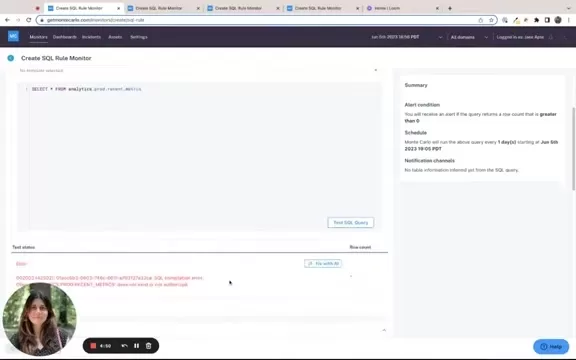
Traditional debugging relies on manual inspection, which can be laborious and susceptible to oversight, especially with intricate queries.
Common categories of SQL errors include:
- Syntax errors: These happen when a statement breaks the grammatical rules of the SQL language.
- Semantic errors: These occur when a query is syntactically valid but cannot be executed, often due to references to non-existent tables.
- Typographical errors: Simple misspellings can cause a query to fail and are often difficult to detect visually.
The advancement of AI and machine learning offers innovative solutions to automate the error correction workflow.
How AI Simplifies SQL Debugging
AI-driven tools greatly simplify SQL debugging by automating the detection and resolution of errors. These tools utilize natural language processing (NLP) and machine learning (ML) algorithms to comprehend the intent and structure of SQL queries. By leveraging AI, developers can swiftly identify and correct mistakes, saving valuable debugging time and boosting productivity.
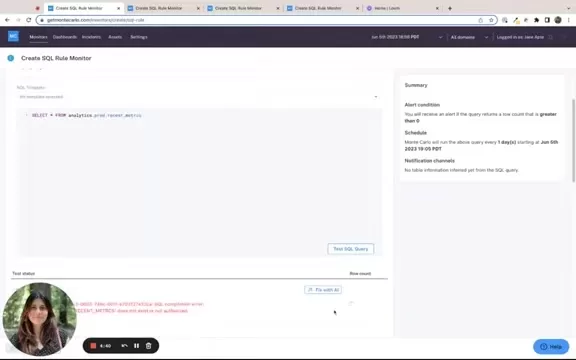
AI algorithms can scan SQL code for syntax issues, semantic problems, and logical inconsistencies. Having been trained on extensive datasets of SQL queries, these algorithms can recognize patterns and anomalies that indicate potential errors. When an issue is found, the AI tool provides specific recommendations for fixing the code, enabling developers to resolve problems quickly.
AI also contributes to optimizing SQL queries for enhanced performance. By analyzing query execution plans, AI can pinpoint performance bottlenecks and suggest improvements to the query's structure or indexing approach. Such optimizations can lead to significant performance improvements, particularly for complex queries handling large datasets.
Examples of AI Assisting in SQL Error Correction
Correcting Table and Column Names
A frequent problem in SQL queries involves incorrect table or column names. AI-powered tools can spot these errors and propose the correct names based on the database schema. For instance, if a developer writes 'SELCT * FROM anlytics.prod.recent_metrcs' instead of the correct 'SELECT * FROM analytics.prod.recent_metrics', the AI can identify the typos and suggest the proper names.
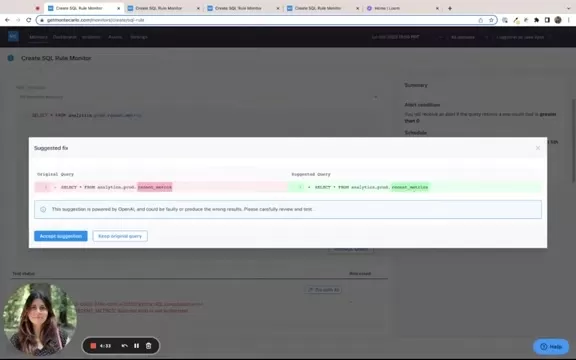
This automated correction saves time and reduces frustration, especially when navigating large, complex database schemas. Some advanced tools can also recognize aliases and synonyms, adding further precision and flexibility to error detection.
Adding Missing WHERE Clauses
Another common mistake is forgetting necessary WHERE clauses, which can lead to syntax errors or unintended query results. AI can detect such omissions and recommend adding appropriate conditions. Consider this SQL statement: 'SELECT * FROM analytics.prod.recent_metrics FULL_TABLE_ID like ‘%wet%’ LIMIT 100'.
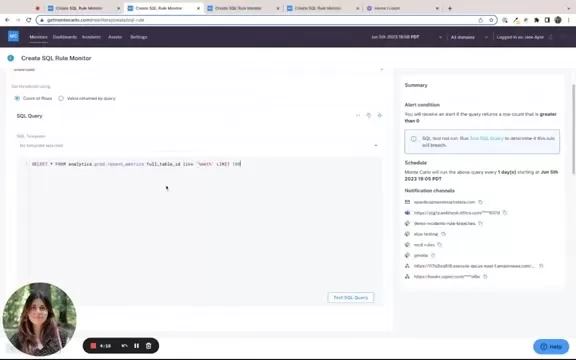
An AI tool can identify the missing WHERE clause and suggest inserting it to filter results correctly. This ensures the query returns only relevant data, preventing performance issues and logical mistakes. In this example, the AI might propose adding 'WHERE FULL_TABLE_ID like ‘%wet%’' to the statement.
By automating the inclusion of missing clauses, AI helps developers write more precise and efficient queries. This is particularly useful for those new to SQL or working with unfamiliar database structures.
Interpreting Natural Language for Date Values
Using natural language in SQL queries can sometimes cause errors, especially with date values. AI can interpret these phrases and convert them into proper SQL syntax. For example, if a developer writes 'WHERE MEASUREMENT_TIMESTAMP greater than YESTERDAY LIMIT 100', the AI can understand 'YESTERDAY' and translate it into a valid date function like 'CURRENT_DATE() - INTERVAL '1' DAY'.
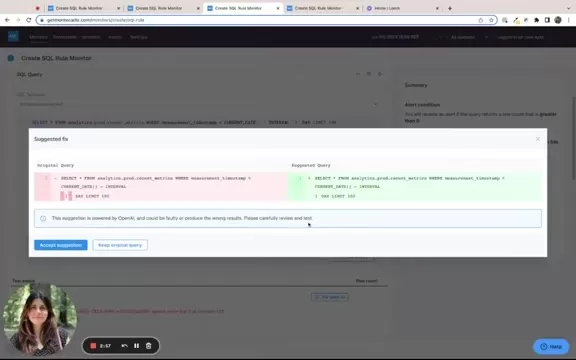
This capability allows developers to use intuitive, human-readable expressions, while the AI ensures the resulting SQL syntax is correct and executable. It simplifies complex date calculations and reduces the risk of errors when handling temporal data.
Steps to Use AI for SQL Error Correction
Step 1: Input Your SQL Query
Begin by entering your SQL query into the AI-powered tool, typically via a web interface or an integrated development environment (IDE) plugin. Ensure you provide the complete query so the AI can conduct a thorough analysis. Input all components, including SELECT statements, FROM clauses, WHERE conditions, and JOIN operations accurately. A complete query gives the AI a clear understanding of your goal, leading to more precise error detection and correction.
Providing the full query also allows the AI to evaluate the overall structure and identify potential optimization areas. This comprehensive approach not only fixes errors but can also enhance the query's performance.
Step 2: Test the Query for Errors
After entering your SQL query, run a test to identify potential errors. Most AI-powered SQL tools feature a 'Test SQL Query' button. Clicking this initiates the AI algorithms to scan your query for syntax mistakes, semantic issues, and other common errors.
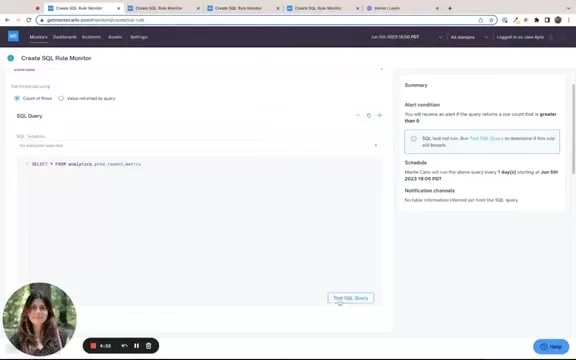
During the test, the AI tool examines the query, comparing it against standard SQL syntax rules and best practices. It checks for problems like misspelled keywords, incorrect table or column references, and missing operators. This testing phase is crucial for catching errors early and avoiding more significant issues later.
Step 3: Review AI-Suggested Fixes
Once the test completes, the AI tool presents a list of suggested fixes for any identified errors. Review these suggestions carefully to understand each issue and the proposed solution. AI-driven tools typically highlight the problematic sections and provide corrected code snippets.
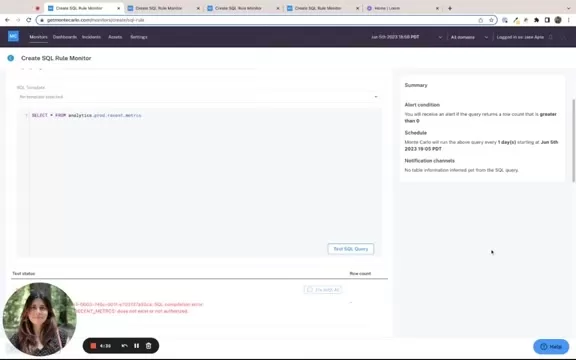
Take time to evaluate each suggestion. Understanding why the AI flagged a specific part of the query is valuable for improving your SQL coding skills. If a suggestion seems unclear, consult the tool's documentation or seek advice from SQL experts. This step empowers you to make informed decisions about applying the proposed corrections.
Step 4: Accept or Modify the Suggestions
After reviewing the AI's suggestions, decide whether to accept them or make adjustments based on your understanding of the query's intent. Most AI-powered tools provide options like 'Accept Suggestion' or 'Keep Original Query.' If you agree with the AI's assessment, accepting the suggestion will automatically update your query.
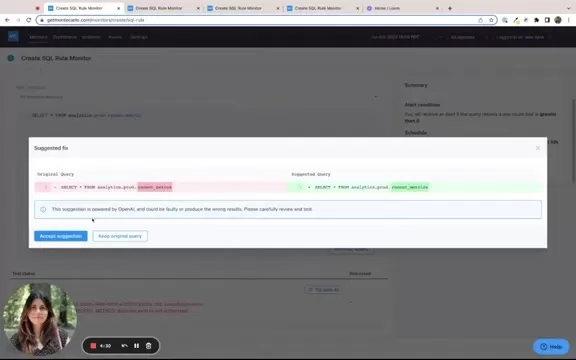
However, if you feel a suggestion is inaccurate or incomplete, you can modify the proposed fix. This flexibility ensures you retain control over your code while benefiting from AI assistance. Make any necessary adjustments and proceed to retest the query to confirm the changes resolve the error correctly.
Step 5: Retest the SQL Query
After accepting or modifying the AI's suggestions, it is essential to retest the SQL query. This final check ensures the changes have fixed the original error without introducing new problems. Click the 'Test SQL Query' button again to run the analysis.
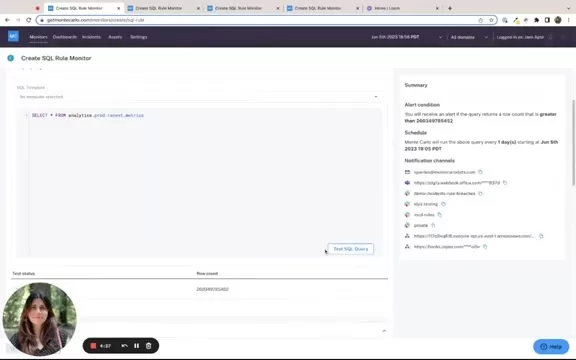
A successful retest will typically display a confirmation message, indicating the query is now error-free and ready for execution. If errors persist, revisit the previous steps, carefully examining any remaining issues and making further refinements as needed. This iterative process helps achieve a fully functional and optimized SQL query.
Pricing Details for AI-Powered SQL Tools
Available Subscription Options
Pricing models for AI-driven SQL tools vary based on features, usage limits, and support levels. Typically, these tools offer a range of subscription plans to suit different user needs and budgets. Options often include free plans with basic functionality and paid plans with more advanced features and higher usage allowances.
Free plans are usually aimed at individual developers or small teams wanting to evaluate the tool's capabilities before subscribing. These plans often have monthly limits on the number of queries that can be analyzed and restricted access to advanced features like query optimization and performance analysis.
Paid plans, conversely, provide comprehensive features and higher usage limits. These are suitable for larger teams and organizations requiring robust SQL debugging and optimization tools.
Pricing Factors and Considerations
When assessing the cost of AI-driven SQL tools, consider the following factors to determine the best value for your needs:
- Usage Limits: Estimate the number of queries you expect to analyze monthly. Select a plan that offers sufficient capacity to handle your usage without extra charges.
- Features: Compare the features included in each plan. Choose one that offers the capabilities you need, such as syntax correction, semantic error detection, query optimization, performance analysis, and integration with your preferred IDEs.
- Support: Consider the level of customer support provided. Some tools offer community-based support, while others provide dedicated support with guaranteed response times.
- Scalability: Ensure the pricing model allows for easy scaling as your needs grow. Some tools offer flexible pricing that adjusts based on your actual consumption.
Advantages and Disadvantages of AI-Driven SQL Error Correction
Pros
Increased efficiency in writing SQL code
Significant reduction in debugging time and effort
Improved query performance and scalability
Higher overall code quality and accuracy
Serves as a valuable training aid for new developers
Cons
Reliance on the quality of AI algorithms and training data
Potential for occasional incorrect or suboptimal suggestions
Cost associated with premium tools and subscription fees
May struggle with extremely complex or highly customized queries
Possible learning curve for users unfamiliar with AI tools
Key Features of AI SQL Fix Tools
Natural Language Interpretation
AI-driven SQL tools excel at interpreting natural language within queries. This lets developers use intuitive expressions like 'last week' or 'yesterday' for date ranges, which the AI automatically converts into valid SQL syntax. This feature minimizes the need for complex date calculations and improves query readability.
Automatic Syntax Correction
These tools can automatically identify and fix syntax errors in SQL queries. Whether it's a misspelled keyword, a missing parenthesis, or an incorrect operator, the AI detects the error and proposes a corrected version. This functionality saves developers time and avoids frustration from syntax-related issues.
Intelligent Query Optimization
AI-powered SQL tools offer more than just error correction; they provide intelligent query optimization. By analyzing execution plans, these tools can spot performance bottlenecks and suggest improvements to the query structure, indexing strategy, or data access methods. This leads to faster execution times and lower resource usage.
Practical Use Cases for AI-Driven SQL Solutions
Improving SQL Coding Efficiency
AI SQL tools considerably boost coding efficiency by automating repetitive tasks. For instance, AI can generate SQL code snippets from natural language descriptions, reducing the amount of code developers need to write manually. This automation speeds up development and lets developers concentrate on more complex challenges.
Reducing Debugging Time
A major benefit of AI SQL tools is their ability to cut down debugging time. By automatically finding and fixing errors, these tools eliminate the need for tedious manual checks, which are often time-consuming and prone to oversight. AI-driven correction ensures queries are error-free and ready to run, minimizing the risk of failures during execution.
Training New Developers
AI SQL tools can act as effective training resources for new developers. By offering real-time feedback and suggestions, these tools help developers learn best practices and enhance their SQL skills. The AI's guidance ensures newcomers adhere to coding standards and produce efficient, accurate queries.
Frequently Asked Questions
How accurate are AI-powered SQL error correction tools?
AI-powered SQL error correction tools are generally highly accurate, having been trained on vast datasets of SQL queries. However, accuracy can depend on query complexity and the quality of the underlying AI models. It is always advisable to review the AI's suggestions and test the corrected query thoroughly before using it in a production environment.
Can AI SQL tools handle complex queries with multiple joins and subqueries?
Yes, most advanced AI SQL tools are capable of handling complex queries involving multiple joins and subqueries. These tools employ sophisticated algorithms to analyze the query's structure and identify potential errors or optimization opportunities. That said, performance may vary with the size and intricacy of the query.
Related Questions
What are some common SQL coding mistakes that AI can help prevent?
AI can help prevent a wide range of common SQL mistakes, including syntax errors, incorrect table or column names, missing WHERE clauses, and inefficient query structures. By providing real-time feedback, AI tools guide developers toward writing more accurate and performant code. This assistance is particularly beneficial for those new to SQL or working with unfamiliar databases. AI can also help avert logical errors, such as incorrect join conditions or flawed subqueries. By analyzing the query's intent, AI can spot potential issues and suggest more reliable solutions, ensuring the query delivers the intended results and reducing the risk of data inaccuracies.
How can AI assist in optimizing SQL query performance?
AI contributes significantly to SQL query optimization by analyzing execution plans and suggesting improvements to the query's structure, indexing, or data access methods. AI tools identify performance bottlenecks and offer targeted recommendations. This leads to faster query execution, reduced resource consumption, and better overall system performance. For instance, AI might recommend adding indexes to frequently queried columns to speed up data retrieval. It could also propose restructuring complex queries to minimize joins or subqueries. Implementing these optimizations can dramatically improve SQL query performance, particularly when processing large datasets.
Related article
 Anthropic Opens Doors to EU Cybersecurity Agency as Mythos5 Model Faces Compliance Exam
Artificial intelligence compliance regulations are advancing significantly. Leading AI firm Anthropic has officially granted the European Union's cybersecurity authority access to its Mythos AI model, a pivotal move for this advanced large language m
Lenovo Unveils AI Cutie at MWC 2026: Desktop Robotic Arm Becomes Your New Workplace Assistant
If AI in 2025 is still confined to screen-based chats, 2026 marks the shift toward tangible, desk-integrated intelligence. At MWC 2026 in Barcelona, Lenovo unveiled two groundbreaking AI hardware concepts: AI Workmate (an AI Office Partner) and AI Wo
TikTok Launches Voice Copyright Report Channel as AI Clone Voice Complaints Double
TikTok has introduced a dedicated reporting channel for voice-related intellectual property infringement, alongside enhanced rights protection mechanisms. The platform notes that as AI voice synthesis and imitation technologies become more accessible
Related Special Topic Recommendations
code
Anthropic Opens Doors to EU Cybersecurity Agency as Mythos5 Model Faces Compliance Exam
Artificial intelligence compliance regulations are advancing significantly. Leading AI firm Anthropic has officially granted the European Union's cybersecurity authority access to its Mythos AI model, a pivotal move for this advanced large language m
Lenovo Unveils AI Cutie at MWC 2026: Desktop Robotic Arm Becomes Your New Workplace Assistant
If AI in 2025 is still confined to screen-based chats, 2026 marks the shift toward tangible, desk-integrated intelligence. At MWC 2026 in Barcelona, Lenovo unveiled two groundbreaking AI hardware concepts: AI Workmate (an AI Office Partner) and AI Wo
TikTok Launches Voice Copyright Report Channel as AI Clone Voice Complaints Double
TikTok has introduced a dedicated reporting channel for voice-related intellectual property infringement, alongside enhanced rights protection mechanisms. The platform notes that as AI voice synthesis and imitation technologies become more accessible
Related Special Topic Recommendations
code
 AI Pull Request Review Tools for GitHub Teams Handling Refactors, Bugs, and Security Gaps
2026 Latest Best AI Pull Request Review Tools for GitHub Teams are here on XIX.AI! This top-rated curated list showcases powerful game-changing solutions that streamline refactoring, bug fixing, and security gap detection across all team workflows. Enjoy a free vs paid comparison along with real-world tests and detailed rankings to help you find the perfect tool that boosts productivity significantly. Explore now to unlock your AI edge!
 12 tools
 xix.ai
Text-to-speech
Best AI Text to Speech Tools for Natural Voiceovers
xix.ai
Text-to-speech
Best AI Text to Speech Tools for Natural Voiceovers
2026 Latest Best Top-rated AI Text to Speech Tools for Natural Voiceovers are here on XIX.AI! This curated list features powerful, game-changing options that deliver crystal-clear voices for every use case, backed by real-world tests and weekly updated rankings. Get a free vs paid comparison to find the must-try solution that boosts your productivity instantly. Explore now to Unlock your AI edge!
11 tools
xix.ai
Comic Creation
Manga AI Background Generators for Serialized Chapters, Covers, and Promo Art
2026 Latest Best Manga AI Background Generators Ranked Top-Rated! This curated collection showcases powerful game-changing tools perfect for creating high-quality chapter backgrounds, book covers, and promotional art. Every option has undergone rigorous real-world tests to ensure reliability. Get a free vs paid comparison along with detailed insights. Explore now to discover your perfect tool and unlock your AI edge in manga creation.
6 tools
xix.ai
Image editing
AI Object Removal Editors: Clean Up Portraits, Travel, and Product Shots
2026 Latest Best Top-rated AI Object Removal Editors for portraits travel product shots! XIX.AI curates a powerful game-changing collection regularly updated with weekly rankings. These tools offer real-world tests to help you quickly remove unwanted elements, boost content quality, and save tons of time without compromising results. Must-try for anyone aiming to unlock their AI creation edge. Explore now!
10 tools
xix.ai
Text-to-speech
Best AI Text to Speech Tools for Online Courses
2026 Latest Best Top-rated AI Text to Speech Tools for Online Courses are curated by XIX.AI based on rigorous real-world tests and weekly updated rankings. These powerful tools help creators deliver crystal-clear audio content effortlessly, boosting writing efficiency and streamlining course production. Check out the free vs paid comparison to find your perfect fit. Explore now to unlock your AI edge in online education.
10 tools
xix.ai
writing
AI Blog Title Tools for Higher Click Through Rates
2026 Latest Best Top-Rated AI Blog Title Tools for Higher Click Through Rates! XIX.AI has carefully curated a powerful, game-changing collection of top tools that go through rigorous real-world tests. You’ll find a free vs paid comparison, weekly updated rankings, and detailed insights to help you boost your blog’s traffic efficiently. Must-try options are highlighted to help you unlock your AI edge. Explore now!
10 tools
xix.ai

 Comments (4)
0/500
Comments (4)
0/500
![JoeCarter]()
Finally, a tool that actually understands context! I used to spend hours hunting for missing commas in massive queries. This AI approach feels like having a senior dev looking over my shoulder. Can't wait to test it on our legacy codebase.
![JohnAllen]()
SQL debugging used to be a pain with cryptic error codes, but AI tools are making it so much easier now. Just paste the query and let the bot figure out the syntax nightmares! 🤖
![RaymondBaker]()
Hätte ich das früher gewusst! 😅 Als Student hab ich Stunden mit SQL-Fehlern verbracht. Die Idee, dass KI jetzt helfen kann, ist echt faszinierend - aber frage ich mich, ob das am Ende dazu führt, dass Entwickler weniger genau auf ihren Code achten? 🤔
![JonathanMiller]()
Finde den Ansatz spannend, aber ich frage mich, ob solche AI-Tools die Nutzer am Ende davon abhalten, SQL wirklich gründlich zu lernen. Ist das langfristig eine gute Idee, oder sorgt es nur für oberflächliches Verständnis? 🧐
While SQL serves as the foundation of data management, it can be prone to various errors in practice. These mistakes range from simple typos to more intricate issues with syntax. The emergence of AI now provides robust tools for debugging and refining SQL queries. This article examines how AI technology can help create accurate and optimized SQL statements.
Key Points
AI can automate the process of finding and fixing SQL errors.
AI helps in understanding natural language expressions within SQL queries.
AI assists in spotting and resolving syntax errors in SQL code.
AI offers recommendations for optimizing SQL query performance.
AI boosts coding efficiency and cuts down on debugging time.
Understanding AI-Driven SQL Error Correction
The Challenge of SQL Errors
Structured Query Language (SQL) is fundamental for managing and manipulating databases. However, crafting correct and high-performing SQL queries can be challenging. Mistakes in SQL can stem from various sources, including syntax errors, typographical slips, incorrect table or column names, and flawed logic. Debugging these issues often requires significant time and effort.
Traditional debugging relies on manual inspection, which can be laborious and susceptible to oversight, especially with intricate queries.
Common categories of SQL errors include:
- Syntax errors: These happen when a statement breaks the grammatical rules of the SQL language.
- Semantic errors: These occur when a query is syntactically valid but cannot be executed, often due to references to non-existent tables.
- Typographical errors: Simple misspellings can cause a query to fail and are often difficult to detect visually.
The advancement of AI and machine learning offers innovative solutions to automate the error correction workflow.
How AI Simplifies SQL Debugging
AI-driven tools greatly simplify SQL debugging by automating the detection and resolution of errors. These tools utilize natural language processing (NLP) and machine learning (ML) algorithms to comprehend the intent and structure of SQL queries. By leveraging AI, developers can swiftly identify and correct mistakes, saving valuable debugging time and boosting productivity.
AI algorithms can scan SQL code for syntax issues, semantic problems, and logical inconsistencies. Having been trained on extensive datasets of SQL queries, these algorithms can recognize patterns and anomalies that indicate potential errors. When an issue is found, the AI tool provides specific recommendations for fixing the code, enabling developers to resolve problems quickly.
AI also contributes to optimizing SQL queries for enhanced performance. By analyzing query execution plans, AI can pinpoint performance bottlenecks and suggest improvements to the query's structure or indexing approach. Such optimizations can lead to significant performance improvements, particularly for complex queries handling large datasets.
Examples of AI Assisting in SQL Error Correction
Correcting Table and Column Names
A frequent problem in SQL queries involves incorrect table or column names. AI-powered tools can spot these errors and propose the correct names based on the database schema. For instance, if a developer writes 'SELCT * FROM anlytics.prod.recent_metrcs' instead of the correct 'SELECT * FROM analytics.prod.recent_metrics', the AI can identify the typos and suggest the proper names.
This automated correction saves time and reduces frustration, especially when navigating large, complex database schemas. Some advanced tools can also recognize aliases and synonyms, adding further precision and flexibility to error detection.
Adding Missing WHERE Clauses
Another common mistake is forgetting necessary WHERE clauses, which can lead to syntax errors or unintended query results. AI can detect such omissions and recommend adding appropriate conditions. Consider this SQL statement: 'SELECT * FROM analytics.prod.recent_metrics FULL_TABLE_ID like ‘%wet%’ LIMIT 100'.
An AI tool can identify the missing WHERE clause and suggest inserting it to filter results correctly. This ensures the query returns only relevant data, preventing performance issues and logical mistakes. In this example, the AI might propose adding 'WHERE FULL_TABLE_ID like ‘%wet%’' to the statement.
By automating the inclusion of missing clauses, AI helps developers write more precise and efficient queries. This is particularly useful for those new to SQL or working with unfamiliar database structures.
Interpreting Natural Language for Date Values
Using natural language in SQL queries can sometimes cause errors, especially with date values. AI can interpret these phrases and convert them into proper SQL syntax. For example, if a developer writes 'WHERE MEASUREMENT_TIMESTAMP greater than YESTERDAY LIMIT 100', the AI can understand 'YESTERDAY' and translate it into a valid date function like 'CURRENT_DATE() - INTERVAL '1' DAY'.
This capability allows developers to use intuitive, human-readable expressions, while the AI ensures the resulting SQL syntax is correct and executable. It simplifies complex date calculations and reduces the risk of errors when handling temporal data.
Steps to Use AI for SQL Error Correction
Step 1: Input Your SQL Query
Begin by entering your SQL query into the AI-powered tool, typically via a web interface or an integrated development environment (IDE) plugin. Ensure you provide the complete query so the AI can conduct a thorough analysis. Input all components, including SELECT statements, FROM clauses, WHERE conditions, and JOIN operations accurately. A complete query gives the AI a clear understanding of your goal, leading to more precise error detection and correction.
Providing the full query also allows the AI to evaluate the overall structure and identify potential optimization areas. This comprehensive approach not only fixes errors but can also enhance the query's performance.
Step 2: Test the Query for Errors
After entering your SQL query, run a test to identify potential errors. Most AI-powered SQL tools feature a 'Test SQL Query' button. Clicking this initiates the AI algorithms to scan your query for syntax mistakes, semantic issues, and other common errors.
During the test, the AI tool examines the query, comparing it against standard SQL syntax rules and best practices. It checks for problems like misspelled keywords, incorrect table or column references, and missing operators. This testing phase is crucial for catching errors early and avoiding more significant issues later.
Step 3: Review AI-Suggested Fixes
Once the test completes, the AI tool presents a list of suggested fixes for any identified errors. Review these suggestions carefully to understand each issue and the proposed solution. AI-driven tools typically highlight the problematic sections and provide corrected code snippets.
Take time to evaluate each suggestion. Understanding why the AI flagged a specific part of the query is valuable for improving your SQL coding skills. If a suggestion seems unclear, consult the tool's documentation or seek advice from SQL experts. This step empowers you to make informed decisions about applying the proposed corrections.
Step 4: Accept or Modify the Suggestions
After reviewing the AI's suggestions, decide whether to accept them or make adjustments based on your understanding of the query's intent. Most AI-powered tools provide options like 'Accept Suggestion' or 'Keep Original Query.' If you agree with the AI's assessment, accepting the suggestion will automatically update your query.
However, if you feel a suggestion is inaccurate or incomplete, you can modify the proposed fix. This flexibility ensures you retain control over your code while benefiting from AI assistance. Make any necessary adjustments and proceed to retest the query to confirm the changes resolve the error correctly.
Step 5: Retest the SQL Query
After accepting or modifying the AI's suggestions, it is essential to retest the SQL query. This final check ensures the changes have fixed the original error without introducing new problems. Click the 'Test SQL Query' button again to run the analysis.
A successful retest will typically display a confirmation message, indicating the query is now error-free and ready for execution. If errors persist, revisit the previous steps, carefully examining any remaining issues and making further refinements as needed. This iterative process helps achieve a fully functional and optimized SQL query.
Pricing Details for AI-Powered SQL Tools
Available Subscription Options
Pricing models for AI-driven SQL tools vary based on features, usage limits, and support levels. Typically, these tools offer a range of subscription plans to suit different user needs and budgets. Options often include free plans with basic functionality and paid plans with more advanced features and higher usage allowances.
Free plans are usually aimed at individual developers or small teams wanting to evaluate the tool's capabilities before subscribing. These plans often have monthly limits on the number of queries that can be analyzed and restricted access to advanced features like query optimization and performance analysis.
Paid plans, conversely, provide comprehensive features and higher usage limits. These are suitable for larger teams and organizations requiring robust SQL debugging and optimization tools.
Pricing Factors and Considerations
When assessing the cost of AI-driven SQL tools, consider the following factors to determine the best value for your needs:
- Usage Limits: Estimate the number of queries you expect to analyze monthly. Select a plan that offers sufficient capacity to handle your usage without extra charges.
- Features: Compare the features included in each plan. Choose one that offers the capabilities you need, such as syntax correction, semantic error detection, query optimization, performance analysis, and integration with your preferred IDEs.
- Support: Consider the level of customer support provided. Some tools offer community-based support, while others provide dedicated support with guaranteed response times.
- Scalability: Ensure the pricing model allows for easy scaling as your needs grow. Some tools offer flexible pricing that adjusts based on your actual consumption.
Advantages and Disadvantages of AI-Driven SQL Error Correction
Pros
Increased efficiency in writing SQL code
Significant reduction in debugging time and effort
Improved query performance and scalability
Higher overall code quality and accuracy
Serves as a valuable training aid for new developers
Cons
Reliance on the quality of AI algorithms and training data
Potential for occasional incorrect or suboptimal suggestions
Cost associated with premium tools and subscription fees
May struggle with extremely complex or highly customized queries
Possible learning curve for users unfamiliar with AI tools
Key Features of AI SQL Fix Tools
Natural Language Interpretation
AI-driven SQL tools excel at interpreting natural language within queries. This lets developers use intuitive expressions like 'last week' or 'yesterday' for date ranges, which the AI automatically converts into valid SQL syntax. This feature minimizes the need for complex date calculations and improves query readability.
Automatic Syntax Correction
These tools can automatically identify and fix syntax errors in SQL queries. Whether it's a misspelled keyword, a missing parenthesis, or an incorrect operator, the AI detects the error and proposes a corrected version. This functionality saves developers time and avoids frustration from syntax-related issues.
Intelligent Query Optimization
AI-powered SQL tools offer more than just error correction; they provide intelligent query optimization. By analyzing execution plans, these tools can spot performance bottlenecks and suggest improvements to the query structure, indexing strategy, or data access methods. This leads to faster execution times and lower resource usage.
Practical Use Cases for AI-Driven SQL Solutions
Improving SQL Coding Efficiency
AI SQL tools considerably boost coding efficiency by automating repetitive tasks. For instance, AI can generate SQL code snippets from natural language descriptions, reducing the amount of code developers need to write manually. This automation speeds up development and lets developers concentrate on more complex challenges.
Reducing Debugging Time
A major benefit of AI SQL tools is their ability to cut down debugging time. By automatically finding and fixing errors, these tools eliminate the need for tedious manual checks, which are often time-consuming and prone to oversight. AI-driven correction ensures queries are error-free and ready to run, minimizing the risk of failures during execution.
Training New Developers
AI SQL tools can act as effective training resources for new developers. By offering real-time feedback and suggestions, these tools help developers learn best practices and enhance their SQL skills. The AI's guidance ensures newcomers adhere to coding standards and produce efficient, accurate queries.
Frequently Asked Questions
How accurate are AI-powered SQL error correction tools?
AI-powered SQL error correction tools are generally highly accurate, having been trained on vast datasets of SQL queries. However, accuracy can depend on query complexity and the quality of the underlying AI models. It is always advisable to review the AI's suggestions and test the corrected query thoroughly before using it in a production environment.
Can AI SQL tools handle complex queries with multiple joins and subqueries?
Yes, most advanced AI SQL tools are capable of handling complex queries involving multiple joins and subqueries. These tools employ sophisticated algorithms to analyze the query's structure and identify potential errors or optimization opportunities. That said, performance may vary with the size and intricacy of the query.
Related Questions
What are some common SQL coding mistakes that AI can help prevent?
AI can help prevent a wide range of common SQL mistakes, including syntax errors, incorrect table or column names, missing WHERE clauses, and inefficient query structures. By providing real-time feedback, AI tools guide developers toward writing more accurate and performant code. This assistance is particularly beneficial for those new to SQL or working with unfamiliar databases. AI can also help avert logical errors, such as incorrect join conditions or flawed subqueries. By analyzing the query's intent, AI can spot potential issues and suggest more reliable solutions, ensuring the query delivers the intended results and reducing the risk of data inaccuracies.
How can AI assist in optimizing SQL query performance?
AI contributes significantly to SQL query optimization by analyzing execution plans and suggesting improvements to the query's structure, indexing, or data access methods. AI tools identify performance bottlenecks and offer targeted recommendations. This leads to faster query execution, reduced resource consumption, and better overall system performance. For instance, AI might recommend adding indexes to frequently queried columns to speed up data retrieval. It could also propose restructuring complex queries to minimize joins or subqueries. Implementing these optimizations can dramatically improve SQL query performance, particularly when processing large datasets.








 Anthropic Opens Doors to EU Cybersecurity Agency as Mythos5 Model Faces Compliance Exam
Artificial intelligence compliance regulations are advancing significantly. Leading AI firm Anthropic has officially granted the European Union's cybersecurity authority access to its Mythos AI model, a pivotal move for this advanced large language m
Anthropic Opens Doors to EU Cybersecurity Agency as Mythos5 Model Faces Compliance Exam
Artificial intelligence compliance regulations are advancing significantly. Leading AI firm Anthropic has officially granted the European Union's cybersecurity authority access to its Mythos AI model, a pivotal move for this advanced large language m
 Lenovo Unveils AI Cutie at MWC 2026: Desktop Robotic Arm Becomes Your New Workplace Assistant
If AI in 2025 is still confined to screen-based chats, 2026 marks the shift toward tangible, desk-integrated intelligence. At MWC 2026 in Barcelona, Lenovo unveiled two groundbreaking AI hardware concepts: AI Workmate (an AI Office Partner) and AI Wo
Lenovo Unveils AI Cutie at MWC 2026: Desktop Robotic Arm Becomes Your New Workplace Assistant
If AI in 2025 is still confined to screen-based chats, 2026 marks the shift toward tangible, desk-integrated intelligence. At MWC 2026 in Barcelona, Lenovo unveiled two groundbreaking AI hardware concepts: AI Workmate (an AI Office Partner) and AI Wo
 TikTok Launches Voice Copyright Report Channel as AI Clone Voice Complaints Double
TikTok has introduced a dedicated reporting channel for voice-related intellectual property infringement, alongside enhanced rights protection mechanisms. The platform notes that as AI voice synthesis and imitation technologies become more accessible
TikTok Launches Voice Copyright Report Channel as AI Clone Voice Complaints Double
TikTok has introduced a dedicated reporting channel for voice-related intellectual property infringement, alongside enhanced rights protection mechanisms. The platform notes that as AI voice synthesis and imitation technologies become more accessible

2026 Latest Best AI Pull Request Review Tools for GitHub Teams are here on XIX.AI! This top-rated curated list showcases powerful game-changing solutions that streamline refactoring, bug fixing, and security gap detection across all team workflows. Enjoy a free vs paid comparison along with real-world tests and detailed rankings to help you find the perfect tool that boosts productivity significantly. Explore now to unlock your AI edge!
12 tools
xix.ai

2026 Latest Best Top-rated AI Text to Speech Tools for Natural Voiceovers are here on XIX.AI! This curated list features powerful, game-changing options that deliver crystal-clear voices for every use case, backed by real-world tests and weekly updated rankings. Get a free vs paid comparison to find the must-try solution that boosts your productivity instantly. Explore now to Unlock your AI edge!
11 tools
xix.ai

2026 Latest Best Manga AI Background Generators Ranked Top-Rated! This curated collection showcases powerful game-changing tools perfect for creating high-quality chapter backgrounds, book covers, and promotional art. Every option has undergone rigorous real-world tests to ensure reliability. Get a free vs paid comparison along with detailed insights. Explore now to discover your perfect tool and unlock your AI edge in manga creation.
6 tools
xix.ai

2026 Latest Best Top-rated AI Object Removal Editors for portraits travel product shots! XIX.AI curates a powerful game-changing collection regularly updated with weekly rankings. These tools offer real-world tests to help you quickly remove unwanted elements, boost content quality, and save tons of time without compromising results. Must-try for anyone aiming to unlock their AI creation edge. Explore now!
10 tools
xix.ai

2026 Latest Best Top-rated AI Text to Speech Tools for Online Courses are curated by XIX.AI based on rigorous real-world tests and weekly updated rankings. These powerful tools help creators deliver crystal-clear audio content effortlessly, boosting writing efficiency and streamlining course production. Check out the free vs paid comparison to find your perfect fit. Explore now to unlock your AI edge in online education.
10 tools
xix.ai

2026 Latest Best Top-Rated AI Blog Title Tools for Higher Click Through Rates! XIX.AI has carefully curated a powerful, game-changing collection of top tools that go through rigorous real-world tests. You’ll find a free vs paid comparison, weekly updated rankings, and detailed insights to help you boost your blog’s traffic efficiently. Must-try options are highlighted to help you unlock your AI edge. Explore now!
10 tools
xix.ai

Finally, a tool that actually understands context! I used to spend hours hunting for missing commas in massive queries. This AI approach feels like having a senior dev looking over my shoulder. Can't wait to test it on our legacy codebase.
SQL debugging used to be a pain with cryptic error codes, but AI tools are making it so much easier now. Just paste the query and let the bot figure out the syntax nightmares! 🤖
Hätte ich das früher gewusst! 😅 Als Student hab ich Stunden mit SQL-Fehlern verbracht. Die Idee, dass KI jetzt helfen kann, ist echt faszinierend - aber frage ich mich, ob das am Ende dazu führt, dass Entwickler weniger genau auf ihren Code achten? 🤔
Finde den Ansatz spannend, aber ich frage mich, ob solche AI-Tools die Nutzer am Ende davon abhalten, SQL wirklich gründlich zu lernen. Ist das langfristig eine gute Idee, oder sorgt es nur für oberflächliches Verständnis? 🧐












