


 Home
HomeAI-Powered Personalized Messages Revolutionize Automated LinkedIn Outreach
In the hustle and bustle of today's digital world, automating your networking efforts on LinkedIn can be a game-changer. This blog post dives into the nitty-gritty of using artificial intelligence to streamline your LinkedIn connection requests with personalized messages. By automating your LinkedIn outreach, you can supercharge your network and boost professional engagement. We'll walk you through the process of using tools to find leads, extract profile data, and craft unique connection requests, all while leveraging AI for smarter networking strategies.
Key Points
- Automate LinkedIn connection requests with AI-generated messages.
- Find targeted leads on LinkedIn using effective search strategies.
- Extract profile data to personalize your outreach.
- Utilize PhantomBuster for automated profile enrichment and connection.
- Create and customize AI prompts for unique and relevant messaging.
Automating LinkedIn Connections with AI: A Step-by-Step Guide
Step 1: Searching LinkedIn Profiles for Targeted Leads
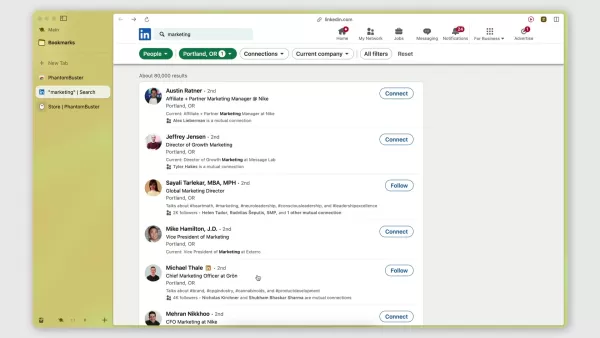
The first step in your journey to automate your LinkedIn outreach is to pinpoint your target audience. Fire up LinkedIn and start searching for those you want to connect with. For example, if you're aiming to connect with marketing gurus in Portland, Oregon, type in keywords like 'marketing' and 'Portland'. This initial search is crucial as it helps you zero in on the right people to engage with.
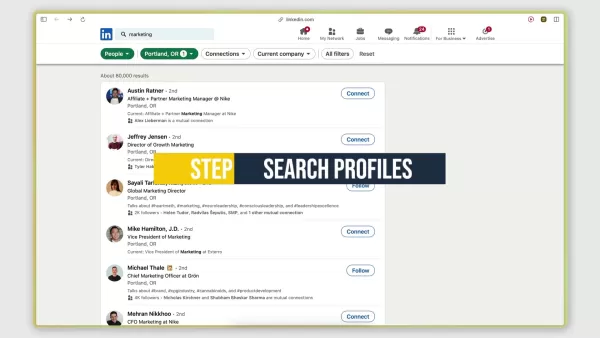
Using targeted keywords is key to attracting marketing professionals who are more likely to resonate with your brand and be interested in your products. Once your search results are in, your goal is to reach out to each person with a personalized connection request, accompanied by a note that's tailored to their profile. By refining your search, you set the stage for more effective profile extraction, AI-powered lead enrichment, and successful connections.
LinkedIn is a goldmine for marketing professionals. The more targeted your connection request, the better the chances of getting a positive response. Remember, the right keywords and personalized connection requests are the backbone of a successful marketing campaign.
Step 2: Extracting LinkedIn Profiles Using PhantomBuster
To automate the extraction of LinkedIn profiles, you'll want to use a tool like PhantomBuster. This handy tool helps you collect and organize the results of your LinkedIn search in a structured way.
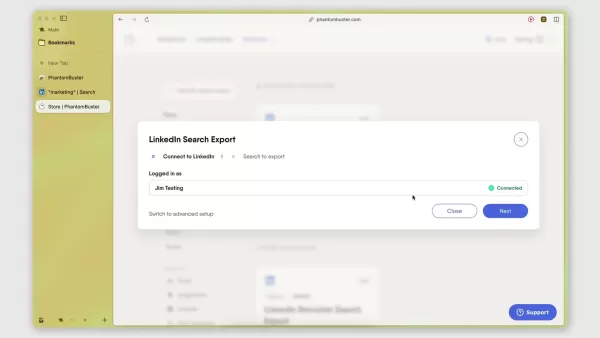
Start by connecting PhantomBuster to your LinkedIn account through its Chrome extension for seamless integration. Once connected, you can use the 'LinkedIn Search Export' Phantom to scrape and export your search results into a spreadsheet. Name your search something like 'Marketing Professionals Portland' and paste the LinkedIn search URL into PhantomBuster. Adjust the settings to limit the number of profiles extracted per launch (say, 10) to stay within LinkedIn's daily limits. Launch the automation, and PhantomBuster will navigate through the search pages, scraping the necessary data. Once done, export the profiles from LinkedIn to PhantomBuster.
PhantomBuster offers a free trial, perfect for testing the waters. Just be mindful of LinkedIn's scraping limits to avoid any account restrictions. Limiting the data extracted is a smart way to keep your LinkedIn account safe.
Step 3: AI-Powered Lead Enrichment for Personalized Connection Requests
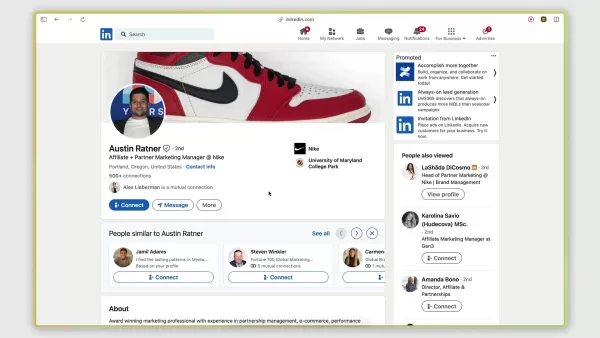
After extracting LinkedIn profiles, it's time to use the AI LinkedIn Message Writer Phantom in PhantomBuster to generate personalized connection request messages. Choose a GPT model, like GPT 3.5 Turbo, and a prompt that aligns with your outreach goals. Crafting unique prompts is a great way to connect with other marketing professionals.
Here's an example of a unique LinkedIn connection request:
'As a seasoned professional in [industry], I'm always keen to connect with fellow experts like yourself, [First Name], [Last Name].'
Feature Description Model GPT 3.5 Turbo (or GPT 4) Purpose Generates personalized connection request messages Advantage Enhances engagement with unique, context-aware messaging
Feed relevant profile data like headlines, descriptions, and current job titles to the AI for context. This helps generate messages that resonate with each recipient. Keep it genuine and targeted, ensuring every note is personalized with relevant data. This increases the likelihood of these marketing professionals responding and becoming valuable connections in your network.
Step 4: Automating Connection Requests on LinkedIn
With your personalized messages ready, it's time to automate sending connection requests using PhantomBuster's LinkedIn Auto Connect Phantom.
Configure the Phantom by connecting it to your LinkedIn account and specifying the list of LinkedIn profiles to invite. Input a custom message and include placeholders for variables like first name to add a personal touch. Set clear goals for your message and ensure you're targeting the right kind of people to protect your brand.
Make sure your connection request message clearly states who you are and what your company does. Once everything is set, send away. As the automated connection requests are made, keep an eye out and respond appropriately to new connections on LinkedIn. This whole process helps you connect with the most relevant leads in your industry.
PhantomBuster: Weighing the Pros and Cons
Pros
- Streamlines LinkedIn profile extraction
- AI-powered lead enrichment with personalized messages
- Automates connection requests
Cons
- Potential risk of violating LinkedIn's terms of service if overused
- Dependence on third-party tool
FAQ
What is the best tool to automate LinkedIn connections?
PhantomBuster is a fantastic tool for automating LinkedIn connections. It streamlines profile extraction, lead enrichment using AI, and personalized connection requests.
What are some best keywords to use to attract marketing professionals?
Keywords like 'Marketing' and 'Marketing professional', along with your industry and a specific location such as a city or county, can help attract talent to your company's brand.
How can you protect your LinkedIn company account?
Using an automation tool like PhantomBuster ensures that your company account only scrapes the right leads and controls the rate of scraping. LinkedIn doesn't appreciate rapid scraping, so keeping it in check is crucial.
Related Questions
What is LinkedIn automation?
LinkedIn automation involves using tools and software to automate various tasks on LinkedIn, such as sending connection requests, liking posts, sending messages, and extracting data. It's a way to enhance LinkedIn lead generation for your company using tools like PhantomBuster.
How do you use LinkedIn automation for lead generation?
LinkedIn automation for lead generation focuses on finding, engaging, and converting potential customers efficiently. The key is to use software that automates outreach, helps with messaging, and builds an audience by sending appropriate content to your leads.
What are the benefits of using LinkedIn automation?
There are numerous benefits to automating your brand's LinkedIn account. From enhancing marketing efforts to targeting the right leads, LinkedIn automation can transform your company. Here are some key benefits:
- Enhanced Efficiency: Automate repetitive tasks, saving time and resources.
- Improved Lead Generation: Identify and engage with targeted prospects more effectively.
- Personalized Engagement: Deliver tailored messages to resonate with your audience.
- Data-Driven Optimization: Gain insights from automated activities to refine strategies.
- Increased Network Growth: Expand your professional network and build strategic partnerships.
Related article
 U.S. Stocks Hit Historic Milestone as AI and Aerospace Giants Prepare for Trillion-Dollar Debut
Elon Musk, Sam Altman, and Dario Amodei, three titans of the technology sector, are advancing toward initial public offerings for their respective ventures. With SpaceX, OpenAI, and Anthropic—three industry behemoths nearing trillion-dollar valuation
Swedish AI Startup Lovable Eyes $13.2 Billion Valuation After Major Funding Round
As AI-driven coding tools gain traction, Swedish startup Lovable has secured a major funding round. The company aims to raise $3 billion, potentially boosting its valuation to $13.2 billion—double the $6.6 billion recorded last December. Menlo Ventur
Google Tests Remy AI Agent for Gemini as Focus Shifts to User Control
According to Business Insider, Google is testing Remy, a new AI personal agent for Gemini. This tool aims to execute tasks on behalf of users, streamlining both professional workflows and daily routines.Currently, Remy is undergoing testing in an int
Related Special Topic Recommendations
Data Analysis
U.S. Stocks Hit Historic Milestone as AI and Aerospace Giants Prepare for Trillion-Dollar Debut
Elon Musk, Sam Altman, and Dario Amodei, three titans of the technology sector, are advancing toward initial public offerings for their respective ventures. With SpaceX, OpenAI, and Anthropic—three industry behemoths nearing trillion-dollar valuation
Swedish AI Startup Lovable Eyes $13.2 Billion Valuation After Major Funding Round
As AI-driven coding tools gain traction, Swedish startup Lovable has secured a major funding round. The company aims to raise $3 billion, potentially boosting its valuation to $13.2 billion—double the $6.6 billion recorded last December. Menlo Ventur
Google Tests Remy AI Agent for Gemini as Focus Shifts to User Control
According to Business Insider, Google is testing Remy, a new AI personal agent for Gemini. This tool aims to execute tasks on behalf of users, streamlining both professional workflows and daily routines.Currently, Remy is undergoing testing in an int
Related Special Topic Recommendations
Data Analysis
 Best AI Anomaly Detection Tools for KPI Monitoring across SaaS and Ecommerce Teams
2026 Latest Best Top-rated AI Anomaly Detection Tools for KPI Monitoring in SaaS and Ecommerce teams! XIX.AI has curated a powerful, game-changing collection based on rigorous real-world tests and weekly updated rankings. You’ll find detailed free vs paid comparison insights to help you identify the must-try solution that boosts productivity and unlocks your AI edge. Explore now!
 10 tools
 xix.ai
writing
Best AI Outline Generators for Long-Form SEO Articles
xix.ai
writing
Best AI Outline Generators for Long-Form SEO Articles
2026 Latest Best Top-Rated AI Outline Generators for Long-Form SEO Articles, meticulously curated by XIX.AI. These powerful tools offer game-changing assistance in creating high-quality content quickly, boosting writing efficiency significantly. Get a free vs paid comparison along with real-world tests and detailed rankings to help you find the must-try option that suits your needs. Explore now to unlock your AI edge.
8 tools
xix.ai
Education and Learning
AI Study Tools for Homework and Exam Prep
2026 Latest Best AI Study Tools for Homework and Exam Prep! XIX.AI curates a top-rated list of powerful, game-changing tools that help students boost productivity, streamline homework completion, and ace exams through real-world tests. Get a free vs paid comparison, detailed rankings, and must-try options to unlock your AI edge. Explore now!
10 tools
xix.ai
Music composition
AI Vocal Demo Tools for Songwriters, Hooks, Toplines, and Multilingual Draft Sessions
2026 Latest Best AI Vocal Demo Tools for Songwriters, Hook Creators, and Multi-Language Content Teams! XIX.AI has curated a top-rated list of powerful game-changing tools that go through rigorous real-world tests. You’ll find detailed free vs paid comparison data, comprehensive rankings, and must-try options to help you boost writing efficiency and unlock your creative potential. Explore now to discover your perfect tool for all your content needs!
9 tools
xix.ai
Business
Best AI Competitive Research Tools for Small Businesses
2026 Latest Best Top-rated AI Competitive Research Tools for Small Businesses! XIX.AI has curated a highly powerful game-changing collection, updated weekly with rigorous real-world tests and detailed rankings. You can find a comprehensive free vs paid comparison to help you identify the must-try tools that boost your productivity and give you a competitive edge. Explore now to discover your perfect tool!
9 tools
xix.ai
Image editing
Photoshop AI Retouch Tools for Ecommerce Apparel, Skin Cleanup, and Color Consistency
2026 Latest Best Photoshop AI retouch tools for ecommerce apparel, skin cleanup, and color consistency! This top-rated curated list features powerful game-changing solutions that help you boost writing efficiency, streamline content creation, and achieve perfect visual results effortlessly. Each tool has undergone real-world tests through weekly updated rankings, complete with free vs paid comparison details. Backed by XIX.AI, it’s the must-try guide for anyone aiming to unlock your AI edge. Explore now!
10 tools
xix.ai

 Comments (9)
0/500
Comments (9)
0/500
![StevenSanchez]()
Just tried this AI tool for LinkedIn outreach and it's a total game-changer! No more copy-pasting generic messages. The personalization feels so natural, like having a virtual assistant who actually gets your networking style. Saves me hours each week! 😎
![ThomasMiller]()
Ah les messages personnalisés par IA pour LinkedIn 😅 L'idée est intelligente, mais ça accentue le côté 'robot relationnel' non ? À force, on va tous se contacter sans même s'en rendre compte... Perso j'y vois un outil utile pour les pros, mais l'automatisation à outrance risque de vider un peu plus les échanges de leur authenticité. À utiliser avec parcimonie !
![JonathanMiller]()
Endlich mal was Neues für LinkedIn! 🤖 Der Algorithmus scheint echt zu verstehen, wie man personalisierte Nachrichten schreibt. Aber ich frage mich, ob das am Ende nicht zu viel Spam erzeugt... Hoffentlich bleibt die menschliche Note nicht auf der Strecke. 👀
![LarryJones]()
This AI stuff for LinkedIn sounds cool, but isn’t it just making bots better at spamming? I’d rather get a real message than some fancy auto-generated one, no matter how ‘personalized’ it is. 🥱
![FrankSmith]()
맞춤형 메시지를 사용한 자동 LinkedIn 연결 요청은 정말 대단했어요. 시간을 많이 절약할 수 있어서 업무 효율성이 올라갔죠. 하지만 너무 많은 요청을 보내면 피로감을 줄 수 있겠더라구요.
![CharlesWhite]()
La herramienta de mensajes personalizados para LinkedIn es una maravilla. Realmente me ha ayudado a aumentar las respuestas, pero siento que el tono puede parecer demasiado mecánico a veces. ¡Más naturalidad sería perfecto!
In the hustle and bustle of today's digital world, automating your networking efforts on LinkedIn can be a game-changer. This blog post dives into the nitty-gritty of using artificial intelligence to streamline your LinkedIn connection requests with personalized messages. By automating your LinkedIn outreach, you can supercharge your network and boost professional engagement. We'll walk you through the process of using tools to find leads, extract profile data, and craft unique connection requests, all while leveraging AI for smarter networking strategies.
Key Points
- Automate LinkedIn connection requests with AI-generated messages.
- Find targeted leads on LinkedIn using effective search strategies.
- Extract profile data to personalize your outreach.
- Utilize PhantomBuster for automated profile enrichment and connection.
- Create and customize AI prompts for unique and relevant messaging.
Automating LinkedIn Connections with AI: A Step-by-Step Guide
Step 1: Searching LinkedIn Profiles for Targeted Leads
The first step in your journey to automate your LinkedIn outreach is to pinpoint your target audience. Fire up LinkedIn and start searching for those you want to connect with. For example, if you're aiming to connect with marketing gurus in Portland, Oregon, type in keywords like 'marketing' and 'Portland'. This initial search is crucial as it helps you zero in on the right people to engage with.
Using targeted keywords is key to attracting marketing professionals who are more likely to resonate with your brand and be interested in your products. Once your search results are in, your goal is to reach out to each person with a personalized connection request, accompanied by a note that's tailored to their profile. By refining your search, you set the stage for more effective profile extraction, AI-powered lead enrichment, and successful connections.
LinkedIn is a goldmine for marketing professionals. The more targeted your connection request, the better the chances of getting a positive response. Remember, the right keywords and personalized connection requests are the backbone of a successful marketing campaign.
Step 2: Extracting LinkedIn Profiles Using PhantomBuster
To automate the extraction of LinkedIn profiles, you'll want to use a tool like PhantomBuster. This handy tool helps you collect and organize the results of your LinkedIn search in a structured way.
Start by connecting PhantomBuster to your LinkedIn account through its Chrome extension for seamless integration. Once connected, you can use the 'LinkedIn Search Export' Phantom to scrape and export your search results into a spreadsheet. Name your search something like 'Marketing Professionals Portland' and paste the LinkedIn search URL into PhantomBuster. Adjust the settings to limit the number of profiles extracted per launch (say, 10) to stay within LinkedIn's daily limits. Launch the automation, and PhantomBuster will navigate through the search pages, scraping the necessary data. Once done, export the profiles from LinkedIn to PhantomBuster.
PhantomBuster offers a free trial, perfect for testing the waters. Just be mindful of LinkedIn's scraping limits to avoid any account restrictions. Limiting the data extracted is a smart way to keep your LinkedIn account safe.
Step 3: AI-Powered Lead Enrichment for Personalized Connection Requests
After extracting LinkedIn profiles, it's time to use the AI LinkedIn Message Writer Phantom in PhantomBuster to generate personalized connection request messages. Choose a GPT model, like GPT 3.5 Turbo, and a prompt that aligns with your outreach goals. Crafting unique prompts is a great way to connect with other marketing professionals.
Here's an example of a unique LinkedIn connection request:
'As a seasoned professional in [industry], I'm always keen to connect with fellow experts like yourself, [First Name], [Last Name].'
| Feature | Description |
|---|---|
| Model | GPT 3.5 Turbo (or GPT 4) |
| Purpose | Generates personalized connection request messages |
| Advantage | Enhances engagement with unique, context-aware messaging |
Feed relevant profile data like headlines, descriptions, and current job titles to the AI for context. This helps generate messages that resonate with each recipient. Keep it genuine and targeted, ensuring every note is personalized with relevant data. This increases the likelihood of these marketing professionals responding and becoming valuable connections in your network.
Step 4: Automating Connection Requests on LinkedIn
With your personalized messages ready, it's time to automate sending connection requests using PhantomBuster's LinkedIn Auto Connect Phantom.
Configure the Phantom by connecting it to your LinkedIn account and specifying the list of LinkedIn profiles to invite. Input a custom message and include placeholders for variables like first name to add a personal touch. Set clear goals for your message and ensure you're targeting the right kind of people to protect your brand.
Make sure your connection request message clearly states who you are and what your company does. Once everything is set, send away. As the automated connection requests are made, keep an eye out and respond appropriately to new connections on LinkedIn. This whole process helps you connect with the most relevant leads in your industry.
PhantomBuster: Weighing the Pros and Cons
Pros
- Streamlines LinkedIn profile extraction
- AI-powered lead enrichment with personalized messages
- Automates connection requests
Cons
- Potential risk of violating LinkedIn's terms of service if overused
- Dependence on third-party tool
FAQ
What is the best tool to automate LinkedIn connections?
PhantomBuster is a fantastic tool for automating LinkedIn connections. It streamlines profile extraction, lead enrichment using AI, and personalized connection requests.
What are some best keywords to use to attract marketing professionals?
Keywords like 'Marketing' and 'Marketing professional', along with your industry and a specific location such as a city or county, can help attract talent to your company's brand.
How can you protect your LinkedIn company account?
Using an automation tool like PhantomBuster ensures that your company account only scrapes the right leads and controls the rate of scraping. LinkedIn doesn't appreciate rapid scraping, so keeping it in check is crucial.
Related Questions
What is LinkedIn automation?
LinkedIn automation involves using tools and software to automate various tasks on LinkedIn, such as sending connection requests, liking posts, sending messages, and extracting data. It's a way to enhance LinkedIn lead generation for your company using tools like PhantomBuster.
How do you use LinkedIn automation for lead generation?
LinkedIn automation for lead generation focuses on finding, engaging, and converting potential customers efficiently. The key is to use software that automates outreach, helps with messaging, and builds an audience by sending appropriate content to your leads.
What are the benefits of using LinkedIn automation?
There are numerous benefits to automating your brand's LinkedIn account. From enhancing marketing efforts to targeting the right leads, LinkedIn automation can transform your company. Here are some key benefits:
- Enhanced Efficiency: Automate repetitive tasks, saving time and resources.
- Improved Lead Generation: Identify and engage with targeted prospects more effectively.
- Personalized Engagement: Deliver tailored messages to resonate with your audience.
- Data-Driven Optimization: Gain insights from automated activities to refine strategies.
- Increased Network Growth: Expand your professional network and build strategic partnerships.








 U.S. Stocks Hit Historic Milestone as AI and Aerospace Giants Prepare for Trillion-Dollar Debut
Elon Musk, Sam Altman, and Dario Amodei, three titans of the technology sector, are advancing toward initial public offerings for their respective ventures. With SpaceX, OpenAI, and Anthropic—three industry behemoths nearing trillion-dollar valuation
U.S. Stocks Hit Historic Milestone as AI and Aerospace Giants Prepare for Trillion-Dollar Debut
Elon Musk, Sam Altman, and Dario Amodei, three titans of the technology sector, are advancing toward initial public offerings for their respective ventures. With SpaceX, OpenAI, and Anthropic—three industry behemoths nearing trillion-dollar valuation
 Swedish AI Startup Lovable Eyes $13.2 Billion Valuation After Major Funding Round
As AI-driven coding tools gain traction, Swedish startup Lovable has secured a major funding round. The company aims to raise $3 billion, potentially boosting its valuation to $13.2 billion—double the $6.6 billion recorded last December. Menlo Ventur
Google Tests Remy AI Agent for Gemini as Focus Shifts to User Control
According to Business Insider, Google is testing Remy, a new AI personal agent for Gemini. This tool aims to execute tasks on behalf of users, streamlining both professional workflows and daily routines.Currently, Remy is undergoing testing in an int
Swedish AI Startup Lovable Eyes $13.2 Billion Valuation After Major Funding Round
As AI-driven coding tools gain traction, Swedish startup Lovable has secured a major funding round. The company aims to raise $3 billion, potentially boosting its valuation to $13.2 billion—double the $6.6 billion recorded last December. Menlo Ventur
Google Tests Remy AI Agent for Gemini as Focus Shifts to User Control
According to Business Insider, Google is testing Remy, a new AI personal agent for Gemini. This tool aims to execute tasks on behalf of users, streamlining both professional workflows and daily routines.Currently, Remy is undergoing testing in an int

2026 Latest Best Top-rated AI Anomaly Detection Tools for KPI Monitoring in SaaS and Ecommerce teams! XIX.AI has curated a powerful, game-changing collection based on rigorous real-world tests and weekly updated rankings. You’ll find detailed free vs paid comparison insights to help you identify the must-try solution that boosts productivity and unlocks your AI edge. Explore now!
10 tools
xix.ai

2026 Latest Best Top-Rated AI Outline Generators for Long-Form SEO Articles, meticulously curated by XIX.AI. These powerful tools offer game-changing assistance in creating high-quality content quickly, boosting writing efficiency significantly. Get a free vs paid comparison along with real-world tests and detailed rankings to help you find the must-try option that suits your needs. Explore now to unlock your AI edge.
8 tools
xix.ai

2026 Latest Best AI Study Tools for Homework and Exam Prep! XIX.AI curates a top-rated list of powerful, game-changing tools that help students boost productivity, streamline homework completion, and ace exams through real-world tests. Get a free vs paid comparison, detailed rankings, and must-try options to unlock your AI edge. Explore now!
10 tools
xix.ai

2026 Latest Best AI Vocal Demo Tools for Songwriters, Hook Creators, and Multi-Language Content Teams! XIX.AI has curated a top-rated list of powerful game-changing tools that go through rigorous real-world tests. You’ll find detailed free vs paid comparison data, comprehensive rankings, and must-try options to help you boost writing efficiency and unlock your creative potential. Explore now to discover your perfect tool for all your content needs!
9 tools
xix.ai

2026 Latest Best Top-rated AI Competitive Research Tools for Small Businesses! XIX.AI has curated a highly powerful game-changing collection, updated weekly with rigorous real-world tests and detailed rankings. You can find a comprehensive free vs paid comparison to help you identify the must-try tools that boost your productivity and give you a competitive edge. Explore now to discover your perfect tool!
9 tools
xix.ai

2026 Latest Best Photoshop AI retouch tools for ecommerce apparel, skin cleanup, and color consistency! This top-rated curated list features powerful game-changing solutions that help you boost writing efficiency, streamline content creation, and achieve perfect visual results effortlessly. Each tool has undergone real-world tests through weekly updated rankings, complete with free vs paid comparison details. Backed by XIX.AI, it’s the must-try guide for anyone aiming to unlock your AI edge. Explore now!
10 tools
xix.ai

Just tried this AI tool for LinkedIn outreach and it's a total game-changer! No more copy-pasting generic messages. The personalization feels so natural, like having a virtual assistant who actually gets your networking style. Saves me hours each week! 😎
Ah les messages personnalisés par IA pour LinkedIn 😅 L'idée est intelligente, mais ça accentue le côté 'robot relationnel' non ? À force, on va tous se contacter sans même s'en rendre compte... Perso j'y vois un outil utile pour les pros, mais l'automatisation à outrance risque de vider un peu plus les échanges de leur authenticité. À utiliser avec parcimonie !
Endlich mal was Neues für LinkedIn! 🤖 Der Algorithmus scheint echt zu verstehen, wie man personalisierte Nachrichten schreibt. Aber ich frage mich, ob das am Ende nicht zu viel Spam erzeugt... Hoffentlich bleibt die menschliche Note nicht auf der Strecke. 👀
This AI stuff for LinkedIn sounds cool, but isn’t it just making bots better at spamming? I’d rather get a real message than some fancy auto-generated one, no matter how ‘personalized’ it is. 🥱
맞춤형 메시지를 사용한 자동 LinkedIn 연결 요청은 정말 대단했어요. 시간을 많이 절약할 수 있어서 업무 효율성이 올라갔죠. 하지만 너무 많은 요청을 보내면 피로감을 줄 수 있겠더라구요.
La herramienta de mensajes personalizados para LinkedIn es una maravilla. Realmente me ha ayudado a aumentar las respuestas, pero siento que el tono puede parecer demasiado mecánico a veces. ¡Más naturalidad sería perfecto!












