


 Home
HomeAnthropic's Claude AI Analyzes and Generates Color Palettes
In the world of creative design, color is a powerful tool for evoking emotions, establishing mood, and building brand identity. Yet, the process of choosing and harmonizing colors can be complex and laborious. The emergence of artificial intelligence has dramatically simplified this task. This article explores the innovative application of Anthropic's Claude, a sophisticated AI model, for analyzing and extracting color schemes from images, revolutionizing the creative process for designers, artists, and creative professionals.
Key Points
Anthropic's Claude is a large language model (LLM) capable of analyzing color palettes.
The 'INSANE' prompt enables the efficient extraction of color palettes complete with hex codes.
Claude produces visual representations (artifacts) of color palettes for straightforward human comprehension.
A workflow using the 'CA' prompt allows for multiple image analyses within a single session.
The process helps develop a keener eye for color through repeated exposure to curated palettes.
Understanding Claude AI and Color Palette Analysis
What is Claude by Anthropic?
Claude is a large language model (LLM) created by Anthropic, a company dedicated to developing dependable and understandable AI systems. Like other leading LLMs such as ChatGPT, Claude is skilled at comprehending and producing human-like text. It sets itself apart through a strong focus on safety, ethical considerations, and a conversational style. In creative fields, Claude's capacity to analyze and interpret visual data, including images, creates new opportunities for design and art direction. It is important to highlight that Claude uses code within chat to generate visual outputs, giving it a unique advantage in managing visual projects.
One practical use is pulling color palettes from images. Color palette analysis involves pinpointing the main colors in a picture and forming a cohesive color set suitable for diverse design projects like branding, web design, or interior decorating. Historically, this required manual selection and tweaking, which could be subjective and slow. AI-driven tools like Claude offer a more objective, efficient, and data-informed method.
The Importance of Color Palettes in Design
Color palettes are crucial in design for multiple reasons:
- Brand Identity: Colors help shape a brand's character and ensure a uniform visual identity.
- Emotional Impact: Various colors trigger different feelings and can shape how audiences interpret a design.
- Visual Harmony: Well-selected color combinations foster balance and aesthetic appeal.
In fashion and editorial contexts, color schemes are vital for producing unified and striking visuals. Studying and recreating effective color combinations from editorial photographs can offer immense inspiration and direction for designers and art directors. Tools like Claude AI equip creatives to explore color subtleties more deeply and uncover new creative avenues.
Streamlining Color Palette Extraction with Claude: A Step-by-Step Guide
The 'INSANE' Prompt: A Game Changer
Central to Claude's color analysis ability is a meticulously designed prompt that prompts precise and aesthetically pleasing outcomes. Known as the 'INSANE' prompt, it directs Claude to:
- Analyze the photo: Scrutinize the image to identify its primary colors.
- Create a color palette with hex codes: Develop a set of hex codes that faithfully represent the image's dominant colors.
- Create a visual Artifact: Generate a visual depiction of the color palette, showing the colors as squares alongside their hex codes.
- Ensure human readability: Display the visual artifact in a manner that is clear and accessible for people.
By offering explicit and detailed directions, the 'INSANE' prompt guarantees that Claude produces high-fidelity color palettes that are both accurate and visually clear.
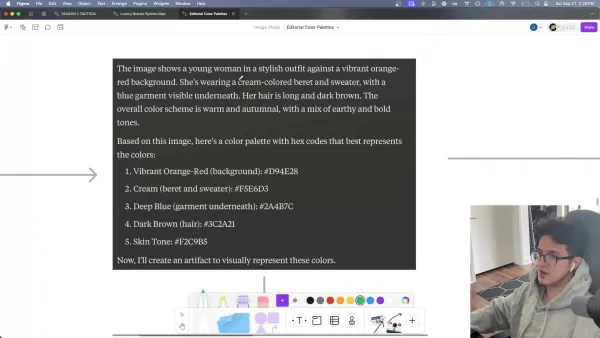
The prompt reads:
Analyze this photo and then create a color palette with hex codes that best represents the colors in the photo.After you generate the hex codes, create an artifact with the colors displayed in squares with the ACTUAL COLORS associated with the codes. Create a visual representation that is easy for a human to see and understand.
This prompt is configured to execute code in the chat, resulting in what Claude calls an artifact—a rendered visual depiction of the code.
Analyzing Single Photos with the 'INSANE' Prompt
To analyze a single image with the 'INSANE' prompt, adhere to these steps:
- Access Claude AI: Go to the Claude AI platform (claude.ai) and set up a free account.
- Upload the image: Upload the editorial photograph you wish to analyze.
- Enter the 'INSANE' prompt: Input or copy the 'INSANE' prompt into the chat interface.
- Run the analysis: Send the message and allow Claude to process the image.
Claude will then provide a comprehensive analysis of the photo, including a description, a color palette with hex codes, and a visual representation of the palette. This visual output can be easily exported for future applications.
For example, analyzing a Ralph Lauren campaign image of Winter from Aespa results in a palette that includes the vibrant orange-red background, cream beret and sweater, deep blue garment, dark brown hair, and skin tone.
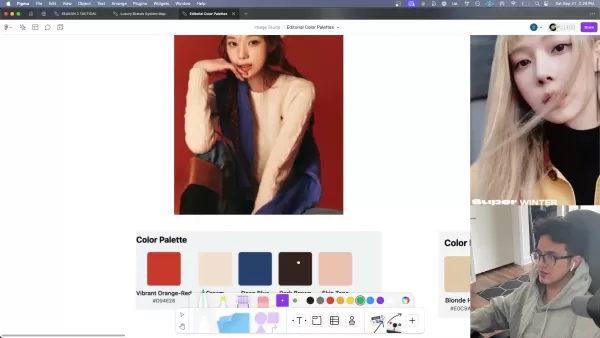
This extracted color scheme offers a starting point for crafting designs that mirror the original photo's aesthetic.
Analyzing Multiple Photos: The 'CA' Workflow
To efficiently analyze several images in one session, you can adopt a workflow that utilizes Claude's capability to retain and apply instructions. This method involves establishing a quick command, 'CA' (Color Analysis), and employing it to start each subsequent analysis.
- Define the 'CA' command: After the initial analysis using the 'INSANE' prompt, tell Claude you will now call the process 'CA'. For instance, state:
That was perfect. Now I will refer to our workflow as "CA" for Color Analysis.
- Instruct Claude on workflow usage: Once the workflow is defined, provide a concise instruction covering all necessary steps.
To save time, I will give you a photo and say "CA:". Then you will proceed with the analysis and artifact creation. Are you ready?
Claude will confirm its understanding of your workflow. From then on, simply upload a photo and type "CA:". Claude will conduct the color analysis and provide the corresponding code.
This method considerably cuts down on typing for each image analysis, enabling you to swiftly accumulate a collection of color palettes.
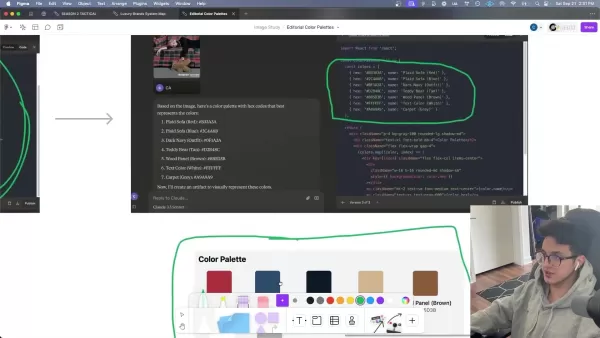
Each image is rapidly converted into a high-quality color palette and functional code.
Workflow Demonstration: Winter from Aespa Editorial Photos
To demonstrate the 'CA' workflow, consider a set of editorial photos featuring Winter from Aespa in Ralph Lauren attire. By uploading each photo and entering 'CA:', Claude produces a distinct color palette that reflects the image's spirit. For instance:
- A photo with blonde hair yields a palette encompassing blonde hair, skin tone, black (top), brown (jacket), and grey background.
- A photo of Winter on a plaid couch with a teddy bear features colors from the plaid sofa, navy outfit, teddy bear tan, wood panel, and grey carpet.
- A photo of Winter in black and denim generates a palette with black jacket, light blue shirt, denim blue jeans, silver (belt buckle), skin tone, and white (text/background).

This workflow permits fast and uniform extraction of color schemes from numerous images, supplying designers and art directors with a valuable source of inspiration and reference.
Using Claude to Develop Your Eye for Color
Building Your Color Library
Claude is highly effective for assembling a color palette library. After finishing the color analysis as described, the subsequent step is to save both the image and its palette to a tool like Figma. Once you have a catalog of palettes, you will have abundant choices for future projects. Regularly reviewing these palettes can also serve as a continual source of creative inspiration.
Claude AI for Color Palette Analysis: Pros and Cons
Pros
Quick and precise extraction of color palettes from images
Produces visual artifacts that are easily understood
Simplifies the process of analyzing numerous photos in one go
Improves the user's perception of color harmony and relationships
Cons
Depends on a well-structured prompt for best outcomes
Might need some technical familiarity to understand the generated code
Over-reliance on AI could potentially hinder human intuition and creativity
Possible biases in color interpretation due to the model's training data
FAQ
What is Anthropic?
Anthropic is an AI safety and research organization focused on creating reliable, interpretable, and controllable AI systems.
What is Claude AI?
Claude is a modern AI assistant designed for task management, accessible through conversational prompts.
What is a color palette?
In visual design, a color palette refers to a coordinated set of colors applied consistently across various elements.
What do hex codes do?
Hex color codes specify colors using hexadecimal values. Each code is a hex triplet, representing the intensity of three base colors.
Related Questions
How can AI enhance creative direction and art direction?
AI is reshaping creative and art direction by offering capabilities for:Automated Analysis: Detecting design trends, color patterns, and visual themes from extensive data collections.Personalized Recommendations: Delivering customized suggestions aligned with user tastes and project needs.Creative Support: Generating design alternatives, mock-ups, and prototypes to experiment with new concepts.Workflow Efficiency: Automating routine tasks so creative professionals can concentrate on strategic decision-making.By integrating AI, creative and art directors can enhance their output, achieve greater efficiency, and maintain a competitive edge in a fast-changing field.
Related article
 Suno to Watermark Songs Amid Legal Battles
Suno, the platform enabling users to generate AI-created music, has unveiled new features to label platform-produced tracks, restrict downloads, and update community standards to curb unauthorized replicas. These updates arrive as Suno confronts mult
Musk Admits Grok Build Leaked User Code, Promises to Erase All Historical Data
Elon Musk directly addressed the privacy controversy surrounding Grok Build, beginning with a simple "True" to confirm the incident's validity. He pledged that all user data previously uploaded to SpaceXAI would be permanently erased, stating, "not a
U.S. Stocks Hit Historic Milestone as AI and Aerospace Giants Prepare for Trillion-Dollar Debut
Elon Musk, Sam Altman, and Dario Amodei, three titans of the technology sector, are advancing toward initial public offerings for their respective ventures. With SpaceX, OpenAI, and Anthropic—three industry behemoths nearing trillion-dollar valuation
Related Special Topic Recommendations
SEO
Suno to Watermark Songs Amid Legal Battles
Suno, the platform enabling users to generate AI-created music, has unveiled new features to label platform-produced tracks, restrict downloads, and update community standards to curb unauthorized replicas. These updates arrive as Suno confronts mult
Musk Admits Grok Build Leaked User Code, Promises to Erase All Historical Data
Elon Musk directly addressed the privacy controversy surrounding Grok Build, beginning with a simple "True" to confirm the incident's validity. He pledged that all user data previously uploaded to SpaceXAI would be permanently erased, stating, "not a
U.S. Stocks Hit Historic Milestone as AI and Aerospace Giants Prepare for Trillion-Dollar Debut
Elon Musk, Sam Altman, and Dario Amodei, three titans of the technology sector, are advancing toward initial public offerings for their respective ventures. With SpaceX, OpenAI, and Anthropic—three industry behemoths nearing trillion-dollar valuation
Related Special Topic Recommendations
SEO
 Best AI SERP Analysis Tools for Search Strategy
2026 Latest Best Top-rated AI SERP Analysis Tools for Search Strategy are curated by XIX.AI through rigorous real-world tests and weekly updated rankings. These powerful tools help you unlock hidden optimization opportunities, boost content performance, and gain a competitive edge in search. Discover your perfect tool to elevate your search strategy today. Explore now!
 13 tools
 xix.ai
Data Analysis
Best AI Anomaly Detection Tools for KPI Monitoring across SaaS and Ecommerce Teams
xix.ai
Data Analysis
Best AI Anomaly Detection Tools for KPI Monitoring across SaaS and Ecommerce Teams
2026 Latest Best Top-rated AI Anomaly Detection Tools for KPI Monitoring in SaaS and Ecommerce teams! XIX.AI has curated a powerful, game-changing collection based on rigorous real-world tests and weekly updated rankings. You’ll find detailed free vs paid comparison insights to help you identify the must-try solution that boosts productivity and unlocks your AI edge. Explore now!
10 tools
xix.ai
writing
Best AI Outline Generators for Long-Form SEO Articles
2026 Latest Best Top-Rated AI Outline Generators for Long-Form SEO Articles, meticulously curated by XIX.AI. These powerful tools offer game-changing assistance in creating high-quality content quickly, boosting writing efficiency significantly. Get a free vs paid comparison along with real-world tests and detailed rankings to help you find the must-try option that suits your needs. Explore now to unlock your AI edge.
8 tools
xix.ai
Education and Learning
AI Study Tools for Homework and Exam Prep
2026 Latest Best AI Study Tools for Homework and Exam Prep! XIX.AI curates a top-rated list of powerful, game-changing tools that help students boost productivity, streamline homework completion, and ace exams through real-world tests. Get a free vs paid comparison, detailed rankings, and must-try options to unlock your AI edge. Explore now!
10 tools
xix.ai
Music composition
AI Vocal Demo Tools for Songwriters, Hooks, Toplines, and Multilingual Draft Sessions
2026 Latest Best AI Vocal Demo Tools for Songwriters, Hook Creators, and Multi-Language Content Teams! XIX.AI has curated a top-rated list of powerful game-changing tools that go through rigorous real-world tests. You’ll find detailed free vs paid comparison data, comprehensive rankings, and must-try options to help you boost writing efficiency and unlock your creative potential. Explore now to discover your perfect tool for all your content needs!
9 tools
xix.ai
Business
Best AI Competitive Research Tools for Small Businesses
2026 Latest Best Top-rated AI Competitive Research Tools for Small Businesses! XIX.AI has curated a highly powerful game-changing collection, updated weekly with rigorous real-world tests and detailed rankings. You can find a comprehensive free vs paid comparison to help you identify the must-try tools that boost your productivity and give you a competitive edge. Explore now to discover your perfect tool!
9 tools
xix.ai

 Comments (3)
0/500
Comments (3)
0/500
![AlbertWalker]()
Wait, so Claude can generate color palettes now? Sure, the article makes it sound revolutionary, but let's be real — I've seen enough random hex codes thrown at me by various tools that look like a toddler's finger painting. Unless it can explain why I should pair neon green with dusty rose for my startup's logo, I'm staying skeptical. 😅
![BruceGonzalez]()
Клауд от Anthropic в дизайне? Интересно, но не заменит ли это полностью работу дизайнеров? 🤔 Технологии развиваются так быстро, что начинаешь волноваться о будущем творческих профессий. Хотя для быстрых проектов, наверное, удобно.
![HarryPerez]()
Никогда бы не подумал, что нейросети могут так уверенно работать с цветами! В статье про Claude хорошо описано, как ИИ помогает дизайнерам - уже представляет, как такие модели могут анализировать рекламные плакаты или подбирать оттенки под настроение текста. Интересно, приведёт ли такой подход к усреднению визуалов 🤔
In the world of creative design, color is a powerful tool for evoking emotions, establishing mood, and building brand identity. Yet, the process of choosing and harmonizing colors can be complex and laborious. The emergence of artificial intelligence has dramatically simplified this task. This article explores the innovative application of Anthropic's Claude, a sophisticated AI model, for analyzing and extracting color schemes from images, revolutionizing the creative process for designers, artists, and creative professionals.
Key Points
Anthropic's Claude is a large language model (LLM) capable of analyzing color palettes.
The 'INSANE' prompt enables the efficient extraction of color palettes complete with hex codes.
Claude produces visual representations (artifacts) of color palettes for straightforward human comprehension.
A workflow using the 'CA' prompt allows for multiple image analyses within a single session.
The process helps develop a keener eye for color through repeated exposure to curated palettes.
Understanding Claude AI and Color Palette Analysis
What is Claude by Anthropic?
Claude is a large language model (LLM) created by Anthropic, a company dedicated to developing dependable and understandable AI systems. Like other leading LLMs such as ChatGPT, Claude is skilled at comprehending and producing human-like text. It sets itself apart through a strong focus on safety, ethical considerations, and a conversational style. In creative fields, Claude's capacity to analyze and interpret visual data, including images, creates new opportunities for design and art direction. It is important to highlight that Claude uses code within chat to generate visual outputs, giving it a unique advantage in managing visual projects.
One practical use is pulling color palettes from images. Color palette analysis involves pinpointing the main colors in a picture and forming a cohesive color set suitable for diverse design projects like branding, web design, or interior decorating. Historically, this required manual selection and tweaking, which could be subjective and slow. AI-driven tools like Claude offer a more objective, efficient, and data-informed method.
The Importance of Color Palettes in Design
Color palettes are crucial in design for multiple reasons:
- Brand Identity: Colors help shape a brand's character and ensure a uniform visual identity.
- Emotional Impact: Various colors trigger different feelings and can shape how audiences interpret a design.
- Visual Harmony: Well-selected color combinations foster balance and aesthetic appeal.
In fashion and editorial contexts, color schemes are vital for producing unified and striking visuals. Studying and recreating effective color combinations from editorial photographs can offer immense inspiration and direction for designers and art directors. Tools like Claude AI equip creatives to explore color subtleties more deeply and uncover new creative avenues.
Streamlining Color Palette Extraction with Claude: A Step-by-Step Guide
The 'INSANE' Prompt: A Game Changer
Central to Claude's color analysis ability is a meticulously designed prompt that prompts precise and aesthetically pleasing outcomes. Known as the 'INSANE' prompt, it directs Claude to:
- Analyze the photo: Scrutinize the image to identify its primary colors.
- Create a color palette with hex codes: Develop a set of hex codes that faithfully represent the image's dominant colors.
- Create a visual Artifact: Generate a visual depiction of the color palette, showing the colors as squares alongside their hex codes.
- Ensure human readability: Display the visual artifact in a manner that is clear and accessible for people.
By offering explicit and detailed directions, the 'INSANE' prompt guarantees that Claude produces high-fidelity color palettes that are both accurate and visually clear.
The prompt reads:
Analyze this photo and then create a color palette with hex codes that best represents the colors in the photo.After you generate the hex codes, create an artifact with the colors displayed in squares with the ACTUAL COLORS associated with the codes. Create a visual representation that is easy for a human to see and understand.
This prompt is configured to execute code in the chat, resulting in what Claude calls an artifact—a rendered visual depiction of the code.
Analyzing Single Photos with the 'INSANE' Prompt
To analyze a single image with the 'INSANE' prompt, adhere to these steps:
- Access Claude AI: Go to the Claude AI platform (claude.ai) and set up a free account.
- Upload the image: Upload the editorial photograph you wish to analyze.
- Enter the 'INSANE' prompt: Input or copy the 'INSANE' prompt into the chat interface.
- Run the analysis: Send the message and allow Claude to process the image.
Claude will then provide a comprehensive analysis of the photo, including a description, a color palette with hex codes, and a visual representation of the palette. This visual output can be easily exported for future applications.
For example, analyzing a Ralph Lauren campaign image of Winter from Aespa results in a palette that includes the vibrant orange-red background, cream beret and sweater, deep blue garment, dark brown hair, and skin tone.
This extracted color scheme offers a starting point for crafting designs that mirror the original photo's aesthetic.
Analyzing Multiple Photos: The 'CA' Workflow
To efficiently analyze several images in one session, you can adopt a workflow that utilizes Claude's capability to retain and apply instructions. This method involves establishing a quick command, 'CA' (Color Analysis), and employing it to start each subsequent analysis.
- Define the 'CA' command: After the initial analysis using the 'INSANE' prompt, tell Claude you will now call the process 'CA'. For instance, state:
That was perfect. Now I will refer to our workflow as "CA" for Color Analysis.
- Instruct Claude on workflow usage: Once the workflow is defined, provide a concise instruction covering all necessary steps.
To save time, I will give you a photo and say "CA:". Then you will proceed with the analysis and artifact creation. Are you ready?
Claude will confirm its understanding of your workflow. From then on, simply upload a photo and type "CA:". Claude will conduct the color analysis and provide the corresponding code.
This method considerably cuts down on typing for each image analysis, enabling you to swiftly accumulate a collection of color palettes.
Each image is rapidly converted into a high-quality color palette and functional code.
Workflow Demonstration: Winter from Aespa Editorial Photos
To demonstrate the 'CA' workflow, consider a set of editorial photos featuring Winter from Aespa in Ralph Lauren attire. By uploading each photo and entering 'CA:', Claude produces a distinct color palette that reflects the image's spirit. For instance:
- A photo with blonde hair yields a palette encompassing blonde hair, skin tone, black (top), brown (jacket), and grey background.
- A photo of Winter on a plaid couch with a teddy bear features colors from the plaid sofa, navy outfit, teddy bear tan, wood panel, and grey carpet.
- A photo of Winter in black and denim generates a palette with black jacket, light blue shirt, denim blue jeans, silver (belt buckle), skin tone, and white (text/background).
This workflow permits fast and uniform extraction of color schemes from numerous images, supplying designers and art directors with a valuable source of inspiration and reference.
Using Claude to Develop Your Eye for Color
Building Your Color Library
Claude is highly effective for assembling a color palette library. After finishing the color analysis as described, the subsequent step is to save both the image and its palette to a tool like Figma. Once you have a catalog of palettes, you will have abundant choices for future projects. Regularly reviewing these palettes can also serve as a continual source of creative inspiration.
Claude AI for Color Palette Analysis: Pros and Cons
Pros
Quick and precise extraction of color palettes from images
Produces visual artifacts that are easily understood
Simplifies the process of analyzing numerous photos in one go
Improves the user's perception of color harmony and relationships
Cons
Depends on a well-structured prompt for best outcomes
Might need some technical familiarity to understand the generated code
Over-reliance on AI could potentially hinder human intuition and creativity
Possible biases in color interpretation due to the model's training data
FAQ
What is Anthropic?
Anthropic is an AI safety and research organization focused on creating reliable, interpretable, and controllable AI systems.
What is Claude AI?
Claude is a modern AI assistant designed for task management, accessible through conversational prompts.
What is a color palette?
In visual design, a color palette refers to a coordinated set of colors applied consistently across various elements.
What do hex codes do?
Hex color codes specify colors using hexadecimal values. Each code is a hex triplet, representing the intensity of three base colors.
Related Questions
How can AI enhance creative direction and art direction?
AI is reshaping creative and art direction by offering capabilities for:Automated Analysis: Detecting design trends, color patterns, and visual themes from extensive data collections.Personalized Recommendations: Delivering customized suggestions aligned with user tastes and project needs.Creative Support: Generating design alternatives, mock-ups, and prototypes to experiment with new concepts.Workflow Efficiency: Automating routine tasks so creative professionals can concentrate on strategic decision-making.By integrating AI, creative and art directors can enhance their output, achieve greater efficiency, and maintain a competitive edge in a fast-changing field.








 Suno to Watermark Songs Amid Legal Battles
Suno, the platform enabling users to generate AI-created music, has unveiled new features to label platform-produced tracks, restrict downloads, and update community standards to curb unauthorized replicas. These updates arrive as Suno confronts mult
Suno to Watermark Songs Amid Legal Battles
Suno, the platform enabling users to generate AI-created music, has unveiled new features to label platform-produced tracks, restrict downloads, and update community standards to curb unauthorized replicas. These updates arrive as Suno confronts mult
 Musk Admits Grok Build Leaked User Code, Promises to Erase All Historical Data
Elon Musk directly addressed the privacy controversy surrounding Grok Build, beginning with a simple "True" to confirm the incident's validity. He pledged that all user data previously uploaded to SpaceXAI would be permanently erased, stating, "not a
Musk Admits Grok Build Leaked User Code, Promises to Erase All Historical Data
Elon Musk directly addressed the privacy controversy surrounding Grok Build, beginning with a simple "True" to confirm the incident's validity. He pledged that all user data previously uploaded to SpaceXAI would be permanently erased, stating, "not a
 U.S. Stocks Hit Historic Milestone as AI and Aerospace Giants Prepare for Trillion-Dollar Debut
Elon Musk, Sam Altman, and Dario Amodei, three titans of the technology sector, are advancing toward initial public offerings for their respective ventures. With SpaceX, OpenAI, and Anthropic—three industry behemoths nearing trillion-dollar valuation
U.S. Stocks Hit Historic Milestone as AI and Aerospace Giants Prepare for Trillion-Dollar Debut
Elon Musk, Sam Altman, and Dario Amodei, three titans of the technology sector, are advancing toward initial public offerings for their respective ventures. With SpaceX, OpenAI, and Anthropic—three industry behemoths nearing trillion-dollar valuation

2026 Latest Best Top-rated AI SERP Analysis Tools for Search Strategy are curated by XIX.AI through rigorous real-world tests and weekly updated rankings. These powerful tools help you unlock hidden optimization opportunities, boost content performance, and gain a competitive edge in search. Discover your perfect tool to elevate your search strategy today. Explore now!
13 tools
xix.ai

2026 Latest Best Top-rated AI Anomaly Detection Tools for KPI Monitoring in SaaS and Ecommerce teams! XIX.AI has curated a powerful, game-changing collection based on rigorous real-world tests and weekly updated rankings. You’ll find detailed free vs paid comparison insights to help you identify the must-try solution that boosts productivity and unlocks your AI edge. Explore now!
10 tools
xix.ai

2026 Latest Best Top-Rated AI Outline Generators for Long-Form SEO Articles, meticulously curated by XIX.AI. These powerful tools offer game-changing assistance in creating high-quality content quickly, boosting writing efficiency significantly. Get a free vs paid comparison along with real-world tests and detailed rankings to help you find the must-try option that suits your needs. Explore now to unlock your AI edge.
8 tools
xix.ai

2026 Latest Best AI Study Tools for Homework and Exam Prep! XIX.AI curates a top-rated list of powerful, game-changing tools that help students boost productivity, streamline homework completion, and ace exams through real-world tests. Get a free vs paid comparison, detailed rankings, and must-try options to unlock your AI edge. Explore now!
10 tools
xix.ai

2026 Latest Best AI Vocal Demo Tools for Songwriters, Hook Creators, and Multi-Language Content Teams! XIX.AI has curated a top-rated list of powerful game-changing tools that go through rigorous real-world tests. You’ll find detailed free vs paid comparison data, comprehensive rankings, and must-try options to help you boost writing efficiency and unlock your creative potential. Explore now to discover your perfect tool for all your content needs!
9 tools
xix.ai

2026 Latest Best Top-rated AI Competitive Research Tools for Small Businesses! XIX.AI has curated a highly powerful game-changing collection, updated weekly with rigorous real-world tests and detailed rankings. You can find a comprehensive free vs paid comparison to help you identify the must-try tools that boost your productivity and give you a competitive edge. Explore now to discover your perfect tool!
9 tools
xix.ai

Wait, so Claude can generate color palettes now? Sure, the article makes it sound revolutionary, but let's be real — I've seen enough random hex codes thrown at me by various tools that look like a toddler's finger painting. Unless it can explain why I should pair neon green with dusty rose for my startup's logo, I'm staying skeptical. 😅
Клауд от Anthropic в дизайне? Интересно, но не заменит ли это полностью работу дизайнеров? 🤔 Технологии развиваются так быстро, что начинаешь волноваться о будущем творческих профессий. Хотя для быстрых проектов, наверное, удобно.
Никогда бы не подумал, что нейросети могут так уверенно работать с цветами! В статье про Claude хорошо описано, как ИИ помогает дизайнерам - уже представляет, как такие модели могут анализировать рекламные плакаты или подбирать оттенки под настроение текста. Интересно, приведёт ли такой подход к усреднению визуалов 🤔












