


 Home
HomeAI-Powered App Design: Step-by-Step Guide Using Free Tools
Starting out in mobile app design can feel overwhelming, especially if you're not a seasoned designer. But here's the good news: artificial intelligence (AI) is here to help, offering user-friendly tools that can simplify the design journey. This guide is your roadmap to using AI to craft a functional and eye-catching mobile app, all while sticking to free (though limited) resources. Get ready to turn your app ideas into reality, complete with interactive prototypes, without spending a fortune.
Key Points
- Use Claude to gather requirements and brainstorm, ensuring your app meets user needs.
- Create diagrams and wireframes with UX Pilot and FigJam to map out your app's structure.
- Utilize Visily for UI design and prototyping to bring your app's interface to life.
- Plan your design carefully to maximize the use of free AI tools.
- Focus on essential features and user flows to develop an effective Minimum Viable Product (MVP).
- Develop a shareable prototype to showcase your app idea.
From Idea to Interactive Prototype: An AI-Assisted App Design Process
Step 1: Requirement Gathering and Ideation with Claude
The foundation of any successful app design project is understanding what's needed. This means pinpointing your target audience, core features, design preferences, and technical considerations. AI can make this process much quicker. For instance, you can use Claude to simulate client interactions and gather project requirements.
 Claude can act as a virtual client, providing valuable insights and feedback to shape your app's functionality and design.
Here's an example prompt you might use with Claude:
"I'm a UX designer, and you're the client. Give me requirements for a new project."
After getting those requirements from Claude, start with a simple approach to build your MVP. For example, when I asked Claude about a meal delivery app, it provided these key requirements:
- Target Audience: Busy professionals aged 25-45 in urban areas.
- Core Features: Customizable meal plans based on dietary preferences and restrictions, real-time order tracking, integration with popular fitness apps to sync nutritional data.
- Design Preferences: Clean, modern aesthetic, emphasis on high-quality food photography, intuitive navigation, minimizing the number of taps to place an order.
- Technical Requirements: iOS and Android versions, secure payment integration, push notifications for order updates and promotions.
- Key User Flows: New user onboarding, meal selection and customization, checkout process, delivery tracking.
- Unique Selling Points: Sourcing from local, organic farms, option for eco-friendly packaging, ability to rate and review meals.
- Budget: $100,000 for initial design and development timeline; four months to launch MVP.
Step 2: Diagramming and Wireframing with UX Pilot and FigJam
With a clear understanding of your app's requirements, it's time to visualize its structure and user flows. This involves creating diagrams and wireframes to outline the app's screens and interactions. Start by organizing your design features in FigJam, and enhance this process with the UX Pilot plugin.
UX Pilot, when used as a plugin in FigJam, leverages AI to automatically generate sitemaps and flowcharts based on your requirements.
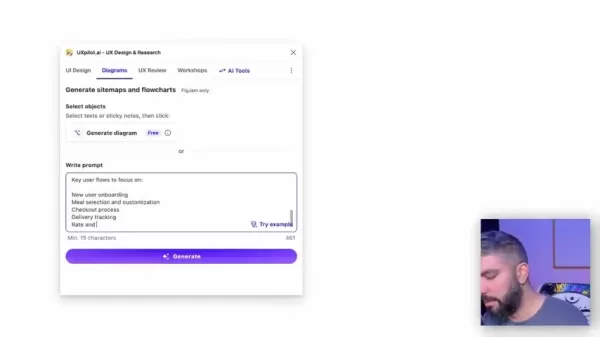 Feed the information you received from Claude into UX Pilot, and it will automatically provide you with the architecture for your app. For instance, using the requirements from the first step, UX Pilot can create categories for your app.
Here’s how to use UX Pilot with the information generated from Claude:
- Open FigJam and create a free account if you're new to the platform.
- Once in FigJam, launch the UX Pilot plugin to start the diagramming process.
- Copy in the requirements generated from Claude. UX Pilot will use this information to develop the architecture for your app.
By keeping your request vague with Claude, UX Pilot can generate a general site map that's suitable for development. With the architecture now set by UX Pilot, you can move on to building the UI design with Visily.
Step 3: UI Design and Prototyping with Visily
With your requirements outlined and wireframes visualized, it's time to create the user interface (UI) and prototype using Visily. Visily's AI can transform your wireframes and sketches into sleek, interactive prototypes, bringing your app's design to life. Here's how it works:
- Export your work from UX Pilot in Figma as a PDF to use in Visily.
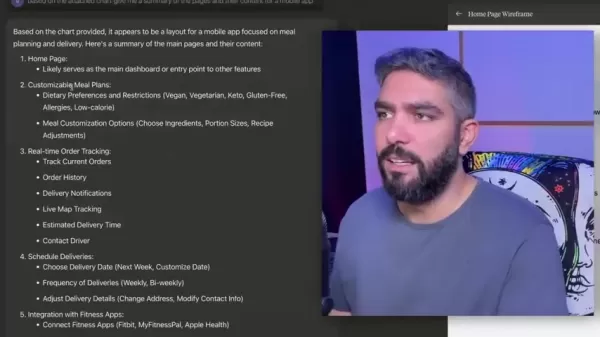
- Use Visily's AI tool, Screenshot to Design, to convert your PDF into a website screenshot, which you'll use to develop the UI.
- Visily will create a UI that aligns with the core features and requirements from your PDF.
Now, refine your UI. Be meticulous and ensure everything meets your design standards. Adjust colors, photos, and other elements as needed. Once your screens are designed, add interactive features to create a prototype.
For interactive prototyping, you can share your final designs and prototypes with stakeholders and users to gather feedback and refine your designs.
Tips for Staying Within Free Tier Usage Limits
Plan Your Work
The AI tools mentioned in this guide have free usage tiers, but they come with limitations. You might be restricted by the number of projects, time, or designs you can create.
 For Claude and UX Pilot, it's crucial to keep these limits in mind. If you plan your project thoroughly, you should be able to stay within the free usage tiers, which also helps in honing your skills in planning UI design, development, and architecture.
Tips on How to Further UI Designs
Implement Brand Elements
Once you've refined your app designs, consider adding UI brand elements. These can include:
- Adding brand colors and typography to your UI designs.
- Incorporating brand-specific imagery or icons into your app designs.
- Using your brand's logo throughout the UI.
Improve Prototyping
Enhance the UI/UX experience by creating an interactive prototype with links between various pages of your app. High-quality animations and a user-friendly UI can significantly improve the overall experience and customer satisfaction.
AI-Assisted App Design: Weighing the Pros and Cons
Pros
- Accelerated Design Process: AI automates many tasks, speeding up the design process.
- Cost-Effectiveness: Using free AI tools keeps design costs low.
- Accessibility: AI enables those without extensive design knowledge to create functional prototypes.
- Increased Efficiency: Focus on core tasks like ideation and user experience, while AI handles routine design elements.
Cons
- Usage Limits: Free AI tools often have usage limits, requiring strategic planning.
- Design Flexibility: AI-generated designs might lack the unique touch and creativity of human designers.
- Learning Curve: Some AI tools may have a learning curve to master their features.
- Internet Dependence: All these tools require a stable internet connection.
- Requires Meticulous Adjustments: UX will need fine-tuning to be fully complete.
FAQ
Can I really design an app for free using AI?
Yes, with the tools outlined in this guide, you can create a functional prototype for free. However, you need to be mindful of the usage limits on the free tiers.
What if I exceed the usage limits?
Consider upgrading to a paid plan for unlimited access or plan your usage strategically to stay within the free tier limits.
Do I need coding skills for this process?
No coding skills are required. These AI tools focus on design and prototyping, allowing you to visualize and demonstrate your app idea.
Related Questions
What are the essential elements of a good mobile app design?
A good mobile app design focuses on user experience, prioritizing intuitive navigation, clear visual hierarchy, and accessibility. The design should align with the app's purpose and target audience, ensuring a seamless and engaging experience. Key components include:
- Intuitive Navigation: Make the app easy to explore with clear menus, search functions, and consistent labeling.
- Visually Appealing Interface: Create a modern and attractive UI that's pleasant to use.
- Clear Hierarchy of Information: Present information in a logical order, making it easy for users to find what they need.
- Accessibility: Ensure the app is usable by people with disabilities by following accessibility guidelines.
- Performance Optimization: Optimize the app for speed and responsiveness to provide a smooth user experience.
Related article
 U.S. Stocks Hit Historic Milestone as AI and Aerospace Giants Prepare for Trillion-Dollar Debut
Elon Musk, Sam Altman, and Dario Amodei, three titans of the technology sector, are advancing toward initial public offerings for their respective ventures. With SpaceX, OpenAI, and Anthropic—three industry behemoths nearing trillion-dollar valuation
Swedish AI Startup Lovable Eyes $13.2 Billion Valuation After Major Funding Round
As AI-driven coding tools gain traction, Swedish startup Lovable has secured a major funding round. The company aims to raise $3 billion, potentially boosting its valuation to $13.2 billion—double the $6.6 billion recorded last December. Menlo Ventur
Google Tests Remy AI Agent for Gemini as Focus Shifts to User Control
According to Business Insider, Google is testing Remy, a new AI personal agent for Gemini. This tool aims to execute tasks on behalf of users, streamlining both professional workflows and daily routines.Currently, Remy is undergoing testing in an int
Related Special Topic Recommendations
Data Analysis
U.S. Stocks Hit Historic Milestone as AI and Aerospace Giants Prepare for Trillion-Dollar Debut
Elon Musk, Sam Altman, and Dario Amodei, three titans of the technology sector, are advancing toward initial public offerings for their respective ventures. With SpaceX, OpenAI, and Anthropic—three industry behemoths nearing trillion-dollar valuation
Swedish AI Startup Lovable Eyes $13.2 Billion Valuation After Major Funding Round
As AI-driven coding tools gain traction, Swedish startup Lovable has secured a major funding round. The company aims to raise $3 billion, potentially boosting its valuation to $13.2 billion—double the $6.6 billion recorded last December. Menlo Ventur
Google Tests Remy AI Agent for Gemini as Focus Shifts to User Control
According to Business Insider, Google is testing Remy, a new AI personal agent for Gemini. This tool aims to execute tasks on behalf of users, streamlining both professional workflows and daily routines.Currently, Remy is undergoing testing in an int
Related Special Topic Recommendations
Data Analysis
 Best AI Anomaly Detection Tools for KPI Monitoring across SaaS and Ecommerce Teams
2026 Latest Best Top-rated AI Anomaly Detection Tools for KPI Monitoring in SaaS and Ecommerce teams! XIX.AI has curated a powerful, game-changing collection based on rigorous real-world tests and weekly updated rankings. You’ll find detailed free vs paid comparison insights to help you identify the must-try solution that boosts productivity and unlocks your AI edge. Explore now!
 10 tools
 xix.ai
writing
Best AI Outline Generators for Long-Form SEO Articles
xix.ai
writing
Best AI Outline Generators for Long-Form SEO Articles
2026 Latest Best Top-Rated AI Outline Generators for Long-Form SEO Articles, meticulously curated by XIX.AI. These powerful tools offer game-changing assistance in creating high-quality content quickly, boosting writing efficiency significantly. Get a free vs paid comparison along with real-world tests and detailed rankings to help you find the must-try option that suits your needs. Explore now to unlock your AI edge.
8 tools
xix.ai
Education and Learning
AI Study Tools for Homework and Exam Prep
2026 Latest Best AI Study Tools for Homework and Exam Prep! XIX.AI curates a top-rated list of powerful, game-changing tools that help students boost productivity, streamline homework completion, and ace exams through real-world tests. Get a free vs paid comparison, detailed rankings, and must-try options to unlock your AI edge. Explore now!
10 tools
xix.ai
Music composition
AI Vocal Demo Tools for Songwriters, Hooks, Toplines, and Multilingual Draft Sessions
2026 Latest Best AI Vocal Demo Tools for Songwriters, Hook Creators, and Multi-Language Content Teams! XIX.AI has curated a top-rated list of powerful game-changing tools that go through rigorous real-world tests. You’ll find detailed free vs paid comparison data, comprehensive rankings, and must-try options to help you boost writing efficiency and unlock your creative potential. Explore now to discover your perfect tool for all your content needs!
9 tools
xix.ai
Business
Best AI Competitive Research Tools for Small Businesses
2026 Latest Best Top-rated AI Competitive Research Tools for Small Businesses! XIX.AI has curated a highly powerful game-changing collection, updated weekly with rigorous real-world tests and detailed rankings. You can find a comprehensive free vs paid comparison to help you identify the must-try tools that boost your productivity and give you a competitive edge. Explore now to discover your perfect tool!
9 tools
xix.ai
Image editing
Photoshop AI Retouch Tools for Ecommerce Apparel, Skin Cleanup, and Color Consistency
2026 Latest Best Photoshop AI retouch tools for ecommerce apparel, skin cleanup, and color consistency! This top-rated curated list features powerful game-changing solutions that help you boost writing efficiency, streamline content creation, and achieve perfect visual results effortlessly. Each tool has undergone real-world tests through weekly updated rankings, complete with free vs paid comparison details. Backed by XIX.AI, it’s the must-try guide for anyone aiming to unlock your AI edge. Explore now!
10 tools
xix.ai

 Comments (42)
0/500
Comments (42)
0/500
![RyanAdams]()
A IA democratiza o design, mas cuidado para não perder a essência do projeto. Ferramentas são ótimas, mas a visão criativa humana é insubstituível para criar algo verdadeiramente impactante.
![WillMitchell]()
¡Qué alivio! Las herramientas de IA hacen que el diseño sea accesible para todos. Sin embargo, es crucial mantener un toque personal para que la aplicación destaque en un mercado saturado.
![AlbertGarcía]()
Endlich ein Leitfaden für Anfänger! KI-Werkzeuge sind großartig, aber sie sollten nur als Startpunkt dienen. Die eigentliche Magie entsteht durch die menschliche Kreativität und Feinarbeit.
![MateoAdams]()
AI 도구 덕분에 앱 디자인이 훨씬 쉬워졌네요. 하지만 너무 의존하면 개성이 사라질 수 있으니, 적절한 선에서 활용하는 게 중요할 것 같아요.
![DouglasCarter]()
ИИ упрощает дизайн, но не заменяет вкус. Важно находить баланс между автоматизацией и личным творческим подходом, чтобы приложение не стало безликим.
![LarryEvans]()
C'est génial de voir l'IA rendre le design accessible à tous. Cependant, il ne faut pas oublier que la touche humaine reste essentielle pour créer quelque chose d'unique et mémorable.
Starting out in mobile app design can feel overwhelming, especially if you're not a seasoned designer. But here's the good news: artificial intelligence (AI) is here to help, offering user-friendly tools that can simplify the design journey. This guide is your roadmap to using AI to craft a functional and eye-catching mobile app, all while sticking to free (though limited) resources. Get ready to turn your app ideas into reality, complete with interactive prototypes, without spending a fortune.
Key Points
- Use Claude to gather requirements and brainstorm, ensuring your app meets user needs.
- Create diagrams and wireframes with UX Pilot and FigJam to map out your app's structure.
- Utilize Visily for UI design and prototyping to bring your app's interface to life.
- Plan your design carefully to maximize the use of free AI tools.
- Focus on essential features and user flows to develop an effective Minimum Viable Product (MVP).
- Develop a shareable prototype to showcase your app idea.
From Idea to Interactive Prototype: An AI-Assisted App Design Process
Step 1: Requirement Gathering and Ideation with Claude
The foundation of any successful app design project is understanding what's needed. This means pinpointing your target audience, core features, design preferences, and technical considerations. AI can make this process much quicker. For instance, you can use Claude to simulate client interactions and gather project requirements.
Claude can act as a virtual client, providing valuable insights and feedback to shape your app's functionality and design.
Here's an example prompt you might use with Claude:
"I'm a UX designer, and you're the client. Give me requirements for a new project."
After getting those requirements from Claude, start with a simple approach to build your MVP. For example, when I asked Claude about a meal delivery app, it provided these key requirements:
- Target Audience: Busy professionals aged 25-45 in urban areas.
- Core Features: Customizable meal plans based on dietary preferences and restrictions, real-time order tracking, integration with popular fitness apps to sync nutritional data.
- Design Preferences: Clean, modern aesthetic, emphasis on high-quality food photography, intuitive navigation, minimizing the number of taps to place an order.
- Technical Requirements: iOS and Android versions, secure payment integration, push notifications for order updates and promotions.
- Key User Flows: New user onboarding, meal selection and customization, checkout process, delivery tracking.
- Unique Selling Points: Sourcing from local, organic farms, option for eco-friendly packaging, ability to rate and review meals.
- Budget: $100,000 for initial design and development timeline; four months to launch MVP.
Step 2: Diagramming and Wireframing with UX Pilot and FigJam
With a clear understanding of your app's requirements, it's time to visualize its structure and user flows. This involves creating diagrams and wireframes to outline the app's screens and interactions. Start by organizing your design features in FigJam, and enhance this process with the UX Pilot plugin.
UX Pilot, when used as a plugin in FigJam, leverages AI to automatically generate sitemaps and flowcharts based on your requirements.
Feed the information you received from Claude into UX Pilot, and it will automatically provide you with the architecture for your app. For instance, using the requirements from the first step, UX Pilot can create categories for your app.
Here’s how to use UX Pilot with the information generated from Claude:
- Open FigJam and create a free account if you're new to the platform.
- Once in FigJam, launch the UX Pilot plugin to start the diagramming process.
- Copy in the requirements generated from Claude. UX Pilot will use this information to develop the architecture for your app.
By keeping your request vague with Claude, UX Pilot can generate a general site map that's suitable for development. With the architecture now set by UX Pilot, you can move on to building the UI design with Visily.
Step 3: UI Design and Prototyping with Visily
With your requirements outlined and wireframes visualized, it's time to create the user interface (UI) and prototype using Visily. Visily's AI can transform your wireframes and sketches into sleek, interactive prototypes, bringing your app's design to life. Here's how it works:
- Export your work from UX Pilot in Figma as a PDF to use in Visily.
- Use Visily's AI tool, Screenshot to Design, to convert your PDF into a website screenshot, which you'll use to develop the UI.
- Visily will create a UI that aligns with the core features and requirements from your PDF.
Now, refine your UI. Be meticulous and ensure everything meets your design standards. Adjust colors, photos, and other elements as needed. Once your screens are designed, add interactive features to create a prototype.
For interactive prototyping, you can share your final designs and prototypes with stakeholders and users to gather feedback and refine your designs.
Tips for Staying Within Free Tier Usage Limits
Plan Your Work
The AI tools mentioned in this guide have free usage tiers, but they come with limitations. You might be restricted by the number of projects, time, or designs you can create.
For Claude and UX Pilot, it's crucial to keep these limits in mind. If you plan your project thoroughly, you should be able to stay within the free usage tiers, which also helps in honing your skills in planning UI design, development, and architecture.
Tips on How to Further UI Designs
Implement Brand Elements
Once you've refined your app designs, consider adding UI brand elements. These can include:
- Adding brand colors and typography to your UI designs.
- Incorporating brand-specific imagery or icons into your app designs.
- Using your brand's logo throughout the UI.
Improve Prototyping
Enhance the UI/UX experience by creating an interactive prototype with links between various pages of your app. High-quality animations and a user-friendly UI can significantly improve the overall experience and customer satisfaction.
AI-Assisted App Design: Weighing the Pros and Cons
Pros
- Accelerated Design Process: AI automates many tasks, speeding up the design process.
- Cost-Effectiveness: Using free AI tools keeps design costs low.
- Accessibility: AI enables those without extensive design knowledge to create functional prototypes.
- Increased Efficiency: Focus on core tasks like ideation and user experience, while AI handles routine design elements.
Cons
- Usage Limits: Free AI tools often have usage limits, requiring strategic planning.
- Design Flexibility: AI-generated designs might lack the unique touch and creativity of human designers.
- Learning Curve: Some AI tools may have a learning curve to master their features.
- Internet Dependence: All these tools require a stable internet connection.
- Requires Meticulous Adjustments: UX will need fine-tuning to be fully complete.
FAQ
Can I really design an app for free using AI?
Yes, with the tools outlined in this guide, you can create a functional prototype for free. However, you need to be mindful of the usage limits on the free tiers.
What if I exceed the usage limits?
Consider upgrading to a paid plan for unlimited access or plan your usage strategically to stay within the free tier limits.
Do I need coding skills for this process?
No coding skills are required. These AI tools focus on design and prototyping, allowing you to visualize and demonstrate your app idea.
Related Questions
What are the essential elements of a good mobile app design?
A good mobile app design focuses on user experience, prioritizing intuitive navigation, clear visual hierarchy, and accessibility. The design should align with the app's purpose and target audience, ensuring a seamless and engaging experience. Key components include:
- Intuitive Navigation: Make the app easy to explore with clear menus, search functions, and consistent labeling.
- Visually Appealing Interface: Create a modern and attractive UI that's pleasant to use.
- Clear Hierarchy of Information: Present information in a logical order, making it easy for users to find what they need.
- Accessibility: Ensure the app is usable by people with disabilities by following accessibility guidelines.
- Performance Optimization: Optimize the app for speed and responsiveness to provide a smooth user experience.








 U.S. Stocks Hit Historic Milestone as AI and Aerospace Giants Prepare for Trillion-Dollar Debut
Elon Musk, Sam Altman, and Dario Amodei, three titans of the technology sector, are advancing toward initial public offerings for their respective ventures. With SpaceX, OpenAI, and Anthropic—three industry behemoths nearing trillion-dollar valuation
U.S. Stocks Hit Historic Milestone as AI and Aerospace Giants Prepare for Trillion-Dollar Debut
Elon Musk, Sam Altman, and Dario Amodei, three titans of the technology sector, are advancing toward initial public offerings for their respective ventures. With SpaceX, OpenAI, and Anthropic—three industry behemoths nearing trillion-dollar valuation
 Swedish AI Startup Lovable Eyes $13.2 Billion Valuation After Major Funding Round
As AI-driven coding tools gain traction, Swedish startup Lovable has secured a major funding round. The company aims to raise $3 billion, potentially boosting its valuation to $13.2 billion—double the $6.6 billion recorded last December. Menlo Ventur
Google Tests Remy AI Agent for Gemini as Focus Shifts to User Control
According to Business Insider, Google is testing Remy, a new AI personal agent for Gemini. This tool aims to execute tasks on behalf of users, streamlining both professional workflows and daily routines.Currently, Remy is undergoing testing in an int
Swedish AI Startup Lovable Eyes $13.2 Billion Valuation After Major Funding Round
As AI-driven coding tools gain traction, Swedish startup Lovable has secured a major funding round. The company aims to raise $3 billion, potentially boosting its valuation to $13.2 billion—double the $6.6 billion recorded last December. Menlo Ventur
Google Tests Remy AI Agent for Gemini as Focus Shifts to User Control
According to Business Insider, Google is testing Remy, a new AI personal agent for Gemini. This tool aims to execute tasks on behalf of users, streamlining both professional workflows and daily routines.Currently, Remy is undergoing testing in an int

2026 Latest Best Top-rated AI Anomaly Detection Tools for KPI Monitoring in SaaS and Ecommerce teams! XIX.AI has curated a powerful, game-changing collection based on rigorous real-world tests and weekly updated rankings. You’ll find detailed free vs paid comparison insights to help you identify the must-try solution that boosts productivity and unlocks your AI edge. Explore now!
10 tools
xix.ai

2026 Latest Best Top-Rated AI Outline Generators for Long-Form SEO Articles, meticulously curated by XIX.AI. These powerful tools offer game-changing assistance in creating high-quality content quickly, boosting writing efficiency significantly. Get a free vs paid comparison along with real-world tests and detailed rankings to help you find the must-try option that suits your needs. Explore now to unlock your AI edge.
8 tools
xix.ai

2026 Latest Best AI Study Tools for Homework and Exam Prep! XIX.AI curates a top-rated list of powerful, game-changing tools that help students boost productivity, streamline homework completion, and ace exams through real-world tests. Get a free vs paid comparison, detailed rankings, and must-try options to unlock your AI edge. Explore now!
10 tools
xix.ai

2026 Latest Best AI Vocal Demo Tools for Songwriters, Hook Creators, and Multi-Language Content Teams! XIX.AI has curated a top-rated list of powerful game-changing tools that go through rigorous real-world tests. You’ll find detailed free vs paid comparison data, comprehensive rankings, and must-try options to help you boost writing efficiency and unlock your creative potential. Explore now to discover your perfect tool for all your content needs!
9 tools
xix.ai

2026 Latest Best Top-rated AI Competitive Research Tools for Small Businesses! XIX.AI has curated a highly powerful game-changing collection, updated weekly with rigorous real-world tests and detailed rankings. You can find a comprehensive free vs paid comparison to help you identify the must-try tools that boost your productivity and give you a competitive edge. Explore now to discover your perfect tool!
9 tools
xix.ai

2026 Latest Best Photoshop AI retouch tools for ecommerce apparel, skin cleanup, and color consistency! This top-rated curated list features powerful game-changing solutions that help you boost writing efficiency, streamline content creation, and achieve perfect visual results effortlessly. Each tool has undergone real-world tests through weekly updated rankings, complete with free vs paid comparison details. Backed by XIX.AI, it’s the must-try guide for anyone aiming to unlock your AI edge. Explore now!
10 tools
xix.ai

A IA democratiza o design, mas cuidado para não perder a essência do projeto. Ferramentas são ótimas, mas a visão criativa humana é insubstituível para criar algo verdadeiramente impactante.
¡Qué alivio! Las herramientas de IA hacen que el diseño sea accesible para todos. Sin embargo, es crucial mantener un toque personal para que la aplicación destaque en un mercado saturado.
Endlich ein Leitfaden für Anfänger! KI-Werkzeuge sind großartig, aber sie sollten nur als Startpunkt dienen. Die eigentliche Magie entsteht durch die menschliche Kreativität und Feinarbeit.
AI 도구 덕분에 앱 디자인이 훨씬 쉬워졌네요. 하지만 너무 의존하면 개성이 사라질 수 있으니, 적절한 선에서 활용하는 게 중요할 것 같아요.
ИИ упрощает дизайн, но не заменяет вкус. Важно находить баланс между автоматизацией и личным творческим подходом, чтобы приложение не стало безликим.
C'est génial de voir l'IA rendre le design accessible à tous. Cependant, il ne faut pas oublier que la touche humaine reste essentielle pour créer quelque chose d'unique et mémorable.












