


 Home
HomeAI-Enhanced Motion Graphics Revolutionize Final Cut Pro Editing
Unlocking the Power of AI-Assisted Motion Graphics in Final Cut Pro
Motion graphics are an essential element of video editing, bringing dynamism and visual appeal to your projects. Final Cut Pro, a popular choice among editors, can be leveraged even by those not deeply entrenched in the field, especially when combined with artificial intelligence (AI) and Apple Motion. This synergy makes the creation of sophisticated motion graphics more accessible than ever. Let's delve into how AI can revolutionize your motion graphics workflow with Final Cut Pro and some handy resources to get you started.
Key Advantages of Integrating AI with Final Cut Pro
- Enhance your motion graphics by combining Final Cut Pro with AI and Apple Motion.
- Generate dynamic, copyright-free graphics using AI-powered tools.
- Utilize AI to create scalable vector graphics (SVGs) for versatile use.
- Develop customizable templates to streamline your creative process.
- Explore premium plugins and templates on the Industrial Revolution website for Final Cut Pro.
Exploring AI-Driven Motion Graphics
The Power of AI in Content Creation
Integrating AI into your video editing workflow can significantly boost both creativity and efficiency. AI tools can generate complex animations and analyze content for the best visual presentation. By blending tools like Final Cut Pro, Apple Motion, and AI, you can tap into new realms of creative potential.

Generating Graphics with AI: Using Claude for SVG Creation
One effective way to incorporate AI into your motion graphics is by using tools like Claude to generate SVG files. Claude can produce HTML bar charts and basic SVG graphics, which are crucial for motion graphics due to their scalability without quality loss. These graphics, generated quickly and copyright-free, can be seamlessly integrated into your projects.

Although Final Cut Pro does not natively support SVG files, a few extra steps can help you bring these graphics into your project. Let's walk through the process to ensure all your tools work together harmoniously.
Hands-On: Creating a Waving US Flag
Step-by-Step Process
- AI-Assisted SVG Creation: Begin by using Claude to create an SVG of the American flag. Specific instructions can help ensure the stars and stripes are correctly generated.
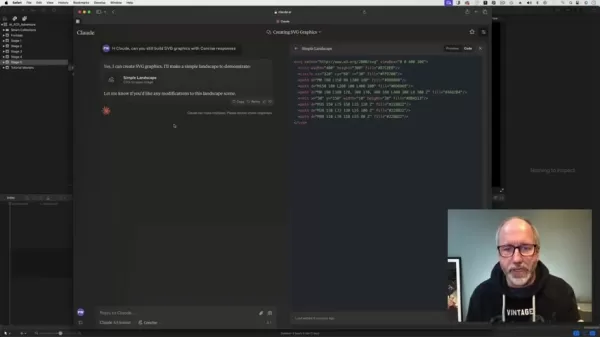
- Saving the Graphic: Save the SVG code generated by Claude as a text file, ready for conversion into a format compatible with Final Cut Pro.
- Importing into Pixelmator Pro: Use Pixelmator Pro to import and convert the graphic into a file type that Final Cut Pro can use.
- Exporting as a Motion Project: From Pixelmator Pro, export the design as a Motion project to ensure compatibility with Apple Motion.
- Customizing in Apple Motion: Open the file in Apple Motion and enhance it using various filters. Begin animating different parts of the flag to create a dynamic effect.
- Publishing for Final Cut Pro: Once satisfied with the visual, publish the file for use in Final Cut Pro. Set controls to allow for adjustments within Final Cut Pro.
- Integrating into Final Cut Pro: Open Final Cut Pro, search for the generator, and integrate the AI-assisted animation into your project. All customization options from Apple Motion will be available.
Considerations with this Method
This process involves using several tools, which might require slight modifications to suit your needs. While using a single plugin in Final Cut Pro would be simpler, this method highlights the potential of AI-enhanced graphics. If Apple were to acquire Pixelmator, it might streamline the process by directly supporting SVG files in Apple Motion and Final Cut Pro.

How to Use Industrial Revolution for Final Cut Pro Plugins and Templates
The Industrial Revolution website is a treasure trove for Final Cut Pro plugins. It offers a variety of new plugins, products, themes, and ideas for your projects. To find what you need, utilize the search function or browse through the latest offerings for Final Cut Pro X.
Pricing for Plugins
The Industrial Revolution website provides both premium and free plugins. Some free options include XEffects NEON Text, XEffects Insta Splits, and XEffects New Year Fireworks. Premium plugins offer specialized collections for Final Cut Pro editors, boasting high creativity and a mix of free and commercial options.
Industrial Revolution Plugins: Pros and Cons
Pros
- Professionally designed plugins and templates.
- Enhances creativity and workflow efficiency.
- Offers both free and commercial options.
- Regular updates and new content.
Cons
- Some plugins require purchase.
- Reliance on third-party software.
- Requires time to learn and master all available tools.
Core Features of Industrial Revolution Plugins
The Industrial Revolution offers a complete graphic package, including new plugins, products, themes, and ideas for Final Cut Pro projects. Regular updates and a mix of free and commercial packs keep your toolkit fresh and versatile.
Use Cases for Industrial Revolution Plugins
With Industrial Revolution plugins, users can create professionally designed graphics for their Final Cut Pro projects. Both free and commercial packs are readily available, making it easy to enhance your video editing with dynamic visuals.
FAQ
What is Apple Motion?
Apple Motion is a software application developed by Apple Inc. for creating motion graphics and visual effects. It's designed to work seamlessly with Final Cut Pro, offering advanced tools for animated titles, transitions, and other effects.
What is an SVG file?
A Scalable Vector Graphic (SVG) is a vector image format based on XML. Its key advantage is scalability without losing image quality, making it ideal for motion graphics.
Related Questions
How can AI enhance video editing?
AI can enhance video editing by generating elements from scratch, offering new creative possibilities. Tools like Final Cut Pro, Apple Motion, and AI can unlock innovative approaches to your video projects.
Related article
 Claude Opus 5.2 Night Gray Launches with Faster Response, Solving Laziness Issue
Opus 5.2 quietly launched this morning, prompting many developers to notice that the updated model, Claude Opus 5.2, has begun a limited rollout within Claude Code.Yesterday evening, X users observed that invoking Opus 5 in Claude Code yielded perfor
Fireworks AI Unveils FireRouter with Opus: Cuts Encoding Costs by 57% with Minimal Accuracy Drop
Fireworks AI has introduced FireRouter with Opus, the industry’s first cache-aware routing system tailored for the Claude Opus series. Now accessible via a serverless endpoint, this independent routing model underwent over a month of internal A/B tes
NVIDIA Unveils Nemotron-Labs-Audex-30B-A3B Unified Audio Intelligence Model
As multimodal large models evolve rapidly, audio processing capabilities are frequently compromised—many models improve audio understanding at the expense of text logic. To address this, NVIDIA researchers have introduced Nemotron-Labs-Audex-30B-A3B
Related Special Topic Recommendations
Data Analysis
Claude Opus 5.2 Night Gray Launches with Faster Response, Solving Laziness Issue
Opus 5.2 quietly launched this morning, prompting many developers to notice that the updated model, Claude Opus 5.2, has begun a limited rollout within Claude Code.Yesterday evening, X users observed that invoking Opus 5 in Claude Code yielded perfor
Fireworks AI Unveils FireRouter with Opus: Cuts Encoding Costs by 57% with Minimal Accuracy Drop
Fireworks AI has introduced FireRouter with Opus, the industry’s first cache-aware routing system tailored for the Claude Opus series. Now accessible via a serverless endpoint, this independent routing model underwent over a month of internal A/B tes
NVIDIA Unveils Nemotron-Labs-Audex-30B-A3B Unified Audio Intelligence Model
As multimodal large models evolve rapidly, audio processing capabilities are frequently compromised—many models improve audio understanding at the expense of text logic. To address this, NVIDIA researchers have introduced Nemotron-Labs-Audex-30B-A3B
Related Special Topic Recommendations
Data Analysis
 Best AI Chart Builder Tools for Fast Reporting
2026 Latest Best Top-rated AI Chart Builder Tools for Fast Reporting are here on XIX.AI! This curated list features powerful game-changing tools that deliver accurate professional charts with just a few clicks, helping you boost writing efficiency and streamline content creation. Get a free vs paid comparison along with real-world tests and detailed rankings to find the must-try solution for your needs. Explore now to unlock your AI edge!
 9 tools
 xix.ai
chatbot
AI Live Chat Routing Tools for Ecommerce Queues, VIP Buyers, and Return Requests
xix.ai
chatbot
AI Live Chat Routing Tools for Ecommerce Queues, VIP Buyers, and Return Requests
2026 Latest Best Top-rated AI Live Chat Routing Tools for Ecommerce Queues, VIP Buyers, and Return Requests. This curated list features powerful game-changing solutions that boost productivity dramatically through real-world tests. It includes a free vs paid comparison along with detailed rankings to help you find the perfect fit. XIX.AI stands out as a trusted provider in this space. Explore now to Unlock your AI edge!
9 tools
xix.ai
writing
Best AI Editing Tools for ESL Writers: Improve Tone, Grammar, and Flow
2026 Latest Best Top-Rated AI Editing Tools for ESL Writers are here on XIX.AI! This curated list features powerful game-changing tools that go through real-world tests to ensure accuracy. You can find a free vs paid comparison alongside detailed rankings to help you pick the must-try solution that boosts your writing tone, grammar, and flow perfectly. Explore now to Unlock your AI edge!
9 tools
xix.ai
Software Development
Best AI Bug Triage Tools for Engineering Teams
2026 Latest Best Top-Rated AI Bug Triage Tools for Engineering Teams! XIX.AI has curated a powerful, game-changing collection of must-try tools that go through rigorous real-world tests to deliver accurate issue analysis and efficient resolution. Get a free vs paid comparison along with detailed rankings to help you find the perfect solution that boosts your team’s productivity significantly. Explore now to unlock your AI edge!
9 tools
xix.ai
Image editing
Best AI Portrait Enhancers: Improve Lighting, Skin Tone, and Sharpness
2026 Latest Best Top-rated AI Portrait Enhancers curated for ultimate image quality. These powerful tools deliver game-changing results by boosting lighting, skin tone, and sharpness effortlessly, perfect for creators needing to enhance photos quickly. XIX.AI provides a free vs paid comparison along with real-world tests and weekly updated rankings. Discover your perfect tool to unlock your AI edge today. Explore now!
7 tools
xix.ai
writing
AI Technical Documentation Tools for API Guides, Release Notes, and Onboarding Docs
2026 Latest Best Top-rated AI Technical Documentation Tools for API Guides Release Notes and Onboarding Docs. This curated list features powerful game-changing solutions that streamline content creation boost writing efficiency and save time across all project phases. XIX.AI provides weekly updated rankings along with free vs paid comparison results from real-world tests. Explore now to Discover your perfect tool and Unlock your AI edge.
10 tools
xix.ai

 Comments (9)
0/500
Comments (9)
0/500
![RobertRamirez]()
Honestly, I've been using Final Cut Pro for years and motion graphics always felt like a steep learning curve. If AI can actually handle the heavy lifting—like auto-generating dynamic titles or matching keyframes to music—that'd be a game changer. But I'm a bit skeptical: will it dumb down the creative process or just speed up the boring stuff? 🤔 Either way, curious to see if Apple lets this trickle down to the regular version or locks it behind a Pro subscription.
![JosephGreen]()
This is exactly what I needed! As a hobbyist editor, I always struggled with motion graphics. The idea of AI helping with that inside Final Cut Pro sounds like a game-changer. Can't wait to try it and see if it really speeds up my workflow. 🤞
![JackAllen]()
Final Cut Pro结合AI做动态图形,确实让门槛降低不少。不过感觉这类工具越来越‘自动’,反而让我犹豫要不要深入学习基础特效技术了。🤔
![TerryGonzalez]()
Final Cut Pro加上AI动态图形真的太强了!以前调个动画曲线都要折腾半天,现在AI几秒钟就能生成流畅的过渡效果 😍 就是担心以后剪辑师都要失业了...
![StephenRoberts]()
Whoa, AI making motion graphics in Final Cut Pro smoother? That's a game-changer for newbie editors like me! 🥳 Can't wait to try it out and make my videos pop without spending hours on keyframes.
![RogerMartinez]()
The AI motion graphics in Final Cut Pro sound like a game-changer! I’m curious how intuitive it is for beginners—might finally try editing my own videos. 😎
Unlocking the Power of AI-Assisted Motion Graphics in Final Cut Pro
Motion graphics are an essential element of video editing, bringing dynamism and visual appeal to your projects. Final Cut Pro, a popular choice among editors, can be leveraged even by those not deeply entrenched in the field, especially when combined with artificial intelligence (AI) and Apple Motion. This synergy makes the creation of sophisticated motion graphics more accessible than ever. Let's delve into how AI can revolutionize your motion graphics workflow with Final Cut Pro and some handy resources to get you started.
Key Advantages of Integrating AI with Final Cut Pro
- Enhance your motion graphics by combining Final Cut Pro with AI and Apple Motion.
- Generate dynamic, copyright-free graphics using AI-powered tools.
- Utilize AI to create scalable vector graphics (SVGs) for versatile use.
- Develop customizable templates to streamline your creative process.
- Explore premium plugins and templates on the Industrial Revolution website for Final Cut Pro.
Exploring AI-Driven Motion Graphics
The Power of AI in Content Creation
Integrating AI into your video editing workflow can significantly boost both creativity and efficiency. AI tools can generate complex animations and analyze content for the best visual presentation. By blending tools like Final Cut Pro, Apple Motion, and AI, you can tap into new realms of creative potential.
Generating Graphics with AI: Using Claude for SVG Creation
One effective way to incorporate AI into your motion graphics is by using tools like Claude to generate SVG files. Claude can produce HTML bar charts and basic SVG graphics, which are crucial for motion graphics due to their scalability without quality loss. These graphics, generated quickly and copyright-free, can be seamlessly integrated into your projects.
Although Final Cut Pro does not natively support SVG files, a few extra steps can help you bring these graphics into your project. Let's walk through the process to ensure all your tools work together harmoniously.
Hands-On: Creating a Waving US Flag
Step-by-Step Process
- AI-Assisted SVG Creation: Begin by using Claude to create an SVG of the American flag. Specific instructions can help ensure the stars and stripes are correctly generated.
- Saving the Graphic: Save the SVG code generated by Claude as a text file, ready for conversion into a format compatible with Final Cut Pro.
- Importing into Pixelmator Pro: Use Pixelmator Pro to import and convert the graphic into a file type that Final Cut Pro can use.
- Exporting as a Motion Project: From Pixelmator Pro, export the design as a Motion project to ensure compatibility with Apple Motion.
- Customizing in Apple Motion: Open the file in Apple Motion and enhance it using various filters. Begin animating different parts of the flag to create a dynamic effect.
- Publishing for Final Cut Pro: Once satisfied with the visual, publish the file for use in Final Cut Pro. Set controls to allow for adjustments within Final Cut Pro.
- Integrating into Final Cut Pro: Open Final Cut Pro, search for the generator, and integrate the AI-assisted animation into your project. All customization options from Apple Motion will be available.
Considerations with this Method
This process involves using several tools, which might require slight modifications to suit your needs. While using a single plugin in Final Cut Pro would be simpler, this method highlights the potential of AI-enhanced graphics. If Apple were to acquire Pixelmator, it might streamline the process by directly supporting SVG files in Apple Motion and Final Cut Pro.
How to Use Industrial Revolution for Final Cut Pro Plugins and Templates
The Industrial Revolution website is a treasure trove for Final Cut Pro plugins. It offers a variety of new plugins, products, themes, and ideas for your projects. To find what you need, utilize the search function or browse through the latest offerings for Final Cut Pro X.
Pricing for Plugins
The Industrial Revolution website provides both premium and free plugins. Some free options include XEffects NEON Text, XEffects Insta Splits, and XEffects New Year Fireworks. Premium plugins offer specialized collections for Final Cut Pro editors, boasting high creativity and a mix of free and commercial options.
Industrial Revolution Plugins: Pros and Cons
Pros
- Professionally designed plugins and templates.
- Enhances creativity and workflow efficiency.
- Offers both free and commercial options.
- Regular updates and new content.
Cons
- Some plugins require purchase.
- Reliance on third-party software.
- Requires time to learn and master all available tools.
Core Features of Industrial Revolution Plugins
The Industrial Revolution offers a complete graphic package, including new plugins, products, themes, and ideas for Final Cut Pro projects. Regular updates and a mix of free and commercial packs keep your toolkit fresh and versatile.
Use Cases for Industrial Revolution Plugins
With Industrial Revolution plugins, users can create professionally designed graphics for their Final Cut Pro projects. Both free and commercial packs are readily available, making it easy to enhance your video editing with dynamic visuals.
FAQ
What is Apple Motion?
Apple Motion is a software application developed by Apple Inc. for creating motion graphics and visual effects. It's designed to work seamlessly with Final Cut Pro, offering advanced tools for animated titles, transitions, and other effects.
What is an SVG file?
A Scalable Vector Graphic (SVG) is a vector image format based on XML. Its key advantage is scalability without losing image quality, making it ideal for motion graphics.
Related Questions
How can AI enhance video editing?
AI can enhance video editing by generating elements from scratch, offering new creative possibilities. Tools like Final Cut Pro, Apple Motion, and AI can unlock innovative approaches to your video projects.








 Claude Opus 5.2 Night Gray Launches with Faster Response, Solving Laziness Issue
Opus 5.2 quietly launched this morning, prompting many developers to notice that the updated model, Claude Opus 5.2, has begun a limited rollout within Claude Code.Yesterday evening, X users observed that invoking Opus 5 in Claude Code yielded perfor
Claude Opus 5.2 Night Gray Launches with Faster Response, Solving Laziness Issue
Opus 5.2 quietly launched this morning, prompting many developers to notice that the updated model, Claude Opus 5.2, has begun a limited rollout within Claude Code.Yesterday evening, X users observed that invoking Opus 5 in Claude Code yielded perfor
 Fireworks AI Unveils FireRouter with Opus: Cuts Encoding Costs by 57% with Minimal Accuracy Drop
Fireworks AI has introduced FireRouter with Opus, the industry’s first cache-aware routing system tailored for the Claude Opus series. Now accessible via a serverless endpoint, this independent routing model underwent over a month of internal A/B tes
Fireworks AI Unveils FireRouter with Opus: Cuts Encoding Costs by 57% with Minimal Accuracy Drop
Fireworks AI has introduced FireRouter with Opus, the industry’s first cache-aware routing system tailored for the Claude Opus series. Now accessible via a serverless endpoint, this independent routing model underwent over a month of internal A/B tes
 NVIDIA Unveils Nemotron-Labs-Audex-30B-A3B Unified Audio Intelligence Model
As multimodal large models evolve rapidly, audio processing capabilities are frequently compromised—many models improve audio understanding at the expense of text logic. To address this, NVIDIA researchers have introduced Nemotron-Labs-Audex-30B-A3B
NVIDIA Unveils Nemotron-Labs-Audex-30B-A3B Unified Audio Intelligence Model
As multimodal large models evolve rapidly, audio processing capabilities are frequently compromised—many models improve audio understanding at the expense of text logic. To address this, NVIDIA researchers have introduced Nemotron-Labs-Audex-30B-A3B

2026 Latest Best Top-rated AI Chart Builder Tools for Fast Reporting are here on XIX.AI! This curated list features powerful game-changing tools that deliver accurate professional charts with just a few clicks, helping you boost writing efficiency and streamline content creation. Get a free vs paid comparison along with real-world tests and detailed rankings to find the must-try solution for your needs. Explore now to unlock your AI edge!
9 tools
xix.ai

2026 Latest Best Top-rated AI Live Chat Routing Tools for Ecommerce Queues, VIP Buyers, and Return Requests. This curated list features powerful game-changing solutions that boost productivity dramatically through real-world tests. It includes a free vs paid comparison along with detailed rankings to help you find the perfect fit. XIX.AI stands out as a trusted provider in this space. Explore now to Unlock your AI edge!
9 tools
xix.ai

2026 Latest Best Top-Rated AI Editing Tools for ESL Writers are here on XIX.AI! This curated list features powerful game-changing tools that go through real-world tests to ensure accuracy. You can find a free vs paid comparison alongside detailed rankings to help you pick the must-try solution that boosts your writing tone, grammar, and flow perfectly. Explore now to Unlock your AI edge!
9 tools
xix.ai

2026 Latest Best Top-Rated AI Bug Triage Tools for Engineering Teams! XIX.AI has curated a powerful, game-changing collection of must-try tools that go through rigorous real-world tests to deliver accurate issue analysis and efficient resolution. Get a free vs paid comparison along with detailed rankings to help you find the perfect solution that boosts your team’s productivity significantly. Explore now to unlock your AI edge!
9 tools
xix.ai

2026 Latest Best Top-rated AI Portrait Enhancers curated for ultimate image quality. These powerful tools deliver game-changing results by boosting lighting, skin tone, and sharpness effortlessly, perfect for creators needing to enhance photos quickly. XIX.AI provides a free vs paid comparison along with real-world tests and weekly updated rankings. Discover your perfect tool to unlock your AI edge today. Explore now!
7 tools
xix.ai

2026 Latest Best Top-rated AI Technical Documentation Tools for API Guides Release Notes and Onboarding Docs. This curated list features powerful game-changing solutions that streamline content creation boost writing efficiency and save time across all project phases. XIX.AI provides weekly updated rankings along with free vs paid comparison results from real-world tests. Explore now to Discover your perfect tool and Unlock your AI edge.
10 tools
xix.ai

Honestly, I've been using Final Cut Pro for years and motion graphics always felt like a steep learning curve. If AI can actually handle the heavy lifting—like auto-generating dynamic titles or matching keyframes to music—that'd be a game changer. But I'm a bit skeptical: will it dumb down the creative process or just speed up the boring stuff? 🤔 Either way, curious to see if Apple lets this trickle down to the regular version or locks it behind a Pro subscription.
This is exactly what I needed! As a hobbyist editor, I always struggled with motion graphics. The idea of AI helping with that inside Final Cut Pro sounds like a game-changer. Can't wait to try it and see if it really speeds up my workflow. 🤞
Final Cut Pro结合AI做动态图形,确实让门槛降低不少。不过感觉这类工具越来越‘自动’,反而让我犹豫要不要深入学习基础特效技术了。🤔
Final Cut Pro加上AI动态图形真的太强了!以前调个动画曲线都要折腾半天,现在AI几秒钟就能生成流畅的过渡效果 😍 就是担心以后剪辑师都要失业了...
Whoa, AI making motion graphics in Final Cut Pro smoother? That's a game-changer for newbie editors like me! 🥳 Can't wait to try it out and make my videos pop without spending hours on keyframes.
The AI motion graphics in Final Cut Pro sound like a game-changer! I’m curious how intuitive it is for beginners—might finally try editing my own videos. 😎












