


 Home
HomeAI-Driven Thumbnail Creation: Capturing MrBeast's YouTube Style
Creating compelling YouTube thumbnails is essential if you want to draw in viewers and increase your video's click-through rate. Taking a leaf out of MrBeast's book can really give your video a visibility boost. In this guide, we'll walk you through using AI tools to whip up eye-catching, MrBeast-inspired thumbnails with ease and flair. We're here to make sure your videos pop in the bustling world of YouTube.
Key Points
- Learn how to download existing YouTube thumbnails for inspiration and analysis.
- Discover how to use ChatGPT to generate effective prompts for AI image generators.
- Explore Ideogram.ai for creating AI-generated thumbnails based on your prompts.
- Understand the importance of aspect ratios and prompt customization for optimal results.
- Get practical steps to replicate MrBeast's engaging thumbnail style using AI.
Getting Started with AI Thumbnail Creation
Analyzing and Downloading Existing Thumbnails
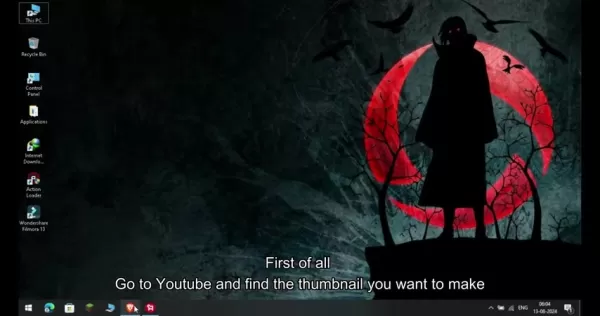
Want to make those eye-catching thumbnails? Start by figuring out what works. Check out the thumbnails that have caught your eye, especially those from big names like MrBeast. They're a goldmine of insights. Hop onto YouTube and pick out a few that really stand out to you.
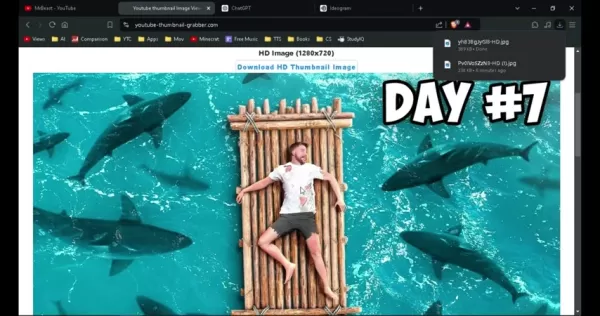
Now, to get those thumbnails, you'll need to download them. YouTube doesn't let you do this directly, but don't worry, there are plenty of third-party sites that can help. One handy tool is a 'YouTube Thumbnail Grabber.' Just copy the video URL, paste it into the site, and voila—you can download the thumbnail in HD. This is your chance to study and learn from the best, setting a high bar for your own designs.
Key takeaway: Downloading existing thumbnails is a smart move to kickstart your understanding of effective design.
Leveraging ChatGPT for Prompt Generation
With a reference thumbnail in hand, it's time to tap into AI's power to create something unique yet inspired. The key to getting good results from AI image generators is crafting the right prompt. This is where ChatGPT shines.
Upload your reference thumbnail to ChatGPT to give it a visual context. Then, ask ChatGPT to come up with a few prompts—say, four—that can guide an AI image generator to create a similar image. Be specific and keep the prompts concise. For instance, you might request prompts that capture the thumbnail's essence, like its composition or mood.
Here's how you can ask ChatGPT for prompts: "Give me four prompts to generate this image using an AI image generator, don't distribute it in points, single prompts."
ChatGPT will then dish out some prompts that serve as a blueprint for your AI image generator. This can save you a ton of time and effort, setting a strong foundation for your thumbnail.
Key takeaway: ChatGPT can generate prompts based on an image, making your AI thumbnail creation smoother.
Creating Thumbnails with Ideogram.ai
Now that you've got your prompts, it's time to bring your thumbnail to life with Ideogram.ai. This AI platform is fantastic for turning text into high-quality images. First, sign up for an account on Ideogram.ai. Once you're in, you'll see a prompt field where you can paste your ChatGPT-generated prompts.
Copy one of your prompts into the field. For YouTube thumbnails, you'll want to set the aspect ratio to 16:9 to ensure your thumbnail looks right. Click 'Generate,' and Ideogram.ai will churn out four different image variations. You can then pick the one that fits your vision or tweak your prompts for better results. The whole process takes just about 30 seconds.
Take a good look at the generated images, considering composition, color, and overall appeal. If you're not happy with what you see, refine your prompt and try again until you get it just right. Ideogram.ai lets you iterate and perfect your thumbnails until they're spot on.
Key takeaway: Ideogram.ai is a powerful tool for generating and refining thumbnails.
Optimizing and Downloading Your AI Thumbnail
Once you've got your thumbnail options from Ideogram.ai, it's time to pick the best one. Look for the image that captures your video's essence and fits your aesthetic. Ideogram.ai has tools for basic editing—adjust brightness, contrast, saturation, or add text and shapes to make your thumbnail pop.
When you're happy with the result, download it in PNG format for the best quality. Now, upload it to your YouTube video and keep an eye on its performance. Adjust as needed to optimize its impact.
Key takeaway: You can tweak and download your AI-generated thumbnail to perfection.
Understanding MrBeast's Thumbnail Style
Key Elements of MrBeast Thumbnails
MrBeast's thumbnails are known for their high-impact design, which plays a big role in his videos' success. Here's what makes them tick:
- Exaggerated Expressions: He often uses over-the-top facial expressions to grab attention and spark curiosity.
- Bold Text: Large, bold text highlights the video's main theme or hook.
- Bright Colors: Vibrant, saturated colors make the thumbnails pop on YouTube's interface.
- Dynamic Composition: His thumbnails are never dull; elements are arranged to draw the eye.
- Intriguing Imagery: Unusual or striking visuals that make viewers want to click and see more.
By weaving these elements into your AI-generated thumbnails, you can channel MrBeast's style and boost your video's appeal.
Applying MrBeast's Style with AI
Now that you know what makes MrBeast's thumbnails tick, let's apply that knowledge using AI. When crafting prompts for ChatGPT and Ideogram.ai, keep these elements in mind:
- Exaggerated Expressions: Ask for "a surprised man with wide eyes" or "an excited woman with an open mouth."
- Bold Text: Describe text visually in your prompts, like "an image with large, red letters spelling out 'FREE'."
- Bright Colors: Specify vibrant colors, like "a scene with bright, neon hues."
- Dynamic Composition: Use terms like "an action shot with a sense of movement" or "elements arranged diagonally."
- Intriguing Imagery: Think of captivating scenes like "a man on a bamboo raft surrounded by sharks" or "a giant robot battling a skyscraper."
Incorporating these into your AI prompts can significantly enhance your thumbnails' appeal and effectiveness.
Step-by-Step Guide: Creating a MrBeast-Style Thumbnail with AI
Step 1: Inspiration and Reference
Start by browsing YouTube for MrBeast's thumbnails. Note what makes them effective and download a few for reference. This sets the stage for your AI-generated thumbnail.
Step 2: Prompt Generation with ChatGPT
Upload a reference thumbnail to ChatGPT and ask for four concise prompts that capture its essence, including exaggerated expressions and bright colors.
Step 3: Image Generation with Ideogram.ai
Sign up for Ideogram.ai, paste one of ChatGPT's prompts into the prompt field, set the aspect ratio to 16:9, and generate images. Choose the one that best fits your vision.
Step 4: Optimization and Refinement
Use Ideogram.ai's tools to fine-tune your chosen thumbnail. Adjust brightness, contrast, and add design elements until you're happy with the result.
Step 5: Downloading and Implementation
Download your thumbnail in PNG format, upload it to YouTube, and track its performance. Make adjustments to optimize its effectiveness.
Pricing Details for AI Tools
ChatGPT and Ideogram.ai Pricing Models
Both ChatGPT and Ideogram.ai offer free and paid plans. ChatGPT's free tier gives you basic access, while paid subscriptions like ChatGPT Plus offer more features. Ideogram.ai's free plan limits your generations, but paid plans unlock more capabilities.
Always check their websites for the latest pricing details.
Pros and Cons of Using AI for Thumbnail Creation
Pros
- Time-saving: AI can generate thumbnails quickly.
- Cost-effective: Reduces the need for professional designers.
- Creative Inspiration: AI can offer fresh design ideas.
- Accessibility: Makes high-quality thumbnail creation accessible to all.
Cons
- Lack of Originality: AI-generated images might lack unique touches.
- Dependence on Prompts: The quality of output depends heavily on prompt quality.
- Copyright Concerns: Potential issues with AI-generated elements.
- Ethical Considerations: Over-reliance on AI might diminish human creativity.
Core Features of AI Thumbnail Creation Tools
ChatGPT and Ideogram.ai Key Features
ChatGPT offers natural language processing, prompt generation, and image analysis. Ideogram.ai provides AI image generation, aspect ratio customization, and image optimization tools. These features work together to streamline your thumbnail creation process.
Use Cases for AI-Generated Thumbnails
Various Applications of AI Thumbnails
AI-generated thumbnails can be used for:
- YouTube Video Promotion: Boosting click-through rates and views.
- Social Media Marketing: Creating engaging visuals for posts and ads.
- Content Creation: Automating thumbnail design to save time.
- E-commerce: Producing attractive product images.
AI tools help creators and businesses enhance their visual content efficiently and cost-effectively.
FAQ
Is it legal to download thumbnails from YouTube?
Downloading thumbnails for personal use or inspiration is usually okay, but using them commercially without permission can infringe on copyrights. Always check with the original creator before using their thumbnails commercially.
Can I use AI-generated thumbnails for commercial purposes?
Typically, yes, but always review the terms of service for AI image generators like Ideogram.ai. Be cautious if your prompts include copyrighted characters or trademarks, as these may still be subject to legal restrictions.
How accurate is ChatGPT in generating effective prompts?
ChatGPT's accuracy depends on your instructions and the complexity of what you're aiming for. Experiment with different prompts and be specific to get the best results. AI language models are improving, so expect even better performance in the future.
Related Questions
What other AI tools can be used for content creation?
Besides ChatGPT and Ideogram.ai, tools like Jasper.ai and Copy.ai are great for marketing copy and blog posts. Descript and Murf.ai are useful for audio and video editing, streamlining your content creation process.
How can I optimize my YouTube videos for search?
Use relevant keywords in titles, descriptions, and tags. Create compelling thumbnails, engage with your audience in comments, and promote your videos on social media to improve visibility and ranking on YouTube.
What are some common mistakes to avoid when creating YouTube thumbnails?
Avoid low-resolution images, cluttered designs, misleading imagery, and inconsistent branding. Use high-quality images, keep designs simple and clear, ensure accuracy, and maintain consistent branding for a professional look.
Related article
 How to fix Core Web Vitals for better SEO rankings
Streamline Report Card Comments with AI ToolsIntroductionAI Tools for Generating Report Card CommentsMagic SchoolAlmanac AIChat GPTUsing Magic School to Generate Report Card CommentsLogging into Magic SchoolSelecting the Report Card Comments ToolCust
Slackbot Becomes an AI Agent
Slackbot, the automated assistant embedded in Salesforce’s corporate messaging platform Slack, is evolving into an AI agent. Salesforce CTO Parker Harris envisions it achieving viral status comparable to OpenAI’s ChatGPT.The cloud software giant laun
ByteDance Boosts Core AI Incentives as Doubao Surges 14.6%
ByteDance recently convened a DouBao equity briefing to unveil fresh incentive policies for staff involved in the DouBao division. The strike price for DouBao shares has been lifted from $14.85 in June 2026 to $17.02, marking an approximate 14.6% inc
Related Special Topic Recommendations
writing
How to fix Core Web Vitals for better SEO rankings
Streamline Report Card Comments with AI ToolsIntroductionAI Tools for Generating Report Card CommentsMagic SchoolAlmanac AIChat GPTUsing Magic School to Generate Report Card CommentsLogging into Magic SchoolSelecting the Report Card Comments ToolCust
Slackbot Becomes an AI Agent
Slackbot, the automated assistant embedded in Salesforce’s corporate messaging platform Slack, is evolving into an AI agent. Salesforce CTO Parker Harris envisions it achieving viral status comparable to OpenAI’s ChatGPT.The cloud software giant laun
ByteDance Boosts Core AI Incentives as Doubao Surges 14.6%
ByteDance recently convened a DouBao equity briefing to unveil fresh incentive policies for staff involved in the DouBao division. The strike price for DouBao shares has been lifted from $14.85 in June 2026 to $17.02, marking an approximate 14.6% inc
Related Special Topic Recommendations
writing
 Best AI Outline Generators for Long-Form SEO Articles
2026 Latest Best Top-Rated AI Outline Generators for Long-Form SEO Articles, meticulously curated by XIX.AI. These powerful tools offer game-changing assistance in creating high-quality content quickly, boosting writing efficiency significantly. Get a free vs paid comparison along with real-world tests and detailed rankings to help you find the must-try option that suits your needs. Explore now to unlock your AI edge.
 8 tools
 xix.ai
Education and Learning
AI Study Tools for Homework and Exam Prep
xix.ai
Education and Learning
AI Study Tools for Homework and Exam Prep
2026 Latest Best AI Study Tools for Homework and Exam Prep! XIX.AI curates a top-rated list of powerful, game-changing tools that help students boost productivity, streamline homework completion, and ace exams through real-world tests. Get a free vs paid comparison, detailed rankings, and must-try options to unlock your AI edge. Explore now!
10 tools
xix.ai
Music composition
AI Vocal Demo Tools for Songwriters, Hooks, Toplines, and Multilingual Draft Sessions
2026 Latest Best AI Vocal Demo Tools for Songwriters, Hook Creators, and Multi-Language Content Teams! XIX.AI has curated a top-rated list of powerful game-changing tools that go through rigorous real-world tests. You’ll find detailed free vs paid comparison data, comprehensive rankings, and must-try options to help you boost writing efficiency and unlock your creative potential. Explore now to discover your perfect tool for all your content needs!
9 tools
xix.ai
Business
Best AI Competitive Research Tools for Small Businesses
2026 Latest Best Top-rated AI Competitive Research Tools for Small Businesses! XIX.AI has curated a highly powerful game-changing collection, updated weekly with rigorous real-world tests and detailed rankings. You can find a comprehensive free vs paid comparison to help you identify the must-try tools that boost your productivity and give you a competitive edge. Explore now to discover your perfect tool!
9 tools
xix.ai
Image editing
Photoshop AI Retouch Tools for Ecommerce Apparel, Skin Cleanup, and Color Consistency
2026 Latest Best Photoshop AI retouch tools for ecommerce apparel, skin cleanup, and color consistency! This top-rated curated list features powerful game-changing solutions that help you boost writing efficiency, streamline content creation, and achieve perfect visual results effortlessly. Each tool has undergone real-world tests through weekly updated rankings, complete with free vs paid comparison details. Backed by XIX.AI, it’s the must-try guide for anyone aiming to unlock your AI edge. Explore now!
10 tools
xix.ai
Prompt
Best AI Prompt Libraries for ChatGPT Workflows
2026 Latest Best Top-Rated AI Prompt Libraries for optimizing all types of ChatGPT workflows. XIX.AI has curated a powerful, game-changing collection that goes through rigorous real-world tests to ensure top performance. You can find detailed free vs paid comparisons and expert rankings to help you choose the must-try tools that boost your productivity and unlock your AI edge. Explore now!
11 tools
xix.ai

 Comments (3)
0/500
Comments (3)
0/500
![BruceHernández]()
這篇文章太實用了!我一直苦惱縮圖設計,沒想到AI工具可以模仿MrBeast的風格,馬上試試看,希望能讓我的頻道點擊率翻倍 😆
![WillCarter]()
Не уверен, что ИИ сможет воспроизвести эту харизму Мистера Биста в миниатюрах. Его стиль — это не только яркие цвета, но и эмоциональный заряд, который сложно алгоритмизировать 🤔 Может, нейросетям стоит сначала научиться понимать, что вызывает у людей такой отклик?
![RogerSanchez]()
AI로 유튜브 썸네일 만드는 건 편리한데... 정말 미스터비스트 스타일처럼 효과적일까? 🤔 과연 AI가 사람의 감성을 완벽히 따라잡을 수 있을지 의문이다. 그냥 도구로만 생각해야 할 듯!
Creating compelling YouTube thumbnails is essential if you want to draw in viewers and increase your video's click-through rate. Taking a leaf out of MrBeast's book can really give your video a visibility boost. In this guide, we'll walk you through using AI tools to whip up eye-catching, MrBeast-inspired thumbnails with ease and flair. We're here to make sure your videos pop in the bustling world of YouTube.
Key Points
- Learn how to download existing YouTube thumbnails for inspiration and analysis.
- Discover how to use ChatGPT to generate effective prompts for AI image generators.
- Explore Ideogram.ai for creating AI-generated thumbnails based on your prompts.
- Understand the importance of aspect ratios and prompt customization for optimal results.
- Get practical steps to replicate MrBeast's engaging thumbnail style using AI.
Getting Started with AI Thumbnail Creation
Analyzing and Downloading Existing Thumbnails
Want to make those eye-catching thumbnails? Start by figuring out what works. Check out the thumbnails that have caught your eye, especially those from big names like MrBeast. They're a goldmine of insights. Hop onto YouTube and pick out a few that really stand out to you.
Now, to get those thumbnails, you'll need to download them. YouTube doesn't let you do this directly, but don't worry, there are plenty of third-party sites that can help. One handy tool is a 'YouTube Thumbnail Grabber.' Just copy the video URL, paste it into the site, and voila—you can download the thumbnail in HD. This is your chance to study and learn from the best, setting a high bar for your own designs.
Key takeaway: Downloading existing thumbnails is a smart move to kickstart your understanding of effective design.
Leveraging ChatGPT for Prompt Generation
With a reference thumbnail in hand, it's time to tap into AI's power to create something unique yet inspired. The key to getting good results from AI image generators is crafting the right prompt. This is where ChatGPT shines.
Upload your reference thumbnail to ChatGPT to give it a visual context. Then, ask ChatGPT to come up with a few prompts—say, four—that can guide an AI image generator to create a similar image. Be specific and keep the prompts concise. For instance, you might request prompts that capture the thumbnail's essence, like its composition or mood.
Here's how you can ask ChatGPT for prompts: "Give me four prompts to generate this image using an AI image generator, don't distribute it in points, single prompts."
ChatGPT will then dish out some prompts that serve as a blueprint for your AI image generator. This can save you a ton of time and effort, setting a strong foundation for your thumbnail.
Key takeaway: ChatGPT can generate prompts based on an image, making your AI thumbnail creation smoother.
Creating Thumbnails with Ideogram.ai
Now that you've got your prompts, it's time to bring your thumbnail to life with Ideogram.ai. This AI platform is fantastic for turning text into high-quality images. First, sign up for an account on Ideogram.ai. Once you're in, you'll see a prompt field where you can paste your ChatGPT-generated prompts.
Copy one of your prompts into the field. For YouTube thumbnails, you'll want to set the aspect ratio to 16:9 to ensure your thumbnail looks right. Click 'Generate,' and Ideogram.ai will churn out four different image variations. You can then pick the one that fits your vision or tweak your prompts for better results. The whole process takes just about 30 seconds.
Take a good look at the generated images, considering composition, color, and overall appeal. If you're not happy with what you see, refine your prompt and try again until you get it just right. Ideogram.ai lets you iterate and perfect your thumbnails until they're spot on.
Key takeaway: Ideogram.ai is a powerful tool for generating and refining thumbnails.
Optimizing and Downloading Your AI Thumbnail
Once you've got your thumbnail options from Ideogram.ai, it's time to pick the best one. Look for the image that captures your video's essence and fits your aesthetic. Ideogram.ai has tools for basic editing—adjust brightness, contrast, saturation, or add text and shapes to make your thumbnail pop.
When you're happy with the result, download it in PNG format for the best quality. Now, upload it to your YouTube video and keep an eye on its performance. Adjust as needed to optimize its impact.
Key takeaway: You can tweak and download your AI-generated thumbnail to perfection.
Understanding MrBeast's Thumbnail Style
Key Elements of MrBeast Thumbnails
MrBeast's thumbnails are known for their high-impact design, which plays a big role in his videos' success. Here's what makes them tick:
- Exaggerated Expressions: He often uses over-the-top facial expressions to grab attention and spark curiosity.
- Bold Text: Large, bold text highlights the video's main theme or hook.
- Bright Colors: Vibrant, saturated colors make the thumbnails pop on YouTube's interface.
- Dynamic Composition: His thumbnails are never dull; elements are arranged to draw the eye.
- Intriguing Imagery: Unusual or striking visuals that make viewers want to click and see more.
By weaving these elements into your AI-generated thumbnails, you can channel MrBeast's style and boost your video's appeal.
Applying MrBeast's Style with AI
Now that you know what makes MrBeast's thumbnails tick, let's apply that knowledge using AI. When crafting prompts for ChatGPT and Ideogram.ai, keep these elements in mind:
- Exaggerated Expressions: Ask for "a surprised man with wide eyes" or "an excited woman with an open mouth."
- Bold Text: Describe text visually in your prompts, like "an image with large, red letters spelling out 'FREE'."
- Bright Colors: Specify vibrant colors, like "a scene with bright, neon hues."
- Dynamic Composition: Use terms like "an action shot with a sense of movement" or "elements arranged diagonally."
- Intriguing Imagery: Think of captivating scenes like "a man on a bamboo raft surrounded by sharks" or "a giant robot battling a skyscraper."
Incorporating these into your AI prompts can significantly enhance your thumbnails' appeal and effectiveness.
Step-by-Step Guide: Creating a MrBeast-Style Thumbnail with AI
Step 1: Inspiration and Reference
Start by browsing YouTube for MrBeast's thumbnails. Note what makes them effective and download a few for reference. This sets the stage for your AI-generated thumbnail.
Step 2: Prompt Generation with ChatGPT
Upload a reference thumbnail to ChatGPT and ask for four concise prompts that capture its essence, including exaggerated expressions and bright colors.
Step 3: Image Generation with Ideogram.ai
Sign up for Ideogram.ai, paste one of ChatGPT's prompts into the prompt field, set the aspect ratio to 16:9, and generate images. Choose the one that best fits your vision.
Step 4: Optimization and Refinement
Use Ideogram.ai's tools to fine-tune your chosen thumbnail. Adjust brightness, contrast, and add design elements until you're happy with the result.
Step 5: Downloading and Implementation
Download your thumbnail in PNG format, upload it to YouTube, and track its performance. Make adjustments to optimize its effectiveness.
Pricing Details for AI Tools
ChatGPT and Ideogram.ai Pricing Models
Both ChatGPT and Ideogram.ai offer free and paid plans. ChatGPT's free tier gives you basic access, while paid subscriptions like ChatGPT Plus offer more features. Ideogram.ai's free plan limits your generations, but paid plans unlock more capabilities.
Always check their websites for the latest pricing details.
Pros and Cons of Using AI for Thumbnail Creation
Pros
- Time-saving: AI can generate thumbnails quickly.
- Cost-effective: Reduces the need for professional designers.
- Creative Inspiration: AI can offer fresh design ideas.
- Accessibility: Makes high-quality thumbnail creation accessible to all.
Cons
- Lack of Originality: AI-generated images might lack unique touches.
- Dependence on Prompts: The quality of output depends heavily on prompt quality.
- Copyright Concerns: Potential issues with AI-generated elements.
- Ethical Considerations: Over-reliance on AI might diminish human creativity.
Core Features of AI Thumbnail Creation Tools
ChatGPT and Ideogram.ai Key Features
ChatGPT offers natural language processing, prompt generation, and image analysis. Ideogram.ai provides AI image generation, aspect ratio customization, and image optimization tools. These features work together to streamline your thumbnail creation process.
Use Cases for AI-Generated Thumbnails
Various Applications of AI Thumbnails
AI-generated thumbnails can be used for:
- YouTube Video Promotion: Boosting click-through rates and views.
- Social Media Marketing: Creating engaging visuals for posts and ads.
- Content Creation: Automating thumbnail design to save time.
- E-commerce: Producing attractive product images.
AI tools help creators and businesses enhance their visual content efficiently and cost-effectively.
FAQ
Is it legal to download thumbnails from YouTube?
Downloading thumbnails for personal use or inspiration is usually okay, but using them commercially without permission can infringe on copyrights. Always check with the original creator before using their thumbnails commercially.
Can I use AI-generated thumbnails for commercial purposes?
Typically, yes, but always review the terms of service for AI image generators like Ideogram.ai. Be cautious if your prompts include copyrighted characters or trademarks, as these may still be subject to legal restrictions.
How accurate is ChatGPT in generating effective prompts?
ChatGPT's accuracy depends on your instructions and the complexity of what you're aiming for. Experiment with different prompts and be specific to get the best results. AI language models are improving, so expect even better performance in the future.
Related Questions
What other AI tools can be used for content creation?
Besides ChatGPT and Ideogram.ai, tools like Jasper.ai and Copy.ai are great for marketing copy and blog posts. Descript and Murf.ai are useful for audio and video editing, streamlining your content creation process.
How can I optimize my YouTube videos for search?
Use relevant keywords in titles, descriptions, and tags. Create compelling thumbnails, engage with your audience in comments, and promote your videos on social media to improve visibility and ranking on YouTube.
What are some common mistakes to avoid when creating YouTube thumbnails?
Avoid low-resolution images, cluttered designs, misleading imagery, and inconsistent branding. Use high-quality images, keep designs simple and clear, ensure accuracy, and maintain consistent branding for a professional look.








 How to fix Core Web Vitals for better SEO rankings
Streamline Report Card Comments with AI ToolsIntroductionAI Tools for Generating Report Card CommentsMagic SchoolAlmanac AIChat GPTUsing Magic School to Generate Report Card CommentsLogging into Magic SchoolSelecting the Report Card Comments ToolCust
How to fix Core Web Vitals for better SEO rankings
Streamline Report Card Comments with AI ToolsIntroductionAI Tools for Generating Report Card CommentsMagic SchoolAlmanac AIChat GPTUsing Magic School to Generate Report Card CommentsLogging into Magic SchoolSelecting the Report Card Comments ToolCust
 Slackbot Becomes an AI Agent
Slackbot, the automated assistant embedded in Salesforce’s corporate messaging platform Slack, is evolving into an AI agent. Salesforce CTO Parker Harris envisions it achieving viral status comparable to OpenAI’s ChatGPT.The cloud software giant laun
Slackbot Becomes an AI Agent
Slackbot, the automated assistant embedded in Salesforce’s corporate messaging platform Slack, is evolving into an AI agent. Salesforce CTO Parker Harris envisions it achieving viral status comparable to OpenAI’s ChatGPT.The cloud software giant laun
 ByteDance Boosts Core AI Incentives as Doubao Surges 14.6%
ByteDance recently convened a DouBao equity briefing to unveil fresh incentive policies for staff involved in the DouBao division. The strike price for DouBao shares has been lifted from $14.85 in June 2026 to $17.02, marking an approximate 14.6% inc
ByteDance Boosts Core AI Incentives as Doubao Surges 14.6%
ByteDance recently convened a DouBao equity briefing to unveil fresh incentive policies for staff involved in the DouBao division. The strike price for DouBao shares has been lifted from $14.85 in June 2026 to $17.02, marking an approximate 14.6% inc

2026 Latest Best Top-Rated AI Outline Generators for Long-Form SEO Articles, meticulously curated by XIX.AI. These powerful tools offer game-changing assistance in creating high-quality content quickly, boosting writing efficiency significantly. Get a free vs paid comparison along with real-world tests and detailed rankings to help you find the must-try option that suits your needs. Explore now to unlock your AI edge.
8 tools
xix.ai

2026 Latest Best AI Study Tools for Homework and Exam Prep! XIX.AI curates a top-rated list of powerful, game-changing tools that help students boost productivity, streamline homework completion, and ace exams through real-world tests. Get a free vs paid comparison, detailed rankings, and must-try options to unlock your AI edge. Explore now!
10 tools
xix.ai

2026 Latest Best AI Vocal Demo Tools for Songwriters, Hook Creators, and Multi-Language Content Teams! XIX.AI has curated a top-rated list of powerful game-changing tools that go through rigorous real-world tests. You’ll find detailed free vs paid comparison data, comprehensive rankings, and must-try options to help you boost writing efficiency and unlock your creative potential. Explore now to discover your perfect tool for all your content needs!
9 tools
xix.ai

2026 Latest Best Top-rated AI Competitive Research Tools for Small Businesses! XIX.AI has curated a highly powerful game-changing collection, updated weekly with rigorous real-world tests and detailed rankings. You can find a comprehensive free vs paid comparison to help you identify the must-try tools that boost your productivity and give you a competitive edge. Explore now to discover your perfect tool!
9 tools
xix.ai

2026 Latest Best Photoshop AI retouch tools for ecommerce apparel, skin cleanup, and color consistency! This top-rated curated list features powerful game-changing solutions that help you boost writing efficiency, streamline content creation, and achieve perfect visual results effortlessly. Each tool has undergone real-world tests through weekly updated rankings, complete with free vs paid comparison details. Backed by XIX.AI, it’s the must-try guide for anyone aiming to unlock your AI edge. Explore now!
10 tools
xix.ai

2026 Latest Best Top-Rated AI Prompt Libraries for optimizing all types of ChatGPT workflows. XIX.AI has curated a powerful, game-changing collection that goes through rigorous real-world tests to ensure top performance. You can find detailed free vs paid comparisons and expert rankings to help you choose the must-try tools that boost your productivity and unlock your AI edge. Explore now!
11 tools
xix.ai

這篇文章太實用了!我一直苦惱縮圖設計,沒想到AI工具可以模仿MrBeast的風格,馬上試試看,希望能讓我的頻道點擊率翻倍 😆
Не уверен, что ИИ сможет воспроизвести эту харизму Мистера Биста в миниатюрах. Его стиль — это не только яркие цвета, но и эмоциональный заряд, который сложно алгоритмизировать 🤔 Может, нейросетям стоит сначала научиться понимать, что вызывает у людей такой отклик?
AI로 유튜브 썸네일 만드는 건 편리한데... 정말 미스터비스트 스타일처럼 효과적일까? 🤔 과연 AI가 사람의 감성을 완벽히 따라잡을 수 있을지 의문이다. 그냥 도구로만 생각해야 할 듯!












