


 Home
HomeUltimate Guide to Creating Hyper-Realistic AI Voices
Want to transform your AI voice from robotic to remarkably human-like? This detailed guide offers a step-by-step process for editing your AI-generated audio to achieve a natural, convincing sound. We'll guide you from writing the initial script to applying the final polishing touches, covering all the essentials for creating a captivating AI voice, enabling you to begin monetizing your AI voice.
Key Points
Learn scripting techniques to infuse emotion and engagement into AI voices.
Use Eleven Labs to produce high-fidelity AI audio and pick the ideal model for your project.
Edit your AI voice file using Lexis Audio Editor to eliminate awkward pauses and improve clarity.
Apply key audio effects like pitch correction, tempo adjustments, and equalization for a more natural human sound.
Utilize Adobe Podcast Enhance Speech for final refinement and professional polish on your AI voice.
Learn effective strategies for monetizing your realistic AI voices on platforms such as YouTube.
Transforming AI Voice: A Comprehensive Guide
Crafting Emotion: The Importance of Scripting AI Voices
The foundation of a believable AI voice is a thoughtfully crafted script. A strong script introduces nuance and feeling, preventing a flat, monotonous delivery. It's crucial to strategically add pauses and use proper punctuation—like commas, periods, colons, and semicolons—to guide the AI's inflection and pacing. Using a simple text editor like Notepad is highly recommended for this stage.

Working in a basic notepad application offers several advantages:
- Flexibility: Notepad provides a straightforward, uncluttered interface for writing and refining your script.
- Easy Editing: It allows you to quickly revise wording and adjust your text as needed.
- Simple Copying: The application includes the fundamental ability to copy your finished script easily.
AI Voice Generation: Eleven Labs
After perfecting your script, the next step is to generate the voice using a specialized AI tool.
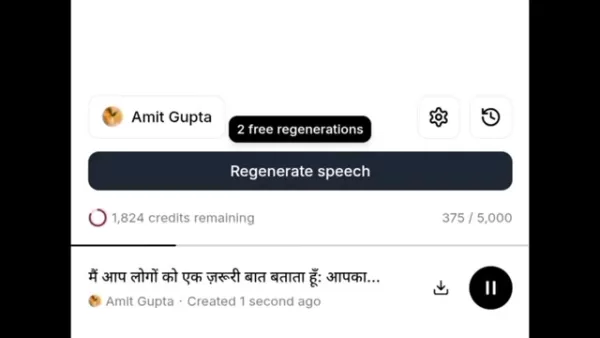
The video tutorial demonstrates Eleven Labs as the chosen AI voice generator. Visit their website at ElevenLabs.io and sign up using a Google account to start.
Follow this step-by-step process:
- Sign Up: Create your account on elevenlabs.io.
- Instant Speech: Navigate to the 'Instant Speech' feature.
- Paste Script: Copy and paste your prepared script into the provided text box.
- Hindi Script: For generating a voice in Hindi, make sure your script is written in the Hindi alphabet.
- Select Voice: Browse the available speaker voices and choose one. The video's presenter prefers using the voice named Amit Gupta. Experiment to find the voice that best suits your content.
- Choosing a Model: Click the settings icon, then select the 'Model' option to choose a voice generation model. Eleven Labs provides guidance on which model works best for your selected speaker.
- Generate: Click the 'Generate' button to create your initial AI voice audio file.
Refining the AI Voice: Lexis Audio Editor
The raw AI voice output now requires editing to sound fluid and natural.
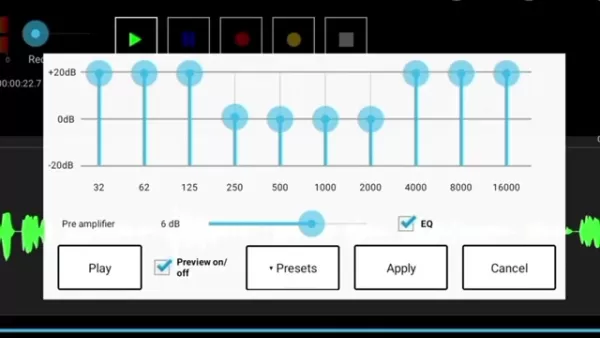
For this refining process, the video recommends using Lexis Audio Editor, which is available for download on the Google Play Store. The editing steps are outlined below:
- Download and Open Lexis Audio Editor: Install the app from the Play Store and launch it.
- Import Audio: Tap the 'Open' button and select 'Open with File Manager' to import your generated audio file.
- Zoom: Use the zoom (+/-) buttons to get a better view of the audio waveform.
- Remove Silences: Identify and delete sections of silence to create a seamless audio flow.
- Apply Effects: Access the effects menu to apply various sound adjustments.
- Change Pitch: Select 'Change Pitch' from the effects. Adjustments within a +2 or -2 range typically yield the most natural results.
- Change Tempo: A slight increase in tempo can often make the speech sound more energetic and natural.
- Equalization: Open the Equalizer tab and fine-tune the frequency levels to your preference.
- Compression: Apply the compressor effect to even out the audio dynamics. Sticking with default settings is advised for a natural sound.
- Add Reverb: Choose 'Reverb' from the effects menu, then select the 'Voice' preset from the available options.
- Save Audio: Once editing is complete, tap the save button at the top to export your final audio file.
Polishing AI Voices with Adobe Podcast Enhance Speech
For a final layer of professional polish, Adobe Podcast's Enhance Speech tool is used.
- Open Adobe Podcast: Using the Chrome browser, go to Podcast.adobe.com.
- Enhance Speech: Click on the 'Enhance Speech' feature.
- Choose File: Click 'Choose File', navigate to your 'Files' or 'Recents' folder, and select your AI recording.
- Automatic Enhancement: The tool will process the file automatically. Note that enhancement can take up to 10 minutes for some files.
- Download: Once processing is complete, click the 'Download' button to save the polished audio.
Enhancing Realism: Key Considerations
Understanding Your Target Audience
Success hinges on a clear understanding of your project's purpose.
Identify the primary use for your AI voice, such as:
- Podcasts
- Audiobooks
- Explainer videos
Once the application is defined, ask key questions. For a podcast, what is its tone—humorous, serious, or a blend? Answering these will help you tailor the AI's output and identify the right target audience for promotion.
Eleven Labs and Lexis Audio Editor Pros and Cons
Pros
High-Quality Voice Generation: Produces realistic and expressive AI voices.
Multiple Languages: Offers support for voice generation in a wide array of languages.
Easy to Use: Features an intuitive interface suitable for users of all skill levels.
Constant Updates: The software is regularly updated, ensuring ongoing improvements and new features.
Cons
Cost: Full access to all features requires a paid subscription.
Limited Free Tier: The free plan comes with a restricted number of credits, limiting audio generation.
Altering Original Script: There is a potential for the AI to misinterpret and inadvertently alter your original script if not carefully monitored.
FAQ
Is it possible to make money by using an ai voice?
Absolutely. There are multiple avenues for generating revenue, whether by creating your own content channel powered by an AI voice or by offering AI voiceover services to other businesses.
Related Questions
Is AI voice monetization allowed on Youtube?
According to the video presenter, YouTube's policies do not explicitly prohibit the use of AI voices. Monetization is permitted as long as your content provides genuine value to viewers, regardless of how it's produced. It is important to conduct your own research, as misinformation on this topic can be prevalent.
Related article
 Swedish AI Startup Lovable Eyes $13.2 Billion Valuation After Major Funding Round
As AI-driven coding tools gain traction, Swedish startup Lovable has secured a major funding round. The company aims to raise $3 billion, potentially boosting its valuation to $13.2 billion—double the $6.6 billion recorded last December. Menlo Ventur
Google Tests Remy AI Agent for Gemini as Focus Shifts to User Control
According to Business Insider, Google is testing Remy, a new AI personal agent for Gemini. This tool aims to execute tasks on behalf of users, streamlining both professional workflows and daily routines.Currently, Remy is undergoing testing in an int
How to fix Core Web Vitals for better SEO rankings
Streamline Report Card Comments with AI ToolsIntroductionAI Tools for Generating Report Card CommentsMagic SchoolAlmanac AIChat GPTUsing Magic School to Generate Report Card CommentsLogging into Magic SchoolSelecting the Report Card Comments ToolCust
Related Special Topic Recommendations
writing
Swedish AI Startup Lovable Eyes $13.2 Billion Valuation After Major Funding Round
As AI-driven coding tools gain traction, Swedish startup Lovable has secured a major funding round. The company aims to raise $3 billion, potentially boosting its valuation to $13.2 billion—double the $6.6 billion recorded last December. Menlo Ventur
Google Tests Remy AI Agent for Gemini as Focus Shifts to User Control
According to Business Insider, Google is testing Remy, a new AI personal agent for Gemini. This tool aims to execute tasks on behalf of users, streamlining both professional workflows and daily routines.Currently, Remy is undergoing testing in an int
How to fix Core Web Vitals for better SEO rankings
Streamline Report Card Comments with AI ToolsIntroductionAI Tools for Generating Report Card CommentsMagic SchoolAlmanac AIChat GPTUsing Magic School to Generate Report Card CommentsLogging into Magic SchoolSelecting the Report Card Comments ToolCust
Related Special Topic Recommendations
writing
 Best AI Outline Generators for Long-Form SEO Articles
2026 Latest Best Top-Rated AI Outline Generators for Long-Form SEO Articles, meticulously curated by XIX.AI. These powerful tools offer game-changing assistance in creating high-quality content quickly, boosting writing efficiency significantly. Get a free vs paid comparison along with real-world tests and detailed rankings to help you find the must-try option that suits your needs. Explore now to unlock your AI edge.
 8 tools
 xix.ai
Education and Learning
AI Study Tools for Homework and Exam Prep
xix.ai
Education and Learning
AI Study Tools for Homework and Exam Prep
2026 Latest Best AI Study Tools for Homework and Exam Prep! XIX.AI curates a top-rated list of powerful, game-changing tools that help students boost productivity, streamline homework completion, and ace exams through real-world tests. Get a free vs paid comparison, detailed rankings, and must-try options to unlock your AI edge. Explore now!
10 tools
xix.ai
Music composition
AI Vocal Demo Tools for Songwriters, Hooks, Toplines, and Multilingual Draft Sessions
2026 Latest Best AI Vocal Demo Tools for Songwriters, Hook Creators, and Multi-Language Content Teams! XIX.AI has curated a top-rated list of powerful game-changing tools that go through rigorous real-world tests. You’ll find detailed free vs paid comparison data, comprehensive rankings, and must-try options to help you boost writing efficiency and unlock your creative potential. Explore now to discover your perfect tool for all your content needs!
9 tools
xix.ai
Business
Best AI Competitive Research Tools for Small Businesses
2026 Latest Best Top-rated AI Competitive Research Tools for Small Businesses! XIX.AI has curated a highly powerful game-changing collection, updated weekly with rigorous real-world tests and detailed rankings. You can find a comprehensive free vs paid comparison to help you identify the must-try tools that boost your productivity and give you a competitive edge. Explore now to discover your perfect tool!
9 tools
xix.ai
Image editing
Photoshop AI Retouch Tools for Ecommerce Apparel, Skin Cleanup, and Color Consistency
2026 Latest Best Photoshop AI retouch tools for ecommerce apparel, skin cleanup, and color consistency! This top-rated curated list features powerful game-changing solutions that help you boost writing efficiency, streamline content creation, and achieve perfect visual results effortlessly. Each tool has undergone real-world tests through weekly updated rankings, complete with free vs paid comparison details. Backed by XIX.AI, it’s the must-try guide for anyone aiming to unlock your AI edge. Explore now!
10 tools
xix.ai
Prompt
Best AI Prompt Libraries for ChatGPT Workflows
2026 Latest Best Top-Rated AI Prompt Libraries for optimizing all types of ChatGPT workflows. XIX.AI has curated a powerful, game-changing collection that goes through rigorous real-world tests to ensure top performance. You can find detailed free vs paid comparisons and expert rankings to help you choose the must-try tools that boost your productivity and unlock your AI edge. Explore now!
11 tools
xix.ai

 Comments (4)
0/500
Comments (4)
0/500
![EdwardRamirez]()
Honestly, I've been trying to make my AI voice sound less like a robot reading a script. This guide seems like a lifesaver! But I'm wondering if the step on script writing really makes that much difference? 🤔
![DavidMartínez]()
這篇文章太實用了!之前用AI語音總覺得像機器人,照著步驟調整後真的自然很多,連停頓和呼吸聲都模擬出來了,簡直像在聽真人錄音。不過有點擔心以後詐騙電話會不會更難分辨啊?大家覺得呢?🤔
![StevenHill]()
AI 목소리를 이렇게 자연스럽게 만들 수 있다니... 🤯 이 가이드만 따라하면 로봇 같은 느낌 없이 진짜 사람처럼 말할 수 있을 것 같아요. 특히 스크립트 작성 단계가 중요한 것 같은데, 한국어 버전도 나왔으면 좋겠네요! 혹시 한국어 음성 합성에도 적용 가능한가요?
![BrianRoberts]()
This was super insightful! I always wondered why some AI voices sound like they're from a sci-fi show and others sound like my neighbor. The script part before recording is key, huh? Makes total sense. Gonna try using more varied sentence structures in my prompts from now on. 🤔 The future of voiceovers is definitely getting more accessible, though a bit scary for professional voice actors maybe.
Want to transform your AI voice from robotic to remarkably human-like? This detailed guide offers a step-by-step process for editing your AI-generated audio to achieve a natural, convincing sound. We'll guide you from writing the initial script to applying the final polishing touches, covering all the essentials for creating a captivating AI voice, enabling you to begin monetizing your AI voice.
Key Points
Learn scripting techniques to infuse emotion and engagement into AI voices.
Use Eleven Labs to produce high-fidelity AI audio and pick the ideal model for your project.
Edit your AI voice file using Lexis Audio Editor to eliminate awkward pauses and improve clarity.
Apply key audio effects like pitch correction, tempo adjustments, and equalization for a more natural human sound.
Utilize Adobe Podcast Enhance Speech for final refinement and professional polish on your AI voice.
Learn effective strategies for monetizing your realistic AI voices on platforms such as YouTube.
Transforming AI Voice: A Comprehensive Guide
Crafting Emotion: The Importance of Scripting AI Voices
The foundation of a believable AI voice is a thoughtfully crafted script. A strong script introduces nuance and feeling, preventing a flat, monotonous delivery. It's crucial to strategically add pauses and use proper punctuation—like commas, periods, colons, and semicolons—to guide the AI's inflection and pacing. Using a simple text editor like Notepad is highly recommended for this stage.
Working in a basic notepad application offers several advantages:
- Flexibility: Notepad provides a straightforward, uncluttered interface for writing and refining your script.
- Easy Editing: It allows you to quickly revise wording and adjust your text as needed.
- Simple Copying: The application includes the fundamental ability to copy your finished script easily.
AI Voice Generation: Eleven Labs
After perfecting your script, the next step is to generate the voice using a specialized AI tool.
The video tutorial demonstrates Eleven Labs as the chosen AI voice generator. Visit their website at ElevenLabs.io and sign up using a Google account to start.
Follow this step-by-step process:
- Sign Up: Create your account on elevenlabs.io.
- Instant Speech: Navigate to the 'Instant Speech' feature.
- Paste Script: Copy and paste your prepared script into the provided text box.
- Hindi Script: For generating a voice in Hindi, make sure your script is written in the Hindi alphabet.
- Select Voice: Browse the available speaker voices and choose one. The video's presenter prefers using the voice named Amit Gupta. Experiment to find the voice that best suits your content.
- Choosing a Model: Click the settings icon, then select the 'Model' option to choose a voice generation model. Eleven Labs provides guidance on which model works best for your selected speaker.
- Generate: Click the 'Generate' button to create your initial AI voice audio file.
Refining the AI Voice: Lexis Audio Editor
The raw AI voice output now requires editing to sound fluid and natural.
For this refining process, the video recommends using Lexis Audio Editor, which is available for download on the Google Play Store. The editing steps are outlined below:
- Download and Open Lexis Audio Editor: Install the app from the Play Store and launch it.
- Import Audio: Tap the 'Open' button and select 'Open with File Manager' to import your generated audio file.
- Zoom: Use the zoom (+/-) buttons to get a better view of the audio waveform.
- Remove Silences: Identify and delete sections of silence to create a seamless audio flow.
- Apply Effects: Access the effects menu to apply various sound adjustments.
- Change Pitch: Select 'Change Pitch' from the effects. Adjustments within a +2 or -2 range typically yield the most natural results.
- Change Tempo: A slight increase in tempo can often make the speech sound more energetic and natural.
- Equalization: Open the Equalizer tab and fine-tune the frequency levels to your preference.
- Compression: Apply the compressor effect to even out the audio dynamics. Sticking with default settings is advised for a natural sound.
- Add Reverb: Choose 'Reverb' from the effects menu, then select the 'Voice' preset from the available options.
- Save Audio: Once editing is complete, tap the save button at the top to export your final audio file.
Polishing AI Voices with Adobe Podcast Enhance Speech
For a final layer of professional polish, Adobe Podcast's Enhance Speech tool is used.
- Open Adobe Podcast: Using the Chrome browser, go to Podcast.adobe.com.
- Enhance Speech: Click on the 'Enhance Speech' feature.
- Choose File: Click 'Choose File', navigate to your 'Files' or 'Recents' folder, and select your AI recording.
- Automatic Enhancement: The tool will process the file automatically. Note that enhancement can take up to 10 minutes for some files.
- Download: Once processing is complete, click the 'Download' button to save the polished audio.
Enhancing Realism: Key Considerations
Understanding Your Target Audience
Success hinges on a clear understanding of your project's purpose.
Identify the primary use for your AI voice, such as:
- Podcasts
- Audiobooks
- Explainer videos
Once the application is defined, ask key questions. For a podcast, what is its tone—humorous, serious, or a blend? Answering these will help you tailor the AI's output and identify the right target audience for promotion.
Eleven Labs and Lexis Audio Editor Pros and Cons
Pros
High-Quality Voice Generation: Produces realistic and expressive AI voices.
Multiple Languages: Offers support for voice generation in a wide array of languages.
Easy to Use: Features an intuitive interface suitable for users of all skill levels.
Constant Updates: The software is regularly updated, ensuring ongoing improvements and new features.
Cons
Cost: Full access to all features requires a paid subscription.
Limited Free Tier: The free plan comes with a restricted number of credits, limiting audio generation.
Altering Original Script: There is a potential for the AI to misinterpret and inadvertently alter your original script if not carefully monitored.
FAQ
Is it possible to make money by using an ai voice?
Absolutely. There are multiple avenues for generating revenue, whether by creating your own content channel powered by an AI voice or by offering AI voiceover services to other businesses.
Related Questions
Is AI voice monetization allowed on Youtube?
According to the video presenter, YouTube's policies do not explicitly prohibit the use of AI voices. Monetization is permitted as long as your content provides genuine value to viewers, regardless of how it's produced. It is important to conduct your own research, as misinformation on this topic can be prevalent.








 Swedish AI Startup Lovable Eyes $13.2 Billion Valuation After Major Funding Round
As AI-driven coding tools gain traction, Swedish startup Lovable has secured a major funding round. The company aims to raise $3 billion, potentially boosting its valuation to $13.2 billion—double the $6.6 billion recorded last December. Menlo Ventur
Google Tests Remy AI Agent for Gemini as Focus Shifts to User Control
According to Business Insider, Google is testing Remy, a new AI personal agent for Gemini. This tool aims to execute tasks on behalf of users, streamlining both professional workflows and daily routines.Currently, Remy is undergoing testing in an int
Swedish AI Startup Lovable Eyes $13.2 Billion Valuation After Major Funding Round
As AI-driven coding tools gain traction, Swedish startup Lovable has secured a major funding round. The company aims to raise $3 billion, potentially boosting its valuation to $13.2 billion—double the $6.6 billion recorded last December. Menlo Ventur
Google Tests Remy AI Agent for Gemini as Focus Shifts to User Control
According to Business Insider, Google is testing Remy, a new AI personal agent for Gemini. This tool aims to execute tasks on behalf of users, streamlining both professional workflows and daily routines.Currently, Remy is undergoing testing in an int
 How to fix Core Web Vitals for better SEO rankings
Streamline Report Card Comments with AI ToolsIntroductionAI Tools for Generating Report Card CommentsMagic SchoolAlmanac AIChat GPTUsing Magic School to Generate Report Card CommentsLogging into Magic SchoolSelecting the Report Card Comments ToolCust
How to fix Core Web Vitals for better SEO rankings
Streamline Report Card Comments with AI ToolsIntroductionAI Tools for Generating Report Card CommentsMagic SchoolAlmanac AIChat GPTUsing Magic School to Generate Report Card CommentsLogging into Magic SchoolSelecting the Report Card Comments ToolCust

2026 Latest Best Top-Rated AI Outline Generators for Long-Form SEO Articles, meticulously curated by XIX.AI. These powerful tools offer game-changing assistance in creating high-quality content quickly, boosting writing efficiency significantly. Get a free vs paid comparison along with real-world tests and detailed rankings to help you find the must-try option that suits your needs. Explore now to unlock your AI edge.
8 tools
xix.ai

2026 Latest Best AI Study Tools for Homework and Exam Prep! XIX.AI curates a top-rated list of powerful, game-changing tools that help students boost productivity, streamline homework completion, and ace exams through real-world tests. Get a free vs paid comparison, detailed rankings, and must-try options to unlock your AI edge. Explore now!
10 tools
xix.ai

2026 Latest Best AI Vocal Demo Tools for Songwriters, Hook Creators, and Multi-Language Content Teams! XIX.AI has curated a top-rated list of powerful game-changing tools that go through rigorous real-world tests. You’ll find detailed free vs paid comparison data, comprehensive rankings, and must-try options to help you boost writing efficiency and unlock your creative potential. Explore now to discover your perfect tool for all your content needs!
9 tools
xix.ai

2026 Latest Best Top-rated AI Competitive Research Tools for Small Businesses! XIX.AI has curated a highly powerful game-changing collection, updated weekly with rigorous real-world tests and detailed rankings. You can find a comprehensive free vs paid comparison to help you identify the must-try tools that boost your productivity and give you a competitive edge. Explore now to discover your perfect tool!
9 tools
xix.ai

2026 Latest Best Photoshop AI retouch tools for ecommerce apparel, skin cleanup, and color consistency! This top-rated curated list features powerful game-changing solutions that help you boost writing efficiency, streamline content creation, and achieve perfect visual results effortlessly. Each tool has undergone real-world tests through weekly updated rankings, complete with free vs paid comparison details. Backed by XIX.AI, it’s the must-try guide for anyone aiming to unlock your AI edge. Explore now!
10 tools
xix.ai

2026 Latest Best Top-Rated AI Prompt Libraries for optimizing all types of ChatGPT workflows. XIX.AI has curated a powerful, game-changing collection that goes through rigorous real-world tests to ensure top performance. You can find detailed free vs paid comparisons and expert rankings to help you choose the must-try tools that boost your productivity and unlock your AI edge. Explore now!
11 tools
xix.ai

Honestly, I've been trying to make my AI voice sound less like a robot reading a script. This guide seems like a lifesaver! But I'm wondering if the step on script writing really makes that much difference? 🤔
這篇文章太實用了!之前用AI語音總覺得像機器人,照著步驟調整後真的自然很多,連停頓和呼吸聲都模擬出來了,簡直像在聽真人錄音。不過有點擔心以後詐騙電話會不會更難分辨啊?大家覺得呢?🤔
AI 목소리를 이렇게 자연스럽게 만들 수 있다니... 🤯 이 가이드만 따라하면 로봇 같은 느낌 없이 진짜 사람처럼 말할 수 있을 것 같아요. 특히 스크립트 작성 단계가 중요한 것 같은데, 한국어 버전도 나왔으면 좋겠네요! 혹시 한국어 음성 합성에도 적용 가능한가요?
This was super insightful! I always wondered why some AI voices sound like they're from a sci-fi show and others sound like my neighbor. The script part before recording is key, huh? Makes total sense. Gonna try using more varied sentence structures in my prompts from now on. 🤔 The future of voiceovers is definitely getting more accessible, though a bit scary for professional voice actors maybe.












