


 Home
HomeUnlock Peak Productivity with AI Voice Keyboard
In our fast-paced digital era, maximizing productivity is essential. Imagine dramatically cutting down on typing time and optimizing your entire workflow using just your voice. The AI Voice Keyboard makes this a reality, combining seamless voice-to-text capabilities with advanced AI functions. Far more than a simple dictation app, it fundamentally transforms your interaction with computers to boost both efficiency and creativity. This article examines its core features, diverse applications, and provides a free step-by-step setup guide to help you harness its full power.
Key Points
The AI Voice Keyboard redefines computer interaction through voice commands.
It offers powerful features like voice-to-text, real-time translation, and text rephrasing.
The program is highly adaptable to meet individual preferences and workflows.
Support for multiple languages is enabled by the Whisper model.
Setup is quick and easy, with free API keys available.
It emphasizes customization and flexibility.
Understanding the AI Voice Keyboard
What is the AI Voice Keyboard?
The AI Voice Keyboard is a specialized program that efficiently converts spoken language into written text. It employs advanced speech recognition models, enabling highly accurate dictation for documents, emails, and other text-based content.
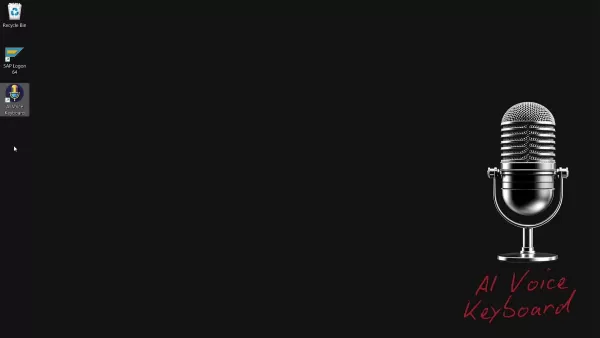
Beyond basic transcription, it includes a suite of AI-powered tools like real-time translation, text rephrasing, and text expansion. The program's customizable nature lets users fine-tune it to their specific requirements, enhancing workflow and overall productivity. This AI Voice Keyboard is straightforward, minimalist, and exceptionally functional.
Key Features of the AI Voice Keyboard
The AI Voice Keyboard is equipped with a variety of features aimed at increasing productivity and streamlining digital tasks.
- Voice-to-Text Conversion: The core function involves accurately transcribing spoken words into text.
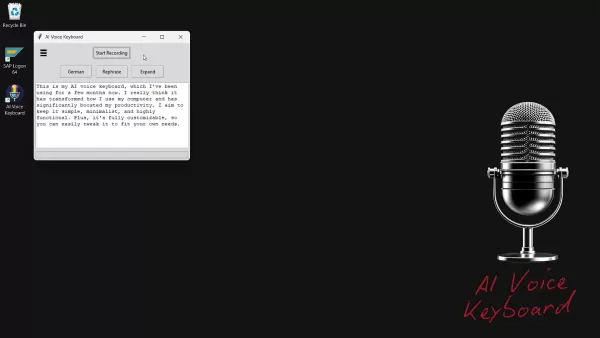
This drastically cuts down on typing time and supports hands-free content creation. Processed transcriptions are automatically copied to the clipboard.
- Real-Time Translation: Instantly translate your speech into numerous languages. This feature removes communication barriers and simplifies creating content for international audiences.
- Text Rephrasing: Improve your writing by restructuring sentences and paragraphs. This enhances clarity, refines tone, and elevates the overall quality of your text.
- Text Expansion: Elaborate on your initial thoughts with the text expansion feature. This helps produce more detailed, polite, and formally structured text.
- Customizable Commands: Tailor the AI Voice Keyboard's commands to match your unique workflow. This high degree of personalization ensures the tool adapts to you, not the reverse.
- Multi-Language Support: With the backing of the Whisper model, the AI Voice Keyboard accommodates a broad spectrum of languages, serving as a versatile tool for global users. The full transcribed text is automatically copied to the clipboard.
Customizing Your AI Voice Keyboard
Tailoring the AI Voice Keyboard to Your Needs
A key strength of the AI Voice Keyboard is its extensive customization, letting you adjust the program to your specific processes and preferences. This personalization can greatly improve efficiency, making the tool a vital part of your everyday activities.
- Transcription API Selection:
You can select from different transcription APIs, including Groq and OpenAI. This choice allows you to pick the API that aligns best with your priorities for accuracy, speed, and budget.
- Custom Prompts: For specialized tasks, you can configure custom prompts to direct the AI model. This is especially valuable for technical or industry-specific content demanding precise terminology.
Here’s a quick summary of accessible models and their typical applications:
Model Description GPT-4 Excellent for general tasks, balancing speed and accuracy effectively. Llama Well-suited for detailed-oriented work, often chosen for its nuanced comprehension and output. GPT-4 Mini A faster, streamlined option for when speed is the primary concern, maintaining solid accuracy. Distil-Whisper Specifically optimized for superior speech recognition performance.
*Note: Each model is designed for specific scenarios.
These tailored AI queries are crucial for translation, rephrasing, and vocabulary enhancement.
Getting Started with the AI Voice Keyboard: A Step-by-Step Guide
Downloading and Installing the AI Voice Keyboard
The AI Voice Keyboard is currently offered as a portable application, so no standard installation is required. Follow these steps to begin:
Download the Program: Go to the official website linked in the video description.
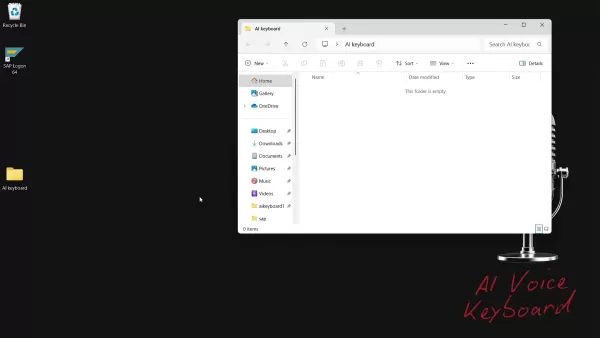
Extract the Files: Since the AI Voice Keyboard is portable, simply unzip the files into a folder on your desktop or any directory you prefer.
Create a Shortcut (Optional): For convenience, create a shortcut to the program’s main executable file and place it on your desktop or start menu.
Configuring the AI Voice Keyboard
Before using the AI Voice Keyboard, you must configure it with an API key. Here’s the process:
- Launch the Program: Run the AI Voice Keyboard executable file.
- Select an API Provider:
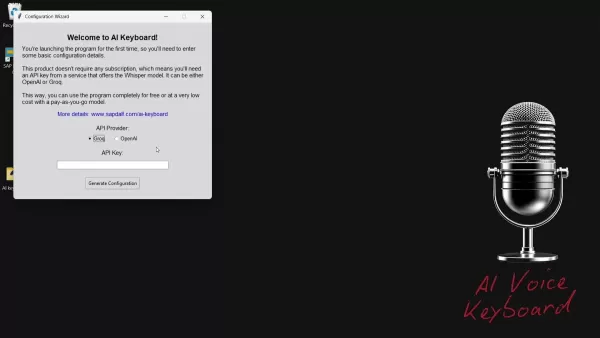
Choose either Groq or OpenAI as your provider. For free usage, Groq is the recommended option.
- Obtain an API Key:
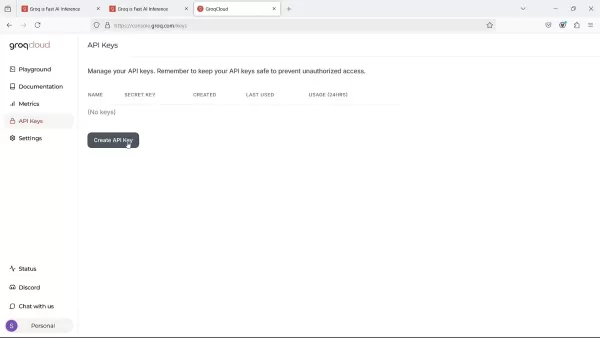
- For Groq: Visit the Groq website, sign up for a free account, go to the API Keys section, and generate a new key.
- For OpenAI: If you opt for OpenAI, create an account on their platform and get an API key. Note that OpenAI generally operates on a paid basis.
- Enter the API Key: Paste your new API key into the appropriate field within the AI Voice Keyboard setup wizard.
- Generate Configuration: Click the "Generate Configuration" button to finalize the setup.
Using the AI Voice Keyboard: A Quick Start
Once configured, operating the AI Voice Keyboard is simple and user-friendly:
Launch the Program: Start the AI Voice Keyboard application.
Start Recording: Press the "Start Recording" button and begin speaking.
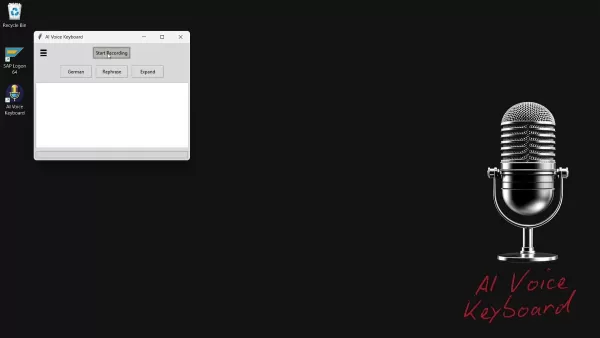
Stop Recording: Click the "Stop Recording" button when you finish speaking.
Process and Use: The program will process your recording and copy the resulting text to your clipboard. You can then paste it into any application.
Explore AI Features: Utilize the available buttons to translate, rephrase, or expand your content.
Understanding the Cost: API Pricing
Maximizing Value
The AI Voice Keyboard application is free to download and use. However, it relies on external APIs; Groq and OpenAI offer competitive rates. For instance, Groq's Whisper v3 costs approximately $0.111 per hour. By understanding the pricing models of these APIs, you can manage your usage effectively to control costs, particularly for large-scale transcription work.
AI Voice Keyboard: Weighing the Benefits and Drawbacks
Pros
Significantly increases productivity with rapid voice-to-text conversion.
Facilitates global communication through multi-language support.
Features customizable commands for a personalized user experience.
Free to download, ensuring wide accessibility.
Cons
Requires an API key from Groq or OpenAI, which might incur expenses.
Transcription accuracy is dependent on the underlying speech recognition model's performance.
Some initial setup and configuration are necessary.
Currently, it is only compatible with the Windows operating system.
Exploring the Core Features of AI Voice Keyboard
Key Functionalities That Enhance Productivity
Here are the main features that distinguish this AI Voice Keyboard:
- Real-time Voice to Text
- Translation Support
- Text Rephrasing Options
- Text Expansion
- Customizable interface
- Multi language use
Unlocking Potential: Use Cases for the AI Voice Keyboard
Applications Across Industries
The AI Voice Keyboard is a highly adaptable tool with uses in many sectors and professions. Prominent applications include:
- Content Creation: Rapidly draft articles, blog posts, and social media content using voice commands.
- Email Communication: Dictate emails and manage messages without typing, saving time and improving workflow.
- Note-Taking: Capture ideas, brainstorming sessions, and meeting notes instantly.
- Accessibility: Provides an easier way for individuals with physical limitations to use computers.
- Multilingual Communication: Translate material into various languages for worldwide distribution.
Frequently Asked Questions about the AI Voice Keyboard
Is the AI Voice Keyboard really free to use?
The AI Voice Keyboard program is a free, portable download available on sapdalf.com. However, the program does not provide API keys directly. You must generate these keys from OpenAI or Groq, which may involve fees depending on the provider.
What languages does the AI Voice Keyboard support?
The AI Voice Keyboard uses the Whisper model, which supports an extensive list of languages. Consult the official Whisper model documentation for the most current language support information.
Can I use the AI Voice Keyboard with other applications?
Yes. The AI Voice Keyboard copies the transcribed text directly to your clipboard, enabling you to paste it into virtually any application that accepts text input.
Is my data secure when using the AI Voice Keyboard?
The AI Voice Keyboard application itself does not store or transmit your data. For data handling and privacy, please review the respective privacy policies of Groq and OpenAI, as their APIs process the audio.
Related Questions: Diving Deeper into Voice-to-Text Technology
What is speech recognition technology?
Speech recognition technology is the foundational component of the AI Voice Keyboard, enabling devices to identify spoken words and convert them into digital text. This process involves acoustic modeling, language modeling, and phonetic analysis to ensure precise transcription. Progress in machine learning and neural networks has greatly improved the reliability and speed of modern speech recognition, powering everything from virtual assistants to professional dictation software.
How can voice recognition software improve business accessibility?
Implementing voice recognition software allows businesses to develop more accessible and intuitive products and services. It improves communication channels, offers customers smoother interaction methods, and helps employees handle administrative duties more effectively, freeing up time for project management and enhancing customer experience.
Related article
 U.S. Stocks Hit Historic Milestone as AI and Aerospace Giants Prepare for Trillion-Dollar Debut
Elon Musk, Sam Altman, and Dario Amodei, three titans of the technology sector, are advancing toward initial public offerings for their respective ventures. With SpaceX, OpenAI, and Anthropic—three industry behemoths nearing trillion-dollar valuation
Swedish AI Startup Lovable Eyes $13.2 Billion Valuation After Major Funding Round
As AI-driven coding tools gain traction, Swedish startup Lovable has secured a major funding round. The company aims to raise $3 billion, potentially boosting its valuation to $13.2 billion—double the $6.6 billion recorded last December. Menlo Ventur
Google Tests Remy AI Agent for Gemini as Focus Shifts to User Control
According to Business Insider, Google is testing Remy, a new AI personal agent for Gemini. This tool aims to execute tasks on behalf of users, streamlining both professional workflows and daily routines.Currently, Remy is undergoing testing in an int
Related Special Topic Recommendations
Data Analysis
U.S. Stocks Hit Historic Milestone as AI and Aerospace Giants Prepare for Trillion-Dollar Debut
Elon Musk, Sam Altman, and Dario Amodei, three titans of the technology sector, are advancing toward initial public offerings for their respective ventures. With SpaceX, OpenAI, and Anthropic—three industry behemoths nearing trillion-dollar valuation
Swedish AI Startup Lovable Eyes $13.2 Billion Valuation After Major Funding Round
As AI-driven coding tools gain traction, Swedish startup Lovable has secured a major funding round. The company aims to raise $3 billion, potentially boosting its valuation to $13.2 billion—double the $6.6 billion recorded last December. Menlo Ventur
Google Tests Remy AI Agent for Gemini as Focus Shifts to User Control
According to Business Insider, Google is testing Remy, a new AI personal agent for Gemini. This tool aims to execute tasks on behalf of users, streamlining both professional workflows and daily routines.Currently, Remy is undergoing testing in an int
Related Special Topic Recommendations
Data Analysis
 Best AI Anomaly Detection Tools for KPI Monitoring across SaaS and Ecommerce Teams
2026 Latest Best Top-rated AI Anomaly Detection Tools for KPI Monitoring in SaaS and Ecommerce teams! XIX.AI has curated a powerful, game-changing collection based on rigorous real-world tests and weekly updated rankings. You’ll find detailed free vs paid comparison insights to help you identify the must-try solution that boosts productivity and unlocks your AI edge. Explore now!
 10 tools
 xix.ai
writing
Best AI Outline Generators for Long-Form SEO Articles
xix.ai
writing
Best AI Outline Generators for Long-Form SEO Articles
2026 Latest Best Top-Rated AI Outline Generators for Long-Form SEO Articles, meticulously curated by XIX.AI. These powerful tools offer game-changing assistance in creating high-quality content quickly, boosting writing efficiency significantly. Get a free vs paid comparison along with real-world tests and detailed rankings to help you find the must-try option that suits your needs. Explore now to unlock your AI edge.
8 tools
xix.ai
Education and Learning
AI Study Tools for Homework and Exam Prep
2026 Latest Best AI Study Tools for Homework and Exam Prep! XIX.AI curates a top-rated list of powerful, game-changing tools that help students boost productivity, streamline homework completion, and ace exams through real-world tests. Get a free vs paid comparison, detailed rankings, and must-try options to unlock your AI edge. Explore now!
10 tools
xix.ai
Music composition
AI Vocal Demo Tools for Songwriters, Hooks, Toplines, and Multilingual Draft Sessions
2026 Latest Best AI Vocal Demo Tools for Songwriters, Hook Creators, and Multi-Language Content Teams! XIX.AI has curated a top-rated list of powerful game-changing tools that go through rigorous real-world tests. You’ll find detailed free vs paid comparison data, comprehensive rankings, and must-try options to help you boost writing efficiency and unlock your creative potential. Explore now to discover your perfect tool for all your content needs!
9 tools
xix.ai
Business
Best AI Competitive Research Tools for Small Businesses
2026 Latest Best Top-rated AI Competitive Research Tools for Small Businesses! XIX.AI has curated a highly powerful game-changing collection, updated weekly with rigorous real-world tests and detailed rankings. You can find a comprehensive free vs paid comparison to help you identify the must-try tools that boost your productivity and give you a competitive edge. Explore now to discover your perfect tool!
9 tools
xix.ai
Image editing
Photoshop AI Retouch Tools for Ecommerce Apparel, Skin Cleanup, and Color Consistency
2026 Latest Best Photoshop AI retouch tools for ecommerce apparel, skin cleanup, and color consistency! This top-rated curated list features powerful game-changing solutions that help you boost writing efficiency, streamline content creation, and achieve perfect visual results effortlessly. Each tool has undergone real-world tests through weekly updated rankings, complete with free vs paid comparison details. Backed by XIX.AI, it’s the must-try guide for anyone aiming to unlock your AI edge. Explore now!
10 tools
xix.ai

 Comments (1)
0/500
Comments (1)
0/500
![DonaldSanchez]()
음성 인식 정확도 실사용 중에 얼마나 되는지 궁금하네요. 혹시 동영상 편집이나 프로그래밍 같은 특수한 작업에도 적용 가능할까요? 경쟁사 제품과 비교했을 때 메리트가 부족하다는 글을 본 것 같은데... 실제로 써본 분들 후기가 더 필요해 보여요 😅
In our fast-paced digital era, maximizing productivity is essential. Imagine dramatically cutting down on typing time and optimizing your entire workflow using just your voice. The AI Voice Keyboard makes this a reality, combining seamless voice-to-text capabilities with advanced AI functions. Far more than a simple dictation app, it fundamentally transforms your interaction with computers to boost both efficiency and creativity. This article examines its core features, diverse applications, and provides a free step-by-step setup guide to help you harness its full power.
Key Points
The AI Voice Keyboard redefines computer interaction through voice commands.
It offers powerful features like voice-to-text, real-time translation, and text rephrasing.
The program is highly adaptable to meet individual preferences and workflows.
Support for multiple languages is enabled by the Whisper model.
Setup is quick and easy, with free API keys available.
It emphasizes customization and flexibility.
Understanding the AI Voice Keyboard
What is the AI Voice Keyboard?
The AI Voice Keyboard is a specialized program that efficiently converts spoken language into written text. It employs advanced speech recognition models, enabling highly accurate dictation for documents, emails, and other text-based content.
Beyond basic transcription, it includes a suite of AI-powered tools like real-time translation, text rephrasing, and text expansion. The program's customizable nature lets users fine-tune it to their specific requirements, enhancing workflow and overall productivity. This AI Voice Keyboard is straightforward, minimalist, and exceptionally functional.
Key Features of the AI Voice Keyboard
The AI Voice Keyboard is equipped with a variety of features aimed at increasing productivity and streamlining digital tasks.
- Voice-to-Text Conversion: The core function involves accurately transcribing spoken words into text.
This drastically cuts down on typing time and supports hands-free content creation. Processed transcriptions are automatically copied to the clipboard.
- Real-Time Translation: Instantly translate your speech into numerous languages. This feature removes communication barriers and simplifies creating content for international audiences.
- Text Rephrasing: Improve your writing by restructuring sentences and paragraphs. This enhances clarity, refines tone, and elevates the overall quality of your text.
- Text Expansion: Elaborate on your initial thoughts with the text expansion feature. This helps produce more detailed, polite, and formally structured text.
- Customizable Commands: Tailor the AI Voice Keyboard's commands to match your unique workflow. This high degree of personalization ensures the tool adapts to you, not the reverse.
- Multi-Language Support: With the backing of the Whisper model, the AI Voice Keyboard accommodates a broad spectrum of languages, serving as a versatile tool for global users. The full transcribed text is automatically copied to the clipboard.
Customizing Your AI Voice Keyboard
Tailoring the AI Voice Keyboard to Your Needs
A key strength of the AI Voice Keyboard is its extensive customization, letting you adjust the program to your specific processes and preferences. This personalization can greatly improve efficiency, making the tool a vital part of your everyday activities.
- Transcription API Selection:
You can select from different transcription APIs, including Groq and OpenAI. This choice allows you to pick the API that aligns best with your priorities for accuracy, speed, and budget.
- Custom Prompts: For specialized tasks, you can configure custom prompts to direct the AI model. This is especially valuable for technical or industry-specific content demanding precise terminology.
Here’s a quick summary of accessible models and their typical applications:
| Model | Description |
|---|---|
| GPT-4 | Excellent for general tasks, balancing speed and accuracy effectively. |
| Llama | Well-suited for detailed-oriented work, often chosen for its nuanced comprehension and output. |
| GPT-4 Mini | A faster, streamlined option for when speed is the primary concern, maintaining solid accuracy. |
| Distil-Whisper | Specifically optimized for superior speech recognition performance. |
*Note: Each model is designed for specific scenarios.
These tailored AI queries are crucial for translation, rephrasing, and vocabulary enhancement.
Getting Started with the AI Voice Keyboard: A Step-by-Step Guide
Downloading and Installing the AI Voice Keyboard
The AI Voice Keyboard is currently offered as a portable application, so no standard installation is required. Follow these steps to begin:
Download the Program: Go to the official website linked in the video description.
Extract the Files: Since the AI Voice Keyboard is portable, simply unzip the files into a folder on your desktop or any directory you prefer.
Create a Shortcut (Optional): For convenience, create a shortcut to the program’s main executable file and place it on your desktop or start menu.
Configuring the AI Voice Keyboard
Before using the AI Voice Keyboard, you must configure it with an API key. Here’s the process:
- Launch the Program: Run the AI Voice Keyboard executable file.
- Select an API Provider:
Choose either Groq or OpenAI as your provider. For free usage, Groq is the recommended option.
- Obtain an API Key:
- For Groq: Visit the Groq website, sign up for a free account, go to the API Keys section, and generate a new key.
- For OpenAI: If you opt for OpenAI, create an account on their platform and get an API key. Note that OpenAI generally operates on a paid basis.
- Enter the API Key: Paste your new API key into the appropriate field within the AI Voice Keyboard setup wizard.
- Generate Configuration: Click the "Generate Configuration" button to finalize the setup.
Using the AI Voice Keyboard: A Quick Start
Once configured, operating the AI Voice Keyboard is simple and user-friendly:
Launch the Program: Start the AI Voice Keyboard application.
Start Recording: Press the "Start Recording" button and begin speaking.
Stop Recording: Click the "Stop Recording" button when you finish speaking.
Process and Use: The program will process your recording and copy the resulting text to your clipboard. You can then paste it into any application.
Explore AI Features: Utilize the available buttons to translate, rephrase, or expand your content.
Understanding the Cost: API Pricing
Maximizing Value
The AI Voice Keyboard application is free to download and use. However, it relies on external APIs; Groq and OpenAI offer competitive rates. For instance, Groq's Whisper v3 costs approximately $0.111 per hour. By understanding the pricing models of these APIs, you can manage your usage effectively to control costs, particularly for large-scale transcription work.
AI Voice Keyboard: Weighing the Benefits and Drawbacks
Pros
Significantly increases productivity with rapid voice-to-text conversion.
Facilitates global communication through multi-language support.
Features customizable commands for a personalized user experience.
Free to download, ensuring wide accessibility.
Cons
Requires an API key from Groq or OpenAI, which might incur expenses.
Transcription accuracy is dependent on the underlying speech recognition model's performance.
Some initial setup and configuration are necessary.
Currently, it is only compatible with the Windows operating system.
Exploring the Core Features of AI Voice Keyboard
Key Functionalities That Enhance Productivity
Here are the main features that distinguish this AI Voice Keyboard:
- Real-time Voice to Text
- Translation Support
- Text Rephrasing Options
- Text Expansion
- Customizable interface
- Multi language use
Unlocking Potential: Use Cases for the AI Voice Keyboard
Applications Across Industries
The AI Voice Keyboard is a highly adaptable tool with uses in many sectors and professions. Prominent applications include:
- Content Creation: Rapidly draft articles, blog posts, and social media content using voice commands.
- Email Communication: Dictate emails and manage messages without typing, saving time and improving workflow.
- Note-Taking: Capture ideas, brainstorming sessions, and meeting notes instantly.
- Accessibility: Provides an easier way for individuals with physical limitations to use computers.
- Multilingual Communication: Translate material into various languages for worldwide distribution.
Frequently Asked Questions about the AI Voice Keyboard
Is the AI Voice Keyboard really free to use?
The AI Voice Keyboard program is a free, portable download available on sapdalf.com. However, the program does not provide API keys directly. You must generate these keys from OpenAI or Groq, which may involve fees depending on the provider.
What languages does the AI Voice Keyboard support?
The AI Voice Keyboard uses the Whisper model, which supports an extensive list of languages. Consult the official Whisper model documentation for the most current language support information.
Can I use the AI Voice Keyboard with other applications?
Yes. The AI Voice Keyboard copies the transcribed text directly to your clipboard, enabling you to paste it into virtually any application that accepts text input.
Is my data secure when using the AI Voice Keyboard?
The AI Voice Keyboard application itself does not store or transmit your data. For data handling and privacy, please review the respective privacy policies of Groq and OpenAI, as their APIs process the audio.
Related Questions: Diving Deeper into Voice-to-Text Technology
What is speech recognition technology?
Speech recognition technology is the foundational component of the AI Voice Keyboard, enabling devices to identify spoken words and convert them into digital text. This process involves acoustic modeling, language modeling, and phonetic analysis to ensure precise transcription. Progress in machine learning and neural networks has greatly improved the reliability and speed of modern speech recognition, powering everything from virtual assistants to professional dictation software.
How can voice recognition software improve business accessibility?
Implementing voice recognition software allows businesses to develop more accessible and intuitive products and services. It improves communication channels, offers customers smoother interaction methods, and helps employees handle administrative duties more effectively, freeing up time for project management and enhancing customer experience.








 U.S. Stocks Hit Historic Milestone as AI and Aerospace Giants Prepare for Trillion-Dollar Debut
Elon Musk, Sam Altman, and Dario Amodei, three titans of the technology sector, are advancing toward initial public offerings for their respective ventures. With SpaceX, OpenAI, and Anthropic—three industry behemoths nearing trillion-dollar valuation
U.S. Stocks Hit Historic Milestone as AI and Aerospace Giants Prepare for Trillion-Dollar Debut
Elon Musk, Sam Altman, and Dario Amodei, three titans of the technology sector, are advancing toward initial public offerings for their respective ventures. With SpaceX, OpenAI, and Anthropic—three industry behemoths nearing trillion-dollar valuation
 Swedish AI Startup Lovable Eyes $13.2 Billion Valuation After Major Funding Round
As AI-driven coding tools gain traction, Swedish startup Lovable has secured a major funding round. The company aims to raise $3 billion, potentially boosting its valuation to $13.2 billion—double the $6.6 billion recorded last December. Menlo Ventur
Google Tests Remy AI Agent for Gemini as Focus Shifts to User Control
According to Business Insider, Google is testing Remy, a new AI personal agent for Gemini. This tool aims to execute tasks on behalf of users, streamlining both professional workflows and daily routines.Currently, Remy is undergoing testing in an int
Swedish AI Startup Lovable Eyes $13.2 Billion Valuation After Major Funding Round
As AI-driven coding tools gain traction, Swedish startup Lovable has secured a major funding round. The company aims to raise $3 billion, potentially boosting its valuation to $13.2 billion—double the $6.6 billion recorded last December. Menlo Ventur
Google Tests Remy AI Agent for Gemini as Focus Shifts to User Control
According to Business Insider, Google is testing Remy, a new AI personal agent for Gemini. This tool aims to execute tasks on behalf of users, streamlining both professional workflows and daily routines.Currently, Remy is undergoing testing in an int

2026 Latest Best Top-rated AI Anomaly Detection Tools for KPI Monitoring in SaaS and Ecommerce teams! XIX.AI has curated a powerful, game-changing collection based on rigorous real-world tests and weekly updated rankings. You’ll find detailed free vs paid comparison insights to help you identify the must-try solution that boosts productivity and unlocks your AI edge. Explore now!
10 tools
xix.ai

2026 Latest Best Top-Rated AI Outline Generators for Long-Form SEO Articles, meticulously curated by XIX.AI. These powerful tools offer game-changing assistance in creating high-quality content quickly, boosting writing efficiency significantly. Get a free vs paid comparison along with real-world tests and detailed rankings to help you find the must-try option that suits your needs. Explore now to unlock your AI edge.
8 tools
xix.ai

2026 Latest Best AI Study Tools for Homework and Exam Prep! XIX.AI curates a top-rated list of powerful, game-changing tools that help students boost productivity, streamline homework completion, and ace exams through real-world tests. Get a free vs paid comparison, detailed rankings, and must-try options to unlock your AI edge. Explore now!
10 tools
xix.ai

2026 Latest Best AI Vocal Demo Tools for Songwriters, Hook Creators, and Multi-Language Content Teams! XIX.AI has curated a top-rated list of powerful game-changing tools that go through rigorous real-world tests. You’ll find detailed free vs paid comparison data, comprehensive rankings, and must-try options to help you boost writing efficiency and unlock your creative potential. Explore now to discover your perfect tool for all your content needs!
9 tools
xix.ai

2026 Latest Best Top-rated AI Competitive Research Tools for Small Businesses! XIX.AI has curated a highly powerful game-changing collection, updated weekly with rigorous real-world tests and detailed rankings. You can find a comprehensive free vs paid comparison to help you identify the must-try tools that boost your productivity and give you a competitive edge. Explore now to discover your perfect tool!
9 tools
xix.ai

2026 Latest Best Photoshop AI retouch tools for ecommerce apparel, skin cleanup, and color consistency! This top-rated curated list features powerful game-changing solutions that help you boost writing efficiency, streamline content creation, and achieve perfect visual results effortlessly. Each tool has undergone real-world tests through weekly updated rankings, complete with free vs paid comparison details. Backed by XIX.AI, it’s the must-try guide for anyone aiming to unlock your AI edge. Explore now!
10 tools
xix.ai

음성 인식 정확도 실사용 중에 얼마나 되는지 궁금하네요. 혹시 동영상 편집이나 프로그래밍 같은 특수한 작업에도 적용 가능할까요? 경쟁사 제품과 비교했을 때 메리트가 부족하다는 글을 본 것 같은데... 실제로 써본 분들 후기가 더 필요해 보여요 😅












