


 Home
HomeCreate Professional Documentary Voiceovers with AI Voice Generator
Looking to produce compelling documentary videos but lack the budget for professional narrators? Artificial intelligence provides a powerful solution, delivering high-quality, AI-generated voiceovers that elevate your storytelling. This guide will walk you through using AI voice generation tools, with a focus on BlipCut, to craft engaging narrations for your documentary projects. Whether you're producing faceless documentaries or simply enhancing your narrative impact, AI voice technology can transform your workflow.
Key Points
AI voice generators make it possible to create documentary voiceovers without hiring professional actors.
BlipCut is a versatile AI platform for generating voiceovers, translating videos, and more.
Educational videos continue to gain traction online, and AI narration can boost their production value.
Producing faceless documentaries becomes far simpler with the help of AI-generated narration.
YouTube monetization is achievable with AI voiceovers, provided your content is original and well-produced.
Unlocking AI Voiceovers for Documentaries
The Power of AI in Documentary Voiceovers
AI voice generation is reshaping documentary production. These systems employ advanced algorithms to produce realistic, expressive narrations. The advantages are particularly significant for independent creators and small teams working with limited resources. AI voice tools provide flexibility, speed, and affordability, freeing you to concentrate on research, scripting, and video editing. They are especially useful for faceless documentaries, where compelling narration drives the story without an on-screen presenter.
Introducing BlipCut: Your AI Voiceover Solution
Of the many available AI voice solutions, BlipCut distinguishes itself as a robust and user-friendly option.
BlipCut is an AI-powered video translator with a comprehensive suite of features, including voiceover generation, video translation, and transcription services. It empowers creators to translate and adapt video content for YouTube and other platforms, expanding their global reach. Its AI narration capabilities include a diverse selection of voices and languages, making it an excellent choice for documentary filmmakers seeking a professional audio track.
Achieving High-Quality Voiceovers
Tips for Creating Clear and Quality Voiceovers
Producing professional-grade voiceovers requires more than just selecting an AI tool. Follow these tips to ensure your audio is clear, engaging, and polished:
- Craft a Strong Script: A well-written script is the foundation of any effective voiceover. Keep your writing clear, concise, and conversational, avoiding unnecessarily complex sentence structures.
- Select a Suitable Voice: Choose a voice that aligns with the tone and subject matter of your documentary. Pay attention to gender, accent, pacing, and overall style.
- Prioritize Audio Quality: While the AI generates the voice, the clarity of your source material matters. Use a decent microphone and record in a quiet space to minimize any background interference.
- Edit and Polish: After generating the voiceover, review and refine it. Trim awkward pauses, correct mispronunciations, and use audio editing software to adjust volume, speed, and tone for a seamless result.
Step-by-Step Guide to Using BlipCut
Signing Up and Logging In
Start by creating a free BlipCut account.
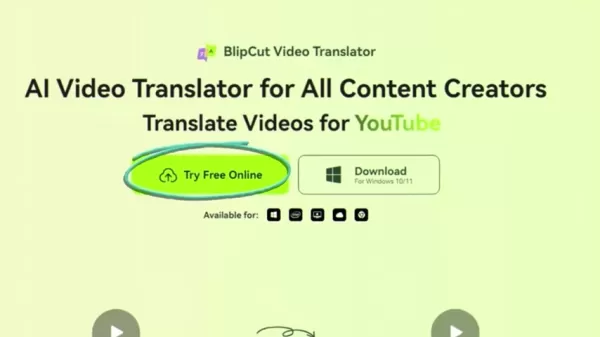
Go to the BlipCut website and select “Sign up for free.” You can quickly register using your Google, Facebook, or Apple accounts. Alternatively, sign up with your email address and a password. Once registered, log in to access your personal dashboard.
Accessing the AI Voiceover Tool
After logging in, find the AI tools section and select “Try Free Online.” This will display the range of AI features available. Locate and click on the “AI Voiceover” tool to begin creating your documentary narration.
Creating a Voiceover
Selecting the AI Voiceover tool takes you to a page where you can start a new project.
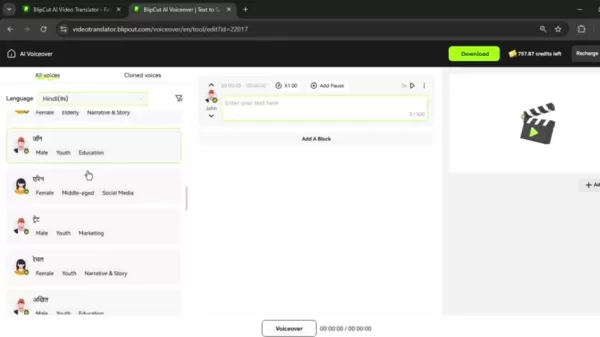
Click “Create Voiceover” to open the text editor where you will input your script. BlipCut supports numerous languages, letting you produce narrations in various accents and styles.
Selecting a Language and Voice
On the left-hand side of the screen, you'll find menus to select your desired language and voice.
BlipCut offers a wide array of languages like English, Hindi, and Spanish. Pick the language that fits your documentary's audience. Then, choose a specific voice that matches the desired narrative tone, with both male and female options available.
Inputting Your Script
Next, add your script to the text editor.

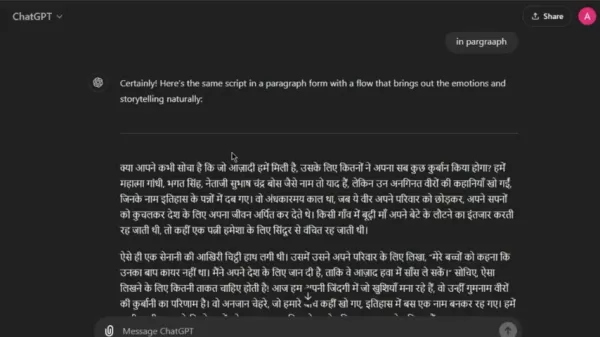
You can type it directly or paste it from an existing document. If you need a script, consider using AI writing assistants like ChatGPT. Provide a relevant prompt about your documentary's topic, and it can generate a draft script for you to copy and paste into BlipCut.
Generating and Downloading the Voiceover
Once your script is ready, click “Generate” to create the AI voiceover.
BlipCut will process the text and produce a high-quality audio file. Preview the result to check for accuracy and make tweaks if needed. When satisfied, click “Download” to save the audio file to your device for later import into your video editing software.
Adding Multiple Voices
For documentaries needing multiple narrators, BlipCut supports this feature. You can add separate blocks to your project, each with its own voice and language settings. This enables dynamic storytelling with different speakers. Click “Add a Block,” choose a different voice and language for that block, and input the corresponding script. Generate and download each block individually, then combine them during the video editing stage.
BlipCut Pricing Plans: Halloween Sale
Overview of BlipCut Pricing
BlipCut offers several subscription plans designed for different usage levels and budgets. These include weekly, monthly, and yearly options, each providing a specific amount of credits for video translation and voice cloning. A special Halloween promotion is currently running, offering discounts of up to 60% on selected plans with a coupon code.
Available pricing options
BlipCut's subscription plans offer flexibility to match various translation requirements:
- Weekly Plan: $16.99 per week (30 Credits/Week).
- Monthly Plan: $39.99 per month (90 Credits/Month).
- Yearly Plan: $25 per month (900 Credits/Year).
- Halloween Promotion: 60% off with a coupon.
Halloween Special Offers
This Halloween, BlipCut is running a special promotion. Use the coupon code Halloween20 to receive up to 60% off on your chosen plan.
HitPaw Halloween Gift
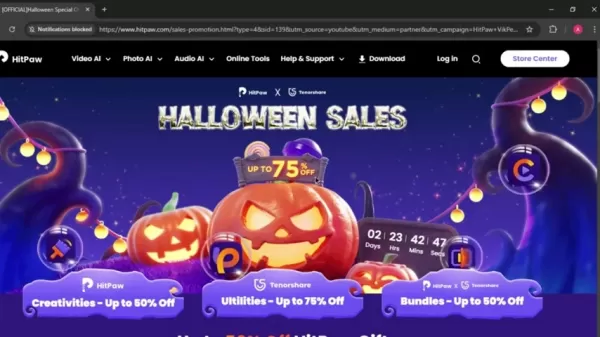
For even greater savings, check out HitPaw's Halloween deals, offering up to 75% off on a selection of creative tools and utilities.
Pros and Cons of Using AI Voice Generators
Pros
Cost-effective: Eliminates the high cost of hiring professional voice actors.
Time-saving: Produces voiceovers rapidly, accelerating your production timeline.
Versatile: Provides access to a wide variety of voices and languages.
Easy to use: Designed for simplicity, requiring minimal technical expertise.
Cons
Limited emotional range: AI voices can sometimes lack the nuanced emotion of a human performance.
Potential pronunciation errors: Some words, especially uncommon names or terms, may be mispronounced.
Customization constraints: Options for fine-tuning vocal performances may be more limited compared to working with a human actor.
Ethical and legal considerations: Always review the terms of service regarding commercial usage rights for generated audio.
FAQ
Can I monetize YouTube videos with AI voiceovers?
Yes, you can monetize YouTube videos that use AI-generated narration. The key is that the content must be original and of high quality. Ensure the voiceover is clear, engaging, and adds substantial value to the video. Avoid simply reading articles aloud or repurposing existing content without significant transformation. Focus on building unique stories and delivering genuine value to your viewers.
Is it legal to use AI voiceovers?
Generally, yes, using AI voiceovers is legal. However, it is crucial to review the specific terms of service for the AI tool you select. Confirm that you have the rights to use the generated audio for commercial purposes, as some platforms may require attribution or place restrictions on usage.
Are AI voiceovers really that good?
The quality of AI voiceovers has advanced dramatically, with many modern systems producing results that are very close to human speech. However, they are not flawless. For the best outcome, choose a high-quality AI voice generator and invest time in writing a natural-sounding script.
Related Questions
How can I improve the quality of my AI documentary?
Enhancing your AI documentary involves several best practices. Begin with a well-structured, engaging script that tells a clear story. Use high-resolution footage or visuals that support and enhance the narration. Meticulous audio editing is essential to remove noise and ensure clarity. Finally, professional video editing will tie everything together into a cohesive and compelling final product. A carefully crafted AI documentary can easily match the quality of traditionally produced works.
What are some of the benefits of using AI for voiceovers?
Utilizing AI for voiceovers offers numerous advantages, especially for creators with limited funds. AI narration is typically more affordable than hiring professionals. It dramatically speeds up production, enabling you to generate audio in minutes. These tools also offer remarkable flexibility, allowing you to experiment with different voices, languages, and delivery styles effortlessly, making them perfect for projects requiring multiple iterations.
Related article
 U.S. Stocks Hit Historic Milestone as AI and Aerospace Giants Prepare for Trillion-Dollar Debut
Elon Musk, Sam Altman, and Dario Amodei, three titans of the technology sector, are advancing toward initial public offerings for their respective ventures. With SpaceX, OpenAI, and Anthropic—three industry behemoths nearing trillion-dollar valuation
Swedish AI Startup Lovable Eyes $13.2 Billion Valuation After Major Funding Round
As AI-driven coding tools gain traction, Swedish startup Lovable has secured a major funding round. The company aims to raise $3 billion, potentially boosting its valuation to $13.2 billion—double the $6.6 billion recorded last December. Menlo Ventur
Google Tests Remy AI Agent for Gemini as Focus Shifts to User Control
According to Business Insider, Google is testing Remy, a new AI personal agent for Gemini. This tool aims to execute tasks on behalf of users, streamlining both professional workflows and daily routines.Currently, Remy is undergoing testing in an int
Related Special Topic Recommendations
Data Analysis
U.S. Stocks Hit Historic Milestone as AI and Aerospace Giants Prepare for Trillion-Dollar Debut
Elon Musk, Sam Altman, and Dario Amodei, three titans of the technology sector, are advancing toward initial public offerings for their respective ventures. With SpaceX, OpenAI, and Anthropic—three industry behemoths nearing trillion-dollar valuation
Swedish AI Startup Lovable Eyes $13.2 Billion Valuation After Major Funding Round
As AI-driven coding tools gain traction, Swedish startup Lovable has secured a major funding round. The company aims to raise $3 billion, potentially boosting its valuation to $13.2 billion—double the $6.6 billion recorded last December. Menlo Ventur
Google Tests Remy AI Agent for Gemini as Focus Shifts to User Control
According to Business Insider, Google is testing Remy, a new AI personal agent for Gemini. This tool aims to execute tasks on behalf of users, streamlining both professional workflows and daily routines.Currently, Remy is undergoing testing in an int
Related Special Topic Recommendations
Data Analysis
 Best AI Anomaly Detection Tools for KPI Monitoring across SaaS and Ecommerce Teams
2026 Latest Best Top-rated AI Anomaly Detection Tools for KPI Monitoring in SaaS and Ecommerce teams! XIX.AI has curated a powerful, game-changing collection based on rigorous real-world tests and weekly updated rankings. You’ll find detailed free vs paid comparison insights to help you identify the must-try solution that boosts productivity and unlocks your AI edge. Explore now!
 10 tools
 xix.ai
writing
Best AI Outline Generators for Long-Form SEO Articles
xix.ai
writing
Best AI Outline Generators for Long-Form SEO Articles
2026 Latest Best Top-Rated AI Outline Generators for Long-Form SEO Articles, meticulously curated by XIX.AI. These powerful tools offer game-changing assistance in creating high-quality content quickly, boosting writing efficiency significantly. Get a free vs paid comparison along with real-world tests and detailed rankings to help you find the must-try option that suits your needs. Explore now to unlock your AI edge.
8 tools
xix.ai
Education and Learning
AI Study Tools for Homework and Exam Prep
2026 Latest Best AI Study Tools for Homework and Exam Prep! XIX.AI curates a top-rated list of powerful, game-changing tools that help students boost productivity, streamline homework completion, and ace exams through real-world tests. Get a free vs paid comparison, detailed rankings, and must-try options to unlock your AI edge. Explore now!
10 tools
xix.ai
Music composition
AI Vocal Demo Tools for Songwriters, Hooks, Toplines, and Multilingual Draft Sessions
2026 Latest Best AI Vocal Demo Tools for Songwriters, Hook Creators, and Multi-Language Content Teams! XIX.AI has curated a top-rated list of powerful game-changing tools that go through rigorous real-world tests. You’ll find detailed free vs paid comparison data, comprehensive rankings, and must-try options to help you boost writing efficiency and unlock your creative potential. Explore now to discover your perfect tool for all your content needs!
9 tools
xix.ai
Business
Best AI Competitive Research Tools for Small Businesses
2026 Latest Best Top-rated AI Competitive Research Tools for Small Businesses! XIX.AI has curated a highly powerful game-changing collection, updated weekly with rigorous real-world tests and detailed rankings. You can find a comprehensive free vs paid comparison to help you identify the must-try tools that boost your productivity and give you a competitive edge. Explore now to discover your perfect tool!
9 tools
xix.ai
Image editing
Photoshop AI Retouch Tools for Ecommerce Apparel, Skin Cleanup, and Color Consistency
2026 Latest Best Photoshop AI retouch tools for ecommerce apparel, skin cleanup, and color consistency! This top-rated curated list features powerful game-changing solutions that help you boost writing efficiency, streamline content creation, and achieve perfect visual results effortlessly. Each tool has undergone real-world tests through weekly updated rankings, complete with free vs paid comparison details. Backed by XIX.AI, it’s the must-try guide for anyone aiming to unlock your AI edge. Explore now!
10 tools
xix.ai

 Comments (2)
0/500
Comments (2)
0/500
![ThomasGreen]()
Honestly, I'm skeptical about AI voiceovers for documentaries. The nuance and emotional weight a human narrator brings is hard to replicate. 🤔 Have any of you tried this and actually been impressed? 🎥
![GeorgeScott]()
這AI旁白技術太酷了!雖然省錢,但聽久了會不會讓紀錄片都變成同一種『科技腔調』啊?有點擔心創意多樣性... 🤔
Looking to produce compelling documentary videos but lack the budget for professional narrators? Artificial intelligence provides a powerful solution, delivering high-quality, AI-generated voiceovers that elevate your storytelling. This guide will walk you through using AI voice generation tools, with a focus on BlipCut, to craft engaging narrations for your documentary projects. Whether you're producing faceless documentaries or simply enhancing your narrative impact, AI voice technology can transform your workflow.
Key Points
AI voice generators make it possible to create documentary voiceovers without hiring professional actors.
BlipCut is a versatile AI platform for generating voiceovers, translating videos, and more.
Educational videos continue to gain traction online, and AI narration can boost their production value.
Producing faceless documentaries becomes far simpler with the help of AI-generated narration.
YouTube monetization is achievable with AI voiceovers, provided your content is original and well-produced.
Unlocking AI Voiceovers for Documentaries
The Power of AI in Documentary Voiceovers
AI voice generation is reshaping documentary production. These systems employ advanced algorithms to produce realistic, expressive narrations. The advantages are particularly significant for independent creators and small teams working with limited resources. AI voice tools provide flexibility, speed, and affordability, freeing you to concentrate on research, scripting, and video editing. They are especially useful for faceless documentaries, where compelling narration drives the story without an on-screen presenter.
Introducing BlipCut: Your AI Voiceover Solution
Of the many available AI voice solutions, BlipCut distinguishes itself as a robust and user-friendly option.
BlipCut is an AI-powered video translator with a comprehensive suite of features, including voiceover generation, video translation, and transcription services. It empowers creators to translate and adapt video content for YouTube and other platforms, expanding their global reach. Its AI narration capabilities include a diverse selection of voices and languages, making it an excellent choice for documentary filmmakers seeking a professional audio track.
Achieving High-Quality Voiceovers
Tips for Creating Clear and Quality Voiceovers
Producing professional-grade voiceovers requires more than just selecting an AI tool. Follow these tips to ensure your audio is clear, engaging, and polished:
- Craft a Strong Script: A well-written script is the foundation of any effective voiceover. Keep your writing clear, concise, and conversational, avoiding unnecessarily complex sentence structures.
- Select a Suitable Voice: Choose a voice that aligns with the tone and subject matter of your documentary. Pay attention to gender, accent, pacing, and overall style.
- Prioritize Audio Quality: While the AI generates the voice, the clarity of your source material matters. Use a decent microphone and record in a quiet space to minimize any background interference.
- Edit and Polish: After generating the voiceover, review and refine it. Trim awkward pauses, correct mispronunciations, and use audio editing software to adjust volume, speed, and tone for a seamless result.
Step-by-Step Guide to Using BlipCut
Signing Up and Logging In
Start by creating a free BlipCut account.
Go to the BlipCut website and select “Sign up for free.” You can quickly register using your Google, Facebook, or Apple accounts. Alternatively, sign up with your email address and a password. Once registered, log in to access your personal dashboard.
Accessing the AI Voiceover Tool
After logging in, find the AI tools section and select “Try Free Online.” This will display the range of AI features available. Locate and click on the “AI Voiceover” tool to begin creating your documentary narration.
Creating a Voiceover
Selecting the AI Voiceover tool takes you to a page where you can start a new project.
Click “Create Voiceover” to open the text editor where you will input your script. BlipCut supports numerous languages, letting you produce narrations in various accents and styles.
Selecting a Language and Voice
On the left-hand side of the screen, you'll find menus to select your desired language and voice.
BlipCut offers a wide array of languages like English, Hindi, and Spanish. Pick the language that fits your documentary's audience. Then, choose a specific voice that matches the desired narrative tone, with both male and female options available.
Inputting Your Script
Next, add your script to the text editor.
You can type it directly or paste it from an existing document. If you need a script, consider using AI writing assistants like ChatGPT. Provide a relevant prompt about your documentary's topic, and it can generate a draft script for you to copy and paste into BlipCut.
Generating and Downloading the Voiceover
Once your script is ready, click “Generate” to create the AI voiceover.
BlipCut will process the text and produce a high-quality audio file. Preview the result to check for accuracy and make tweaks if needed. When satisfied, click “Download” to save the audio file to your device for later import into your video editing software.
Adding Multiple Voices
For documentaries needing multiple narrators, BlipCut supports this feature. You can add separate blocks to your project, each with its own voice and language settings. This enables dynamic storytelling with different speakers. Click “Add a Block,” choose a different voice and language for that block, and input the corresponding script. Generate and download each block individually, then combine them during the video editing stage.
BlipCut Pricing Plans: Halloween Sale
Overview of BlipCut Pricing
BlipCut offers several subscription plans designed for different usage levels and budgets. These include weekly, monthly, and yearly options, each providing a specific amount of credits for video translation and voice cloning. A special Halloween promotion is currently running, offering discounts of up to 60% on selected plans with a coupon code.
Available pricing options
BlipCut's subscription plans offer flexibility to match various translation requirements:
- Weekly Plan: $16.99 per week (30 Credits/Week).
- Monthly Plan: $39.99 per month (90 Credits/Month).
- Yearly Plan: $25 per month (900 Credits/Year).
- Halloween Promotion: 60% off with a coupon.
Halloween Special Offers
This Halloween, BlipCut is running a special promotion. Use the coupon code Halloween20 to receive up to 60% off on your chosen plan.
HitPaw Halloween Gift
For even greater savings, check out HitPaw's Halloween deals, offering up to 75% off on a selection of creative tools and utilities.
Pros and Cons of Using AI Voice Generators
Pros
Cost-effective: Eliminates the high cost of hiring professional voice actors.
Time-saving: Produces voiceovers rapidly, accelerating your production timeline.
Versatile: Provides access to a wide variety of voices and languages.
Easy to use: Designed for simplicity, requiring minimal technical expertise.
Cons
Limited emotional range: AI voices can sometimes lack the nuanced emotion of a human performance.
Potential pronunciation errors: Some words, especially uncommon names or terms, may be mispronounced.
Customization constraints: Options for fine-tuning vocal performances may be more limited compared to working with a human actor.
Ethical and legal considerations: Always review the terms of service regarding commercial usage rights for generated audio.
FAQ
Can I monetize YouTube videos with AI voiceovers?
Yes, you can monetize YouTube videos that use AI-generated narration. The key is that the content must be original and of high quality. Ensure the voiceover is clear, engaging, and adds substantial value to the video. Avoid simply reading articles aloud or repurposing existing content without significant transformation. Focus on building unique stories and delivering genuine value to your viewers.
Is it legal to use AI voiceovers?
Generally, yes, using AI voiceovers is legal. However, it is crucial to review the specific terms of service for the AI tool you select. Confirm that you have the rights to use the generated audio for commercial purposes, as some platforms may require attribution or place restrictions on usage.
Are AI voiceovers really that good?
The quality of AI voiceovers has advanced dramatically, with many modern systems producing results that are very close to human speech. However, they are not flawless. For the best outcome, choose a high-quality AI voice generator and invest time in writing a natural-sounding script.
Related Questions
How can I improve the quality of my AI documentary?
Enhancing your AI documentary involves several best practices. Begin with a well-structured, engaging script that tells a clear story. Use high-resolution footage or visuals that support and enhance the narration. Meticulous audio editing is essential to remove noise and ensure clarity. Finally, professional video editing will tie everything together into a cohesive and compelling final product. A carefully crafted AI documentary can easily match the quality of traditionally produced works.
What are some of the benefits of using AI for voiceovers?
Utilizing AI for voiceovers offers numerous advantages, especially for creators with limited funds. AI narration is typically more affordable than hiring professionals. It dramatically speeds up production, enabling you to generate audio in minutes. These tools also offer remarkable flexibility, allowing you to experiment with different voices, languages, and delivery styles effortlessly, making them perfect for projects requiring multiple iterations.








 U.S. Stocks Hit Historic Milestone as AI and Aerospace Giants Prepare for Trillion-Dollar Debut
Elon Musk, Sam Altman, and Dario Amodei, three titans of the technology sector, are advancing toward initial public offerings for their respective ventures. With SpaceX, OpenAI, and Anthropic—three industry behemoths nearing trillion-dollar valuation
U.S. Stocks Hit Historic Milestone as AI and Aerospace Giants Prepare for Trillion-Dollar Debut
Elon Musk, Sam Altman, and Dario Amodei, three titans of the technology sector, are advancing toward initial public offerings for their respective ventures. With SpaceX, OpenAI, and Anthropic—three industry behemoths nearing trillion-dollar valuation
 Swedish AI Startup Lovable Eyes $13.2 Billion Valuation After Major Funding Round
As AI-driven coding tools gain traction, Swedish startup Lovable has secured a major funding round. The company aims to raise $3 billion, potentially boosting its valuation to $13.2 billion—double the $6.6 billion recorded last December. Menlo Ventur
Google Tests Remy AI Agent for Gemini as Focus Shifts to User Control
According to Business Insider, Google is testing Remy, a new AI personal agent for Gemini. This tool aims to execute tasks on behalf of users, streamlining both professional workflows and daily routines.Currently, Remy is undergoing testing in an int
Swedish AI Startup Lovable Eyes $13.2 Billion Valuation After Major Funding Round
As AI-driven coding tools gain traction, Swedish startup Lovable has secured a major funding round. The company aims to raise $3 billion, potentially boosting its valuation to $13.2 billion—double the $6.6 billion recorded last December. Menlo Ventur
Google Tests Remy AI Agent for Gemini as Focus Shifts to User Control
According to Business Insider, Google is testing Remy, a new AI personal agent for Gemini. This tool aims to execute tasks on behalf of users, streamlining both professional workflows and daily routines.Currently, Remy is undergoing testing in an int

2026 Latest Best Top-rated AI Anomaly Detection Tools for KPI Monitoring in SaaS and Ecommerce teams! XIX.AI has curated a powerful, game-changing collection based on rigorous real-world tests and weekly updated rankings. You’ll find detailed free vs paid comparison insights to help you identify the must-try solution that boosts productivity and unlocks your AI edge. Explore now!
10 tools
xix.ai

2026 Latest Best Top-Rated AI Outline Generators for Long-Form SEO Articles, meticulously curated by XIX.AI. These powerful tools offer game-changing assistance in creating high-quality content quickly, boosting writing efficiency significantly. Get a free vs paid comparison along with real-world tests and detailed rankings to help you find the must-try option that suits your needs. Explore now to unlock your AI edge.
8 tools
xix.ai

2026 Latest Best AI Study Tools for Homework and Exam Prep! XIX.AI curates a top-rated list of powerful, game-changing tools that help students boost productivity, streamline homework completion, and ace exams through real-world tests. Get a free vs paid comparison, detailed rankings, and must-try options to unlock your AI edge. Explore now!
10 tools
xix.ai

2026 Latest Best AI Vocal Demo Tools for Songwriters, Hook Creators, and Multi-Language Content Teams! XIX.AI has curated a top-rated list of powerful game-changing tools that go through rigorous real-world tests. You’ll find detailed free vs paid comparison data, comprehensive rankings, and must-try options to help you boost writing efficiency and unlock your creative potential. Explore now to discover your perfect tool for all your content needs!
9 tools
xix.ai

2026 Latest Best Top-rated AI Competitive Research Tools for Small Businesses! XIX.AI has curated a highly powerful game-changing collection, updated weekly with rigorous real-world tests and detailed rankings. You can find a comprehensive free vs paid comparison to help you identify the must-try tools that boost your productivity and give you a competitive edge. Explore now to discover your perfect tool!
9 tools
xix.ai

2026 Latest Best Photoshop AI retouch tools for ecommerce apparel, skin cleanup, and color consistency! This top-rated curated list features powerful game-changing solutions that help you boost writing efficiency, streamline content creation, and achieve perfect visual results effortlessly. Each tool has undergone real-world tests through weekly updated rankings, complete with free vs paid comparison details. Backed by XIX.AI, it’s the must-try guide for anyone aiming to unlock your AI edge. Explore now!
10 tools
xix.ai

Honestly, I'm skeptical about AI voiceovers for documentaries. The nuance and emotional weight a human narrator brings is hard to replicate. 🤔 Have any of you tried this and actually been impressed? 🎥
這AI旁白技術太酷了!雖然省錢,但聽久了會不會讓紀錄片都變成同一種『科技腔調』啊?有點擔心創意多樣性... 🤔












