


 Home
HomeAI-Powered Thumbnail Creation: A Beginner’s Step-by-Step Guide
Crafting captivating thumbnails is essential for drawing viewers to your content. Manual thumbnail design can be labor-intensive, often requiring hours to refine. With artificial intelligence, you can now produce striking thumbnails quickly, significantly enhancing your video’s click-through rate. This guide offers a detailed walkthrough on leveraging AI tools for efficient thumbnail creation, helping your content shine in a competitive digital space.
Key Highlights
Uncover how AI slashes thumbnail creation time.
Master AI tools to craft distinctive, engaging thumbnails.
Learn top strategies for AI-driven thumbnail design.
Follow step-by-step guidance for creating thumbnails with AI.
Discover tips to optimize AI-generated thumbnails for better results.
Seamlessly integrate AI tools into your creative workflow.
Introduction to AI Thumbnail Creation
Why Thumbnails Matter
Thumbnails serve as your content’s first impression. A compelling thumbnail can determine whether a viewer skips your video or clicks to watch. Effective thumbnails are visually striking, clearly convey the video’s theme, and spark curiosity. They must stand out across devices, from smartphones to large monitors. Investing in high-quality thumbnails boosts your content’s success. Eye-catching thumbnails drive higher click-through rates (CTR), fueling viewership and channel growth. A strong visual identity through consistent thumbnail branding builds viewer loyalty and recognition.
Manual vs. AI-Driven Thumbnail Creation
Traditional thumbnail design often relies on tools like Adobe Photoshop or GIMP, demanding expertise in image editing, typography, and layout. This process can be time-consuming, requiring multiple revisions to perfect. AI-driven thumbnail creation streamlines this, enabling rapid production of visually appealing, relevant thumbnails. AI tools analyze video content and generate designs aligned with its theme, saving time and making thumbnail creation accessible to those without design expertise. While manual methods depend on creative effort and time, AI offers a fast prototyping environment, producing multiple variations in minutes for data-driven optimization. This is ideal for channels producing high volumes of content, ensuring consistent branding and visual appeal with minimal effort.
Advantages of AI in Thumbnail Creation
AI-powered thumbnail creation offers significant benefits:
- Time Efficiency: Create thumbnails in minutes, not hours.
- Cost Savings: Eliminate the need for costly design services.
- Accessibility: Empowers anyone to produce professional thumbnails, no design skills required.
- Consistency: Maintains a unified visual style across your thumbnails.
- Optimization: AI algorithms enhance thumbnails for higher click-through rates.
- Scalability: Effortlessly generate thumbnails for numerous videos. AI tools also provide data-driven insights by analyzing viewer behavior, optimizing thumbnails for maximum engagement. This results in more clicks, higher views, and accelerated channel growth, allowing creators to focus on producing quality content.
Step-by-Step Guide: Creating Thumbnails with AI
Step 1: Obtaining a Reference Thumbnail
Start by securing a reference thumbnail.

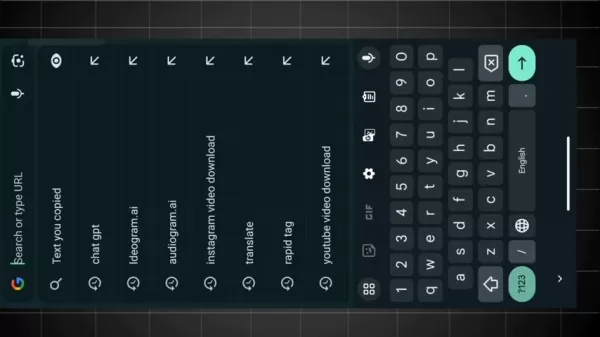
To download a thumbnail from YouTube, copy the video’s URL. Then, visit a YouTube thumbnail downloader site, easily found via a Google search for “YouTube thumbnail download.”
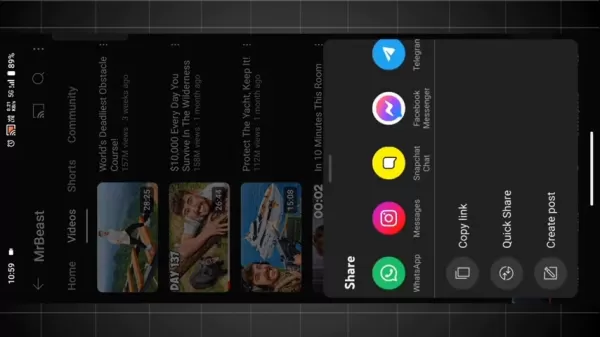
1. Copy the Video URL: Go to the YouTube video and copy its URL from the address bar.
2. Find a Downloader Site: Search for “YouTube thumbnail download” and select a trusted website from the results.
3. Paste the URL: Insert the copied URL into the site’s input field.
4. Download the Thumbnail: Choose your preferred resolution and download the thumbnail to your device. This process helps you gather thumbnails for inspiration and analysis, a key step in identifying effective design elements. Use the downloaded thumbnail as a foundation for creating AI-generated versions, incorporating standout features.
Step 2: Crafting a Prompt with ChatGPT
1. Open ChatGPT: Access the ChatGPT platform and log in.
2. Upload the Thumbnail:
Upload the thumbnail from Step 1 using ChatGPT’s image upload feature.
3. Generate a Prompt: Enter the prompt: “Create a prompt for this image.” ChatGPT will analyze the thumbnail and produce a detailed text description of its key elements.
4. Copy the Prompt: Review the generated prompt, ensuring it captures the thumbnail’s essence, and copy it for the next step. A high-quality prompt is crucial for effective AI image generation, so verify its accuracy. ChatGPT’s analysis ensures the AI-generated thumbnails retain the visual and thematic qualities that make the original engaging.
Step 3: Creating Thumbnails with Ideogram.ai
1. Visit Ideogram.ai: Open your browser and go to the Ideogram.ai website.
2. Sign Up or Log In: New users should create an account; existing users can log in.
3. Paste the Prompt:
Enter the ChatGPT-generated prompt into Ideogram.ai’s input field.
4. Adjust Settings: Set parameters like image ratio (e.g., 16:9 for YouTube thumbnails) and visibility (public for general use).
5. Generate Thumbnails: Click “Generate” to create multiple thumbnail options.
6. Select and Download: Review the generated thumbnails, choose the best match for your vision, and download it. If unsatisfied, tweak the prompt or regenerate. Ideogram.ai transforms text prompts into visually stunning thumbnails, simplifying the design process and offering diverse creative options for users of all skill levels.
Pricing
Ideogram.ai Pricing Options
Ideogram.ai provides flexible pricing plans:
- Free Plan: Offers limited monthly generations, ideal for beginners exploring AI thumbnail creation.
- Paid Plans: Provide higher generation limits, faster processing, and advanced features, suited for professional creators and businesses needing frequent thumbnails. Visit Ideogram.ai for detailed pricing.
Pros and Cons of AI Thumbnail Creation
Pros
Drastically reduces thumbnail creation time.
Lowers costs compared to professional design services.
Makes high-quality thumbnail creation accessible to all.
Ensures consistent visual branding across thumbnails.
Optimizes thumbnails for better click-through rates.
Supports rapid production of thumbnails for multiple videos.
Cons
Risk of generic or unoriginal designs.
Reliance on AI algorithm quality.
Less creative control than manual design.
Potential ethical concerns with AI-generated content.
Requires customization to avoid repetitive designs.
Demands precise prompt crafting for optimal results.
Core Features of Ideogram.ai
Key Tools for AI Thumbnail Creation
Ideogram.ai offers robust features for efficient thumbnail design:
- AI-Driven Image Creation: Generates thumbnails from text prompts using advanced algorithms.
- Customizable Options: Fine-tune settings like image ratio, visibility, and generation parameters.
- Multiple Variations: Produces several thumbnail options from one prompt for easy selection.
- Intuitive Interface: Simplifies thumbnail creation for users of all skill levels.
- Fast Processing: Delivers thumbnails quickly, saving time.
- High-Quality Results: Creates visually appealing thumbnails optimized for engagement.
Use Cases for AI Thumbnail Creation
Applications of AI in Thumbnail Design
AI thumbnail creation serves various purposes:
- YouTube Creators: Craft eye-catching thumbnails to boost video views and engagement.
- Social Media Marketers: Design compelling thumbnails for posts to increase interaction.
- Bloggers: Create engaging featured images for blog posts to attract readers.
- E-commerce: Produce high-quality product visuals to drive online sales.
- Educational Platforms: Design appealing thumbnails for online courses to attract learners.
Frequently Asked Questions (FAQ)
Is Ideogram.ai beginner-friendly?
Yes, Ideogram.ai’s intuitive interface makes it simple for beginners to create professional thumbnails, regardless of design experience.
Can I customize AI-generated thumbnails?
Yes, Ideogram.ai offers customizable settings like image ratio and generation parameters to tailor thumbnails to your needs.
What is ChatGPT?
ChatGPT, developed by OpenAI, is an advanced AI language model that generates human-like text for conversations, answers, and content creation. For thumbnails, it crafts detailed prompts to guide AI image generation tools.
What is Ideogram.ai?
Ideogram.ai is an AI-powered platform for creating high-quality thumbnails and graphics from text prompts. Its customizable settings and user-friendly design make it accessible for all, delivering efficient, engaging visual content.
Related Questions
How does AI improve video content creation?
AI enhances video creation by automating tasks like editing, transcription, and thumbnail design, saving time. It provides audience insights for better engagement and supports scriptwriting, visual effects, and full video creation. AI enables rapid prototyping, A/B testing, and data-driven optimization, improving efficiency, content quality, and competitiveness.
What are the best practices for thumbnail design?
Effective thumbnails use high-resolution images, clear text, and visually appealing designs that reflect the video’s theme. Employ contrasting colors, bold fonts, and consistent branding for recognition. Optimize for mobile, keep designs simple, and A/B test to identify top-performing thumbnails.
Related article
 Enovis acquires eCential Robotics for $180M
eCential’s open, modular architecture enables partnerships with technology firms and implant makers. | Source: eCential RoboticsMedical technology firm Enovis Corp. announced a binding offer to acquire eCential Robotics for €155 million (over $180 mi
OpenAI Unveils Codex Cloud Environments for Seamless Cross-Device Use
OpenAI has expanded its software engineering agent, Codex, with new capabilities that extend its utility beyond individual laptops. These updates introduce reusable cloud development environments, enabling access from any device.Announced during Open
Tencent WorkBuddy Launches on HarmonyOS PC App Market
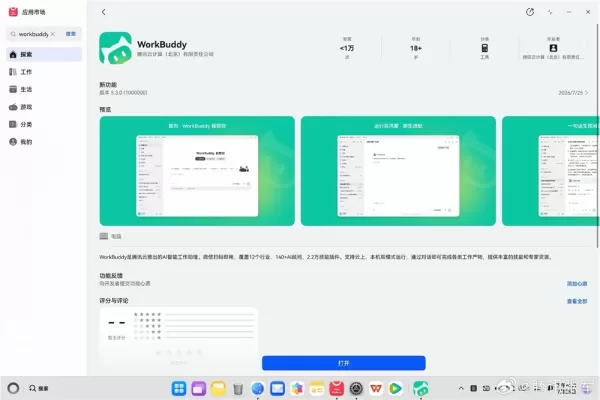
On July 27, Zhang Jun, Tencent’s public relations director, announced the official launch of the company’s AI office assistant, WorkBuddy, on the HarmonyOS PC app market. This marks the debut of the first desktop AI agent within the HarmonyOS ecosyst
Related Special Topic Recommendations
code
Enovis acquires eCential Robotics for $180M
eCential’s open, modular architecture enables partnerships with technology firms and implant makers. | Source: eCential RoboticsMedical technology firm Enovis Corp. announced a binding offer to acquire eCential Robotics for €155 million (over $180 mi
OpenAI Unveils Codex Cloud Environments for Seamless Cross-Device Use
OpenAI has expanded its software engineering agent, Codex, with new capabilities that extend its utility beyond individual laptops. These updates introduce reusable cloud development environments, enabling access from any device.Announced during Open
Tencent WorkBuddy Launches on HarmonyOS PC App Market
On July 27, Zhang Jun, Tencent’s public relations director, announced the official launch of the company’s AI office assistant, WorkBuddy, on the HarmonyOS PC app market. This marks the debut of the first desktop AI agent within the HarmonyOS ecosyst
Related Special Topic Recommendations
code
 Best AI Coding Tools for Python and JavaScript
2026 Latest Best Top-Rated AI Coding Tools for Python and JavaScript are here on XIX.AI’s curated list. These powerful game-changing tools have undergone rigorous real-world tests to deliver exceptional results for writing efficient code, fixing bugs, and boosting productivity. Get a free vs paid comparison and see which options suit your needs. Explore now to Discover your perfect coding tool and Unlock your AI edge.
 10 tools
 xix.ai
Academic Research
Best AI Citation Mapping Tools for Research Discovery
xix.ai
Academic Research
Best AI Citation Mapping Tools for Research Discovery
2026 Latest Best Top-Rated AI Citation Mapping Tools for Research Discovery! XIX.AI has curated a powerful, game-changing collection of must-try tools that go through rigorous real-world tests to deliver accurate results. You’ll find detailed free vs paid comparisons, weekly updated rankings, and insights to help you boost your research efficiency and uncover valuable data faster. Explore now to discover your perfect tool for academic work! 238 characters
11 tools
xix.ai
SEO
AI Meta Tag Tools for Faster On Page SEO
2026 Latest Best Top-rated AI Meta Tag Tools for Faster On Page SEO! XIX.AI has curated a powerful, game-changing collection of highly reliable tools that undergo rigorous real-world tests. You’ll find a free vs paid comparison along with detailed rankings to help you choose the perfect option for boosting your content’s search visibility and improving writing efficiency. Explore now to Unlock your AI edge!
9 tools
xix.ai
Health & Wellness
AI Habit Tracking Tools for Personal Health Goals
2026 Latest Best AI Habit Tracking Tools for Personal Health Goals are here on XIX.AI! Our curated top-rated list includes powerful, game-changing solutions that help you stay consistent with your goals through real-world tests and strict rankings. We also offer a free vs paid comparison to help you choose the perfect fit. Explore now to Unlock your AI edge in achieving better health outcomes.
10 tools
xix.ai
Data Analysis
Best AI Anomaly Detection Tools for Dashboard Monitoring
2026 Latest Best Top-rated AI Anomaly Detection Tools for Dashboard Monitoring are here on XIX.AI! This curated list features powerful, game-changing solutions that deliver accurate real-world tests through weekly updated rankings. You’ll find a free vs paid comparison and insights into how these tools boost productivity by helping users spot issues fast, streamlining workflow efficiency. Discover your perfect tool to unlock your AI edge today. Explore now!
9 tools
xix.ai
Animation Creation
AI Lip-Sync Generators for Dialogue-Driven Character Animation and Motion Scenes
2026 Latest Best AI Lip-Sync Generators for Dialogue-Driven Character Animation and Motion Scenes! XIX.AI has curated a top-rated list of powerful, game-changing tools that deliver flawless synchronized lip movements for animated characters. Each option undergoes rigorous real-world tests to ensure reliability, and our weekly updated rankings help you find the must-try solution that boosts your animation workflow efficiency. Explore now to discover your perfect tool!
9 tools
xix.ai

 Comments (3)
0/500
Comments (3)
0/500
![DouglasScott]()
Super cool guide! AI thumbnails sound like a game-changer for creators. Can it really cut down hours of work? 😮 Excited to try this out!
![BruceBrown]()
This AI thumbnail guide is a game-changer! 😍 I used to spend hours tweaking designs, but now I’m curious if these tools can match my creative vibe. Anyone tried this yet?
![BrianRoberts]()
Super cool guide! AI making thumbnails sounds like a game-changer. I’m curious, how fast can it churn out designs compared to doing it by hand? 🚀
Crafting captivating thumbnails is essential for drawing viewers to your content. Manual thumbnail design can be labor-intensive, often requiring hours to refine. With artificial intelligence, you can now produce striking thumbnails quickly, significantly enhancing your video’s click-through rate. This guide offers a detailed walkthrough on leveraging AI tools for efficient thumbnail creation, helping your content shine in a competitive digital space.
Key Highlights
Uncover how AI slashes thumbnail creation time.
Master AI tools to craft distinctive, engaging thumbnails.
Learn top strategies for AI-driven thumbnail design.
Follow step-by-step guidance for creating thumbnails with AI.
Discover tips to optimize AI-generated thumbnails for better results.
Seamlessly integrate AI tools into your creative workflow.
Introduction to AI Thumbnail Creation
Why Thumbnails Matter
Thumbnails serve as your content’s first impression. A compelling thumbnail can determine whether a viewer skips your video or clicks to watch. Effective thumbnails are visually striking, clearly convey the video’s theme, and spark curiosity. They must stand out across devices, from smartphones to large monitors. Investing in high-quality thumbnails boosts your content’s success. Eye-catching thumbnails drive higher click-through rates (CTR), fueling viewership and channel growth. A strong visual identity through consistent thumbnail branding builds viewer loyalty and recognition.
Manual vs. AI-Driven Thumbnail Creation
Traditional thumbnail design often relies on tools like Adobe Photoshop or GIMP, demanding expertise in image editing, typography, and layout. This process can be time-consuming, requiring multiple revisions to perfect. AI-driven thumbnail creation streamlines this, enabling rapid production of visually appealing, relevant thumbnails. AI tools analyze video content and generate designs aligned with its theme, saving time and making thumbnail creation accessible to those without design expertise. While manual methods depend on creative effort and time, AI offers a fast prototyping environment, producing multiple variations in minutes for data-driven optimization. This is ideal for channels producing high volumes of content, ensuring consistent branding and visual appeal with minimal effort.
Advantages of AI in Thumbnail Creation
AI-powered thumbnail creation offers significant benefits:
- Time Efficiency: Create thumbnails in minutes, not hours.
- Cost Savings: Eliminate the need for costly design services.
- Accessibility: Empowers anyone to produce professional thumbnails, no design skills required.
- Consistency: Maintains a unified visual style across your thumbnails.
- Optimization: AI algorithms enhance thumbnails for higher click-through rates.
- Scalability: Effortlessly generate thumbnails for numerous videos. AI tools also provide data-driven insights by analyzing viewer behavior, optimizing thumbnails for maximum engagement. This results in more clicks, higher views, and accelerated channel growth, allowing creators to focus on producing quality content.
Step-by-Step Guide: Creating Thumbnails with AI
Step 1: Obtaining a Reference Thumbnail
Start by securing a reference thumbnail.
To download a thumbnail from YouTube, copy the video’s URL. Then, visit a YouTube thumbnail downloader site, easily found via a Google search for “YouTube thumbnail download.”
1. Copy the Video URL: Go to the YouTube video and copy its URL from the address bar.
2. Find a Downloader Site: Search for “YouTube thumbnail download” and select a trusted website from the results.
3. Paste the URL: Insert the copied URL into the site’s input field.
4. Download the Thumbnail: Choose your preferred resolution and download the thumbnail to your device. This process helps you gather thumbnails for inspiration and analysis, a key step in identifying effective design elements. Use the downloaded thumbnail as a foundation for creating AI-generated versions, incorporating standout features.
Step 2: Crafting a Prompt with ChatGPT
1. Open ChatGPT: Access the ChatGPT platform and log in.
2. Upload the Thumbnail:
Upload the thumbnail from Step 1 using ChatGPT’s image upload feature.
3. Generate a Prompt: Enter the prompt: “Create a prompt for this image.” ChatGPT will analyze the thumbnail and produce a detailed text description of its key elements.
4. Copy the Prompt: Review the generated prompt, ensuring it captures the thumbnail’s essence, and copy it for the next step. A high-quality prompt is crucial for effective AI image generation, so verify its accuracy. ChatGPT’s analysis ensures the AI-generated thumbnails retain the visual and thematic qualities that make the original engaging.
Step 3: Creating Thumbnails with Ideogram.ai
1. Visit Ideogram.ai: Open your browser and go to the Ideogram.ai website.
2. Sign Up or Log In: New users should create an account; existing users can log in.
3. Paste the Prompt:
Enter the ChatGPT-generated prompt into Ideogram.ai’s input field.
4. Adjust Settings: Set parameters like image ratio (e.g., 16:9 for YouTube thumbnails) and visibility (public for general use).
5. Generate Thumbnails: Click “Generate” to create multiple thumbnail options.
6. Select and Download: Review the generated thumbnails, choose the best match for your vision, and download it. If unsatisfied, tweak the prompt or regenerate. Ideogram.ai transforms text prompts into visually stunning thumbnails, simplifying the design process and offering diverse creative options for users of all skill levels.
Pricing
Ideogram.ai Pricing Options
Ideogram.ai provides flexible pricing plans:
- Free Plan: Offers limited monthly generations, ideal for beginners exploring AI thumbnail creation.
- Paid Plans: Provide higher generation limits, faster processing, and advanced features, suited for professional creators and businesses needing frequent thumbnails. Visit Ideogram.ai for detailed pricing.
Pros and Cons of AI Thumbnail Creation
Pros
Drastically reduces thumbnail creation time.
Lowers costs compared to professional design services.
Makes high-quality thumbnail creation accessible to all.
Ensures consistent visual branding across thumbnails.
Optimizes thumbnails for better click-through rates.
Supports rapid production of thumbnails for multiple videos.
Cons
Risk of generic or unoriginal designs.
Reliance on AI algorithm quality.
Less creative control than manual design.
Potential ethical concerns with AI-generated content.
Requires customization to avoid repetitive designs.
Demands precise prompt crafting for optimal results.
Core Features of Ideogram.ai
Key Tools for AI Thumbnail Creation
Ideogram.ai offers robust features for efficient thumbnail design:
- AI-Driven Image Creation: Generates thumbnails from text prompts using advanced algorithms.
- Customizable Options: Fine-tune settings like image ratio, visibility, and generation parameters.
- Multiple Variations: Produces several thumbnail options from one prompt for easy selection.
- Intuitive Interface: Simplifies thumbnail creation for users of all skill levels.
- Fast Processing: Delivers thumbnails quickly, saving time.
- High-Quality Results: Creates visually appealing thumbnails optimized for engagement.
Use Cases for AI Thumbnail Creation
Applications of AI in Thumbnail Design
AI thumbnail creation serves various purposes:
- YouTube Creators: Craft eye-catching thumbnails to boost video views and engagement.
- Social Media Marketers: Design compelling thumbnails for posts to increase interaction.
- Bloggers: Create engaging featured images for blog posts to attract readers.
- E-commerce: Produce high-quality product visuals to drive online sales.
- Educational Platforms: Design appealing thumbnails for online courses to attract learners.
Frequently Asked Questions (FAQ)
Is Ideogram.ai beginner-friendly?
Yes, Ideogram.ai’s intuitive interface makes it simple for beginners to create professional thumbnails, regardless of design experience.
Can I customize AI-generated thumbnails?
Yes, Ideogram.ai offers customizable settings like image ratio and generation parameters to tailor thumbnails to your needs.
What is ChatGPT?
ChatGPT, developed by OpenAI, is an advanced AI language model that generates human-like text for conversations, answers, and content creation. For thumbnails, it crafts detailed prompts to guide AI image generation tools.
What is Ideogram.ai?
Ideogram.ai is an AI-powered platform for creating high-quality thumbnails and graphics from text prompts. Its customizable settings and user-friendly design make it accessible for all, delivering efficient, engaging visual content.
Related Questions
How does AI improve video content creation?
AI enhances video creation by automating tasks like editing, transcription, and thumbnail design, saving time. It provides audience insights for better engagement and supports scriptwriting, visual effects, and full video creation. AI enables rapid prototyping, A/B testing, and data-driven optimization, improving efficiency, content quality, and competitiveness.
What are the best practices for thumbnail design?
Effective thumbnails use high-resolution images, clear text, and visually appealing designs that reflect the video’s theme. Employ contrasting colors, bold fonts, and consistent branding for recognition. Optimize for mobile, keep designs simple, and A/B test to identify top-performing thumbnails.








 Enovis acquires eCential Robotics for $180M
eCential’s open, modular architecture enables partnerships with technology firms and implant makers. | Source: eCential RoboticsMedical technology firm Enovis Corp. announced a binding offer to acquire eCential Robotics for €155 million (over $180 mi
Enovis acquires eCential Robotics for $180M
eCential’s open, modular architecture enables partnerships with technology firms and implant makers. | Source: eCential RoboticsMedical technology firm Enovis Corp. announced a binding offer to acquire eCential Robotics for €155 million (over $180 mi
 OpenAI Unveils Codex Cloud Environments for Seamless Cross-Device Use
OpenAI has expanded its software engineering agent, Codex, with new capabilities that extend its utility beyond individual laptops. These updates introduce reusable cloud development environments, enabling access from any device.Announced during Open
OpenAI Unveils Codex Cloud Environments for Seamless Cross-Device Use
OpenAI has expanded its software engineering agent, Codex, with new capabilities that extend its utility beyond individual laptops. These updates introduce reusable cloud development environments, enabling access from any device.Announced during Open
 Tencent WorkBuddy Launches on HarmonyOS PC App Market
On July 27, Zhang Jun, Tencent’s public relations director, announced the official launch of the company’s AI office assistant, WorkBuddy, on the HarmonyOS PC app market. This marks the debut of the first desktop AI agent within the HarmonyOS ecosyst
Tencent WorkBuddy Launches on HarmonyOS PC App Market
On July 27, Zhang Jun, Tencent’s public relations director, announced the official launch of the company’s AI office assistant, WorkBuddy, on the HarmonyOS PC app market. This marks the debut of the first desktop AI agent within the HarmonyOS ecosyst

2026 Latest Best Top-Rated AI Coding Tools for Python and JavaScript are here on XIX.AI’s curated list. These powerful game-changing tools have undergone rigorous real-world tests to deliver exceptional results for writing efficient code, fixing bugs, and boosting productivity. Get a free vs paid comparison and see which options suit your needs. Explore now to Discover your perfect coding tool and Unlock your AI edge.
10 tools
xix.ai

2026 Latest Best Top-Rated AI Citation Mapping Tools for Research Discovery! XIX.AI has curated a powerful, game-changing collection of must-try tools that go through rigorous real-world tests to deliver accurate results. You’ll find detailed free vs paid comparisons, weekly updated rankings, and insights to help you boost your research efficiency and uncover valuable data faster. Explore now to discover your perfect tool for academic work! 238 characters
11 tools
xix.ai
2026 Latest Best Top-rated AI Meta Tag Tools for Faster On Page SEO! XIX.AI has curated a powerful, game-changing collection of highly reliable tools that undergo rigorous real-world tests. You’ll find a free vs paid comparison along with detailed rankings to help you choose the perfect option for boosting your content’s search visibility and improving writing efficiency. Explore now to Unlock your AI edge!
9 tools
xix.ai

2026 Latest Best AI Habit Tracking Tools for Personal Health Goals are here on XIX.AI! Our curated top-rated list includes powerful, game-changing solutions that help you stay consistent with your goals through real-world tests and strict rankings. We also offer a free vs paid comparison to help you choose the perfect fit. Explore now to Unlock your AI edge in achieving better health outcomes.
10 tools
xix.ai
2026 Latest Best Top-rated AI Anomaly Detection Tools for Dashboard Monitoring are here on XIX.AI! This curated list features powerful, game-changing solutions that deliver accurate real-world tests through weekly updated rankings. You’ll find a free vs paid comparison and insights into how these tools boost productivity by helping users spot issues fast, streamlining workflow efficiency. Discover your perfect tool to unlock your AI edge today. Explore now!
9 tools
xix.ai
2026 Latest Best AI Lip-Sync Generators for Dialogue-Driven Character Animation and Motion Scenes! XIX.AI has curated a top-rated list of powerful, game-changing tools that deliver flawless synchronized lip movements for animated characters. Each option undergoes rigorous real-world tests to ensure reliability, and our weekly updated rankings help you find the must-try solution that boosts your animation workflow efficiency. Explore now to discover your perfect tool!
9 tools
xix.ai

Super cool guide! AI thumbnails sound like a game-changer for creators. Can it really cut down hours of work? 😮 Excited to try this out!
This AI thumbnail guide is a game-changer! 😍 I used to spend hours tweaking designs, but now I’m curious if these tools can match my creative vibe. Anyone tried this yet?
Super cool guide! AI making thumbnails sounds like a game-changer. I’m curious, how fast can it churn out designs compared to doing it by hand? 🚀












