


 Home
HomeAI Story Videos: Easily Create Engaging Narratives
In the digital era, visual storytelling has become a crucial tool for engaging audiences. However, creating captivating story videos can be a daunting task, often requiring significant time and technical skills. Fortunately, artificial intelligence (AI) provides innovative solutions that simplify this process. By utilizing tools like ChatGPT for scriptwriting and Microsoft Designer for image creation, even those with limited experience can craft compelling story videos effortlessly.
Key Points
- Learn how to create engaging story scripts with ChatGPT.
- Discover the art of crafting image prompts for AI image generation.
- Use Microsoft Designer to generate high-quality images from prompts.
- Understand how to transform images into a seamless video narrative.
- Explore the potential of AI in streamlining content creation.
The Power of AI in Storytelling
Why Use AI for Story Videos?
AI is revolutionizing video creation by automating the process, which not only cuts down production time but also makes it more accessible to creators with limited resources. Whether you're a seasoned professional or just starting out, AI tools can help you generate creative content quickly and economically. By automating the grunt work, AI lets creators focus more on the artistic and narrative elements of their videos, enhancing overall efficiency and creativity.
Key Components of AI Story Video Creation
Creating engaging AI story videos involves several key steps:
- Script Generation: Using AI to draft compelling narratives.
- Image Prompting: Crafting detailed prompts to guide AI in image creation.
- Image Generation: Utilizing AI to create visuals based on the prompts.
- Video Assembly: Combining images and narrative elements into a cohesive video.
Generating a Telugu Moral Story with ChatGPT
Crafting Your Narrative
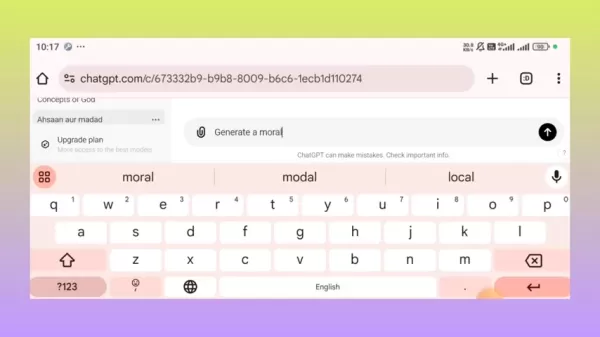
ChatGPT is incredibly versatile when it comes to generating narratives tailored to your needs. For instance, if you want to create a moral story in Telugu, you could use a prompt like, 'Generate a moral story in Telugu. The video should be 5 minutes long for my YouTube channel.' This prompt gives ChatGPT clear directives on the language, theme, and duration, ensuring the story fits your requirements perfectly. You can also tweak the theme to suit genres like horror, action, or adventure.
Transforming Story Scenes into Visuals with Microsoft Designer
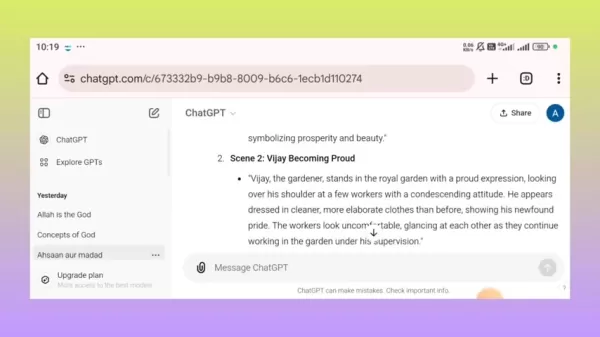
After generating your script with ChatGPT, the next step is to visualize your story. This is where Microsoft Designer comes in handy, allowing you to create stunning images from your narrative. To get the best results, provide detailed prompts that describe each scene. For example, 'A lush, vibrant garden with neatly arranged plants and flowers. In the center, a humble gardener named Vijay stands with the king.' The more descriptive your prompts, the closer the AI can get to your vision.
Free AI Image Generation with Microsoft Designer
For those on a tight budget, Microsoft Designer is a godsend, offering free and unlimited AI image generation. This tool is perfect for beginners or anyone looking to produce a lot of content without breaking the bank. Simply copy and paste your scene prompts from ChatGPT into Microsoft Designer, and let the AI work its magic. It's an efficient way to focus more on your story's narrative while still getting high-quality visuals.
Step-by-Step Guide to Creating AI Story Videos
Step 1: Generate a Story Script with ChatGPT
Start by using ChatGPT to craft your story script. Provide a detailed prompt specifying the language, theme, and desired video length. For example, 'Generate a moral story in Telugu. Video length is 5 minutes for my YouTube video.' ChatGPT will then produce a script complete with scene descriptions, dialogues, and narrative elements.
Here’s a sample story outline:
Title: “Ahamkaram Naashanam Chestundi” (Pride Leads to Downfall)
- Introduction (0:00 - 0:30): Narration: “Ee kadha meeku manaku mukhya mulyaalu nerpedi… satyam ahamkaram eppudoo munidina manishi palitalanu jananadu…”
- Scene 1: Vijay the Gardener Meeting the King (0:30 - 1:30): Narration: “Oka gramamlo Vijay anee stomari undevadu…”
- Conclusion (4:00 - 5:00): Narration: “Ee samahasatan tharuvatha Vijaya thana thatan telusukunnanu…”
This outline helps structure your story for clarity and engagement.
Step 2: Generate Image Prompts
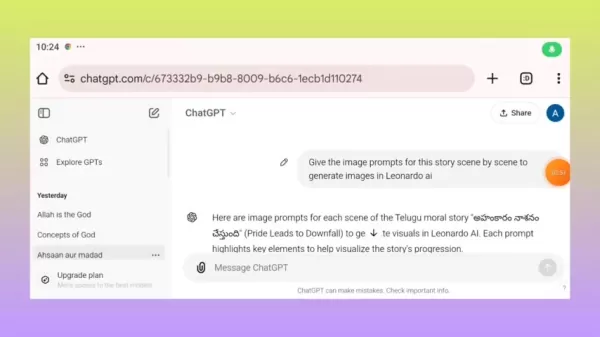
Once you have your script, create image prompts for each scene. Use a prompt like, 'Give the image prompts for this story scene by scene to generate images in Bing AI image generator.' ChatGPT will then provide detailed prompts to guide the AI in creating visuals that match your story.
Step 3: Generate Images with Microsoft Designer
Now, use Microsoft Designer to create images based on the prompts from ChatGPT:
- Open Microsoft Designer in your web browser.
- Copy a scene description prompt from ChatGPT.
- Paste the prompt into the description box in Microsoft Designer.
- Select the image size and format (e.g., widescreen for YouTube videos).
- Click “Generate” to create images based on the prompt.
Download the generated images for use in your video.
Step 4: Assemble the Video
To bring your video to life, use a video editing tool. There are several AI-assisted websites like VivaGo.ai and Vidnoz.com that can help you with this:
- Import the generated images into your video editor.
- Arrange the images in the order of the story script.
- Add voiceover or text narration based on the script.
- Include background music and sound effects.
- Review and finalize your video.
Pricing
Microsoft Designer Pricing
Microsoft Designer offers a free version with unlimited AI image generation, making it an excellent choice for budget-conscious creators.
ChatGPT Pricing
ChatGPT provides a free version as well as a paid subscription called ChatGPT Plus. The paid version offers faster response times and access to new features.
Pros and Cons of Using AI for Story Videos
Pros
- Increased Efficiency: AI streamlines the creation process, saving time and resources.
- Cost-Effectiveness: Reduces production costs by automating tasks.
- Accessibility: Opens doors for creators with limited technical expertise.
- Creativity: Generates diverse narratives and visuals, stimulating imagination.
Cons
- Lack of Originality: AI-generated content may lack emotional depth and originality.
- Ethical Concerns: Raises questions about copyright and authenticity.
- Dependence: Over-reliance on AI may limit human creativity and innovation.
Core Features
ChatGPT Core Features
- Natural Language Generation: Produces coherent and contextually relevant text.
- Customizable Prompts: Tailor prompts to generate specific types of content.
- Multi-Language Support: Generates text in multiple languages.
Microsoft Designer Core Features
- AI Image Generation: Creates images from text prompts.
- User-Friendly Interface: Easy to use for both beginners and experienced designers.
- Free Access: Offers unlimited AI image generation for free.
Use Cases
Creating Educational Videos
AI tools are perfect for generating educational content. Use ChatGPT to create scripts for tutorials and Microsoft Designer to generate images that illustrate key concepts.
Generating Marketing Videos
AI can help create marketing videos by drafting compelling narratives and generating visuals that attract potential customers. These videos can be used for product demonstrations, testimonials, and promotional campaigns.
Developing Entertainment Content
AI can be used to create engaging entertainment content such as short stories, animations, and interactive videos. The ability to generate diverse narratives and visuals opens up numerous creative possibilities.
FAQ
Is Microsoft Designer truly free for AI image generation?
Yes, Microsoft Designer offers a free version with unlimited AI image generation.
Can I use these tools to create videos in languages other than Telugu?
Yes, ChatGPT supports multiple languages, making it versatile for global content creation. You can specify the desired language in your prompts.
What video editing tools are recommended for assembling the final video?
There are several AI-assisted websites that generate videos. Some commonly used ones are VivaGo.ai and Vidnoz.com.
Related Questions
How can I improve the quality of AI-generated images?
To enhance the quality of AI-generated images, use detailed and specific prompts. Include information such as the scene description, character details, lighting, and artistic style. Experiment with different prompts to see which ones yield the best results. The more descriptive your prompts, the better the AI can generate images that align with your vision. For example, use a prompt like: 'Create a photorealistic image of a bearded man in simple, traditional robes, praying earnestly inside a small, candle-lit room with a mat on the floor. The atmosphere is serene, with soft light illuminating his face, and the surroundings are sparse, indicating a life of piety and solitude.'
What are the ethical considerations when using AI for storytelling?
When using AI for storytelling, it's essential to consider ethical implications such as copyright, originality, and authenticity. Ensure that the AI-generated content does not infringe on existing copyrights and that the use of AI is transparent to the audience. It's also important to maintain a balance between AI-generated content and human creativity to ensure the story retains originality and emotional depth.
Related article
 U.S. Stocks Hit Historic Milestone as AI and Aerospace Giants Prepare for Trillion-Dollar Debut
Elon Musk, Sam Altman, and Dario Amodei, three titans of the technology sector, are advancing toward initial public offerings for their respective ventures. With SpaceX, OpenAI, and Anthropic—three industry behemoths nearing trillion-dollar valuation
Swedish AI Startup Lovable Eyes $13.2 Billion Valuation After Major Funding Round
As AI-driven coding tools gain traction, Swedish startup Lovable has secured a major funding round. The company aims to raise $3 billion, potentially boosting its valuation to $13.2 billion—double the $6.6 billion recorded last December. Menlo Ventur
Google Tests Remy AI Agent for Gemini as Focus Shifts to User Control
According to Business Insider, Google is testing Remy, a new AI personal agent for Gemini. This tool aims to execute tasks on behalf of users, streamlining both professional workflows and daily routines.Currently, Remy is undergoing testing in an int
Related Special Topic Recommendations
Data Analysis
U.S. Stocks Hit Historic Milestone as AI and Aerospace Giants Prepare for Trillion-Dollar Debut
Elon Musk, Sam Altman, and Dario Amodei, three titans of the technology sector, are advancing toward initial public offerings for their respective ventures. With SpaceX, OpenAI, and Anthropic—three industry behemoths nearing trillion-dollar valuation
Swedish AI Startup Lovable Eyes $13.2 Billion Valuation After Major Funding Round
As AI-driven coding tools gain traction, Swedish startup Lovable has secured a major funding round. The company aims to raise $3 billion, potentially boosting its valuation to $13.2 billion—double the $6.6 billion recorded last December. Menlo Ventur
Google Tests Remy AI Agent for Gemini as Focus Shifts to User Control
According to Business Insider, Google is testing Remy, a new AI personal agent for Gemini. This tool aims to execute tasks on behalf of users, streamlining both professional workflows and daily routines.Currently, Remy is undergoing testing in an int
Related Special Topic Recommendations
Data Analysis
 Best AI Anomaly Detection Tools for KPI Monitoring across SaaS and Ecommerce Teams
2026 Latest Best Top-rated AI Anomaly Detection Tools for KPI Monitoring in SaaS and Ecommerce teams! XIX.AI has curated a powerful, game-changing collection based on rigorous real-world tests and weekly updated rankings. You’ll find detailed free vs paid comparison insights to help you identify the must-try solution that boosts productivity and unlocks your AI edge. Explore now!
 10 tools
 xix.ai
writing
Best AI Outline Generators for Long-Form SEO Articles
xix.ai
writing
Best AI Outline Generators for Long-Form SEO Articles
2026 Latest Best Top-Rated AI Outline Generators for Long-Form SEO Articles, meticulously curated by XIX.AI. These powerful tools offer game-changing assistance in creating high-quality content quickly, boosting writing efficiency significantly. Get a free vs paid comparison along with real-world tests and detailed rankings to help you find the must-try option that suits your needs. Explore now to unlock your AI edge.
8 tools
xix.ai
Education and Learning
AI Study Tools for Homework and Exam Prep
2026 Latest Best AI Study Tools for Homework and Exam Prep! XIX.AI curates a top-rated list of powerful, game-changing tools that help students boost productivity, streamline homework completion, and ace exams through real-world tests. Get a free vs paid comparison, detailed rankings, and must-try options to unlock your AI edge. Explore now!
10 tools
xix.ai
Music composition
AI Vocal Demo Tools for Songwriters, Hooks, Toplines, and Multilingual Draft Sessions
2026 Latest Best AI Vocal Demo Tools for Songwriters, Hook Creators, and Multi-Language Content Teams! XIX.AI has curated a top-rated list of powerful game-changing tools that go through rigorous real-world tests. You’ll find detailed free vs paid comparison data, comprehensive rankings, and must-try options to help you boost writing efficiency and unlock your creative potential. Explore now to discover your perfect tool for all your content needs!
9 tools
xix.ai
Business
Best AI Competitive Research Tools for Small Businesses
2026 Latest Best Top-rated AI Competitive Research Tools for Small Businesses! XIX.AI has curated a highly powerful game-changing collection, updated weekly with rigorous real-world tests and detailed rankings. You can find a comprehensive free vs paid comparison to help you identify the must-try tools that boost your productivity and give you a competitive edge. Explore now to discover your perfect tool!
9 tools
xix.ai
Image editing
Photoshop AI Retouch Tools for Ecommerce Apparel, Skin Cleanup, and Color Consistency
2026 Latest Best Photoshop AI retouch tools for ecommerce apparel, skin cleanup, and color consistency! This top-rated curated list features powerful game-changing solutions that help you boost writing efficiency, streamline content creation, and achieve perfect visual results effortlessly. Each tool has undergone real-world tests through weekly updated rankings, complete with free vs paid comparison details. Backed by XIX.AI, it’s the must-try guide for anyone aiming to unlock your AI edge. Explore now!
10 tools
xix.ai

 Comments (17)
0/500
Comments (17)
0/500
![HarryMartínez]()
Endlich mal ein Tool, das Storytelling für alle zugänglich macht! Die KI-Unterstützung klingt vielversprechend, besonders für kleine Teams ohne großes Videobudget. Hoffentlich bleibt die Bedienung wirklich intuitiv und es wird nicht zu teuer. Spannend wäre, ob man damit auch komplexere narrative Strukturen umsetzen kann, oder ob es eher für einfache Erklärclips bleibt. 🤔
![JonathanMiller]()
Endlich mal eine KI-Anwendung, die nicht nur Buzzwords produziert! Aber mal sehen, ob die Videos wirklich fesseln oder doch nur generisch aussehen. Ich hoffe, es gibt genug Anpassungsmöglichkeiten 😅
![TimothyHernández]()
AI story videos sound cool, but can they really capture human emotions like a pro editor? 🤔 I’m curious to try one out!
![RonaldLee]()
AI story videos sound cool, but I wonder if they’ll make every video feel samey. Hope it doesn’t kill creativity! 🤔
![JustinHarris]()
AI story videos sound cool, but can they really capture the heart of a good tale like a human storyteller? 🤔 I’m curious to try one out!
![JackRoberts]()
AI story videos sound like a game-changer! Can’t wait to try making one without needing a film degree. 😎
In the digital era, visual storytelling has become a crucial tool for engaging audiences. However, creating captivating story videos can be a daunting task, often requiring significant time and technical skills. Fortunately, artificial intelligence (AI) provides innovative solutions that simplify this process. By utilizing tools like ChatGPT for scriptwriting and Microsoft Designer for image creation, even those with limited experience can craft compelling story videos effortlessly.
Key Points
- Learn how to create engaging story scripts with ChatGPT.
- Discover the art of crafting image prompts for AI image generation.
- Use Microsoft Designer to generate high-quality images from prompts.
- Understand how to transform images into a seamless video narrative.
- Explore the potential of AI in streamlining content creation.
The Power of AI in Storytelling
Why Use AI for Story Videos?
AI is revolutionizing video creation by automating the process, which not only cuts down production time but also makes it more accessible to creators with limited resources. Whether you're a seasoned professional or just starting out, AI tools can help you generate creative content quickly and economically. By automating the grunt work, AI lets creators focus more on the artistic and narrative elements of their videos, enhancing overall efficiency and creativity.
Key Components of AI Story Video Creation
Creating engaging AI story videos involves several key steps:
- Script Generation: Using AI to draft compelling narratives.
- Image Prompting: Crafting detailed prompts to guide AI in image creation.
- Image Generation: Utilizing AI to create visuals based on the prompts.
- Video Assembly: Combining images and narrative elements into a cohesive video.
Generating a Telugu Moral Story with ChatGPT
Crafting Your Narrative
ChatGPT is incredibly versatile when it comes to generating narratives tailored to your needs. For instance, if you want to create a moral story in Telugu, you could use a prompt like, 'Generate a moral story in Telugu. The video should be 5 minutes long for my YouTube channel.' This prompt gives ChatGPT clear directives on the language, theme, and duration, ensuring the story fits your requirements perfectly. You can also tweak the theme to suit genres like horror, action, or adventure.
Transforming Story Scenes into Visuals with Microsoft Designer
After generating your script with ChatGPT, the next step is to visualize your story. This is where Microsoft Designer comes in handy, allowing you to create stunning images from your narrative. To get the best results, provide detailed prompts that describe each scene. For example, 'A lush, vibrant garden with neatly arranged plants and flowers. In the center, a humble gardener named Vijay stands with the king.' The more descriptive your prompts, the closer the AI can get to your vision.
Free AI Image Generation with Microsoft Designer
For those on a tight budget, Microsoft Designer is a godsend, offering free and unlimited AI image generation. This tool is perfect for beginners or anyone looking to produce a lot of content without breaking the bank. Simply copy and paste your scene prompts from ChatGPT into Microsoft Designer, and let the AI work its magic. It's an efficient way to focus more on your story's narrative while still getting high-quality visuals.
Step-by-Step Guide to Creating AI Story Videos
Step 1: Generate a Story Script with ChatGPT
Start by using ChatGPT to craft your story script. Provide a detailed prompt specifying the language, theme, and desired video length. For example, 'Generate a moral story in Telugu. Video length is 5 minutes for my YouTube video.' ChatGPT will then produce a script complete with scene descriptions, dialogues, and narrative elements.
Here’s a sample story outline:
Title: “Ahamkaram Naashanam Chestundi” (Pride Leads to Downfall)
- Introduction (0:00 - 0:30): Narration: “Ee kadha meeku manaku mukhya mulyaalu nerpedi… satyam ahamkaram eppudoo munidina manishi palitalanu jananadu…”
- Scene 1: Vijay the Gardener Meeting the King (0:30 - 1:30): Narration: “Oka gramamlo Vijay anee stomari undevadu…”
- Conclusion (4:00 - 5:00): Narration: “Ee samahasatan tharuvatha Vijaya thana thatan telusukunnanu…”
This outline helps structure your story for clarity and engagement.
Step 2: Generate Image Prompts
Once you have your script, create image prompts for each scene. Use a prompt like, 'Give the image prompts for this story scene by scene to generate images in Bing AI image generator.' ChatGPT will then provide detailed prompts to guide the AI in creating visuals that match your story.
Step 3: Generate Images with Microsoft Designer
Now, use Microsoft Designer to create images based on the prompts from ChatGPT:
- Open Microsoft Designer in your web browser.
- Copy a scene description prompt from ChatGPT.
- Paste the prompt into the description box in Microsoft Designer.
- Select the image size and format (e.g., widescreen for YouTube videos).
- Click “Generate” to create images based on the prompt.
Download the generated images for use in your video.
Step 4: Assemble the Video
To bring your video to life, use a video editing tool. There are several AI-assisted websites like VivaGo.ai and Vidnoz.com that can help you with this:
- Import the generated images into your video editor.
- Arrange the images in the order of the story script.
- Add voiceover or text narration based on the script.
- Include background music and sound effects.
- Review and finalize your video.
Pricing
Microsoft Designer Pricing
Microsoft Designer offers a free version with unlimited AI image generation, making it an excellent choice for budget-conscious creators.
ChatGPT Pricing
ChatGPT provides a free version as well as a paid subscription called ChatGPT Plus. The paid version offers faster response times and access to new features.
Pros and Cons of Using AI for Story Videos
Pros
- Increased Efficiency: AI streamlines the creation process, saving time and resources.
- Cost-Effectiveness: Reduces production costs by automating tasks.
- Accessibility: Opens doors for creators with limited technical expertise.
- Creativity: Generates diverse narratives and visuals, stimulating imagination.
Cons
- Lack of Originality: AI-generated content may lack emotional depth and originality.
- Ethical Concerns: Raises questions about copyright and authenticity.
- Dependence: Over-reliance on AI may limit human creativity and innovation.
Core Features
ChatGPT Core Features
- Natural Language Generation: Produces coherent and contextually relevant text.
- Customizable Prompts: Tailor prompts to generate specific types of content.
- Multi-Language Support: Generates text in multiple languages.
Microsoft Designer Core Features
- AI Image Generation: Creates images from text prompts.
- User-Friendly Interface: Easy to use for both beginners and experienced designers.
- Free Access: Offers unlimited AI image generation for free.
Use Cases
Creating Educational Videos
AI tools are perfect for generating educational content. Use ChatGPT to create scripts for tutorials and Microsoft Designer to generate images that illustrate key concepts.
Generating Marketing Videos
AI can help create marketing videos by drafting compelling narratives and generating visuals that attract potential customers. These videos can be used for product demonstrations, testimonials, and promotional campaigns.
Developing Entertainment Content
AI can be used to create engaging entertainment content such as short stories, animations, and interactive videos. The ability to generate diverse narratives and visuals opens up numerous creative possibilities.
FAQ
Is Microsoft Designer truly free for AI image generation?
Yes, Microsoft Designer offers a free version with unlimited AI image generation.
Can I use these tools to create videos in languages other than Telugu?
Yes, ChatGPT supports multiple languages, making it versatile for global content creation. You can specify the desired language in your prompts.
What video editing tools are recommended for assembling the final video?
There are several AI-assisted websites that generate videos. Some commonly used ones are VivaGo.ai and Vidnoz.com.
Related Questions
How can I improve the quality of AI-generated images?
To enhance the quality of AI-generated images, use detailed and specific prompts. Include information such as the scene description, character details, lighting, and artistic style. Experiment with different prompts to see which ones yield the best results. The more descriptive your prompts, the better the AI can generate images that align with your vision. For example, use a prompt like: 'Create a photorealistic image of a bearded man in simple, traditional robes, praying earnestly inside a small, candle-lit room with a mat on the floor. The atmosphere is serene, with soft light illuminating his face, and the surroundings are sparse, indicating a life of piety and solitude.'
What are the ethical considerations when using AI for storytelling?
When using AI for storytelling, it's essential to consider ethical implications such as copyright, originality, and authenticity. Ensure that the AI-generated content does not infringe on existing copyrights and that the use of AI is transparent to the audience. It's also important to maintain a balance between AI-generated content and human creativity to ensure the story retains originality and emotional depth.








 U.S. Stocks Hit Historic Milestone as AI and Aerospace Giants Prepare for Trillion-Dollar Debut
Elon Musk, Sam Altman, and Dario Amodei, three titans of the technology sector, are advancing toward initial public offerings for their respective ventures. With SpaceX, OpenAI, and Anthropic—three industry behemoths nearing trillion-dollar valuation
U.S. Stocks Hit Historic Milestone as AI and Aerospace Giants Prepare for Trillion-Dollar Debut
Elon Musk, Sam Altman, and Dario Amodei, three titans of the technology sector, are advancing toward initial public offerings for their respective ventures. With SpaceX, OpenAI, and Anthropic—three industry behemoths nearing trillion-dollar valuation
 Swedish AI Startup Lovable Eyes $13.2 Billion Valuation After Major Funding Round
As AI-driven coding tools gain traction, Swedish startup Lovable has secured a major funding round. The company aims to raise $3 billion, potentially boosting its valuation to $13.2 billion—double the $6.6 billion recorded last December. Menlo Ventur
Google Tests Remy AI Agent for Gemini as Focus Shifts to User Control
According to Business Insider, Google is testing Remy, a new AI personal agent for Gemini. This tool aims to execute tasks on behalf of users, streamlining both professional workflows and daily routines.Currently, Remy is undergoing testing in an int
Swedish AI Startup Lovable Eyes $13.2 Billion Valuation After Major Funding Round
As AI-driven coding tools gain traction, Swedish startup Lovable has secured a major funding round. The company aims to raise $3 billion, potentially boosting its valuation to $13.2 billion—double the $6.6 billion recorded last December. Menlo Ventur
Google Tests Remy AI Agent for Gemini as Focus Shifts to User Control
According to Business Insider, Google is testing Remy, a new AI personal agent for Gemini. This tool aims to execute tasks on behalf of users, streamlining both professional workflows and daily routines.Currently, Remy is undergoing testing in an int

2026 Latest Best Top-rated AI Anomaly Detection Tools for KPI Monitoring in SaaS and Ecommerce teams! XIX.AI has curated a powerful, game-changing collection based on rigorous real-world tests and weekly updated rankings. You’ll find detailed free vs paid comparison insights to help you identify the must-try solution that boosts productivity and unlocks your AI edge. Explore now!
10 tools
xix.ai

2026 Latest Best Top-Rated AI Outline Generators for Long-Form SEO Articles, meticulously curated by XIX.AI. These powerful tools offer game-changing assistance in creating high-quality content quickly, boosting writing efficiency significantly. Get a free vs paid comparison along with real-world tests and detailed rankings to help you find the must-try option that suits your needs. Explore now to unlock your AI edge.
8 tools
xix.ai

2026 Latest Best AI Study Tools for Homework and Exam Prep! XIX.AI curates a top-rated list of powerful, game-changing tools that help students boost productivity, streamline homework completion, and ace exams through real-world tests. Get a free vs paid comparison, detailed rankings, and must-try options to unlock your AI edge. Explore now!
10 tools
xix.ai

2026 Latest Best AI Vocal Demo Tools for Songwriters, Hook Creators, and Multi-Language Content Teams! XIX.AI has curated a top-rated list of powerful game-changing tools that go through rigorous real-world tests. You’ll find detailed free vs paid comparison data, comprehensive rankings, and must-try options to help you boost writing efficiency and unlock your creative potential. Explore now to discover your perfect tool for all your content needs!
9 tools
xix.ai

2026 Latest Best Top-rated AI Competitive Research Tools for Small Businesses! XIX.AI has curated a highly powerful game-changing collection, updated weekly with rigorous real-world tests and detailed rankings. You can find a comprehensive free vs paid comparison to help you identify the must-try tools that boost your productivity and give you a competitive edge. Explore now to discover your perfect tool!
9 tools
xix.ai

2026 Latest Best Photoshop AI retouch tools for ecommerce apparel, skin cleanup, and color consistency! This top-rated curated list features powerful game-changing solutions that help you boost writing efficiency, streamline content creation, and achieve perfect visual results effortlessly. Each tool has undergone real-world tests through weekly updated rankings, complete with free vs paid comparison details. Backed by XIX.AI, it’s the must-try guide for anyone aiming to unlock your AI edge. Explore now!
10 tools
xix.ai

Endlich mal ein Tool, das Storytelling für alle zugänglich macht! Die KI-Unterstützung klingt vielversprechend, besonders für kleine Teams ohne großes Videobudget. Hoffentlich bleibt die Bedienung wirklich intuitiv und es wird nicht zu teuer. Spannend wäre, ob man damit auch komplexere narrative Strukturen umsetzen kann, oder ob es eher für einfache Erklärclips bleibt. 🤔
Endlich mal eine KI-Anwendung, die nicht nur Buzzwords produziert! Aber mal sehen, ob die Videos wirklich fesseln oder doch nur generisch aussehen. Ich hoffe, es gibt genug Anpassungsmöglichkeiten 😅
AI story videos sound cool, but can they really capture human emotions like a pro editor? 🤔 I’m curious to try one out!
AI story videos sound cool, but I wonder if they’ll make every video feel samey. Hope it doesn’t kill creativity! 🤔
AI story videos sound cool, but can they really capture the heart of a good tale like a human storyteller? 🤔 I’m curious to try one out!
AI story videos sound like a game-changer! Can’t wait to try making one without needing a film degree. 😎












