


 Home
HomeAI Presentation Generator: Create Compelling Slides Effortlessly
In the rapid-fire modern workplace, captivating presentations are essential for clear communication and achieving results. Yet, producing polished, professional slides can drain hours and challenge those without a design background. The emergence of artificial intelligence (AI) has fundamentally changed how we build presentations. This guide details how AI-powered slide generators, including platforms such as ChatGPT and Kimi, help you design impressive presentations effortlessly—saving precious time and increasing audience involvement.
Key Points
AI presentation tools can construct entire slide decks using simple text instructions or by analyzing uploaded documents.
Platforms like ChatGPT and Kimi employ distinct strategies for AI-driven slide creation.
Kimi focuses specifically on PPT generation, providing a range of templates and the ability to create slides directly from Word files.
Artificial intelligence can assist in polishing your content, recommending imagery, and guaranteeing a professional finish.
Blending multiple AI tools can create a smooth and efficient workflow for the entire presentation process.
Unlocking Presentation Magic with AI
What is an AI Presentation Generator?
An AI presentation generator automates the design of slideshows by utilizing artificial intelligence. This technology helps with multiple facets of presentation development, such as:
- Content generation:
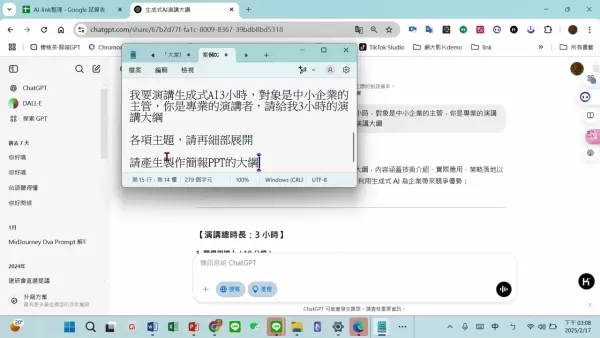
Based on your subject or keywords, AI can compose textual content, conserving your time on research and writing.
- Template selection:The AI can recommend suitable design templates that match your content's purpose and your intended audience, ensuring a visually attractive and polished appearance.
- Layout design:Elements on your slides can be automatically organized by the AI for maximum readability and strong visual effect.
- Image and icon suggestions:To strengthen your message and improve slide appeal, AI can propose relevant photographs and icons.
- Formatting and styling:Your presentation will maintain uniform fonts, colors, and spacing throughout, resulting in a cohesive and refined final product.
By handling these duties automatically, AI presentation builders enable users to produce high-caliber slides rapidly and effectively, regardless of their design expertise. Different tools emphasize various parts of the process, such as content enhancement or visual arrangement. Knowing these distinctions helps you pick the ideal tool for your project and get the most out of your time.
The Power of ChatGPT for Presentation Outlines
Created by OpenAI, ChatGPT is a highly adaptable language model capable of numerous tasks, among them drafting presentation outlines and scripts. Although it doesn't build slides itself, it is incredibly useful for mapping out your presentation's framework and narrative. Here are its main applications:
- Topic brainstorming:Give ChatGPT your main topic and any goals; it will propose different subtopics, perspectives, and talking points for your slides.
- Outline creation:Request a comprehensive outline with proposed slide titles, section headers, and the principal ideas to cover for each one, establishing a firm structural blueprint.
- Script generation:ChatGPT can draft speaker notes or a full script for each slide, aiding in the delivery of a focused and compelling presentation.
- Content refinement:If you have a draft, ChatGPT can help polish it for better clarity, grammar, and overall effectiveness.
Using ChatGPT's capacity for generating structured and creative text saves considerable effort during the planning phase. You can then use a different application to transform that outline into a formatted, visual slide deck.
Kimi: AI-Powered PPT Generation
A Streamlined Approach to Slide Creation
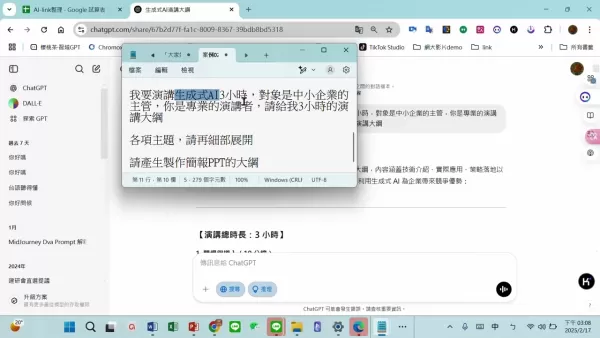
Kimi adopts a more straightforward method for AI-powered presentation creation. While ChatGPT centers on text and structure, Kimi specializes in producing the actual PowerPoint file. Key aspects of Kimi include:
- Word to PPT Conversion:A primary feature is its direct transformation of Word documents into PPT files, which is extremely helpful if your content already exists as a report or written summary.
- Template Variety:You can select from a library of professionally designed templates, guaranteeing your final presentation has a sharp, business-appropriate look.
- Automated Design:Kimi automatically takes your Word document's content, applies formatting, and positions it within your chosen template, producing a near-complete slideshow with little input.
- AI-Powered Refinement:Beyond basic conversion, Kimi uses AI to assess and improve the generated slides, offering recommendations on layout adjustments, typography, and graphics.
Kimi is an excellent solution for anyone needing to quickly transform text-based material into a professional PPT. Its direct document conversion and automatic styling drastically cut down the time and labor involved in building slides manually.
Creating an AI-Powered Presentation: A Step-by-Step Guide
Steps to Create a PPT
- Outline Creation with ChatGPT:First, define your presentation's core topic, intended audience, and primary objectives. Feed this information to ChatGPT and instruct it to produce a structured outline with headings and main ideas for every slide.
- Refine and Finalize the Outline:Examine the AI-generated outline, editing and tailoring it to ensure it correctly conveys your message and thoroughly addresses the subject.
- Prepare Your Word Document:
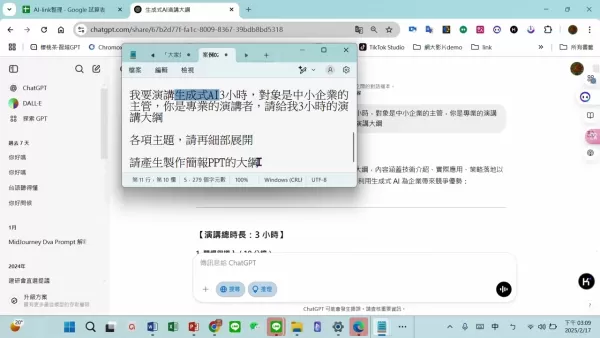
Expand your finalized outline into a properly formatted Word document, using distinct headings and subheadings. This file becomes the direct input for Kimi.
- Access Kimi and Upload Your Document: Go to the Kimi website and upload your prepared Word document.
- Select a Template: Browse the template gallery and pick a design that matches your presentation's theme, desired tone, and audience expectations, considering colors, fonts, and overall style.
- Generate the PPT Presentation:Start the generation process. Kimi will process your document, automatically creating a slide deck formatted according to the template.
- Review and Refine:Once Kimi produces the presentation, carefully go through each slide.
Following this process lets you develop a professionally styled PowerPoint swiftly and effectively, using AI to simplify design work and amplify your core message.
FAQ
Can I use AI presentation generators if I have no design experience?
Definitely. These tools are built for ease of use, making them accessible even if you have no prior design knowledge. Their straightforward interfaces and automated styling allow anyone to craft polished slides.
Are AI-generated presentations customizable?
Yes, they are. AI generators handle the heavy lifting of initial design, but they also provide various editing options. You can usually alter layouts, change fonts and colors, swap images, and more to tailor the presentation to your specific needs and branding.
Which one between ChatGPT and Kimi is better to use for generating PPT?
Each excels in a different role. ChatGPT is superior for structuring your narrative and writing the script. Kimi is the better option for actually building the final PowerPoint file from your content and a template.
Related Questions
What are the benefits of using AI in presentation creation?
Integrating AI into your presentation workflow provides several key advantages:Time efficiency: Automation of labor-intensive tasks like writing, template picking, and formatting allows for dramatically faster creation.Improved aesthetics: The technology helps you achieve a professional, consistent design with appealing visuals, bypassing the need for advanced skills.Higher engagement: AI can recommend compelling content and graphics that draw in your audience and maintain their focus.Better teamwork: Certain AI platforms include collaborative functions, letting several people edit a presentation at the same time, which improves group coordination.Cost reduction: By minimizing reliance on professional designers or premium software, AI tools can significantly lower the expenses associated with producing quality presentations. These advantages make AI an incredibly useful resource for anyone aiming to create powerful presentations quickly and with minimal hassle.
Related article
 Musk's xAI Halts Recruitment of AI Mentors Amid HR Overload
Elon Musk’s AI venture, xAI, has recently introduced an unexpected operational shift. Citing informed sources, Bloomberg reports that the company has temporarily halted recruitment for specialists tasked with training and refining its Grok chatbot. T
How to fix Core Web Vitals for better SEO rankings
How to Build a Free Website: Free Domain, Hosting & AI Website BuilderTable of ContentsIntroductionAI Website Builder 1: Hookous AIStep 1: Sign UpStep 2: Choose Business Type/NicheStep 3: Select ServicesStep 4: Define Website GoalsStep 5: Enter Busin
Apple, Google Partner With Anthropic to Address 27-Year-Old Vulnerability via Glass Wing Protection
As artificial intelligence advances rapidly in code generation and logical reasoning, the cybersecurity landscape faces unprecedented challenges. Recently, the prominent AI startup Anthropic officially launched a cross-industry collaboration called *
Related Special Topic Recommendations
Image editing
Musk's xAI Halts Recruitment of AI Mentors Amid HR Overload
Elon Musk’s AI venture, xAI, has recently introduced an unexpected operational shift. Citing informed sources, Bloomberg reports that the company has temporarily halted recruitment for specialists tasked with training and refining its Grok chatbot. T
How to fix Core Web Vitals for better SEO rankings
How to Build a Free Website: Free Domain, Hosting & AI Website BuilderTable of ContentsIntroductionAI Website Builder 1: Hookous AIStep 1: Sign UpStep 2: Choose Business Type/NicheStep 3: Select ServicesStep 4: Define Website GoalsStep 5: Enter Busin
Apple, Google Partner With Anthropic to Address 27-Year-Old Vulnerability via Glass Wing Protection
As artificial intelligence advances rapidly in code generation and logical reasoning, the cybersecurity landscape faces unprecedented challenges. Recently, the prominent AI startup Anthropic officially launched a cross-industry collaboration called *
Related Special Topic Recommendations
Image editing
 AI Object Removal Editors: Clean Up Portraits, Travel, and Product Shots
2026 Latest Best Top-rated AI Object Removal Editors for portraits travel product shots! XIX.AI curates a powerful game-changing collection regularly updated with weekly rankings. These tools offer real-world tests to help you quickly remove unwanted elements, boost content quality, and save tons of time without compromising results. Must-try for anyone aiming to unlock their AI creation edge. Explore now!
 10 tools
 xix.ai
Text-to-speech
Best AI Text to Speech Tools for Online Courses
xix.ai
Text-to-speech
Best AI Text to Speech Tools for Online Courses
2026 Latest Best Top-rated AI Text to Speech Tools for Online Courses are curated by XIX.AI based on rigorous real-world tests and weekly updated rankings. These powerful tools help creators deliver crystal-clear audio content effortlessly, boosting writing efficiency and streamlining course production. Check out the free vs paid comparison to find your perfect fit. Explore now to unlock your AI edge in online education.
10 tools
xix.ai
writing
AI Blog Title Tools for Higher Click Through Rates
2026 Latest Best Top-Rated AI Blog Title Tools for Higher Click Through Rates! XIX.AI has carefully curated a powerful, game-changing collection of top tools that go through rigorous real-world tests. You’ll find a free vs paid comparison, weekly updated rankings, and detailed insights to help you boost your blog’s traffic efficiently. Must-try options are highlighted to help you unlock your AI edge. Explore now!
10 tools
xix.ai
automation
Best AI Task Routing Tools for Support Workflows
2026 Latest Best Top-rated AI Task Routing Tools for Support Workflows! XIX.AI has curated a highly powerful game-changing collection of must-try solutions, all undergoing rigorous real-world tests and updated weekly. These tools streamline workflows, boost productivity, and help teams deliver faster, more efficient support. Explore now to discover your perfect tool and unlock your AI edge!
17 tools
xix.ai
Academic Research
AI Citation and Paper Summary Tools
2026 Latest Best Top-Rated AI Citation and Paper Summary Tools Curated by XIX.AI. Get powerful game-changing solutions for quick content creation, improved writing efficiency, and boosting productivity. We offer a free vs paid comparison along with real-world tests and weekly updated rankings to help you find the must-try tool that fits your needs perfectly. Explore now to Unlock your AI edge.
10 tools
xix.ai
Productivity
Best AI Productivity Tools for Daily Work
2026 Latest Best Top-Rated AI Productivity Tools for Daily Work! XIX.AI has curated a powerful, game-changing selection based on rigorous weekly updated rankings and real-world tests. You’ll find must-try options that boost writing efficiency, streamline content creation, and help you overcome daily work challenges. Get a free vs paid comparison to find the perfect fit for your needs. Explore now to unlock your AI edge!
9 tools
xix.ai

 Comments (2)
0/500
Comments (2)
0/500
![DouglasMartínez]()
I'm a bit skeptical about AI-generated slides tbh. They usually miss that human spark that makes a presentation feel genuine. But if it cuts down the time I spend wrestling with formatting, maybe I'll give it a shot. 😅
![CharlesWhite]()
Does this thing actually understand that not every slide needs a million bullet points? I’ve seen too many AI tools vomit text everywhere. Hope it prioritizes clarity over flashiness. 🤞
In the rapid-fire modern workplace, captivating presentations are essential for clear communication and achieving results. Yet, producing polished, professional slides can drain hours and challenge those without a design background. The emergence of artificial intelligence (AI) has fundamentally changed how we build presentations. This guide details how AI-powered slide generators, including platforms such as ChatGPT and Kimi, help you design impressive presentations effortlessly—saving precious time and increasing audience involvement.
Key Points
AI presentation tools can construct entire slide decks using simple text instructions or by analyzing uploaded documents.
Platforms like ChatGPT and Kimi employ distinct strategies for AI-driven slide creation.
Kimi focuses specifically on PPT generation, providing a range of templates and the ability to create slides directly from Word files.
Artificial intelligence can assist in polishing your content, recommending imagery, and guaranteeing a professional finish.
Blending multiple AI tools can create a smooth and efficient workflow for the entire presentation process.
Unlocking Presentation Magic with AI
What is an AI Presentation Generator?
An AI presentation generator automates the design of slideshows by utilizing artificial intelligence. This technology helps with multiple facets of presentation development, such as:
- Content generation:
Based on your subject or keywords, AI can compose textual content, conserving your time on research and writing.
- Template selection:The AI can recommend suitable design templates that match your content's purpose and your intended audience, ensuring a visually attractive and polished appearance.
- Layout design:Elements on your slides can be automatically organized by the AI for maximum readability and strong visual effect.
- Image and icon suggestions:To strengthen your message and improve slide appeal, AI can propose relevant photographs and icons.
- Formatting and styling:Your presentation will maintain uniform fonts, colors, and spacing throughout, resulting in a cohesive and refined final product.
By handling these duties automatically, AI presentation builders enable users to produce high-caliber slides rapidly and effectively, regardless of their design expertise. Different tools emphasize various parts of the process, such as content enhancement or visual arrangement. Knowing these distinctions helps you pick the ideal tool for your project and get the most out of your time.
The Power of ChatGPT for Presentation Outlines
Created by OpenAI, ChatGPT is a highly adaptable language model capable of numerous tasks, among them drafting presentation outlines and scripts. Although it doesn't build slides itself, it is incredibly useful for mapping out your presentation's framework and narrative. Here are its main applications:
- Topic brainstorming:Give ChatGPT your main topic and any goals; it will propose different subtopics, perspectives, and talking points for your slides.
- Outline creation:Request a comprehensive outline with proposed slide titles, section headers, and the principal ideas to cover for each one, establishing a firm structural blueprint.
- Script generation:ChatGPT can draft speaker notes or a full script for each slide, aiding in the delivery of a focused and compelling presentation.
- Content refinement:If you have a draft, ChatGPT can help polish it for better clarity, grammar, and overall effectiveness.
Using ChatGPT's capacity for generating structured and creative text saves considerable effort during the planning phase. You can then use a different application to transform that outline into a formatted, visual slide deck.
Kimi: AI-Powered PPT Generation
A Streamlined Approach to Slide Creation
Kimi adopts a more straightforward method for AI-powered presentation creation. While ChatGPT centers on text and structure, Kimi specializes in producing the actual PowerPoint file. Key aspects of Kimi include:
- Word to PPT Conversion:A primary feature is its direct transformation of Word documents into PPT files, which is extremely helpful if your content already exists as a report or written summary.
- Template Variety:You can select from a library of professionally designed templates, guaranteeing your final presentation has a sharp, business-appropriate look.
- Automated Design:Kimi automatically takes your Word document's content, applies formatting, and positions it within your chosen template, producing a near-complete slideshow with little input.
- AI-Powered Refinement:Beyond basic conversion, Kimi uses AI to assess and improve the generated slides, offering recommendations on layout adjustments, typography, and graphics.
Kimi is an excellent solution for anyone needing to quickly transform text-based material into a professional PPT. Its direct document conversion and automatic styling drastically cut down the time and labor involved in building slides manually.
Creating an AI-Powered Presentation: A Step-by-Step Guide
Steps to Create a PPT
- Outline Creation with ChatGPT:First, define your presentation's core topic, intended audience, and primary objectives. Feed this information to ChatGPT and instruct it to produce a structured outline with headings and main ideas for every slide.
- Refine and Finalize the Outline:Examine the AI-generated outline, editing and tailoring it to ensure it correctly conveys your message and thoroughly addresses the subject.
- Prepare Your Word Document:
Expand your finalized outline into a properly formatted Word document, using distinct headings and subheadings. This file becomes the direct input for Kimi.
- Access Kimi and Upload Your Document: Go to the Kimi website and upload your prepared Word document.
- Select a Template: Browse the template gallery and pick a design that matches your presentation's theme, desired tone, and audience expectations, considering colors, fonts, and overall style.
- Generate the PPT Presentation:Start the generation process. Kimi will process your document, automatically creating a slide deck formatted according to the template.
- Review and Refine:Once Kimi produces the presentation, carefully go through each slide.
Following this process lets you develop a professionally styled PowerPoint swiftly and effectively, using AI to simplify design work and amplify your core message.
FAQ
Can I use AI presentation generators if I have no design experience?
Definitely. These tools are built for ease of use, making them accessible even if you have no prior design knowledge. Their straightforward interfaces and automated styling allow anyone to craft polished slides.
Are AI-generated presentations customizable?
Yes, they are. AI generators handle the heavy lifting of initial design, but they also provide various editing options. You can usually alter layouts, change fonts and colors, swap images, and more to tailor the presentation to your specific needs and branding.
Which one between ChatGPT and Kimi is better to use for generating PPT?
Each excels in a different role. ChatGPT is superior for structuring your narrative and writing the script. Kimi is the better option for actually building the final PowerPoint file from your content and a template.
Related Questions
What are the benefits of using AI in presentation creation?
Integrating AI into your presentation workflow provides several key advantages:Time efficiency: Automation of labor-intensive tasks like writing, template picking, and formatting allows for dramatically faster creation.Improved aesthetics: The technology helps you achieve a professional, consistent design with appealing visuals, bypassing the need for advanced skills.Higher engagement: AI can recommend compelling content and graphics that draw in your audience and maintain their focus.Better teamwork: Certain AI platforms include collaborative functions, letting several people edit a presentation at the same time, which improves group coordination.Cost reduction: By minimizing reliance on professional designers or premium software, AI tools can significantly lower the expenses associated with producing quality presentations. These advantages make AI an incredibly useful resource for anyone aiming to create powerful presentations quickly and with minimal hassle.







 Musk's xAI Halts Recruitment of AI Mentors Amid HR Overload
Elon Musk’s AI venture, xAI, has recently introduced an unexpected operational shift. Citing informed sources, Bloomberg reports that the company has temporarily halted recruitment for specialists tasked with training and refining its Grok chatbot. T
Musk's xAI Halts Recruitment of AI Mentors Amid HR Overload
Elon Musk’s AI venture, xAI, has recently introduced an unexpected operational shift. Citing informed sources, Bloomberg reports that the company has temporarily halted recruitment for specialists tasked with training and refining its Grok chatbot. T
 How to fix Core Web Vitals for better SEO rankings
How to Build a Free Website: Free Domain, Hosting & AI Website BuilderTable of ContentsIntroductionAI Website Builder 1: Hookous AIStep 1: Sign UpStep 2: Choose Business Type/NicheStep 3: Select ServicesStep 4: Define Website GoalsStep 5: Enter Busin
How to fix Core Web Vitals for better SEO rankings
How to Build a Free Website: Free Domain, Hosting & AI Website BuilderTable of ContentsIntroductionAI Website Builder 1: Hookous AIStep 1: Sign UpStep 2: Choose Business Type/NicheStep 3: Select ServicesStep 4: Define Website GoalsStep 5: Enter Busin
 Apple, Google Partner With Anthropic to Address 27-Year-Old Vulnerability via Glass Wing Protection
As artificial intelligence advances rapidly in code generation and logical reasoning, the cybersecurity landscape faces unprecedented challenges. Recently, the prominent AI startup Anthropic officially launched a cross-industry collaboration called *
Apple, Google Partner With Anthropic to Address 27-Year-Old Vulnerability via Glass Wing Protection
As artificial intelligence advances rapidly in code generation and logical reasoning, the cybersecurity landscape faces unprecedented challenges. Recently, the prominent AI startup Anthropic officially launched a cross-industry collaboration called *

2026 Latest Best Top-rated AI Object Removal Editors for portraits travel product shots! XIX.AI curates a powerful game-changing collection regularly updated with weekly rankings. These tools offer real-world tests to help you quickly remove unwanted elements, boost content quality, and save tons of time without compromising results. Must-try for anyone aiming to unlock their AI creation edge. Explore now!
10 tools
xix.ai

2026 Latest Best Top-rated AI Text to Speech Tools for Online Courses are curated by XIX.AI based on rigorous real-world tests and weekly updated rankings. These powerful tools help creators deliver crystal-clear audio content effortlessly, boosting writing efficiency and streamlining course production. Check out the free vs paid comparison to find your perfect fit. Explore now to unlock your AI edge in online education.
10 tools
xix.ai

2026 Latest Best Top-Rated AI Blog Title Tools for Higher Click Through Rates! XIX.AI has carefully curated a powerful, game-changing collection of top tools that go through rigorous real-world tests. You’ll find a free vs paid comparison, weekly updated rankings, and detailed insights to help you boost your blog’s traffic efficiently. Must-try options are highlighted to help you unlock your AI edge. Explore now!
10 tools
xix.ai

2026 Latest Best Top-rated AI Task Routing Tools for Support Workflows! XIX.AI has curated a highly powerful game-changing collection of must-try solutions, all undergoing rigorous real-world tests and updated weekly. These tools streamline workflows, boost productivity, and help teams deliver faster, more efficient support. Explore now to discover your perfect tool and unlock your AI edge!
17 tools
xix.ai

2026 Latest Best Top-Rated AI Citation and Paper Summary Tools Curated by XIX.AI. Get powerful game-changing solutions for quick content creation, improved writing efficiency, and boosting productivity. We offer a free vs paid comparison along with real-world tests and weekly updated rankings to help you find the must-try tool that fits your needs perfectly. Explore now to Unlock your AI edge.
10 tools
xix.ai

2026 Latest Best Top-Rated AI Productivity Tools for Daily Work! XIX.AI has curated a powerful, game-changing selection based on rigorous weekly updated rankings and real-world tests. You’ll find must-try options that boost writing efficiency, streamline content creation, and help you overcome daily work challenges. Get a free vs paid comparison to find the perfect fit for your needs. Explore now to unlock your AI edge!
9 tools
xix.ai

I'm a bit skeptical about AI-generated slides tbh. They usually miss that human spark that makes a presentation feel genuine. But if it cuts down the time I spend wrestling with formatting, maybe I'll give it a shot. 😅
Does this thing actually understand that not every slide needs a million bullet points? I’ve seen too many AI tools vomit text everywhere. Hope it prioritizes clarity over flashiness. 🤞












