


 Home
HomeAI-Powered Six-Pack Video Transformations Unveiled
Transform photos into captivating videos showcasing stunning six-pack abs with AI. This guide reveals how PixVerse, a cutting-edge AI video platform, simplifies creating viral, engaging content. Turn your images into impressive, muscular masterpieces effortlessly!
Highlights
Explore AI tools that convert static photos into dynamic videos.
Discover PixVerse, an intuitive platform for AI-driven video creation.
Learn steps to craft a six-pack body transformation video.
Unleash potential for viral, engaging content creation.
Boost social media impact with striking AI-generated videos.
Mastering AI Video Creation
What is PixVerse?
PixVerse is a groundbreaking AI video platform that enables effortless creation of high-quality, engaging videos.
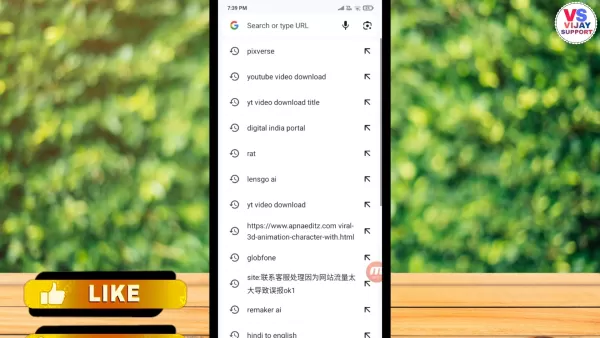
Leveraging artificial intelligence, PixVerse streamlines video production, making it accessible to beginners without video editing or design experience. Its intuitive interface, robust features, and ability to craft visually stunning videos from text or images set it apart. PixVerse uses advanced algorithms to transform inputs into dynamic video narratives, ideal for marketing, education, or social media storytelling. Key features include AI-driven scene creation, automated editing, and a vast library of customizable templates, ensuring professional results with ease. Supporting various formats and aspect ratios, PixVerse ensures compatibility across devices and platforms. Its user-centric design lets creators focus on storytelling, not technicalities. Continually evolving, PixVerse integrates the latest AI advancements, keeping users equipped with cutting-edge tools for impactful videos. More than a tool, PixVerse is a creative ally, empowering users to tell compelling stories and stay competitive in a content-driven world.
Why Choose AI for Photo-to-Video?
AI-powered photo-to-video transformations offer distinct advantages over traditional methods, slashing time and effort for high-quality results.
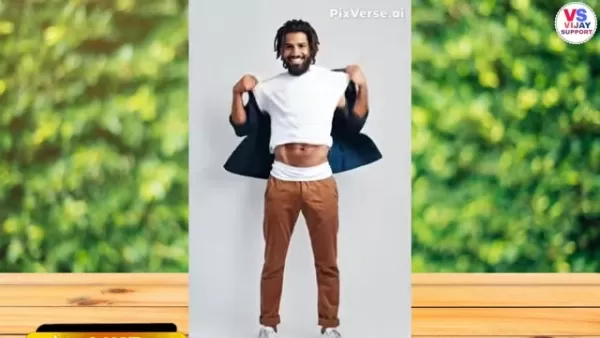
Unlike complex editing software requiring extensive skills, AI tools deliver professional videos in minutes. They generate realistic animations, muscle movements, and effects unattainable manually, enhancing visuals with dynamic lighting and backgrounds. Platforms like PixVerse are beginner-friendly, with intuitive interfaces and automated features that require no prior expertise. AI enables personalized content tailored to specific audiences, boosting engagement and conversions. Cost-effective and scalable, AI tools are perfect for businesses and creators needing high-volume video production. From marketing to social media, AI transforms static images into dynamic, impactful videos, revolutionizing content creation.
Guide to Crafting Six-Pack Videos
Step 1: Access PixVerse
Open your browser on a smartphone or computer.
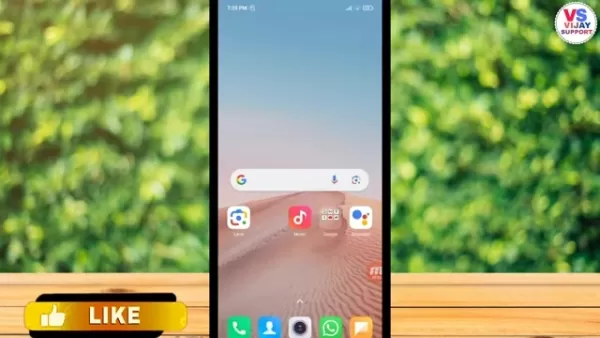
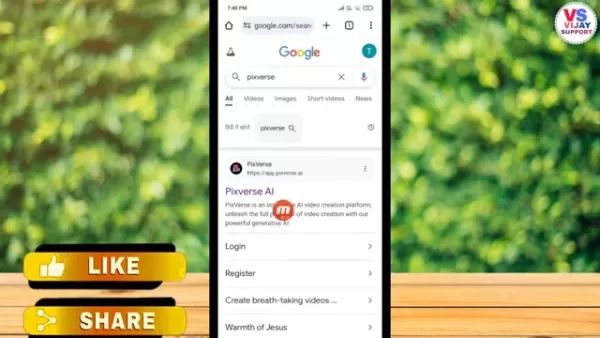
Search for 'PixVerse' to visit the official AI platform. Ensure a stable internet connection for seamless navigation. The mobile-friendly site prompts new users to sign up using email, Facebook, or phone number, offering instant credits for video creation. Existing users can log in to resume. PixVerse’s intuitive interface guides you through video creation with templates and tools, setting the stage for professional results.
Step 2: Choose a Template
After logging in, browse PixVerse’s video templates to match your six-pack transformation vision.
Explore templates tailored for fitness, body transformations, or before-and-after themes, featuring dynamic animations and effects. Preview templates to ensure alignment with your goals, then select 'Try Now' to load into the editor for customization. Choose templates that enhance your creative vision with the right aesthetic and style.
Step 3: Upload Your Photo
Click the 'Upload Image or Video' area to select your photo.
Choose a clear, well-lit image showing your upper body for optimal AI processing. Upload the photo, and PixVerse’s algorithms analyze it to fit the template. Adjust cropping or positioning if needed to ensure a natural look. High-quality photos ensure the best transformation results.
Step 4: Create and Download
After uploading, click 'Create' to start the AI transformation.
PixVerse processes the photo, applying algorithms to craft the six-pack video. Monitor progress, then preview the result. If satisfied, select 'Download' and choose your preferred format or quality. Save the video to your device for sharing or further use, ensuring a stable connection and sufficient storage.
Optimizing AI Transformation Videos
Choose the Right Photo
Photo quality impacts video results. Select high-resolution, well-lit images showing clear body contours.
- Resolution: Use 1080p or higher for sharp results.
- Lighting: Ensure even lighting, avoiding shadows or glare.
- Clarity: Keep the subject in focus, free from blur.
- Pose: Opt for a natural, upright stance.
Customize Templates
PixVerse offers customization options to refine transformations. Adjust muscle definition, skin tone, or background effects to match your vision.
- Muscle Definition: Fine-tune enhancement levels.
- Skin Tone: Match the subject’s natural complexion.
- Background Effects: Enhance or simplify visuals.
- Animation Speed: Control transformation pace for impact.
Share on Social Media
Maximize video reach by sharing on social platforms with tailored captions and hashtags.
- Platforms: Target Instagram, TikTok, or Facebook for visual content.
- Captions: Craft engaging stories highlighting the transformation.
- Hashtags: Use terms like 'body transformation' or 'AI video' for visibility.
- Timing: Post during peak hours for maximum engagement.
PixVerse Pricing Options
Subscription Plans
PixVerse offers free and premium plans. The free version includes basic templates, limited processing, and watermarked videos. Premium plans unlock advanced features.
- Premium Templates: Access professional designs.
- Faster Processing: Speed up video generation.
- No Watermarks: Create clean, professional videos.
- Priority Support: Get dedicated assistance.
- Longer Videos: Produce extended content.
Plan Monthly Price Annual Price Features Free $0 $0 Basic templates, limited processing, watermarks Premium $9.99 $99.99 Premium templates, faster processing, no watermarks, priority support Professional $19.99 $199.99 All Premium features, longer videos, advanced customization Enterprise Contact Sales Contact Sales Custom solutions, dedicated account manager, enterprise support
PixVerse’s flexible plans cater to diverse budgets and video creation needs.
AI Video Transformation: Pros and Cons
Pros
Saves time and effort for high-quality video production.
Automates complex editing tasks, no expertise needed.
Scales efficiently for businesses and creators.
Adds realistic, dynamic effects to videos.
Cost-effective for high-volume content creation.
Cons
Poor-quality photos may yield unnatural results.
AI may struggle with accurate human anatomy.
Customization may be needed for desired outcomes.
Not ideal for all video types.
Limited customization compared to traditional software.
PixVerse Features: AI Video Creation Simplified
AI Scene Generation
PixVerse uses advanced AI to create realistic video scenes from text or images, ideal for explainer videos, marketing, or social media.
- Text-to-Video: Turn descriptions into vivid scenes.
- Image-to-Video: Transform static images into dynamic clips.
- Scene Customization: Adjust scenes for precision.
Automated Editing
PixVerse automates cutting, trimming, and transitions, streamlining video production with an intuitive interface.
- Auto Cutting: Easily remove unwanted clips.
- Smooth Transitions: Add polished scene changes.
- Text Overlays: Highlight key messages.
- Music and Effects: Enhance videos with audio.
Customizable Templates
PixVerse’s template library offers diverse, customizable options for quick, high-quality video creation.
- Diverse Library: Access professional templates.
- Easy Customization: Add personal photos or branding.
- Category Browsing: Find templates for marketing or education.
- Regular Updates: Stay current with new designs.
PixVerse Use Cases Across Industries
Marketing and Advertising
PixVerse enables businesses to create compelling marketing videos for product demos, ads, or promotions.
- Product Demos: Highlight features dynamically.
- Explainer Videos: Simplify complex ideas.
- Social Media Ads: Craft engaging platform-specific ads.
- Promotions: Boost sales with vibrant videos.
Education and E-Learning
PixVerse transforms educational content into engaging video lessons and tutorials.
- Tutorials: Create step-by-step guides.
- Lectures: Turn lectures into dynamic videos.
- Interactive Lessons: Add quizzes for engagement.
- Educational Content: Produce course materials.
Social Media Content
PixVerse simplifies creating standout social media videos for influencers and brands.
- Short-Form Videos: Craft clips for TikTok or Reels.
- Storytelling: Share compelling narratives.
- Visual Content: Enhance feeds with vibrant videos.
- Branding: Build consistent brand identity.
FAQs on AI Photo-to-Video Transformations
Is PixVerse Beginner-Friendly?
Yes, PixVerse’s intuitive interface and automated tools make it easy for beginners to create stunning videos without editing experience. Comprehensive support and tutorials guide users through the process.
Best Photos for AI Body Transformations?
Use high-resolution, well-lit photos with clear body contours and clean backgrounds. Avoid blurry or shadowy images for optimal AI results.
AI’s Impact on Video Creation
How is AI Reshaping Video Creation?
AI streamlines video production, automating generation, editing, and enhancement. It supports translation, analytics, and personalized content, making high-quality video creation accessible and efficient for all.
Related article
 Musk Admits Grok Build Leaked User Code, Promises to Erase All Historical Data
Elon Musk directly addressed the privacy controversy surrounding Grok Build, beginning with a simple "True" to confirm the incident's validity. He pledged that all user data previously uploaded to SpaceXAI would be permanently erased, stating, "not a
U.S. Stocks Hit Historic Milestone as AI and Aerospace Giants Prepare for Trillion-Dollar Debut
Elon Musk, Sam Altman, and Dario Amodei, three titans of the technology sector, are advancing toward initial public offerings for their respective ventures. With SpaceX, OpenAI, and Anthropic—three industry behemoths nearing trillion-dollar valuation
Swedish AI Startup Lovable Eyes $13.2 Billion Valuation After Major Funding Round
As AI-driven coding tools gain traction, Swedish startup Lovable has secured a major funding round. The company aims to raise $3 billion, potentially boosting its valuation to $13.2 billion—double the $6.6 billion recorded last December. Menlo Ventur
Related Special Topic Recommendations
SEO
Musk Admits Grok Build Leaked User Code, Promises to Erase All Historical Data
Elon Musk directly addressed the privacy controversy surrounding Grok Build, beginning with a simple "True" to confirm the incident's validity. He pledged that all user data previously uploaded to SpaceXAI would be permanently erased, stating, "not a
U.S. Stocks Hit Historic Milestone as AI and Aerospace Giants Prepare for Trillion-Dollar Debut
Elon Musk, Sam Altman, and Dario Amodei, three titans of the technology sector, are advancing toward initial public offerings for their respective ventures. With SpaceX, OpenAI, and Anthropic—three industry behemoths nearing trillion-dollar valuation
Swedish AI Startup Lovable Eyes $13.2 Billion Valuation After Major Funding Round
As AI-driven coding tools gain traction, Swedish startup Lovable has secured a major funding round. The company aims to raise $3 billion, potentially boosting its valuation to $13.2 billion—double the $6.6 billion recorded last December. Menlo Ventur
Related Special Topic Recommendations
SEO
 Best AI SERP Analysis Tools for Search Strategy
2026 Latest Best Top-rated AI SERP Analysis Tools for Search Strategy are curated by XIX.AI through rigorous real-world tests and weekly updated rankings. These powerful tools help you unlock hidden optimization opportunities, boost content performance, and gain a competitive edge in search. Discover your perfect tool to elevate your search strategy today. Explore now!
 13 tools
 xix.ai
Data Analysis
Best AI Anomaly Detection Tools for KPI Monitoring across SaaS and Ecommerce Teams
xix.ai
Data Analysis
Best AI Anomaly Detection Tools for KPI Monitoring across SaaS and Ecommerce Teams
2026 Latest Best Top-rated AI Anomaly Detection Tools for KPI Monitoring in SaaS and Ecommerce teams! XIX.AI has curated a powerful, game-changing collection based on rigorous real-world tests and weekly updated rankings. You’ll find detailed free vs paid comparison insights to help you identify the must-try solution that boosts productivity and unlocks your AI edge. Explore now!
10 tools
xix.ai
writing
Best AI Outline Generators for Long-Form SEO Articles
2026 Latest Best Top-Rated AI Outline Generators for Long-Form SEO Articles, meticulously curated by XIX.AI. These powerful tools offer game-changing assistance in creating high-quality content quickly, boosting writing efficiency significantly. Get a free vs paid comparison along with real-world tests and detailed rankings to help you find the must-try option that suits your needs. Explore now to unlock your AI edge.
8 tools
xix.ai
Education and Learning
AI Study Tools for Homework and Exam Prep
2026 Latest Best AI Study Tools for Homework and Exam Prep! XIX.AI curates a top-rated list of powerful, game-changing tools that help students boost productivity, streamline homework completion, and ace exams through real-world tests. Get a free vs paid comparison, detailed rankings, and must-try options to unlock your AI edge. Explore now!
10 tools
xix.ai
Music composition
AI Vocal Demo Tools for Songwriters, Hooks, Toplines, and Multilingual Draft Sessions
2026 Latest Best AI Vocal Demo Tools for Songwriters, Hook Creators, and Multi-Language Content Teams! XIX.AI has curated a top-rated list of powerful game-changing tools that go through rigorous real-world tests. You’ll find detailed free vs paid comparison data, comprehensive rankings, and must-try options to help you boost writing efficiency and unlock your creative potential. Explore now to discover your perfect tool for all your content needs!
9 tools
xix.ai
Business
Best AI Competitive Research Tools for Small Businesses
2026 Latest Best Top-rated AI Competitive Research Tools for Small Businesses! XIX.AI has curated a highly powerful game-changing collection, updated weekly with rigorous real-world tests and detailed rankings. You can find a comprehensive free vs paid comparison to help you identify the must-try tools that boost your productivity and give you a competitive edge. Explore now to discover your perfect tool!
9 tools
xix.ai

 Comments (4)
0/500
Comments (4)
0/500
![AnthonyHill]()
This is wild 🤯 but also kind of creepy? Like, I could just fake my way into a fitness influencer career with a few clicks? PixVerse sounds cool but also feels like another step toward 'reality is whatever you want it to be' — not sure if that’s empowering or just exhausting.
![HenryJackson]()
写真を動画に変換するだけで腹筋がバキバキに…?AIの進化がちょっと怖いけど、試してみたくなりました🤔 でもこれ、フィルターと同じで身体コンプレックスを助長しそうで少し不安。
![HaroldMiller]()
"Who needs the gym when you've got AI? 😂 This is wild - just uploaded my beach photo and got instant six-pack abs in motion! As cool as this is, kind of worrying how easy it is to create completely fake fitness content now."
![LarryWilliams]()
This AI six-pack video tech is wild! 😮 Makes me wonder if we'll all be fitness influencers soon, or just lazy couch potatoes faking it.
Transform photos into captivating videos showcasing stunning six-pack abs with AI. This guide reveals how PixVerse, a cutting-edge AI video platform, simplifies creating viral, engaging content. Turn your images into impressive, muscular masterpieces effortlessly!
Highlights
Explore AI tools that convert static photos into dynamic videos.
Discover PixVerse, an intuitive platform for AI-driven video creation.
Learn steps to craft a six-pack body transformation video.
Unleash potential for viral, engaging content creation.
Boost social media impact with striking AI-generated videos.
Mastering AI Video Creation
What is PixVerse?
PixVerse is a groundbreaking AI video platform that enables effortless creation of high-quality, engaging videos.
Leveraging artificial intelligence, PixVerse streamlines video production, making it accessible to beginners without video editing or design experience. Its intuitive interface, robust features, and ability to craft visually stunning videos from text or images set it apart. PixVerse uses advanced algorithms to transform inputs into dynamic video narratives, ideal for marketing, education, or social media storytelling. Key features include AI-driven scene creation, automated editing, and a vast library of customizable templates, ensuring professional results with ease. Supporting various formats and aspect ratios, PixVerse ensures compatibility across devices and platforms. Its user-centric design lets creators focus on storytelling, not technicalities. Continually evolving, PixVerse integrates the latest AI advancements, keeping users equipped with cutting-edge tools for impactful videos. More than a tool, PixVerse is a creative ally, empowering users to tell compelling stories and stay competitive in a content-driven world.
Why Choose AI for Photo-to-Video?
AI-powered photo-to-video transformations offer distinct advantages over traditional methods, slashing time and effort for high-quality results.
Unlike complex editing software requiring extensive skills, AI tools deliver professional videos in minutes. They generate realistic animations, muscle movements, and effects unattainable manually, enhancing visuals with dynamic lighting and backgrounds. Platforms like PixVerse are beginner-friendly, with intuitive interfaces and automated features that require no prior expertise. AI enables personalized content tailored to specific audiences, boosting engagement and conversions. Cost-effective and scalable, AI tools are perfect for businesses and creators needing high-volume video production. From marketing to social media, AI transforms static images into dynamic, impactful videos, revolutionizing content creation.
Guide to Crafting Six-Pack Videos
Step 1: Access PixVerse
Open your browser on a smartphone or computer.
Search for 'PixVerse' to visit the official AI platform. Ensure a stable internet connection for seamless navigation. The mobile-friendly site prompts new users to sign up using email, Facebook, or phone number, offering instant credits for video creation. Existing users can log in to resume. PixVerse’s intuitive interface guides you through video creation with templates and tools, setting the stage for professional results.
Step 2: Choose a Template
After logging in, browse PixVerse’s video templates to match your six-pack transformation vision.
Explore templates tailored for fitness, body transformations, or before-and-after themes, featuring dynamic animations and effects. Preview templates to ensure alignment with your goals, then select 'Try Now' to load into the editor for customization. Choose templates that enhance your creative vision with the right aesthetic and style.
Step 3: Upload Your Photo
Click the 'Upload Image or Video' area to select your photo.
Choose a clear, well-lit image showing your upper body for optimal AI processing. Upload the photo, and PixVerse’s algorithms analyze it to fit the template. Adjust cropping or positioning if needed to ensure a natural look. High-quality photos ensure the best transformation results.
Step 4: Create and Download
After uploading, click 'Create' to start the AI transformation.
PixVerse processes the photo, applying algorithms to craft the six-pack video. Monitor progress, then preview the result. If satisfied, select 'Download' and choose your preferred format or quality. Save the video to your device for sharing or further use, ensuring a stable connection and sufficient storage.
Optimizing AI Transformation Videos
Choose the Right Photo
Photo quality impacts video results. Select high-resolution, well-lit images showing clear body contours.
- Resolution: Use 1080p or higher for sharp results.
- Lighting: Ensure even lighting, avoiding shadows or glare.
- Clarity: Keep the subject in focus, free from blur.
- Pose: Opt for a natural, upright stance.
Customize Templates
PixVerse offers customization options to refine transformations. Adjust muscle definition, skin tone, or background effects to match your vision.
- Muscle Definition: Fine-tune enhancement levels.
- Skin Tone: Match the subject’s natural complexion.
- Background Effects: Enhance or simplify visuals.
- Animation Speed: Control transformation pace for impact.
Share on Social Media
Maximize video reach by sharing on social platforms with tailored captions and hashtags.
- Platforms: Target Instagram, TikTok, or Facebook for visual content.
- Captions: Craft engaging stories highlighting the transformation.
- Hashtags: Use terms like 'body transformation' or 'AI video' for visibility.
- Timing: Post during peak hours for maximum engagement.
PixVerse Pricing Options
Subscription Plans
PixVerse offers free and premium plans. The free version includes basic templates, limited processing, and watermarked videos. Premium plans unlock advanced features.
- Premium Templates: Access professional designs.
- Faster Processing: Speed up video generation.
- No Watermarks: Create clean, professional videos.
- Priority Support: Get dedicated assistance.
- Longer Videos: Produce extended content.
| Plan | Monthly Price | Annual Price | Features |
|---|---|---|---|
| Free | $0 | $0 | Basic templates, limited processing, watermarks |
| Premium | $9.99 | $99.99 | Premium templates, faster processing, no watermarks, priority support |
| Professional | $19.99 | $199.99 | All Premium features, longer videos, advanced customization |
| Enterprise | Contact Sales | Contact Sales | Custom solutions, dedicated account manager, enterprise support |
PixVerse’s flexible plans cater to diverse budgets and video creation needs.
AI Video Transformation: Pros and Cons
Pros
Saves time and effort for high-quality video production.
Automates complex editing tasks, no expertise needed.
Scales efficiently for businesses and creators.
Adds realistic, dynamic effects to videos.
Cost-effective for high-volume content creation.
Cons
Poor-quality photos may yield unnatural results.
AI may struggle with accurate human anatomy.
Customization may be needed for desired outcomes.
Not ideal for all video types.
Limited customization compared to traditional software.
PixVerse Features: AI Video Creation Simplified
AI Scene Generation
PixVerse uses advanced AI to create realistic video scenes from text or images, ideal for explainer videos, marketing, or social media.
- Text-to-Video: Turn descriptions into vivid scenes.
- Image-to-Video: Transform static images into dynamic clips.
- Scene Customization: Adjust scenes for precision.
Automated Editing
PixVerse automates cutting, trimming, and transitions, streamlining video production with an intuitive interface.
- Auto Cutting: Easily remove unwanted clips.
- Smooth Transitions: Add polished scene changes.
- Text Overlays: Highlight key messages.
- Music and Effects: Enhance videos with audio.
Customizable Templates
PixVerse’s template library offers diverse, customizable options for quick, high-quality video creation.
- Diverse Library: Access professional templates.
- Easy Customization: Add personal photos or branding.
- Category Browsing: Find templates for marketing or education.
- Regular Updates: Stay current with new designs.
PixVerse Use Cases Across Industries
Marketing and Advertising
PixVerse enables businesses to create compelling marketing videos for product demos, ads, or promotions.
- Product Demos: Highlight features dynamically.
- Explainer Videos: Simplify complex ideas.
- Social Media Ads: Craft engaging platform-specific ads.
- Promotions: Boost sales with vibrant videos.
Education and E-Learning
PixVerse transforms educational content into engaging video lessons and tutorials.
- Tutorials: Create step-by-step guides.
- Lectures: Turn lectures into dynamic videos.
- Interactive Lessons: Add quizzes for engagement.
- Educational Content: Produce course materials.
Social Media Content
PixVerse simplifies creating standout social media videos for influencers and brands.
- Short-Form Videos: Craft clips for TikTok or Reels.
- Storytelling: Share compelling narratives.
- Visual Content: Enhance feeds with vibrant videos.
- Branding: Build consistent brand identity.
FAQs on AI Photo-to-Video Transformations
Is PixVerse Beginner-Friendly?
Yes, PixVerse’s intuitive interface and automated tools make it easy for beginners to create stunning videos without editing experience. Comprehensive support and tutorials guide users through the process.
Best Photos for AI Body Transformations?
Use high-resolution, well-lit photos with clear body contours and clean backgrounds. Avoid blurry or shadowy images for optimal AI results.
AI’s Impact on Video Creation
How is AI Reshaping Video Creation?
AI streamlines video production, automating generation, editing, and enhancement. It supports translation, analytics, and personalized content, making high-quality video creation accessible and efficient for all.








 Musk Admits Grok Build Leaked User Code, Promises to Erase All Historical Data
Elon Musk directly addressed the privacy controversy surrounding Grok Build, beginning with a simple "True" to confirm the incident's validity. He pledged that all user data previously uploaded to SpaceXAI would be permanently erased, stating, "not a
Musk Admits Grok Build Leaked User Code, Promises to Erase All Historical Data
Elon Musk directly addressed the privacy controversy surrounding Grok Build, beginning with a simple "True" to confirm the incident's validity. He pledged that all user data previously uploaded to SpaceXAI would be permanently erased, stating, "not a
 U.S. Stocks Hit Historic Milestone as AI and Aerospace Giants Prepare for Trillion-Dollar Debut
Elon Musk, Sam Altman, and Dario Amodei, three titans of the technology sector, are advancing toward initial public offerings for their respective ventures. With SpaceX, OpenAI, and Anthropic—three industry behemoths nearing trillion-dollar valuation
U.S. Stocks Hit Historic Milestone as AI and Aerospace Giants Prepare for Trillion-Dollar Debut
Elon Musk, Sam Altman, and Dario Amodei, three titans of the technology sector, are advancing toward initial public offerings for their respective ventures. With SpaceX, OpenAI, and Anthropic—three industry behemoths nearing trillion-dollar valuation
 Swedish AI Startup Lovable Eyes $13.2 Billion Valuation After Major Funding Round
As AI-driven coding tools gain traction, Swedish startup Lovable has secured a major funding round. The company aims to raise $3 billion, potentially boosting its valuation to $13.2 billion—double the $6.6 billion recorded last December. Menlo Ventur
Swedish AI Startup Lovable Eyes $13.2 Billion Valuation After Major Funding Round
As AI-driven coding tools gain traction, Swedish startup Lovable has secured a major funding round. The company aims to raise $3 billion, potentially boosting its valuation to $13.2 billion—double the $6.6 billion recorded last December. Menlo Ventur

2026 Latest Best Top-rated AI SERP Analysis Tools for Search Strategy are curated by XIX.AI through rigorous real-world tests and weekly updated rankings. These powerful tools help you unlock hidden optimization opportunities, boost content performance, and gain a competitive edge in search. Discover your perfect tool to elevate your search strategy today. Explore now!
13 tools
xix.ai

2026 Latest Best Top-rated AI Anomaly Detection Tools for KPI Monitoring in SaaS and Ecommerce teams! XIX.AI has curated a powerful, game-changing collection based on rigorous real-world tests and weekly updated rankings. You’ll find detailed free vs paid comparison insights to help you identify the must-try solution that boosts productivity and unlocks your AI edge. Explore now!
10 tools
xix.ai

2026 Latest Best Top-Rated AI Outline Generators for Long-Form SEO Articles, meticulously curated by XIX.AI. These powerful tools offer game-changing assistance in creating high-quality content quickly, boosting writing efficiency significantly. Get a free vs paid comparison along with real-world tests and detailed rankings to help you find the must-try option that suits your needs. Explore now to unlock your AI edge.
8 tools
xix.ai

2026 Latest Best AI Study Tools for Homework and Exam Prep! XIX.AI curates a top-rated list of powerful, game-changing tools that help students boost productivity, streamline homework completion, and ace exams through real-world tests. Get a free vs paid comparison, detailed rankings, and must-try options to unlock your AI edge. Explore now!
10 tools
xix.ai

2026 Latest Best AI Vocal Demo Tools for Songwriters, Hook Creators, and Multi-Language Content Teams! XIX.AI has curated a top-rated list of powerful game-changing tools that go through rigorous real-world tests. You’ll find detailed free vs paid comparison data, comprehensive rankings, and must-try options to help you boost writing efficiency and unlock your creative potential. Explore now to discover your perfect tool for all your content needs!
9 tools
xix.ai

2026 Latest Best Top-rated AI Competitive Research Tools for Small Businesses! XIX.AI has curated a highly powerful game-changing collection, updated weekly with rigorous real-world tests and detailed rankings. You can find a comprehensive free vs paid comparison to help you identify the must-try tools that boost your productivity and give you a competitive edge. Explore now to discover your perfect tool!
9 tools
xix.ai

This is wild 🤯 but also kind of creepy? Like, I could just fake my way into a fitness influencer career with a few clicks? PixVerse sounds cool but also feels like another step toward 'reality is whatever you want it to be' — not sure if that’s empowering or just exhausting.
写真を動画に変換するだけで腹筋がバキバキに…?AIの進化がちょっと怖いけど、試してみたくなりました🤔 でもこれ、フィルターと同じで身体コンプレックスを助長しそうで少し不安。
"Who needs the gym when you've got AI? 😂 This is wild - just uploaded my beach photo and got instant six-pack abs in motion! As cool as this is, kind of worrying how easy it is to create completely fake fitness content now."
This AI six-pack video tech is wild! 😮 Makes me wonder if we'll all be fitness influencers soon, or just lazy couch potatoes faking it.












