


 Home
HomeAI Grading Rubric Generators Revolutionize Educational Assessment
Grading rubrics are essential tools in education, providing clear expectations and ensuring consistent assessments. However, crafting these rubrics can be a daunting task for educators, consuming a significant amount of time. Enter AI grading rubric generators—a game-changer in the world of educational assessment. These innovative tools harness the power of artificial intelligence to help educators quickly create tailored grading rubrics that align perfectly with their specific learning objectives. By automating the initial stages of rubric creation, AI not only saves precious time but also allows teachers to concentrate more on teaching and engaging with students. In this article, we delve into the workings of AI grading rubric generators, their numerous benefits, the customization options they offer, and how they stack up against traditional methods.
Key Points
- AI efficiently generates initial drafts of grading rubrics, freeing up educators' time.
- These generators can be customized to match specific course objectives and learning outcomes.
- Customization options ensure AI-generated rubrics meet the unique demands of each assignment.
- Unlike rigid templates, AI tools provide flexibility for extensive modifications.
- AI can produce rubrics that are nearly ready for use, minimizing the need for manual tweaks.
- By drawing from expert-designed rubrics, AI enhances the overall quality of the output.
- Educators can use AI-generated rubrics as a starting point and further personalize them.
The Role of AI in Grading Rubric Creation
Understanding AI Grading Rubric Generators
AI grading rubric generators are a boon for educators, simplifying the often cumbersome process of creating grading rubrics. These tools utilize artificial intelligence to sift through assignment descriptions, learning objectives, and other relevant inputs, producing a draft rubric. This draft can be further customized and refined by the educator to suit the specific needs of the course and assignment. The aim is to cut down the time and effort needed to start from scratch while ensuring the rubric remains high-quality and relevant.
Key features of these generators include:
- Automated Analysis: AI scans assignment descriptions and learning objectives to pinpoint key assessment criteria.
- Customizable Templates: Offers pre-built templates tailored to various subjects and assignment types.
- Alignment with Learning Outcomes: Ensures the rubric aligns with the course's intended learning outcomes.
- Adaptability: Allows educators to tweak and refine the AI-generated rubric to meet their specific requirements.
By leveraging AI grading rubric generators, educators can establish consistent, fair, and transparent grading standards, which in turn helps students grasp expectations and enhance their performance.
Benefits of Using AI for Rubric Creation
The use of AI grading rubric generators in education brings several advantages:
- Time Savings: AI drastically reduces the time needed to create a rubric, freeing educators to focus on other critical tasks like lesson planning and student interaction.
- Consistency: AI ensures grading criteria are applied uniformly, resulting in fairer and more objective assessments.
- Improved Clarity: Well-crafted rubrics clarify expectations for students, aiding them in understanding what's required for success.
- Enhanced Feedback: AI-generated rubrics can support more detailed and constructive feedback, helping students improve their work.
- Customization: AI tools allow for customization, enabling educators to adapt the rubric to the specific needs of an assignment.
Consistency in grading is crucial, and AI helps to reduce subjective biases that might otherwise affect evaluations. The ability to provide enhanced feedback is another major perk. Detailed feedback, aligned with clear criteria, enables students to identify areas for improvement. These benefits foster a more transparent and equitable learning environment, ultimately boosting student success.
Overcoming the Limitations of Traditional Rubric Tools
Traditional rubric tools often constrain educators with rigid templates, limiting their ability to tailor the rubric to specific assignment needs. AI grading rubric generators overcome this by offering greater flexibility and adaptability. Unlike static templates, AI-generated rubrics can be easily modified and refined to align with the unique requirements of each course and assignment. This flexibility ensures the rubric accurately reflects the intended learning objectives and assessment criteria.
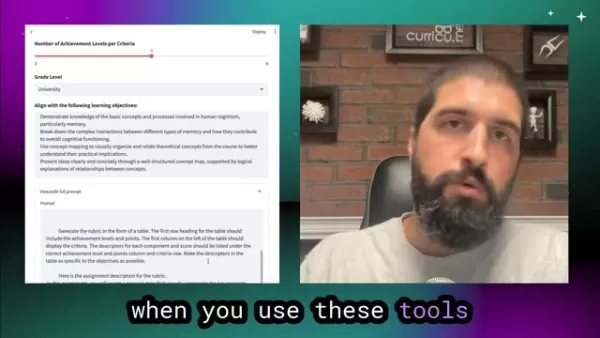
With AI, educators can:
- Adjust Criteria: Easily add, remove, or modify assessment criteria based on the specific assignment.
- Tailor Achievement Levels: Customize descriptions of achievement levels to reflect the nuances of student performance.
- Incorporate Specific Feedback: Integrate specific feedback points into the rubric to address common student challenges.
- Align with Learning Objectives: Ensure the rubric directly aligns with the course's learning objectives and desired outcomes.
By providing this level of customization, AI grading rubric generators empower educators to create rubrics that are not only efficient but also highly effective in promoting student learning.
Customizing Your AI Grading Rubric
Tailoring AI-Generated Rubrics to Your Course
One of the standout features of AI grading rubric generators is their ability to be customized to meet the specific needs of each course. Educators can input details like course descriptions, learning objectives, and assignment specifics to create a rubric that aligns with the course's goals. This customization ensures the rubric accurately reflects the intended learning outcomes and assessment criteria, while also allowing for personal touches that cater to the unique needs of the students.
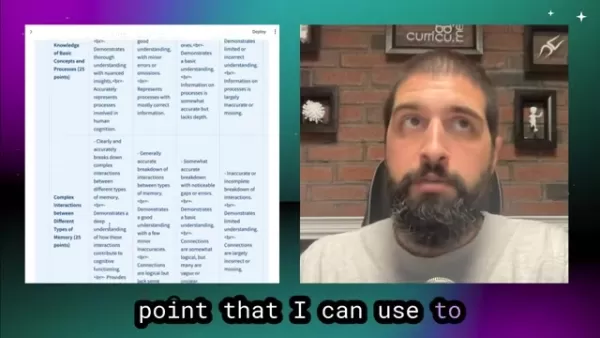
Key customization options include:
- Subject Area: Select from various subject areas to ensure the rubric is relevant to the course content.
- Assignment Type: Choose the type of assignment (e.g., essay, presentation, project) to tailor the rubric to the specific task.
- Learning Objectives: Input the specific learning objectives the assignment aims to assess.
- Grade Level: Adjust the rubric to match the appropriate grade level and student abilities.
By carefully customizing these options, educators can create AI-generated rubrics that are highly relevant and effective in promoting student learning.
Aligning Rubrics with Learning Objectives
Aligning the grading rubric with the course's learning objectives is vital for effective assessment. AI grading rubric generators can facilitate this process by analyzing the learning objectives and integrating them into the rubric's criteria and achievement levels. This alignment ensures the rubric accurately measures student progress toward the desired learning outcomes.
Steps to align rubrics with learning objectives:
- Identify Key Objectives: Clearly define the learning objectives the assignment is designed to assess.
- Incorporate Objectives into Criteria: Ensure each criterion in the rubric directly relates to one or more learning objectives.
- Define Achievement Levels: Describe different levels of achievement for each criterion in terms of the learning objectives.
- Provide Specific Feedback: Use the rubric to give specific feedback on students' progress toward achieving the learning objectives.
By aligning the grading rubric with the course's learning objectives, educators can create assessments that are meaningful, relevant, and effective in promoting student learning, helping students understand what is expected of them and providing a clear path to success.
Fine-Tuning the AI-Generated Rubric
While AI grading rubric generators can produce a solid initial draft, it's often necessary to fine-tune the rubric to ensure it meets the specific needs of the course and assignment. Educators can use their expertise to modify the rubric, adjust criteria, and refine achievement levels. This iterative process ensures the rubric accurately reflects the intended learning outcomes and assessment criteria.
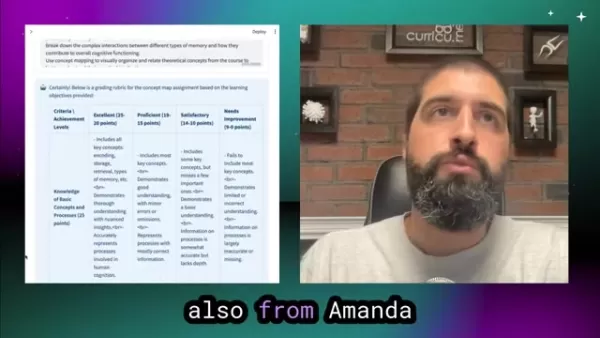
Fine-tuning the rubric may involve:
- Adjusting Weighting: Assign different weights to different criteria based on their importance.
- Refining Descriptions: Reword descriptions of achievement levels for greater clarity and specificity.
- Adding Examples: Include specific examples of student work that exemplify each achievement level.
- Addressing Gaps: Identify and address any gaps in the rubric's coverage of the learning objectives.
By fine-tuning the AI-generated rubric, educators can create assessments that are not only efficient but also highly effective in promoting student learning and providing valuable feedback to students.
Building a Custom AI Grading Rubric Generator
Defining Input Fields
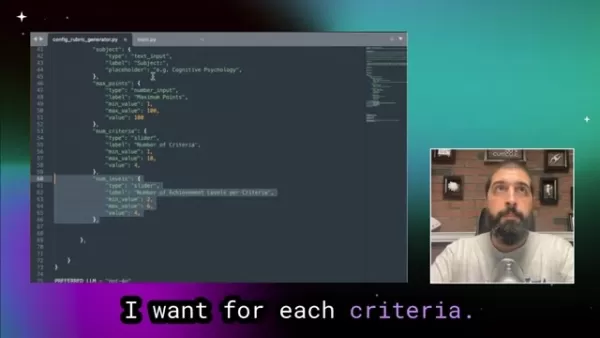
The first step in creating a custom AI grading rubric generator is to define the input fields that will be used to generate the rubric. These fields should capture all the relevant information needed to produce a high-quality rubric, such as assignment descriptions, learning objectives, and grade levels.
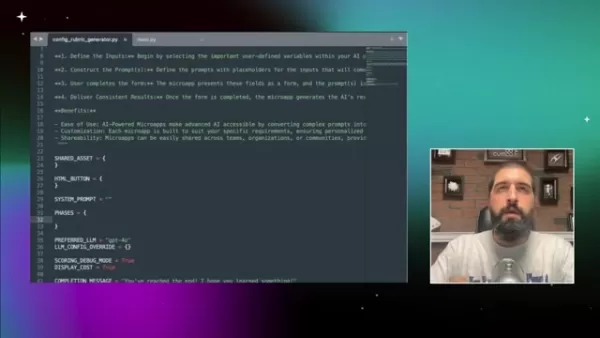
Common input fields include:
- Assignment Description: A detailed description of the assignment, including its purpose, scope, and requirements.
- Learning Objectives: A list of the specific learning objectives the assignment is designed to assess.
- Subject Area: The subject area or discipline to which the assignment belongs.
- Grade Level: The appropriate grade level for the assignment.
- Maximum Points: The total number of points the assignment is worth.
- Number of Criteria: The number of criteria to be included in the rubric.
- Achievement Levels: The number of achievement levels to be used for each criterion.
By carefully defining these input fields, you can ensure your AI grading rubric generator has all the necessary information to create effective and customized rubrics.
Crafting the AI Prompt
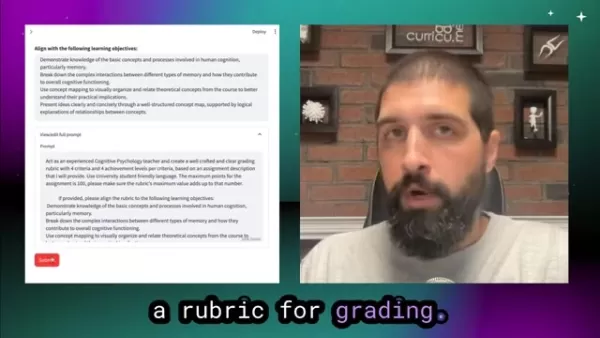
The AI prompt is a set of instructions that tells the AI how to generate the grading rubric based on the input fields. The prompt should be clear, concise, and specific, providing the AI with all the necessary information to create a high-quality rubric.
A well-crafted prompt should:
- Specify the Role: Tell the AI to act as an experienced teacher in a specific subject area.
- Outline the Task: Clearly state that the AI should create a well-crafted grading rubric.
- Define the Criteria: Specify the number of criteria and achievement levels to be included in the rubric.
- Align with Learning Objectives: Instruct the AI to align the rubric with the provided learning objectives.
- Provide Formatting Instructions: Tell the AI to generate the rubric in a specific format, such as a table.
By crafting a clear and specific AI prompt, you can ensure your grading rubric generator produces rubrics tailored to your specific needs and requirements.
Allowing Prompt Customization
Enabling users to customize the AI prompt can significantly enhance the flexibility and adaptability of your grading rubric generator. This allows educators to fine-tune the AI's instructions and tailor the generated rubrics to their specific needs and preferences.
To enable prompt customization:
- Show the Prompt: Display the full AI prompt to the user.
- Allow Editing: Provide a text field where users can modify the prompt.
- Limit Revisions: Set a maximum number of revisions to prevent overuse of AI resources.
By allowing prompt customization, you empower educators to create grading rubrics that are not only efficient but also highly effective in promoting student learning and providing valuable feedback.
Advantages and Disadvantages of AI Grading Rubric Generators
Pros
- Saves time by automating the initial stages of rubric creation.
- Ensures consistency in grading criteria.
- Offers customization options to align with course objectives.
- Provides a starting point that can be tailored to individual assignments.
- Can help educators create more detailed and constructive feedback.
- Offers flexibility by building a custom generator.
Cons
- May require fine-tuning to ensure accuracy and relevance.
- Might not be suitable for all subject areas or assignment types.
- Reliance on AI could diminish human expertise and judgment.
- Requires a thoughtful design of the prompt.
- May have trouble with nuanced or subjective assessments.
Frequently Asked Questions
Are AI grading rubric generators suitable for all subjects?
AI grading rubric generators can be adapted for various subjects, but some may require more customization than others. Fields that rely heavily on subjective assessment, such as art or creative writing, might need more human oversight.
How accurate are AI-generated grading rubrics?
The accuracy of AI-generated rubrics depends on the quality of the input data and the AI's training. While they can provide a solid starting point, educators should always review and fine-tune the rubrics to ensure they meet specific course needs.
Can AI grading rubric generators replace human educators?
No, AI grading rubric generators are tools to assist educators, not replace them. They streamline the rubric creation process, but human expertise and judgment are still essential for effective assessment and feedback.
What if I don't like the rubric after it generates?
The beauty of the rubric generator is that it serves as a springboard, allowing you to modify and adjust the criteria. Ultimately, the educator has the final say and can refine the rubric to their liking.
Related Questions
What are some alternatives to AI Grading Rubric Generators?
While AI grading rubric generators offer many advantages, several alternatives are available for educators who prefer a more traditional approach:
- Traditional Rubric Templates: Many websites and educational resources offer pre-built rubric templates that can be downloaded and customized. These templates provide a starting point but may require more manual adjustment than AI-generated rubrics.
- Collaborative Rubric Creation: Educators can collaborate with colleagues to create rubrics that reflect shared expertise and perspectives. This approach can lead to more comprehensive rubrics but may require more time and coordination.
- Student-Involved Rubric Design: Involving students in the rubric creation process can promote ownership and understanding of assessment criteria. This can lead to more relevant rubrics but may require careful facilitation.
- Manual Rubric Design: Educators can create rubrics from scratch, drawing on their expertise. This offers the greatest level of customization but also requires the most time and effort.
Ultimately, the best approach to rubric creation depends on the specific needs of the course, the preferences of the educator, and the available resources. AI grading rubric generators offer a powerful and efficient option, but traditional methods remain viable alternatives for those who prefer a more hands-on approach.
Related article
 How to fix Core Web Vitals for better SEO rankings
Streamline Report Card Comments with AI ToolsIntroductionAI Tools for Generating Report Card CommentsMagic SchoolAlmanac AIChat GPTUsing Magic School to Generate Report Card CommentsLogging into Magic SchoolSelecting the Report Card Comments ToolCust
Slackbot Becomes an AI Agent
Slackbot, the automated assistant embedded in Salesforce’s corporate messaging platform Slack, is evolving into an AI agent. Salesforce CTO Parker Harris envisions it achieving viral status comparable to OpenAI’s ChatGPT.The cloud software giant laun
ByteDance Boosts Core AI Incentives as Doubao Surges 14.6%
ByteDance recently convened a DouBao equity briefing to unveil fresh incentive policies for staff involved in the DouBao division. The strike price for DouBao shares has been lifted from $14.85 in June 2026 to $17.02, marking an approximate 14.6% inc
Related Special Topic Recommendations
Education and Learning
How to fix Core Web Vitals for better SEO rankings
Streamline Report Card Comments with AI ToolsIntroductionAI Tools for Generating Report Card CommentsMagic SchoolAlmanac AIChat GPTUsing Magic School to Generate Report Card CommentsLogging into Magic SchoolSelecting the Report Card Comments ToolCust
Slackbot Becomes an AI Agent
Slackbot, the automated assistant embedded in Salesforce’s corporate messaging platform Slack, is evolving into an AI agent. Salesforce CTO Parker Harris envisions it achieving viral status comparable to OpenAI’s ChatGPT.The cloud software giant laun
ByteDance Boosts Core AI Incentives as Doubao Surges 14.6%
ByteDance recently convened a DouBao equity briefing to unveil fresh incentive policies for staff involved in the DouBao division. The strike price for DouBao shares has been lifted from $14.85 in June 2026 to $17.02, marking an approximate 14.6% inc
Related Special Topic Recommendations
Education and Learning
 AI Study Tools for Homework and Exam Prep
2026 Latest Best AI Study Tools for Homework and Exam Prep! XIX.AI curates a top-rated list of powerful, game-changing tools that help students boost productivity, streamline homework completion, and ace exams through real-world tests. Get a free vs paid comparison, detailed rankings, and must-try options to unlock your AI edge. Explore now!
 10 tools
 xix.ai
Music composition
AI Vocal Demo Tools for Songwriters, Hooks, Toplines, and Multilingual Draft Sessions
xix.ai
Music composition
AI Vocal Demo Tools for Songwriters, Hooks, Toplines, and Multilingual Draft Sessions
2026 Latest Best AI Vocal Demo Tools for Songwriters, Hook Creators, and Multi-Language Content Teams! XIX.AI has curated a top-rated list of powerful game-changing tools that go through rigorous real-world tests. You’ll find detailed free vs paid comparison data, comprehensive rankings, and must-try options to help you boost writing efficiency and unlock your creative potential. Explore now to discover your perfect tool for all your content needs!
9 tools
xix.ai
Business
Best AI Competitive Research Tools for Small Businesses
2026 Latest Best Top-rated AI Competitive Research Tools for Small Businesses! XIX.AI has curated a highly powerful game-changing collection, updated weekly with rigorous real-world tests and detailed rankings. You can find a comprehensive free vs paid comparison to help you identify the must-try tools that boost your productivity and give you a competitive edge. Explore now to discover your perfect tool!
9 tools
xix.ai
Image editing
Photoshop AI Retouch Tools for Ecommerce Apparel, Skin Cleanup, and Color Consistency
2026 Latest Best Photoshop AI retouch tools for ecommerce apparel, skin cleanup, and color consistency! This top-rated curated list features powerful game-changing solutions that help you boost writing efficiency, streamline content creation, and achieve perfect visual results effortlessly. Each tool has undergone real-world tests through weekly updated rankings, complete with free vs paid comparison details. Backed by XIX.AI, it’s the must-try guide for anyone aiming to unlock your AI edge. Explore now!
10 tools
xix.ai
Prompt
Best AI Prompt Libraries for ChatGPT Workflows
2026 Latest Best Top-Rated AI Prompt Libraries for optimizing all types of ChatGPT workflows. XIX.AI has curated a powerful, game-changing collection that goes through rigorous real-world tests to ensure top performance. You can find detailed free vs paid comparisons and expert rankings to help you choose the must-try tools that boost your productivity and unlock your AI edge. Explore now!
11 tools
xix.ai
Education and Learning
AI Quiz Builder Platforms for Teachers, Tutors, and Cohort-Based Learning Programs
2026 Latest Best AI Quiz Builder Platforms for Teachers, Tutors, and Cohort-Based Learning Programs! XIX.AI has curated a top-rated list of powerful game-changing tools that go through real-world tests to deliver accurate rankings. These must-try platforms help boost writing efficiency, streamline content creation, and simplify quiz design across all learning scenarios. Explore now to discover your perfect tool for unlocking your AI edge in teaching!
13 tools
xix.ai

 Comments (18)
0/500
Comments (18)
0/500
![AnthonyHill]()
Never thought I'd see the day! As a teacher, I spend way too many weekends tweaking rubrics. If this actually works and doesn't just spit out generic stuff, it could be a total time-saver. Curious about how it handles creative project assessments though—can it judge originality?
![WillieHernández]()
教師がルーブリック作成にかかる時間を削減できるのは素晴らしい!🤔でも、AIが評価基準を作ると、どうしても画一的にならないかな?創造性を重視する科目だと微妙かも...。でも自動化の流れは止まらないから、教師はより生徒と向き合う時間が増えるなら良いよね。
![StevenSanchez]()
AI rubric generators sound like a lifesaver for teachers! Saves time and keeps grading fair. Wonder how accurate they are compared to human-made ones? 🤔
![DouglasPerez]()
¡Los generadores de rúbricas de calificación por IA son un salvavidas para los profesores! Hacen que la creación de rúbricas sea mucho más fácil y rápida. Pero a veces las rúbricas generadas necesitan un poco de ajuste. Aún así, es un gran ahorro de tiempo y una herramienta imprescindible! 📚✨
![WillCarter]()
Генераторы рубрик оценки с использованием ИИ - это настоящий прорыв! Они экономят столько времени, но иногда сгенерированные рубрики кажутся немного общими. Тем не менее, это огромная помощь для педагогов! 😊
![AnthonyHernández]()
이 AI 도구 덕분에 교사로서의 삶이 정말 편해졌어요! 채점 루브릭을 만드는 일이 예전에는 골치였는데, 이제는 간단해졌어요. 다만, 가끔 루브릭이 너무 일반적인 게 단점이지만, 그래도 시간을 많이 절약할 수 있어요! 꼭 시도해 보세요! 😊
Grading rubrics are essential tools in education, providing clear expectations and ensuring consistent assessments. However, crafting these rubrics can be a daunting task for educators, consuming a significant amount of time. Enter AI grading rubric generators—a game-changer in the world of educational assessment. These innovative tools harness the power of artificial intelligence to help educators quickly create tailored grading rubrics that align perfectly with their specific learning objectives. By automating the initial stages of rubric creation, AI not only saves precious time but also allows teachers to concentrate more on teaching and engaging with students. In this article, we delve into the workings of AI grading rubric generators, their numerous benefits, the customization options they offer, and how they stack up against traditional methods.
Key Points
- AI efficiently generates initial drafts of grading rubrics, freeing up educators' time.
- These generators can be customized to match specific course objectives and learning outcomes.
- Customization options ensure AI-generated rubrics meet the unique demands of each assignment.
- Unlike rigid templates, AI tools provide flexibility for extensive modifications.
- AI can produce rubrics that are nearly ready for use, minimizing the need for manual tweaks.
- By drawing from expert-designed rubrics, AI enhances the overall quality of the output.
- Educators can use AI-generated rubrics as a starting point and further personalize them.
The Role of AI in Grading Rubric Creation
Understanding AI Grading Rubric Generators
AI grading rubric generators are a boon for educators, simplifying the often cumbersome process of creating grading rubrics. These tools utilize artificial intelligence to sift through assignment descriptions, learning objectives, and other relevant inputs, producing a draft rubric. This draft can be further customized and refined by the educator to suit the specific needs of the course and assignment. The aim is to cut down the time and effort needed to start from scratch while ensuring the rubric remains high-quality and relevant.
Key features of these generators include:
- Automated Analysis: AI scans assignment descriptions and learning objectives to pinpoint key assessment criteria.
- Customizable Templates: Offers pre-built templates tailored to various subjects and assignment types.
- Alignment with Learning Outcomes: Ensures the rubric aligns with the course's intended learning outcomes.
- Adaptability: Allows educators to tweak and refine the AI-generated rubric to meet their specific requirements.
By leveraging AI grading rubric generators, educators can establish consistent, fair, and transparent grading standards, which in turn helps students grasp expectations and enhance their performance.
Benefits of Using AI for Rubric Creation
The use of AI grading rubric generators in education brings several advantages:
- Time Savings: AI drastically reduces the time needed to create a rubric, freeing educators to focus on other critical tasks like lesson planning and student interaction.
- Consistency: AI ensures grading criteria are applied uniformly, resulting in fairer and more objective assessments.
- Improved Clarity: Well-crafted rubrics clarify expectations for students, aiding them in understanding what's required for success.
- Enhanced Feedback: AI-generated rubrics can support more detailed and constructive feedback, helping students improve their work.
- Customization: AI tools allow for customization, enabling educators to adapt the rubric to the specific needs of an assignment.
Consistency in grading is crucial, and AI helps to reduce subjective biases that might otherwise affect evaluations. The ability to provide enhanced feedback is another major perk. Detailed feedback, aligned with clear criteria, enables students to identify areas for improvement. These benefits foster a more transparent and equitable learning environment, ultimately boosting student success.
Overcoming the Limitations of Traditional Rubric Tools
Traditional rubric tools often constrain educators with rigid templates, limiting their ability to tailor the rubric to specific assignment needs. AI grading rubric generators overcome this by offering greater flexibility and adaptability. Unlike static templates, AI-generated rubrics can be easily modified and refined to align with the unique requirements of each course and assignment. This flexibility ensures the rubric accurately reflects the intended learning objectives and assessment criteria.
With AI, educators can:
- Adjust Criteria: Easily add, remove, or modify assessment criteria based on the specific assignment.
- Tailor Achievement Levels: Customize descriptions of achievement levels to reflect the nuances of student performance.
- Incorporate Specific Feedback: Integrate specific feedback points into the rubric to address common student challenges.
- Align with Learning Objectives: Ensure the rubric directly aligns with the course's learning objectives and desired outcomes.
By providing this level of customization, AI grading rubric generators empower educators to create rubrics that are not only efficient but also highly effective in promoting student learning.
Customizing Your AI Grading Rubric
Tailoring AI-Generated Rubrics to Your Course
One of the standout features of AI grading rubric generators is their ability to be customized to meet the specific needs of each course. Educators can input details like course descriptions, learning objectives, and assignment specifics to create a rubric that aligns with the course's goals. This customization ensures the rubric accurately reflects the intended learning outcomes and assessment criteria, while also allowing for personal touches that cater to the unique needs of the students.
Key customization options include:
- Subject Area: Select from various subject areas to ensure the rubric is relevant to the course content.
- Assignment Type: Choose the type of assignment (e.g., essay, presentation, project) to tailor the rubric to the specific task.
- Learning Objectives: Input the specific learning objectives the assignment aims to assess.
- Grade Level: Adjust the rubric to match the appropriate grade level and student abilities.
By carefully customizing these options, educators can create AI-generated rubrics that are highly relevant and effective in promoting student learning.
Aligning Rubrics with Learning Objectives
Aligning the grading rubric with the course's learning objectives is vital for effective assessment. AI grading rubric generators can facilitate this process by analyzing the learning objectives and integrating them into the rubric's criteria and achievement levels. This alignment ensures the rubric accurately measures student progress toward the desired learning outcomes.
Steps to align rubrics with learning objectives:
- Identify Key Objectives: Clearly define the learning objectives the assignment is designed to assess.
- Incorporate Objectives into Criteria: Ensure each criterion in the rubric directly relates to one or more learning objectives.
- Define Achievement Levels: Describe different levels of achievement for each criterion in terms of the learning objectives.
- Provide Specific Feedback: Use the rubric to give specific feedback on students' progress toward achieving the learning objectives.
By aligning the grading rubric with the course's learning objectives, educators can create assessments that are meaningful, relevant, and effective in promoting student learning, helping students understand what is expected of them and providing a clear path to success.
Fine-Tuning the AI-Generated Rubric
While AI grading rubric generators can produce a solid initial draft, it's often necessary to fine-tune the rubric to ensure it meets the specific needs of the course and assignment. Educators can use their expertise to modify the rubric, adjust criteria, and refine achievement levels. This iterative process ensures the rubric accurately reflects the intended learning outcomes and assessment criteria.
Fine-tuning the rubric may involve:
- Adjusting Weighting: Assign different weights to different criteria based on their importance.
- Refining Descriptions: Reword descriptions of achievement levels for greater clarity and specificity.
- Adding Examples: Include specific examples of student work that exemplify each achievement level.
- Addressing Gaps: Identify and address any gaps in the rubric's coverage of the learning objectives.
By fine-tuning the AI-generated rubric, educators can create assessments that are not only efficient but also highly effective in promoting student learning and providing valuable feedback to students.
Building a Custom AI Grading Rubric Generator
Defining Input Fields
The first step in creating a custom AI grading rubric generator is to define the input fields that will be used to generate the rubric. These fields should capture all the relevant information needed to produce a high-quality rubric, such as assignment descriptions, learning objectives, and grade levels.
Common input fields include:
- Assignment Description: A detailed description of the assignment, including its purpose, scope, and requirements.
- Learning Objectives: A list of the specific learning objectives the assignment is designed to assess.
- Subject Area: The subject area or discipline to which the assignment belongs.
- Grade Level: The appropriate grade level for the assignment.
- Maximum Points: The total number of points the assignment is worth.
- Number of Criteria: The number of criteria to be included in the rubric.
- Achievement Levels: The number of achievement levels to be used for each criterion.
By carefully defining these input fields, you can ensure your AI grading rubric generator has all the necessary information to create effective and customized rubrics.
Crafting the AI Prompt
The AI prompt is a set of instructions that tells the AI how to generate the grading rubric based on the input fields. The prompt should be clear, concise, and specific, providing the AI with all the necessary information to create a high-quality rubric.
A well-crafted prompt should:
- Specify the Role: Tell the AI to act as an experienced teacher in a specific subject area.
- Outline the Task: Clearly state that the AI should create a well-crafted grading rubric.
- Define the Criteria: Specify the number of criteria and achievement levels to be included in the rubric.
- Align with Learning Objectives: Instruct the AI to align the rubric with the provided learning objectives.
- Provide Formatting Instructions: Tell the AI to generate the rubric in a specific format, such as a table.
By crafting a clear and specific AI prompt, you can ensure your grading rubric generator produces rubrics tailored to your specific needs and requirements.
Allowing Prompt Customization
Enabling users to customize the AI prompt can significantly enhance the flexibility and adaptability of your grading rubric generator. This allows educators to fine-tune the AI's instructions and tailor the generated rubrics to their specific needs and preferences.
To enable prompt customization:
- Show the Prompt: Display the full AI prompt to the user.
- Allow Editing: Provide a text field where users can modify the prompt.
- Limit Revisions: Set a maximum number of revisions to prevent overuse of AI resources.
By allowing prompt customization, you empower educators to create grading rubrics that are not only efficient but also highly effective in promoting student learning and providing valuable feedback.
Advantages and Disadvantages of AI Grading Rubric Generators
Pros
- Saves time by automating the initial stages of rubric creation.
- Ensures consistency in grading criteria.
- Offers customization options to align with course objectives.
- Provides a starting point that can be tailored to individual assignments.
- Can help educators create more detailed and constructive feedback.
- Offers flexibility by building a custom generator.
Cons
- May require fine-tuning to ensure accuracy and relevance.
- Might not be suitable for all subject areas or assignment types.
- Reliance on AI could diminish human expertise and judgment.
- Requires a thoughtful design of the prompt.
- May have trouble with nuanced or subjective assessments.
Frequently Asked Questions
Are AI grading rubric generators suitable for all subjects?
AI grading rubric generators can be adapted for various subjects, but some may require more customization than others. Fields that rely heavily on subjective assessment, such as art or creative writing, might need more human oversight.
How accurate are AI-generated grading rubrics?
The accuracy of AI-generated rubrics depends on the quality of the input data and the AI's training. While they can provide a solid starting point, educators should always review and fine-tune the rubrics to ensure they meet specific course needs.
Can AI grading rubric generators replace human educators?
No, AI grading rubric generators are tools to assist educators, not replace them. They streamline the rubric creation process, but human expertise and judgment are still essential for effective assessment and feedback.
What if I don't like the rubric after it generates?
The beauty of the rubric generator is that it serves as a springboard, allowing you to modify and adjust the criteria. Ultimately, the educator has the final say and can refine the rubric to their liking.
Related Questions
What are some alternatives to AI Grading Rubric Generators?
While AI grading rubric generators offer many advantages, several alternatives are available for educators who prefer a more traditional approach:
- Traditional Rubric Templates: Many websites and educational resources offer pre-built rubric templates that can be downloaded and customized. These templates provide a starting point but may require more manual adjustment than AI-generated rubrics.
- Collaborative Rubric Creation: Educators can collaborate with colleagues to create rubrics that reflect shared expertise and perspectives. This approach can lead to more comprehensive rubrics but may require more time and coordination.
- Student-Involved Rubric Design: Involving students in the rubric creation process can promote ownership and understanding of assessment criteria. This can lead to more relevant rubrics but may require careful facilitation.
- Manual Rubric Design: Educators can create rubrics from scratch, drawing on their expertise. This offers the greatest level of customization but also requires the most time and effort.
Ultimately, the best approach to rubric creation depends on the specific needs of the course, the preferences of the educator, and the available resources. AI grading rubric generators offer a powerful and efficient option, but traditional methods remain viable alternatives for those who prefer a more hands-on approach.








 How to fix Core Web Vitals for better SEO rankings
Streamline Report Card Comments with AI ToolsIntroductionAI Tools for Generating Report Card CommentsMagic SchoolAlmanac AIChat GPTUsing Magic School to Generate Report Card CommentsLogging into Magic SchoolSelecting the Report Card Comments ToolCust
How to fix Core Web Vitals for better SEO rankings
Streamline Report Card Comments with AI ToolsIntroductionAI Tools for Generating Report Card CommentsMagic SchoolAlmanac AIChat GPTUsing Magic School to Generate Report Card CommentsLogging into Magic SchoolSelecting the Report Card Comments ToolCust
 Slackbot Becomes an AI Agent
Slackbot, the automated assistant embedded in Salesforce’s corporate messaging platform Slack, is evolving into an AI agent. Salesforce CTO Parker Harris envisions it achieving viral status comparable to OpenAI’s ChatGPT.The cloud software giant laun
Slackbot Becomes an AI Agent
Slackbot, the automated assistant embedded in Salesforce’s corporate messaging platform Slack, is evolving into an AI agent. Salesforce CTO Parker Harris envisions it achieving viral status comparable to OpenAI’s ChatGPT.The cloud software giant laun
 ByteDance Boosts Core AI Incentives as Doubao Surges 14.6%
ByteDance recently convened a DouBao equity briefing to unveil fresh incentive policies for staff involved in the DouBao division. The strike price for DouBao shares has been lifted from $14.85 in June 2026 to $17.02, marking an approximate 14.6% inc
ByteDance Boosts Core AI Incentives as Doubao Surges 14.6%
ByteDance recently convened a DouBao equity briefing to unveil fresh incentive policies for staff involved in the DouBao division. The strike price for DouBao shares has been lifted from $14.85 in June 2026 to $17.02, marking an approximate 14.6% inc

2026 Latest Best AI Study Tools for Homework and Exam Prep! XIX.AI curates a top-rated list of powerful, game-changing tools that help students boost productivity, streamline homework completion, and ace exams through real-world tests. Get a free vs paid comparison, detailed rankings, and must-try options to unlock your AI edge. Explore now!
10 tools
xix.ai

2026 Latest Best AI Vocal Demo Tools for Songwriters, Hook Creators, and Multi-Language Content Teams! XIX.AI has curated a top-rated list of powerful game-changing tools that go through rigorous real-world tests. You’ll find detailed free vs paid comparison data, comprehensive rankings, and must-try options to help you boost writing efficiency and unlock your creative potential. Explore now to discover your perfect tool for all your content needs!
9 tools
xix.ai

2026 Latest Best Top-rated AI Competitive Research Tools for Small Businesses! XIX.AI has curated a highly powerful game-changing collection, updated weekly with rigorous real-world tests and detailed rankings. You can find a comprehensive free vs paid comparison to help you identify the must-try tools that boost your productivity and give you a competitive edge. Explore now to discover your perfect tool!
9 tools
xix.ai

2026 Latest Best Photoshop AI retouch tools for ecommerce apparel, skin cleanup, and color consistency! This top-rated curated list features powerful game-changing solutions that help you boost writing efficiency, streamline content creation, and achieve perfect visual results effortlessly. Each tool has undergone real-world tests through weekly updated rankings, complete with free vs paid comparison details. Backed by XIX.AI, it’s the must-try guide for anyone aiming to unlock your AI edge. Explore now!
10 tools
xix.ai

2026 Latest Best Top-Rated AI Prompt Libraries for optimizing all types of ChatGPT workflows. XIX.AI has curated a powerful, game-changing collection that goes through rigorous real-world tests to ensure top performance. You can find detailed free vs paid comparisons and expert rankings to help you choose the must-try tools that boost your productivity and unlock your AI edge. Explore now!
11 tools
xix.ai

2026 Latest Best AI Quiz Builder Platforms for Teachers, Tutors, and Cohort-Based Learning Programs! XIX.AI has curated a top-rated list of powerful game-changing tools that go through real-world tests to deliver accurate rankings. These must-try platforms help boost writing efficiency, streamline content creation, and simplify quiz design across all learning scenarios. Explore now to discover your perfect tool for unlocking your AI edge in teaching!
13 tools
xix.ai

Never thought I'd see the day! As a teacher, I spend way too many weekends tweaking rubrics. If this actually works and doesn't just spit out generic stuff, it could be a total time-saver. Curious about how it handles creative project assessments though—can it judge originality?
教師がルーブリック作成にかかる時間を削減できるのは素晴らしい!🤔でも、AIが評価基準を作ると、どうしても画一的にならないかな?創造性を重視する科目だと微妙かも...。でも自動化の流れは止まらないから、教師はより生徒と向き合う時間が増えるなら良いよね。
AI rubric generators sound like a lifesaver for teachers! Saves time and keeps grading fair. Wonder how accurate they are compared to human-made ones? 🤔
¡Los generadores de rúbricas de calificación por IA son un salvavidas para los profesores! Hacen que la creación de rúbricas sea mucho más fácil y rápida. Pero a veces las rúbricas generadas necesitan un poco de ajuste. Aún así, es un gran ahorro de tiempo y una herramienta imprescindible! 📚✨
Генераторы рубрик оценки с использованием ИИ - это настоящий прорыв! Они экономят столько времени, но иногда сгенерированные рубрики кажутся немного общими. Тем не менее, это огромная помощь для педагогов! 😊
이 AI 도구 덕분에 교사로서의 삶이 정말 편해졌어요! 채점 루브릭을 만드는 일이 예전에는 골치였는데, 이제는 간단해졌어요. 다만, 가끔 루브릭이 너무 일반적인 게 단점이지만, 그래도 시간을 많이 절약할 수 있어요! 꼭 시도해 보세요! 😊












