


 Home
HomeAI Gaming Thumbnails: How ChatGPT and Ideogram AI Enhance Your YouTube Channel
Crafting compelling gaming thumbnails is vital for drawing viewers to your YouTube channel. Professional design tools offer immense possibilities but can be complex and expensive. This guide explains how to use AI tools like ChatGPT and Ideogram AI to produce stunning gaming thumbnails for free, even without design expertise. We'll cover how to write effective prompts and refine your results for maximum impact.
Key Points
Master the art of writing effective prompts for AI thumbnail generation with ChatGPT.
Learn to use Ideogram AI for creating high-quality gaming thumbnails.
Understand the importance of selecting the right image style and aspect ratio.
Discover techniques for refining AI-generated thumbnails to achieve a professional finish.
Explore how to add personalized touches using basic photo editing tools.
Create attention-grabbing thumbnails that increase your YouTube video views.
Unlocking the Power of AI for Gaming Thumbnails
Why Use AI for Thumbnail Creation?
Designing eye-catching thumbnails is often time-consuming and requires design skills many content creators lack. AI tools are transforming content creation by providing accessible and efficient solutions. Using AI for thumbnail creation offers several key advantages:
- Efficiency: AI can produce multiple thumbnail options in seconds, saving significant time and effort.
- Accessibility: No prior design experience is necessary; simply input your requirements and let the AI work.
- Cost-Effectiveness: Many AI thumbnail generators offer free tiers or affordable subscription plans.
- Creative Inspiration: AI can generate surprising results, offering fresh ideas and creative perspectives for your thumbnails.
By leveraging AI, you can focus more on creating engaging content and less on design technicalities, boosting your channel's overall performance.
Introducing ChatGPT and Ideogram AI
This guide focuses on utilizing two powerful AI tools: ChatGPT and Ideogram AI.
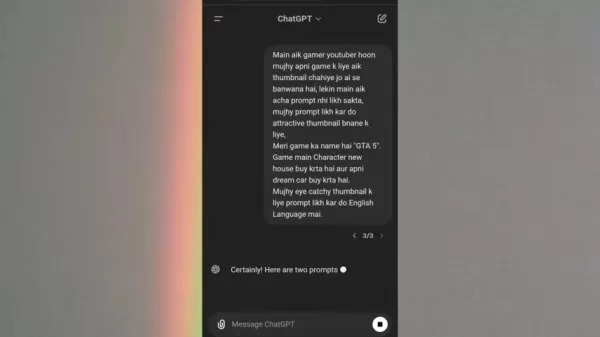
ChatGPT is a sophisticated language model that understands and generates human-like text. It excels at crafting effective prompts for AI image generators. Ideogram AI is a specialized AI image generator that creates visually appealing images from text prompts. Together, these tools provide a seamless workflow for producing impressive gaming thumbnails.
Using ChatGPT allows you to create detailed prompts, simplifying the AI thumbnail creation process. These high-quality thumbnails can significantly contribute to your YouTube channel's growth.
- ChatGPT: Generates effective prompts by understanding your needs and translating them into detailed instructions for Ideogram AI.
- Ideogram AI: Converts text prompts into visually compelling images suitable for gaming thumbnails.
The combination of ChatGPT and Ideogram AI eliminates guesswork from thumbnail design, enabling you to effortlessly create professional visuals that attract viewers.
Crafting the Perfect AI Thumbnail Prompt with ChatGPT
Understanding the Importance of a Well-Crafted Prompt
The quality of your AI-generated thumbnail depends heavily on the effectiveness of your prompt.
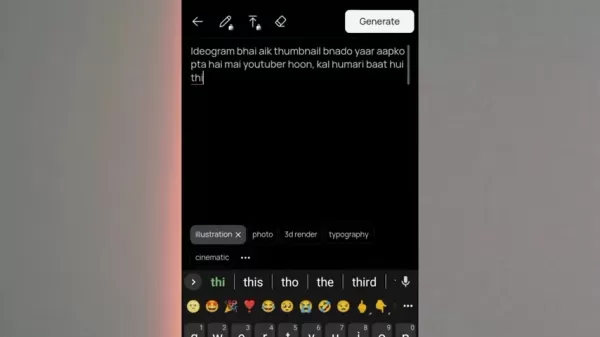
A well-written prompt gives the AI clear instructions, leading to more accurate and visually appealing results. Vague prompts often produce unpredictable outcomes, requiring more time to refine. Here are key strategies for writing effective prompts:
- Be Specific: Clearly define the subject, desired style, and overall tone. The more specific your prompt, the better the AI understands your vision.
- Use Descriptive Language: Employ vivid language to paint a clear picture. Include details about colors, composition, and specific elements.
- Specify Keywords: Incorporate relevant keywords to help the AI grasp the context of your gaming video, ensuring alignment with your theme and audience.
- Provide Examples: If possible, reference thumbnails you admire to guide the AI toward your desired aesthetic.
Mastering prompt writing maximizes the potential of AI thumbnail generators, delivering stunning results with minimal effort.
Step-by-Step Guide to Generating Prompts Using ChatGPT
Follow this step-by-step guide to use ChatGPT for creating compelling thumbnail prompts:
- Access ChatGPT: Visit the ChatGPT website and log in or create an account.
- Define Your Needs: Clearly describe the thumbnail you want to create. Include details about your gaming video, target audience, and desired aesthetic.
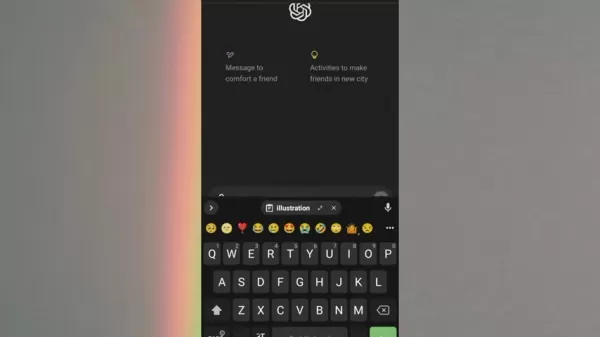
- Example Prompt: "I run a gaming YouTube channel and need an attractive AI-generated thumbnail for my latest video. Could you write a compelling prompt focused on [Game Name] that will capture viewers' attention?"
- Provide Game Details: Specify the game featured in your video, including character names, key locations, or significant events.
- Describe Desired Elements: List any specific elements for inclusion, such as your character's face, a particular scene, or relevant symbols.
- Select a Style: Choose a visual style matching your video's tone—options include cartoonish, realistic, dramatic, or humorous.
- Generate Prompts: Ask ChatGPT to produce multiple prompts based on your specifications. Review and select the best one.
- Refine and Iterate: If needed, refine the prompt by adding details or adjusting the language. Repeat until satisfied.
Following these steps allows you to effectively harness ChatGPT to generate high-quality prompts, leading to impressive AI-generated thumbnails. ChatGPT simplifies the process of creating professional gaming thumbnails.
Generating Thumbnails with Ideogram AI
Accessing and Setting Up Ideogram AI
Once you have a refined prompt from ChatGPT, proceed to Ideogram AI. Here's how to get started:
- Navigate to Ideogram AI: Visit the Ideogram AI website and sign up or log in.
- Familiarize Yourself with the Interface: Explore the prompt input field, image style options, and other settings.
- Copy and Paste Prompt: Paste your refined ChatGPT prompt into Ideogram AI's input field.
- Select Image Styles: Choose styles that align with your vision, such as photo, illustration, cinematic, or 3D render.
- Customize Settings: Adjust additional settings like aspect ratio (e.g., 16:9 for YouTube) and visibility (public or private).
After creation, you might need an app like Picsart for final edits before uploading your thumbnail.
Generating and Refining Thumbnails in Ideogram AI
With Ideogram AI set up, generate and refine your thumbnails as follows:
- Generate Thumbnails: Click "Generate" to create thumbnails based on your prompt and settings.
- Review Results: Ideogram AI will produce several options. Select those that best match your vision.
- Refine and Iterate: If initial results aren't perfect, refine your prompt or adjust style settings.
- Experiment: Try different prompts and settings to explore various thumbnail possibilities.
- Download Thumbnails: Once satisfied, download your chosen thumbnail to your computer.
- Edit Using Picsart: Use the Picsart app to add final touches and personalize your thumbnail.

Pricing Options for Ideogram AI
Free Plan
Ideogram AI offers a free plan with a limited number of dailythumbnail generations, ideal for occasional users or testing the platform.
Paid Plans
For frequent use, paid plans provide higher generation limits and additional features. Pricing varies to suit different budgets and needs. Using free AI thumbnail generation allows you to save resources for other aspects of your gaming setup.
Pros and Cons of Using AI for Thumbnail Creation
Pros
Saves time and effort
Accessible to all skill levels
Cost-effective or free
Provides creative inspiration
Cons
May require prompt refinement
Potential for generic results
Dependence on AI algorithms
Limited creative control
Core Features of Ideogram AI
Text-to-Image Generation
Ideogram AI's core feature is generating images from text prompts, using advanced algorithms to translate your ideas into compelling visuals.
Image Style Options
The platform offers various image styles, allowing you to customize your thumbnails' appearance, including photo, illustration, cinematic, and 3D render.
Aspect Ratio Control
Ideogram AI lets you control the aspect ratio, ensuring thumbnails are optimized for YouTube's recommended dimensions.
Public and Private Visibility
You can choose to make your generated thumbnails public or private, controlling who sees your creations.
Use Cases for AI-Generated Thumbnails
Gaming YouTubers
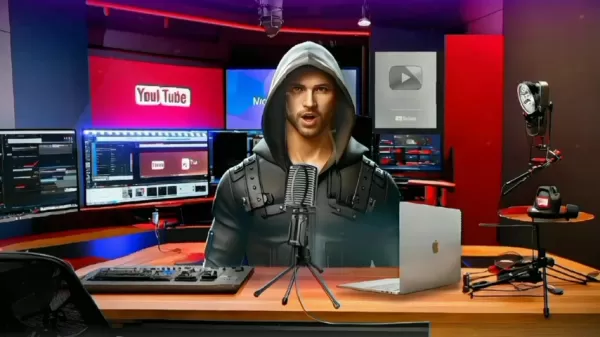
Gaming YouTubers can use AI to create eye-catching thumbnails that attract viewers and promote their videos effectively.
Content Creators
Content creators across various niches can use AI thumbnail generators to quickly produce engaging visuals for their videos. Utilizing AI for gaming thumbnails simplifies future creations.
FAQ
Can I use AI-generated thumbnails for commercial purposes?
Yes, most AI thumbnail generators permit commercial use, such as promoting YouTube videos. Always check the platform's terms of service for compliance.
Are AI-generated thumbnails unique?
While similar prompts can yield comparable results, AI algorithms are designed to produce unique variations, helping your thumbnails stand out.
Related Questions
What are some tips for creating eye-catching gaming thumbnails?
Creating eye-catching gaming thumbnails is essential for attracting viewers. Consider these tips:Use High-Quality Images: Start with high-resolution screenshots or graphics; blurry images deter viewers.Incorporating Your Character: Feature your character's face or recognizable gameplay elements to build a personal connection.Add Text Overlays: Use clear, concise text to convey your video's topic. Choose legible, visually appealing fonts.Use Bold Colors: Employ vibrant, contrasting colors to make your thumbnail stand out against the background.Create a Consistent Style: Develop a uniform visual style across all thumbnails to enhance channel recognition and brand awareness.Optimize for Mobile: Ensure your thumbnail looks good on mobile devices, as a significant portion of YouTube traffic is mobile.Test Different Variations: Experiment with various thumbnail designs and use YouTube Analytics to identify the best performers.Stay Current with Trends: Monitor popular design trends and successful gaming thumbnails to keep your content relevant and competitive.High-quality thumbnails increase the likelihood of viewers clicking on your videos, leading to higher watch times and potential revenue growth.
Related article
 Musk's xAI Halts Recruitment of AI Mentors Amid HR Overload
Elon Musk’s AI venture, xAI, has recently introduced an unexpected operational shift. Citing informed sources, Bloomberg reports that the company has temporarily halted recruitment for specialists tasked with training and refining its Grok chatbot. T
How to fix Core Web Vitals for better SEO rankings
How to Build a Free Website: Free Domain, Hosting & AI Website BuilderTable of ContentsIntroductionAI Website Builder 1: Hookous AIStep 1: Sign UpStep 2: Choose Business Type/NicheStep 3: Select ServicesStep 4: Define Website GoalsStep 5: Enter Busin
Apple, Google Partner With Anthropic to Address 27-Year-Old Vulnerability via Glass Wing Protection
As artificial intelligence advances rapidly in code generation and logical reasoning, the cybersecurity landscape faces unprecedented challenges. Recently, the prominent AI startup Anthropic officially launched a cross-industry collaboration called *
Related Special Topic Recommendations
Image editing
Musk's xAI Halts Recruitment of AI Mentors Amid HR Overload
Elon Musk’s AI venture, xAI, has recently introduced an unexpected operational shift. Citing informed sources, Bloomberg reports that the company has temporarily halted recruitment for specialists tasked with training and refining its Grok chatbot. T
How to fix Core Web Vitals for better SEO rankings
How to Build a Free Website: Free Domain, Hosting & AI Website BuilderTable of ContentsIntroductionAI Website Builder 1: Hookous AIStep 1: Sign UpStep 2: Choose Business Type/NicheStep 3: Select ServicesStep 4: Define Website GoalsStep 5: Enter Busin
Apple, Google Partner With Anthropic to Address 27-Year-Old Vulnerability via Glass Wing Protection
As artificial intelligence advances rapidly in code generation and logical reasoning, the cybersecurity landscape faces unprecedented challenges. Recently, the prominent AI startup Anthropic officially launched a cross-industry collaboration called *
Related Special Topic Recommendations
Image editing
 AI Object Removal Editors: Clean Up Portraits, Travel, and Product Shots
2026 Latest Best Top-rated AI Object Removal Editors for portraits travel product shots! XIX.AI curates a powerful game-changing collection regularly updated with weekly rankings. These tools offer real-world tests to help you quickly remove unwanted elements, boost content quality, and save tons of time without compromising results. Must-try for anyone aiming to unlock their AI creation edge. Explore now!
 10 tools
 xix.ai
Text-to-speech
Best AI Text to Speech Tools for Online Courses
xix.ai
Text-to-speech
Best AI Text to Speech Tools for Online Courses
2026 Latest Best Top-rated AI Text to Speech Tools for Online Courses are curated by XIX.AI based on rigorous real-world tests and weekly updated rankings. These powerful tools help creators deliver crystal-clear audio content effortlessly, boosting writing efficiency and streamlining course production. Check out the free vs paid comparison to find your perfect fit. Explore now to unlock your AI edge in online education.
10 tools
xix.ai
writing
AI Blog Title Tools for Higher Click Through Rates
2026 Latest Best Top-Rated AI Blog Title Tools for Higher Click Through Rates! XIX.AI has carefully curated a powerful, game-changing collection of top tools that go through rigorous real-world tests. You’ll find a free vs paid comparison, weekly updated rankings, and detailed insights to help you boost your blog’s traffic efficiently. Must-try options are highlighted to help you unlock your AI edge. Explore now!
10 tools
xix.ai
automation
Best AI Task Routing Tools for Support Workflows
2026 Latest Best Top-rated AI Task Routing Tools for Support Workflows! XIX.AI has curated a highly powerful game-changing collection of must-try solutions, all undergoing rigorous real-world tests and updated weekly. These tools streamline workflows, boost productivity, and help teams deliver faster, more efficient support. Explore now to discover your perfect tool and unlock your AI edge!
17 tools
xix.ai
Academic Research
AI Citation and Paper Summary Tools
2026 Latest Best Top-Rated AI Citation and Paper Summary Tools Curated by XIX.AI. Get powerful game-changing solutions for quick content creation, improved writing efficiency, and boosting productivity. We offer a free vs paid comparison along with real-world tests and weekly updated rankings to help you find the must-try tool that fits your needs perfectly. Explore now to Unlock your AI edge.
10 tools
xix.ai
Productivity
Best AI Productivity Tools for Daily Work
2026 Latest Best Top-Rated AI Productivity Tools for Daily Work! XIX.AI has curated a powerful, game-changing selection based on rigorous weekly updated rankings and real-world tests. You’ll find must-try options that boost writing efficiency, streamline content creation, and help you overcome daily work challenges. Get a free vs paid comparison to find the perfect fit for your needs. Explore now to unlock your AI edge!
9 tools
xix.ai

 Comments (2)
0/500
Comments (2)
0/500
![PaulThomas]()
Не думал, что AI уже умеет генерировать такие яркие превью для геймерского контента! 😮 Интересно, насколько это повлияет на работу дизайнеров? Может, скоро все ютуберы перейдут на нейросети, и традиционные баннеры станут редкостью. Хотя, наверное, уникальный человеческий стиль всё равно будет цениться.
![NoahSmith]()
I've been struggling with thumbnail design for ages, these AI tools sound like real game-changers 😲 Might finally stop spending hours on Canva. Curious though - does this mean human graphic designers will get less work in this niche?
Crafting compelling gaming thumbnails is vital for drawing viewers to your YouTube channel. Professional design tools offer immense possibilities but can be complex and expensive. This guide explains how to use AI tools like ChatGPT and Ideogram AI to produce stunning gaming thumbnails for free, even without design expertise. We'll cover how to write effective prompts and refine your results for maximum impact.
Key Points
Master the art of writing effective prompts for AI thumbnail generation with ChatGPT.
Learn to use Ideogram AI for creating high-quality gaming thumbnails.
Understand the importance of selecting the right image style and aspect ratio.
Discover techniques for refining AI-generated thumbnails to achieve a professional finish.
Explore how to add personalized touches using basic photo editing tools.
Create attention-grabbing thumbnails that increase your YouTube video views.
Unlocking the Power of AI for Gaming Thumbnails
Why Use AI for Thumbnail Creation?
Designing eye-catching thumbnails is often time-consuming and requires design skills many content creators lack. AI tools are transforming content creation by providing accessible and efficient solutions. Using AI for thumbnail creation offers several key advantages:
- Efficiency: AI can produce multiple thumbnail options in seconds, saving significant time and effort.
- Accessibility: No prior design experience is necessary; simply input your requirements and let the AI work.
- Cost-Effectiveness: Many AI thumbnail generators offer free tiers or affordable subscription plans.
- Creative Inspiration: AI can generate surprising results, offering fresh ideas and creative perspectives for your thumbnails.
By leveraging AI, you can focus more on creating engaging content and less on design technicalities, boosting your channel's overall performance.
Introducing ChatGPT and Ideogram AI
This guide focuses on utilizing two powerful AI tools: ChatGPT and Ideogram AI.
ChatGPT is a sophisticated language model that understands and generates human-like text. It excels at crafting effective prompts for AI image generators. Ideogram AI is a specialized AI image generator that creates visually appealing images from text prompts. Together, these tools provide a seamless workflow for producing impressive gaming thumbnails.
Using ChatGPT allows you to create detailed prompts, simplifying the AI thumbnail creation process. These high-quality thumbnails can significantly contribute to your YouTube channel's growth.
- ChatGPT: Generates effective prompts by understanding your needs and translating them into detailed instructions for Ideogram AI.
- Ideogram AI: Converts text prompts into visually compelling images suitable for gaming thumbnails.
The combination of ChatGPT and Ideogram AI eliminates guesswork from thumbnail design, enabling you to effortlessly create professional visuals that attract viewers.
Crafting the Perfect AI Thumbnail Prompt with ChatGPT
Understanding the Importance of a Well-Crafted Prompt
The quality of your AI-generated thumbnail depends heavily on the effectiveness of your prompt.
A well-written prompt gives the AI clear instructions, leading to more accurate and visually appealing results. Vague prompts often produce unpredictable outcomes, requiring more time to refine. Here are key strategies for writing effective prompts:
- Be Specific: Clearly define the subject, desired style, and overall tone. The more specific your prompt, the better the AI understands your vision.
- Use Descriptive Language: Employ vivid language to paint a clear picture. Include details about colors, composition, and specific elements.
- Specify Keywords: Incorporate relevant keywords to help the AI grasp the context of your gaming video, ensuring alignment with your theme and audience.
- Provide Examples: If possible, reference thumbnails you admire to guide the AI toward your desired aesthetic.
Mastering prompt writing maximizes the potential of AI thumbnail generators, delivering stunning results with minimal effort.
Step-by-Step Guide to Generating Prompts Using ChatGPT
Follow this step-by-step guide to use ChatGPT for creating compelling thumbnail prompts:
- Access ChatGPT: Visit the ChatGPT website and log in or create an account.
- Define Your Needs: Clearly describe the thumbnail you want to create. Include details about your gaming video, target audience, and desired aesthetic.
- Example Prompt: "I run a gaming YouTube channel and need an attractive AI-generated thumbnail for my latest video. Could you write a compelling prompt focused on [Game Name] that will capture viewers' attention?"
- Provide Game Details: Specify the game featured in your video, including character names, key locations, or significant events.
- Describe Desired Elements: List any specific elements for inclusion, such as your character's face, a particular scene, or relevant symbols.
- Select a Style: Choose a visual style matching your video's tone—options include cartoonish, realistic, dramatic, or humorous.
- Generate Prompts: Ask ChatGPT to produce multiple prompts based on your specifications. Review and select the best one.
- Refine and Iterate: If needed, refine the prompt by adding details or adjusting the language. Repeat until satisfied.
Following these steps allows you to effectively harness ChatGPT to generate high-quality prompts, leading to impressive AI-generated thumbnails. ChatGPT simplifies the process of creating professional gaming thumbnails.
Generating Thumbnails with Ideogram AI
Accessing and Setting Up Ideogram AI
Once you have a refined prompt from ChatGPT, proceed to Ideogram AI. Here's how to get started:
- Navigate to Ideogram AI: Visit the Ideogram AI website and sign up or log in.
- Familiarize Yourself with the Interface: Explore the prompt input field, image style options, and other settings.
- Copy and Paste Prompt: Paste your refined ChatGPT prompt into Ideogram AI's input field.
- Select Image Styles: Choose styles that align with your vision, such as photo, illustration, cinematic, or 3D render.
- Customize Settings: Adjust additional settings like aspect ratio (e.g., 16:9 for YouTube) and visibility (public or private).
After creation, you might need an app like Picsart for final edits before uploading your thumbnail.
Generating and Refining Thumbnails in Ideogram AI
With Ideogram AI set up, generate and refine your thumbnails as follows:
- Generate Thumbnails: Click "Generate" to create thumbnails based on your prompt and settings.
- Review Results: Ideogram AI will produce several options. Select those that best match your vision.
- Refine and Iterate: If initial results aren't perfect, refine your prompt or adjust style settings.
- Experiment: Try different prompts and settings to explore various thumbnail possibilities.
- Download Thumbnails: Once satisfied, download your chosen thumbnail to your computer.
- Edit Using Picsart: Use the Picsart app to add final touches and personalize your thumbnail.
Pricing Options for Ideogram AI
Free Plan
Ideogram AI offers a free plan with a limited number of dailythumbnail generations, ideal for occasional users or testing the platform.
Paid Plans
For frequent use, paid plans provide higher generation limits and additional features. Pricing varies to suit different budgets and needs. Using free AI thumbnail generation allows you to save resources for other aspects of your gaming setup.
Pros and Cons of Using AI for Thumbnail Creation
Pros
Saves time and effort
Accessible to all skill levels
Cost-effective or free
Provides creative inspiration
Cons
May require prompt refinement
Potential for generic results
Dependence on AI algorithms
Limited creative control
Core Features of Ideogram AI
Text-to-Image Generation
Ideogram AI's core feature is generating images from text prompts, using advanced algorithms to translate your ideas into compelling visuals.
Image Style Options
The platform offers various image styles, allowing you to customize your thumbnails' appearance, including photo, illustration, cinematic, and 3D render.
Aspect Ratio Control
Ideogram AI lets you control the aspect ratio, ensuring thumbnails are optimized for YouTube's recommended dimensions.
Public and Private Visibility
You can choose to make your generated thumbnails public or private, controlling who sees your creations.
Use Cases for AI-Generated Thumbnails
Gaming YouTubers
Gaming YouTubers can use AI to create eye-catching thumbnails that attract viewers and promote their videos effectively.
Content Creators
Content creators across various niches can use AI thumbnail generators to quickly produce engaging visuals for their videos. Utilizing AI for gaming thumbnails simplifies future creations.
FAQ
Can I use AI-generated thumbnails for commercial purposes?
Yes, most AI thumbnail generators permit commercial use, such as promoting YouTube videos. Always check the platform's terms of service for compliance.
Are AI-generated thumbnails unique?
While similar prompts can yield comparable results, AI algorithms are designed to produce unique variations, helping your thumbnails stand out.
Related Questions
What are some tips for creating eye-catching gaming thumbnails?
Creating eye-catching gaming thumbnails is essential for attracting viewers. Consider these tips:Use High-Quality Images: Start with high-resolution screenshots or graphics; blurry images deter viewers.Incorporating Your Character: Feature your character's face or recognizable gameplay elements to build a personal connection.Add Text Overlays: Use clear, concise text to convey your video's topic. Choose legible, visually appealing fonts.Use Bold Colors: Employ vibrant, contrasting colors to make your thumbnail stand out against the background.Create a Consistent Style: Develop a uniform visual style across all thumbnails to enhance channel recognition and brand awareness.Optimize for Mobile: Ensure your thumbnail looks good on mobile devices, as a significant portion of YouTube traffic is mobile.Test Different Variations: Experiment with various thumbnail designs and use YouTube Analytics to identify the best performers.Stay Current with Trends: Monitor popular design trends and successful gaming thumbnails to keep your content relevant and competitive.High-quality thumbnails increase the likelihood of viewers clicking on your videos, leading to higher watch times and potential revenue growth.







 Musk's xAI Halts Recruitment of AI Mentors Amid HR Overload
Elon Musk’s AI venture, xAI, has recently introduced an unexpected operational shift. Citing informed sources, Bloomberg reports that the company has temporarily halted recruitment for specialists tasked with training and refining its Grok chatbot. T
Musk's xAI Halts Recruitment of AI Mentors Amid HR Overload
Elon Musk’s AI venture, xAI, has recently introduced an unexpected operational shift. Citing informed sources, Bloomberg reports that the company has temporarily halted recruitment for specialists tasked with training and refining its Grok chatbot. T
 How to fix Core Web Vitals for better SEO rankings
How to Build a Free Website: Free Domain, Hosting & AI Website BuilderTable of ContentsIntroductionAI Website Builder 1: Hookous AIStep 1: Sign UpStep 2: Choose Business Type/NicheStep 3: Select ServicesStep 4: Define Website GoalsStep 5: Enter Busin
How to fix Core Web Vitals for better SEO rankings
How to Build a Free Website: Free Domain, Hosting & AI Website BuilderTable of ContentsIntroductionAI Website Builder 1: Hookous AIStep 1: Sign UpStep 2: Choose Business Type/NicheStep 3: Select ServicesStep 4: Define Website GoalsStep 5: Enter Busin
 Apple, Google Partner With Anthropic to Address 27-Year-Old Vulnerability via Glass Wing Protection
As artificial intelligence advances rapidly in code generation and logical reasoning, the cybersecurity landscape faces unprecedented challenges. Recently, the prominent AI startup Anthropic officially launched a cross-industry collaboration called *
Apple, Google Partner With Anthropic to Address 27-Year-Old Vulnerability via Glass Wing Protection
As artificial intelligence advances rapidly in code generation and logical reasoning, the cybersecurity landscape faces unprecedented challenges. Recently, the prominent AI startup Anthropic officially launched a cross-industry collaboration called *

2026 Latest Best Top-rated AI Object Removal Editors for portraits travel product shots! XIX.AI curates a powerful game-changing collection regularly updated with weekly rankings. These tools offer real-world tests to help you quickly remove unwanted elements, boost content quality, and save tons of time without compromising results. Must-try for anyone aiming to unlock their AI creation edge. Explore now!
10 tools
xix.ai

2026 Latest Best Top-rated AI Text to Speech Tools for Online Courses are curated by XIX.AI based on rigorous real-world tests and weekly updated rankings. These powerful tools help creators deliver crystal-clear audio content effortlessly, boosting writing efficiency and streamlining course production. Check out the free vs paid comparison to find your perfect fit. Explore now to unlock your AI edge in online education.
10 tools
xix.ai

2026 Latest Best Top-Rated AI Blog Title Tools for Higher Click Through Rates! XIX.AI has carefully curated a powerful, game-changing collection of top tools that go through rigorous real-world tests. You’ll find a free vs paid comparison, weekly updated rankings, and detailed insights to help you boost your blog’s traffic efficiently. Must-try options are highlighted to help you unlock your AI edge. Explore now!
10 tools
xix.ai

2026 Latest Best Top-rated AI Task Routing Tools for Support Workflows! XIX.AI has curated a highly powerful game-changing collection of must-try solutions, all undergoing rigorous real-world tests and updated weekly. These tools streamline workflows, boost productivity, and help teams deliver faster, more efficient support. Explore now to discover your perfect tool and unlock your AI edge!
17 tools
xix.ai

2026 Latest Best Top-Rated AI Citation and Paper Summary Tools Curated by XIX.AI. Get powerful game-changing solutions for quick content creation, improved writing efficiency, and boosting productivity. We offer a free vs paid comparison along with real-world tests and weekly updated rankings to help you find the must-try tool that fits your needs perfectly. Explore now to Unlock your AI edge.
10 tools
xix.ai

2026 Latest Best Top-Rated AI Productivity Tools for Daily Work! XIX.AI has curated a powerful, game-changing selection based on rigorous weekly updated rankings and real-world tests. You’ll find must-try options that boost writing efficiency, streamline content creation, and help you overcome daily work challenges. Get a free vs paid comparison to find the perfect fit for your needs. Explore now to unlock your AI edge!
9 tools
xix.ai

Не думал, что AI уже умеет генерировать такие яркие превью для геймерского контента! 😮 Интересно, насколько это повлияет на работу дизайнеров? Может, скоро все ютуберы перейдут на нейросети, и традиционные баннеры станут редкостью. Хотя, наверное, уникальный человеческий стиль всё равно будет цениться.
I've been struggling with thumbnail design for ages, these AI tools sound like real game-changers 😲 Might finally stop spending hours on Canva. Curious though - does this mean human graphic designers will get less work in this niche?












