


 Home
HomeAI Comic Creation: A Step-by-Step Tutorial for Beginners
Creating Comics Has Never Been Easier!
Ever dreamed of making your own comics but thought you lacked the artistic talent? Think again! With today’s AI tools, you can craft stunning comics without lifting a pencil. This comprehensive guide will walk you through the entire process, from generating cartoon panels to piecing together a flipbook. Ready to dive in and bring your stories to life? Let’s get started!
Step 1: Generating Cartoons with AI Comic Factory
The AI Comic Factory is a game-changer for budding comic creators. This free tool lets you whip up cartoon panels in minutes—no drawing skills required. It’s super user-friendly, so even if you’re new to comic creation, you’ll catch on quick.
- Choose Your Style: Start by picking a cartoon type that matches your story. For beginners, the 'American (Modern)' style works great.
- Pick a Grid: Decide how you want your panels arranged. Grid 1 is a classic choice for straightforward storytelling.
- Write Your Prompt: Give the AI clear instructions for what you want. Describe the scenario, characters, and mood in detail—it’s like giving the AI a roadmap.
- Generate Your Story: Hit 'Go,' and watch as the AI brings your vision to life. You can increase the number of pages to six, making your story longer and more intricate.
- Edit and Redraw: If something doesn’t quite work, tweak your prompt or redraw the panel until you’re satisfied.
- Download as PDF: Once you’re happy, download your comic as a PDF. Now it’s ready for the next step.
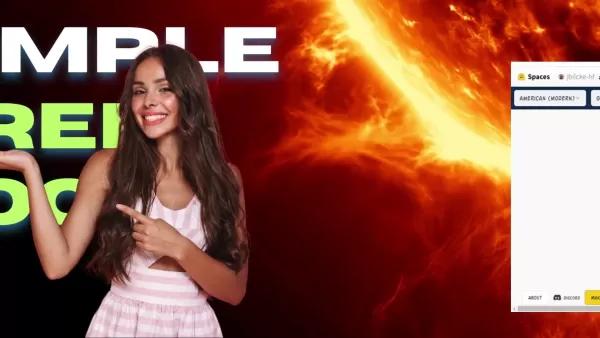
With the AI Comic Factory, you’ll discover that creating comics is less about technical skill and more about letting your imagination run wild. It’s like having a personal artist on call!
Step 2: Adding Captions with Microsoft Copilot
Now that you’ve got your cartoon panels, it’s time to breathe life into them with captions and dialogue. Enter Microsoft Copilot, powered by ChatGPT 4. This nifty tool makes writing captions a breeze.
- Upload Your Panel: Snap a pic of the panel you want to caption. It’s simple!
- Describe the Scene: Give Copilot a rundown of the story and context. This helps it understand the vibe you’re going for.
- Generate Captions: Copilot will churn out suggestions based on your description. Pick the ones that resonate with your vision.
- Refine and Polish: Tweak the tone, language, and length to match your style. Copilot gives you plenty of room to make it your own.
Using Copilot ensures your captions complement the visuals perfectly. It’s like having a writing partner who knows exactly what you’re aiming for.
Step 3: Assembling Your Comic in Canva
Time to bring everything together! Canva is a fantastic tool for organizing your comic into a polished flipbook. Its drag-and-drop interface makes editing a joy.
- Upload Your PDF: Import the PDF you downloaded from the AI Comic Factory.
- Add Speech Bubbles: Pop in text and speech bubbles to bring your characters to life.
- Organize Pages: Arrange the panels in the correct order to keep the story flowing smoothly.
- Enhance with Design Elements: Spruce up your comic with backgrounds, borders, and special effects.
- Download as PDF: Finally, export your comic as a PDF for sharing or printing.
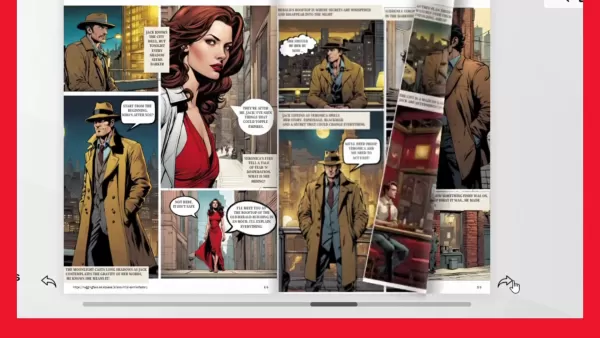
Canva transforms your raw material into a professional-looking flipbook. It’s the perfect finishing touch for your comic creation journey.
Pricing Considerations
Most of the tools we’ve covered are free to use, making comic creation accessible to everyone. However, paid versions offer advanced features for those looking to take their projects to the next level.
- AI Comic Factory: Free to use with no strings attached.
- Microsoft Copilot: Free access through Microsoft’s platform, though daily usage limits may apply.
- Canva: Offers a robust free tier with plenty of features for beginners.
While free versions are enough for basic comics, investing in premium plans can enhance your work significantly. Consider it if you’re serious about turning your hobby into a career.
Pros and Cons of Using AI for Comic Creation
Like any tool, AI comic creation has its upsides and downsides. Here’s a quick rundown:
Pros:
- No drawing skills required—perfect for beginners.
- Saves tons of time compared to traditional methods.
- Offers creative suggestions and inspiration.
- Enables rapid prototyping of ideas.
- Lowers the barrier to entry for comic creation.
Cons:
- Detailed prompts are often necessary for desired results.
- Free versions may lack advanced customization options.
- Results can sometimes be inconsistent or unexpected.
- Relies heavily on AI algorithms, which may not always align with your vision.
- Ethical concerns regarding AI-generated content may arise.
Despite these challenges, AI tools remain an incredible asset for comic creators everywhere.
Core Features of the Tools
Let’s break down the key features of the tools we’ve discussed:
Tool Core Features AI Comic Factory Diverse styles, grid layouts, custom captions, PDF export, new page function, edit and redraw Microsoft Copilot (ChatGPT 4) Contextual understanding, creative suggestions, time-saving, free access, image upscaling Canva User-friendly interface, design templates, text and speech bubbles, customization options, free access
These tools work seamlessly together, forming a complete pipeline for creating comics from scratch. Mastering their features will help you craft comics that captivate audiences worldwide.
Frequently Asked Questions
Curious about getting started? Here are answers to common questions:
- Is it really possible to create a comic without drawing skills? Absolutely! AI tools handle the visuals, leaving you free to focus on storytelling.
- Are these tools really free to use? Yes, AI Comic Factory, Microsoft Copilot, and Canva all offer free versions with essential features.
- Can I customize the generated comic panels? Definitely! Both AI Comic Factory and Canva allow extensive customization.
- How detailed should my prompts be? The more specific, the better. Include details about characters, settings, and emotions.
- What if I’m not happy with the captions Copilot generates? Review and refine them until they fit your vision perfectly.
Still have questions? Dive deeper into the related topics below!
Related article
 Anthropic Opens Doors to EU Cybersecurity Agency as Mythos5 Model Faces Compliance Exam
Artificial intelligence compliance regulations are advancing significantly. Leading AI firm Anthropic has officially granted the European Union's cybersecurity authority access to its Mythos AI model, a pivotal move for this advanced large language m
Lenovo Unveils AI Cutie at MWC 2026: Desktop Robotic Arm Becomes Your New Workplace Assistant
If AI in 2025 is still confined to screen-based chats, 2026 marks the shift toward tangible, desk-integrated intelligence. At MWC 2026 in Barcelona, Lenovo unveiled two groundbreaking AI hardware concepts: AI Workmate (an AI Office Partner) and AI Wo
TikTok Launches Voice Copyright Report Channel as AI Clone Voice Complaints Double
TikTok has introduced a dedicated reporting channel for voice-related intellectual property infringement, alongside enhanced rights protection mechanisms. The platform notes that as AI voice synthesis and imitation technologies become more accessible
Related Special Topic Recommendations
code
Anthropic Opens Doors to EU Cybersecurity Agency as Mythos5 Model Faces Compliance Exam
Artificial intelligence compliance regulations are advancing significantly. Leading AI firm Anthropic has officially granted the European Union's cybersecurity authority access to its Mythos AI model, a pivotal move for this advanced large language m
Lenovo Unveils AI Cutie at MWC 2026: Desktop Robotic Arm Becomes Your New Workplace Assistant
If AI in 2025 is still confined to screen-based chats, 2026 marks the shift toward tangible, desk-integrated intelligence. At MWC 2026 in Barcelona, Lenovo unveiled two groundbreaking AI hardware concepts: AI Workmate (an AI Office Partner) and AI Wo
TikTok Launches Voice Copyright Report Channel as AI Clone Voice Complaints Double
TikTok has introduced a dedicated reporting channel for voice-related intellectual property infringement, alongside enhanced rights protection mechanisms. The platform notes that as AI voice synthesis and imitation technologies become more accessible
Related Special Topic Recommendations
code
 AI Pull Request Review Tools for GitHub Teams Handling Refactors, Bugs, and Security Gaps
2026 Latest Best AI Pull Request Review Tools for GitHub Teams are here on XIX.AI! This top-rated curated list showcases powerful game-changing solutions that streamline refactoring, bug fixing, and security gap detection across all team workflows. Enjoy a free vs paid comparison along with real-world tests and detailed rankings to help you find the perfect tool that boosts productivity significantly. Explore now to unlock your AI edge!
 12 tools
 xix.ai
Text-to-speech
Best AI Text to Speech Tools for Natural Voiceovers
xix.ai
Text-to-speech
Best AI Text to Speech Tools for Natural Voiceovers
2026 Latest Best Top-rated AI Text to Speech Tools for Natural Voiceovers are here on XIX.AI! This curated list features powerful, game-changing options that deliver crystal-clear voices for every use case, backed by real-world tests and weekly updated rankings. Get a free vs paid comparison to find the must-try solution that boosts your productivity instantly. Explore now to Unlock your AI edge!
11 tools
xix.ai
Comic Creation
Manga AI Background Generators for Serialized Chapters, Covers, and Promo Art
2026 Latest Best Manga AI Background Generators Ranked Top-Rated! This curated collection showcases powerful game-changing tools perfect for creating high-quality chapter backgrounds, book covers, and promotional art. Every option has undergone rigorous real-world tests to ensure reliability. Get a free vs paid comparison along with detailed insights. Explore now to discover your perfect tool and unlock your AI edge in manga creation.
6 tools
xix.ai
Image editing
AI Object Removal Editors: Clean Up Portraits, Travel, and Product Shots
2026 Latest Best Top-rated AI Object Removal Editors for portraits travel product shots! XIX.AI curates a powerful game-changing collection regularly updated with weekly rankings. These tools offer real-world tests to help you quickly remove unwanted elements, boost content quality, and save tons of time without compromising results. Must-try for anyone aiming to unlock their AI creation edge. Explore now!
10 tools
xix.ai
Text-to-speech
Best AI Text to Speech Tools for Online Courses
2026 Latest Best Top-rated AI Text to Speech Tools for Online Courses are curated by XIX.AI based on rigorous real-world tests and weekly updated rankings. These powerful tools help creators deliver crystal-clear audio content effortlessly, boosting writing efficiency and streamlining course production. Check out the free vs paid comparison to find your perfect fit. Explore now to unlock your AI edge in online education.
10 tools
xix.ai
writing
AI Blog Title Tools for Higher Click Through Rates
2026 Latest Best Top-Rated AI Blog Title Tools for Higher Click Through Rates! XIX.AI has carefully curated a powerful, game-changing collection of top tools that go through rigorous real-world tests. You’ll find a free vs paid comparison, weekly updated rankings, and detailed insights to help you boost your blog’s traffic efficiently. Must-try options are highlighted to help you unlock your AI edge. Explore now!
10 tools
xix.ai

 Comments (1)
0/500
Comments (1)
0/500
![StevenAllen]()
제목만 봐도 이미 흥미진진하네요! 만화 창작에 AI를 적용하는 건 정말 창의적인 접근이에요. 저도 그림 실력이 부족한 입장에서 이런 가이드는 정말 반갑네요. 혹시 작품을 완성한 후 저작권 문제는 어떻게 처리해야 할지도 궁금해지네요. 😊
Creating Comics Has Never Been Easier!
Ever dreamed of making your own comics but thought you lacked the artistic talent? Think again! With today’s AI tools, you can craft stunning comics without lifting a pencil. This comprehensive guide will walk you through the entire process, from generating cartoon panels to piecing together a flipbook. Ready to dive in and bring your stories to life? Let’s get started!
Step 1: Generating Cartoons with AI Comic Factory
The AI Comic Factory is a game-changer for budding comic creators. This free tool lets you whip up cartoon panels in minutes—no drawing skills required. It’s super user-friendly, so even if you’re new to comic creation, you’ll catch on quick.
- Choose Your Style: Start by picking a cartoon type that matches your story. For beginners, the 'American (Modern)' style works great.
- Pick a Grid: Decide how you want your panels arranged. Grid 1 is a classic choice for straightforward storytelling.
- Write Your Prompt: Give the AI clear instructions for what you want. Describe the scenario, characters, and mood in detail—it’s like giving the AI a roadmap.
- Generate Your Story: Hit 'Go,' and watch as the AI brings your vision to life. You can increase the number of pages to six, making your story longer and more intricate.
- Edit and Redraw: If something doesn’t quite work, tweak your prompt or redraw the panel until you’re satisfied.
- Download as PDF: Once you’re happy, download your comic as a PDF. Now it’s ready for the next step.
With the AI Comic Factory, you’ll discover that creating comics is less about technical skill and more about letting your imagination run wild. It’s like having a personal artist on call!
Step 2: Adding Captions with Microsoft Copilot
Now that you’ve got your cartoon panels, it’s time to breathe life into them with captions and dialogue. Enter Microsoft Copilot, powered by ChatGPT 4. This nifty tool makes writing captions a breeze.
- Upload Your Panel: Snap a pic of the panel you want to caption. It’s simple!
- Describe the Scene: Give Copilot a rundown of the story and context. This helps it understand the vibe you’re going for.
- Generate Captions: Copilot will churn out suggestions based on your description. Pick the ones that resonate with your vision.
- Refine and Polish: Tweak the tone, language, and length to match your style. Copilot gives you plenty of room to make it your own.
Using Copilot ensures your captions complement the visuals perfectly. It’s like having a writing partner who knows exactly what you’re aiming for.
Step 3: Assembling Your Comic in Canva
Time to bring everything together! Canva is a fantastic tool for organizing your comic into a polished flipbook. Its drag-and-drop interface makes editing a joy.
- Upload Your PDF: Import the PDF you downloaded from the AI Comic Factory.
- Add Speech Bubbles: Pop in text and speech bubbles to bring your characters to life.
- Organize Pages: Arrange the panels in the correct order to keep the story flowing smoothly.
- Enhance with Design Elements: Spruce up your comic with backgrounds, borders, and special effects.
- Download as PDF: Finally, export your comic as a PDF for sharing or printing.
Canva transforms your raw material into a professional-looking flipbook. It’s the perfect finishing touch for your comic creation journey.
Pricing Considerations
Most of the tools we’ve covered are free to use, making comic creation accessible to everyone. However, paid versions offer advanced features for those looking to take their projects to the next level.
- AI Comic Factory: Free to use with no strings attached.
- Microsoft Copilot: Free access through Microsoft’s platform, though daily usage limits may apply.
- Canva: Offers a robust free tier with plenty of features for beginners.
While free versions are enough for basic comics, investing in premium plans can enhance your work significantly. Consider it if you’re serious about turning your hobby into a career.
Pros and Cons of Using AI for Comic Creation
Like any tool, AI comic creation has its upsides and downsides. Here’s a quick rundown:
Pros:
- No drawing skills required—perfect for beginners.
- Saves tons of time compared to traditional methods.
- Offers creative suggestions and inspiration.
- Enables rapid prototyping of ideas.
- Lowers the barrier to entry for comic creation.
Cons:
- Detailed prompts are often necessary for desired results.
- Free versions may lack advanced customization options.
- Results can sometimes be inconsistent or unexpected.
- Relies heavily on AI algorithms, which may not always align with your vision.
- Ethical concerns regarding AI-generated content may arise.
Despite these challenges, AI tools remain an incredible asset for comic creators everywhere.
Core Features of the Tools
Let’s break down the key features of the tools we’ve discussed:
| Tool | Core Features |
|---|---|
| AI Comic Factory | Diverse styles, grid layouts, custom captions, PDF export, new page function, edit and redraw |
| Microsoft Copilot (ChatGPT 4) | Contextual understanding, creative suggestions, time-saving, free access, image upscaling |
| Canva | User-friendly interface, design templates, text and speech bubbles, customization options, free access |
These tools work seamlessly together, forming a complete pipeline for creating comics from scratch. Mastering their features will help you craft comics that captivate audiences worldwide.
Frequently Asked Questions
Curious about getting started? Here are answers to common questions:
- Is it really possible to create a comic without drawing skills? Absolutely! AI tools handle the visuals, leaving you free to focus on storytelling.
- Are these tools really free to use? Yes, AI Comic Factory, Microsoft Copilot, and Canva all offer free versions with essential features.
- Can I customize the generated comic panels? Definitely! Both AI Comic Factory and Canva allow extensive customization.
- How detailed should my prompts be? The more specific, the better. Include details about characters, settings, and emotions.
- What if I’m not happy with the captions Copilot generates? Review and refine them until they fit your vision perfectly.
Still have questions? Dive deeper into the related topics below!








 Anthropic Opens Doors to EU Cybersecurity Agency as Mythos5 Model Faces Compliance Exam
Artificial intelligence compliance regulations are advancing significantly. Leading AI firm Anthropic has officially granted the European Union's cybersecurity authority access to its Mythos AI model, a pivotal move for this advanced large language m
Anthropic Opens Doors to EU Cybersecurity Agency as Mythos5 Model Faces Compliance Exam
Artificial intelligence compliance regulations are advancing significantly. Leading AI firm Anthropic has officially granted the European Union's cybersecurity authority access to its Mythos AI model, a pivotal move for this advanced large language m
 Lenovo Unveils AI Cutie at MWC 2026: Desktop Robotic Arm Becomes Your New Workplace Assistant
If AI in 2025 is still confined to screen-based chats, 2026 marks the shift toward tangible, desk-integrated intelligence. At MWC 2026 in Barcelona, Lenovo unveiled two groundbreaking AI hardware concepts: AI Workmate (an AI Office Partner) and AI Wo
Lenovo Unveils AI Cutie at MWC 2026: Desktop Robotic Arm Becomes Your New Workplace Assistant
If AI in 2025 is still confined to screen-based chats, 2026 marks the shift toward tangible, desk-integrated intelligence. At MWC 2026 in Barcelona, Lenovo unveiled two groundbreaking AI hardware concepts: AI Workmate (an AI Office Partner) and AI Wo
 TikTok Launches Voice Copyright Report Channel as AI Clone Voice Complaints Double
TikTok has introduced a dedicated reporting channel for voice-related intellectual property infringement, alongside enhanced rights protection mechanisms. The platform notes that as AI voice synthesis and imitation technologies become more accessible
TikTok Launches Voice Copyright Report Channel as AI Clone Voice Complaints Double
TikTok has introduced a dedicated reporting channel for voice-related intellectual property infringement, alongside enhanced rights protection mechanisms. The platform notes that as AI voice synthesis and imitation technologies become more accessible

2026 Latest Best AI Pull Request Review Tools for GitHub Teams are here on XIX.AI! This top-rated curated list showcases powerful game-changing solutions that streamline refactoring, bug fixing, and security gap detection across all team workflows. Enjoy a free vs paid comparison along with real-world tests and detailed rankings to help you find the perfect tool that boosts productivity significantly. Explore now to unlock your AI edge!
12 tools
xix.ai

2026 Latest Best Top-rated AI Text to Speech Tools for Natural Voiceovers are here on XIX.AI! This curated list features powerful, game-changing options that deliver crystal-clear voices for every use case, backed by real-world tests and weekly updated rankings. Get a free vs paid comparison to find the must-try solution that boosts your productivity instantly. Explore now to Unlock your AI edge!
11 tools
xix.ai

2026 Latest Best Manga AI Background Generators Ranked Top-Rated! This curated collection showcases powerful game-changing tools perfect for creating high-quality chapter backgrounds, book covers, and promotional art. Every option has undergone rigorous real-world tests to ensure reliability. Get a free vs paid comparison along with detailed insights. Explore now to discover your perfect tool and unlock your AI edge in manga creation.
6 tools
xix.ai

2026 Latest Best Top-rated AI Object Removal Editors for portraits travel product shots! XIX.AI curates a powerful game-changing collection regularly updated with weekly rankings. These tools offer real-world tests to help you quickly remove unwanted elements, boost content quality, and save tons of time without compromising results. Must-try for anyone aiming to unlock their AI creation edge. Explore now!
10 tools
xix.ai

2026 Latest Best Top-rated AI Text to Speech Tools for Online Courses are curated by XIX.AI based on rigorous real-world tests and weekly updated rankings. These powerful tools help creators deliver crystal-clear audio content effortlessly, boosting writing efficiency and streamlining course production. Check out the free vs paid comparison to find your perfect fit. Explore now to unlock your AI edge in online education.
10 tools
xix.ai

2026 Latest Best Top-Rated AI Blog Title Tools for Higher Click Through Rates! XIX.AI has carefully curated a powerful, game-changing collection of top tools that go through rigorous real-world tests. You’ll find a free vs paid comparison, weekly updated rankings, and detailed insights to help you boost your blog’s traffic efficiently. Must-try options are highlighted to help you unlock your AI edge. Explore now!
10 tools
xix.ai

제목만 봐도 이미 흥미진진하네요! 만화 창작에 AI를 적용하는 건 정말 창의적인 접근이에요. 저도 그림 실력이 부족한 입장에서 이런 가이드는 정말 반갑네요. 혹시 작품을 완성한 후 저작권 문제는 어떻게 처리해야 할지도 궁금해지네요. 😊












