


 Home
Home
AI Agents Gain New Ability to Navigate Websites and Apps with Copilot Studio's Latest Skill
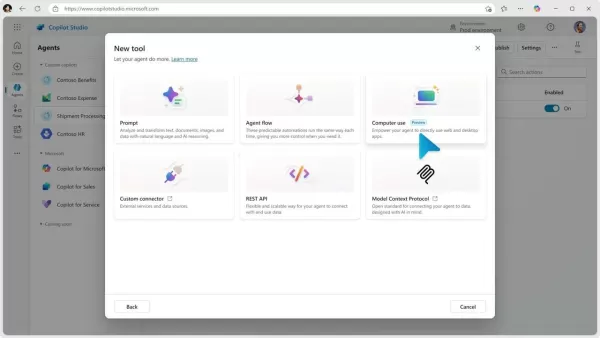
Imagine an AI agent capable of not just surfing the web for research, but actually interacting with websites to get things done—all by itself. This is the vision behind Microsoft's latest innovation.
On Wednesday, Microsoft unveiled a new interactive skill for its Copilot Studio platform, which lets users create their own AI agents. This skill, dubbed "computer use," allows any agent you build to navigate and operate desktop applications or websites, performing tasks just as a human would.
This feature is rolling out through an early access research preview. With it, agents can click buttons, navigate menus, and fill out forms on screens, even if no API is available for the app or site. Microsoft put it succinctly: "If a person can use the app, the agent can too."
Your AI agents will be able to use popular browsers like Microsoft Edge, Chrome, and Firefox to carry out these tasks. The feature runs on Microsoft's backend, so you don't need to worry about setting up your own servers. All data generated stays on the Microsoft cloud and isn't used to train their AI models.
One of the coolest parts? These agents can adapt on the fly to changes in apps and websites. If a button or screen layout changes, your agent can still figure out what to do without needing manual updates from you. Plus, with the ability to "see" the screen, they can make decisions in real time, and they're equipped with reasoning capabilities to handle any hiccups without needing your help.
You don't need to know how to code to create an AI agent. Just use natural language to describe what you want the agent to do in Copilot Studio. You can test and tweak your instructions in a simulated mode, watching the steps play out before letting your agent loose. And you can review a detailed history of your agent's actions, complete with screenshots and reasoning steps.
Microsoft's blog post highlighted three scenarios where these AI agents could shine:
- Automated Data Entry: Need to input heaps of data from various sources into a central system? An AI agent can take this off your hands, saving you time and effort.
- Market Research: Marketing folks often need to gather data from multiple online sources. An AI agent could browse these sites and collect the necessary information autonomously.
- Invoice Processing: In finance, extracting data from invoices and entering it into an accounting system is common. An AI agent could do this automatically, ensuring the data gets where it needs to go.
While this all sounds promising, AI isn't perfect yet. Even simple AI bots can err, and with the added complexity of independent computer use, there's a risk your AI agent might make a wrong click or abandon its task.
The real test is in the doing. Microsoft is inviting Copilot Studio users to sign up for early access to this "computer use" feature. If you're not already using Copilot Studio, you can give it a try for free. Just use a work or school account to set it up, and you'll land on the main page where you can start describing the kind of agent you want to build.
Interested in more AI stories? Subscribe to our weekly newsletter, Innovation, for the latest updates.
Related article
 WeRide Unveils WIIT, a Physical AI Perception Model to Decode the Real World
At the 2026 World Artificial Intelligence Conference (WAIC), WeRide unveiled WIIT, a physical AI cognitive foundation model that charts a new course for artificial intelligence, shifting the focus from data interpretation to real-world cognition.WIIT
Anthropic CEO Amodei Dismisses Pessimistic Views, Attributes AI Trust Crisis to Unkept Promises
Amidst escalating public discourse on AI risks and regulation, Anthropic CEO Dario Amodei has pushed back against claims that his messaging is unduly pessimistic. This clarification directly addresses critiques from investor Gavin Baker, who appeared
OpenAI and Oracle Deepen Computing Power Integration to Simplify Cloud Access
As demand for AI computing power surges, the ease of accessing enterprise-grade infrastructure has emerged as a key industry priority. On June 10, OpenAI and Oracle announced a strategic partnership designed to seamlessly connect AI model integration
Related Special Topic Recommendations
Video creation
WeRide Unveils WIIT, a Physical AI Perception Model to Decode the Real World
At the 2026 World Artificial Intelligence Conference (WAIC), WeRide unveiled WIIT, a physical AI cognitive foundation model that charts a new course for artificial intelligence, shifting the focus from data interpretation to real-world cognition.WIIT
Anthropic CEO Amodei Dismisses Pessimistic Views, Attributes AI Trust Crisis to Unkept Promises
Amidst escalating public discourse on AI risks and regulation, Anthropic CEO Dario Amodei has pushed back against claims that his messaging is unduly pessimistic. This clarification directly addresses critiques from investor Gavin Baker, who appeared
OpenAI and Oracle Deepen Computing Power Integration to Simplify Cloud Access
As demand for AI computing power surges, the ease of accessing enterprise-grade infrastructure has emerged as a key industry priority. On June 10, OpenAI and Oracle announced a strategic partnership designed to seamlessly connect AI model integration
Related Special Topic Recommendations
Video creation
 AI Subtitle and Dubbing Tools: Localize Video for Global Audiences
2026 Latest Best Top-rated AI Subtitle and Dubbing Tools Curated for Localizing Video for Global Audiences Powerfully boost content reach across language barriers with game-changing accuracy Real-world tests prove these must-try solutions offer free vs paid comparison and reliable rankings to maximize productivity Explore now to Discover your perfect tool for global content delivery
 10 tools
 xix.ai
automation
AI Invoice Processing Tools for AP Automation, Approval Routing, and ERP Sync Workflows
xix.ai
automation
AI Invoice Processing Tools for AP Automation, Approval Routing, and ERP Sync Workflows
2026 Latest Best AI Invoice Processing Tools for AP Automation, Approval Routing, and ERP Sync Workflows! XIX.AI curates top-rated, powerful solutions that pass rigorous real-world tests to boost productivity dramatically. Get a free vs paid comparison, see detailed rankings, and discover must-try options to streamline your finance operations. Explore now to unlock your AI edge!
9 tools
xix.ai
writing
AI Technical Documentation Tools for Developer Teams
2026 Latest Best Top-rated AI Technical Documentation Tools for Developer Teams! XIX.AI has curated a powerful, game-changing collection of must-try tools that go through rigorous real-world tests and weekly updated rankings. These top-rated solutions help teams boost productivity dramatically by streamlining content creation, fixing documentation errors, and accelerating coding workflows across all projects. Explore now to Discover your perfect tool for unlocking your AI edge!
13 tools
xix.ai
Software Development
AI Bug Triage Assistants: Rank Issues by Severity and User Impact
2026 Latest Best Top-rated AI Bug Triage Assistants Ranked! This curated collection showcases powerful game-changing tools that help teams quickly sort bugs by severity and user impact, saving valuable time. XIX.AI offers a free vs paid comparison along with real-world tests to help you find the must-try solution that boosts productivity significantly. Explore now to Discover your perfect tool for streamlining development workflows!
10 tools
xix.ai
code
Best AI Coding Tools for Python and JavaScript
2026 Latest Best Top-Rated AI Coding Tools for Python and JavaScript are here on XIX.AI’s curated list. These powerful game-changing tools have undergone rigorous real-world tests to deliver exceptional results for writing efficient code, fixing bugs, and boosting productivity. Get a free vs paid comparison and see which options suit your needs. Explore now to Discover your perfect coding tool and Unlock your AI edge.
10 tools
xix.ai
Academic Research
Best AI Citation Mapping Tools for Research Discovery
2026 Latest Best Top-Rated AI Citation Mapping Tools for Research Discovery! XIX.AI has curated a powerful, game-changing collection of must-try tools that go through rigorous real-world tests to deliver accurate results. You’ll find detailed free vs paid comparisons, weekly updated rankings, and insights to help you boost your research efficiency and uncover valuable data faster. Explore now to discover your perfect tool for academic work! 238 characters
11 tools
xix.ai

 Comments (8)
0/500
Comments (8)
0/500
![JuanEvans]()
So basically we're giving AI the ability to click buttons... what could possibly go wrong? 😅 But seriously, this could be a game-changer for automating boring tasks. Though I wonder how it handles captchas or weird pop-ups.
![SamuelThomas]()
有点被惊艳到…以后填表格、预约这些琐事是不是真能全交给AI自己搞定了?不过想到以后网站都要针对AI做适配,感觉开发者的工作量又要增加了😂
![DavidRodriguez]()
Interessant! Klingt fast so, als ob wir bald nur noch zuschauen, während die KI unsere Arbeit erledigt. Hoffentlich denkt Microsoft auch an die Datenschutzfragen, wenn seine Agenten durch Websites surfen... 🤔
![WillieAnderson]()
AI 에이전트가 웹사이트를 돌아다니면서 실제로 뭔가를 처리한다고? 🤯 진짜라면 일상생활에 정말 도움될 것 같은데... 개인정보 보안 문제는 어떻게 해결했을지 궁금해요. 사기꾼들이 악용할 수도 있지 않나 걱정되네요.
![PaulKing]()
This AI navigating websites is wild! Imagine it booking my flights or shopping for me. But, uh, what if it clicks on sketchy ads? 😅 Needs some guardrails!
![KeithSmith]()
This new Copilot Studio skill sounds like a game-changer! An AI that can actually navigate websites and get stuff done on its own? I'm curious how secure this is, though—could it accidentally mess up my online orders? 😅
Imagine an AI agent capable of not just surfing the web for research, but actually interacting with websites to get things done—all by itself. This is the vision behind Microsoft's latest innovation.
On Wednesday, Microsoft unveiled a new interactive skill for its Copilot Studio platform, which lets users create their own AI agents. This skill, dubbed "computer use," allows any agent you build to navigate and operate desktop applications or websites, performing tasks just as a human would.
This feature is rolling out through an early access research preview. With it, agents can click buttons, navigate menus, and fill out forms on screens, even if no API is available for the app or site. Microsoft put it succinctly: "If a person can use the app, the agent can too."
Your AI agents will be able to use popular browsers like Microsoft Edge, Chrome, and Firefox to carry out these tasks. The feature runs on Microsoft's backend, so you don't need to worry about setting up your own servers. All data generated stays on the Microsoft cloud and isn't used to train their AI models.
One of the coolest parts? These agents can adapt on the fly to changes in apps and websites. If a button or screen layout changes, your agent can still figure out what to do without needing manual updates from you. Plus, with the ability to "see" the screen, they can make decisions in real time, and they're equipped with reasoning capabilities to handle any hiccups without needing your help.
You don't need to know how to code to create an AI agent. Just use natural language to describe what you want the agent to do in Copilot Studio. You can test and tweak your instructions in a simulated mode, watching the steps play out before letting your agent loose. And you can review a detailed history of your agent's actions, complete with screenshots and reasoning steps.
Microsoft's blog post highlighted three scenarios where these AI agents could shine:
- Automated Data Entry: Need to input heaps of data from various sources into a central system? An AI agent can take this off your hands, saving you time and effort.
- Market Research: Marketing folks often need to gather data from multiple online sources. An AI agent could browse these sites and collect the necessary information autonomously.
- Invoice Processing: In finance, extracting data from invoices and entering it into an accounting system is common. An AI agent could do this automatically, ensuring the data gets where it needs to go.
While this all sounds promising, AI isn't perfect yet. Even simple AI bots can err, and with the added complexity of independent computer use, there's a risk your AI agent might make a wrong click or abandon its task.
The real test is in the doing. Microsoft is inviting Copilot Studio users to sign up for early access to this "computer use" feature. If you're not already using Copilot Studio, you can give it a try for free. Just use a work or school account to set it up, and you'll land on the main page where you can start describing the kind of agent you want to build.
Interested in more AI stories? Subscribe to our weekly newsletter, Innovation, for the latest updates.








 WeRide Unveils WIIT, a Physical AI Perception Model to Decode the Real World
At the 2026 World Artificial Intelligence Conference (WAIC), WeRide unveiled WIIT, a physical AI cognitive foundation model that charts a new course for artificial intelligence, shifting the focus from data interpretation to real-world cognition.WIIT
WeRide Unveils WIIT, a Physical AI Perception Model to Decode the Real World
At the 2026 World Artificial Intelligence Conference (WAIC), WeRide unveiled WIIT, a physical AI cognitive foundation model that charts a new course for artificial intelligence, shifting the focus from data interpretation to real-world cognition.WIIT
 Anthropic CEO Amodei Dismisses Pessimistic Views, Attributes AI Trust Crisis to Unkept Promises
Amidst escalating public discourse on AI risks and regulation, Anthropic CEO Dario Amodei has pushed back against claims that his messaging is unduly pessimistic. This clarification directly addresses critiques from investor Gavin Baker, who appeared
Anthropic CEO Amodei Dismisses Pessimistic Views, Attributes AI Trust Crisis to Unkept Promises
Amidst escalating public discourse on AI risks and regulation, Anthropic CEO Dario Amodei has pushed back against claims that his messaging is unduly pessimistic. This clarification directly addresses critiques from investor Gavin Baker, who appeared
 OpenAI and Oracle Deepen Computing Power Integration to Simplify Cloud Access
As demand for AI computing power surges, the ease of accessing enterprise-grade infrastructure has emerged as a key industry priority. On June 10, OpenAI and Oracle announced a strategic partnership designed to seamlessly connect AI model integration
OpenAI and Oracle Deepen Computing Power Integration to Simplify Cloud Access
As demand for AI computing power surges, the ease of accessing enterprise-grade infrastructure has emerged as a key industry priority. On June 10, OpenAI and Oracle announced a strategic partnership designed to seamlessly connect AI model integration

2026 Latest Best Top-rated AI Subtitle and Dubbing Tools Curated for Localizing Video for Global Audiences Powerfully boost content reach across language barriers with game-changing accuracy Real-world tests prove these must-try solutions offer free vs paid comparison and reliable rankings to maximize productivity Explore now to Discover your perfect tool for global content delivery
10 tools
xix.ai

2026 Latest Best AI Invoice Processing Tools for AP Automation, Approval Routing, and ERP Sync Workflows! XIX.AI curates top-rated, powerful solutions that pass rigorous real-world tests to boost productivity dramatically. Get a free vs paid comparison, see detailed rankings, and discover must-try options to streamline your finance operations. Explore now to unlock your AI edge!
9 tools
xix.ai

2026 Latest Best Top-rated AI Technical Documentation Tools for Developer Teams! XIX.AI has curated a powerful, game-changing collection of must-try tools that go through rigorous real-world tests and weekly updated rankings. These top-rated solutions help teams boost productivity dramatically by streamlining content creation, fixing documentation errors, and accelerating coding workflows across all projects. Explore now to Discover your perfect tool for unlocking your AI edge!
13 tools
xix.ai

2026 Latest Best Top-rated AI Bug Triage Assistants Ranked! This curated collection showcases powerful game-changing tools that help teams quickly sort bugs by severity and user impact, saving valuable time. XIX.AI offers a free vs paid comparison along with real-world tests to help you find the must-try solution that boosts productivity significantly. Explore now to Discover your perfect tool for streamlining development workflows!
10 tools
xix.ai

2026 Latest Best Top-Rated AI Coding Tools for Python and JavaScript are here on XIX.AI’s curated list. These powerful game-changing tools have undergone rigorous real-world tests to deliver exceptional results for writing efficient code, fixing bugs, and boosting productivity. Get a free vs paid comparison and see which options suit your needs. Explore now to Discover your perfect coding tool and Unlock your AI edge.
10 tools
xix.ai

2026 Latest Best Top-Rated AI Citation Mapping Tools for Research Discovery! XIX.AI has curated a powerful, game-changing collection of must-try tools that go through rigorous real-world tests to deliver accurate results. You’ll find detailed free vs paid comparisons, weekly updated rankings, and insights to help you boost your research efficiency and uncover valuable data faster. Explore now to discover your perfect tool for academic work! 238 characters
11 tools
xix.ai

So basically we're giving AI the ability to click buttons... what could possibly go wrong? 😅 But seriously, this could be a game-changer for automating boring tasks. Though I wonder how it handles captchas or weird pop-ups.
有点被惊艳到…以后填表格、预约这些琐事是不是真能全交给AI自己搞定了?不过想到以后网站都要针对AI做适配,感觉开发者的工作量又要增加了😂
Interessant! Klingt fast so, als ob wir bald nur noch zuschauen, während die KI unsere Arbeit erledigt. Hoffentlich denkt Microsoft auch an die Datenschutzfragen, wenn seine Agenten durch Websites surfen... 🤔
AI 에이전트가 웹사이트를 돌아다니면서 실제로 뭔가를 처리한다고? 🤯 진짜라면 일상생활에 정말 도움될 것 같은데... 개인정보 보안 문제는 어떻게 해결했을지 궁금해요. 사기꾼들이 악용할 수도 있지 않나 걱정되네요.
This AI navigating websites is wild! Imagine it booking my flights or shopping for me. But, uh, what if it clicks on sketchy ads? 😅 Needs some guardrails!
This new Copilot Studio skill sounds like a game-changer! An AI that can actually navigate websites and get stuff done on its own? I'm curious how secure this is, though—could it accidentally mess up my online orders? 😅












