


 Home
HomeLeading AI 3D Modeling Tools to Convert 2D Images into 3D Models
The integration of Artificial Intelligence into 3D modeling is fundamentally reshaping the creative landscape, offering unprecedented efficiency for digital artists. A key breakthrough is the ability to transform a simple 2D image into a detailed 3D model through sophisticated AI algorithms. This technology unlocks immense creative potential, allowing for rapid prototyping and asset generation directly from reference images. This guide examines the leading AI tools that empower this conversion, highlighting their unique strengths and practical advantages for creators at any skill level.
Key Points
AI is accelerating 3D modeling workflows by streamlining the conversion of 2D images into 3D models.
Rodin AI excels at generating textured 3D models from 2D images, providing diverse customization capabilities.
Meshy AI features a professional-grade interface complemented by AI-powered texturing and animation tools.
Stable Point Aware 3D, a collaboration between Stability AI and Nvidia, delivers rapid 3D reconstruction and supports local deployment.
HiPaw FotoPee serves as an effective tool for generating high-quality 2D source images optimized for 3D conversion.
Introduction to AI-Powered 3D Modeling
The Evolution of 3D Modeling with AI
Traditional 3D modeling demands meticulous manual effort, a process that is both time-intensive and requires advanced expertise. AI is automating significant portions of this workflow, enabling professionals and enthusiasts alike to produce high-fidelity 3D models with greater speed. By analyzing a 2D image, AI algorithms infer depth and surface properties to construct a three-dimensional representation. This advancement has dramatically lowered the technical barriers, democratizing 3D creation. Automating complex technical tasks frees artists to concentrate on creative exploration, enabling rapid iteration and stylistic experimentation. Furthermore, AI-driven tools can produce models with intricate details and realistic textures, faithfully replicating source imagery. The ongoing evolution of this technology promises even more sophisticated features and broader accessibility.
Search terms such as AI 3D modeling, 2D to 3D conversion, and automated 3D modeling are gaining prominence in this dynamic field.
Benefits of Using AI for 2D to 3D Conversion
Leveraging AI for converting 2D images into 3D models provides distinct advantages over conventional techniques.
- Efficiency: AI dramatically shortens the time needed to create 3D models.
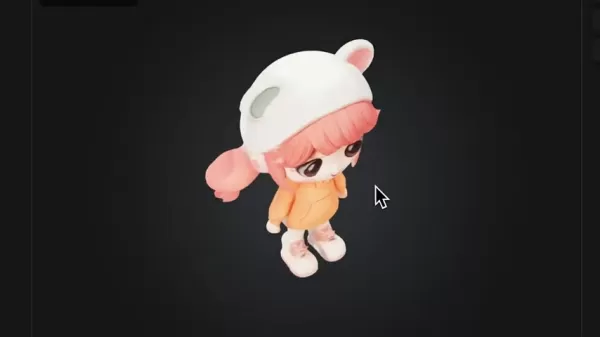
Tasks that once required hours or days of manual labor can now be completed in minutes.
- Accessibility: AI simplifies the technical process, empowering individuals with limited 3D modeling experience to create impressive assets. This is particularly valuable for rapid prototyping and conceptual development.
- Cost-Effectiveness: By reducing the time and specialized skill required, AI significantly cuts production costs, offering a major benefit for independent creators and small studios.
- Accuracy: Advanced algorithms capture fine details and textures from source images, yielding highly accurate 3D models essential for gaming, animation, and product design.
- Iterative Design: AI facilitates swift experimentation, allowing designers to test and refine concepts quickly, which is crucial for an agile creative process.
Understanding the value of AI in this domain involves keywords like 2D to 3D AI conversion, efficient 3D modeling, and cost-effective 3D design.
Generating 2D Images for 3D Conversion
Using HiPaw FotoPee for Image Generation
High-quality 3D models start with exceptional source imagery. HiPaw FotoPee is a powerful AI image generator capable of producing the detailed, stylized images needed for tools like Rodin AI, Meshy AI, and Stable Point Aware 3D.
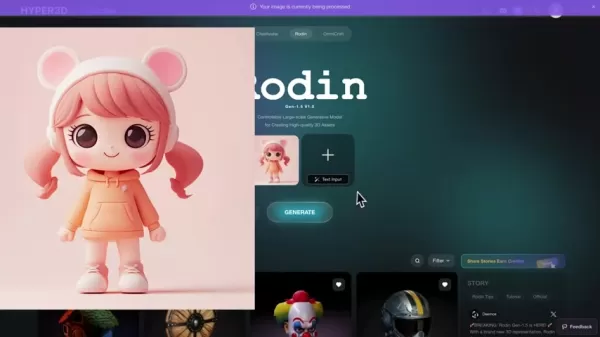
Follow these steps to create your source images:
- Access HiPaw FotoPee: Navigate to the HiPaw FotoPee website, which provides an intuitive platform for AI image generation.
- Enter Your Prompt: Input a detailed description of the desired image, specifying style, subject, and relevant details. A prompt like "Cute collectible toy girl, 3D illustration" yields excellent results for 3D conversion.
- Generate Images: Click the generate button to produce multiple image options based on your prompt and select the most suitable one.
- Download Your Image: Download the chosen image in high resolution to ensure the 3D conversion tools have ample detail to work with.
Step-by-Step Guide to Using AI Tools for 3D Modeling
Using Rodin AI for 2D to 3D Conversion
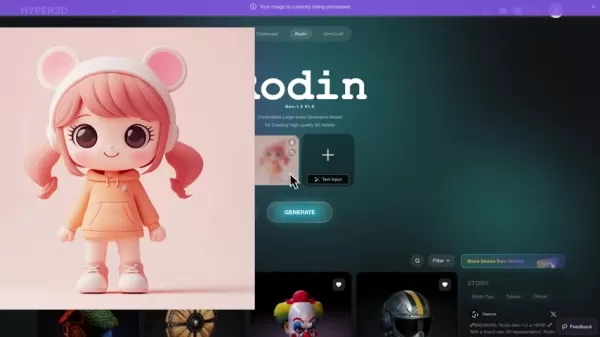
Rodin AI simplifies the process of converting 2D images into fully textured 3D models. Here is a step-by-step workflow:
- Access the Rodin AI Platform:
Visit the Rodin AI website using the provided link, ensuring a stable internet connection.
- Upload Your 2D Image: Click the upload button to import your source image. Images with clear, well-defined details yield the best results.
- Generate the Basic 3D Model: Initiate the process with the generate button. Rodin AI will produce a basic, untextured 3D model forming the structural base.
- Refine the Model (Optional): If the initial result is unsatisfactory, use the redo function to generate alternative interpretations until you achieve a desirable base geometry.
- Confirm Geometry Generation:
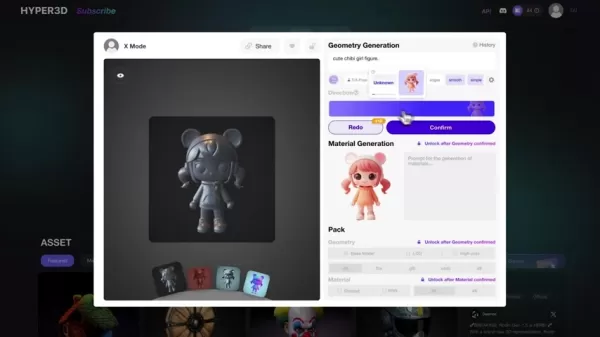
Once satisfied, confirm the model and select a mesh style (e.g., triangular or quad) suitable for your project's needs.
- Generate Material and Texture: Initiate a second generation pass to create materials and textures that automatically match the colors and details of your original image.
- Download the 3D Model: Download the completed model in a standard format like .obj or .fbx for use in other 3D software.
Using Meshy AI for 2D to 3D Conversion
Meshy AI offers a professional toolkit for 2D-to-3D conversion, including advanced texturing and animation. Here's how to use it:
- Access the Meshy AI Platform:
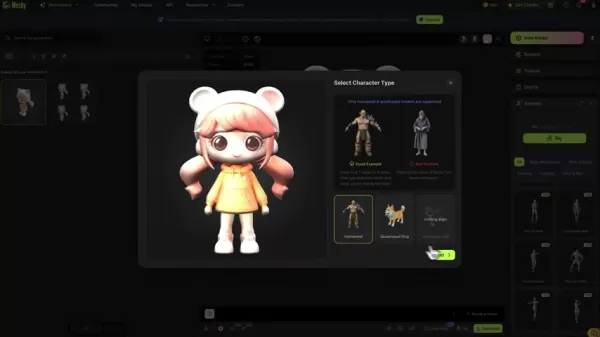
Go to the Meshy AI website and log in to your account to access its features.
- Navigate to Image to 3D: From the dashboard, select the 'Image to 3D' option to enter the conversion workspace.
- Upload Your 2D Image: Upload a clear, high-quality image in a supported format like JPG or PNG.
- Generate the 3D Model: Click generate to process the image. Meshy AI will present several model variations for you to choose from.
- Select and Confirm the Model: Browse the generated options and select the most appropriate model for your project.
- Add Materials and Textures: The tool will automatically apply textures based on the original image, striving for a realistic representation.
- Animate the Model (Optional): Utilize Meshy AI's animation features to rig and animate your model, adding dynamic movement.
- Download the 3D Model: Export the final model, with or without animation, in a compatible format for your pipeline.
Using Stable Point Aware 3D for 2D to 3D Conversion
Stable Point Aware 3D provides fast 3D reconstruction from single images and can be run locally. Follow these steps:
- Access Stable Point Aware 3D: Navigate to the tool, either via a platform like Hugging Face or by setting it up locally on your machine.
- Upload Your 2D Image: Upload a high-quality 2D image for conversion.
- Adjust Settings (Optional): Fine-tune parameters like padding ratio, guidance scale, and texture size, though defaults often work well.
- Run the Conversion: Start the conversion process. The time required depends on image complexity and your system.
- Review and Adjust Texture Size: Evaluate the generated model. If texture detail is low, increase the texture size and run the process again for improved quality.
- Download the 3D Model: Once satisfied with the result, download the model for use in game engines, animation software, or other 3D applications.
Pricing and Accessibility of AI 3D Modeling Tools
Cost Considerations for Rodin AI, Meshy AI, and Stable Point Aware 3D
Understanding the cost structure of these tools is crucial for budget planning.
- Rodin AI: Operates on a credit-based system with free and paid tiers. The free plan is ideal for experimentation, while paid plans offer more credits, faster processing, and commercial usage rights, catering to professionals.
- Meshy AI: Also offers a freemium model. Free access allows basic use, with premium subscriptions unlocking advanced features like high-resolution exports, AI texturing, and animation for teams and businesses.
- Stable Point Aware 3D: Being open-source, it can be run locally at no ongoing cost, though this requires compatible hardware. Access through third-party platforms may involve usage fees based on their pricing.
Evaluating Rodin AI pricing, Meshy AI subscription plans, and Stable Point Aware 3D access options will guide your selection.
Analyzing the Pros and Cons of Each Tool
Pros
Streamlines the 2D to 3D conversion workflow
Allows for iterative generation to improve outcomes
Automates the application of materials and textures
Cons
Offers less granular control than traditional 3D software
AI interpretation can sometimes introduce inaccuracies
The free tier typically comes with generation limits
Core Features of AI-Powered 3D Modeling Tools
Key Functionalities in Rodin AI, Meshy AI, and Stable Point Aware 3D
Each tool brings a unique set of features to the table, enhancing different aspects of the 3D creation process.
Rodin AI:
2D to 3D Conversion: Transforms images into textured 3D models automatically.

Iterative Model Generation: Enables multiple generations to refine the result.
Mesh Style Selection: Provides options for different mesh topologies.
Material Generation: Automatically generates textures from the source image.
- Meshy AI:
- Professional Interface: Designed for an efficient and intuitive user experience.
- AI Texturing: Applies high-quality, AI-driven textures to models.
- Animation Features: Includes tools for rigging and animating creations.
- Multiple Model Options: Generates several variations from a single input.
- Stable Point Aware 3D:
- Fast 3D Reconstruction: Quickly builds 3D geometry from single images.
- Local or Cloud Access: Offers flexibility in deployment.
- Adjustable Settings: Allows for fine-tuning of reconstruction parameters.
Keywords like Rodin AI features, Meshy AI functionalities, and Stable Point Aware 3D capabilities help distinguish each tool's offerings.
Practical Use Cases for AI 3D Modeling Tools
Applications of Rodin AI, Meshy AI, and Stable Point Aware 3D Across Industries
The versatility of these tools allows for application in numerous fields.
Gaming Industry:
Character Modeling: Rapidly generate 3D characters from 2D concept art.
Environment Design: Create 3D environment assets from reference images.
Asset Prototyping: Quickly prototype and iterate on asset designs.
- Animation and Film:
- Character Animation: Animate characters using built-in rigging tools.
- Special Effects: Generate detailed 3D models for visual effects shots.
- Storyboarding: Visualize storyboard panels in 3D for pre-production.
- Product Design:
- Rapid Prototyping: Create 3D prototypes directly from 2D sketches.
- Visualization: Produce realistic 3D renders for marketing and presentation.
- Customization: Generate personalized 3D models based on client input.
- Education:
- Interactive Learning: Develop engaging 3D educational materials.
- Virtual Tours: Recreate historical sites or locations in 3D from photographs.
- Skill Development: Introduce 3D modeling concepts with accessible tools.
Frequently Asked Questions
Can I use these AI tools for commercial projects?
Yes, Rodin AI, Meshy AI, and Stable Point Aware 3D can generally be used for commercial projects, but it is essential to review each tool's specific licensing terms and subscription plans. These terms outline the rights for commercial use of the generated models. Professional plans often explicitly grant commercial rights and provide higher processing limits and superior output quality, making them suitable for game development, product visualization, and animation production. Always verify the details of your chosen plan to ensure compliance.
What image formats are supported by these AI 3D modeling tools?
Rodin AI, Meshy AI, and Stable Point Aware 3D primarily support common raster image formats such as JPEG and PNG. These formats are widely compatible and provide a good balance of quality and file size. For the best results, especially with complex details, using high-resolution PNG files is recommended as they are lossless. While specific implementations (like a local install of Stable Point Aware 3D) might support additional formats, sticking to JPEG and PNG ensures broad compatibility across all platforms.
Related Questions
How accurate are 3D models generated from 2D images using AI?
The accuracy of AI-generated 3D models is contingent on the input image quality, the complexity of the subject, and the capabilities of the specific AI algorithm. Modern tools produce impressive results by analyzing visual cues to infer depth and structure. However, challenges remain with images containing occlusions, low contrast, or insufficient detail, which can lead to approximations or inaccuracies in the model. For applications demanding high precision, such as engineering or medical visualization, manual refinement in dedicated 3D software is often necessary. For creative purposes like game assets or animation, the accuracy is frequently sufficient, with the speed and accessibility of AI generation offering a significant advantage. The technology continues to improve, steadily enhancing the fidelity and reliability of the output.
Related article
 Suno to Watermark Songs Amid Legal Battles
Suno, the platform enabling users to generate AI-created music, has unveiled new features to label platform-produced tracks, restrict downloads, and update community standards to curb unauthorized replicas. These updates arrive as Suno confronts mult
Musk Admits Grok Build Leaked User Code, Promises to Erase All Historical Data
Elon Musk directly addressed the privacy controversy surrounding Grok Build, beginning with a simple "True" to confirm the incident's validity. He pledged that all user data previously uploaded to SpaceXAI would be permanently erased, stating, "not a
U.S. Stocks Hit Historic Milestone as AI and Aerospace Giants Prepare for Trillion-Dollar Debut
Elon Musk, Sam Altman, and Dario Amodei, three titans of the technology sector, are advancing toward initial public offerings for their respective ventures. With SpaceX, OpenAI, and Anthropic—three industry behemoths nearing trillion-dollar valuation
Related Special Topic Recommendations
SEO
Suno to Watermark Songs Amid Legal Battles
Suno, the platform enabling users to generate AI-created music, has unveiled new features to label platform-produced tracks, restrict downloads, and update community standards to curb unauthorized replicas. These updates arrive as Suno confronts mult
Musk Admits Grok Build Leaked User Code, Promises to Erase All Historical Data
Elon Musk directly addressed the privacy controversy surrounding Grok Build, beginning with a simple "True" to confirm the incident's validity. He pledged that all user data previously uploaded to SpaceXAI would be permanently erased, stating, "not a
U.S. Stocks Hit Historic Milestone as AI and Aerospace Giants Prepare for Trillion-Dollar Debut
Elon Musk, Sam Altman, and Dario Amodei, three titans of the technology sector, are advancing toward initial public offerings for their respective ventures. With SpaceX, OpenAI, and Anthropic—three industry behemoths nearing trillion-dollar valuation
Related Special Topic Recommendations
SEO
 Best AI SERP Analysis Tools for Search Strategy
2026 Latest Best Top-rated AI SERP Analysis Tools for Search Strategy are curated by XIX.AI through rigorous real-world tests and weekly updated rankings. These powerful tools help you unlock hidden optimization opportunities, boost content performance, and gain a competitive edge in search. Discover your perfect tool to elevate your search strategy today. Explore now!
 13 tools
 xix.ai
Data Analysis
Best AI Anomaly Detection Tools for KPI Monitoring across SaaS and Ecommerce Teams
xix.ai
Data Analysis
Best AI Anomaly Detection Tools for KPI Monitoring across SaaS and Ecommerce Teams
2026 Latest Best Top-rated AI Anomaly Detection Tools for KPI Monitoring in SaaS and Ecommerce teams! XIX.AI has curated a powerful, game-changing collection based on rigorous real-world tests and weekly updated rankings. You’ll find detailed free vs paid comparison insights to help you identify the must-try solution that boosts productivity and unlocks your AI edge. Explore now!
10 tools
xix.ai
writing
Best AI Outline Generators for Long-Form SEO Articles
2026 Latest Best Top-Rated AI Outline Generators for Long-Form SEO Articles, meticulously curated by XIX.AI. These powerful tools offer game-changing assistance in creating high-quality content quickly, boosting writing efficiency significantly. Get a free vs paid comparison along with real-world tests and detailed rankings to help you find the must-try option that suits your needs. Explore now to unlock your AI edge.
8 tools
xix.ai
Education and Learning
AI Study Tools for Homework and Exam Prep
2026 Latest Best AI Study Tools for Homework and Exam Prep! XIX.AI curates a top-rated list of powerful, game-changing tools that help students boost productivity, streamline homework completion, and ace exams through real-world tests. Get a free vs paid comparison, detailed rankings, and must-try options to unlock your AI edge. Explore now!
10 tools
xix.ai
Music composition
AI Vocal Demo Tools for Songwriters, Hooks, Toplines, and Multilingual Draft Sessions
2026 Latest Best AI Vocal Demo Tools for Songwriters, Hook Creators, and Multi-Language Content Teams! XIX.AI has curated a top-rated list of powerful game-changing tools that go through rigorous real-world tests. You’ll find detailed free vs paid comparison data, comprehensive rankings, and must-try options to help you boost writing efficiency and unlock your creative potential. Explore now to discover your perfect tool for all your content needs!
9 tools
xix.ai
Business
Best AI Competitive Research Tools for Small Businesses
2026 Latest Best Top-rated AI Competitive Research Tools for Small Businesses! XIX.AI has curated a highly powerful game-changing collection, updated weekly with rigorous real-world tests and detailed rankings. You can find a comprehensive free vs paid comparison to help you identify the must-try tools that boost your productivity and give you a competitive edge. Explore now to discover your perfect tool!
9 tools
xix.ai

 Comments (2)
0/500
Comments (2)
0/500
![DanielWalker]()
C'est impressionnant de voir comment on peut créer des modèles 3D détaillés à partir d'une simple image 2D. Je me demande si cette technologie pourrait être utilisée pour restaurer des vieilles photos familiales en 3D ? Ça serait un bel usage ! 😊 En tout cas, ça va changer beaucoup de choses pour des métiers comme l'architecture ou le design.
![GeorgeMartinez]()
2Dから3Dへの自動変換ってすごい技術だけど、ちょっと怖くない?アーティストの仕事が奪われるんじゃ…。現実のモデリング技術が廃れないことを願うよ。🙏 でも確かに、アイデアのラフスケッチをさっと立体化できるのは革命的なツールかも。
The integration of Artificial Intelligence into 3D modeling is fundamentally reshaping the creative landscape, offering unprecedented efficiency for digital artists. A key breakthrough is the ability to transform a simple 2D image into a detailed 3D model through sophisticated AI algorithms. This technology unlocks immense creative potential, allowing for rapid prototyping and asset generation directly from reference images. This guide examines the leading AI tools that empower this conversion, highlighting their unique strengths and practical advantages for creators at any skill level.
Key Points
AI is accelerating 3D modeling workflows by streamlining the conversion of 2D images into 3D models.
Rodin AI excels at generating textured 3D models from 2D images, providing diverse customization capabilities.
Meshy AI features a professional-grade interface complemented by AI-powered texturing and animation tools.
Stable Point Aware 3D, a collaboration between Stability AI and Nvidia, delivers rapid 3D reconstruction and supports local deployment.
HiPaw FotoPee serves as an effective tool for generating high-quality 2D source images optimized for 3D conversion.
Introduction to AI-Powered 3D Modeling
The Evolution of 3D Modeling with AI
Traditional 3D modeling demands meticulous manual effort, a process that is both time-intensive and requires advanced expertise. AI is automating significant portions of this workflow, enabling professionals and enthusiasts alike to produce high-fidelity 3D models with greater speed. By analyzing a 2D image, AI algorithms infer depth and surface properties to construct a three-dimensional representation. This advancement has dramatically lowered the technical barriers, democratizing 3D creation. Automating complex technical tasks frees artists to concentrate on creative exploration, enabling rapid iteration and stylistic experimentation. Furthermore, AI-driven tools can produce models with intricate details and realistic textures, faithfully replicating source imagery. The ongoing evolution of this technology promises even more sophisticated features and broader accessibility.
Search terms such as AI 3D modeling, 2D to 3D conversion, and automated 3D modeling are gaining prominence in this dynamic field.
Benefits of Using AI for 2D to 3D Conversion
Leveraging AI for converting 2D images into 3D models provides distinct advantages over conventional techniques.
- Efficiency: AI dramatically shortens the time needed to create 3D models.
Tasks that once required hours or days of manual labor can now be completed in minutes.
- Accessibility: AI simplifies the technical process, empowering individuals with limited 3D modeling experience to create impressive assets. This is particularly valuable for rapid prototyping and conceptual development.
- Cost-Effectiveness: By reducing the time and specialized skill required, AI significantly cuts production costs, offering a major benefit for independent creators and small studios.
- Accuracy: Advanced algorithms capture fine details and textures from source images, yielding highly accurate 3D models essential for gaming, animation, and product design.
- Iterative Design: AI facilitates swift experimentation, allowing designers to test and refine concepts quickly, which is crucial for an agile creative process.
Understanding the value of AI in this domain involves keywords like 2D to 3D AI conversion, efficient 3D modeling, and cost-effective 3D design.
Generating 2D Images for 3D Conversion
Using HiPaw FotoPee for Image Generation
High-quality 3D models start with exceptional source imagery. HiPaw FotoPee is a powerful AI image generator capable of producing the detailed, stylized images needed for tools like Rodin AI, Meshy AI, and Stable Point Aware 3D.
Follow these steps to create your source images:
- Access HiPaw FotoPee: Navigate to the HiPaw FotoPee website, which provides an intuitive platform for AI image generation.
- Enter Your Prompt: Input a detailed description of the desired image, specifying style, subject, and relevant details. A prompt like "Cute collectible toy girl, 3D illustration" yields excellent results for 3D conversion.
- Generate Images: Click the generate button to produce multiple image options based on your prompt and select the most suitable one.
- Download Your Image: Download the chosen image in high resolution to ensure the 3D conversion tools have ample detail to work with.
Step-by-Step Guide to Using AI Tools for 3D Modeling
Using Rodin AI for 2D to 3D Conversion
Rodin AI simplifies the process of converting 2D images into fully textured 3D models. Here is a step-by-step workflow:
- Access the Rodin AI Platform:
Visit the Rodin AI website using the provided link, ensuring a stable internet connection.
- Upload Your 2D Image: Click the upload button to import your source image. Images with clear, well-defined details yield the best results.
- Generate the Basic 3D Model: Initiate the process with the generate button. Rodin AI will produce a basic, untextured 3D model forming the structural base.
- Refine the Model (Optional): If the initial result is unsatisfactory, use the redo function to generate alternative interpretations until you achieve a desirable base geometry.
- Confirm Geometry Generation:
Once satisfied, confirm the model and select a mesh style (e.g., triangular or quad) suitable for your project's needs.
- Generate Material and Texture: Initiate a second generation pass to create materials and textures that automatically match the colors and details of your original image.
- Download the 3D Model: Download the completed model in a standard format like .obj or .fbx for use in other 3D software.
Using Meshy AI for 2D to 3D Conversion
Meshy AI offers a professional toolkit for 2D-to-3D conversion, including advanced texturing and animation. Here's how to use it:
- Access the Meshy AI Platform:
Go to the Meshy AI website and log in to your account to access its features.
- Navigate to Image to 3D: From the dashboard, select the 'Image to 3D' option to enter the conversion workspace.
- Upload Your 2D Image: Upload a clear, high-quality image in a supported format like JPG or PNG.
- Generate the 3D Model: Click generate to process the image. Meshy AI will present several model variations for you to choose from.
- Select and Confirm the Model: Browse the generated options and select the most appropriate model for your project.
- Add Materials and Textures: The tool will automatically apply textures based on the original image, striving for a realistic representation.
- Animate the Model (Optional): Utilize Meshy AI's animation features to rig and animate your model, adding dynamic movement.
- Download the 3D Model: Export the final model, with or without animation, in a compatible format for your pipeline.
Using Stable Point Aware 3D for 2D to 3D Conversion
Stable Point Aware 3D provides fast 3D reconstruction from single images and can be run locally. Follow these steps:
- Access Stable Point Aware 3D: Navigate to the tool, either via a platform like Hugging Face or by setting it up locally on your machine.
- Upload Your 2D Image: Upload a high-quality 2D image for conversion.
- Adjust Settings (Optional): Fine-tune parameters like padding ratio, guidance scale, and texture size, though defaults often work well.
- Run the Conversion: Start the conversion process. The time required depends on image complexity and your system.
- Review and Adjust Texture Size: Evaluate the generated model. If texture detail is low, increase the texture size and run the process again for improved quality.
- Download the 3D Model: Once satisfied with the result, download the model for use in game engines, animation software, or other 3D applications.
Pricing and Accessibility of AI 3D Modeling Tools
Cost Considerations for Rodin AI, Meshy AI, and Stable Point Aware 3D
Understanding the cost structure of these tools is crucial for budget planning.
- Rodin AI: Operates on a credit-based system with free and paid tiers. The free plan is ideal for experimentation, while paid plans offer more credits, faster processing, and commercial usage rights, catering to professionals.
- Meshy AI: Also offers a freemium model. Free access allows basic use, with premium subscriptions unlocking advanced features like high-resolution exports, AI texturing, and animation for teams and businesses.
- Stable Point Aware 3D: Being open-source, it can be run locally at no ongoing cost, though this requires compatible hardware. Access through third-party platforms may involve usage fees based on their pricing.
Evaluating Rodin AI pricing, Meshy AI subscription plans, and Stable Point Aware 3D access options will guide your selection.
Analyzing the Pros and Cons of Each Tool
Pros
Streamlines the 2D to 3D conversion workflow
Allows for iterative generation to improve outcomes
Automates the application of materials and textures
Cons
Offers less granular control than traditional 3D software
AI interpretation can sometimes introduce inaccuracies
The free tier typically comes with generation limits
Core Features of AI-Powered 3D Modeling Tools
Key Functionalities in Rodin AI, Meshy AI, and Stable Point Aware 3D
Each tool brings a unique set of features to the table, enhancing different aspects of the 3D creation process.
Rodin AI:
2D to 3D Conversion: Transforms images into textured 3D models automatically.
Iterative Model Generation: Enables multiple generations to refine the result.
Mesh Style Selection: Provides options for different mesh topologies.
Material Generation: Automatically generates textures from the source image.
- Meshy AI:
- Professional Interface: Designed for an efficient and intuitive user experience.
- AI Texturing: Applies high-quality, AI-driven textures to models.
- Animation Features: Includes tools for rigging and animating creations.
- Multiple Model Options: Generates several variations from a single input.
- Stable Point Aware 3D:
- Fast 3D Reconstruction: Quickly builds 3D geometry from single images.
- Local or Cloud Access: Offers flexibility in deployment.
- Adjustable Settings: Allows for fine-tuning of reconstruction parameters.
Keywords like Rodin AI features, Meshy AI functionalities, and Stable Point Aware 3D capabilities help distinguish each tool's offerings.
Practical Use Cases for AI 3D Modeling Tools
Applications of Rodin AI, Meshy AI, and Stable Point Aware 3D Across Industries
The versatility of these tools allows for application in numerous fields.
Gaming Industry:
Character Modeling: Rapidly generate 3D characters from 2D concept art.
Environment Design: Create 3D environment assets from reference images.
Asset Prototyping: Quickly prototype and iterate on asset designs.
- Animation and Film:
- Character Animation: Animate characters using built-in rigging tools.
- Special Effects: Generate detailed 3D models for visual effects shots.
- Storyboarding: Visualize storyboard panels in 3D for pre-production.
- Product Design:
- Rapid Prototyping: Create 3D prototypes directly from 2D sketches.
- Visualization: Produce realistic 3D renders for marketing and presentation.
- Customization: Generate personalized 3D models based on client input.
- Education:
- Interactive Learning: Develop engaging 3D educational materials.
- Virtual Tours: Recreate historical sites or locations in 3D from photographs.
- Skill Development: Introduce 3D modeling concepts with accessible tools.
Frequently Asked Questions
Can I use these AI tools for commercial projects?
Yes, Rodin AI, Meshy AI, and Stable Point Aware 3D can generally be used for commercial projects, but it is essential to review each tool's specific licensing terms and subscription plans. These terms outline the rights for commercial use of the generated models. Professional plans often explicitly grant commercial rights and provide higher processing limits and superior output quality, making them suitable for game development, product visualization, and animation production. Always verify the details of your chosen plan to ensure compliance.
What image formats are supported by these AI 3D modeling tools?
Rodin AI, Meshy AI, and Stable Point Aware 3D primarily support common raster image formats such as JPEG and PNG. These formats are widely compatible and provide a good balance of quality and file size. For the best results, especially with complex details, using high-resolution PNG files is recommended as they are lossless. While specific implementations (like a local install of Stable Point Aware 3D) might support additional formats, sticking to JPEG and PNG ensures broad compatibility across all platforms.
Related Questions
How accurate are 3D models generated from 2D images using AI?
The accuracy of AI-generated 3D models is contingent on the input image quality, the complexity of the subject, and the capabilities of the specific AI algorithm. Modern tools produce impressive results by analyzing visual cues to infer depth and structure. However, challenges remain with images containing occlusions, low contrast, or insufficient detail, which can lead to approximations or inaccuracies in the model. For applications demanding high precision, such as engineering or medical visualization, manual refinement in dedicated 3D software is often necessary. For creative purposes like game assets or animation, the accuracy is frequently sufficient, with the speed and accessibility of AI generation offering a significant advantage. The technology continues to improve, steadily enhancing the fidelity and reliability of the output.








 Suno to Watermark Songs Amid Legal Battles
Suno, the platform enabling users to generate AI-created music, has unveiled new features to label platform-produced tracks, restrict downloads, and update community standards to curb unauthorized replicas. These updates arrive as Suno confronts mult
Suno to Watermark Songs Amid Legal Battles
Suno, the platform enabling users to generate AI-created music, has unveiled new features to label platform-produced tracks, restrict downloads, and update community standards to curb unauthorized replicas. These updates arrive as Suno confronts mult
 Musk Admits Grok Build Leaked User Code, Promises to Erase All Historical Data
Elon Musk directly addressed the privacy controversy surrounding Grok Build, beginning with a simple "True" to confirm the incident's validity. He pledged that all user data previously uploaded to SpaceXAI would be permanently erased, stating, "not a
Musk Admits Grok Build Leaked User Code, Promises to Erase All Historical Data
Elon Musk directly addressed the privacy controversy surrounding Grok Build, beginning with a simple "True" to confirm the incident's validity. He pledged that all user data previously uploaded to SpaceXAI would be permanently erased, stating, "not a
 U.S. Stocks Hit Historic Milestone as AI and Aerospace Giants Prepare for Trillion-Dollar Debut
Elon Musk, Sam Altman, and Dario Amodei, three titans of the technology sector, are advancing toward initial public offerings for their respective ventures. With SpaceX, OpenAI, and Anthropic—three industry behemoths nearing trillion-dollar valuation
U.S. Stocks Hit Historic Milestone as AI and Aerospace Giants Prepare for Trillion-Dollar Debut
Elon Musk, Sam Altman, and Dario Amodei, three titans of the technology sector, are advancing toward initial public offerings for their respective ventures. With SpaceX, OpenAI, and Anthropic—three industry behemoths nearing trillion-dollar valuation

2026 Latest Best Top-rated AI SERP Analysis Tools for Search Strategy are curated by XIX.AI through rigorous real-world tests and weekly updated rankings. These powerful tools help you unlock hidden optimization opportunities, boost content performance, and gain a competitive edge in search. Discover your perfect tool to elevate your search strategy today. Explore now!
13 tools
xix.ai

2026 Latest Best Top-rated AI Anomaly Detection Tools for KPI Monitoring in SaaS and Ecommerce teams! XIX.AI has curated a powerful, game-changing collection based on rigorous real-world tests and weekly updated rankings. You’ll find detailed free vs paid comparison insights to help you identify the must-try solution that boosts productivity and unlocks your AI edge. Explore now!
10 tools
xix.ai

2026 Latest Best Top-Rated AI Outline Generators for Long-Form SEO Articles, meticulously curated by XIX.AI. These powerful tools offer game-changing assistance in creating high-quality content quickly, boosting writing efficiency significantly. Get a free vs paid comparison along with real-world tests and detailed rankings to help you find the must-try option that suits your needs. Explore now to unlock your AI edge.
8 tools
xix.ai

2026 Latest Best AI Study Tools for Homework and Exam Prep! XIX.AI curates a top-rated list of powerful, game-changing tools that help students boost productivity, streamline homework completion, and ace exams through real-world tests. Get a free vs paid comparison, detailed rankings, and must-try options to unlock your AI edge. Explore now!
10 tools
xix.ai

2026 Latest Best AI Vocal Demo Tools for Songwriters, Hook Creators, and Multi-Language Content Teams! XIX.AI has curated a top-rated list of powerful game-changing tools that go through rigorous real-world tests. You’ll find detailed free vs paid comparison data, comprehensive rankings, and must-try options to help you boost writing efficiency and unlock your creative potential. Explore now to discover your perfect tool for all your content needs!
9 tools
xix.ai

2026 Latest Best Top-rated AI Competitive Research Tools for Small Businesses! XIX.AI has curated a highly powerful game-changing collection, updated weekly with rigorous real-world tests and detailed rankings. You can find a comprehensive free vs paid comparison to help you identify the must-try tools that boost your productivity and give you a competitive edge. Explore now to discover your perfect tool!
9 tools
xix.ai

C'est impressionnant de voir comment on peut créer des modèles 3D détaillés à partir d'une simple image 2D. Je me demande si cette technologie pourrait être utilisée pour restaurer des vieilles photos familiales en 3D ? Ça serait un bel usage ! 😊 En tout cas, ça va changer beaucoup de choses pour des métiers comme l'architecture ou le design.
2Dから3Dへの自動変換ってすごい技術だけど、ちょっと怖くない?アーティストの仕事が奪われるんじゃ…。現実のモデリング技術が廃れないことを願うよ。🙏 でも確かに、アイデアのラフスケッチをさっと立体化できるのは革命的なツールかも。












