


 Home
HomeAdobe Podcast AI: Easily Boost Audio Quality
In today's digital world, where clear audio is essential for content creators, podcasters, and anyone keen on making their voice heard, Adobe Podcast AI stands out as a revolutionary tool. It's a free, AI-powered platform designed to significantly boost audio quality, making it easier than ever to produce recordings that sound like they were crafted in a professional studio. Whether you're an experienced audio engineer or just starting, Adobe Podcast AI offers a simple yet powerful way to enhance your audio projects. Let's explore how this tool can elevate your audio experience.
Key Points
- Adobe Podcast AI is a free, AI-driven tool that enhances audio quality.
- It efficiently removes background noise and echo from voice recordings.
- The tool is accessible through a web browser, eliminating the need for software downloads.
- Users can easily create an account to access the audio enhancement features.
- The enhancement process is as simple as uploading or dragging and dropping your audio file.
- It provides a straightforward method to achieve professional-sounding audio without complex software.
- The tool allows for a quick comparison between the enhanced audio and the original raw recording.
- It's perfect for podcasters, content creators, and anyone needing clear, high-quality voice recordings.
Understanding Adobe Podcast AI
What is Adobe Podcast AI?
Adobe Podcast AI is an innovative, web-based tool that harnesses AI to improve the quality of audio recordings. It tackles common issues like background noise and echo, which can compromise the clarity and professionalism of your voice recordings. What makes this tool unique is its accessibility—

users can access it directly through their web browser, bypassing the need for complex software installations. This feature makes it an excellent choice for both novices and seasoned audio professionals looking for a quick and efficient way to enhance their audio files. By using AI to analyze and refine audio, Adobe Podcast AI ensures your voice recordings are clear, crisp, and free from distracting ambient sounds, making them sound as if they were recorded in a professional, soundproof studio.
What's more, Adobe Podcast AI is incredibly user-friendly, requiring no specialized audio engineering skills. The enhancement process is straightforward: you upload your audio file to the platform, and the AI algorithms work their magic, cleaning up the audio and optimizing it for clarity. This ease of use, combined with its powerful enhancement capabilities, makes Adobe Podcast AI an invaluable tool for podcasters, content creators, journalists, educators, and anyone else who depends on clear, high-quality voice recordings to communicate effectively. By making professional audio enhancement accessible to everyone, Adobe Podcast AI empowers users to produce content that captivates and engages their audience.
Getting Started with Adobe Podcast AI
Step-by-Step Guide to Audio Enhancement
Here’s a detailed guide to help you effectively use Adobe Podcast AI for enhancing your audio files:
- Accessing the Tool:

Start by opening your preferred web browser and searching for 'Adobe Podcast'. Click on the first link to navigate to the Adobe Podcast AI website, eliminating the need for any software installation.
- Account Creation: As a new user, you'll need to create an account. This process is simple and involves providing basic information like your username, email address, and a secure password.
- Navigating to Enhance Speech Feature: Once your account is set up, navigate to the 'Enhance Speech' option and click on the button below.
- Uploading Your Audio File: The core of the enhancement process involves uploading the audio file you want to improve. You can do this by dragging and dropping the file into the designated area on the webpage or selecting a file from your computer's directory.
- Waiting for Enhancement: After uploading, the AI algorithms will automatically begin analyzing and cleaning up your audio. The time this takes depends on the size and complexity of the audio file. Be patient and wait for the process to complete.
- Reviewing the Enhanced Audio: Once the enhancement is finished, you'll be presented with the enhanced audio file. At this stage, you can preview the changes by playing the enhanced audio clip.
- Downloading the Enhanced Audio: If you're satisfied with the enhanced audio, you can download the file directly to your computer by clicking the 'Download' button. This allows you to integrate the improved audio into your projects.
These steps enable anyone to leverage the power of AI to achieve professional-quality sound, making it easier to create engaging audio content.
Tips for Best Results with Audio Enhancement
To get the best possible results when using Adobe Podcast AI, consider these practical tips:
- Choose the Right Environment: Even though Adobe Podcast AI excels at removing noise, starting with the quietest possible recording environment will yield better results. Minimize background sounds like traffic, air conditioning, or keyboard clicks.
- Use a Good Microphone: While the AI can enhance audio from any source, using a quality microphone captures more detail and provides the AI with better material to work with. A good microphone can reduce initial noise levels and capture a broader range of frequencies.
- Speak Clearly: Ensure that the speaker articulates clearly and speaks directly into the microphone. This helps the AI distinguish the speech from background noise more effectively.
- Monitor Audio Levels: Keep an eye on audio levels during recording to prevent clipping or distortion. Adobe Podcast AI can enhance audio but cannot fully recover audio that's damaged due to poor recording levels.
- Use the Preview Feature:
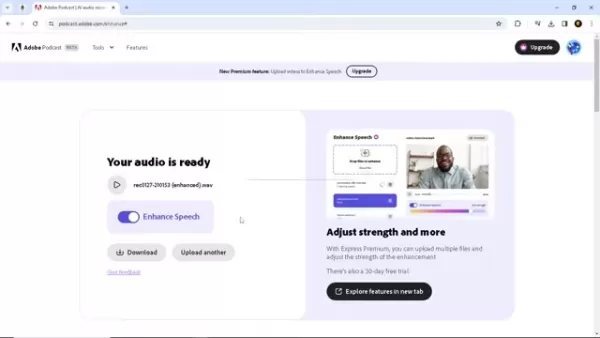
Always use the preview feature after enhancement to ensure the result meets your expectations. This helps you make any necessary adjustments or re-upload if needed.
- Check File Compatibility: Before uploading, confirm that your audio file is in a supported format. Adobe Podcast AI supports common audio formats, but it's always best to double-check.
- Experiment with Different Settings: While Adobe Podcast AI primarily offers automated enhancements, experimenting with any available settings can help you fine-tune the audio to your specific needs.
By implementing these tips, you'll be well-equipped to leverage the full potential of Adobe Podcast AI and consistently create high-quality, professional-sounding audio content.
Advanced Techniques for Audio Enhancement with Adobe Podcast AI
Refining Audio Settings for Optimal Clarity
Adobe Podcast AI offers a straightforward approach to audio enhancement, but you can further refine your results by understanding the subtle nuances of audio settings.
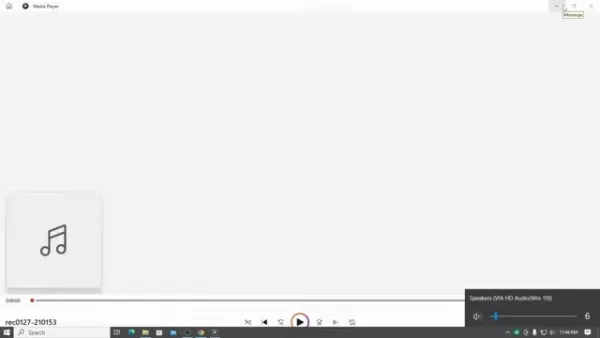
While the tool lacks advanced customization options, you can optimize your audio by adjusting the input levels, microphone placement, and recording environment. Here’s how:
- Input Levels: Before uploading your audio, ensure that the input levels are properly adjusted. Aim for a strong signal without clipping. Most recording software displays audio levels in decibels (dB). Keep the peaks of your audio signal below 0 dB to avoid distortion.
- Microphone Placement: Position your microphone correctly to capture the best possible sound. For dynamic microphones, speak directly into the mic, about 2-3 inches away. For condenser microphones, speaking at a slight angle can help reduce plosives (the harsh 'p' and 'b' sounds).
- Recording Environment: Even with Adobe Podcast AI's noise reduction capabilities, starting with a quiet environment is crucial. Close windows and doors, turn off noisy appliances, and consider using acoustic treatment like foam panels or blankets to dampen echoes.
- Audio Format and Quality: Ensure that your audio is recorded in a high-quality format such as WAV or FLAC to preserve as much detail as possible. While MP3 is convenient, it's a lossy format that compresses audio, potentially reducing the effectiveness of the AI enhancement.
- Experiment with Source Material: Different types of audio may require different approaches. Experiment with short segments and preview the results to determine the optimal settings for your specific audio needs.
By focusing on these techniques, you can maximize the performance of Adobe Podcast AI and consistently produce outstanding audio content.
Evaluating the Pros and Cons of Adobe Podcast AI
Pros
- Free to Use: Adobe Podcast AI is completely free, making it accessible to a wide range of users.
- Web-Based: As a web-based tool, it requires no software downloads or installations.
- User-Friendly Interface: The tool features a simple and intuitive interface.
- Effective Noise Reduction: Excellent at reducing background noise, echo, and other ambient sounds.
- AI-Powered Enhancement: Utilizes advanced AI algorithms to automatically enhance audio quality.
- Quick Processing: Provides rapid audio enhancement, saving time for content creators.
- Professional Sound Quality: Delivers high-quality audio output.
- Accessibility: Simplifies professional audio enhancement for users of all skill levels.
Cons
- Limited Advanced Settings: Lacks advanced settings and customization options.
- Dependency on Internet Connection: Requires a stable internet connection to function.
- File Size Limitations: May impose restrictions on the size or duration of audio files.
- Potential for Over-Processing: In some cases, the AI algorithms may over-process audio, leading to unnatural sound.
- Privacy Concerns: Uploading audio files to a web-based tool may raise privacy concerns for some users.
- Lack of Real-Time Processing: Does not support real-time audio enhancement, which is essential for live recordings or broadcasts.
Frequently Asked Questions About Adobe Podcast AI
Is Adobe Podcast AI really free to use?
Yes, Adobe Podcast AI is completely free to use. There are no hidden fees or subscription costs. You can access the tool through your web browser and enhance your audio files without any financial commitment.
What types of audio files does Adobe Podcast AI support?
Adobe Podcast AI supports various audio file formats, including MP3 and WAV. However, for the best results, it is recommended to use higher-quality formats like WAV, which preserve more audio detail.
Is there a limit to the size or duration of audio files that I can enhance?
Adobe Podcast AI may have limitations on the size or duration of audio files that can be enhanced. It's advisable to check the specific restrictions on the platform to ensure your files meet the requirements.
Does Adobe Podcast AI offer advanced settings for audio enhancement?
No, Adobe Podcast AI primarily offers automated enhancements without advanced settings for customization. This simplicity makes it user-friendly for beginners, but may limit flexibility for experienced audio engineers.
How secure is it to upload my audio files to Adobe Podcast AI?
Uploading audio files to a web-based tool may raise privacy concerns. Review Adobe's privacy policy to understand how your data is handled and take necessary precautions to protect sensitive information.
Related Questions
What are some alternative AI-powered audio enhancement tools?
Besides Adobe Podcast AI, several other AI-powered audio enhancement tools are available, each with its unique features and capabilities. Here are some notable alternatives:
- Auphonic: Auphonic is a web-based tool that offers automated audio processing, including leveling, noise reduction, and loudness normalization. It's particularly popular among podcasters for its ability to produce broadcast-quality audio.
- Descript: Descript is a powerful audio and video editing tool that combines transcription, editing, and AI-powered enhancements. It allows you to edit audio by editing the transcript, making it easy to refine your recordings.
- Landr: Landr is known for its automated mastering service, which uses AI to optimize audio for various platforms. It also offers tools for noise reduction, voice enhancement, and audio restoration.
- iZotope RX: iZotope RX is a comprehensive audio repair and enhancement suite used by professionals in the music, film, and television industries. It offers a wide range of tools for noise reduction, spectral editing, and audio restoration.
- Krisp: Krisp is an AI-powered noise cancellation app that works in real-time. It removes background noise from both your microphone and incoming audio, making it ideal for online meetings and voice calls.
Each of these tools offers different strengths and features, so it's worth exploring them to find the one that best suits your specific audio enhancement needs.
Related article
 EverMind Invests $3M in ReUnite to Boost Global Family Reunions With AI Long-Term Memory
EverMind, a subsidiary of Shandong Group, has officially launched "ReUnite," an AI-driven public welfare tool designed to reunite separated families worldwide through advanced long-term memory technology.Developed by a chemical industry AI engineer,
Anthropic Tightens Access to Claude Opus, Ending Free Tier
Anthropic has announced a significant policy shift regarding its most advanced AI model, Claude Fable5. Starting July 7, 2026, the company will discontinue access to this model for all existing subscription tiers.This change effectively removes core
South Korea Sets 80 Trillion KRW Budget for 2027, Relying on AI Chip Taxes
South Korea’s 2027 budget will surpass 80 trillion won (roughly 3.6 trillion CNY), driven by tax revenue from the booming AI chip sector. This marks a substantial rise from the 727.9 trillion won expenditure plan for 2026. Finance Minister Park Hong-
Related Special Topic Recommendations
design
EverMind Invests $3M in ReUnite to Boost Global Family Reunions With AI Long-Term Memory
EverMind, a subsidiary of Shandong Group, has officially launched "ReUnite," an AI-driven public welfare tool designed to reunite separated families worldwide through advanced long-term memory technology.Developed by a chemical industry AI engineer,
Anthropic Tightens Access to Claude Opus, Ending Free Tier
Anthropic has announced a significant policy shift regarding its most advanced AI model, Claude Fable5. Starting July 7, 2026, the company will discontinue access to this model for all existing subscription tiers.This change effectively removes core
South Korea Sets 80 Trillion KRW Budget for 2027, Relying on AI Chip Taxes
South Korea’s 2027 budget will surpass 80 trillion won (roughly 3.6 trillion CNY), driven by tax revenue from the booming AI chip sector. This marks a substantial rise from the 727.9 trillion won expenditure plan for 2026. Finance Minister Park Hong-
Related Special Topic Recommendations
design
 Best AI Wireframe Tools for Product Teams
2026 Latest Best Top-rated AI Wireframe Tools for Product Teams! This curated list showcases powerful, game-changing solutions that significantly boost productivity through real-world tests and rigorous rankings. It includes a detailed free vs paid comparison to help you find the perfect fit. XIX.AI provides expert insights to guide your decision. Explore now to Discover your perfect tool and Unlock your AI edge in product development!
 8 tools
 xix.ai
Software Development
Best AI DevOps Tools for Deployment Monitoring
xix.ai
Software Development
Best AI DevOps Tools for Deployment Monitoring
2026 Latest Best Top-Rated AI DevOps Tools for Deployment Monitoring are featured here in our carefully curated list. These powerful tools help teams boost productivity significantly through real-world tests and rigorous rankings. Get a free vs paid comparison to find the perfect option that suits your needs. Explore now to unlock your AI edge!
11 tools
xix.ai
Data Analysis
Best AI Data Analysis Tools for Excel and SQL
2026 Latest Best Top-rated AI Data Analysis Tools for Excel and SQL are here on XIX.AI! Our curated list includes powerful, game-changing solutions that help you speed up data processing, boost productivity, and overcome analysis challenges. We’ve conducted real-world tests to deliver accurate rankings based on performance, ease of use, and value. Explore now to find the must-try tool that fits your needs perfectly and Unlock your AI edge in data work.
10 tools
xix.ai
Text-to-speech
AI Podcast Voice Cloning Tools for Long-Form Episodes, Host Ads, and Audio Courses
2026 Latest Best Top-rated AI Podcast Voice Cloning Tools for Long-form Episodes Host Ads and Audio Courses are curated here. These powerful game-changing solutions undergo real-world tests to ensure reliability. You can find a free vs paid comparison along with detailed rankings. XIX.AI offers a must-try selection that boosts productivity significantly. Explore now to discover your perfect tool and unlock your AI edge.
9 tools
xix.ai
Design & Art
AI Visual Style Reference Tools for Character Sheets, Moodboards, and Pitch Decks
2026 Latest Best AI Visual Style Reference Tools for Character Sheets, Moodboards, and Pitch Decks are here on XIX.AI! This curated top-rated list features powerful game-changing tools that go through rigorous real-world tests. You’ll find a free vs paid comparison, detailed rankings, and must-try options to help you boost creativity and streamline your workflow. Explore now to discover your perfect tool for boosting productivity!
11 tools
xix.ai
SEO
Best AI SERP Analysis Tools for Search Strategy
2026 Latest Best Top-rated AI SERP Analysis Tools for Search Strategy are curated by XIX.AI through rigorous real-world tests and weekly updated rankings. These powerful tools help you unlock hidden optimization opportunities, boost content performance, and gain a competitive edge in search. Discover your perfect tool to elevate your search strategy today. Explore now!
13 tools
xix.ai

 Comments (11)
0/500
Comments (11)
0/500
![JohnAllen]()
Honestly, I'm a bit torn. The tech sounds amazing for creators on a budget, but part of me worries about the 'Adobe-ification' of everything. Will this eventually become another subscription trap? Still, the free access is a great move to get people hooked. The audio samples I've heard are genuinely impressive though! 🎙️
![DonaldSanchez]()
음질 개선에 AI를 활용하다니 정말 편리하네요. 🎧 하지만 이런 기술이 대규모로 보급되면 음성 편집 분야에서 일하던 사람들의 일자리가 위협받을까 걱정스럽기도 해요.
![RogerJackson]()
와... Adobe가 이제 AI로 오디오 품질까지 잡네요! 🎙️ 팟캐스트 하는 친구들 엄청 유용하게 쓸 것 같은데, 무료라니 진짜 대박이에요. 근데 혹시 나중에 유료화 될까봐 조금 걱정되기도 하네요 ㅠㅠ 개인 크리에이터들도 전문가급 음질을 쉽게 낼 수 있게 해준다는 점에서 정말 혁신적인 것 같아요!
![KeithSmith]()
Adobe Podcast AI sounds like a game-changer for podcasters! I love how it makes pro-level audio so accessible. Anyone tried it with a noisy background? Curious if it really wipes out distractions like my neighbor’s lawnmower! 😄
![GaryGarcia]()
Adobe Podcast AI sounds like a game-changer for podcasters! I love how it makes audio crisp without needing fancy gear. Anyone tried it with noisy backgrounds? 😎
![JamesJones]()
This Adobe Podcast AI sounds like a game-changer for podcasters! I love how it cleans up audio so easily—perfect for my late-night recording sessions in a noisy apartment. 😎 Definitely giving it a try!
In today's digital world, where clear audio is essential for content creators, podcasters, and anyone keen on making their voice heard, Adobe Podcast AI stands out as a revolutionary tool. It's a free, AI-powered platform designed to significantly boost audio quality, making it easier than ever to produce recordings that sound like they were crafted in a professional studio. Whether you're an experienced audio engineer or just starting, Adobe Podcast AI offers a simple yet powerful way to enhance your audio projects. Let's explore how this tool can elevate your audio experience.
Key Points
- Adobe Podcast AI is a free, AI-driven tool that enhances audio quality.
- It efficiently removes background noise and echo from voice recordings.
- The tool is accessible through a web browser, eliminating the need for software downloads.
- Users can easily create an account to access the audio enhancement features.
- The enhancement process is as simple as uploading or dragging and dropping your audio file.
- It provides a straightforward method to achieve professional-sounding audio without complex software.
- The tool allows for a quick comparison between the enhanced audio and the original raw recording.
- It's perfect for podcasters, content creators, and anyone needing clear, high-quality voice recordings.
Understanding Adobe Podcast AI
What is Adobe Podcast AI?
Adobe Podcast AI is an innovative, web-based tool that harnesses AI to improve the quality of audio recordings. It tackles common issues like background noise and echo, which can compromise the clarity and professionalism of your voice recordings. What makes this tool unique is its accessibility—
users can access it directly through their web browser, bypassing the need for complex software installations. This feature makes it an excellent choice for both novices and seasoned audio professionals looking for a quick and efficient way to enhance their audio files. By using AI to analyze and refine audio, Adobe Podcast AI ensures your voice recordings are clear, crisp, and free from distracting ambient sounds, making them sound as if they were recorded in a professional, soundproof studio.
What's more, Adobe Podcast AI is incredibly user-friendly, requiring no specialized audio engineering skills. The enhancement process is straightforward: you upload your audio file to the platform, and the AI algorithms work their magic, cleaning up the audio and optimizing it for clarity. This ease of use, combined with its powerful enhancement capabilities, makes Adobe Podcast AI an invaluable tool for podcasters, content creators, journalists, educators, and anyone else who depends on clear, high-quality voice recordings to communicate effectively. By making professional audio enhancement accessible to everyone, Adobe Podcast AI empowers users to produce content that captivates and engages their audience.
Getting Started with Adobe Podcast AI
Step-by-Step Guide to Audio Enhancement
Here’s a detailed guide to help you effectively use Adobe Podcast AI for enhancing your audio files:
- Accessing the Tool:
Start by opening your preferred web browser and searching for 'Adobe Podcast'. Click on the first link to navigate to the Adobe Podcast AI website, eliminating the need for any software installation.
- Account Creation: As a new user, you'll need to create an account. This process is simple and involves providing basic information like your username, email address, and a secure password.
- Navigating to Enhance Speech Feature: Once your account is set up, navigate to the 'Enhance Speech' option and click on the button below.
- Uploading Your Audio File: The core of the enhancement process involves uploading the audio file you want to improve. You can do this by dragging and dropping the file into the designated area on the webpage or selecting a file from your computer's directory.
- Waiting for Enhancement: After uploading, the AI algorithms will automatically begin analyzing and cleaning up your audio. The time this takes depends on the size and complexity of the audio file. Be patient and wait for the process to complete.
- Reviewing the Enhanced Audio: Once the enhancement is finished, you'll be presented with the enhanced audio file. At this stage, you can preview the changes by playing the enhanced audio clip.
- Downloading the Enhanced Audio: If you're satisfied with the enhanced audio, you can download the file directly to your computer by clicking the 'Download' button. This allows you to integrate the improved audio into your projects.
These steps enable anyone to leverage the power of AI to achieve professional-quality sound, making it easier to create engaging audio content.
Tips for Best Results with Audio Enhancement
To get the best possible results when using Adobe Podcast AI, consider these practical tips:
- Choose the Right Environment: Even though Adobe Podcast AI excels at removing noise, starting with the quietest possible recording environment will yield better results. Minimize background sounds like traffic, air conditioning, or keyboard clicks.
- Use a Good Microphone: While the AI can enhance audio from any source, using a quality microphone captures more detail and provides the AI with better material to work with. A good microphone can reduce initial noise levels and capture a broader range of frequencies.
- Speak Clearly: Ensure that the speaker articulates clearly and speaks directly into the microphone. This helps the AI distinguish the speech from background noise more effectively.
- Monitor Audio Levels: Keep an eye on audio levels during recording to prevent clipping or distortion. Adobe Podcast AI can enhance audio but cannot fully recover audio that's damaged due to poor recording levels.
- Use the Preview Feature:
Always use the preview feature after enhancement to ensure the result meets your expectations. This helps you make any necessary adjustments or re-upload if needed.
- Check File Compatibility: Before uploading, confirm that your audio file is in a supported format. Adobe Podcast AI supports common audio formats, but it's always best to double-check.
- Experiment with Different Settings: While Adobe Podcast AI primarily offers automated enhancements, experimenting with any available settings can help you fine-tune the audio to your specific needs.
By implementing these tips, you'll be well-equipped to leverage the full potential of Adobe Podcast AI and consistently create high-quality, professional-sounding audio content.
Advanced Techniques for Audio Enhancement with Adobe Podcast AI
Refining Audio Settings for Optimal Clarity
Adobe Podcast AI offers a straightforward approach to audio enhancement, but you can further refine your results by understanding the subtle nuances of audio settings.
While the tool lacks advanced customization options, you can optimize your audio by adjusting the input levels, microphone placement, and recording environment. Here’s how:
- Input Levels: Before uploading your audio, ensure that the input levels are properly adjusted. Aim for a strong signal without clipping. Most recording software displays audio levels in decibels (dB). Keep the peaks of your audio signal below 0 dB to avoid distortion.
- Microphone Placement: Position your microphone correctly to capture the best possible sound. For dynamic microphones, speak directly into the mic, about 2-3 inches away. For condenser microphones, speaking at a slight angle can help reduce plosives (the harsh 'p' and 'b' sounds).
- Recording Environment: Even with Adobe Podcast AI's noise reduction capabilities, starting with a quiet environment is crucial. Close windows and doors, turn off noisy appliances, and consider using acoustic treatment like foam panels or blankets to dampen echoes.
- Audio Format and Quality: Ensure that your audio is recorded in a high-quality format such as WAV or FLAC to preserve as much detail as possible. While MP3 is convenient, it's a lossy format that compresses audio, potentially reducing the effectiveness of the AI enhancement.
- Experiment with Source Material: Different types of audio may require different approaches. Experiment with short segments and preview the results to determine the optimal settings for your specific audio needs.
By focusing on these techniques, you can maximize the performance of Adobe Podcast AI and consistently produce outstanding audio content.
Evaluating the Pros and Cons of Adobe Podcast AI
Pros
- Free to Use: Adobe Podcast AI is completely free, making it accessible to a wide range of users.
- Web-Based: As a web-based tool, it requires no software downloads or installations.
- User-Friendly Interface: The tool features a simple and intuitive interface.
- Effective Noise Reduction: Excellent at reducing background noise, echo, and other ambient sounds.
- AI-Powered Enhancement: Utilizes advanced AI algorithms to automatically enhance audio quality.
- Quick Processing: Provides rapid audio enhancement, saving time for content creators.
- Professional Sound Quality: Delivers high-quality audio output.
- Accessibility: Simplifies professional audio enhancement for users of all skill levels.
Cons
- Limited Advanced Settings: Lacks advanced settings and customization options.
- Dependency on Internet Connection: Requires a stable internet connection to function.
- File Size Limitations: May impose restrictions on the size or duration of audio files.
- Potential for Over-Processing: In some cases, the AI algorithms may over-process audio, leading to unnatural sound.
- Privacy Concerns: Uploading audio files to a web-based tool may raise privacy concerns for some users.
- Lack of Real-Time Processing: Does not support real-time audio enhancement, which is essential for live recordings or broadcasts.
Frequently Asked Questions About Adobe Podcast AI
Is Adobe Podcast AI really free to use?
Yes, Adobe Podcast AI is completely free to use. There are no hidden fees or subscription costs. You can access the tool through your web browser and enhance your audio files without any financial commitment.
What types of audio files does Adobe Podcast AI support?
Adobe Podcast AI supports various audio file formats, including MP3 and WAV. However, for the best results, it is recommended to use higher-quality formats like WAV, which preserve more audio detail.
Is there a limit to the size or duration of audio files that I can enhance?
Adobe Podcast AI may have limitations on the size or duration of audio files that can be enhanced. It's advisable to check the specific restrictions on the platform to ensure your files meet the requirements.
Does Adobe Podcast AI offer advanced settings for audio enhancement?
No, Adobe Podcast AI primarily offers automated enhancements without advanced settings for customization. This simplicity makes it user-friendly for beginners, but may limit flexibility for experienced audio engineers.
How secure is it to upload my audio files to Adobe Podcast AI?
Uploading audio files to a web-based tool may raise privacy concerns. Review Adobe's privacy policy to understand how your data is handled and take necessary precautions to protect sensitive information.
Related Questions
What are some alternative AI-powered audio enhancement tools?
Besides Adobe Podcast AI, several other AI-powered audio enhancement tools are available, each with its unique features and capabilities. Here are some notable alternatives:
- Auphonic: Auphonic is a web-based tool that offers automated audio processing, including leveling, noise reduction, and loudness normalization. It's particularly popular among podcasters for its ability to produce broadcast-quality audio.
- Descript: Descript is a powerful audio and video editing tool that combines transcription, editing, and AI-powered enhancements. It allows you to edit audio by editing the transcript, making it easy to refine your recordings.
- Landr: Landr is known for its automated mastering service, which uses AI to optimize audio for various platforms. It also offers tools for noise reduction, voice enhancement, and audio restoration.
- iZotope RX: iZotope RX is a comprehensive audio repair and enhancement suite used by professionals in the music, film, and television industries. It offers a wide range of tools for noise reduction, spectral editing, and audio restoration.
- Krisp: Krisp is an AI-powered noise cancellation app that works in real-time. It removes background noise from both your microphone and incoming audio, making it ideal for online meetings and voice calls.
Each of these tools offers different strengths and features, so it's worth exploring them to find the one that best suits your specific audio enhancement needs.








 EverMind Invests $3M in ReUnite to Boost Global Family Reunions With AI Long-Term Memory
EverMind, a subsidiary of Shandong Group, has officially launched "ReUnite," an AI-driven public welfare tool designed to reunite separated families worldwide through advanced long-term memory technology.Developed by a chemical industry AI engineer,
EverMind Invests $3M in ReUnite to Boost Global Family Reunions With AI Long-Term Memory
EverMind, a subsidiary of Shandong Group, has officially launched "ReUnite," an AI-driven public welfare tool designed to reunite separated families worldwide through advanced long-term memory technology.Developed by a chemical industry AI engineer,
 Anthropic Tightens Access to Claude Opus, Ending Free Tier
Anthropic has announced a significant policy shift regarding its most advanced AI model, Claude Fable5. Starting July 7, 2026, the company will discontinue access to this model for all existing subscription tiers.This change effectively removes core
Anthropic Tightens Access to Claude Opus, Ending Free Tier
Anthropic has announced a significant policy shift regarding its most advanced AI model, Claude Fable5. Starting July 7, 2026, the company will discontinue access to this model for all existing subscription tiers.This change effectively removes core
 South Korea Sets 80 Trillion KRW Budget for 2027, Relying on AI Chip Taxes
South Korea’s 2027 budget will surpass 80 trillion won (roughly 3.6 trillion CNY), driven by tax revenue from the booming AI chip sector. This marks a substantial rise from the 727.9 trillion won expenditure plan for 2026. Finance Minister Park Hong-
South Korea Sets 80 Trillion KRW Budget for 2027, Relying on AI Chip Taxes
South Korea’s 2027 budget will surpass 80 trillion won (roughly 3.6 trillion CNY), driven by tax revenue from the booming AI chip sector. This marks a substantial rise from the 727.9 trillion won expenditure plan for 2026. Finance Minister Park Hong-

2026 Latest Best Top-rated AI Wireframe Tools for Product Teams! This curated list showcases powerful, game-changing solutions that significantly boost productivity through real-world tests and rigorous rankings. It includes a detailed free vs paid comparison to help you find the perfect fit. XIX.AI provides expert insights to guide your decision. Explore now to Discover your perfect tool and Unlock your AI edge in product development!
8 tools
xix.ai

2026 Latest Best Top-Rated AI DevOps Tools for Deployment Monitoring are featured here in our carefully curated list. These powerful tools help teams boost productivity significantly through real-world tests and rigorous rankings. Get a free vs paid comparison to find the perfect option that suits your needs. Explore now to unlock your AI edge!
11 tools
xix.ai

2026 Latest Best Top-rated AI Data Analysis Tools for Excel and SQL are here on XIX.AI! Our curated list includes powerful, game-changing solutions that help you speed up data processing, boost productivity, and overcome analysis challenges. We’ve conducted real-world tests to deliver accurate rankings based on performance, ease of use, and value. Explore now to find the must-try tool that fits your needs perfectly and Unlock your AI edge in data work.
10 tools
xix.ai
2026 Latest Best Top-rated AI Podcast Voice Cloning Tools for Long-form Episodes Host Ads and Audio Courses are curated here. These powerful game-changing solutions undergo real-world tests to ensure reliability. You can find a free vs paid comparison along with detailed rankings. XIX.AI offers a must-try selection that boosts productivity significantly. Explore now to discover your perfect tool and unlock your AI edge.
9 tools
xix.ai

2026 Latest Best AI Visual Style Reference Tools for Character Sheets, Moodboards, and Pitch Decks are here on XIX.AI! This curated top-rated list features powerful game-changing tools that go through rigorous real-world tests. You’ll find a free vs paid comparison, detailed rankings, and must-try options to help you boost creativity and streamline your workflow. Explore now to discover your perfect tool for boosting productivity!
11 tools
xix.ai

2026 Latest Best Top-rated AI SERP Analysis Tools for Search Strategy are curated by XIX.AI through rigorous real-world tests and weekly updated rankings. These powerful tools help you unlock hidden optimization opportunities, boost content performance, and gain a competitive edge in search. Discover your perfect tool to elevate your search strategy today. Explore now!
13 tools
xix.ai

Honestly, I'm a bit torn. The tech sounds amazing for creators on a budget, but part of me worries about the 'Adobe-ification' of everything. Will this eventually become another subscription trap? Still, the free access is a great move to get people hooked. The audio samples I've heard are genuinely impressive though! 🎙️
음질 개선에 AI를 활용하다니 정말 편리하네요. 🎧 하지만 이런 기술이 대규모로 보급되면 음성 편집 분야에서 일하던 사람들의 일자리가 위협받을까 걱정스럽기도 해요.
와... Adobe가 이제 AI로 오디오 품질까지 잡네요! 🎙️ 팟캐스트 하는 친구들 엄청 유용하게 쓸 것 같은데, 무료라니 진짜 대박이에요. 근데 혹시 나중에 유료화 될까봐 조금 걱정되기도 하네요 ㅠㅠ 개인 크리에이터들도 전문가급 음질을 쉽게 낼 수 있게 해준다는 점에서 정말 혁신적인 것 같아요!
Adobe Podcast AI sounds like a game-changer for podcasters! I love how it makes pro-level audio so accessible. Anyone tried it with a noisy background? Curious if it really wipes out distractions like my neighbor’s lawnmower! 😄
Adobe Podcast AI sounds like a game-changer for podcasters! I love how it makes audio crisp without needing fancy gear. Anyone tried it with noisy backgrounds? 😎
This Adobe Podcast AI sounds like a game-changer for podcasters! I love how it cleans up audio so easily—perfect for my late-night recording sessions in a noisy apartment. 😎 Definitely giving it a try!












