


 Home
HomeheyCLI
heyCLI: Linux Commands in Natural Language



Helps TikTok sellers, brands, MCNs, and TAPs discover winning products and find creators.

HelpLook is an AI-powered all-in-one knowledge base tool that helps businesses quickly build knowledge bases, help centers, and...

Your AI Workspace

302.AI is an enterprise-grade AI resource platform with pay-as-you-go pricing, API access to a full range of AI models, and ready-to-use online applications.

剧火AI — AI Screenwriter + Director, a One-Person Short Drama Studio In one sentence, what is it?

The Drive AI isn't just another tool—it's like having a super-smart assistant that transforms your files into a dynamic knowledge base. Imagine having a platform that not only organizes your documents but also harnesses the power of AI to streamline your
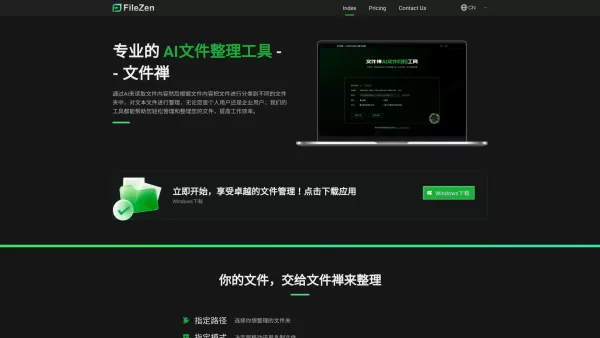
What is FileZen?FileZen is an intelligent file management solution that uses AI to read file content and automatically organize documents into appropriate folders. It streamlines document management for users, ensuring files are easy to find and syst

iAsk isn't just your average assistant; it's a smart tool designed to make your life easier by answering questions about your files and links. Think of it as your personal digital helper that knows your stuff inside out.How to Use iAsk?Getting starte
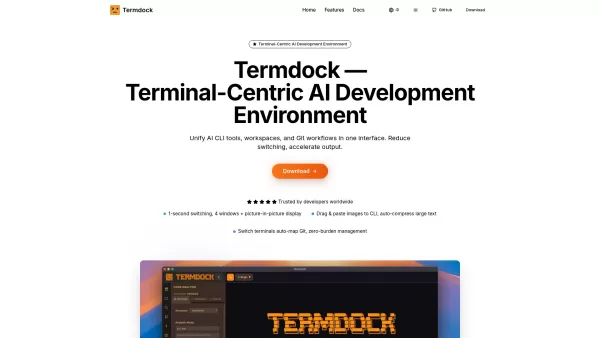
What is Termdock? Termdock is an AI-powered development environment built around the terminal. It consolidates multi-workspace management, multi-terminal layouts, and Git visualization into a single, unified interface. Using AST search (Tree-sitter),

What is Poly?Poly is an intelligent platform that helps you manage personal files and media using advanced AI. It enables users to store, browse, search, and share images and documents effortlessly. The system uses multimodal AI to interpret content,
heyCLI Product Information
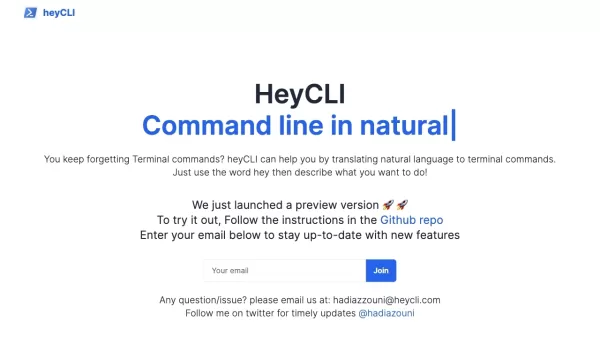
Ever found yourself staring at a Linux terminal, wishing you could just tell it what to do instead of memorizing a bunch of cryptic commands? Well, that's where heyCLI comes in—it's like having a friendly copilot right there in your terminal. This nifty tool lets you use Linux commands in everyday language, making it a breeze to navigate and manage your system.
How to Use heyCLI?
Getting started with heyCLI is as easy as pie. Just fire up your terminal and start talking to it like you would to a friend. Want to move a file? Just say so in plain English, and heyCLI will translate your request into the right Linux command and execute it for you. From file management to networking, heyCLI has got you covered.
heyCLI's Core Features
Plain English Command Translation
Forget about memorizing complex commands. heyCLI understands what you mean and does the heavy lifting for you.
Terminal Execution
Once heyCLI figures out what you're asking for, it runs the command right in your terminal. No muss, no fuss.
File Management
Need to create, delete, rename, or move files and directories? heyCLI makes it as simple as asking nicely.
Process Management
Start, stop, and keep an eye on your system's processes with ease. heyCLI turns process management into a conversation.
Networking and Configuration
Set up your network interfaces, configure IP addresses, and troubleshoot connections without breaking a sweat.
System Monitoring and Troubleshooting
Keep tabs on your system's performance and dive into logs to solve issues. heyCLI helps you keep everything running smoothly.
heyCLI's Use Cases
File Management
Whether you're organizing your files or just need to tidy up, heyCLI can help you create, delete, rename, and move files and directories with a few simple words.
Process Management
Managing your system's processes can be a headache, but with heyCLI, you can start, stop, and monitor them like you're just chatting with a buddy.
Network Configuration
Setting up your network or troubleshooting issues? heyCLI makes it easy to configure IP addresses, set up interfaces, and manage connections.
System Monitoring
Keep your system in check with heyCLI. Monitor performance, check process status, and sift through logs to keep everything running smoothly.
FAQ from heyCLI
- Can heyCLI run any Linux command?
- heyCLI aims to support a wide range of commands, but there might be some limitations depending on the complexity or specificity of the command.
- Is heyCLI compatible with all Linux distributions?
- heyCLI is designed to be compatible with most Linux distributions, but always check the latest compatibility information on their GitHub.
- Does heyCLI require any additional software or dependencies?
- heyCLI might need some basic dependencies, but typically, it's designed to be lightweight and easy to set up.
- Can I use heyCLI for scripting or automation?
- While heyCLI is great for interactive use, it's not primarily designed for scripting or automation. However, you might find creative ways to use it in scripts.
- Is heyCLI free to use?
- Yes, heyCLI is free to use. Check out their GitHub for more details on usage and licensing.
For any support or questions, you can reach out to heyCLI's customer service at [email protected].
heyCLI is brought to you by HeyCLI, and you can follow them on Twitter or check out their GitHub for more info and updates.
heyCLI Screenshot





2026 Latest Best Top-rated AI Object Removal Editors for portraits travel product shots! XIX.AI curates a powerful game-changing collection regularly updated with weekly rankings. These tools offer real-world tests to help you quickly remove unwanted elements, boost content quality, and save tons of time without compromising results. Must-try for anyone aiming to unlock their AI creation edge. Explore now!
 10 tools
 xix.ai

2026 Latest Best Top-rated AI Text to Speech Tools for Online Courses are curated by XIX.AI based on rigorous real-world tests and weekly updated rankings. These powerful tools help creators deliver crystal-clear audio content effortlessly, boosting writing efficiency and streamlining course production. Check out the free vs paid comparison to find your perfect fit. Explore now to unlock your AI edge in online education.
10 tools
xix.ai

2026 Latest Best Top-Rated AI Blog Title Tools for Higher Click Through Rates! XIX.AI has carefully curated a powerful, game-changing collection of top tools that go through rigorous real-world tests. You’ll find a free vs paid comparison, weekly updated rankings, and detailed insights to help you boost your blog’s traffic efficiently. Must-try options are highlighted to help you unlock your AI edge. Explore now!
10 tools
xix.ai

2026 Latest Best Top-rated AI Task Routing Tools for Support Workflows! XIX.AI has curated a highly powerful game-changing collection of must-try solutions, all undergoing rigorous real-world tests and updated weekly. These tools streamline workflows, boost productivity, and help teams deliver faster, more efficient support. Explore now to discover your perfect tool and unlock your AI edge!
17 tools
xix.ai

2026 Latest Best Top-Rated AI Citation and Paper Summary Tools Curated by XIX.AI. Get powerful game-changing solutions for quick content creation, improved writing efficiency, and boosting productivity. We offer a free vs paid comparison along with real-world tests and weekly updated rankings to help you find the must-try tool that fits your needs perfectly. Explore now to Unlock your AI edge.
10 tools
xix.ai

2026 Latest Best Top-Rated AI Productivity Tools for Daily Work! XIX.AI has curated a powerful, game-changing selection based on rigorous weekly updated rankings and real-world tests. You’ll find must-try options that boost writing efficiency, streamline content creation, and help you overcome daily work challenges. Get a free vs paid comparison to find the perfect fit for your needs. Explore now to unlock your AI edge!
9 tools
xix.ai


I've been using heyCLI for a week now and it's honestly a game changer. No more googling commands every five minutes! The natural language interface is surprisingly accurate. Just type 'heyCLI, install nginx' and boom, it works. Though I'm a bit worried about security implications of giving AI root access... but for now, it's super handy. 🚀
So hype to see heyCLI bringing that natural language magic directly into the terminal. The idea of simply telling my terminal what I want instead of frantically Googling flags is a game-changer. Just hope it handles context well across different sessions! Totally gonna try this out for my daily workflows 💻
heyCLI is a lifesaver for Linux newbies like me! 😄 Just say 'hey' and what you want, and it translates to commands. No more Googling syntax. Still, I worry it might oversimplify complex tasks. Worth a try!


