


 Home
HomeTermdock
AI Dev Environment: Terminal-Centric Workspaces



Helps TikTok sellers, brands, MCNs, and TAPs discover winning products and find creators.

HelpLook is an AI-powered all-in-one knowledge base tool that helps businesses quickly build knowledge bases, help centers, and...

Your AI Workspace

302.AI is an enterprise-grade AI resource platform with pay-as-you-go pricing, API access to a full range of AI models, and ready-to-use online applications.

剧火AI — AI Screenwriter + Director, a One-Person Short Drama Studio In one sentence, what is it?

Ever stumbled upon Cherry Studio AI and wondered what it's all about? Well, let me break it down for you. Cherry Studio AI isn't just another run-of-the-mill AI tool; it's a powerhouse desktop client that lets you dive into advanced AI interactions across

Discover Plume AI: Your Ultimate Academic Writing AssistantAre you tired of struggling with your academic writing? Well, say hello to Plume AI, the innovative AI assistant that's here to revolutionize the way you write! Designed with students in mind, Plume AI harnesses the power of cutting-edge art

Ever wondered how to turn your jumbled thoughts and complex queries into something you can actually grasp? Enter The Visualizer, your new best friend in the world of learning and creativity. This nifty tool takes your written queries, URLs, and even PDFs,

Ever wished for a trusty sidekick to help you navigate the digital world with ease? Enter Sider, your personal AI companion designed to seamlessly blend into your daily routine. Starting off as a handy Chrome/Edge extension, Sider transforms your browsing

Ever wondered what Ninja AI is all about? Well, let me tell you, it's like having a Swiss Army knife for your digital needs! Ninja AI isn't just another AI tool; it's a powerhouse that brings together over 24 top-notch Large Language Models (LLMs) to help
Termdock Product Information
What is Termdock?
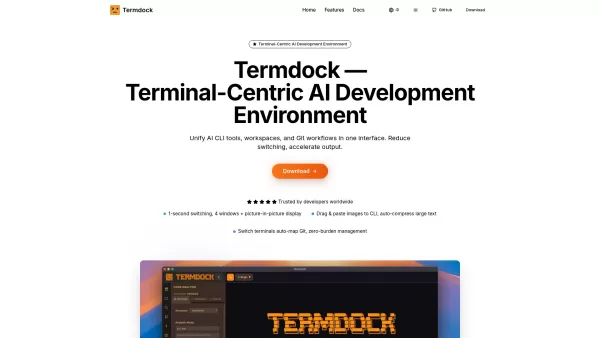
Termdock is an AI-powered development environment built around the terminal. It consolidates multi-workspace management, multi-terminal layouts, and Git visualization into a single, unified interface. Using AST search (Tree-sitter), it enables instant navigation to symbols and dependencies, while supporting up to 4 windows along with a Picture-in-Picture (PiP) mode for parallel operation of tools such as Docker, Redis, logs, tests, and AI applications. Additional features include drag-and-drop image pasting into the CLI with automatic compression, an integrated file tree, and prompt libraries to maintain fast, consistent, and scalable workflows. Termdock’s goal is to unify AI CLI tools, workspaces, and Git workflows, reducing context switching and boosting productivity for developers handling multiple projects and terminal setups at once.
How to use Termdock?
Developers can manage multiple projects and terminal setups through Termdock’s integrated interface. They can execute AST searches to navigate to symbols and dependencies instantly, drag and drop images directly into the command-line interface, and take advantage of built-in file trees and prompt libraries for efficient workflows. Multiple terminals can be organized using custom layouts—including picture-in-picture—so you can run different tools at the same time.
Termdock's Core Features
Multi-workspace management
Multi-terminal layouts (up to 4 windows + PiP)
AST search (Tree-sitter) for symbols and dependencies
Drag-and-paste images to CLI with auto-compression
Built-in file tree
Prompt libraries and management
Git visualization and auxiliary integration
Seamless integration with AI CLI Tools
Theme Customization
Termdock's Use Cases
Managing multiple projects and terminal environments at the same time.
Locating Kubernetes configuration issues using AST search.
Efficient file searching and navigation in large-scale projects.
Simultaneously monitoring Docker, Redis, logs, and tests using Picture-in-Picture.
Standardizing code review feedback and team workflows with prompt management.
Switching seamlessly between cross-repository tasks.
FAQ from Termdock
What is Termdock?
Termdock is a terminal-focused AI development environment that combines multi-workspace management, multi-terminal layouts, and Git visualization in a single interface—built to accelerate developer productivity.
How many windows can I run simultaneously in Termdock?
You can run up to 4 windows plus a Picture-in-Picture (PiP) display at the same time, enabling you to monitor tools like Docker, Redis, logs, and tests side-by-side.
Is Termdock free to use?
Yes, Termdock states it is 'Free to use — start now' and 'Free forever'.
Termdock Support Email & Customer service contact & Refund contact etc.
For more contact options, visit the contact us page(https://github.com/termdock/termdock-issues)
Termdock Company
Termdock Company name: Termdock .
Termdock Github
Termdock Github Link: https://github.com/termdock/termdock-issues
Termdock Screenshot


2026 Latest Best Photoshop AI retouch tools for ecommerce apparel, skin cleanup, and color consistency! This top-rated curated list features powerful game-changing solutions that help you boost writing efficiency, streamline content creation, and achieve perfect visual results effortlessly. Each tool has undergone real-world tests through weekly updated rankings, complete with free vs paid comparison details. Backed by XIX.AI, it’s the must-try guide for anyone aiming to unlock your AI edge. Explore now!
 10 tools
 xix.ai

2026 Latest Best Top-Rated AI Prompt Libraries for optimizing all types of ChatGPT workflows. XIX.AI has curated a powerful, game-changing collection that goes through rigorous real-world tests to ensure top performance. You can find detailed free vs paid comparisons and expert rankings to help you choose the must-try tools that boost your productivity and unlock your AI edge. Explore now!
11 tools
xix.ai

2026 Latest Best AI Quiz Builder Platforms for Teachers, Tutors, and Cohort-Based Learning Programs! XIX.AI has curated a top-rated list of powerful game-changing tools that go through real-world tests to deliver accurate rankings. These must-try platforms help boost writing efficiency, streamline content creation, and simplify quiz design across all learning scenarios. Explore now to discover your perfect tool for unlocking your AI edge in teaching!
13 tools
xix.ai

2026 Latest Best AI Pull Request Review Tools for GitHub Teams are here on XIX.AI! This top-rated curated list showcases powerful game-changing solutions that streamline refactoring, bug fixing, and security gap detection across all team workflows. Enjoy a free vs paid comparison along with real-world tests and detailed rankings to help you find the perfect tool that boosts productivity significantly. Explore now to unlock your AI edge!
12 tools
xix.ai

2026 Latest Best Top-rated AI Text to Speech Tools for Natural Voiceovers are here on XIX.AI! This curated list features powerful, game-changing options that deliver crystal-clear voices for every use case, backed by real-world tests and weekly updated rankings. Get a free vs paid comparison to find the must-try solution that boosts your productivity instantly. Explore now to Unlock your AI edge!
11 tools
xix.ai

2026 Latest Best Manga AI Background Generators Ranked Top-Rated! This curated collection showcases powerful game-changing tools perfect for creating high-quality chapter backgrounds, book covers, and promotional art. Every option has undergone rigorous real-world tests to ensure reliability. Get a free vs paid comparison along with detailed insights. Explore now to discover your perfect tool and unlock your AI edge in manga creation.
6 tools
xix.ai


