


 Home
Home


Helps TikTok sellers, brands, MCNs, and TAPs discover winning products and find creators.

HelpLook is an AI-powered all-in-one knowledge base tool that helps businesses quickly build knowledge bases, help centers, and...

Your AI Workspace

302.AI is an enterprise-grade AI resource platform with pay-as-you-go pricing, API access to a full range of AI models, and ready-to-use online applications.

剧火AI — AI Screenwriter + Director, a One-Person Short Drama Studio In one sentence, what is it?
VideoCompress Product Information
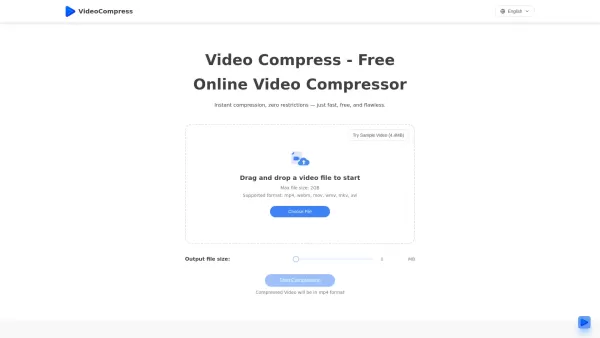
What is VideoCompress?
VideoCompress is a free, AI-driven online tool that reduces video file sizes while preserving quality. It uses advanced compression algorithms and cloud processing to deliver fast, high-quality results—with no watermarks and no usage limits. Supporting formats like MP4, MOV, and AVI, it's the ideal solution for creators, marketers, and anyone who needs efficient, professional video compression before sharing or uploading.
How to use VideoCompress?
1. Upload your video for compression. 2. Choose your target file size or compression mode. 3. Click Compress and wait for the process to finish before downloading your compressed video.
VideoCompress's Core Features
AI-Powered Compression: Automatically optimizes videos with intelligent AI algorithms to reduce file size while maintaining visual clarity.
Fast & Cloud-Based Processing: Compression happens on powerful cloud servers for maximum speed—no strain on your device's CPU.
No Watermark, No Limits: Totally free compression with no watermarks, no file size limits, and unlimited usage.
Multi-Format Support: Works seamlessly with popular formats like MP4, MOV, and AVI for broad compatibility.
VideoCompress's Use Cases
Shrink videos before uploading to social media
Optimize videos for faster website performance
Reduce file size for email or cloud sharing
Prepare lightweight videos for ads and marketing
Compress demo or tutorial videos for product pages
Save storage space on local or cloud backups
FAQ from VideoCompress
Can I use VideoCompress on my phone?
Yes! VideoCompress works smoothly on both iPhone and Android. Simply open it in your mobile browser, upload your video, choose your compression settings, and download the result—all in just a few taps.
How to make videos smaller for email or quick sharing?
Need to email or share a video quickly? VideoCompress lets you reduce file size instantly, avoiding "file too large" errors and ensuring faster uploads.
Do I have to download or install anything?
No installation is required—VideoCompress runs entirely in your browser. Use it on Windows, Mac, iPhone, or Android and start compressing right away.
Is VideoCompress really free?
Yes, it’s completely free. VideoCompress never adds watermarks and has no usage restrictions—compress as many videos as you want, anytime.
VideoCompress Support Email & Customer service contact & Refund contact etc.
For more ways to reach us, visit the Contact Us page()
VideoCompress Company
VideoCompress Company name: .
VideoCompress Company address: .
Learn more about VideoCompress on the About Us page().
VideoCompress Login
VideoCompress Login Link:
VideoCompress Sign up
VideoCompress Sign up Link:
VideoCompress Screenshot


2026 Latest Best Top-rated AI Object Removal Editors for portraits travel product shots! XIX.AI curates a powerful game-changing collection regularly updated with weekly rankings. These tools offer real-world tests to help you quickly remove unwanted elements, boost content quality, and save tons of time without compromising results. Must-try for anyone aiming to unlock their AI creation edge. Explore now!
 10 tools
 xix.ai

2026 Latest Best Top-rated AI Text to Speech Tools for Online Courses are curated by XIX.AI based on rigorous real-world tests and weekly updated rankings. These powerful tools help creators deliver crystal-clear audio content effortlessly, boosting writing efficiency and streamlining course production. Check out the free vs paid comparison to find your perfect fit. Explore now to unlock your AI edge in online education.
10 tools
xix.ai

2026 Latest Best Top-Rated AI Blog Title Tools for Higher Click Through Rates! XIX.AI has carefully curated a powerful, game-changing collection of top tools that go through rigorous real-world tests. You’ll find a free vs paid comparison, weekly updated rankings, and detailed insights to help you boost your blog’s traffic efficiently. Must-try options are highlighted to help you unlock your AI edge. Explore now!
10 tools
xix.ai

2026 Latest Best Top-rated AI Task Routing Tools for Support Workflows! XIX.AI has curated a highly powerful game-changing collection of must-try solutions, all undergoing rigorous real-world tests and updated weekly. These tools streamline workflows, boost productivity, and help teams deliver faster, more efficient support. Explore now to discover your perfect tool and unlock your AI edge!
17 tools
xix.ai

2026 Latest Best Top-Rated AI Citation and Paper Summary Tools Curated by XIX.AI. Get powerful game-changing solutions for quick content creation, improved writing efficiency, and boosting productivity. We offer a free vs paid comparison along with real-world tests and weekly updated rankings to help you find the must-try tool that fits your needs perfectly. Explore now to Unlock your AI edge.
10 tools
xix.ai

2026 Latest Best Top-Rated AI Productivity Tools for Daily Work! XIX.AI has curated a powerful, game-changing selection based on rigorous weekly updated rankings and real-world tests. You’ll find must-try options that boost writing efficiency, streamline content creation, and help you overcome daily work challenges. Get a free vs paid comparison to find the perfect fit for your needs. Explore now to unlock your AI edge!
9 tools
xix.ai


