


 Home
HomeVideo Transcriber AI
Free Video to Text Transcribe AI Online



Helps TikTok sellers, brands, MCNs, and TAPs discover winning products and find creators.

HelpLook is an AI-powered all-in-one knowledge base tool that helps businesses quickly build knowledge bases, help centers, and...

Your AI Workspace

302.AI is an enterprise-grade AI resource platform with pay-as-you-go pricing, API access to a full range of AI models, and ready-to-use online applications.

剧火AI — AI Screenwriter + Director, a One-Person Short Drama Studio In one sentence, what is it?
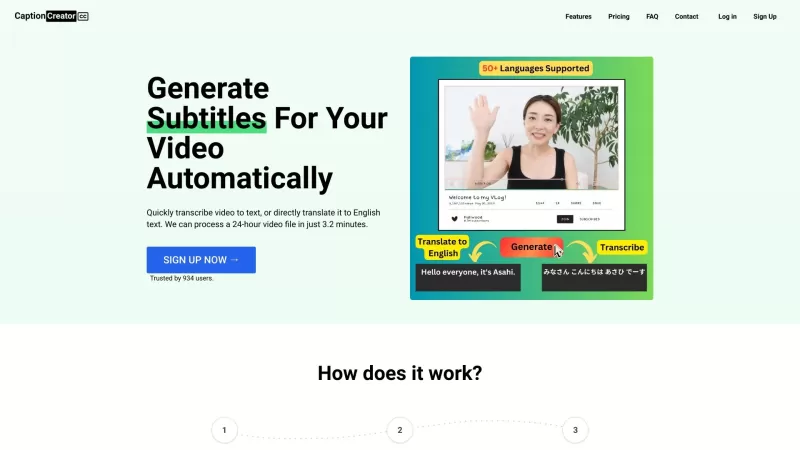
Ever found yourself wishing you could easily add subtitles to your videos or translate them into English? Well, let me introduce you to CaptionCreator, your new best friend for all things video and audio transcription. This nifty online tool is designed to make your life easier by turning your video
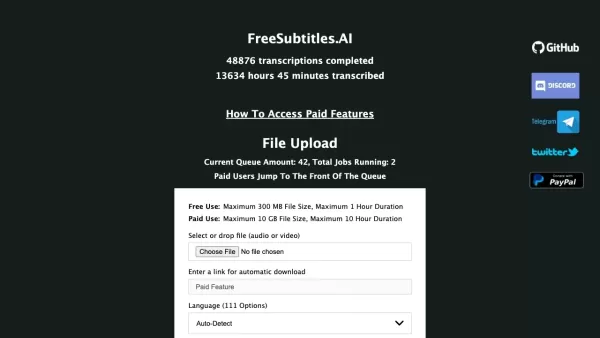
What is Free Subtitles AI?FreeSubtitles.AI is a robust tool offering complimentary transcription and translation for audio and video content. Its user-friendly platform allows you to effortlessly convert speech from any language into text and transla
Video Transcriber AI Product Information
What is Video Transcriber AI?
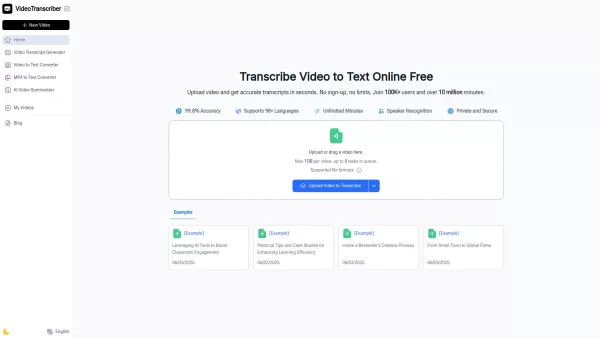
Video Transcriber AI is an online AI tool that quickly converts video and audio from sources like YouTube, Podcasts, and Bilibili into precise text transcripts for free. No downloads or login are required — just upload a file or paste a link, and the AI generates accurate transcriptions in seconds with multi-language support.
How to use Video Transcriber AI?
1. Go to the website: Visit VideoTranscriber AI (https://videotranscriber.ai/) directly in your browser. No download or sign-up is necessary. 2. Upload your video: Click "Upload Video" and select any supported file from your device. The tool works with YouTube links, Zoom recordings, MP4, MOV, AVI, and other formats. 3. Select your language and options: Pick the spoken language and choose your preferred transcription accuracy mode. Video Transcriber AI supports speaker detection and more than 90 languages. 4. Start transcribing: Click "Transcribe" to begin. The AI processes your file immediately to create an accurate text transcript. 5. Download or copy the transcript: Save the transcription as a text file or copy the content to your clipboard. Use the exported text for captions, summaries, or notes.
Video Transcriber AI's Core Features
Fast Video-to-Text Conversion: Video Transcriber AI quickly transforms your uploaded videos into readable text transcripts in just seconds.
Extensive Format Support: Video Transcriber AI handles MP4, MOV, and AVI files, plus integrates with YouTube, Podcasts, Bilibili, Zoom, and other platforms. Simply paste a URL or upload a file, and the tool instantly produces accurate text.
Multi-Language & Speaker Recognition: The tool supports over 90 languages and includes speaker identification, helping you track who is speaking during conversations or meetings.
Free & No Sign-Up Required: Use Video Transcriber AI immediately without creating an account — just upload your content and start transcribing.
Flexible Accuracy Modes: Choose from different transcription accuracy levels in Video Transcriber AI to match your file quality and requirements.
Downloadable & Shareable Output: After Video Transcriber AI finishes transcribing, you can easily copy, download, or share the resulting text.
Large File Handling: Video Transcriber AI accepts video files up to 1 GB and allows multiple queued tasks, perfect for bulk or long recordings.
Video Transcriber AI's Use Cases
Transcribe Online Lectures and Courses: Students can turn online classes from YouTube, Bilibili, or recorded Zoom sessions into searchable, organized notes for studying and review.
Convert Podcasts into Readable Articles: Podcasters and bloggers can use Video Transcriber AI to transcribe episodes into full text or blog content, ideal for SEO and content repurposing.
Capture Meeting and Interview Notes: Professionals and journalists can rely on Video Transcriber AI to quickly convert meeting or interview recordings into accurate written summaries and records.
Create Captions and Subtitles Automatically: Content creators can generate subtitles for YouTube or Bilibili videos with Video Transcriber AI, improving accessibility and audience engagement worldwide.
Support Academic Research and Documentation: Researchers can transcribe video lectures, presentations, or discussions using Video Transcriber AI to simplify quoting, analysis, and archiving.
Enhance Content Creation Efficiency: From video tutorials to vlogs, Video Transcriber AI helps creators extract text, repurpose content, and save time using fast AI transcription.
FAQ from Video Transcriber AI
What is Video Transcriber AI?
Video Transcriber AI is an advanced online AI tool that converts video and audio files into accurate text transcripts in seconds. It supports YouTube, Bilibili, Podcasts, Zoom recordings, and MP4 files, making transcription effortless, swift, and free.
How accurate is Video Transcriber AI for YouTube or Podcast transcriptions?
Video Transcriber AI uses sophisticated AI speech recognition to deliver high accuracy, even with rapid speech or background noise. It identifies multiple speakers, supports timestamps, and transcribes over 90 languages — perfect for YouTube tutorials, podcasts, or online courses.
Do I need to install any software to use Video Transcriber AI?
No software installation is required. Video Transcriber AI is web-based — go to videotranscriber.ai, upload your file or paste a link, and the AI automatically transcribes your content securely in your browser.
Who can benefit from using Video Transcriber AI?
Video Transcriber AI is designed for students, educators, creators, and professionals. Whether you’re learning from YouTube or Bilibili, summarizing podcasts, or documenting meetings, it eliminates manual typing and provides instant, editable transcripts.
Video Transcriber AI Support Email & Customer service contact & Refund contact etc.
For additional support, visit the contact us page(https://videotranscriber.ai/contact-us)
Video Transcriber AI Company
Video Transcriber AI Company name: Video Transcriber AI .
Video Transcriber AI Company address: .
To learn more about Video Transcriber AI, visit the about us page().
Video Transcriber AI Login
Video Transcriber AI Login Link:
Video Transcriber AI Sign up
Video Transcriber AI Sign up Link:
Video Transcriber AI Screenshot

2026 Latest Best AI Quiz Builder Platforms for Teachers, Tutors, and Cohort-Based Learning Programs! XIX.AI has curated a top-rated list of powerful game-changing tools that go through real-world tests to deliver accurate rankings. These must-try platforms help boost writing efficiency, streamline content creation, and simplify quiz design across all learning scenarios. Explore now to discover your perfect tool for unlocking your AI edge in teaching!
 13 tools
 xix.ai

2026 Latest Best AI Pull Request Review Tools for GitHub Teams are here on XIX.AI! This top-rated curated list showcases powerful game-changing solutions that streamline refactoring, bug fixing, and security gap detection across all team workflows. Enjoy a free vs paid comparison along with real-world tests and detailed rankings to help you find the perfect tool that boosts productivity significantly. Explore now to unlock your AI edge!
12 tools
xix.ai

2026 Latest Best Top-rated AI Text to Speech Tools for Natural Voiceovers are here on XIX.AI! This curated list features powerful, game-changing options that deliver crystal-clear voices for every use case, backed by real-world tests and weekly updated rankings. Get a free vs paid comparison to find the must-try solution that boosts your productivity instantly. Explore now to Unlock your AI edge!
11 tools
xix.ai

2026 Latest Best Manga AI Background Generators Ranked Top-Rated! This curated collection showcases powerful game-changing tools perfect for creating high-quality chapter backgrounds, book covers, and promotional art. Every option has undergone rigorous real-world tests to ensure reliability. Get a free vs paid comparison along with detailed insights. Explore now to discover your perfect tool and unlock your AI edge in manga creation.
6 tools
xix.ai

2026 Latest Best Top-rated AI Object Removal Editors for portraits travel product shots! XIX.AI curates a powerful game-changing collection regularly updated with weekly rankings. These tools offer real-world tests to help you quickly remove unwanted elements, boost content quality, and save tons of time without compromising results. Must-try for anyone aiming to unlock their AI creation edge. Explore now!
10 tools
xix.ai

2026 Latest Best Top-rated AI Text to Speech Tools for Online Courses are curated by XIX.AI based on rigorous real-world tests and weekly updated rankings. These powerful tools help creators deliver crystal-clear audio content effortlessly, boosting writing efficiency and streamlining course production. Check out the free vs paid comparison to find your perfect fit. Explore now to unlock your AI edge in online education.
10 tools
xix.ai


