


 Home
HomeTinyStudio
Mac Subtitle Generator for Video Audio



Helps TikTok sellers, brands, MCNs, and TAPs discover winning products and find creators.

HelpLook is an AI-powered all-in-one knowledge base tool that helps businesses quickly build knowledge bases, help centers, and...

Your AI Workspace

302.AI is an enterprise-grade AI resource platform with pay-as-you-go pricing, API access to a full range of AI models, and ready-to-use online applications.

剧火AI — AI Screenwriter + Director, a One-Person Short Drama Studio In one sentence, what is it?

Introducing AniEraser: The Ultimate AI Clothes RemoverIf you've ever wanted to edit photos like a pro without the hassle of complicated tools or software installations, AniEraser is here to change the game. This cutting-edge online tool uses advanced AI t

What is Undressbaby AI?Undressbaby is a cutting-edge, AI-driven platform that lets users creatively alter their photos and videos. From swapping faces to trying on virtual outfits, it offers a simple yet powerful solution. Just upload your media, and
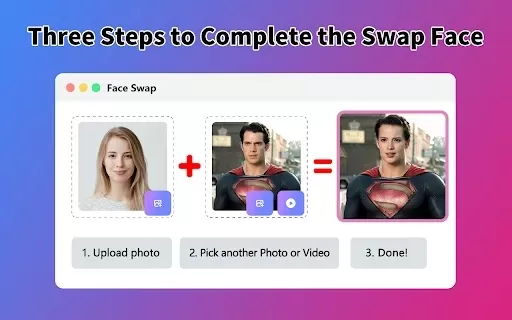
What is Face Swap - AI Face Swapper?Face Swap AI Face Swapper is a cutting-edge online tool that enables effortless face swapping in photos and videos. Powered by sophisticated artificial intelligence, it allows you to seamlessly replace faces, swap

Ever wanted to give your videos a quirky twist or a professional touch? Look no further than KreadoAI Video Face Swap! This nifty tool is a game-changer for anyone looking to seamlessly replace faces in videos. What's even better? It's absolutely free and

What is VideoWatermarkRemover AI? VideoWatermarkRemover is a free, AI-powered online tool that quickly and easily removes watermarks from videos. It supports popular formats like MP4, MOV, and AVI, and can detect and erase both static and moving wate
TinyStudio Product Information
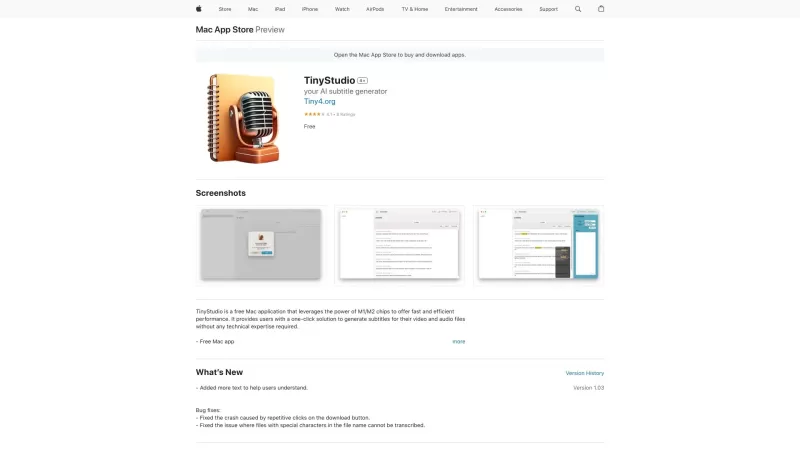
If you're on the hunt for a tool that can make your video and audio files more accessible, let me introduce you to TinyStudio. This nifty little app is designed specifically for Mac users with M1/M2 chips, promising lightning-fast performance that'll have you generating subtitles in a snap. And the best part? You don't need to be a tech wizard to use it. Just a few clicks, and you're good to go!
How to Use TinyStudio?
Getting started with TinyStudio is as easy as pie. First, head over to their site and download the app onto your Mac. Once it's installed, fire it up and pick the video or audio file you want to work on. Then, all you've got to do is hit that 'Generate Subtitles' button. Sit back and watch as TinyStudio works its magic, churning out accurate subtitles without breaking a sweat.
TinyStudio's Core Features
TinyStudio isn't just about speed; it's packed with features that make it a must-have for anyone dealing with media files. It harnesses the power of those M1/M2 chips to deliver top-notch performance. With its one-click solution, you can generate subtitles for both video and audio files effortlessly. And don't worry about accuracy—TinyStudio's got you covered there too. Plus, you don't need any technical know-how to get the job done.
TinyStudio's Use Cases
Who can benefit from TinyStudio? Well, if you're a video content creator, this app can streamline your workflow by adding subtitles to your videos. Podcasters, you'll love how it makes your episodes more accessible to a wider audience. Language learners, TinyStudio can help you practice by providing subtitles for your learning materials. And if you're in the transcription business, this tool can be a game-changer for your productivity.
FAQ from TinyStudio
- Can TinyStudio generate subtitles for multiple languages?
- Is TinyStudio compatible with older Mac models?
- Can I edit the generated subtitles?
- Does TinyStudio support batch processing?
- Is TinyStudio available for other platforms?
TinyStudio Screenshot

2026 Latest Best Top-rated AI Subtitle Tools for Multilingual Videos are here on XIX.AI! This curated list features powerful, game-changing options that go through real-world tests to deliver accurate subtitles in dozens of languages. Get a free vs paid comparison and see which tools suit your needs best. Explore now to unlock your AI edge!
 9 tools
 xix.ai
Discover 2026's best AI video editing tools for short dramas. Explore our top-rated curated picks on XIX.AI, compare free vs paid options, and see real-world test results. Transform your storytelling with powerful, game-changing features. Find your perfect editing assistant now and start creating.
10 tools
xix.ai


TinyStudioはM1/M2チップのMacユーザーにとって救世主!字幕生成が早くて効率的。ただ、最初は使い方が少し難しいかも。でも、ビデオやオーディオのアクセシビリティには必須のアプリだよ!👍
TinyStudio는 M1/M2 칩을 가진 맥 사용자들에게는 구세주야! 자막 생성 속도가 빨라서 효율적이야. 하지만 처음에는 사용하기가 조금 어려울 수 있어. 그래도 비디오나 오디오 접근성에는 필수 앱이야! 👍
TinyStudio es un salvavidas para los usuarios de Mac con chips M1/M2. ¡Es rápido y eficiente para generar subtítulos! Pero puede ser un poco complicado de navegar al principio. Aún así, es imprescindible para la accesibilidad de video/audio. 👍
TinyStudio é incrível para usuários de Mac com chips M1/M2! É super rápido e gera legendas em um piscar de olhos. O único ponto negativo é que a interface poderia ser mais intuitiva. Ainda assim, é uma ferramenta que muda o jogo para a acessibilidade de vídeos!
TinyStudioはM1/M2チップのMacユーザーにとって素晴らしいです!超高速で字幕もすぐに生成されます。ただ、インターフェースがもう少し直感的だといいんですけどね。それでも、ビデオのアクセシビリティを変えるアプリです!


