


 Home
HomeSnapy AI
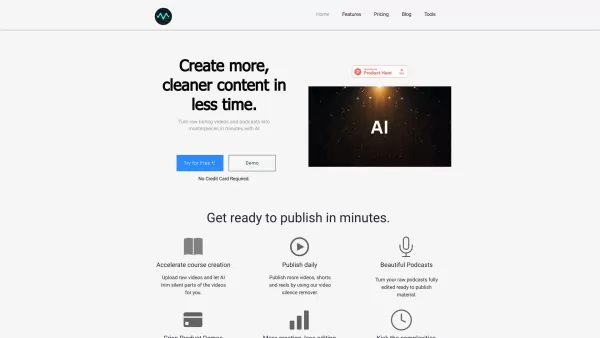
AI Video Editor: Auto Silence Removal & Shorts Generator



Helps TikTok sellers, brands, MCNs, and TAPs discover winning products and find creators.

HelpLook is an AI-powered all-in-one knowledge base tool that helps businesses quickly build knowledge bases, help centers, and...

Your AI Workspace

302.AI is an enterprise-grade AI resource platform with pay-as-you-go pricing, API access to a full range of AI models, and ready-to-use online applications.

剧火AI — AI Screenwriter + Director, a One-Person Short Drama Studio In one sentence, what is it?

Introducing AniEraser: The Ultimate AI Clothes RemoverIf you've ever wanted to edit photos like a pro without the hassle of complicated tools or software installations, AniEraser is here to change the game. This cutting-edge online tool uses advanced AI t

What is Undressbaby AI?Undressbaby is a cutting-edge, AI-driven platform that lets users creatively alter their photos and videos. From swapping faces to trying on virtual outfits, it offers a simple yet powerful solution. Just upload your media, and
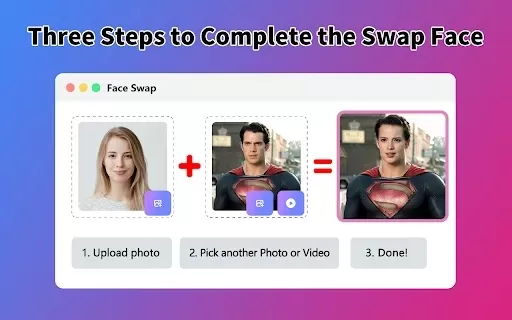
What is Face Swap - AI Face Swapper?Face Swap AI Face Swapper is a cutting-edge online tool that enables effortless face swapping in photos and videos. Powered by sophisticated artificial intelligence, it allows you to seamlessly replace faces, swap

Ever wanted to give your videos a quirky twist or a professional touch? Look no further than KreadoAI Video Face Swap! This nifty tool is a game-changer for anyone looking to seamlessly replace faces in videos. What's even better? It's absolutely free and

What is VideoWatermarkRemover AI? VideoWatermarkRemover is a free, AI-powered online tool that quickly and easily removes watermarks from videos. It supports popular formats like MP4, MOV, and AVI, and can detect and erase both static and moving wate
Snapy AI Product Information
Snapy AI: The First Online AI Video Editor
Let’s talk about Snappy AI—it’s no ordinary tool. Think of it as your digital filmmaking wizard, capable of doing everything from magically removing silences to turning raw footage into polished YouTube shorts. Yes, it’s that powerful. Whether you’re working on a podcast, creating course content, or piecing together a product demo, Snappy AI has got your back.
But what makes Snappy AI stand out? For starters, it’s not just about cutting and pasting clips—it’s about making your videos smarter. Need silence removed automatically? Done. Want to tweak transitions or add music? No problem. It even helps craft engaging shorts for platforms like Instagram or TikTok—all thanks to its nifty AI brain.
Using Snappy AI Made Simple
Here’s the scoop: using Snappy AI isn’t rocket science. Here’s how it works:
Upload Your Video: Head over to Snappy AI and upload your clip. It could be anything—a lecture recording, a family vacation montage, or even a live stream.
Hit Process: Once your file is uploaded, click “Process.” Sit back while the magic happens in the cloud.
Sit Tight: Depending on the length of your video, it might take a few minutes. When it’s ready, voilà! You’ll receive your edited masterpiece via email, along with a preview right on your dashboard.
Core Features That Make Snappy AI Special
Snappy AI doesn’t just edit—it reinvents. Here are some of its standout features:
- Automatic Silence Removal: No more manual cuts—let the AI handle background noise.
- Video Editing: Trim, splice, and rearrange like a pro.
- Automatic Shorts Editing: Turn long-form content into bite-sized gems optimized for social media.
- AI Short Making: Let the AI do the heavy lifting when crafting attention-grabbing clips.
Real-World Use Cases
Snappy AI isn’t just for techies; it’s for anyone who wants their videos to shine. Here are a few examples:
- Podcasts: Clean up audio tracks effortlessly.
- Courses: Break down lessons into digestible chunks.
- YouTube Videos: Transform raw footage into polished uploads.
- Product Demos: Highlight key features seamlessly.
Frequently Asked Questions
- What can I use Snappy AI for?
- Snappy AI is versatile. From cleaning up audio to generating social media-ready shorts, it’s designed to fit your creative needs.
- How long does it take to process a video?
- The processing time depends on the video length and complexity. Small clips usually take just a few minutes.
- Can I use Snappy AI for free?
- You bet! There’s a free tier available for basic usage. For advanced features, consider upgrading to a paid plan.
- Can Snappy AI help me generate shorts for social media?
- Absolutely! Its automatic shorts editor is perfect for creating engaging content tailored to platforms like Instagram Reels or TikTok.
Need Help? Contact Us
If you’ve got questions, Snappy AI’s got answers. Reach out via email at [email protected] or connect with their friendly team on Twitter, LinkedIn, or YouTube.
About Snappy AI
Snappy AI is brought to you by AISOLO Technologies Private Limited, a company dedicated to simplifying video creation with cutting-edge AI technology. Learn more about their mission and values on the About Us page.
Ready to Get Started?
Whether you’re looking to streamline your workflow or create something truly unique, Snappy AI is here to help. Visit Snappy AI today to sign up, log in, or explore pricing options. And hey, don’t forget to follow them on social media for tips, tutorials, and behind-the-scenes insights!
Snapy AI Screenshot
2026 Latest: Discover our top-rated AI tools for professional YouTube videos. We curate and rank the most powerful, game-changing solutions to streamline editing, boost productivity, and unlock stunning results. Compare free vs paid options with real-world insights. Find your perfect match at XIX.AI today.
 10 tools
 xix.ai


