


 Home
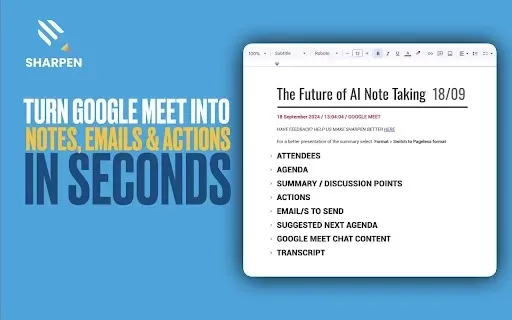
HomeSharpen AI: Turn Google Meets into notes, emails & actions in seconds.
AI Meeting Summaries for Google Meet & Teams



Helps TikTok sellers, brands, MCNs, and TAPs discover winning products and find creators.

HelpLook is an AI-powered all-in-one knowledge base tool that helps businesses quickly build knowledge bases, help centers, and...

Your AI Workspace

302.AI is an enterprise-grade AI resource platform with pay-as-you-go pricing, API access to a full range of AI models, and ready-to-use online applications.

剧火AI — AI Screenwriter + Director, a One-Person Short Drama Studio In one sentence, what is it?

What is Speech Translator?Speech Translator leverages Google's advanced speech recognition to deliver real-time translation for videos, audio, and live streams. This tool bridges language gaps, enabling seamless conversations and fostering clearer un

Ever wondered how to effortlessly turn your audio and video files into text? Enter Clipto, the powerhouse of AI transcription on the web. Imagine harnessing the same cutting-edge tech that fuels ChatGPT to convert your Zoom meetings, interviews, and

What is Revoldiv AI Chrome Extension? Revoldiv is a Chrome browser extension that instantly transcribes audio and video directly in your browser. It lets users follow along by reading live transcriptions and search for specific spoken words within po

Ever found yourself needing to turn spoken words into written text? Well, let me introduce you to tulz.AI—an AI-powered service that's all about making audio transcription a breeze. Whether it's a podcast, a business meeting, or any other spoken content,

Ever found yourself in need of a quick and accurate transcription of a video or audio file? That's where Video To Text AI comes into play. It's a slick AI-powered tool designed to effortlessly convert your media into text. Whether you're juggling YouTube
Sharpen AI: Turn Google Meets into notes, emails & actions in seconds. Product Information
What is Sharpen AI?
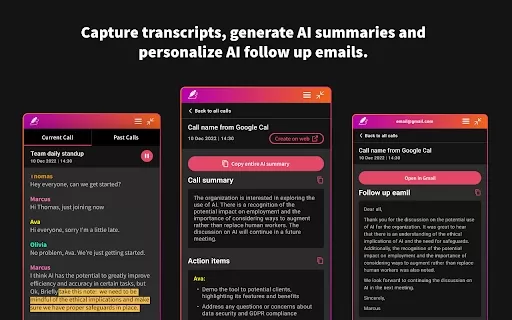
Sharpen AI is an AI-powered tool that instantly transforms your Google Meet and Microsoft Teams meetings into structured notes, emails, and action items. It automatically transcribes conversations in real time, generating complete summaries with key discussion points, assigned tasks, and next steps. Seamlessly integrated with Google Workspace, it saves all meeting notes and summaries directly to your Google Drive, keeping your information secure and accessible.
Who should use Sharpen AI?
- Sales Teams
- Product Managers
- Marketing Professionals
- Consultants and Coaches
How does Sharpen AI work?
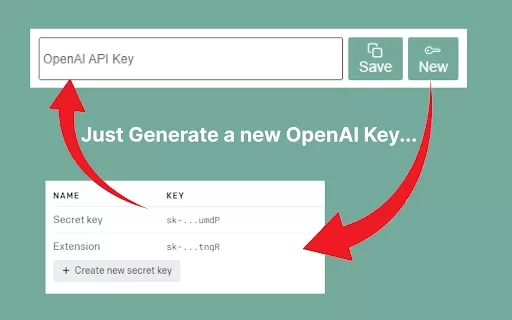
- Step 1: Install the Chrome Extension and pin it to your toolbar
- Step 2: Join a Google Meet—Sharpen AI starts automatically
- Step 3: Follow along with real-time transcription during your meeting
- Step 4: After the meeting, find a detailed summary in your Google Drive with clear action items and insights
Platform
- Web
- Chrome
Sharpen AI Core Features & Benefits
Core Features
- Real-Time Transcription
- Comprehensive Summary
- Effortless Follow-Up Tracking
- Google Workspace Integration
- Private & Secure
Key Benefits
- Save Time
- Stay Organized
- Collaborate More Effectively
Main Use Cases & Applications
- Tracking follow-ups and client requirements
- Documenting meeting results and next steps
- Compiling actionable insights from brainstorming meetings
- Sharing professional meeting summaries with clients
FAQs About Sharpen AI
What platforms does Sharpen AI support?
Sharpen AI is available on the web and as a Chrome extension.
How do I install Sharpen AI?
Simply install the Sharpen AI Chrome Extension and pin it to your browser toolbar.
Does Sharpen AI work with Microsoft Teams?
Yes, Sharpen AI provides AI-generated meeting summaries for both Google Meet and Microsoft Teams.
How secure is my meeting data?
All meeting data is stored securely in your Google Drive, ensuring your privacy is protected.
Can I use Sharpen AI for free?
Sharpen AI includes free features alongside premium options available through in-app purchases.
What kind of meeting summaries does Sharpen AI provide?
Sharpen AI delivers detailed summaries that capture key points, action items, and follow-up tasks.
Is there a limit to how many meetings Sharpen AI can summarize?
Usage limits depend on your selected plan, but there's no fixed limit mentioned.
Can I integrate Sharpen AI with other tools?
Yes, it integrates smoothly with Google Workspace and stores notes directly in Google Drive.
How accurate are the transcriptions?
Sharpen AI provides fast and reliable real-time transcriptions during meetings.
Who benefits most from using Sharpen AI?
Sales teams, product managers, marketers, consultants, and coaches gain significant value from Sharpen AI.
Sharpen AI Company Information
- Sharpen App Ltd
- https://sharpennotes.com
- [email protected]
Sharpen AI: Turn Google Meets into notes, emails & actions in seconds. Screenshot
Discover the 2026 best AI meeting assistants for Google Meet. Our top-rated, curated list features powerful tools that automatically generate action items and mind maps, saving you hours. Compare free vs paid options with real-world tests and weekly updated rankings. Find your perfect productivity boost at XIX.AI. Explore now!
 10 tools
 xix.ai
2026 Latest: Discover the best AI meeting assistants to transform your video calls. Our curated list compares top-rated tools for Zoom, Google Meet & Teams, highlighting key features, free vs paid options, and real-world performance. Find your perfect productivity boost with weekly updated rankings and expert insights from XIX.AI. Unlock smarter meetings today!
10 tools
xix.ai


