


 Home
HomeBriefly - Chrome Extension
Automated Meeting Notes & Summaries for Productivity



Helps TikTok sellers, brands, MCNs, and TAPs discover winning products and find creators.

HelpLook is an AI-powered all-in-one knowledge base tool that helps businesses quickly build knowledge bases, help centers, and...

Your AI Workspace

302.AI is an enterprise-grade AI resource platform with pay-as-you-go pricing, API access to a full range of AI models, and ready-to-use online applications.

剧火AI — AI Screenwriter + Director, a One-Person Short Drama Studio In one sentence, what is it?

Ever stumbled upon Cherry Studio AI and wondered what it's all about? Well, let me break it down for you. Cherry Studio AI isn't just another run-of-the-mill AI tool; it's a powerhouse desktop client that lets you dive into advanced AI interactions across

Discover Plume AI: Your Ultimate Academic Writing AssistantAre you tired of struggling with your academic writing? Well, say hello to Plume AI, the innovative AI assistant that's here to revolutionize the way you write! Designed with students in mind, Plume AI harnesses the power of cutting-edge art

Ever wondered how to turn your jumbled thoughts and complex queries into something you can actually grasp? Enter The Visualizer, your new best friend in the world of learning and creativity. This nifty tool takes your written queries, URLs, and even PDFs,

Ever wished for a trusty sidekick to help you navigate the digital world with ease? Enter Sider, your personal AI companion designed to seamlessly blend into your daily routine. Starting off as a handy Chrome/Edge extension, Sider transforms your browsing

Ever wondered what Ninja AI is all about? Well, let me tell you, it's like having a Swiss Army knife for your digital needs! Ninja AI isn't just another AI tool; it's a powerhouse that brings together over 24 top-notch Large Language Models (LLMs) to help
Briefly - Chrome Extension Product Information
What is the Briefly AI Chrome Extension?
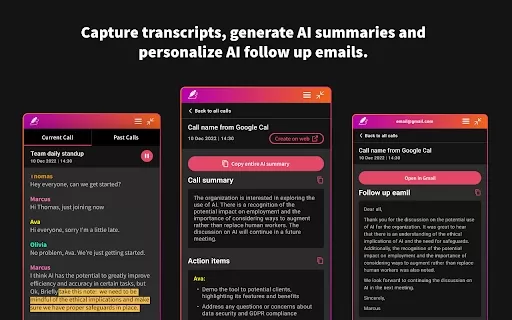
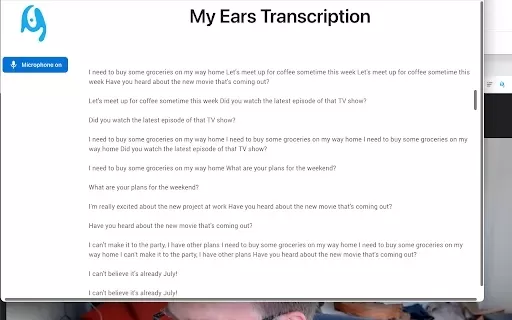
Briefly is a browser extension that captures meeting notes, transcribes conversations, and summarizes key takeaways without causing disruption. It allows professionals to concentrate during discussions by automating note capture and offering organizational tools. The extension also simplifies post-meeting tasks by generating concise summaries, actionable items, and follow-up emails, while converting dialogue into project assets like product specs, marketing briefs, and investment memos. It connects with platforms such as Slack to sync CRM systems with meeting insights.
How to Use the Briefly AI Chrome Extension
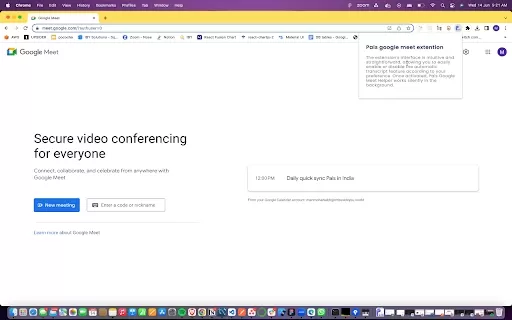
To use Briefly, first install the Chrome extension and sign in with Google. When you begin a Google Meet, click 'Start transcribing this meeting' under the Current Call section. After the meeting, open the Briefly extension to review the full transcript and AI-generated summary. Use the AI follow-up tab to edit and send recap emails directly from your Gmail. For additional features, access the web dashboard by clicking the 'Create on web' button or visiting the provided URL.
Briefly AI Chrome Extension's Core Features
Automatic Meeting Transcription and Categorization
AI-Powered Summaries and Key Insights
Personalized Action Items
Automated Follow-Up Email Drafting
Project Document Creation from Transcripts
Integration with Tools like Slack
Briefly AI Chrome Extension's Use Cases
Creating Meeting Summaries and Action Items
Drafting Follow-Up Emails Post-Meeting
Developing Project Documents from Transcripts (e.g., PRDs, Marketing Briefs)
Syncing CRM Systems with Meeting Insights
FAQ from Briefly
How do I start transcribing a meeting with Briefly?
Where can I find the transcripts and AI summaries after a call?
Are my transcripts and summaries stored by Briefly?
What if I'm not receiving my recaps after the call?
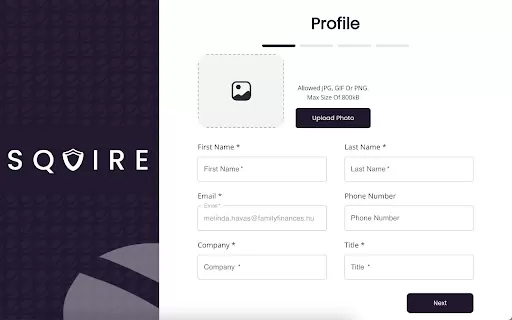
Briefly - Chrome Extension Screenshot

Discover the 2026 best AI meeting assistants for Google Meet. Our top-rated, curated list features powerful tools that automatically generate action items and mind maps, saving you hours. Compare free vs paid options with real-world tests and weekly updated rankings. Find your perfect productivity boost at XIX.AI. Explore now!
 10 tools
 xix.ai

Discover the 2026 best AI meeting assistants for Zoom & Teams. Our top-rated, curated list features powerful tools that automate transcripts and action items. Compare free vs paid options with real-world tests. Unlock productivity and never miss a detail. Explore the rankings on XIX.AI now.
10 tools
xix.ai
Discover the 2026 best AI chat assistants for teams. Our curated, top-rated selection helps streamline Slack & Teams conversations with instant summaries, boosting productivity. Compare free vs paid options with real-world tests. Explore your perfect team collaboration tool now on XIX.AI.
10 tools
xix.ai
Discover the 2026 best AI daily stand-up bots for agile teams. Our top-rated, curated list features powerful tools that automate meeting notes and track sprint blockers in real-time. Compare free vs paid options with weekly updated rankings. Boost team productivity and streamline your workflow. Explore the top picks now on XIX.AI.
10 tools
xix.ai
Discover the 2026 best AI notetakers for engineering syncs. Our top-rated, curated list helps you effortlessly capture technical architecture decisions and code context. Compare free vs paid tools with real-world tests and weekly updated rankings. Find your perfect productivity boost at XIX.AI. Explore now!
10 tools
xix.ai


